Blog

  • Prompt Engineering: Advanced Techniques for Better AI Results

    Prompt Engineering: Advanced Techniques for Better AI Results

    Prompt Engineering: Advanced Techniques for Better AI Results

    Learn advanced prompt engineering techniques to get better AI results using clear goals, context, examples, constraints, structured outputs, iteration, evaluation and AI workflows.

    Suggested URL Slug: /advanced-prompt-engineering-techniques/

    Prompt Engineering: Advanced Techniques for Better AI Results

    You ask an AI tool a question.

    It gives you an answer.

    But sometimes the answer is excellent—and sometimes it is vague, generic, too long, inaccurate or simply not what you wanted.

    Why?

    Often, the problem isn’t the AI model itself.

    It’s the way the task was communicated.

    This is where prompt engineering becomes important.

    Prompt engineering is the practice of designing instructions and context so an AI system has a better understanding of the task, desired outcome, constraints and expected response.

    For beginners, prompt engineering might mean learning how to write a clear question.

    For advanced users, it goes much further.

    You learn how to:

    Define outcomes

    Provide useful context

    Give examples

    Set constraints

    Specify output formats

    Break down complex tasks

    Ask AI to evaluate its work

    Build reusable prompt templates

    Create multi-step workflows

    Connect AI with tools and data

    Test prompts systematically

    OpenAI’s current model guidance emphasizes clear outcomes, success criteria, relevant context, constraints and desired output, while also recommending leaner prompts rather than unnecessary layers of instructions. �

    OpenAI Developers +1

    So let’s move beyond basic “write me a prompt” advice and explore advanced techniques that can make AI interactions more useful and reliable.

    What Is Prompt Engineering?

    Prompt engineering is the process of creating effective instructions for an AI model to achieve a particular result.

    A basic prompt might be:

    “Write a blog about digital marketing.”

    An improved prompt might be:

    “Write a 1,500-word beginner-friendly blog about digital marketing for Indian college students. Explain SEO, social media marketing, email marketing and paid advertising. Use practical examples, short paragraphs and clear headings. End with five actionable tips.”

    The second prompt provides much more useful information.

    It tells the AI:

    What to write + who it’s for + how long + what to cover + how to structure it.

    But advanced prompting goes further than simply adding more instructions.

    Why Prompt Engineering Matters

    AI models are powerful, but they don’t automatically know:

    What your real objective is

    Who your audience is

    What information matters most

    What constraints you’re working under

    What a successful answer looks like

    Which format you prefer

    What the AI should avoid

    A well-designed prompt reduces ambiguity.

    This can help you get more:

    Relevant answers

    Consistent outputs

    Useful ideas

    Structured content

    Actionable recommendations

    Professional results

    However, better prompting does not guarantee factual accuracy. Important information should still be verified.

    Basic Prompt vs Advanced Prompt

    Consider this basic request:

    “Analyze my business.”

    There are many possible interpretations.

    Now consider:

    “Act as a business analyst. Analyze the following monthly sales data for a small online education business. Identify the three biggest trends, unusual changes, possible causes, and five practical actions management should consider. Separate observations from assumptions. Present the result in a table followed by a short executive summary.”

    The second prompt establishes:

    Role

    Context

    Objective

    Analysis criteria

    Evidence boundaries

    Output format

    That’s the difference between a casual prompt and a more advanced one.

    1. Start With the Desired Outcome

    One of the most useful advanced prompting techniques is to describe what success looks like.

    Instead of:

    “Help me improve my website.”

    Try:

    “Identify the five highest-impact improvements I can make to increase course-enrollment conversions on my website. Prioritize the recommendations by expected impact and effort.”

    The second prompt defines an outcome.

    OpenAI’s current guidance recommends outcome-first prompting: describe the target result, success criteria, constraints and available context, while avoiding unnecessary step-by-step instructions when the exact process isn’t important. �

    OpenAI Developers

    Better prompt formula:

    Goal → Success criteria → Context → Constraints → Output

    1. Give the AI Relevant Context

    Context is one of the most important ingredients in a useful prompt.

    Suppose you ask:

    “Create a marketing strategy.”

    AI doesn’t know:

    What you’re selling

    Who your customers are

    Your budget

    Your location

    Your competitors

    Your marketing channels

    Your objective

    Add context:

    “I run an online learning website offering short courses for students and working professionals. Courses are priced affordably, and our current marketing channels include Instagram, Facebook, LinkedIn and YouTube. Create a 30-day content strategy focused on increasing website visits and course enquiries.”

    Now the AI has something to work with.

    Remember:

    More information isn’t always better.

    Give the AI relevant information, not a giant pile of unrelated details.

    1. Define the Audience

    AI output should change depending on who will consume it.

    Compare:

    “Explain Generative AI.”

    with:

    “Explain Generative AI to Class 8 students using simple language and two everyday examples.”

    And:

    “Explain Generative AI to senior business executives focusing on productivity, risk and implementation.”

    Same topic.

    Completely different communication.

    Always consider:

    Who is reading or using the output?

    1. Specify the Role When It Helps

    You can tell an AI model what perspective or expertise to adopt.

    For example:

    “Act as an experienced SEO strategist.”

    Or:

    “Act as a career counsellor helping recent graduates.”

    Or:

    “Act as a financial analyst reviewing business performance.”

    This can help establish the desired perspective.

    But don’t assume the phrase “Act as an expert” magically makes the answer correct.

    Role prompting helps communicate the intended perspective; it doesn’t replace verification or real expertise.

    1. Use Constraints

    Constraints tell the AI what boundaries it needs to respect.

    For example:

    “Write a 700-word article using simple language, no unnecessary jargon, no more than five main sections, and include practical examples.”

    Useful constraints include:

    Word count

    Number of sections

    Audience level

    Tone

    Format

    Required topics

    Forbidden content

    Reading level

    Geographic context

    Business limitations

    Constraints are especially useful when you need consistent outputs.

    1. Specify the Output Format

    Don’t leave the final format completely open when structure matters.

    You can request:

    Table

    Bullet points

    Checklist

    Step-by-step guide

    Executive summary

    FAQ

    JSON

    Email

    Presentation outline

    Comparison matrix

    For example:

    “Compare these five AI tools in a table with columns for price, primary use, strengths, limitations and ideal user.”

    This is much more predictable than:

    “Compare these AI tools.”

    OpenAI’s current guidance also recommends explicitly specifying output shape and verbosity when those details matter. �

    OpenAI Developers

    1. Use Examples: Few-Shot Prompting

    One powerful advanced technique is giving the AI examples of the kind of output you want.

    This is often called few-shot prompting.

    For example:

    “Convert product descriptions into short social-media captions.

    Example: Product: Online Excel course

    Caption: Learn Excel skills that help you work smarter, faster and more confidently.

    Now create captions for these five products.”

    The example gives the model a pattern to follow.

    This can be useful when you want:

    Consistent formatting

    Specific tone

    Repeated content structures

    Classification

    Categorization

    Standardized responses

    1. Break Complex Tasks Into Smaller Tasks

    Don’t always ask AI to complete a complicated project in one enormous prompt.

    Instead of:

    “Create my entire marketing strategy.”

    Break it into stages.

    Step 1

    Analyze the target audience.

    Step 2

    Identify their problems.

    Step 3

    Develop content themes.

    Step 4

    Create a content calendar.

    Step 5

    Create distribution ideas.

    Step 6

    Define metrics.

    This approach makes it easier to review each stage.

    It also helps you catch mistakes earlier.

    1. Use Prompt Chaining

    Prompt chaining means connecting multiple AI tasks together.

    For example:

    Prompt 1

    “Analyze this customer feedback.”

    ↓

    Prompt 2

    “Group the feedback into five major themes.”

    ↓

    Prompt 3

    “Identify the three biggest customer problems.”

    ↓

    Prompt 4

    “Suggest solutions for each problem.”

    ↓

    Prompt 5

    “Create an executive summary.”

    Instead of asking AI to do everything simultaneously, you create a workflow.

    This is especially useful for research, analysis, content creation and business processes.

    1. Ask AI to Identify Assumptions

    AI can sometimes make assumptions without clearly telling you.

    You can explicitly ask:

    “Separate information directly supported by the provided data from assumptions or interpretations.”

    This is particularly useful for:

    Business analysis

    Market research

    Strategy

    Financial analysis

    Research

    Decision support

    It helps you distinguish:

    Known → Inferred → Unknown

    That’s a very useful habit when working with AI.

    1. Ask for Evidence or Sources

    For research-oriented tasks, ask AI to distinguish between information and evidence.

    For example:

    “For each major claim, identify the source or evidence supporting it. If evidence is unavailable, clearly mark the claim as unverified.”

    For current information, use a tool or workflow that can actually access current sources.

    Don’t assume that an AI-generated citation is genuine.

    Always check important sources yourself.

    1. Use AI for Critique, Not Just Creation

    Most people use AI like this:

    Create something → Done.

    Advanced users can use another approach:

    Create → Critique → Improve → Evaluate

    For example:

    “Review this article as an SEO editor. Identify weak headings, repetitive sections, unclear explanations and missing search intent. Do not rewrite the article yet.”

    Then:

    “Now revise the article based on the highest-priority issues.”

    This creates a feedback loop.

    1. Ask AI to Compare Multiple Options

    Instead of asking:

    “Which option is best?”

    ask:

    “Compare these three options using cost, implementation difficulty, scalability, risk and expected impact. Identify the best option for a small business with a limited budget.”

    Now the model has criteria.

    This is much better for decision support.

    You can also ask it to explain:

    Why Option A wins

    When Option B would be better

    What assumptions influence the recommendation

    That makes the result more useful.

    1. Use Decision Criteria

    When you’re making a decision, tell AI what matters.

    For example:

    “Recommend an online learning platform. Prioritize low cost, easy setup, mobile access, recording capability and beginner-friendly administration. Treat advanced customization as less important.”

    Without priorities, AI may optimize for the wrong thing.

    Advanced prompting isn’t about writing longer prompts.

    It’s about making the decision criteria clear.

    1. Use Positive Instructions

    Instead of only telling AI what not to do, explain what you want.

    Weak:

    “Don’t make the article boring.”

    Better:

    “Use short paragraphs, practical examples, conversational language and specific takeaways.”

    Weak:

    “Don’t use complicated words.”

    Better:

    “Use simple language suitable for a general audience.”

    Tell the model what success looks like.

    1. Use Delimiters for Important Context

    When working with large amounts of text, clearly separate instructions from the material you’re asking AI to analyze.

    For example:

    TASK: Summarize the document.

    DOCUMENT:

    [Insert document here]

    OUTPUT:

    Give five key findings and three recommended actions.

    This reduces ambiguity between:

    Instructions

    and

    Information being analyzed.

    It becomes particularly useful when working with documents, datasets and long inputs.

    1. Ask for Structured Data

    If you’re processing repeated information, structured output can make AI much more useful.

    For example:

    “Extract the following information from each customer review:

    Product

    Main complaint

    Sentiment

    Urgency

    Suggested action”

    You could request a table.

    For software applications, structured-output features can provide stronger machine-readable consistency than relying entirely on natural-language formatting. OpenAI’s API documentation currently supports Structured Outputs for responses that adhere to a specified schema. �

    OpenAI Platform

    1. Control the Level of Detail

    Sometimes AI gives you too much information.

    Sometimes it gives you too little.

    Specify the level you need.

    For example:

    “Give me a concise executive summary in 150 words.”

    Or:

    “Explain this concept in depth with examples, edge cases and practical recommendations.”

    OpenAI’s current model guidance recommends explicitly controlling response length and verbosity when the application requires consistent output. �

    OpenAI Developers

    1. Use Iterative Prompting

    Don’t expect your first prompt to be perfect.

    Start.

    Review.

    Improve.

    Try again.

    For example:

    First prompt

    “Create a blog outline about AI automation.”

    Follow-up

    “Make it more suitable for small-business owners.”

    Follow-up

    “Add practical examples from marketing, HR and finance.”

    Follow-up

    “Make the headings more SEO-friendly.”

    Follow-up

    “Identify missing search-intent questions.”

    This is often more effective than trying to write one giant prompt containing every possible instruction.

    1. Create Reusable Prompt Templates

    If you perform the same task repeatedly, don’t start from scratch every time.

    Create a template.

    Example: Blog Prompt Template

    Role: SEO content strategist

    Topic: [TOPIC]

    Audience: [AUDIENCE]

    Goal: [GOAL]

    Length: [WORD COUNT]

    Primary keyword: [KEYWORD]

    Secondary keywords: [KEYWORDS]

    Required sections: [SECTIONS]

    Tone: [TONE]

    Output: [FORMAT]

    Then fill in the variables.

    This saves time and creates more consistent results.

    1. Build Prompts Around Success Criteria

    One of the most powerful advanced techniques is explicitly defining what a successful result must contain.

    For example:

    Create a 1,000-word beginner guide to AI automation. Success means the article:

    Explains AI automation clearly

    Includes three real-world examples

    Uses simple language

    Includes practical steps

    Avoids unsupported statistics

    Ends with a five-point checklist

    Now the AI knows how you will judge the result.

    This outcome-first approach is emphasized in current OpenAI guidance for newer models. �

    OpenAI Developers

    1. Add Stop Conditions

    For complex AI workflows, tell the system when it should stop, ask a question or report that it cannot complete something.

    For example:

    “If the information provided is insufficient to make a reliable recommendation, identify the missing information rather than guessing.”

    This is particularly useful for:

    Research

    Business analysis

    AI agents

    Automated workflows

    Customer support

    Decision-support systems

    A good AI system shouldn’t simply produce an answer at all costs.

    Sometimes the correct output is:

    “I need more information.”

    1. Use AI Evaluation

    Advanced prompting isn’t just about creating prompts.

    It’s also about measuring whether they work.

    Suppose you create a prompt for generating customer-support responses.

    Test it against 20 realistic customer questions.

    Evaluate:

    Accuracy

    Relevance

    Tone

    Completeness

    Policy compliance

    Consistency

    Then improve the prompt.

    For applications, OpenAI recommends using representative evaluations and rerunning them after prompt changes rather than assuming that a prompt improvement is actually an improvement. �

    OpenAI Developers +1

    Think:

    Prompt → Test → Measure → Improve → Test again

    1. Don’t Make Prompts Unnecessarily Long

    This is an important advanced lesson.

    Many people believe:

    Longer prompt = Better answer

    Not necessarily.

    Current OpenAI guidance specifically recommends leaner prompts, removing repeated instructions and unnecessary examples while keeping the context and requirements that genuinely affect behavior. �

    OpenAI Developers

    A good prompt is:

    Clear, relevant, specific and purposeful.

    Not:

    Long, repetitive and complicated.

    1. Use the Right Level of Specificity

    Too little information:

    “Create a business strategy.”

    Too much information:

    A 3,000-word instruction containing dozens of unnecessary rules.

    The goal is the middle ground.

    Give the model:

    Goal

    Context

    Constraints

    Success criteria

    Output requirements

    Then let it solve the task.

    For newer reasoning-capable models, OpenAI recommends avoiding unnecessary step-by-step process instructions when the exact process isn’t important. �

    OpenAI Developers

    1. Prompt Engineering for Research

    Research prompts should clearly define:

    Research question

    Geographic scope

    Time period

    Target audience

    Required evidence

    Sources

    Output structure

    Example:

    “Research the growth of AI skills in the Indian job market from 2024–2026. Use reliable current sources. Separate confirmed facts from interpretation. Summarize the findings in a table and identify five implications for students.”

    For current or important claims, verify the sources independently.

    1. Prompt Engineering for Marketing

    Marketing prompts can include:

    Product + Audience + Problem + Platform + Objective + Tone

    Example:

    “Create five LinkedIn post ideas promoting an online Excel course for working professionals. Focus on productivity and career development. Use a professional but approachable tone. Each idea should include a hook, three key points and a CTA.”

    That’s much more useful than:

    “Write LinkedIn posts for my Excel course.”

    1. Prompt Engineering for Business Analysis

    Try:

    “Act as a business analyst. Review this sales dataset and identify revenue trends, underperforming categories, unusual changes and three business questions management should investigate. Clearly distinguish observations from assumptions. Present the results in a concise executive format.”

    This kind of prompt is useful because it defines:

    Role + data + objective + analysis criteria + evidence boundary + output.

    1. Prompt Engineering for Public Speaking

    You can also use advanced prompting for your public-speaking content.

    Example:

    “Act as a public-speaking coach. I’m preparing a five-minute presentation for college students about AI and future careers. Create an engaging opening, three key points, one story, two audience questions and a memorable conclusion. Use simple conversational language.”

    Then:

    “Now act as a skeptical audience member and ask me 10 difficult questions.”

    Then:

    “Evaluate my answers for clarity, confidence and relevance.”

    This turns AI into a practice partner, not just a content generator.

    1. Prompt Engineering for AI Agents

    Prompt engineering becomes even more important when AI is connected to tools and business systems.

    An agent may need instructions covering:

    Goal

    Available tools

    Permissions

    Evidence requirements

    Allowed actions

    Approval requirements

    Error handling

    Escalation rules

    Stop conditions

    For example:

    Goal: Resolve customer requests.

    Success: Provide an accurate response or escalate appropriately.

    Constraints: Never modify customer billing information without approval.

    Evidence: Use approved knowledge sources.

    Escalation: If information is missing or confidence is low, ask for clarification or route to a human.

    This is much closer to AI workflow design than simple prompt writing.

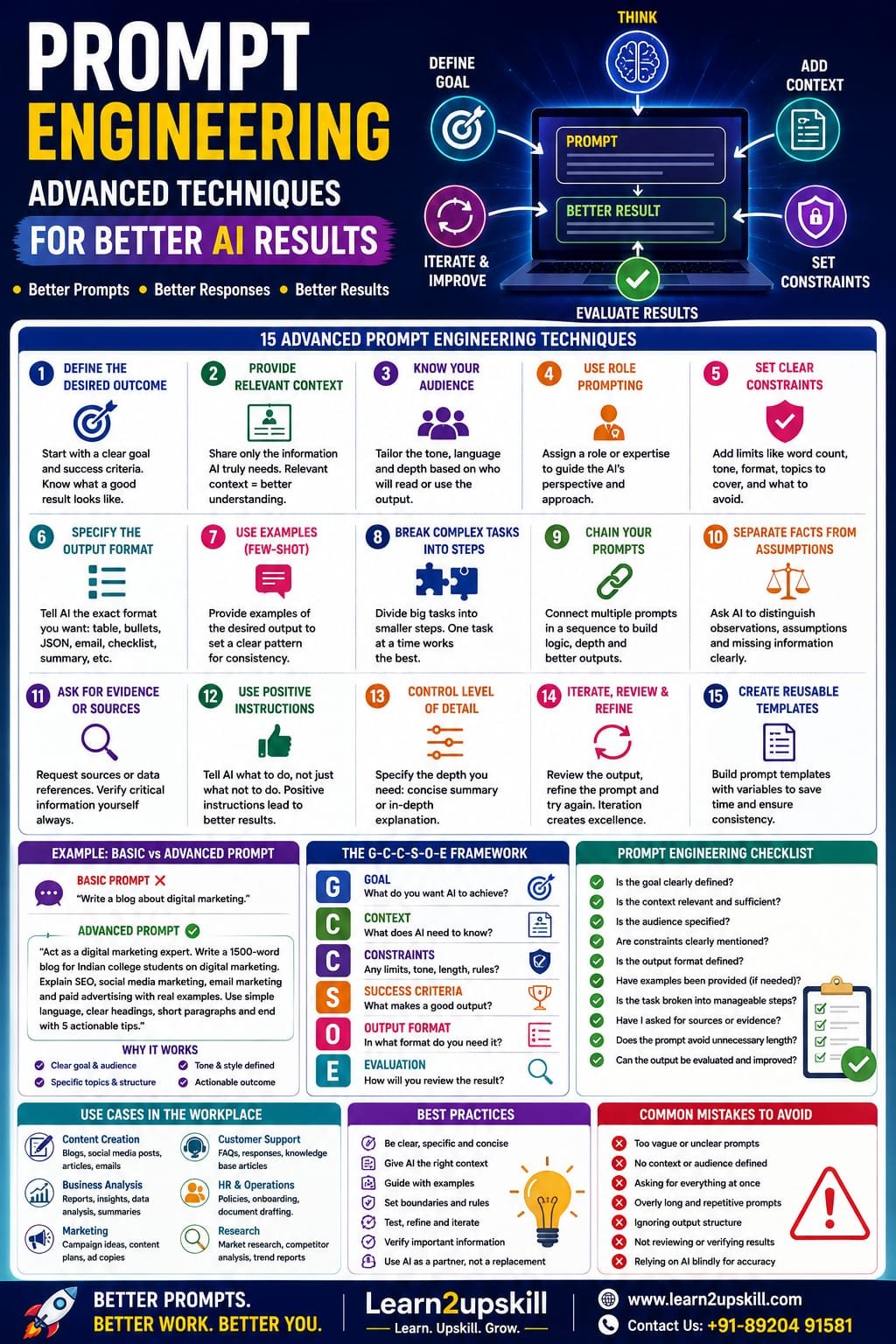
    The Advanced Prompt Engineering Framework

    Here’s a framework you can remember:

    G-C-C-S-O-E

    G — Goal

    What do you want?

    C — Context

    What does the AI need to know?

    C — Constraints

    What boundaries should it follow?

    S — Success Criteria

    What does a good answer look like?

    O — Output

    What format do you want?

    E — Evaluation

    How will you judge the result?

    Example

    Goal: Create a career-development article.

    Context: Audience is Indian college students.

    Constraints: 1,500 words, simple English, practical examples.

    Success: Clear, useful and actionable.

    Output: SEO article with headings, FAQs and checklist.

    Evaluation: Check clarity, relevance and keyword coverage.

    This is a strong starting point for advanced prompting.

    10 Advanced Prompt Templates You Can Use

    1. Expert Analysis

    “Act as a [ROLE]. Analyze [INPUT] for [OBJECTIVE]. Use [CRITERIA]. Separate facts from assumptions. Present the result as [FORMAT].”

    1. Content Creation

    “Create a [CONTENT TYPE] for [AUDIENCE] about [TOPIC]. The goal is [GOAL]. Use [TONE]. Include [REQUIRED ELEMENTS]. Keep it within [LENGTH].”

    1. Critique

    “Review the following [CONTENT] as a [ROLE]. Identify the five highest-impact weaknesses and explain how to improve each. Do not rewrite it yet.”

    1. Comparison

    “Compare [OPTIONS] using [CRITERIA]. Explain the trade-offs, identify the best option for [CONTEXT], and state the assumptions behind your recommendation.”

    1. Research

    “Research [QUESTION] using reliable sources from [TIME PERIOD/REGION]. Separate evidence from interpretation and summarize the findings in [FORMAT].”

    1. Data Analysis

    “Analyze the provided data. Identify [METRICS/TRENDS]. Flag anomalies. Separate observations from assumptions. End with [NUMBER] recommended actions.”

    1. Summarization

    “Summarize this material for [AUDIENCE]. Extract [KEY INFORMATION]. Preserve important caveats. Present the result in [FORMAT].”

    1. Brainstorming

    “Generate [NUMBER] ideas for [OBJECTIVE]. Group them by category and rank them by [CRITERIA]. Explain the top five.”

    1. Decision Support

    “Help me decide between [OPTIONS]. Prioritize [CRITERIA]. Show the main trade-offs, risks and assumptions before recommending an option.”

    1. AI Agent

    “Your goal is [GOAL]. You may use [TOOLS]. Success means [CRITERIA]. You must follow [CONSTRAINTS]. Ask for clarification when [CONDITION]. Stop when [STOP CONDITION].”

    Common Prompt Engineering Mistakes

    ❌ Mistake 1: Being Too Vague

    “Make this better.”

    Better:

    “Improve the introduction so it is clearer, more engaging and suitable for beginners.”

    ❌ Mistake 2: Giving No Context

    AI can’t read your mind.

    Explain the situation.

    ❌ Mistake 3: Asking for Everything at Once

    Break complex tasks into stages when useful.

    ❌ Mistake 4: Adding Endless Instructions

    More instructions aren’t automatically better.

    Remove repetition.

    ❌ Mistake 5: Not Defining Success

    Tell AI what a good result looks like.

    ❌ Mistake 6: Trusting the First Answer

    Review and refine.

    ❌ Mistake 7: Ignoring Accuracy

    Verify important claims.

    ❌ Mistake 8: Not Testing Prompts

    If you’re using AI repeatedly, evaluate whether the prompt actually performs better.

    Prompt Engineering in 2026: What’s Changing?

    Prompt engineering is becoming more sophisticated.

    The focus is gradually moving from:

    “Write the perfect prompt.”

    to:

    “Design the right AI interaction.”

    That can involve:

    Prompts

    Context

    Files

    Knowledge sources

    Tools

    Structured outputs

    Evaluation

    Memory

    Workflows

    Agents

    Modern AI platforms increasingly combine models with tools, file search, web search, structured outputs and agent capabilities. �

    OpenAI Platform +1

    So advanced prompt engineering is increasingly connected to context engineering, workflow design and AI application development.

    Do You Need Coding to Learn Prompt Engineering?

    No.

    Basic and intermediate prompt engineering can be learned without programming.

    You can use prompting for:

    Content

    Marketing

    Education

    Presentations

    Research

    Business analysis

    Customer service

    Career development

    However, technical professionals can take prompting further by combining it with:

    APIs

    Automation

    RAG

    AI agents

    Structured outputs

    Evaluation

    Software development

    That’s where prompt engineering becomes part of larger AI systems.

    Prompt Engineering for Students

    Students can use advanced prompting to:

    Understand difficult concepts

    Create study plans

    Generate practice questions

    Prepare presentations

    Practice interviews

    Brainstorm projects

    Summarize notes

    Improve writing

    Explore career options

    But students should use AI to learn, not simply submit AI-generated work without understanding it.

    The best approach is:

    Ask → Understand → Question → Practice → Create

    Prompt Engineering for Professionals

    Professionals can use prompting to improve:

    Productivity

    Summaries, emails and planning.

    Analysis

    Reports, trends and structured insights.

    Communication

    Presentations, proposals and explanations.

    Research

    Information gathering and synthesis.

    Automation

    Repeatable AI workflows.

    Decision Support

    Comparing options and identifying risks.

    The real advantage comes when AI becomes part of your workflow rather than a tool you open only when you have a question.

    The Future of Prompt Engineering

    Prompt engineering will continue to evolve as AI models become better at understanding context and user intent.

    The skill is unlikely to disappear.

    But it may change.

    Instead of spending all your time trying to find the perfect wording, you’ll increasingly need to understand:

    What should AI do?

    What information should AI receive?

    What tools should it use?

    What should it be allowed to do?

    How do we know the result is good?

    When should a human take over?

    That’s a much broader skill.

    And it’s why prompt engineering is becoming part of AI literacy, workflow design and AI strategy.

    Final Thoughts

    Prompt engineering isn’t about discovering a magical sentence that makes AI perfect.

    It’s about communicating goals clearly and designing useful AI interactions.

    The most effective approach is to:

    Define the goal.

    Provide relevant context.

    Specify constraints.

    Define success.

    Choose the right output format.

    Use examples when helpful.

    Break complex tasks into manageable stages.

    Iterate.

    Evaluate the results.

    Verify important information.

    And remember:

    A better prompt can improve an AI response—but good judgment still belongs to the human.

    The future isn’t about writing longer prompts.

    It’s about becoming better at working with intelligent systems.

    Learn the prompt. Understand the process. Evaluate the result. Build better with AI.

    Quick Prompt Engineering Checklist

    Before sending an important prompt, ask:

    [ ] Is my goal clear?

    [ ] Did I provide relevant context?

    [ ] Did I define the audience?

    [ ] Did I explain the desired outcome?

    [ ] Did I specify important constraints?

    [ ] Did I define what success looks like?

    [ ] Did I request the right output format?

    [ ] Would an example improve consistency?

    [ ] Should the task be broken into smaller steps?

    [ ] Can I verify the result?

    [ ] Should the AI ask for clarification if information is missing?

    [ ] Am I giving unnecessary instructions?

    [ ] Can this prompt become a reusable template?

    [ ] If used repeatedly, have I tested its performance?

    Build Advanced AI Skills With Learn2upskill

    Prompt engineering is just one part of becoming an advanced AI user.

    At Learn2upskill, learners can explore practical skills across:

    Advanced AI • Generative AI • Prompt Engineering • AI Agents • AI Automation • ChatGPT • Business Analysis • Excel • Digital Marketing • Cybersecurity • Professional Development

    The goal isn’t simply to learn how to ask AI questions.

    It’s to learn how to use AI to solve real problems, improve productivity and build future-ready skills.

    Learn. Upskill. Grow.

    🌐 www.coral-kudu-326218.hostingersite.com⁠�

    Contact Us: +91-89204 91581


  • How to Speak Confidently in Front of an Audience

    How to Speak Confidently in Front of an Audience

    How to Speak Confidently in Front of an Audience

    Learn how to speak confidently in front of an audience with practical tips for preparation, body language, voice, storytelling, presentations, Q&A, and overcoming nervousness.

    Suggested URL Slug: /how-to-speak-confidently-in-front-of-an-audience/

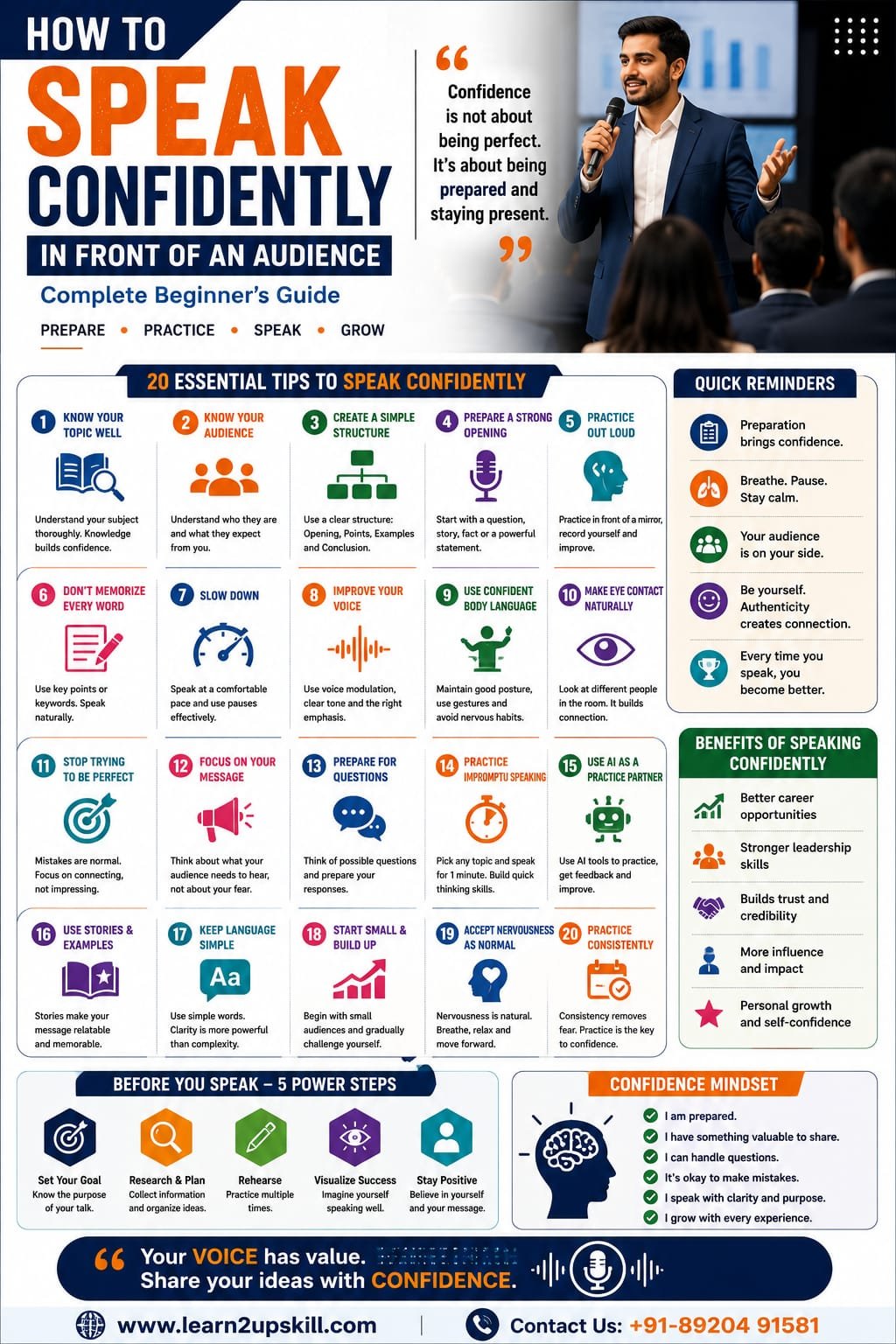
    How to Speak Confidently in Front of an Audience: Complete Beginner’s Guide

    Standing in front of an audience and speaking confidently can feel intimidating.

    Your heart may beat faster. Your hands may become sweaty. You may suddenly forget what you wanted to say.

    And sometimes, even when you know your subject extremely well, speaking in front of others can feel difficult.

    The good news is that confidence in public speaking is not something you either have or don’t have. It is a skill you can develop.

    You don’t need to be naturally outgoing.

    You don’t need to have a powerful voice.

    You don’t need to become a professional motivational speaker.

    You simply need the right preparation, regular practice, and a willingness to improve.

    Whether you’re a student preparing for a school presentation, a professional presenting to management, a job seeker attending an interview, or someone who simply wants to communicate more confidently, this beginner’s guide will help you get started.

    What Does It Mean to Speak Confidently?

    Speaking confidently doesn’t mean speaking loudly or talking continuously.

    A confident speaker is someone who can:

    Communicate ideas clearly

    Maintain comfortable eye contact

    Speak at a controlled pace

    Use appropriate body language

    Organize thoughts logically

    Handle questions calmly

    Recover from mistakes

    Connect with the audience

    Express opinions respectfully

    Adapt to different audiences

    Most importantly, confidence doesn’t mean never feeling nervous.

    You can feel nervous and still speak well.

    Real confidence is the ability to communicate effectively even when you feel some pressure.

    Why Do People Lose Confidence While Speaking?

    Before improving your confidence, understand what may be holding you back.

    Common causes include:

    Lack of preparation

    Fear of being judged

    Fear of making mistakes

    Lack of speaking experience

    Poor knowledge of the topic

    Trying to memorize everything

    Speaking too quickly

    Comparing yourself with experienced speakers

    Negative self-talk

    Fear of difficult questions

    Sometimes the biggest obstacle is not the audience.

    It’s the conversation happening inside your own head.

    You may think:

    “Everyone is going to notice I’m nervous.”

    “What if I forget everything?”

    “What if someone asks me something I don’t know?”

    Instead of trying to eliminate every possible problem, prepare yourself to handle these situations.

    1. Know Your Topic

    The foundation of confident speaking is preparation.

    You don’t have to know every possible detail about your subject.

    But you should understand your key points.

    Before speaking, ask:

    What is my main message?

    What are the three most important points?

    Who is my audience?

    What examples can I use?

    What questions might people ask?

    What should the audience remember?

    When you understand your topic, you don’t have to depend completely on notes.

    That makes you more flexible and confident.

    Remember:

    Understand your message instead of memorizing every sentence.

    1. Know Your Audience

    A confident speaker doesn’t simply think about what they want to say.

    They think about what the audience needs to hear.

    For example, you wouldn’t explain artificial intelligence in exactly the same way to:

    School students

    Business executives

    Software developers

    Marketing professionals

    Senior citizens

    Before your presentation, understand:

    Who is listening?

    What do they already know?

    What do they want to learn?

    Why should they care?

    This allows you to adjust your language, examples and level of detail.

    1. Create a Simple Structure

    A complicated speech is difficult to remember.

    Use a simple structure.

    Opening

    Introduce the topic and capture attention.

    Main Point 1

    Explain the first important idea.

    Main Point 2

    Provide another important idea or example.

    Main Point 3

    Give a practical takeaway.

    Conclusion

    Summarize your message and end strongly.

    This structure gives your brain a roadmap.

    If you forget a sentence, you can simply return to the next key point.

    1. Prepare a Strong Opening

    The beginning of your speech can determine how comfortable you feel during the rest of the presentation.

    Instead of starting with:

    “Good morning everyone. Today I am going to talk about…”

    try something more engaging.

    Ask a question

    “How many of you have ever been nervous before speaking in public?”

    Tell a short story

    “Three years ago, I was terrified of speaking in front of five people.”

    Share a surprising fact

    “We communicate every day, but most of us rarely receive formal training in communication.”

    Make a strong statement

    “Confidence isn’t something you’re born with. It’s something you build.”

    A strong opening immediately gives you direction.

    1. Practice Out Loud

    Reading your speech silently is not enough.

    Your brain needs to experience the actual speaking process.

    Practice aloud.

    You can speak:

    In front of a mirror

    In front of family

    In front of friends

    In front of colleagues

    Into your phone camera

    Recording yourself is particularly useful.

    Watch the recording and notice:

    Speaking speed

    Voice clarity

    Eye contact

    Facial expressions

    Body movement

    Filler words

    Long pauses

    Don’t criticize everything you do.

    Choose one or two things to improve at a time.

    1. Don’t Memorize Every Word

    Memorizing a complete speech can actually increase anxiety.

    Imagine you’ve memorized:

    “There are three major reasons why communication skills…”

    Then you forget the next sentence.

    Your brain may freeze because you’re trying to remember the exact wording.

    Instead, use keywords.

    For example:

    Communication → AI → Leadership → Career Growth

    These four words can remind you what you want to discuss.

    Speak naturally around the key ideas.

    This makes your delivery sound more authentic.

    1. Slow Down When You Speak

    Nervous speakers often speak too quickly.

    You may feel that finishing quickly will make the nervousness disappear.

    Usually, the opposite happens.

    Speaking too quickly can:

    Make your message difficult to understand

    Increase mistakes

    Make you appear more nervous

    Reduce audience engagement

    Instead, deliberately slow down.

    Use pauses.

    For example:

    “AI is changing the workplace.”

    Pause.

    “But technology isn’t the only skill professionals need.”

    Pause.

    “Human communication still matters.”

    Pauses can make your speech more powerful.

    1. Improve Your Voice

    Your voice is an important part of communication.

    Avoid speaking in exactly the same tone from beginning to end.

    Use voice modulation.

    Change:

    Pitch

    Speed

    Volume

    Pauses

    Emphasis

    For example, emphasize an important word:

    “The most important skill is communication.”

    Your voice should support your message.

    You don’t need a dramatic speaker’s voice.

    You simply need a clear and natural one.

    1. Use Confident Body Language

    Your audience notices your body language even when you’re not thinking about it.

    Focus on:

    Posture

    Stand comfortably upright.

    Eye contact

    Look at different people naturally.

    Hands

    Use natural gestures when appropriate.

    Facial expression

    Allow your expression to match your message.

    Movement

    Move purposefully rather than constantly walking around.

    Avoid repeatedly:

    Looking at the floor

    Touching your face

    Playing with objects

    Crossing your arms

    Hiding behind a podium

    Checking your notes every few seconds

    Your body should support your words.

    1. Make Eye Contact Naturally

    You don’t need to stare at one person throughout your presentation.

    Instead, move your attention around the room.

    Try looking toward:

    Left → Centre → Right → Centre

    Spend a few seconds with each area.

    If direct eye contact feels uncomfortable initially, look near people’s eyes.

    With practice, natural eye contact becomes easier.

    Eye contact helps create connection and makes your presentation feel more like a conversation.

    1. Stop Trying to Be Perfect

    Perfectionism is one of the biggest confidence killers.

    You may think:

    “I cannot make any mistakes.”

    But experienced speakers make mistakes too.

    They may:

    Forget a word

    Mispronounce something

    Lose their place

    Need to restart a sentence

    Receive an unexpected question

    What matters is how they recover.

    If you make a mistake, pause.

    Take a breath.

    Correct yourself if necessary.

    Continue.

    Most audiences are far more forgiving than nervous speakers imagine.

    1. Focus on Your Message, Not Your Nervousness

    Instead of constantly thinking:

    “Am I looking nervous?”

    focus on:

    “Am I helping my audience understand this?”

    This small mental shift can make a major difference.

    Think about your audience as people who have come to hear something useful.

    Your job is not to prove that you’re perfect.

    Your job is to communicate something valuable.

    1. Learn to Handle Questions

    Many beginners fear the Q&A session more than the presentation.

    Prepare beforehand.

    Think of five to ten questions someone might ask.

    Prepare your responses.

    But don’t feel pressured to know everything.

    If you don’t know an answer, say:

    “That’s a good question. I don’t have enough information to answer that accurately right now, but I can look into it.”

    This is better than giving incorrect information.

    A confident speaker knows that saying “I don’t know” when appropriate is not a weakness.

    It’s professionalism.

    1. Practice Impromptu Speaking

    Not every speaking situation gives you time to prepare.

    Your manager may suddenly ask for your opinion.

    A client may ask an unexpected question.

    A teacher may ask you to explain something.

    A colleague may ask:

    “Can you quickly present this?”

    Practice impromptu speaking.

    Choose a random topic and speak for one minute.

    Try topics such as:

    Social media

    AI

    Education

    Your favorite book

    Your career goals

    Remote work

    A recent project

    Your favorite technology

    This exercise trains your brain to organize thoughts quickly.

    1. Use AI as a Practice Partner

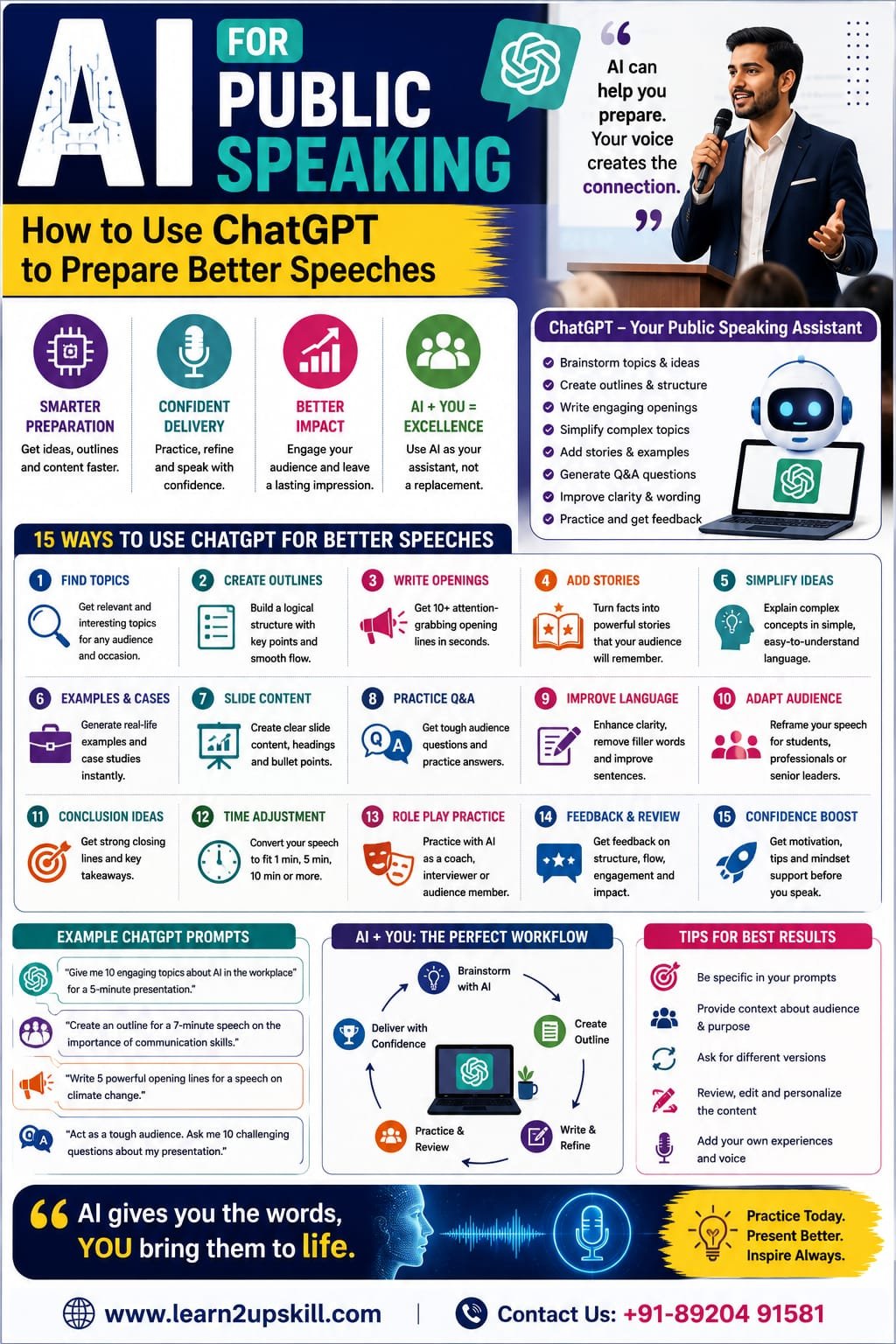
    AI can be a useful tool for developing speaking confidence.

    You can ask AI to:

    Create a speech outline

    “Create a five-minute presentation outline about digital marketing for beginners.”

    Generate questions

    “Act as an audience member and ask me 10 difficult questions about my presentation.”

    Improve your language

    “Make this speech clearer and easier for a beginner audience to understand.”

    Practice interviews

    “Act as a job interviewer and ask me five communication-related questions.”

    Find weak points

    “Review this presentation and identify areas where the message is unclear or repetitive.”

    AI can help you prepare.

    But remember:

    AI should support your voice—not replace it.

    Add your own experiences, examples and personality.

    1. Use Stories to Make Your Speech Memorable

    People often remember stories better than lists of facts.

    Suppose you’re presenting about time management.

    Instead of saying:

    “Time management improves productivity.”

    tell a short story:

    “Last year, I noticed that I was spending almost an hour every morning simply deciding what to work on. I started planning my top three priorities the night before, and my mornings became much more productive.”

    The story gives the idea context.

    You don’t need dramatic stories.

    Even simple personal experiences can make your presentation more human.

    1. Use Simple Language

    Confident speakers don’t necessarily use complicated vocabulary.

    In fact, simple language often makes communication stronger.

    Instead of:

    “We need to optimize our organizational operational efficiency.”

    say:

    “We need to improve how efficiently our team works.”

    Simple language is easier to understand.

    Your goal is not to impress people with vocabulary.

    Your goal is to make your message clear.

    1. Practice With Smaller Audiences

    If speaking in front of a large audience scares you, start small.

    Try:

    1 person → 3 people → 5 people → 10 people → larger audience

    Each successful experience builds evidence that you can do it.

    Confidence grows through experience.

    You don’t have to wait until you “feel confident” before speaking.

    Often, speaking creates confidence.

    1. Prepare for Different Speaking Situations

    Public speaking isn’t limited to formal speeches.

    Practice speaking confidently in:

    Meetings

    Share your opinion clearly.

    Interviews

    Explain your achievements confidently.

    Presentations

    Organize your message logically.

    Networking

    Introduce yourself naturally.

    Group discussions

    Listen and contribute thoughtfully.

    Client meetings

    Explain solutions clearly.

    Webinars

    Maintain energy even when speaking online.

    Everyday communication creates public-speaking confidence.

    1. Create a 7-Day Confidence Challenge

    Want to start immediately?

    Try this:

    Day 1

    Record yourself speaking for two minutes.

    Day 2

    Practice your body language.

    Day 3

    Give a three-minute presentation.

    Day 4

    Practice answering five unexpected questions.

    Day 5

    Speak for five minutes using only keywords.

    Day 6

    Present to a friend or family member.

    Day 7

    Record yourself again and compare it with Day 1.

    Look for improvement rather than perfection.

    Common Mistakes Beginners Should Avoid

    ❌ Reading every word from your slides

    Use slides as visual support.

    ❌ Speaking too quickly

    Slow down.

    ❌ Using too much text

    Keep your presentation simple.

    ❌ Avoiding eye contact

    Connect naturally with the audience.

    ❌ Memorizing everything

    Remember key ideas instead.

    ❌ Using complicated language

    Keep your message clear.

    ❌ Ignoring questions

    Prepare for likely questions.

    ❌ Comparing yourself with expert speakers

    Everyone starts somewhere.

    ❌ Avoiding speaking opportunities

    Practice requires participation.

    ❌ Expecting instant confidence

    Confidence develops over time.

    Public Speaking and Career Growth

    Speaking confidently can influence your professional development.

    It can help you:

    Perform better in interviews

    Present ideas to management

    Lead meetings

    Communicate with clients

    Explain technical concepts

    Build professional relationships

    Participate in discussions

    Lead teams

    Deliver training

    Represent your organization

    In an AI-powered workplace, technical skills are increasingly important—but human communication remains essential.

    A professional who can use technology and communicate effectively can bring a powerful combination of skills to the workplace.

    Public Speaking for Students

    Students can start developing speaking confidence early.

    Practice through:

    Classroom presentations

    Debates

    Group discussions

    School events

    Seminars

    Project presentations

    Competitions

    Interviews

    Start with small opportunities.

    Don’t worry about sounding perfect.

    Every presentation gives you another chance to improve.

    Public Speaking for Professionals

    Professionals can build confidence through everyday workplace situations.

    Try volunteering to:

    Present a project update

    Explain a report

    Lead a short meeting

    Demonstrate a new process

    Train a colleague

    Present an idea

    Speak during a team discussion

    Small opportunities eventually prepare you for bigger ones.

    What If You Still Feel Nervous?

    You may practice regularly and still feel nervous.

    That’s completely normal.

    The goal isn’t:

    “I must never feel nervous.”

    Instead, aim for:

    “I can feel nervous and still communicate effectively.”

    That is real confidence.

    Your heart may beat faster.

    Your hands may feel slightly shaky.

    You may need to pause.

    And you can still deliver a successful presentation.

    Final Thoughts

    Learning how to speak confidently in front of an audience takes time.

    You don’t need to transform yourself overnight.

    Start with small steps.

    Know your topic.

    Prepare your structure.

    Practice out loud.

    Slow down.

    Use natural eye contact.

    Improve your body language.

    Prepare for questions.

    Use AI as a practice partner.

    Accept mistakes.

    Keep practicing.

    Most importantly, remember that confidence isn’t about becoming someone else.

    It’s about becoming comfortable expressing your own ideas, knowledge and personality.

    Your voice has value.

    Your ideas deserve to be heard.

    And with consistent practice, you can become a much more confident speaker.

    Prepare. Practice. Speak. Grow.

    Quick Confident Speaking Checklist

    [ ] Know your topic.

    [ ] Understand your audience.

    [ ] Create a simple structure.

    [ ] Prepare a strong opening.

    [ ] Practice out loud.

    [ ] Don’t memorize every word.

    [ ] Slow down.

    [ ] Use pauses.

    [ ] Improve voice modulation.

    [ ] Maintain natural eye contact.

    [ ] Use confident body language.

    [ ] Prepare for questions.

    [ ] Practice impromptu speaking.

    [ ] Use AI as a practice partner.

    [ ] Use stories and examples.

    [ ] Keep your language simple.

    [ ] Start with small audiences.

    [ ] Accept mistakes.

    [ ] Practice consistently.

    Build Your Communication Skills With Learn2upskill

    Public speaking is not just a presentation skill. It is a valuable career and workplace communication skill.

    At Learn2upskill, we help students, professionals, job seekers and career changers develop practical skills for today’s changing workplace.

    Explore learning opportunities in:

    Public Speaking • Communication • AI • Excel • Business Analysis • Digital Marketing • Cybersecurity • Professional Development

    Don’t let nervousness stop you from sharing your ideas.

    Learn. Upskill. Grow.

    🌐 www.coral-kudu-326218.hostingersite.com⁠�

    Contact Us: +91-89204 91581


  • How to Prepare for a Layoff Before It Happens: A Practical Career Survival Guide

    How to Prepare for a Layoff Before It Happens: A Practical Career Survival Guide

    How to Prepare for a Layoff Before It Happens: A Practical Career Survival Guide

    How to Prepare for a Layoff Before It Happens | Career Guide

    Meta Description: Worried about layoffs? Learn how to prepare before a layoff happens by protecting your finances, updating your resume, building skills, networking, and planning your next career move.

    Suggested URL Slug: “/how-to-prepare-for-a-layoff-before-it-happens/”

    —

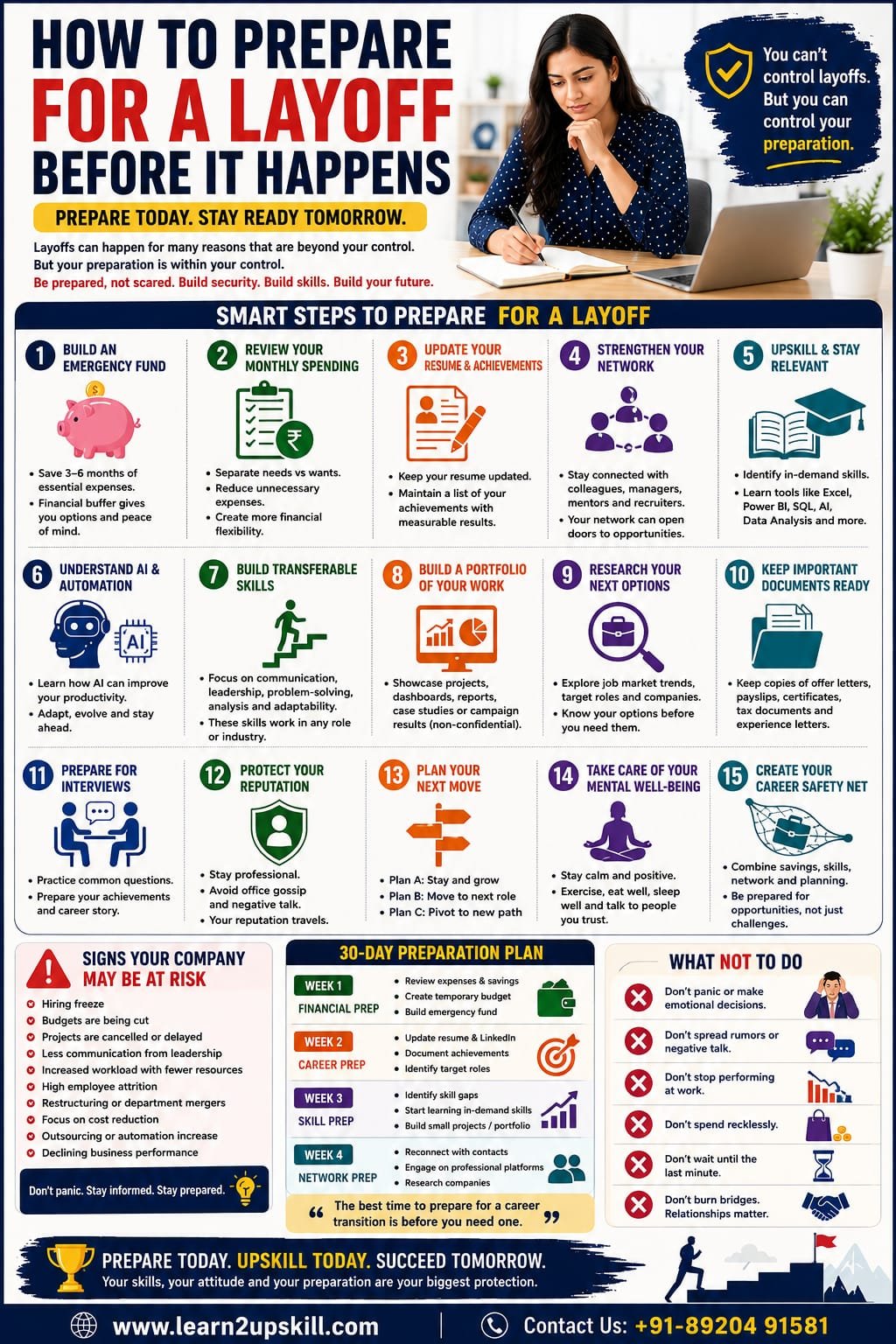
    How to Prepare for a Layoff Before It Happens

    Nobody wants to think about losing their job.

    But when a company starts experiencing financial pressure, restructuring, automation, mergers, or changing business priorities, layoffs can become a possibility.

    The worst time to start preparing for a job loss is after you receive your termination notice.

    By then, you may be dealing with financial pressure, emotional stress, a busy job search, and uncertainty about what to do next.

    A better approach is to prepare quietly while you are still employed.

    This doesn’t mean assuming that you will be laid off.

    It means making sure that if your situation changes, you’re ready to respond.

    Preparing for a potential layoff involves much more than updating your resume. You need to think about your finances, professional network, skills, employment documents, personal brand, mental well-being, and future career direction.

    Here’s a practical step-by-step guide.

    —

    1. Don’t Panic—Prepare Strategically

    If you notice signs that your company may be under pressure, your first reaction might be fear.

    Avoid making decisions based purely on rumors.

    Instead, ask yourself:

    «“If my job disappeared tomorrow, what would I need?”»

    You would probably need:

    – Financial savings

    – An updated resume

    – Professional contacts

    – Current skills

    – Interview preparation

    – Job-market knowledge

    – Employment documents

    – A clear career direction

    Start working on these areas gradually.

    Preparation doesn’t mean you expect the worst.

    It means you’re reducing the impact if the worst happens.

    —

    1. Build an Emergency Fund

    Financial preparation is one of the most important parts of layoff planning.

    Calculate your essential monthly expenses.

    Include:

    – Rent or home loan

    – Food

    – Utilities

    – Education

    – Insurance

    – Transportation

    – Loan payments

    – Other essential household expenses

    Then determine how long your existing savings could cover those costs if your income stopped.

    If possible, gradually build an emergency fund.

    Even small monthly contributions can make a difference over time.

    Why does this matter?

    Financial breathing room gives you more flexibility.

    Instead of accepting the first job available because you urgently need money, you may have more time to find a role that matches your skills and career goals.

    —

    1. Review Your Monthly Spending

    If you suspect your company is going through financial difficulties, review your spending.

    Separate expenses into:

    Essential

    Things you genuinely need.

    Optional

    Things you could temporarily reduce.

    Look at:

    – Subscriptions

    – Shopping

    – Dining out

    – Entertainment

    – Travel

    – Unnecessary upgrades

    – Impulse purchases

    You don’t need to stop enjoying life.

    The objective is simply to create more financial flexibility.

    Think of it as creating a career safety net.

    —

    1. Update Your Resume Now

    Don’t wait for a layoff announcement.

    Your achievements are freshest while you’re still working.

    Update your resume with:

    – Recent projects

    – Promotions

    – Certifications

    – New skills

    – Leadership responsibilities

    – Major achievements

    – Measurable results

    Avoid making your resume just a list of duties.

    Instead of:

    «Responsible for preparing monthly reports.»

    Write:

    «Automated monthly reporting using Excel, reducing manual reporting time and improving reporting efficiency.»

    Numbers make achievements stronger whenever they’re accurate and appropriate to share.

    —

    1. Create a Master List of Your Achievements

    Your resume has limited space.

    Create a separate private document containing your career achievements.

    Include:

    – Projects completed

    – Problems solved

    – Awards

    – Positive feedback

    – Major clients or projects

    – Process improvements

    – Revenue impact

    – Cost savings

    – Team leadership

    – Certifications

    – New technologies learned

    This document can become your personal career evidence bank.

    When you need to update your resume or prepare for an interview, you’ll have the information ready.

    —

    1. Update Your LinkedIn Profile

    Don’t wait until you’re unemployed to update LinkedIn.

    Review:

    – Headline

    – About section

    – Experience

    – Skills

    – Certifications

    – Projects

    – Profile photo

    Make it clear what you do and what you’re good at.

    For example:

    «Business Analyst | Excel | SQL | Power BI | Data-Driven Business Insights»

    is much more informative than:

    «Experienced Professional»

    Your online professional profile should support your career goals.

    —

    1. Strengthen Your Professional Network

    Networking is one of the strongest forms of career protection.

    But networking shouldn’t begin only when you need a job.

    Stay connected with:

    – Former colleagues

    – Former managers

    – College classmates

    – Clients

    – Recruiters

    – Mentors

    – Industry professionals

    Send occasional messages.

    Congratulate people on promotions.

    Share useful industry information.

    Attend professional events.

    Participate in relevant online communities.

    When you eventually need help, you’ll already have relationships in place.

    —

    1. Don’t Announce That You’re Looking for a Job Too Early

    If you’re still employed, there’s no need to publicly announce:

    «“I’m looking for a new job because I think my company is going to lay me off.”»

    That can create unnecessary problems.

    Instead, quietly explore the job market.

    You can:

    – Research companies

    – Update your resume

    – Connect with recruiters

    – Monitor job postings

    – Attend networking events

    – Improve your LinkedIn profile

    Preparation can happen privately and professionally.

    —

    1. Understand the Skills Employers Are Looking For

    One of the best ways to prepare for a possible career transition is to understand what employers currently want.

    Look at job descriptions for the roles you would consider.

    Create two lists:

    Skills you already have

    For example:

    – Excel

    – Communication

    – Project coordination

    – Customer management

    – Reporting

    Skills employers increasingly request

    For example:

    – Power BI

    – SQL

    – AI tools

    – Data analytics

    – Automation

    – Digital marketing


    Then identify the gap.

    This gives you a clear learning roadmap.

    —

    1. Upskill Before You Need to

    Don’t wait until you’re unemployed to start learning.

    Use your current income and stability to invest in your skills.

    Depending on your career, you might consider:

    Business & Analytics

    – Advanced Excel

    – Power BI

    – SQL

    – Data visualization

    – Business analysis

    Marketing

    – SEO

    – Google Ads

    – Analytics

    – Social media

    – AI marketing

    Finance

    – Financial modelling

    – Advanced Excel

    – Data analytics

    – Power BI

    – AI for finance

    Technology

    – AI

    – Cloud computing

    – Cybersecurity

    – Automation

    – Programming

    You don’t need ten certifications.

    Choose skills that are relevant to your desired next role.

    —

    1. Learn How AI Is Changing Your Industry

    AI is increasingly becoming part of everyday business operations.

    Instead of only asking:

    «“Will AI replace my job?”»

    also ask:

    «“How can I use AI to become better at my job?”»

    Depending on your profession, AI can help with:

    – Research

    – Data analysis

    – Writing

    – Reporting

    – Presentations

    – Customer service

    – Marketing

    – Automation

    – Administrative work

    The goal isn’t to become an AI expert overnight.

    It’s to understand how AI can improve your productivity and complement your existing expertise.

    Always follow your employer’s policies regarding approved AI tools and confidential information.

    —

    1. Build Transferable Skills

    Job titles can change.

    Industries can change.

    Companies can disappear.

    Transferable skills can help you move between roles.

    Examples include:

    – Communication

    – Problem-solving

    – Leadership

    – Data analysis

    – Project management

    – Customer management

    – Presentation skills

    – Business writing

    – Negotiation

    – Technology skills

    Ask yourself:

    «“If I couldn’t get the exact same job somewhere else, what other roles could I perform?”»

    The answer will reveal your transferable skills.

    —

    1. Keep Your Professional Certifications Current

    If your industry values certifications or professional training, review whether yours are still relevant.

    You don’t need to collect certificates simply for the sake of collecting them.

    Prioritize learning that:

    – Matches your target role

    – Builds practical skills

    – Is recognized in your industry

    – Helps you demonstrate competence

    Whenever possible, combine certifications with practical projects.

    Skills + evidence of using those skills is more powerful than a certificate alone.

    —

    1. Build a Portfolio

    A portfolio isn’t just for designers or developers.

    Professionals in many fields can create evidence of their work.

    Examples include:

    Data professionals

    Excel dashboards, Power BI reports, SQL projects.

    Digital marketers

    SEO audits, campaign examples, content strategies.

    Finance professionals

    Financial models and analysis examples using non-confidential or publicly available data.

    Business analysts

    Process maps, business requirements examples, dashboards, case studies.

    Project managers

    Project plans, risk frameworks, process improvement examples.

    Never use confidential company information.

    Instead, create your own examples or use publicly available datasets.

    —

    1. Keep Track of Your Employment Documents

    While you still have access to them, make sure you understand where your legitimate personal employment documents are stored.

    These may include:

    – Employment contract

    – Offer letter

    – Salary documents

    – Payslips

    – Promotion letters

    – Performance reviews

    – Training certificates

    – Benefits information

    – Tax documents

    You may need these later for another employer, financial purposes, or administrative processes.

    However, don’t copy confidential company information or proprietary files.

    —

    1. Understand Your Employment Benefits

    Review your employment contract and benefits information.

    Understand:

    – Notice period

    – Leave policy

    – Insurance

    – Bonus conditions

    – Retirement-related benefits

    – Provident fund procedures, where applicable

    – Stock or equity arrangements, if applicable

    – Final settlement procedures

    If your employer announces a restructuring, read any official documentation carefully.

    Employment rights and benefits vary depending on your location, employment contract, and circumstances.

    If you’re unsure about important legal or financial issues, seek qualified professional advice.

    —

    1. Prepare a Personal Career Budget

    Your career transition may involve costs.

    You might need money for:

    – Training

    – Certifications

    – Internet

    – Transportation

    – Interview travel

    – Professional clothing

    – Resume services

    – Job-search tools

    Include these in your financial planning.

    A small career-development budget can help you continue progressing even during uncertain periods.

    —

    1. Start Researching Potential Employers

    Don’t wait until you’re unemployed to discover which companies are hiring.

    Create a list of potential employers.

    Research:

    – Industry

    – Company size

    – Growth

    – Job openings

    – Required skills

    – Work culture

    – Career opportunities

    – Location

    – Working arrangements

    You don’t need to apply immediately.

    The purpose is to understand your options.

    —

    1. Prepare Your Interview Answers

    Imagine that you received a job interview tomorrow.

    Could you confidently answer:

    «“Tell me about yourself.”»

    «“Why are you looking for a new opportunity?”»

    «“What are your strengths?”»

    «“What are your biggest achievements?”»

    «“Why should we hire you?”»

    Prepare now.

    If a layoff eventually happens, you’ll already have your answers ready.

    —

    1. Protect Your Professional Reputation

    Even if you’re worried about layoffs, continue behaving professionally.

    Keep:

    – Meeting deadlines

    – Communicating clearly

    – Supporting colleagues

    – Completing projects

    – Maintaining relationships

    Avoid:

    – Workplace gossip

    – Angry social media posts

    – Sharing confidential information

    – Blaming management publicly

    – Becoming deliberately disengaged

    Remember that today’s colleague could become tomorrow’s manager, recruiter, client, or referral source.

    Your reputation travels.

    —

    1. Don’t Let Fear Affect Your Performance

    If you’re constantly worried about losing your job, your performance can suffer.

    Try to focus on what you can control.

    You cannot control:

    – Company strategy

    – Economic conditions

    – Management decisions

    – Budget changes

    You can control:

    – Your skills

    – Your attitude

    – Your work quality

    – Your network

    – Your finances

    – Your preparation

    Focus your energy where it can actually make a difference.

    —

    1. Create Three Career Plans

    Don’t have only one plan.

    Create:

    Plan A: Stay

    How can you continue growing if you remain with the company?

    Plan B: Move

    What would you do if your role disappeared?

    Plan C: Pivot

    What if this is the right time to move into another career direction?

    For example:

    Current role: Operations Executive

    Plan B: Business Analyst

    Plan C: Data Analyst

    This doesn’t mean you must change careers.

    It simply means you’re thinking ahead.

    —

    1. Prepare Emotionally

    Financial preparation is important.

    Career preparation is important.

    But emotional preparation matters too.

    If a layoff happens, you may experience:

    – Shock

    – Anger

    – Anxiety

    – Disappointment

    – Loss of confidence

    Understand that these reactions are normal.

    Build a support system before you need it.

    Stay connected with family, friends, mentors, and trusted colleagues.

    If stress becomes overwhelming or significantly affects your daily life, consider speaking with a qualified mental-health professional.

    —

    1. Create a “Ready-to-Go” Career Folder

    A simple folder on your personal device can contain:

    – Updated resume

    – Achievement list

    – Certifications

    – Portfolio links

    – Professional bio

    – LinkedIn profile information

    – Interview notes

    – Target company list

    – Job descriptions for target roles

    Keep only information that you are legally entitled to retain.

    This can save valuable time if you suddenly need to begin a job search.

    —

    1. Build a 30-Day Layoff Preparation Plan

    You don’t need to do everything in one weekend.

    Week 1: Financial Preparation

    – Review expenses.

    – Create a temporary budget.

    – Review savings.

    – Identify unnecessary spending.

    Week 2: Career Preparation

    – Update your resume.

    – Update LinkedIn.

    – Document achievements.

    – Identify target roles.

    Week 3: Skill Preparation

    – Research market demand.

    – Identify one skill gap.

    – Start a relevant course.

    – Build a small practical project.

    Week 4: Network Preparation

    – Reconnect with former colleagues.

    – Contact mentors.

    – Connect with industry professionals.

    – Research potential employers.

    At the end of 30 days, you should feel considerably more prepared.

    —

    What Not to Do When You Suspect a Layoff

    Don’t panic.

    Fear rarely produces good career decisions.

    Don’t spread rumors.

    You could damage relationships and create unnecessary stress.

    Don’t stop performing.

    Continue doing your job professionally.

    Don’t spend recklessly.

    Build financial flexibility.

    Don’t wait until you’re unemployed.

    Preparation works best before a crisis.

    Don’t learn everything at once.

    Focus on relevant skills.

    Don’t burn bridges.

    Professional relationships matter.

    —

    The Most Important Principle: Prepare, Don’t Predict

    You cannot know for certain whether your company will lay off employees.

    Trying to predict exactly what management will do can create unnecessary anxiety.

    Instead, focus on preparation.

    If layoffs don’t happen, your resume is still stronger.

    Your network is still stronger.

    Your skills are still stronger.

    Your finances are still better organized.

    Your career plan is still clearer.

    So there is very little downside to sensible preparation.

    —

    Final Thoughts

    Preparing for a layoff doesn’t mean you’re negative about your employer.

    It means you’re taking responsibility for your career.

    The modern workplace can change quickly. Companies restructure, technologies evolve, industries shift, and business priorities change.

    You can’t control all of those things.

    But you can control how prepared you are.

    Build your emergency fund.

    Update your resume.

    Strengthen your network.

    Learn new skills.

    Understand AI.

    Build transferable skills.

    Protect your professional reputation.

    Prepare your interview answers.

    Create a backup career plan.

    Don’t wait for a layoff announcement before you start thinking about your future.

    The best time to prepare for a career transition is before you need one.

    —

    Quick Layoff Preparation Checklist

    – [ ] Review your monthly expenses.

    – [ ] Build or strengthen an emergency fund.

    – [ ] Update your resume.

    – [ ] Document your achievements.

    – [ ] Refresh your LinkedIn profile.

    – [ ] Strengthen your professional network.

    – [ ] Research target roles.

    – [ ] Research potential employers.

    – [ ] Identify skill gaps.

    – [ ] Learn an in-demand skill.

    – [ ] Understand AI tools relevant to your profession.

    – [ ] Build transferable skills.

    – [ ] Create a portfolio where appropriate.

    – [ ] Organize legitimate employment documents.

    – [ ] Review your employment benefits.

    – [ ] Prepare interview answers.

    – [ ] Create Plan A, Plan B, and Plan C.

    – [ ] Protect your professional reputation.

    – [ ] Maintain your mental well-being.

    —

    Future-Proof Your Career With Learn2upskill

    The workplace is changing quickly. AI, automation, data, and new technologies are creating new opportunities while changing the skills employers need.

    At Learn2upskill, we help students, professionals, job seekers, and career changers develop practical skills for the modern workplace.

    Explore learning opportunities in:

    AI • Excel • Business Analysis • Digital Marketing • Cybersecurity • Data Skills • Professional Development

    Don’t wait for a career crisis to start learning.

    Learn. Upskill. Grow.

    🌐 www.coral-kudu-326218.hostingersite.com

    Contact Us: +91-89204 91581

    —


  • How to Overcome Fear of Public Speaking: 15 Practical Tips That Work

    How to Overcome Fear of Public Speaking: 15 Practical Tips That Work

    How to Overcome Fear of Public Speaking: 15 Practical Tips That Work

    How to Overcome Fear of Public Speaking: 15 Practical Tips

    Meta Description: Afraid of public speaking? Learn 15 practical ways to overcome fear of public speaking, build confidence, speak clearly, manage nervousness, and become a better communicator.

    Suggested URL Slug: “/how-to-overcome-fear-of-public-speaking/”

    —

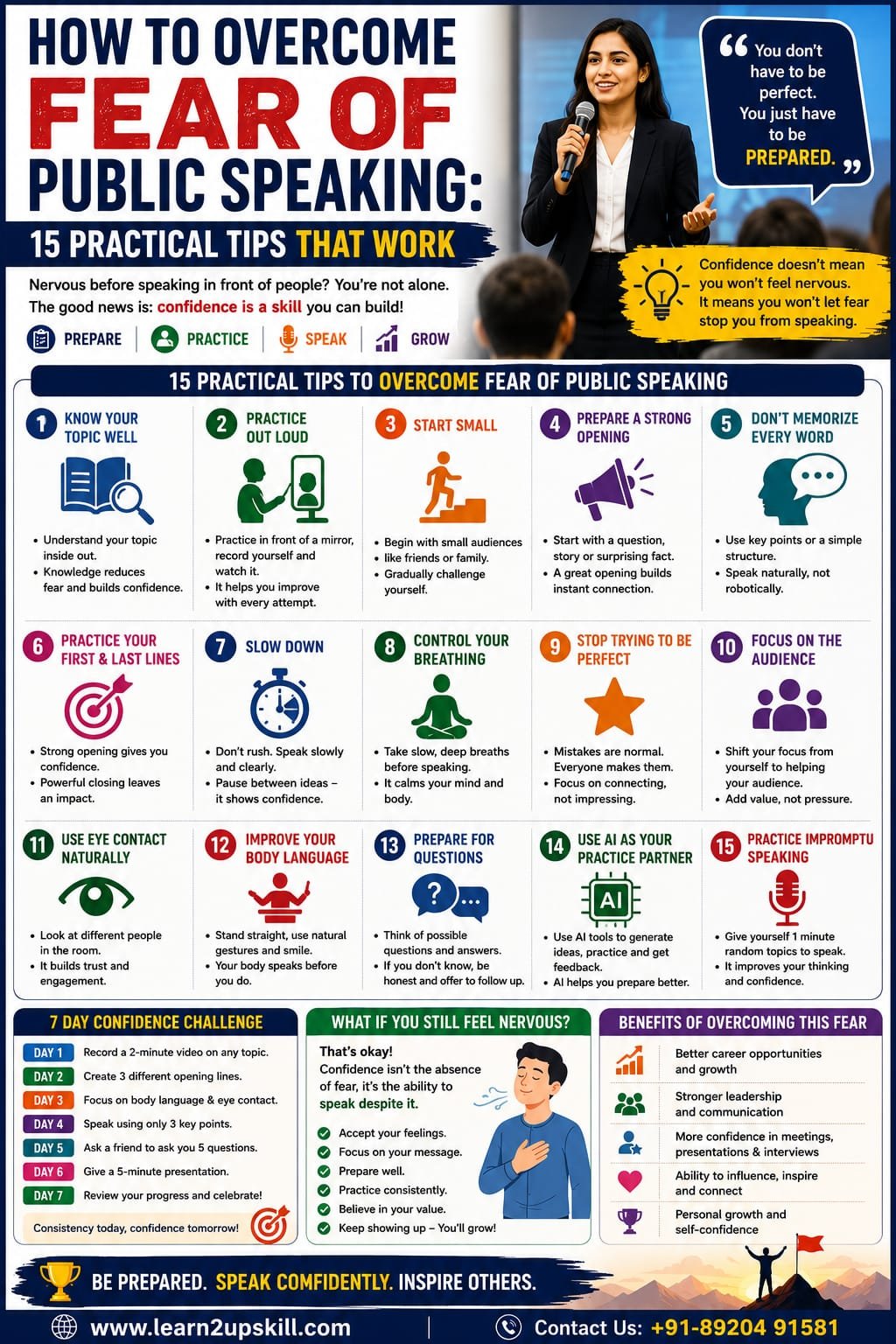
    How to Overcome Fear of Public Speaking: 15 Practical Tips That Work

    Imagine you’re standing in front of a room full of people.

    Your heart starts beating faster.

    Your hands feel sweaty.

    Your mind suddenly goes blank.

    You know exactly what you want to say—but the words don’t seem to come out.

    If this sounds familiar, you’re not alone.

    Fear of public speaking is a common challenge among students, professionals, entrepreneurs, managers, and even experienced speakers.

    The good news is that public speaking confidence is a skill that can be developed.

    You don’t have to be naturally outgoing.

    You don’t need to become the loudest person in the room.

    And you certainly don’t need to eliminate nervousness completely.

    The goal is to learn how to manage nervousness and communicate effectively despite it.

    Whether you’re preparing for a school presentation, college seminar, job interview, business meeting, client presentation, webinar, or professional speech, these 15 practical tips can help you overcome your fear of public speaking.

    —

    Why Are People Afraid of Public Speaking?

    Before learning how to overcome public-speaking fear, it helps to understand where it comes from.

    Common reasons include:

    – Fear of making mistakes

    – Fear of being judged

    – Lack of preparation

    – Low confidence

    – Previous negative experiences

    – Fear of forgetting what to say

    – Worry about being asked difficult questions

    – Feeling uncomfortable around large audiences

    – Comparing yourself with experienced speakers

    – Perfectionism

    Sometimes the fear isn’t really about speaking.

    It’s about what we think might happen while speaking.

    You may think:

    «“What if everyone notices I’m nervous?”»

    «“What if I forget my speech?”»

    «“What if someone laughs?”»

    «“What if I answer a question incorrectly?”»

    The solution isn’t to convince yourself that nothing can go wrong.

    Instead, prepare yourself to handle what happens.

    —

    1. Know Your Topic Thoroughly

    One of the biggest causes of public-speaking anxiety is uncertainty.

    If you don’t understand your topic, you’ll naturally feel nervous.

    The solution is preparation.

    Before your presentation, understand:

    – The main topic

    – Important facts

    – Key examples

    – Possible questions

    – Your audience

    – The purpose of your presentation

    You don’t need to memorize every sentence.

    You need to understand your subject well enough to explain it naturally.

    Remember:

    Don’t memorize every word. Understand the message.

    When you understand your topic, you’re less likely to panic if you forget a sentence.

    —

    1. Practice Out Loud

    Reading your speech silently isn’t enough.

    You need to hear yourself speak.

    Practice out loud.

    Start by speaking to yourself.

    Then try:

    – A mirror

    – Your phone camera

    – A family member

    – A friend

    – A colleague

    Record yourself and watch the recording.

    Look for:

    – Speaking speed

    – Repeated words

    – Unclear sentences

    – Voice tone

    – Body language

    – Long pauses

    – Nervous gestures

    You may feel uncomfortable watching yourself initially.

    That’s normal.

    The more you practice, the more natural it becomes.

    —

    1. Start Small

    Don’t immediately challenge yourself to speak in front of 500 people.

    Build confidence gradually.

    Try this progression:

    Step 1: Speak to yourself.

    Step 2: Record a two-minute video.

    Step 3: Speak to one friend.

    Step 4: Speak to three or four people.

    Step 5: Present to a small group.

    Step 6: Volunteer for a larger presentation.

    This is similar to building physical fitness.

    You don’t start with the heaviest weight.

    You build strength gradually.

    —

    1. Prepare a Strong Opening

    The first few seconds can feel the most frightening.

    That’s why you should prepare your opening carefully.

    Instead of beginning with:

    «“Hello everyone. Today I’m going to talk about…”»

    try something more engaging.

    For example:

    «“What would happen if AI could do 80% of your daily work?”»

    Now the audience is curious.

    You can also start with:

    – A question

    – A surprising fact

    – A short story

    – A personal experience

    – A powerful statement

    Once you’ve successfully delivered the opening, your confidence often increases.

    —

    1. Don’t Memorize Your Entire Speech

    This is a common mistake.

    You memorize every sentence.

    Then you forget one word.

    Suddenly, you panic.

    Instead, create a simple structure:

    Opening

    What is the topic?

    Main Point 1

    What is the first important idea?

    Main Point 2

    What is the second idea?

    Main Point 3

    What is the third idea?

    Conclusion

    What should the audience remember?

    Use keywords or short notes instead of memorizing paragraphs.

    This allows you to speak naturally.

    —

    1. Practice Your First and Last Lines

    While you shouldn’t memorize the entire speech, it’s useful to know exactly how you want to begin and finish.

    Your opening gives you confidence.

    Your conclusion gives you control.

    For example:

    Opening:

    «“Today I want to show you why communication skills are becoming even more important in the age of AI.”»

    Closing:

    «“Technology can help us communicate faster, but human connection is what makes communication meaningful.”»

    Having these lines ready can make the presentation feel more structured.

    —

    1. Slow Down

    Nervous speakers often speak too quickly.

    When you’re anxious, you may feel that you need to finish as quickly as possible.

    Don’t.

    Slow down.

    Use short pauses between important ideas.

    For example:

    «“AI can generate information…”»

    Pause.

    «“But humans still need to understand what that information means.”»

    A pause can make you sound more confident.

    It also gives your brain time to organize your next thought.

    —

    1. Learn to Control Your Breathing

    Your breathing can influence how you feel before speaking.

    When you’re nervous, your breathing may become faster and shallower.

    Before your presentation, try taking a few slow, comfortable breaths.

    For example:

    Inhale slowly.

    Pause briefly.

    Exhale slowly.

    Repeat several times.

    Don’t treat this as a magic trick that eliminates fear.

    Instead, use it as a way to give yourself a moment to slow down and focus.

    —

    1. Stop Trying to Be Perfect

    Perfectionism can make public-speaking fear much worse.

    You may think:

    «“I must not make a single mistake.”»

    That’s unrealistic.

    Even experienced speakers:

    – Forget words

    – Pause

    – Correct themselves

    – Mispronounce something

    – Lose their place

    – Get unexpected questions

    The audience usually doesn’t expect perfection.

    They want useful information and a speaker who can communicate clearly.

    Your goal should be:

    Clear > Perfect

    —

    1. Focus on the Audience, Not Yourself

    This is one of the most powerful mindset changes.

    Instead of thinking:

    «“Everyone is watching me.”»

    think:

    «“I’m here to help the audience understand something.”»

    Your role is to provide value.

    Ask yourself:

    – What does my audience need to know?

    – What problem am I helping them understand?

    – What should they remember?

    – What action should they take?

    When you focus on helping people rather than judging yourself, anxiety can become easier to manage.

    —

    1. Use Eye Contact Naturally

    You don’t need to stare at one person.

    Instead, look around the room naturally.

    Try the three-point technique:

    Look toward someone on the left.

    Then someone in the center.

    Then someone on the right.

    Continue naturally throughout the presentation.

    If direct eye contact feels uncomfortable initially, look at the area around people’s eyes or eyebrows.

    Over time, genuine eye contact will become easier.

    —

    1. Improve Your Body Language

    Your body communicates even when you’re not speaking.

    Pay attention to:

    – Posture

    – Facial expression

    – Hand gestures

    – Eye contact

    – Movement

    Avoid constantly:

    – Looking at the floor

    – Crossing your arms

    – Playing with your phone

    – Moving unnecessarily

    – Hiding behind the podium

    – Repeatedly touching your hair or face

    You don’t need dramatic gestures.

    Stand comfortably and let your movements support your message.

    —

    1. Prepare for Questions

    Many people aren’t afraid of the presentation itself.

    They’re afraid of the Q&A session afterward.

    The solution is preparation.

    Before your presentation, think of:

    5 questions the audience might ask.

    Then prepare your answers.

    Also remember:

    You don’t have to know everything.

    If someone asks something you don’t know, you can say:

    «“That’s a good question. I don’t have enough information to give you an accurate answer right now, but I’d be happy to look into it.”»

    That’s much better than inventing an answer.

    —

    1. Use AI as Your Public-Speaking Practice Partner

    AI can be extremely useful when you’re preparing to speak.

    You can use tools such as ChatGPT to:

    Generate ideas

    «“Give me five engaging ways to start a presentation about digital marketing.”»

    Practice questions

    «“Act as a difficult audience member and ask me 10 questions about my presentation.”»

    Improve your speech

    «“Make this presentation clearer and more engaging without making it sound overly formal.”»

    Simplify complex information

    «“Explain this topic in simple language for a group of college students.”»

    Practice interviews

    «“Act as an interviewer and ask me questions about my career.”»

    AI can help you prepare.

    But don’t let AI replace your own voice.

    Use AI to prepare. Use your human personality to connect.

    —

    1. Practice Impromptu Speaking

    Not every speaking situation will be planned.

    You may suddenly be asked:

    «“Can you give us your opinion?”»

    «“Can you explain this to the client?”»

    «“What do you think we should do?”»

    This is why impromptu speaking is an important skill.

    Try this exercise:

    Pick a random topic.

    Set a timer for 60 seconds.

    Speak continuously about the topic.

    For example:

    – Your favorite book

    – AI in education

    – Social media

    – Remote work

    – Your career goals

    – A recent project

    Don’t worry about perfection.

    The goal is to train your brain to organize thoughts quickly.

    —

    A Simple 7-Day Public Speaking Confidence Challenge

    If you want to start immediately, try this seven-day challenge.

    Day 1: Speak for 2 Minutes

    Choose any topic and record yourself.

    Day 2: Improve Your Opening

    Create three different opening lines for the same topic.

    Day 3: Practice Body Language

    Record yourself while focusing on posture and eye contact.

    Day 4: Practice Without Notes

    Explain a topic using only three keywords.

    Day 5: Handle Questions

    Ask a friend to challenge you with five questions.

    Day 6: Give a 5-Minute Presentation

    Present a topic from beginning to end.

    Day 7: Review Your Progress

    Watch your Day 1 and Day 6 recordings.

    Look for improvements.

    You’ll probably notice changes in confidence, clarity and delivery.

    —

    Common Public Speaking Mistakes to Avoid

    1. Reading every word from the slides

    Slides should support your speech—not replace it.

    1. Speaking too quickly

    Slow down and pause.

    1. Using too much text

    Keep presentations visually simple.

    1. Avoiding eye contact

    Look at your audience naturally.

    1. Memorizing everything

    Understand your message instead.

    1. Using complicated language

    Simple language is often more powerful.

    1. Ignoring the audience

    Adapt your message to their needs.

    1. Overusing filler words

    Watch words such as:

    – “Um”

    – “Actually”

    – “Basically”

    – “Like”

    – “You know”

    1. Trying to sound like someone else

    Develop your own speaking style.

    1. Not practicing

    Confidence comes from preparation and repetition.

    —

    What If You Still Feel Nervous?

    You may practice several times and still feel nervous.

    That’s okay.

    The goal isn’t necessarily to reach a point where your heart never beats faster before speaking.

    Even experienced speakers can feel nervous before an important presentation.

    The difference is that they have learned:

    “I can feel nervous and still perform well.”

    That’s real confidence.

    Confidence isn’t the absence of fear.

    Confidence is the ability to act despite fear.

    —

    Public Speaking and Career Growth

    Public speaking isn’t just useful for presentations.

    It can influence many areas of your career.

    Strong communication can help you:

    – Perform better in interviews

    – Present ideas to management

    – Lead meetings

    – Speak with clients

    – Deliver training

    – Participate in group discussions

    – Build professional relationships

    – Lead teams

    – Negotiate

    – Build your professional reputation

    In an AI-powered workplace, technical knowledge is important.

    But being able to explain ideas, build trust and influence people remains a valuable human capability.

    That’s why public speaking should be treated as a career skill, not just a classroom skill.

    —

    Public Speaking for Students

    Students can start developing communication skills long before entering the workplace.

    Practice through:

    – Classroom presentations

    – Debates

    – Group discussions

    – School events

    – College seminars

    – Project presentations

    – Competitions

    – Interviews

    Start small.

    You don’t need to become a professional speaker overnight.

    Every presentation is another opportunity to improve.

    —

    Public Speaking for Professionals

    Professionals can practice through everyday workplace situations.

    Volunteer to:

    – Present a project update

    – Explain a report

    – Lead a meeting

    – Train a colleague

    – Present a new idea

    – Speak during team discussions

    Don’t wait until someone gives you a major presentation.

    Use small opportunities to build confidence.

    —

    The Most Important Mindset Shift

    Instead of asking:

    «“How can I stop being afraid of public speaking?”»

    ask:

    «“How can I become comfortable speaking even when I feel nervous?”»

    That’s a much more realistic goal.

    Fear may not disappear completely.

    But with preparation, practice and experience, it can become manageable.

    —

    Final Thoughts

    Fear of public speaking doesn’t have to control your career.

    You don’t have to be born confident.

    You can learn to speak clearly.

    You can learn to organize your thoughts.

    You can learn to control your pace.

    You can learn to handle questions.

    You can learn to use body language.

    And you can learn to manage nervousness.

    Start small.

    Practice consistently.

    Record yourself.

    Use AI as a practice partner.

    Ask for feedback.

    And give yourself permission to make mistakes.

    The next time you stand in front of an audience, remember:

    You don’t need to be perfect.

    You need to be prepared, clear and authentic.

    Your voice has value.

    Learn to use it with confidence.

    Speak with confidence. Communicate with purpose. Grow your career.

    —

    Quick Public Speaking Confidence Checklist

    – [ ] Understand your topic.

    – [ ] Know your audience.

    – [ ] Prepare a clear structure.

    – [ ] Practice out loud.

    – [ ] Record yourself.

    – [ ] Prepare your opening.

    – [ ] Prepare your conclusion.

    – [ ] Don’t memorize every sentence.

    – [ ] Slow down while speaking.

    – [ ] Use comfortable eye contact.

    – [ ] Improve your body language.

    – [ ] Prepare for questions.

    – [ ] Use AI for practice and feedback.

    – [ ] Practice impromptu speaking.

    – [ ] Focus on helping your audience.

    – [ ] Accept that mistakes are normal.

    – [ ] Keep practicing.

    —

    Build Your Communication Skills With Learn2upskill

    Public speaking is a skill—and like any skill, it improves with learning and practice.

    At Learn2upskill, we help students, professionals, job seekers and career changers develop practical skills for the modern workplace.

    Explore learning opportunities in:

    Public Speaking • Communication • AI • Excel • Business Analysis • Digital Marketing • Cybersecurity • Professional Development

    Don’t let fear stop you from sharing your ideas.

    Learn. Upskill. Grow.

    🌐 www.coral-kudu-326218.hostingersite.com

    Contact Us: +91-89204 91581

    —


  • How to Give a Great Presentation: 15 Tips for Students & Professionals

    How to Give a Great Presentation: 15 Tips for Students & Professionals

    How to Give a Great Presentation: 15 Tips for Students & Professionals

    Meta Description: Learn how to give a great presentation with 15 practical tips for students and professionals, including preparation, slide design, storytelling, body language, delivery, Q&A and AI tools.

    Suggested URL Slug: /how-to-give-a-great-presentation/

    How to Give a Great Presentation: 15 Tips for Students and Professionals

    Whether you’re a student presenting a college project or a professional presenting an important business proposal, giving a great presentation is a valuable skill.

    A good presentation isn’t simply about putting information on slides and reading it aloud.

    It is about communicating an idea clearly, keeping your audience interested, and helping them understand what you want them to remember or do.

    You may have excellent knowledge of your subject, but if your presentation is confusing, overloaded with text, or delivered without confidence, your message can easily get lost.

    The good news is that presentation skills can be learned.

    You don’t need to be a naturally confident speaker.

    With proper preparation, a clear structure, good visual design and regular practice, you can significantly improve your presentations.

    In this guide, we’ll explore 15 practical presentation tips that students and professionals can use immediately.

    What Makes a Great Presentation?

    Before discussing the tips, let’s understand what separates an average presentation from a great one.

    A strong presentation usually has:

    A clear objective

    A logical structure

    Relevant information

    Simple and attractive slides

    An engaging opening

    Good storytelling

    Confident delivery

    Effective body language

    Audience interaction

    A memorable conclusion

    The best presentations aren’t necessarily the longest.

    They’re the ones where the audience understands the right message.

    1. Know the Purpose of Your Presentation

    Before creating your first slide, answer one simple question:

    “What do I want my audience to understand, remember or do after this presentation?”

    Your answer becomes the foundation of your presentation.

    For example:

    Student presentation

    “I want my classmates to understand how climate change affects water resources.”

    Business presentation

    “I want management to approve our proposed digital marketing budget.”

    Training presentation

    “I want employees to understand how to identify phishing emails.”

    Once your purpose is clear, deciding what information to include becomes much easier.

    1. Understand Your Audience

    A presentation should be designed for the people listening—not just for the person presenting.

    Ask:

    Who is my audience?

    What do they already know?

    What do they need to learn?

    What questions might they have?

    What language will they understand?

    Why should they care about this topic?

    For example, a presentation about AI would look very different for:

    School students → simple examples and visuals.

    Business leaders → productivity, cost and business impact.

    Technology professionals → technical details and implementation.

    Knowing your audience helps you choose the right message.

    1. Create a Clear Presentation Structure

    A strong presentation usually follows a simple structure.

    Opening

    Introduce the topic and capture attention.

    Problem or Context

    Explain why the topic matters.

    Main Points

    Present two to five important ideas.

    Examples or Evidence

    Show how the ideas work in practice.

    Recommendations or Takeaways

    Explain what the audience should remember or do.

    Conclusion

    End with a clear final message.

    This structure prevents your presentation from becoming a collection of unrelated facts.

    1. Start With a Strong Opening

    Your first minute matters.

    Avoid starting with a long definition or a slide full of text.

    Instead, try:

    A question

    “How many hours do you think employees lose every week to repetitive tasks?”

    A surprising fact

    “Most people remember only a fraction of a presentation if the information isn’t structured effectively.”

    A short story

    “Last year, our team faced a problem that seemed impossible to solve…”

    A bold statement

    “AI isn’t eliminating the need for human skills. It’s changing which human skills matter most.”

    A strong opening creates curiosity.

    1. Keep Your Slides Simple

    One of the most common presentation mistakes is putting too much information on slides.

    A slide should support your speech—not become a document that the audience has to read.

    Avoid:

    Large paragraphs

    Tiny fonts

    Too many bullet points

    Excessive animations

    Unnecessary graphics

    Too many different fonts

    Instead, use:

    Short phrases

    Large headings

    Relevant images

    Simple diagrams

    Charts

    Key statistics

    Think:

    One slide → One main idea.

    1. Use Visuals Instead of Too Much Text

    People generally process visual information differently from large blocks of written text.

    Instead of explaining a process using six bullet points, consider using:

    Step 1 → Step 2 → Step 3 → Result

    Instead of describing data in a paragraph, use a chart.

    Instead of listing a complicated concept, use a diagram.

    Visuals should make the information easier to understand, not simply make the slide look attractive.

    1. Use Storytelling

    Facts provide information.

    Stories provide context.

    Suppose you’re presenting a cybersecurity topic.

    Instead of saying:

    “Phishing attacks are increasing.”

    you could say:

    “Imagine an employee receives an email that appears to come from the company’s CEO asking for an urgent payment. The email looks completely legitimate. Within minutes, the employee transfers the money.”

    Now the audience has a situation they can imagine.

    Storytelling can make presentations:

    More memorable

    More relatable

    More engaging

    Easier to understand

    You don’t need dramatic stories.

    A simple real-world example can be enough.

    1. Practice Your Presentation Out Loud

    Reading your slides silently isn’t practice.

    You need to actually speak.

    Practice:

    In front of a mirror

    In front of a friend

    In front of family

    In an empty room

    Using your phone camera

    Record yourself when possible.

    Look for:

    Speaking too quickly

    Repeated words

    Unnecessary pauses

    Weak openings

    Unclear explanations

    Poor posture

    Don’t try to fix everything at once.

    Choose one or two areas to improve each time.

    1. Don’t Memorize Every Word

    Memorizing a complete presentation can create unnecessary pressure.

    Instead, understand your content and remember the key ideas.

    For example:

    Problem → Cause → Solution → Result

    Those four words can guide an entire section of your presentation.

    Use speaker notes if necessary.

    But avoid reading every sentence directly from the screen.

    Your audience should feel that you’re talking to them, not reciting a script.

    1. Pay Attention to Your Body Language

    Your body communicates before you even say a word.

    During a presentation:

    Stand confidently

    Keep your posture comfortable and upright.

    Make eye contact

    Look around the audience naturally.

    Use gestures

    Let your hands support your message.

    Avoid distracting movements

    Don’t constantly:

    Touch your face

    Play with objects

    Look at the floor

    Rock from side to side

    Hide behind the podium

    You don’t need exaggerated movements.

    Natural body language is enough.

    1. Control Your Voice and Speaking Speed

    A presentation can become boring if you speak in the same tone from beginning to end.

    Use voice modulation.

    Change:

    Speed

    Pitch

    Volume

    Pauses

    Emphasis

    Slow down when discussing an important idea.

    Pause before revealing an important point.

    Speak more energetically when telling a story.

    Your voice should help guide the audience through the presentation.

    1. Engage Your Audience

    Don’t make the presentation a one-way conversation.

    Depending on the setting, you can ask:

    “How many of you have experienced this problem?”

    or:

    “What would you do in this situation?”

    You can also use:

    Polls

    Questions

    Short activities

    Demonstrations

    Audience examples

    Quick discussions

    Even a small interaction can make people more attentive.

    1. Prepare for the Q&A Session

    Many presentations become uncomfortable during questions.

    Don’t wait until the end to think about possible questions.

    Before your presentation, identify:

    What are the five most likely questions?

    Prepare your answers.

    Also think about difficult questions.

    If you don’t know something, don’t panic.

    You can say:

    “That’s a good question. I don’t have enough information to answer that accurately right now, but I’d be happy to follow up on it.”

    Honesty is better than guessing.

    1. Use AI to Prepare a Better Presentation

    AI can be a useful presentation assistant.

    You can use AI tools to:

    Brainstorm topics

    “Give me five presentation ideas about AI in education.”

    Create an outline

    “Create a 10-slide presentation structure about digital marketing for beginners.”

    Improve your wording

    “Make this slide easier for a non-technical audience to understand.”

    Generate questions

    “Act as a critical audience member and ask me 10 challenging questions about this presentation.”

    Practice delivery

    You can even use AI as a simulated audience for presentation practice.

    But don’t let AI do all the thinking.

    Your presentation should include:

    Your analysis

    Your experience

    Your examples

    Your perspective

    Your judgment

    Use AI as an assistant—not as a substitute for your expertise.

    1. End With a Memorable Conclusion

    Don’t finish with:

    “That’s all. Thank you.”

    Instead, summarize your key message.

    For example:

    “AI can help us work faster, but the ability to communicate ideas clearly is what helps people understand and act on them. So don’t just learn the technology—learn how to communicate its value.”

    You can also finish with:

    A memorable statement

    A question

    A call to action

    A short story

    Three key takeaways

    Your final words are often what people remember.

    Make them count.

    A Simple Presentation Formula

    If you’re a beginner, use this structure:

    1. Hook

    Get attention.

    1. Problem

    Explain what matters.

    1. Main Ideas

    Present three key points.

    1. Examples

    Make the ideas practical.

    1. Solution

    Explain what can be done.

    1. Key Takeaways

    Summarize.

    1. Call to Action

    Tell the audience what to do next.

    This formula can work for many student and professional presentations.

    Presentation Tips for Students

    Students can use these techniques for:

    School projects

    College presentations

    Seminars

    Viva preparation

    Group projects

    Debates

    Competitions

    Internship presentations

    Student tip:

    Don’t try to make your presentation complicated just to sound intelligent.

    Clear + Interesting + Well-Organized is better than complicated.

    Use examples that your classmates can relate to.

    Practice your presentation several times before the actual event.

    Presentation Tips for Professionals

    Professionals often present to:

    Managers

    Clients

    Colleagues

    Senior executives

    Investors

    Customers

    Business partners

    The focus should be on business value.

    Instead of presenting ten slides of data, answer:

    What does this information mean for the business?

    For example:

    Don’t simply say:

    “Website traffic increased 25%.”

    Explain:

    “Website traffic increased 25%, mainly because of our organic search strategy. The next opportunity is to improve conversion rates on the pages receiving the most traffic.”

    That’s the difference between presenting information and presenting insight.

    Common Presentation Mistakes to Avoid

    ❌ Too much text

    Simplify your slides.

    ❌ Reading slides word-for-word

    Talk to the audience.

    ❌ No clear objective

    Know what you want people to remember.

    ❌ Too many statistics

    Use only relevant information.

    ❌ Too many animations

    Design should support the message.

    ❌ No practice

    Practice before presenting.

    ❌ Ignoring the audience

    Make the presentation relevant to them.

    ❌ Weak ending

    Finish with a strong takeaway.

    ❌ Speaking too quickly

    Slow down and pause.

    ❌ Overloading the presentation

    Less can be more.

    A 7-Day Presentation Improvement Challenge

    Want to improve quickly?

    Try this:

    Day 1

    Choose a topic and create a simple outline.

    Day 2

    Create five to seven slides.

    Day 3

    Practice your opening and closing.

    Day 4

    Give the presentation aloud.

    Day 5

    Record yourself and review your delivery.

    Day 6

    Ask a friend to watch and provide feedback.

    Day 7

    Present again using the feedback.

    Compare your first and final recordings.

    You’ll begin to see where your confidence and delivery have improved.

    The Future of Presentations: AI + Human Skills

    AI is changing how presentations are created.

    Today, AI can help with:

    Brainstorming

    Research

    Outlining

    Writing

    Slide ideas

    Data analysis

    Visual concepts

    Practice questions

    But technology doesn’t automatically make a presentation effective.

    Someone still needs to:

    Understand the audience

    Decide what matters

    Tell the story

    Interpret the information

    Build trust

    Answer questions

    Communicate with confidence

    This is why presentation skills remain an important professional capability in the AI era.

    The strongest combination is:

    AI Skills + Presentation Skills + Critical Thinking + Human Communication

    Final Thoughts

    A great presentation isn’t about having the perfect slides.

    It isn’t about speaking like a professional news anchor.

    And it isn’t about memorizing a 30-minute speech.

    A great presentation is about making your audience understand something important and remember it.

    Start with a clear purpose.

    Know your audience.

    Structure your message.

    Keep your slides simple.

    Use stories and examples.

    Practice out loud.

    Improve your body language.

    Control your speaking pace.

    Prepare for questions.

    Use AI intelligently.

    And finish with a strong takeaway.

    Whether you’re a student giving your first classroom presentation or a professional presenting to senior management, these skills can help you communicate more effectively.

    Prepare well. Present clearly. Connect with your audience.

    Quick Presentation Checklist

    Before your presentation, ask:

    [ ] Is my objective clear?

    [ ] Do I understand my audience?

    [ ] Does my presentation have a logical structure?

    [ ] Is my opening engaging?

    [ ] Are my slides simple?

    [ ] Have I removed unnecessary text?

    [ ] Have I included relevant visuals?

    [ ] Have I practiced aloud?

    [ ] Do I know my key points?

    [ ] Am I speaking at a comfortable pace?

    [ ] Is my body language natural?

    [ ] Have I prepared for questions?

    [ ] Have I tested my presentation equipment?

    [ ] Do I have a strong conclusion?

    [ ] Have I prepared a clear call to action?

    Build Your Presentation & Communication Skills With Learn2upskill

    Great presentation skills can help you perform better in academics, interviews and the workplace.

    At Learn2upskill, we help students, professionals, job seekers and career changers develop practical skills for the modern workplace.

    Explore learning opportunities in:

    Public Speaking • Presentation Skills • Communication • AI • Excel • Business Analysis • Digital Marketing • Cybersecurity • Professional Development

    Don’t just create better slides.

    Learn to communicate better.

    Learn. Upskill. Grow.

    🌐 www.coral-kudu-326218.hostingersite.com⁠�

    Contact Us: +91-89204 91581


  • How to Explain a Layoff in a Job Interview

    How to Explain a Layoff in a Job Interview

    How to Explain a Layoff in a Job Interview

    How to Explain a Layoff in a Job Interview: Best Answers

    Meta Description: Learn how to explain a layoff confidently in a job interview, what to say, what to avoid, and how to turn a difficult career transition into a positive professional story.

    Suggested URL Slug: “/how-to-explain-a-layoff-in-a-job-interview/”

    —

    How to Explain a Layoff in a Job Interview

    Being laid off can be difficult enough without worrying about how to explain it to a potential employer.

    One question many job seekers fear is:

    «“Why did you leave your previous company?”»

    Or even more directly:

    «“Why were you laid off?”»

    If you have recently lost your job because of restructuring, downsizing, cost-cutting, or a company-wide workforce reduction, you may worry that recruiters will judge you negatively.

    The good news is that being laid off does not automatically make you a weaker candidate.

    Companies reduce their workforce for many reasons that have nothing to do with an individual’s performance. What matters during an interview is how professionally you explain the situation and how effectively you shift the conversation toward your experience, skills, achievements, and future goals.

    This guide will show you exactly how to talk about a layoff without sounding defensive, negative, or uncomfortable.

    —

    1. First, Understand That a Layoff Is Different From Being Fired

    This distinction is important.

    A layoff generally occurs because the employer eliminates a position or reduces its workforce for business reasons.

    Possible reasons include:

    – Cost reduction

    – Company restructuring

    – Mergers or acquisitions

    – Business downturn

    – Project cancellation

    – Automation

    – Outsourcing

    – Department closure

    – Change in business strategy

    Being fired, on the other hand, is usually connected to an individual’s performance, conduct, or other employment-related reasons.

    If you were laid off as part of a larger workforce reduction, you should communicate that clearly.

    For example:

    «“My position was eliminated as part of a company-wide restructuring.”»

    This immediately provides context.

    —

    1. Don’t Be Ashamed of Being Laid Off

    One of the biggest mistakes candidates make is treating a layoff as something embarrassing.

    It’s not.

    A company decision does not define your professional ability.

    You may have performed well, received positive reviews, completed important projects, and still been affected by a workforce reduction.

    During an interview, your confidence matters.

    Don’t lower your voice or apologize for the layoff.

    Don’t say:

    «“Unfortunately, I lost my job…”»

    Instead, use professional language:

    «“My previous company went through a restructuring, and my role was affected as part of the workforce reduction.”»

    The second version sounds factual and confident.

    —

    1. Keep Your Explanation Short

    You don’t need to tell the interviewer the entire story.

    A good explanation usually contains three parts:

    Part 1: What happened

    Briefly explain the business situation.

    Part 2: Your role

    Clarify that your position was affected by the restructuring or reduction.

    Part 3: What you’re doing now

    Move the conversation toward your skills and future goals.

    For example:

    «“My previous company underwent a restructuring that resulted in a reduction in workforce, and my position was affected. I had a positive experience there and gained strong experience in business analysis, reporting, and stakeholder management. I’m now looking for an opportunity where I can apply those skills and continue growing.”»

    That’s enough.

    —

    1. Use the “Fact → Value → Future” Formula

    One of the easiest ways to answer layoff questions is to follow this structure:

    Fact → Value → Future

    Fact

    Explain what happened.

    «“The company went through a restructuring and my role was eliminated.”»

    Value

    Mention what you accomplished.

    «“During my time there, I managed reporting projects and helped improve operational efficiency.”»

    Future

    Explain what you’re looking for.

    «“I’m now looking for a role where I can use that experience and take on greater responsibility.”»

    This approach prevents the conversation from getting stuck on the layoff.

    —

    1. Sample Answer for a Company-Wide Layoff

    If many employees were affected, you can say:

    «“My previous company went through a broader workforce reduction as part of a restructuring initiative, and my position was among the roles affected. I had a valuable experience there and was able to develop strong skills in project coordination and business operations. I’m now focused on finding a role where I can bring those skills to a growing organization.”»

    Simple. Professional. Forward-looking.

    —

    1. Sample Answer for a Department Closure

    If your department was closed:

    «“The company decided to restructure its operations and eventually closed the department I was working in. As a result, my position was eliminated. It was a challenging transition, but I gained valuable experience in customer management, reporting, and process improvement. I’m now looking for an opportunity where I can continue applying those skills.”»

    —

    1. Sample Answer for a Project-Based Layoff

    Sometimes employees lose their jobs because a major project ends.

    You could say:

    «“My role was connected to a specific project, and when the project was completed and the company restructured its staffing requirements, my position was eliminated. The experience gave me strong exposure to project management, client communication, and problem-solving, and I’m now looking for a longer-term opportunity where I can build on those skills.”»

    —

    1. Sample Answer for a Startup Layoff

    Startups can experience rapid changes in funding, strategy, and staffing.

    You could explain:

    «“The startup went through a restructuring following a change in its business strategy, and several positions, including mine, were eliminated. I gained valuable experience working in a fast-paced environment and taking on multiple responsibilities. I’m now looking to bring that adaptability and experience to my next role.”»

    —

    1. What If the Interviewer Asks, “Was It Performance Related?”

    Don’t become defensive.

    Answer clearly and honestly.

    If the layoff was unrelated to performance, you can say:

    «“No. My position was eliminated as part of a broader workforce reduction that affected multiple employees and teams.”»

    Then move on:

    «“My focus now is on finding a role where I can contribute my experience in…”»

    If performance was a factor, don’t lie.

    Instead, be honest and focus on what you’ve learned and improved.

    —

    1. What If the Interviewer Asks, “How Many People Were Laid Off?”

    You don’t need to provide confidential information.

    If you know the number and it was publicly communicated, you can mention it.

    For example:

    «“It was part of a broader restructuring that affected several teams across the organization.”»

    If you’re unsure:

    «“It affected multiple teams and was part of a larger organizational restructuring.”»

    There’s no need to speculate.

    —

    1. What If They Ask, “Why Didn’t You Find Another Role Within the Company?”

    You can answer professionally:

    «“I explored the available opportunities, but there wasn’t a suitable position aligned with my experience and career direction at that time. I therefore decided to focus on opportunities where I could continue developing my skills.”»

    This shows that you approached the situation thoughtfully.

    —

    1. What If You Were Laid Off More Than Once?

    This can feel particularly uncomfortable.

    But the principle remains the same.

    Don’t create a complicated story.

    Focus on facts and patterns.

    For example:

    «“Two of my previous employers went through significant restructuring during my time there, and my positions were affected. Those experiences gave me a strong understanding of how to adapt to changing business environments. I’ve also used the transitions to strengthen my skills in data analysis and AI-enabled productivity.”»

    Then focus on your current capabilities.

    Multiple layoffs don’t automatically mean you’re a bad employee.

    The interviewer will want to understand the circumstances and whether you’re now ready for the role.

    —

    1. What If You Have a Long Employment Gap After the Layoff?

    Don’t try to hide it.

    Use the time productively if possible.

    You might have:

    – Completed courses

    – Learned new technology

    – Worked on projects

    – Freelanced

    – Consulted

    – Volunteered

    – Taken care of family responsibilities

    – Built a portfolio

    – Prepared for a career change

    For example:

    «“After the layoff, I took some time to reassess my career direction and completed training in Power BI and SQL. I also worked on several data analysis projects to strengthen my practical skills. I’m now ready to return to a full-time role.”»

    This turns an employment gap into a period of development.

    —

    1. Never Blame Your Previous Employer

    This is one of the most important rules.

    You may have valid reasons to be angry.

    But an interview isn’t the right place to express them.

    Avoid statements such as:

    «“My manager didn’t like me.”»

    «“The company was badly managed.”»

    «“They laid off good employees while keeping incompetent people.”»

    «“The CEO made terrible decisions.”»

    Even if you believe these statements are true, they can make you appear negative.

    Instead, use neutral language:

    «“The company underwent significant restructuring.”»

    Professional neutrality is your friend.

    —

    1. Don’t Share Confidential Information

    Avoid discussing:

    – Internal financial information

    – Customer information

    – Confidential strategies

    – Internal emails

    – Employee disputes

    – Private management discussions

    – Trade secrets

    An interviewer may be interested in what happened, but sharing confidential information can create a bigger problem.

    A good rule is:

    «Explain your experience without exposing your former employer’s confidential information.»

    —

    1. Don’t Over-Explain

    Candidates sometimes become nervous and talk too much.

    The interviewer asks:

    «“Why did you leave your previous company?”»

    And the candidate spends ten minutes explaining everything that happened.

    Don’t.

    Give a clear answer and stop.

    Then allow the interviewer to ask follow-up questions.

    A concise explanation often sounds more confident.

    —

    1. Shift the Conversation Toward Your Achievements

    The layoff is only one part of your career story.

    Talk about what you achieved before it happened.

    For example:

    «“During my time there, I managed a portfolio of projects, improved reporting processes, and worked closely with cross-functional teams.”»

    You can then discuss:

    – Leadership

    – Technical skills

    – Business results

    – Projects

    – Problem-solving

    – Customer impact

    – Process improvements

    The interviewer should leave the conversation thinking:

    “This person has valuable experience.”

    —not—

    “This person was laid off.”

    —

    1. Prepare for Follow-Up Questions

    Interviewers may ask:

    “When exactly were you laid off?”

    Answer honestly.

    “How many employees were affected?”

    Provide information only if you know it and can appropriately share it.

    “Was your performance an issue?”

    Answer truthfully and professionally.

    “What did you do after the layoff?”

    Talk about learning, job searching, projects, networking, or other productive activities.

    “Why should we hire you?”

    This is your opportunity to talk about your value.

    Prepare answers in advance so you’re not caught off guard.

    —

    1. Turn the Layoff Into a Learning Story

    A difficult career experience can demonstrate resilience.

    For example:

    «“The experience taught me the importance of staying adaptable and continuously developing my skills. During the transition, I focused on improving my knowledge of AI and data analytics and became more intentional about the type of role I want next.”»

    This shows maturity.

    You’re not pretending the layoff was enjoyable.

    You’re demonstrating that you learned from the experience.

    —

    1. Practice Your Answer Before the Interview

    Don’t wait until the interview to decide what you’re going to say.

    Write down your answer.

    Practice it several times.

    Your answer should sound:

    – Natural

    – Short

    – Honest

    – Professional

    – Positive

    – Forward-looking

    You don’t need to memorize every word.

    Just become comfortable with the story.

    Practice with a friend or record yourself answering:

    «“Why did you leave your previous company?”»

    Listen to your response.

    Do you sound nervous?

    Defensive?

    Angry?

    Too detailed?

    If so, simplify it.

    —

    A Simple Layoff Interview Formula

    Remember this structure:

    1. Explain the situation

    “The company underwent restructuring…”»

    1. Explain the impact

    «“…and my role was eliminated.”»

    1. Highlight your experience

    «“During my time there, I developed strong skills in…”»

    1. Talk about the future

    «“I’m now looking for an opportunity where I can…”»

    That’s it.

    —

    What NOT to Say in an Interview

    Avoid statements such as:

    ❌ “My company was terrible.”

    ❌ “My manager wanted me gone.”

    ❌ “They kept the wrong people.”

    ❌ “I have no idea why they fired me.”

    ❌ “Everyone knows the company is failing.”

    ❌ “I was treated unfairly.”

    ❌ “I just need any job.”

    Instead, keep your language factual and professional.

    —

    How to Answer If You’re Still Emotionally Affected

    Sometimes a layoff is very recent.

    You may still feel disappointed.

    That’s okay.

    You don’t need to pretend everything was wonderful.

    But separate your emotions from your interview answer.

    You can say:

    «“It was certainly an unexpected transition, but I’ve used the time to reassess my goals, strengthen my skills, and focus on finding the right next opportunity.”»

    This acknowledges the challenge without sounding negative.

    —

    Example: Strong 30-Second Answer

    Here’s a simple answer you can adapt:

    «“My previous company went through a restructuring that resulted in a workforce reduction, and my position was affected. I had a positive experience there and developed strong skills in project management, reporting, and stakeholder communication. Since then, I’ve focused on strengthening my skills and exploring opportunities where I can take on greater responsibility. That’s what attracted me to this role.”»

    Notice the structure:

    What happened → What you achieved → What you’re doing now → Why this job.

    That’s exactly where you want the conversation to go.

    —

    Final Thoughts

    Being laid off can feel like a negative mark on your career.

    It doesn’t have to be.

    In an interview, the goal isn’t to hide the layoff.

    The goal is to explain it honestly, briefly, and professionally—and then show the interviewer why you’re still a strong candidate.

    Remember:

    Don’t apologize.

    Don’t blame.

    Don’t overshare.

    Don’t hide the truth.

    Instead:

    Explain.

    Highlight your achievements.

    Show what you learned.

    Talk about your skills.

    Focus on the future.

    A layoff may be one chapter in your career story.

    It doesn’t have to be the headline.

    Your next employer is not only interested in what happened to you.

    They want to know what you can do for them now.

    So prepare your answer, practice your confidence, and walk into the interview ready to talk about the value you can bring.

    Your past job may have ended. Your career hasn’t.

    —

    Quick Checklist Before a Job Interview After a Layoff

    – [ ] Prepare a 30-second explanation of the layoff.

    – [ ] Be honest about what happened.

    – [ ] Avoid blaming your previous employer.

    – [ ] Don’t share confidential information.

    – [ ] Prepare examples of your achievements.

    – [ ] Research the company you’re interviewing with.

    – [ ] Prepare answers to likely follow-up questions.

    – [ ] Explain what you learned during the transition.

    – [ ] Highlight your current skills.

    – [ ] Explain why you want the new role.

    – [ ] Practice your answer aloud.

    – [ ] Keep your explanation positive and future-focused.

    —

    Build Skills for Your Next Career Opportunity

    A career transition can be a good time to strengthen your professional skills.

    At Learn2upskill, we help students, professionals, job seekers, and career changers develop practical skills for today’s workplace.

    Explore learning opportunities in:

    AI • Excel • Business Analysis • Digital Marketing • Cybersecurity • Data Skills • Professional Development

    Don’t let a career setback stop your learning.

    Learn. Upskill. Grow.

    🌐 www.coral-kudu-326218.hostingersite.com

    Contact Us: +91-89204 91581

    —


  • How to Build an AI-Powered Workflow for Your Business

    How to Build an AI-Powered Workflow for Your Business

    How to Build an AI-Powered Workflow for Your Business

    Learn how to build an AI-powered business workflow step by step. Discover AI workflow examples, automation ideas, tools, benefits, risks, human oversight and implementation tips.

    Suggested URL Slug: /how-to-build-ai-powered-workflow-business/

    How to Build an AI-Powered Workflow for Your Business

    Imagine a business where a new customer enquiry automatically gets categorized, relevant information is retrieved, a personalized response is drafted, the CRM is updated and a salesperson receives a notification—all without someone manually moving information between five different systems.

    Or imagine a marketing team publishing a blog and automatically turning it into:

    A LinkedIn post

    An Instagram caption

    An email newsletter

    A short-video script

    A content summary

    A human still reviews the work, but the repetitive steps happen automatically.

    This is the idea behind an AI-powered workflow.

    AI-powered workflows combine artificial intelligence, business data, software applications and automation to complete tasks more efficiently.

    The shift is important because businesses are increasingly moving beyond experimenting with individual AI tools and toward redesigning entire workflows around AI. The World Economic Forum’s 2026 research describes this as a move toward AI-first operating models, where organizations rethink operations, decision-making and human-AI collaboration rather than simply adding AI on top of existing processes. �

    World Economic Forum +1

    But building an AI workflow doesn’t mean giving an AI system unlimited control.

    A successful workflow needs:

    A clear business problem + good data + the right AI capability + automation + human oversight + security + measurement.

    So, how do you actually build one?

    Let’s go step by step.

    What Is an AI-Powered Workflow?

    An AI-powered workflow is a business process in which AI is used to perform one or more tasks within a larger workflow.

    A simple workflow might look like:

    Trigger → Data → AI Analysis → Decision → Action → Human Review → Completion

    For example:

    Customer Support Workflow

    New customer email

    ↓

    AI understands the enquiry

    ↓

    Classifies the issue

    ↓

    Retrieves relevant information

    ↓

    Drafts a response

    ↓

    Human reviews

    ↓

    Response is sent

    ↓

    CRM is updated

    The AI isn’t necessarily replacing the entire process.

    Instead, it is improving specific parts of the process.

    AI Workflow vs Traditional Workflow

    Consider a traditional customer-support process.

    Traditional workflow

    Customer sends email → Employee reads → Searches information → Writes response → Updates CRM

    Now compare that with an AI-powered workflow:

    AI-powered workflow

    Customer sends email → AI classifies → AI retrieves information → AI drafts response → Employee reviews → CRM updates automatically

    The second workflow can reduce repetitive work while keeping humans involved where judgment matters.

    Why Businesses Are Building AI-Powered Workflows in 2026

    AI adoption is moving from experimentation toward integration into business operations.

    The World Economic Forum’s 2026 work on organizational transformation says organizations are increasingly integrating AI into core workflows and that the next opportunity is to rethink how work is performed, decisions are made and operating models are designed. �

    World Economic Forum

    At the same time, businesses face growing volumes of:

    Emails

    Documents

    Customer enquiries

    Meetings

    Data

    Reports

    Administrative tasks

    Marketing content

    AI can help businesses process some of this information faster.

    But the biggest opportunity isn’t simply:

    “Use AI.”

    It’s:

    “Redesign repetitive workflows so AI and people each do the parts they’re best suited for.”

    The 7 Building Blocks of an AI-Powered Workflow

    A strong AI workflow usually contains several components.

    1. Trigger

    Something starts the workflow.

    Examples:

    New email

    New customer enquiry

    New form submission

    New document

    New sales lead

    Scheduled time

    New database record

    1. Data

    The workflow needs relevant information.

    This could come from:

    CRM

    Website

    Spreadsheet

    Database

    Email

    Documents

    Knowledge base

    Business application

    1. AI Model

    AI performs tasks such as:

    Classification

    Summarization

    Extraction

    Generation

    Analysis

    Recommendation

    1. Rules and Logic

    The workflow determines what should happen next.

    For example:

    If enquiry is urgent → escalate.

    If enquiry is routine → generate response draft.

    1. Tools and Integrations

    The AI may need to interact with:

    Email

    CRM

    Calendar

    Spreadsheet

    Project-management system

    Database

    Internal knowledge base

    1. Human Review

    Important decisions may require human approval.

    1. Monitoring

    You need to know:

    Did the workflow work?

    Was the AI accurate?

    Did anything fail?

    How much time was saved?

    Are users satisfied?

    NIST emphasizes that AI systems need monitoring after deployment because real-world inputs can produce unexpected behavior and consequences that may not appear during controlled testing. �

    NIST

    Step 1: Identify a Business Problem

    Don’t start by asking:

    “Where can we use AI?”

    Start with:

    “What business problem are we trying to solve?”

    Look for tasks that are:

    Repetitive

    Time-consuming

    High-volume

    Digital

    Relatively predictable

    Measurable

    Suitable for human review

    Examples:

    100 customer emails every day

    50 sales leads every week

    Monthly reporting

    Repeated document processing

    Social-media content creation

    These are potential workflow opportunities.

    Step 2: Map the Existing Process

    Before automating anything, understand how the task is currently performed.

    Create a simple process map.

    Example: Customer Enquiry

    Customer submits form

    ↓

    Employee receives notification

    ↓

    Employee reads enquiry

    ↓

    Employee searches course information

    ↓

    Employee writes response

    ↓

    Employee records enquiry

    ↓

    Employee follows up

    Now ask:

    Which steps are repetitive?

    Which steps require judgment?

    Which steps could AI assist with?

    Which steps should remain human-controlled?

    This prevents you from automating a process you don’t fully understand.

    Step 3: Decide Where AI Actually Adds Value

    Not every step needs AI.

    Suppose your workflow is:

    Form submission → Database entry → Email → AI analysis → Human review

    You might use AI only for:

    AI analysis

    The other steps can be handled through conventional automation.

    This is important.

    Don’t use AI simply because you can.

    Use AI where it provides genuine value.

    Step 4: Choose the Right AI Task

    AI is particularly useful for tasks involving unstructured information.

    For example:

    Classification

    “What type of customer enquiry is this?”

    Extraction

    “Extract the customer name, course and contact information.”

    Summarization

    “Summarize this meeting.”

    Generation

    “Draft a response.”

    Analysis

    “Identify the main issues in these reviews.”

    Transformation

    “Turn this blog into a LinkedIn post.”

    Retrieval + Generation

    “Find the relevant company policy and explain it.”

    Choose the AI capability based on the actual problem.

    Step 5: Design the Workflow

    Now create the complete process.

    For example:

    AI Customer Support Workflow

    Trigger

    New customer enquiry

    ↓

    AI

    Classify enquiry

    ↓

    Knowledge Retrieval

    Find relevant information

    ↓

    AI

    Draft response

    ↓

    Rule

    If low-risk → human review

    If sensitive → escalate

    ↓

    Human

    Approve/edit response

    ↓

    Automation

    Send response

    ↓

    CRM

    Record interaction

    This is much better than simply saying:

    “Let’s add ChatGPT to customer support.”

    You’re designing an actual business process.

    Step 6: Create a Strong AI Prompt

    The quality of your AI workflow depends partly on the instructions given to the model.

    A useful prompt should explain:

    Objective

    Context

    Available information

    Constraints

    Output format

    Success criteria

    Escalation conditions

    For example:

    You are assisting the customer-support team. Read the customer enquiry and classify it as Billing, Course Access, Technical Support, Course Information or Other. Summarize the issue in two sentences. Use only the approved information provided. If the information is insufficient, mark the case for human review. Do not invent policies or pricing.

    This gives the AI a clear job.

    Step 7: Connect the AI to Your Business Data

    AI becomes much more useful when it has access to relevant, authorized information.

    For example:

    Customer question

    ↓

    AI

    ↓

    Approved course database

    ↓

    Relevant information

    ↓

    AI response

    This is often associated with Retrieval-Augmented Generation (RAG).

    Instead of relying only on the model’s general knowledge, the system can retrieve relevant information from a connected knowledge source.

    Possible sources include:

    Company policies

    Product documentation

    Course information

    FAQs

    Internal manuals

    Approved databases

    This can make responses more grounded in business-specific information.

    Step 8: Add Rules and Guardrails

    AI should not have unlimited freedom inside a business workflow.

    Create clear rules.

    For example:

    AI CAN:

    Classify enquiries

    Summarize documents

    Draft emails

    Retrieve approved information

    Recommend next steps

    AI CANNOT:

    Approve refunds

    Change account permissions

    Delete customer data

    Make financial commitments

    Send sensitive communications without approval

    The exact boundaries depend on the business and risk level.

    NIST’s 2026 work on AI-agent identity and authorization emphasizes the importance of authentication, authorization, auditing and least-privilege controls when AI systems can access tools and data. �

    NIST Computer Security Resource Center +1

    Step 9: Keep Humans in the Loop

    Human oversight is one of the most important parts of a responsible AI workflow.

    You don’t have to choose between:

    100% human

    or

    100% AI

    There is a useful middle ground:

    Human + AI

    For example:

    AI creates draft

    ↓

    Human reviews

    ↓

    Human approves

    ↓

    Automation completes action

    This can provide a good balance between efficiency and control.

    NIST’s AI Risk Management Framework guidance notes that human roles and responsibilities should be clearly defined and differentiated in AI systems, with the appropriate level of human oversight depending on the use case. �

    NIST AI Resource Center

    Step 10: Test Before Launch

    Never assume that an AI workflow will work perfectly because the demo worked once.

    Test different scenarios.

    Normal input

    Does it work?

    Missing information

    Does it ask for clarification or escalate?

    Incorrect information

    Does it detect the problem?

    Unusual request

    Does it follow the rules?

    Sensitive request

    Does it route the case appropriately?

    Malicious input

    Does it resist attempts to manipulate the workflow?

    Large volume

    Does the workflow continue functioning?

    Testing should happen before full deployment.

    Step 11: Monitor the Workflow

    Once your workflow is live, keep watching it.

    Measure:

    Accuracy

    How often does AI produce an acceptable result?

    Speed

    How much time does the workflow save?

    Cost

    What does each automated task cost?

    Escalation Rate

    How often does a human need to intervene?

    Error Rate

    How often does something go wrong?

    User Satisfaction

    Do employees and customers find the workflow useful?

    NIST’s 2026 work on deployed AI monitoring highlights the importance of monitoring real-world systems because unexpected behavior may emerge after deployment. �

    NIST

    10 Practical AI-Powered Workflows for Businesses

    1. Customer Support Workflow

    Customer message

    → AI classification

    → Knowledge retrieval

    → Response draft

    → Human approval

    → CRM update

    1. Sales Lead Workflow

    New lead

    → AI analyzes lead

    → Qualification

    → CRM entry

    → Follow-up draft

    → Sales notification

    1. Marketing Workflow

    New blog

    → AI extracts key ideas

    → LinkedIn post

    → Instagram caption

    → Email draft

    → Short-video script

    → Human review

    1. Meeting Workflow

    Meeting

    → Transcription

    → AI summary

    → Decisions

    → Action items

    → Task creation

    → Follow-up reminder

    1. HR Onboarding Workflow

    New employee

    → Collect information

    → Generate checklist

    → Send approved documents

    → Schedule orientation

    → Create reminders

    → Track completion

    1. Finance Document Workflow

    Invoice received

    → AI extracts data

    → Validate required fields

    → Categorize

    → Send to accounting workflow

    → Flag exceptions

    → Human approval

    1. Business Reporting Workflow

    Data updated

    → AI analyzes changes

    → Identifies trends

    → Creates summary

    → Generates report draft

    → Manager reviews

    1. Content Creation Workflow

    Topic selected

    → Research

    → Outline

    → Draft

    → SEO review

    → Social-media content

    → Newsletter

    → Human approval

    1. Customer Feedback Workflow

    Reviews collected

    → AI sentiment analysis

    → Theme identification

    → Complaint categorization

    → Trend report

    → Management recommendations

    1. Internal Knowledge Workflow

    Employee question

    → Search approved documents

    → Retrieve relevant information

    → AI generates answer

    → Source/reference shown

    This can help employees find information without manually searching through large document collections.

    How to Build an AI-Powered Workflow for a Small Business

    You don’t need to build a huge AI platform.

    Start with one simple process.

    For example:

    Small Business Email Workflow

    New enquiry

    ↓

    AI identifies customer intent

    ↓

    AI extracts important information

    ↓

    AI drafts response

    ↓

    Owner reviews

    ↓

    Email sent

    ↓

    Lead recorded

    That’s enough to demonstrate value.

    Once it works, you can expand.

    AI Workflow Example for an Online Learning Business

    For a business like Learn2upskill, you could build a workflow around student enquiries.

    Step 1

    Student submits a course enquiry.

    Step 2

    AI identifies:

    Course interest

    Student/professional status

    Main requirement

    Urgency

    Step 3

    AI retrieves relevant course information.

    Step 4

    AI prepares a personalized response.

    Step 5

    Human reviews the response.

    Step 6

    Approved response is sent.

    Step 7

    Lead is recorded.

    Step 8

    Follow-up reminder is created.

    Step 9

    If there is no response, a follow-up workflow can be triggered.

    This can turn a manual process into a structured lead-management workflow.

    AI Workflow Example for Marketing

    Imagine you publish a new blog.

    Instead of manually creating everything separately:

    Trigger

    New blog published.

    ↓

    AI

    Extract key points.

    ↓

    AI

    Create:

    LinkedIn post

    Facebook caption

    Instagram caption

    Email newsletter

    Short-video script

    ↓

    Human

    Review content.

    ↓

    Automation

    Schedule or distribute approved content.

    This is a good example of AI-assisted content repurposing.

    AI Workflow Example for Sales

    Trigger

    New lead enters website.

    ↓

    AI

    Analyze lead information.

    ↓

    AI

    Classify lead.

    ↓

    Automation

    Add information to CRM.

    ↓

    AI

    Draft personalized follow-up.

    ↓

    Human

    Salesperson reviews.

    ↓

    Automation

    Create follow-up reminder.

    This can reduce administrative work for sales teams.

    AI Workflow Example for Business Analysts

    Business Analysts can create workflows such as:

    Meeting recording

    ↓

    Transcript

    ↓

    AI extracts requirements

    ↓

    AI identifies missing requirements

    ↓

    AI groups requirements

    ↓

    AI drafts user stories

    ↓

    Business Analyst reviews

    ↓

    Final documentation

    The AI handles much of the repetitive documentation.

    The Business Analyst remains responsible for understanding the business problem and validating the requirements.

    AI-Powered Workflow vs AI Agent

    These concepts overlap, but they aren’t identical.

    AI-Powered Workflow

    Usually follows a designed process with specific AI tasks.

    Trigger → AI → Rule → Action

    AI Agent

    May have greater autonomy to determine how to accomplish a goal using available tools.

    Goal → Planning → Tools → Actions → Evaluation

    NIST describes agentic systems as capable of understanding context, reasoning, planning, adapting and executing tasks, sometimes with limited human supervision. �

    NIST Computer Security Resource Center

    For many businesses, starting with a controlled AI workflow is easier than immediately deploying highly autonomous agents.

    How Much Automation Should You Use?

    A useful framework is:

    Level 1 — AI Assistance

    Human does the task with AI help.

    Level 2 — AI Drafting

    AI creates the first version.

    Level 3 — AI + Human Approval

    AI prepares the task; human approves.

    Level 4 — Conditional Automation

    AI performs low-risk actions automatically but escalates exceptions.

    Level 5 — Agentic Automation

    AI has greater autonomy within defined boundaries.

    For most businesses starting out, Levels 2–4 are sensible places to experiment.

    Security and Privacy Considerations

    An AI workflow may have access to sensitive information.

    That means you should consider:

    What data is being shared?

    Where is the data stored?

    Who can access it?

    What applications can the AI access?

    What actions can it perform?

    How are actions logged?

    Can access be revoked?

    What happens if the AI makes a mistake?

    NIST’s 2026 AI-agent security work highlights new security concerns that arise when AI models are connected to tools and real-world systems, including the need to constrain and monitor agent access. �

    NIST +1

    A good principle is:

    Give AI the minimum access required to complete the task.

    Common AI Workflow Mistakes

    ❌ 1. Automating a Broken Process

    Fix the process first.

    Then automate it.

    ❌ 2. Using AI Everywhere

    Some tasks are better handled with simple automation.

    ❌ 3. Giving AI Too Much Access

    Use least-privilege access.

    ❌ 4. No Human Approval

    Sensitive actions may require human review.

    ❌ 5. No Testing

    Test unusual and failure scenarios.

    ❌ 6. No Monitoring

    A workflow can behave differently in real-world conditions.

    ❌ 7. Poor Data Quality

    AI cannot magically fix unreliable business data.

    ❌ 8. No Success Metrics

    If you can’t measure the result, you don’t know whether automation actually helped.

    AI Workflow Best Practices

    Start Small

    Choose one process.

    Define the Goal

    Know exactly what you’re trying to improve.

    Use Quality Data

    AI workflows depend heavily on the information they receive.

    Keep Instructions Clear

    Give AI a specific task.

    Limit Access

    Use appropriate permissions.

    Keep Humans Involved

    Especially for high-impact decisions.

    Test Before Scaling

    Don’t deploy a workflow across the entire organization immediately.

    Monitor Continuously

    Track quality and unexpected behavior.

    Improve Iteratively

    Use feedback to refine the workflow.

    Document Everything

    Know what the workflow does, what data it uses and who is responsible.

    How to Measure AI Workflow ROI

    A workflow isn’t successful just because it uses AI.

    Measure business results.

    Time Saved

    How many employee hours are saved?

    Cost Reduction

    Has manual processing become cheaper?

    Accuracy

    Are errors decreasing?

    Response Time

    Are customers receiving faster responses?

    Productivity

    Are employees spending more time on valuable work?

    Revenue

    Does the workflow generate more leads or conversions?

    Customer Experience

    Are customers more satisfied?

    Simple formula:

    ROI = Value Created − Cost of AI Workflow

    You can also compare:

    Before automation vs After automation

    For example:

    Metric

    Before

    After

    Average processing time

    20 min

    7 min

    Manual steps

    10

    4

    Human review

    100%

    100%

    Response time

    4 hrs

    45 min

    Error rate

    8%

    3%

    The exact numbers will vary by business; the point is to measure the change.

    A 30-Day AI Workflow Implementation Plan

    Week 1: Discover

    Days 1–2

    List repetitive processes.

    Days 3–4

    Measure time and effort.

    Days 5–7

    Choose one pilot workflow.

    Week 2: Design

    Days 8–10

    Map the workflow.

    Days 11–12

    Identify AI tasks.

    Days 13–14

    Define rules, permissions and human-review points.

    Week 3: Build

    Days 15–17

    Create the workflow.

    Days 18–19

    Connect required data sources.

    Days 20–21

    Create prompts and test outputs.

    Week 4: Test & Improve

    Days 22–24

    Test normal and unusual scenarios.

    Days 25–26

    Fix errors.

    Days 27–28

    Measure results.

    Days 29–30

    Decide whether to improve, expand or stop the workflow.

    This approach keeps AI implementation practical and controlled.

    Skills You Need to Build AI Workflows

    If you want to learn AI workflow design, focus on:

    AI Fundamentals

    Understand what AI can and cannot do.

    Prompt Engineering

    Write clear instructions.

    Workflow Design

    Understand business processes.

    Automation

    Learn how applications connect.

    APIs

    Understand how systems exchange information.

    Data

    Understand data quality and structure.

    RAG

    Learn how AI can work with business knowledge.

    AI Agents

    Understand more autonomous workflows.

    Security

    Understand permissions and data protection.

    Evaluation

    Learn how to measure AI performance.

    Business Thinking

    Understand the problem before choosing the technology.

    Do You Need Coding Skills?

    Not always.

    There are three broad paths.

    No-Code

    Use visual workflow tools.

    Good for:

    Entrepreneurs

    Marketers

    Trainers

    Small-business owners

    Non-technical professionals

    Low-Code

    Use APIs and integrations with some technical configuration.

    Good for:

    Business analysts

    Operations professionals

    Automation specialists

    Technical

    Build custom AI applications using:

    Python

    APIs

    Databases

    RAG

    AI-agent frameworks

    Cloud services

    Good for:

    Developers

    AI engineers

    Data professionals

    Choose the path based on your career goals.

    The Future of AI-Powered Business Workflows

    The future is moving from isolated AI tools toward connected systems.

    Instead of:

    Employee → AI tool → Copy/paste → Business system

    we may increasingly see:

    Business event → AI → Data → Tools → Action → Human oversight → Result

    This is one reason AI agents and workflow redesign are becoming important areas of enterprise AI.

    NIST launched an AI Agent Standards Initiative in 2026 focused on secure and interoperable agent ecosystems, while its related work emphasizes identity, authorization and secure interactions between agents and digital systems. �

    NIST +1

    The World Economic Forum likewise argues that organizations should redesign workflows and operating models around AI rather than simply adding AI to existing processes. �

    World Economic Forum +1

    Final Thoughts

    Building an AI-powered workflow isn’t about finding the most impressive AI tool.

    It’s about solving a real business problem.

    Start with:

    A repetitive task.

    Then identify:

    What AI can do.

    Add:

    Automation.

    Protect it with:

    Rules, permissions and human oversight.

    Then measure:

    The actual business result.

    A well-designed AI workflow can help businesses reduce repetitive work, respond faster, organize information and give employees more time for higher-value activities.

    But don’t automate blindly.

    The strongest AI workflows combine:

    AI + Automation + Good Data + Human Judgment + Security + Measurement

    That’s the real formula for useful business AI.

    Don’t just add AI to your business. Redesign the workflow around the problem you’re trying to solve.

    Build smarter workflows. Empower your team. Grow with AI.

    AI Workflow Checklist

    Before launching an AI-powered workflow, ask:

    [ ] What problem am I solving?

    [ ] Is the task repetitive?

    [ ] How much time does it currently take?

    [ ] Where exactly can AI help?

    [ ] What data does AI need?

    [ ] Is the data accurate and authorized?

    [ ] What output should AI produce?

    [ ] What actions can automation perform?

    [ ] What actions require human approval?

    [ ] What permissions does the workflow need?

    [ ] How will errors be handled?

    [ ] How will I test the workflow?

    [ ] How will I monitor it?

    [ ] What metrics will define success?

    [ ] Can the workflow scale safely?

    Build AI Skills With Learn2upskill

    AI is moving from individual tools toward AI-powered workflows, automation and intelligent business processes.

    At Learn2upskill, we help students, professionals, job seekers and business learners develop practical, future-ready skills.

    Explore learning opportunities in:

    Advanced AI • Generative AI • Prompt Engineering • AI Agents • AI Automation • ChatGPT • Business Analysis • Excel • Digital Marketing • Cybersecurity • Professional Development

    Don’t just learn how to use AI.

    Learn how to apply AI to real business workflows.

    Learn. Upskill. Grow.

    🌐 www.coral-kudu-326218.hostingersite.com⁠�

    Contact Us: +91-89204 91581


  • Agentic AI Explained: How AI Agents Are Changing the Workplace

    Agentic AI Explained: How AI Agents Are Changing the Workplace

    Agentic AI Explained: How AI Agents Are Changing the Workplace

    Learn what Agentic AI is, how AI agents work, workplace examples, benefits, risks, skills to learn, and how AI agents are transforming business and careers in 2026.

    Suggested URL Slug: /agentic-ai-explained-ai-agents-workplace/

    Agentic AI Explained: How AI Agents Are Changing the Workplace

    Artificial intelligence has entered a new phase.

    First, businesses used AI primarily for prediction and automation.

    Then came Generative AI, which made it possible to create text, images, code, summaries and other content using natural-language instructions.

    Now another shift is taking place:

    Agentic AI.

    Instead of simply answering a question, an AI agent can be designed to reason about a goal, plan multiple steps, use tools, retrieve information and take actions with varying degrees of human supervision.

    Google Cloud describes AI agents as software systems that use AI to pursue goals and complete tasks on behalf of users, with capabilities such as reasoning, planning, memory and tool use. �

    Google Cloud

    MIT Sloan similarly describes agentic AI as a newer generation of AI systems capable of perceiving, reasoning and acting, including completing complex, multistep workflows with limited supervision. �

    MIT Sloan

    This could significantly change how work is organized.

    But what exactly is Agentic AI?

    How is it different from ChatGPT or a traditional chatbot?

    And what does it mean for employees, businesses and future careers?

    Let’s explore.

    What Is Agentic AI?

    Agentic AI refers to AI systems designed to pursue goals and perform actions rather than simply generate a response.

    A traditional chatbot might answer:

    “What are our sales numbers this month?”

    An AI agent could potentially:

    Access an authorized sales database.

    Retrieve the latest figures.

    Analyze the numbers.

    Compare them with previous months.

    Identify unusual changes.

    Create a summary.

    Prepare a report.

    Send it to the appropriate person—if permitted by its workflow and access controls.

    The important difference is action.

    Generative AI

    You ask → AI generates

    Agentic AI

    You define a goal → AI plans → uses tools → performs tasks → reports results

    The exact level of autonomy depends on how the agent is designed.

    What Is an AI Agent?

    An AI agent is a software system that combines an AI model with other components that allow it to work toward a goal.

    Depending on the application, an agent may have access to:

    Large language models

    Company databases

    Documents

    APIs

    Web resources

    Business applications

    Search systems

    Calculators

    Code execution

    Email systems

    Calendar systems

    CRM platforms

    Other AI agents

    NIST describes today’s agent paradigm as general-purpose AI models combined with software components that allow models to interact with tools and take actions beyond simply producing text. �

    NIST

    This is what makes agents different from basic chat interfaces.

    Generative AI vs Agentic AI

    These terms are related but not identical.

    Generative AI

    Agentic AI

    Generates content

    Pursues a goal

    Responds to prompts

    Can execute multistep tasks

    Often produces an answer

    Can take actions

    Usually user-directed

    Can have greater autonomy

    Creates text, images, code, etc.

    Uses AI + tools + workflows

    Great for creation

    Great for execution and automation

    Example: writing an email

    Example: managing an email workflow

    An agent may use a Generative AI model as its “brain.”

    So think of it this way:

    Generative AI = intelligence for generating and reasoning

    Agentic AI = intelligence + tools + planning + action

    How Do AI Agents Work?

    A simplified AI-agent workflow looks like this:

    1. Goal

    The user provides an objective.

    “Prepare a weekly sales report.”

    1. Planning

    The agent determines what steps may be required.

    1. Information Gathering

    It retrieves relevant data from authorized sources.

    1. Reasoning

    It analyzes the available information.

    1. Tool Use

    It may interact with software, databases or APIs.

    1. Action

    It performs permitted tasks.

    1. Evaluation

    It checks whether the result meets the defined requirements.

    1. Human Review

    For important actions, a human may approve or modify the result.

    1. Completion

    The agent reports what it did and what happened.

    This process can vary considerably between systems.

    Key Components of Agentic AI

    A workplace AI agent may contain several components.

    AI Model

    The underlying model interprets instructions and helps reason through tasks.

    Memory or State

    The system may maintain relevant information about the current task or workflow.

    Tools

    The agent can interact with external systems.

    Examples:

    Search

    Databases

    APIs

    Spreadsheets

    CRM

    Email

    Calendar

    Knowledge Sources

    The agent may retrieve information from:

    Company documents

    Knowledge bases

    Databases

    Approved websites

    Orchestration

    Software determines how the different components work together.

    Guardrails

    Rules limit what the agent is allowed to do.

    Human Oversight

    People can review or approve important actions.

    Why Is Agentic AI Important in 2026?

    AI is increasingly moving from content generation to workflow execution.

    A chatbot might help you draft an email.

    An agent could potentially:

    Read incoming messages

    Categorize them

    Identify priority

    Retrieve relevant customer information

    Draft a response

    Route complex cases

    Update a system

    The technology is therefore becoming more connected to business processes.

    Google Cloud’s 2026 discussion of the “agentic enterprise” describes organizations redesigning operations so AI agents and human experts can work together inside business processes. �

    Google Cloud

    How Agentic AI Is Changing the Workplace

    1. Customer Service

    Customer service is one of the obvious use cases.

    An AI agent could potentially:

    Receive a customer request.

    Identify the issue.

    Retrieve account information.

    Search approved knowledge sources.

    Suggest or provide an answer.

    Update the relevant system.

    Escalate complicated cases to a human.

    The human employee receives the case with more context instead of starting from scratch.

    1. Sales

    Sales teams spend significant time on repetitive activities.

    Agents can potentially support:

    Lead research

    Lead qualification

    CRM updates

    Follow-up preparation

    Meeting preparation

    Proposal drafts

    Customer research

    Sales reporting

    For example:

    New lead → Research → Qualification → CRM update → Follow-up draft → Human approval

    This can reduce administrative work.

    1. Marketing

    Marketing teams can use agentic workflows for:

    Competitor research

    Content planning

    Campaign analysis

    SEO research

    Audience analysis

    Social media planning

    Reporting

    Content repurposing

    Imagine an AI workflow that takes a completed blog and creates:

    Blog → LinkedIn post → Instagram caption → Email draft → Short-video script

    A human can then review the outputs before publishing.

    1. Human Resources

    HR teams handle large amounts of repetitive information.

    AI agents could assist with:

    Candidate communication

    Interview scheduling

    Employee FAQs

    Training recommendations

    Policy retrieval

    Onboarding workflows

    HR document organization

    However, high-impact decisions involving employment should receive appropriate human oversight.

    AI should support HR professionals—not become an unchecked decision-maker.

    1. Finance

    Finance teams can potentially use agents for:

    Report preparation

    Data collection

    Expense categorization

    Document processing

    Variance analysis

    Reconciliation support

    Financial research

    Management summaries

    For example:

    Financial data → Analysis → Variance identification → Explanation → Report draft

    A finance professional can review the result before it becomes part of an official report.

    1. Business Analysis

    Agentic AI could be particularly useful for Business Analysts.

    An AI agent might assist with:

    Requirements gathering

    Document analysis

    Meeting summaries

    Process mapping

    User-story drafting

    Data analysis

    Report generation

    Stakeholder communication

    For example:

    Meeting transcript → Extract requirements → Identify gaps → Draft user stories → Create questions for stakeholders

    This doesn’t eliminate the Business Analyst.

    Instead, it can reduce administrative work and leave more time for problem-solving and stakeholder engagement.

    1. Software Development

    AI agents are increasingly being explored for software-development workflows.

    Agents can potentially help:

    Understand requirements

    Generate code

    Review code

    Run tests

    Debug problems

    Create documentation

    Investigate issues

    NIST notes that AI agents are already being experimented with for tasks such as building software applications and browsing the internet. �

    NIST

    However, software engineers still need to review architecture, security, correctness and business requirements.

    1. IT Support

    An AI agent could potentially:

    Receive support tickets

    Categorize incidents

    Search troubleshooting documentation

    Recommend solutions

    Perform approved diagnostic actions

    Escalate serious issues

    Update tickets

    This creates a workflow such as:

    Ticket → Diagnosis → Knowledge retrieval → Suggested solution → Action → Escalation

    1. Research and Knowledge Work

    Research is another promising area.

    An agent can potentially:

    Search approved sources

    Gather information

    Compare documents

    Extract key points

    Organize findings

    Produce a research summary

    But research agents must be carefully designed to distinguish reliable information from unsupported claims.

    For important decisions, humans should verify critical evidence.

    AI Agents and Employee Productivity

    One of the biggest promises of Agentic AI is that it can reduce repetitive, high-volume work.

    Consider an employee who spends two hours every day:

    Reading emails

    Copying information

    Updating spreadsheets

    Creating reports

    Searching documents

    Scheduling meetings

    An agentic workflow could potentially automate parts of these processes.

    The employee could then spend more time on:

    Strategy

    Problem-solving

    Creativity

    Customer relationships

    Decision-making

    Collaboration

    IDC emphasizes that the value of AI agents depends not just on technical capability but on the human systems, processes, accountability and oversight surrounding them. �

    IDC

    Will AI Agents Replace Jobs?

    This is one of the biggest questions.

    The more realistic answer is:

    AI agents are likely to change tasks and jobs rather than simply eliminate every job.

    Some repetitive tasks may become highly automated.

    Some roles may shrink.

    Other roles may grow.

    New responsibilities may appear.

    McKinsey describes the future of work as increasingly involving partnerships among people, AI agents and robots, while noting that automation potential is not the same thing as predicted job loss. �

    McKinsey & Company

    This distinction is important.

    Instead of asking:

    “Will AI take my job?”

    A better question is:

    “Which parts of my job can AI do, and which human skills will become more valuable?”

    Skills Employees Should Develop

    As AI agents take on more routine work, employees can strengthen skills that are harder to automate completely.

    1. Critical Thinking

    Evaluate AI-generated recommendations.

    1. Communication

    Explain ideas clearly to people and AI systems.

    1. Problem-Solving

    Define problems that AI should solve.

    1. Domain Expertise

    Understand the business or industry deeply.

    1. AI Literacy

    Know what AI can and cannot do.

    1. Data Literacy

    Understand data quality and interpretation.

    1. Leadership

    Coordinate people and technology.

    1. Creativity

    Generate new approaches and ideas.

    1. Decision-Making

    Make judgments when information is incomplete.

    1. AI Oversight

    Review AI actions and results.

    The goal is to become someone who can work with AI agents effectively.

    Human + AI Agent: The New Workplace Model

    The future workplace may not be:

    Humans OR AI

    It may increasingly be:

    Humans + AI Agents

    Consider a marketing manager.

    The AI agent handles:

    Data collection

    Research

    Drafting

    Reporting

    Repetitive updates

    The human handles:

    Strategy

    Brand decisions

    Creativity

    Relationships

    Final approval

    This is a powerful division of labor.

    Humans provide judgment, context, empathy and accountability.

    Agents provide speed, scale and continuous execution.

    Benefits of Agentic AI

    When appropriately designed, AI agents can offer several potential benefits.

    Increased Productivity

    Automate repetitive workflows.

    Faster Execution

    Complete routine tasks more quickly.

    24/7 Availability

    Software agents can operate outside traditional working hours.

    Scalability

    One workflow can potentially support many users or tasks.

    Better Information Flow

    Agents can connect information across systems.

    Reduced Administrative Work

    Employees can spend less time on repetitive tasks.

    Faster Decision Support

    Agents can gather and organize information quickly.

    However, these benefits aren’t automatic. Good data, workflow design, integrations, testing and governance are essential.

    Risks and Challenges of Agentic AI

    Greater autonomy also creates greater risk.

    1. Incorrect Actions

    If an agent misunderstands a task, it could take the wrong action.

    1. Hallucinations

    AI-generated information may be inaccurate.

    1. Excessive Permissions

    An agent with too much system access could cause serious problems.

    1. Data Privacy

    Agents may process sensitive information.

    1. Prompt Injection

    Malicious instructions embedded in external content can potentially manipulate an agent.

    NIST specifically highlights agent hijacking/indirect prompt injection as a security concern when malicious instructions are inserted into information an agent processes. �

    NIST +1

    1. Lack of Accountability

    Organizations need to know:

    Who approved the agent?

    What was the agent allowed to do?

    What action did it take?

    Why did it take that action?

    1. Over-Automation

    Not every process should be automated.

    Some decisions require human judgment.

    How Businesses Can Implement Agentic AI Safely

    Businesses shouldn’t begin with:

    “Where can we put an AI agent?”

    Instead ask:

    “Which business problem is worth solving?”

    A practical approach is:

    Step 1: Identify a repetitive workflow

    Choose a process with clear inputs and outputs.

    Step 2: Start small

    Don’t automate an entire department immediately.

    Step 3: Define permissions

    Specify exactly what the agent can access and change.

    Step 4: Add human checkpoints

    Require approval for sensitive actions.

    Step 5: Test extensively

    Try normal and unexpected scenarios.

    Step 6: Monitor performance

    Track errors, outcomes and unusual behavior.

    Step 7: Improve continuously

    Update prompts, workflows, tools and guardrails.

    NIST’s 2026 work on AI-agent security emphasizes that agents introduce novel security risks and that traditional cybersecurity practices may need adaptation for agentic systems. �

    NIST +1

    Agentic AI vs Automation

    These concepts are related but different.

    Traditional Automation

    A predefined workflow:

    If A happens → Do B

    Agentic AI

    The system may interpret a goal and determine which steps to take within defined constraints.

    For example:

    Automation:

    If a customer submits a form → send confirmation email.

    Agentic workflow:

    Review the customer request → determine the issue → retrieve relevant information → draft a response → escalate if necessary.

    Agentic systems can therefore handle more variable workflows, although their flexibility also increases the need for testing and controls.

    Agentic AI vs Chatbots

    Chatbot

    Primarily designed to interact conversationally.

    AI Agent

    Designed to pursue goals and perform actions.

    For example:

    Chatbot:

    “Here is the company’s leave policy.”

    Agent:

    “You have 12 days of leave remaining. I’ve checked your requested dates, prepared the leave request and sent it for manager approval.”

    The second system is doing more than answering a question.

    It is interacting with business systems and carrying out a workflow.

    What Should Students Learn About Agentic AI?

    Students don’t necessarily need to become AI engineers.

    A practical learning path could be:

    Foundation

    AI fundamentals

    Generative AI

    LLMs

    Next Level

    Prompt engineering

    APIs

    Context engineering

    RAG

    Advanced

    AI agents

    Tool use

    Workflow orchestration

    Agent evaluation

    Multi-agent concepts

    Professional

    AI automation

    AI security

    AI governance

    Industry applications

    Final Step

    Build a practical AI-agent project.

    Example Agentic AI Projects for Learners

    Project 1: AI Research Agent

    Input:

    Research topic

    Output:

    Sources

    Key findings

    Summary

    Research questions

    Project 2: Customer Support Agent

    Input:

    Customer query

    Agent:

    Classifies issue

    Retrieves information

    Drafts response

    Escalates complex cases

    Project 3: AI Meeting Assistant

    Input:

    Meeting transcript

    Output:

    Summary

    Decisions

    Action items

    Owners

    Follow-up questions

    Project 4: AI Marketing Agent

    Input:

    Campaign objective

    Output:

    Audience ideas

    Content plan

    Draft content

    Performance-analysis framework

    Project 5: AI Career Agent

    Input:

    Job description + candidate profile

    Output:

    Required skills

    Skill gaps

    Resume suggestions

    Interview questions

    Learning recommendations

    These projects help learners understand the difference between using AI and building AI-powered workflows.

    The Future of Agentic AI

    Agentic AI is likely to become increasingly integrated into business software.

    We may see more systems where:

    CRM + AI Agent

    Email + AI Agent

    HR Platform + AI Agent

    Finance Software + AI Agent

    Project Management + AI Agent

    Customer Support + AI Agent

    Analytics + AI Agent

    At the same time, interoperability is becoming important. NIST launched an AI Agent Standards Initiative in February 2026 focused on secure adoption and interoperability, while industry efforts such as the Agent2Agent protocol are addressing communication between agents. �

    NIST +1

    This suggests that the future may involve not just individual agents, but networks of AI systems working across business applications.

    The Most Important Skill: Knowing When NOT to Use AI

    Advanced AI literacy isn’t about automating everything.

    Sometimes the correct decision is:

    “A human should handle this.”

    Examples might include:

    Sensitive employee decisions

    High-stakes financial decisions

    Complex legal judgments

    Critical security incidents

    Highly personal customer situations

    Responsible AI means understanding the boundaries.

    The best organizations won’t simply maximize automation.

    They’ll design the right balance between:

    Automation + Human Judgment + Accountability

    Final Thoughts

    Agentic AI represents an important shift in the evolution of artificial intelligence.

    Traditional AI could predict.

    Generative AI could create.

    Agentic AI adds another dimension:

    AI can increasingly be designed to act.

    That doesn’t mean AI should operate without boundaries.

    The future of work will depend on how organizations combine:

    AI agents + people + data + software + governance

    Employees who understand this shift will be better positioned to adapt.

    Students can learn how agents work.

    Professionals can identify useful workflows.

    Managers can learn how to govern AI systems.

    Businesses can begin with small, measurable use cases.

    And everyone can develop the human skills that remain essential.

    The goal isn’t to compete against every AI system.

    It’s to learn how to work intelligently alongside AI.

    Learn AI. Understand agents. Automate wisely. Keep humans in the loop.

    Quick Agentic AI Checklist

    [ ] Understand Generative AI

    [ ] Learn what an AI agent is

    [ ] Understand LLMs

    [ ] Learn tool use

    [ ] Understand APIs

    [ ] Explore RAG

    [ ] Learn workflow automation

    [ ] Understand AI-agent planning

    [ ] Explore multi-agent systems

    [ ] Learn AI evaluation

    [ ] Understand agent security

    [ ] Learn prompt-injection risks

    [ ] Understand permissions and access control

    [ ] Learn AI governance

    [ ] Practice human-in-the-loop design

    [ ] Build a real-world AI-agent project

    Build Advanced AI Skills With Learn2upskill

    The next generation of AI isn’t only about generating content.

    It’s about solving problems, automating workflows and helping people work more effectively.

    At Learn2upskill, we help students, professionals, job seekers and career changers develop practical skills for the changing workplace.

    Explore learning opportunities in:

    Advanced AI • Generative AI • AI Agents • ChatGPT • Prompt Engineering • AI Automation • Business Analysis • Excel • Digital Marketing • Cybersecurity • Professional Development

    Don’t just learn how to use AI.

    Learn how to work with AI.

    Learn. Upskill. Grow.

    🌐 www.coral-kudu-326218.hostingersite.com⁠�

    Contact Us: +91-89204 91581


  • Generative AI vs Traditional AI: Key Differences Explained

    Generative AI vs Traditional AI: Key Differences Explained

    Generative AI vs Traditional AI: Key Differences Explained

    Learn the difference between Generative AI and Traditional AI, how they work, their use cases, benefits, limitations, and which AI approach businesses and professionals should learn.

    Suggested URL Slug: /generative-ai-vs-traditional-ai/

    Generative AI vs Traditional AI: What’s the Difference?

    Artificial intelligence has been around for decades, but the rise of Generative AI has changed how people think about what AI can do.

    Traditional AI systems have been used for years to classify information, detect patterns, make predictions, recommend products, identify fraud and automate specific decisions.

    Generative AI introduced a different capability: instead of simply analyzing existing information or predicting an outcome, it can generate new content, including text, images, audio, video and software code.

    The National Institute of Standards and Technology (NIST) defines Generative AI as a class of AI models that can generate derived synthetic content such as images, video, audio and text. �

    NIST Computer Security Resource Center +1

    This leads to an important question:

    What is the difference between Traditional AI and Generative AI—and which one should you learn?

    The short answer is:

    Traditional AI is often designed to analyze, classify, predict or optimize.

    Generative AI is designed to create new content based on learned patterns and user input.

    But the real difference is more interesting than that.

    Let’s explore it step by step.

    What Is Traditional AI?

    Traditional AI is a broad term commonly used to describe AI and machine-learning systems designed for specific analytical, predictive or decision-support tasks.

    These systems can learn patterns from data and use those patterns to produce predictions, classifications or recommendations.

    For example:

    Email spam detection

    AI analyzes an email and determines whether it is likely to be spam.

    Fraud detection

    AI identifies unusual transaction patterns that could indicate fraud.

    Product recommendations

    AI analyzes customer behavior and recommends products.

    Sales forecasting

    AI analyzes historical data to estimate future sales.

    Image classification

    AI determines whether an image belongs to a particular category.

    Customer churn prediction

    AI estimates which customers may be likely to leave a service.

    IBM describes traditional machine-learning models as typically specialized for particular tasks, often using targeted datasets to learn patterns and make predictions. �

    IBM

    In simple terms:

    Traditional AI is often focused on understanding data and producing a specific result.

    What Is Generative AI?

    Generative AI is a category of AI that can create new content in response to an instruction or prompt.

    It can generate:

    Text

    Images

    Audio

    Video

    Software code

    Summaries

    Presentations

    Ideas

    Synthetic data

    For example, you can ask a generative AI system:

    “Write a blog introduction about digital marketing.”

    And it can generate the text.

    You could ask:

    “Create an image of a futuristic classroom.”

    And an image-generation model can produce an image.

    Or:

    “Explain this Excel formula in simple language.”

    A language model can generate an explanation.

    IBM describes Generative AI as AI capable of creating original content such as text, images, video, audio and code in response to prompts. �

    IBM

    Traditional AI vs Generative AI: The Simple Difference

    The easiest way to understand the difference is:

    Traditional AI

    Input → Analysis → Prediction/Classification/Decision

    Generative AI

    Input/Prompt → Learned Patterns → New Content

    For example:

    Traditional AI

    “Is this transaction fraudulent?”

    Output: Probably fraudulent / probably legitimate.

    Generative AI

    “Explain why this transaction pattern might indicate fraud.”

    Output: A natural-language explanation.

    The two approaches can even be used together.

    Generative AI vs Traditional AI: Key Differences

    Feature

    Traditional AI

    Generative AI

    Main purpose

    Analyze, classify, predict or optimize

    Generate new content

    Typical output

    Prediction, score, classification or recommendation

    Text, image, audio, video, code or other content

    Training approach

    Often task-specific datasets

    Often large-scale foundation-model training

    Flexibility

    Usually narrower

    Often broader

    User interaction

    Often structured inputs

    Frequently natural-language prompts

    Examples

    Fraud detection, forecasting, recommendations

    Chatbots, image generation, code generation

    Typical use

    Decision support

    Creation + assistance

    Output variability

    Often more constrained

    Can vary significantly

    Evaluation

    Accuracy and task performance

    Quality, factuality, relevance, safety and other criteria

    Human review

    Depends on application

    Often important, especially for high-impact uses

    The exact distinction isn’t absolute: modern AI systems can combine predictive, analytical and generative capabilities.

    1. Difference in Purpose

    The biggest difference is what the system is designed to accomplish.

    Traditional AI is frequently built around a specific objective.

    For example:

    “Predict whether this customer will cancel.”

    Generative AI is designed to produce something new.

    For example:

    “Write a personalized message for this customer.”

    So:

    Traditional AI → What is likely to happen?

    Generative AI → What can we create based on this information?

    1. Difference in Output

    Traditional AI often produces outputs such as:

    Yes/No

    Probability

    Score

    Category

    Recommendation

    Forecast

    Ranking

    Generative AI can produce:

    Paragraphs

    Reports

    Images

    Presentations

    Videos

    Audio

    Code

    Summaries

    This doesn’t mean traditional AI cannot generate information or that generative AI cannot classify information.

    The distinction is primarily about the model’s intended function and how it produces results.

    1. Difference in Training Data

    Traditional machine-learning systems often use datasets designed for a particular task.

    For example, a fraud-detection model might be trained using historical transactions labeled as fraudulent or legitimate.

    Generative AI foundation models are typically trained on much broader datasets and can be adapted for many tasks.

    IBM notes that traditional machine-learning models are often specialized for a specific task, while foundation models are trained on large, diverse datasets and can support multiple applications. �

    IBM

    This flexibility is one reason Generative AI has become so powerful.

    1. Difference in Flexibility

    Traditional AI is often highly specialized.

    A model trained specifically for credit-risk prediction isn’t automatically a good email-writing system.

    Generative AI foundation models can often perform many different tasks through prompting or additional adaptation.

    For example, a single language model might help with:

    Writing

    Summarization

    Translation

    Coding

    Brainstorming

    Question answering

    Data interpretation

    This doesn’t mean the model will perform every task perfectly.

    It means the same underlying model can support a much wider range of applications.

    1. Difference in User Interaction

    Traditional AI applications often require structured inputs.

    For example:

    Customer age → Income → Purchase history → Model → Risk score

    Generative AI often allows users to communicate using natural language.

    For example:

    “Analyze this customer feedback and summarize the three biggest complaints.”

    That conversational interface has made AI accessible to people without technical backgrounds.

    1. Difference in Business Applications

    Traditional AI has long been used in areas such as:

    Fraud detection

    Demand forecasting

    Predictive maintenance

    Recommendation systems

    Risk scoring

    Customer segmentation

    Quality control

    Search ranking

    Generative AI has expanded into:

    Content creation

    Marketing

    Customer support

    Software development

    Document analysis

    Research assistance

    Training

    Design

    Knowledge management

    Many businesses can use both.

    1. Generative AI Can Create Multiple Outputs

    Suppose you ask a generative AI tool:

    “Write a social media post about cybersecurity awareness.”

    You might receive several different versions.

    One could be:

    Professional

    Educational

    Conversational

    Short

    Long

    LinkedIn-focused

    Instagram-focused

    This creative flexibility is one of the major advantages of Generative AI.

    1. Traditional AI Can Be More Predictable

    For certain business applications, predictable output is extremely important.

    Consider:

    Fraud detection

    A company may want a consistent scoring system.

    Quality inspection

    A manufacturer may want a model to classify products as acceptable or defective.

    Forecasting

    A business may need a numerical prediction.

    Traditional machine-learning models can therefore remain highly valuable even while Generative AI becomes more popular.

    The rise of Generative AI doesn’t mean traditional AI has become obsolete.

    1. Generative AI Has New Risks

    Generative AI introduces risks that organizations need to understand.

    These include:

    Incorrect information

    Hallucinations

    Bias

    Privacy concerns

    Intellectual-property questions

    Misuse

    Deepfakes

    Prompt injection

    Security risks

    Overreliance on AI-generated content

    NIST has specifically developed a Generative AI profile for its AI Risk Management Framework to address risks that are new or intensified by Generative AI. �

    NIST Publications

    This is why AI literacy should include responsible AI, not just tool usage.

    1. Traditional AI Has Risks Too

    It’s important not to assume that Traditional AI is automatically safe.

    Traditional AI can also have:

    Biased data

    Incorrect predictions

    Poor-quality training data

    Privacy problems

    Model drift

    Lack of transparency

    Incorrect classifications

    For example, if a hiring model is trained using biased historical data, its recommendations may reproduce those biases.

    So both types of AI require:

    Good data + appropriate design + testing + monitoring + human oversight.

    Real-World Example: E-Commerce

    Imagine an online shopping company.

    Traditional AI

    The system predicts:

    “This customer is likely to purchase running shoes.”

    It can then recommend relevant products.

    Generative AI

    The system could generate:

    “Based on your interest in fitness, here are three running shoes that may suit your needs…”

    It could also create product descriptions or answer customer questions.

    Combined approach

    Traditional AI → Predict customer interest

    Generative AI → Create personalized communication

    Together, they can provide a more complete AI-powered customer experience.

    Real-World Example: Marketing

    Marketing is another excellent example.

    Traditional AI can help with:

    Customer segmentation

    Campaign prediction

    Lead scoring

    Conversion forecasting

    Recommendation systems

    Generative AI can help with:

    Blog ideas

    Ad copy

    Social media posts

    Email drafts

    Product descriptions

    Creative concepts

    The best marketing teams don’t necessarily choose one over the other.

    They can combine them.

    Real-World Example: Finance

    Traditional AI

    Can support:

    Fraud detection

    Risk analysis

    Forecasting

    Customer segmentation

    Anomaly detection

    Generative AI

    Can support:

    Report summaries

    Document analysis

    Research assistance

    Natural-language explanations

    Drafting communications

    Human professionals still need to review important outputs and make appropriate decisions.

    Real-World Example: Healthcare

    AI can support healthcare in different ways.

    Traditional AI

    Can assist with:

    Pattern recognition

    Risk prediction

    Medical-image analysis

    Patient-risk assessment

    Generative AI

    Can assist with:

    Summarizing documents

    Drafting administrative content

    Patient communication

    Research assistance

    Knowledge retrieval

    Healthcare is a high-impact environment, so AI outputs require appropriate professional oversight and validation.

    Is Generative AI Better Than Traditional AI?

    No.

    This is one of the biggest misconceptions.

    Generative AI isn’t a replacement for every other type of AI.

    The better question is:

    Which type of AI is appropriate for the problem?

    If you need to predict customer churn, a specialized predictive model may be appropriate.

    If you need to generate a marketing draft, Generative AI may be more useful.

    If you need both prediction and communication, you might combine them.

    The technology should follow the business problem—not the other way around.

    Traditional AI + Generative AI: The Future

    The future isn’t necessarily:

    Traditional AI vs Generative AI

    It’s increasingly:

    Traditional AI + Generative AI

    Imagine a business system that:

    Collects customer data.

    Uses predictive AI to identify customers at risk of leaving.

    Uses Generative AI to draft personalized retention messages.

    Sends the message for human approval.

    Tracks the response.

    Uses the results to improve future decisions.

    This combines:

    Prediction + Generation + Automation + Human Judgment

    That’s where AI becomes especially powerful.

    What Should Students Learn?

    Students don’t necessarily need to become AI engineers.

    A strong AI learning path can include:

    Foundation

    AI basics

    Machine learning basics

    Data literacy

    Generative AI

    ChatGPT

    AI prompting

    Content generation

    AI research

    Advanced skills

    LLMs

    RAG

    AI agents

    AI automation

    Multimodal AI

    Human skills

    Communication

    Critical thinking

    Problem-solving

    Creativity

    Presentation skills

    This combination prepares students for a workplace where AI is increasingly integrated into everyday tasks.

    What Should Professionals Learn?

    Professionals should focus on applying AI to their existing expertise.

    Marketing professionals

    Learn:

    Generative AI + analytics + automation

    Finance professionals

    Learn:

    AI + data analysis + reporting

    Business analysts

    Learn:

    AI + requirements + data + automation

    HR professionals

    Learn:

    AI + workforce analytics + communication

    Cybersecurity professionals

    Learn:

    AI + security + threat analysis

    Managers

    Learn:

    AI strategy + productivity + governance

    The most valuable skill isn’t simply knowing an AI tool.

    It’s understanding how AI can solve problems in your profession.

    Generative AI vs Traditional AI: Which Should You Learn First?

    If you’re new to AI, start with the fundamentals.

    Step 1

    Understand basic AI concepts.

    ↓

    Step 2

    Learn machine-learning fundamentals.

    ↓

    Step 3

    Learn Generative AI.

    ↓

    Step 4

    Learn prompt engineering.

    ↓

    Step 5

    Understand LLMs.

    ↓

    Step 6

    Explore RAG and AI agents.

    ↓

    Step 7

    Learn AI automation.

    ↓

    Step 8

    Apply AI to your industry.

    This gives you a balanced understanding rather than focusing on a single tool.

    A Simple Way to Remember the Difference

    Here’s an easy memory trick:

    Traditional AI

    “What is likely to happen?”

    Generative AI

    “What can we create?”

    Predictive AI

    “What might happen next?”

    AI Agents

    “What actions can the system take toward a goal?”

    These categories can overlap in real-world systems, but the simplified framework is useful for beginners.

    Common Misconceptions

    Myth 1: Traditional AI is outdated.

    Reality: Traditional AI remains valuable for prediction, classification and optimization.

    Myth 2: Generative AI can do everything.

    Reality: Generative AI has powerful capabilities but also limitations and risks.

    Myth 3: Generative AI is completely separate from machine learning.

    Reality: Generative AI is built using machine-learning and deep-learning techniques. �

    IBM

    Myth 4: AI always gives accurate answers.

    Reality: AI outputs need appropriate validation, particularly for important decisions.

    Myth 5: You need to be a programmer to learn AI.

    Reality: There are AI skills for both technical and non-technical professionals.

    Why Learn Both?

    Learning both Traditional AI and Generative AI gives you a broader perspective.

    You’ll understand:

    How AI analyzes data


    How AI generates content


    How AI can automate workflows


    How AI can support decisions


    Where humans need to remain involved

    That’s a much stronger foundation than simply learning how to write prompts.

    Final Thoughts

    The debate around Generative AI vs Traditional AI isn’t really about deciding which technology will “win.”

    Both have important roles.

    Traditional AI remains powerful for:

    Prediction

    Classification

    Detection

    Recommendation

    Optimization

    Decision support

    Generative AI is powerful for:

    Content creation

    Summarization

    Brainstorming

    Natural-language interaction

    Code generation

    Document assistance

    Creative workflows

    And increasingly, businesses can combine both.

    The most valuable AI professionals will understand not just how AI works, but when to use which approach.

    So if you’re learning AI in 2026, don’t limit yourself to one category.

    Build a foundation.

    Understand Traditional AI.

    Learn Generative AI.

    Explore LLMs, RAG, AI agents and automation.

    And most importantly, learn how to apply these technologies to real-world problems.

    Don’t just learn AI tools.

    Learn how AI works—and how to use the right AI for the right problem.

    Quick Comparison Checklist

    Traditional AI

    [ ] Prediction

    [ ] Classification

    [ ] Recommendation

    [ ] Fraud detection

    [ ] Forecasting

    [ ] Anomaly detection

    [ ] Optimization

    [ ] Specialized models

    Generative AI

    [ ] Text generation

    [ ] Image generation

    [ ] Audio generation

    [ ] Video generation

    [ ] Code generation

    [ ] Summarization

    [ ] Brainstorming

    [ ] Conversational AI

    [ ] Multimodal applications

    Advanced AI

    [ ] LLMs

    [ ] Prompt engineering

    [ ] Context engineering

    [ ] RAG

    [ ] AI agents

    [ ] AI automation

    [ ] AI APIs

    [ ] AI evaluation

    [ ] AI security

    [ ] AI governance

    Learn AI Skills With Learn2upskill

    AI is changing the way people work, learn and solve problems.

    At Learn2upskill, we help students, professionals, job seekers and career changers develop practical skills for the modern workplace.

    Explore learning opportunities in:

    Advanced AI • Generative AI • ChatGPT • Prompt Engineering • AI Automation • Business Analysis • Excel • Digital Marketing • Cybersecurity • Professional Development

    Don’t just learn the latest AI tool.

    Build skills that stay useful as technology evolves.

    Learn. Upskill. Grow.

    🌐 www.coral-kudu-326218.hostingersite.com⁠�

    Contact Us: +91-89204 91581


  • AI for Public Speaking: How to Use ChatGPT for Better Speeches

    AI for Public Speaking: How to Use ChatGPT for Better Speeches

    AI for Public Speaking: How to Use ChatGPT for Better Speeches

    Learn how to use ChatGPT for public speaking to create speech ideas, outlines, openings, stories, Q&A questions, practice sessions and presentation content.

    Suggested URL Slug: /ai-for-public-speaking-how-to-use-chatgpt/

    AI for Public Speaking: How to Use ChatGPT to Prepare Better Speeches

    Public speaking can be challenging.

    You may know your subject well but struggle to organize your thoughts. You may have difficulty finding the right opening, worry about forgetting your points, or feel nervous about questions from the audience.

    This is where AI can become a useful preparation partner.

    Tools such as ChatGPT can help you brainstorm ideas, create speech outlines, improve wording, generate practice questions, simplify complicated topics and rehearse different speaking situations.

    But there is an important distinction:

    AI can help you prepare a better speech. It cannot replace your voice, experience, judgment or connection with the audience.

    The strongest approach is therefore:

    AI + Human Expertise + Practice = Better Public Speaking

    OpenAI recommends giving ChatGPT clear, specific instructions, providing relevant context, specifying the desired format or tone, and refining the response through follow-up prompts. �

    OpenAI Help Center +1

    Let’s look at how you can put that into practice.

    What Is AI for Public Speaking?

    AI for public speaking means using artificial intelligence tools to support different stages of speech preparation and delivery.

    For example, you can use ChatGPT to help with:

    Choosing a speech topic

    Brainstorming ideas

    Creating an outline

    Writing an introduction

    Developing stories

    Simplifying complex information

    Creating examples

    Preparing presentation slides

    Generating audience questions

    Practicing interviews

    Rehearsing difficult conversations

    Improving clarity

    Creating different versions for different audiences

    Think of ChatGPT as a virtual preparation assistant.

    You remain the speaker.

    Why Use ChatGPT for Public Speaking?

    Preparing a speech can take considerable time.

    You may stare at a blank document wondering:

    “How do I even begin?”

    ChatGPT can help you get past that first hurdle.

    It can quickly give you several possible directions, which you can then evaluate and adapt.

    For example, instead of asking:

    “Write a speech about AI.”

    you could provide more useful context:

    “I’m a college student preparing a five-minute presentation about how AI is changing education. My audience has basic knowledge of AI. Create a simple structure with an engaging opening, three main points, one real-world example and a memorable conclusion.”

    The second prompt gives the AI much more information about your goal.

    1. Use ChatGPT to Find Speech Ideas

    Sometimes the hardest part is choosing what to talk about.

    You can ask ChatGPT for topic ideas based on:

    Your audience

    Your industry

    Your interests

    Your time limit

    The event

    Your level of expertise

    Try this prompt:

    “Give me 15 public-speaking topics for college students about AI, careers and future workplace skills. Make the topics practical, interesting and suitable for a five-minute speech.”

    You can then choose the topic that best matches your knowledge and audience.

    Don’t automatically choose the first idea AI gives you.

    Evaluate it.

    Ask:

    Is this relevant?

    Do I understand it?

    Will my audience care?

    1. Ask ChatGPT to Create a Speech Outline

    Once you have a topic, create a structure before writing the entire speech.

    Example prompt:

    “Create a seven-minute speech outline on ‘Why Communication Skills Matter in the Age of AI.’ Include an attention-grabbing opening, three main arguments, two examples, one audience question and a strong conclusion.”

    A good outline might look like:

    Opening question

    How AI is changing work

    Why communication remains important

    Examples from the workplace

    AI + human skills

    Practical advice

    Conclusion

    Now you have a roadmap.

    1. Create a Powerful Opening

    The first few seconds of a speech can be challenging.

    ChatGPT can help you brainstorm different openings.

    Prompt:

    “Give me 10 different opening lines for a five-minute speech about public speaking in the age of AI. Include questions, surprising statements, short stories and thought-provoking openings. Keep them natural rather than overly dramatic.”

    You can choose the strongest option and adapt it to your personality.

    For example:

    “If AI can write a speech in seconds, why should we still learn how to speak?”

    That’s a question that immediately creates curiosity.

    1. Generate Different Speech Hooks

    A hook is something that captures attention at the beginning.

    ChatGPT can generate hooks based on different approaches.

    Question hook

    “What would happen if everyone in this room suddenly lost access to AI?”

    Story hook

    “Last year, I watched a colleague turn a complicated business problem into a simple story—and everyone immediately understood it.”

    Contrarian hook

    “AI may actually make communication skills more valuable, not less.”

    Statistics hook

    If you’re using statistics, verify important figures with reliable sources rather than assuming an AI-generated number is correct.

    1. Turn Facts Into Stories

    A speech full of statistics can become difficult to follow.

    Stories create context.

    Suppose your topic is cybersecurity.

    Instead of simply saying:

    “Phishing attacks can cause serious business damage.”

    you could build a short scenario:

    “Imagine receiving an email that appears to come from your manager. It asks you to urgently approve a payment. The logo looks correct, the language sounds professional, and the request appears genuine. Would you click?”

    ChatGPT can help you develop scenarios like this.

    Prompt:

    “Turn these three facts about phishing into a short workplace story that I can use during a five-minute presentation. Keep it realistic and easy for non-technical employees to understand.”

    Then review the result and make it your own.

    1. Simplify Complicated Topics

    This is particularly useful for students and professionals.

    You may understand a technical concept but struggle to explain it to a non-technical audience.

    Ask ChatGPT:

    “Explain machine learning in simple language that a group of high-school students can understand. Use one everyday example and avoid technical jargon.”

    You can then ask:

    “Now explain the same concept to business managers who don’t have a technical background.”

    This helps you adapt your message to different audiences.

    1. Create Examples and Analogies

    Analogies can make difficult concepts easier to understand.

    For example, you could ask:

    “Give me five simple analogies for explaining artificial intelligence to beginners.”

    You might compare AI with:

    A smart assistant

    A pattern-recognition system

    A highly trained helper

    A recommendation engine

    Choose an analogy that actually fits your subject.

    Don’t use an analogy simply because AI generated it.

    Make sure the comparison is accurate.

    1. Improve Your Speech Language

    Sometimes your ideas are good but your wording is too complicated.

    Give ChatGPT your draft and ask:

    “Rewrite this speech using simple, natural language suitable for a general audience. Keep my original meaning and avoid making it sound overly formal or AI-generated.”

    You can also ask it to:

    Remove repetition

    Shorten long sentences

    Improve transitions

    Make the introduction stronger

    Make the conclusion clearer

    OpenAI recommends iterative prompting—reviewing the output and refining the request rather than expecting one perfect response from the first prompt. �

    OpenAI Help Center +1

    1. Practice Different Speech Lengths

    Sometimes you need a:

    30-second introduction

    1-minute elevator pitch

    3-minute speech

    5-minute presentation

    10-minute seminar

    30-minute workshop

    ChatGPT can help you adapt the same idea to different time limits.

    Try:

    “Turn this five-minute speech into a 60-second version while keeping the main message, one example and the conclusion.”

    This is especially useful when you’re suddenly asked:

    “Can you explain this in one minute?”

    1. Prepare for Audience Questions

    Q&A sessions can make speakers nervous.

    Use ChatGPT to create a practice list.

    Prompt:

    “I am presenting a 10-minute presentation about digital marketing to small-business owners. Act as a challenging audience and ask me 15 questions they might ask after the presentation.”

    Then answer the questions yourself.

    After that, you can ask:

    “Review my answers and tell me where my explanations are unclear.”

    This creates a simple practice loop:

    AI asks → You answer → AI gives feedback → You improve.

    1. Practice Difficult Questions

    You can make the simulation more challenging.

    For example:

    “Act as a skeptical senior manager. Ask me five challenging questions about my proposed AI project. Do not make the questions easy.”

    Or:

    “Act as a customer who disagrees with my proposal. Ask difficult questions and challenge my assumptions one at a time.”

    This can help you prepare for real-world situations where the audience isn’t simply listening politely.

    1. Use ChatGPT for Interview Speaking Practice

    Job interviews are another form of professional speaking.

    You can ask ChatGPT to simulate an interviewer.

    Prompt:

    “Act as a job interviewer for a Business Analyst position. Ask me one question at a time. After each answer, give concise feedback on my clarity, structure and communication.”

    You can practice:

    Tell me about yourself

    Explain your biggest achievement

    Describe a difficult situation

    Why should we hire you?

    Why are you changing jobs?

    Explain a technical concept

    Tell me about a project

    This is especially useful if you become nervous during interviews.

    1. Practice Your Elevator Pitch

    An elevator pitch is a short introduction that explains who you are and what you do.

    For example:

    “I’m a digital marketing professional specializing in SEO and content strategy. I help businesses improve their online visibility through data-driven content and search optimization.”

    Ask ChatGPT:

    “Help me create a 30-second professional introduction for a digital marketing professional. Make it confident, natural and conversational rather than sales-focused.”

    Then customize it.

    Your final version should sound like you, not like a chatbot.

    1. Ask ChatGPT to Challenge Your Speech

    Don’t only ask AI to praise your presentation.

    Ask it to find weaknesses.

    Prompt:

    “Review this speech as a critical public-speaking coach. Identify unclear arguments, weak transitions, repetitive points, unnecessary information and places where the audience may lose interest. Give practical improvements.”

    This is much more useful than simply asking:

    “Is my speech good?”

    Specific questions produce more useful feedback.

    1. Improve Your Transitions

    A speech can feel disorganized if you jump from one idea to another.

    Use ChatGPT to create smoother transitions.

    Prompt:

    “Write natural transition sentences connecting these three sections of my speech. Keep them short and conversational.”

    For example:

    “Now that we’ve looked at the problem, let’s examine what we can actually do about it.”

    A good transition tells the audience where you’re going next.

    1. Create a Strong Conclusion

    Never underestimate the importance of the final 30 seconds.

    Ask:

    “Give me five memorable ways to conclude a five-minute presentation about communication skills in the age of AI. Include a call to action and avoid clichés.”

    Your conclusion might include:

    A final question

    A call to action

    A memorable statement

    Three key takeaways

    A connection back to your opening

    A strong ending gives your audience something to remember.

    1. Use ChatGPT as a Speech Coach

    You can create a repeatable workflow.

    Step 1: Choose your topic

    Ask AI for ideas.

    Step 2: Define your audience

    Tell ChatGPT who will listen.

    Step 3: Create an outline

    Ask for a logical structure.

    Step 4: Write your first draft

    Use AI for brainstorming and organization.

    Step 5: Add your own experiences

    Insert personal stories and examples.

    Step 6: Improve the language

    Ask AI to simplify and strengthen the draft.

    Step 7: Generate questions

    Practice likely audience questions.

    Step 8: Rehearse

    Speak aloud.

    Step 9: Get feedback

    Ask AI or another person to identify weaknesses.

    Step 10: Deliver

    Use your own voice.

    This approach makes AI part of your preparation—not a replacement for preparation.

    1. Create a Personalized Prompt

    The quality of your output depends heavily on the information you give the AI.

    A weak prompt:

    “Write a speech about leadership.”

    A better prompt:

    “I am a 25-year-old professional preparing a seven-minute presentation for 30 employees about leadership in an AI-powered workplace. The audience has basic knowledge of AI. Create a practical speech with a strong opening, three key lessons, two workplace examples, one audience question and a memorable conclusion. Use simple, conversational language.”

    The second prompt provides:

    Audience

    Topic

    Duration

    Purpose

    Knowledge level

    Structure

    Tone

    OpenAI’s prompting guidance similarly recommends being clear and specific, providing context, defining the desired outcome and breaking complex requests into smaller steps. �

    OpenAI Help Center +1

    1. Use the “Role + Context + Task + Format” Formula

    Here’s an easy formula for better public-speaking prompts.

    Role

    Tell ChatGPT what role it should take.

    “Act as an experienced public-speaking coach…”

    Context

    Explain your situation.

    “I’m preparing a five-minute college presentation…”

    Task

    Explain what you need.

    “Help me create a compelling speech…”

    Format

    Specify the output.

    “Give me an opening, three main points, examples and a conclusion.”

    Put them together:

    “Act as an experienced public-speaking coach. I’m preparing a five-minute college presentation about AI and future careers. Help me create an engaging speech for students with an attention-grabbing opening, three practical points, two examples, one audience question and a memorable conclusion. Keep the language simple and conversational.”

    That’s a much stronger prompt.

    1. Don’t Let ChatGPT Replace Your Personality

    This is perhaps the most important rule.

    If ChatGPT writes every word and you simply memorize it, your speech may sound unnatural.

    Your audience doesn’t want to hear a machine.

    They want to hear you.

    Add:

    Your personal experience

    Your examples

    Your opinions

    Your humor

    Your observations

    Your lessons

    Your speaking style

    AI should help you become a better communicator—not make every speaker sound identical.

    1. Verify Important Facts

    AI-generated content should not automatically be treated as fact.

    If your speech contains:

    Statistics

    Research findings

    Historical facts

    Financial information

    Medical claims

    Legal information

    Current events

    Company information

    verify important claims using reliable sources.

    For current information, ChatGPT can use web search when available, but you should still review important sources and citations before presenting them publicly. OpenAI notes that ChatGPT can search the web for up-to-date information with citations in supported experiences. �

    OpenAI Help Center +1

    Your credibility is ultimately your responsibility.

    1. Protect Confidential Information

    If you’re preparing a workplace presentation, be careful about what information you put into an AI tool.

    Don’t casually paste:

    Confidential company documents

    Customer information

    Passwords

    Private employee information

    Trade secrets

    Sensitive financial information

    Proprietary business plans

    Use only information you’re authorized to share with the tool, and follow your organization’s AI policies.

    AI can help with communication—but professional judgment and data protection still matter.

    1. Build a Complete Speech With ChatGPT

    Here’s a practical workflow you can reuse.

    Prompt 1: Topic

    “Give me five presentation topics about AI and workplace productivity.”

    Prompt 2: Audience

    “My audience is working professionals with basic AI knowledge.”

    Prompt 3: Structure

    “Create a seven-minute presentation structure with an opening, three main points and a conclusion.”

    Prompt 4: Opening

    “Give me five engaging opening options.”

    Prompt 5: Examples

    “Give me three realistic workplace examples.”

    Prompt 6: Questions

    “Generate 10 challenging audience questions.”

    Prompt 7: Feedback

    “Review my draft as a public-speaking coach.”

    Prompt 8: Final polish

    “Make the speech clear, natural and conversational while preserving my personal examples.”

    This is much more effective than asking:

    “Write my entire speech.”

    1. ChatGPT Prompts You Can Copy and Use

    Prompt 1: Speech Ideas

    “Give me 10 engaging speech topics about [topic] for [audience]. Make them practical and suitable for a [5/10]-minute presentation.”

    Prompt 2: Speech Outline

    “Create a clear outline for a [duration]-minute speech about [topic]. Include an engaging opening, three main points, examples and a memorable conclusion.”

    Prompt 3: Opening

    “Give me five attention-grabbing opening ideas for a speech about [topic]. Include a question, story, surprising statement and thought-provoking option.”

    Prompt 4: Storytelling

    “Turn this information into a short, realistic story that I can use in a professional presentation: [information].”

    Prompt 5: Simplify

    “Explain this concept in simple language for [audience]. Avoid unnecessary technical jargon and include one everyday example.”

    Prompt 6: Q&A Practice

    “Act as a challenging audience member. Ask me 10 questions about my presentation on [topic], one at a time.”

    Prompt 7: Speech Feedback

    “Act as a public-speaking coach. Review my speech and identify weak areas in structure, clarity, engagement, transitions and conclusion. Give practical suggestions.”

    Prompt 8: Interview Practice

    “Act as an interviewer for a [job title] position. Ask me one question at a time and give feedback on the clarity and confidence of my answers.”

    Prompt 9: Shorten a Speech

    “Reduce this 10-minute speech to five minutes while keeping the main message, strongest examples and conclusion.”

    Prompt 10: Make It Sound Natural

    “Rewrite this speech so it sounds natural and conversational. Keep my ideas and personal examples. Avoid overly formal or generic AI-style language.”

    AI for Public Speaking: What ChatGPT Can and Cannot Do

    ChatGPT Can Help With

    You Still Need to Do

    Brainstorm topics

    Choose the best topic

    Create outlines

    Decide what matters

    Suggest opening hooks

    Deliver the opening naturally

    Generate examples

    Check whether examples are appropriate

    Prepare questions

    Practice answering them

    Improve wording

    Add your personality

    Simplify complex ideas

    Confirm accuracy

    Suggest stories

    Make them authentic

    Help structure slides

    Design for your actual audience

    Provide practice scenarios

    Build real speaking experience

    The biggest lesson is simple:

    AI can accelerate preparation. It cannot replace human communication.

    AI + Public Speaking: The Future Skill Combination

    The future of public speaking isn’t necessarily:

    Humans vs AI

    It’s:

    Humans using AI effectively.

    A professional who can:

    Use AI to research

    Analyze information

    Create a presentation

    Tell a compelling story

    Explain complex ideas

    Answer questions

    Build trust

    Communicate confidently

    has a powerful combination of skills.

    AI makes information easier to create.

    Human communication makes information meaningful.

    Final Thoughts

    ChatGPT can become an extremely useful partner when preparing for a speech.

    It can help you move from:

    Blank page → Ideas → Outline → Draft → Practice → Feedback → Better speech

    But don’t make the mistake of thinking that the best speech is the one AI writes for you.

    The best speech is the one you understand, believe in and can deliver naturally.

    Use ChatGPT to brainstorm.

    Use it to structure.

    Use it to challenge you.

    Use it to help you practice.

    Use it to improve your wording.

    Then put the AI aside and speak like yourself.

    Because audiences don’t connect with perfect sentences.

    They connect with people.

    Use AI to prepare better. Use your voice to connect better.

    Quick AI Public Speaking Checklist

    [ ] Define your audience.

    [ ] Define your speaking goal.

    [ ] Ask ChatGPT for topic ideas.

    [ ] Create a clear speech structure.

    [ ] Develop an engaging opening.

    [ ] Add personal stories and examples.

    [ ] Simplify complicated information.

    [ ] Generate possible audience questions.

    [ ] Practice difficult Q&A scenarios.

    [ ] Ask ChatGPT for feedback.

    [ ] Verify important facts.

    [ ] Protect confidential information.

    [ ] Practice the speech aloud.

    [ ] Keep your own personality.

    [ ] Don’t memorize AI-generated text word-for-word.

    [ ] Deliver the final speech in your own voice.

    Build AI & Communication Skills With Learn2upskill

    The future of work requires more than technical knowledge.

    Professionals need to understand AI and communicate effectively.

    At Learn2upskill, we help students, professionals, job seekers and career changers develop practical skills for the modern workplace.

    Explore learning opportunities in:

    AI • Public Speaking • Communication • Excel • Business Analysis • Digital Marketing • Cybersecurity • Professional Development

    Don’t just learn how AI works.

    Learn how to use AI to communicate, create and grow.

    Learn. Upskill. Grow.

    🌐 www.coral-kudu-326218.hostingersite.com⁠�

    Contact Us: +91-89204 91581