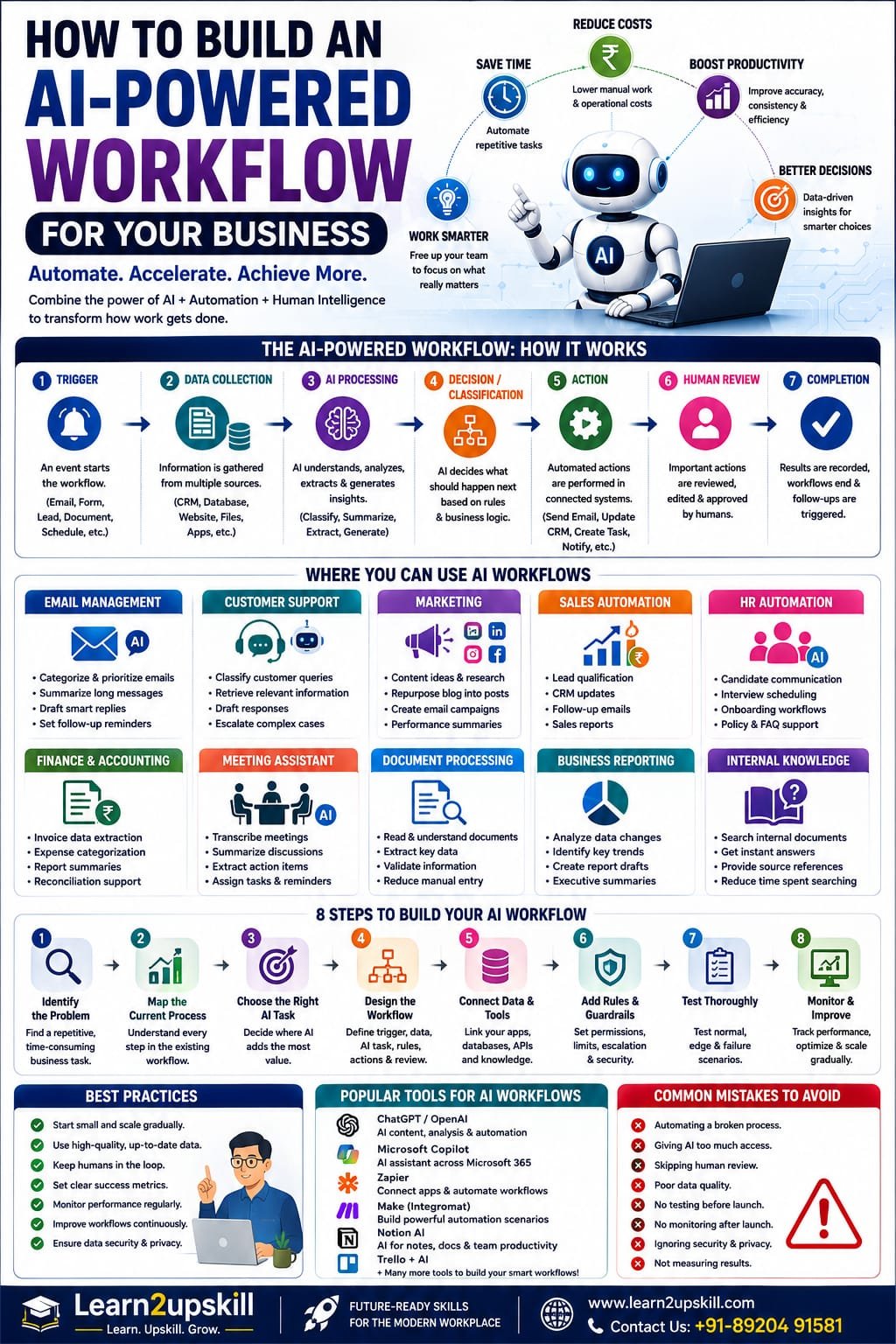
How to Build an AI-Powered Workflow for Your Business
Learn how to build an AI-powered business workflow step by step. Discover AI workflow examples, automation ideas, tools, benefits, risks, human oversight and implementation tips.
Suggested URL Slug: /how-to-build-ai-powered-workflow-business/
How to Build an AI-Powered Workflow for Your Business
Imagine a business where a new customer enquiry automatically gets categorized, relevant information is retrieved, a personalized response is drafted, the CRM is updated and a salesperson receives a notification—all without someone manually moving information between five different systems.
Or imagine a marketing team publishing a blog and automatically turning it into:
A LinkedIn post
An Instagram caption
An email newsletter
A short-video script
A content summary
A human still reviews the work, but the repetitive steps happen automatically.
This is the idea behind an AI-powered workflow.
AI-powered workflows combine artificial intelligence, business data, software applications and automation to complete tasks more efficiently.
The shift is important because businesses are increasingly moving beyond experimenting with individual AI tools and toward redesigning entire workflows around AI. The World Economic Forum’s 2026 research describes this as a move toward AI-first operating models, where organizations rethink operations, decision-making and human-AI collaboration rather than simply adding AI on top of existing processes. �
World Economic Forum +1
But building an AI workflow doesn’t mean giving an AI system unlimited control.
A successful workflow needs:
A clear business problem + good data + the right AI capability + automation + human oversight + security + measurement.
So, how do you actually build one?
Let’s go step by step.
What Is an AI-Powered Workflow?
An AI-powered workflow is a business process in which AI is used to perform one or more tasks within a larger workflow.
A simple workflow might look like:
Trigger → Data → AI Analysis → Decision → Action → Human Review → Completion
For example:
Customer Support Workflow
New customer email
↓
AI understands the enquiry
↓
Classifies the issue
↓
Retrieves relevant information
↓
Drafts a response
↓
Human reviews
↓
Response is sent
↓
CRM is updated
The AI isn’t necessarily replacing the entire process.
Instead, it is improving specific parts of the process.
AI Workflow vs Traditional Workflow
Consider a traditional customer-support process.
Traditional workflow
Customer sends email → Employee reads → Searches information → Writes response → Updates CRM
Now compare that with an AI-powered workflow:
AI-powered workflow
Customer sends email → AI classifies → AI retrieves information → AI drafts response → Employee reviews → CRM updates automatically
The second workflow can reduce repetitive work while keeping humans involved where judgment matters.
Why Businesses Are Building AI-Powered Workflows in 2026
AI adoption is moving from experimentation toward integration into business operations.
The World Economic Forum’s 2026 work on organizational transformation says organizations are increasingly integrating AI into core workflows and that the next opportunity is to rethink how work is performed, decisions are made and operating models are designed. �
World Economic Forum
At the same time, businesses face growing volumes of:
Emails
Documents
Customer enquiries
Meetings
Data
Reports
Administrative tasks
Marketing content
AI can help businesses process some of this information faster.
But the biggest opportunity isn’t simply:
“Use AI.”
It’s:
“Redesign repetitive workflows so AI and people each do the parts they’re best suited for.”
The 7 Building Blocks of an AI-Powered Workflow
A strong AI workflow usually contains several components.
- Trigger
Something starts the workflow.
Examples:
New email
New customer enquiry
New form submission
New document
New sales lead
Scheduled time
New database record
- Data
The workflow needs relevant information.
This could come from:
CRM
Website
Spreadsheet
Database
Documents
Knowledge base
Business application
- AI Model
AI performs tasks such as:
Classification
Summarization
Extraction
Generation
Analysis
Recommendation
- Rules and Logic
The workflow determines what should happen next.
For example:
If enquiry is urgent → escalate.
If enquiry is routine → generate response draft.
- Tools and Integrations
The AI may need to interact with:
CRM
Calendar
Spreadsheet
Project-management system
Database
Internal knowledge base
- Human Review
Important decisions may require human approval.
- Monitoring
You need to know:
Did the workflow work?
Was the AI accurate?
Did anything fail?
How much time was saved?
Are users satisfied?
NIST emphasizes that AI systems need monitoring after deployment because real-world inputs can produce unexpected behavior and consequences that may not appear during controlled testing. �
NIST
Step 1: Identify a Business Problem
Don’t start by asking:
“Where can we use AI?”
Start with:
“What business problem are we trying to solve?”
Look for tasks that are:
Repetitive
Time-consuming
High-volume
Digital
Relatively predictable
Measurable
Suitable for human review
Examples:
100 customer emails every day
50 sales leads every week
Monthly reporting
Repeated document processing
Social-media content creation
These are potential workflow opportunities.
Step 2: Map the Existing Process
Before automating anything, understand how the task is currently performed.
Create a simple process map.
Example: Customer Enquiry
Customer submits form
↓
Employee receives notification
↓
Employee reads enquiry
↓
Employee searches course information
↓
Employee writes response
↓
Employee records enquiry
↓
Employee follows up
Now ask:
Which steps are repetitive?
Which steps require judgment?
Which steps could AI assist with?
Which steps should remain human-controlled?
This prevents you from automating a process you don’t fully understand.
Step 3: Decide Where AI Actually Adds Value
Not every step needs AI.
Suppose your workflow is:
Form submission → Database entry → Email → AI analysis → Human review
You might use AI only for:
AI analysis
The other steps can be handled through conventional automation.
This is important.
Don’t use AI simply because you can.
Use AI where it provides genuine value.
Step 4: Choose the Right AI Task
AI is particularly useful for tasks involving unstructured information.
For example:
Classification
“What type of customer enquiry is this?”
Extraction
“Extract the customer name, course and contact information.”
Summarization
“Summarize this meeting.”
Generation
“Draft a response.”
Analysis
“Identify the main issues in these reviews.”
Transformation
“Turn this blog into a LinkedIn post.”
Retrieval + Generation
“Find the relevant company policy and explain it.”
Choose the AI capability based on the actual problem.
Step 5: Design the Workflow
Now create the complete process.
For example:
AI Customer Support Workflow
Trigger
New customer enquiry
↓
AI
Classify enquiry
↓
Knowledge Retrieval
Find relevant information
↓
AI
Draft response
↓
Rule
If low-risk → human review
If sensitive → escalate
↓
Human
Approve/edit response
↓
Automation
Send response
↓
CRM
Record interaction
This is much better than simply saying:
“Let’s add ChatGPT to customer support.”
You’re designing an actual business process.
Step 6: Create a Strong AI Prompt
The quality of your AI workflow depends partly on the instructions given to the model.
A useful prompt should explain:
Objective
Context
Available information
Constraints
Output format
Success criteria
Escalation conditions
For example:
You are assisting the customer-support team. Read the customer enquiry and classify it as Billing, Course Access, Technical Support, Course Information or Other. Summarize the issue in two sentences. Use only the approved information provided. If the information is insufficient, mark the case for human review. Do not invent policies or pricing.
This gives the AI a clear job.
Step 7: Connect the AI to Your Business Data
AI becomes much more useful when it has access to relevant, authorized information.
For example:
Customer question
↓
AI
↓
Approved course database
↓
Relevant information
↓
AI response
This is often associated with Retrieval-Augmented Generation (RAG).
Instead of relying only on the model’s general knowledge, the system can retrieve relevant information from a connected knowledge source.
Possible sources include:
Company policies
Product documentation
Course information
FAQs
Internal manuals
Approved databases
This can make responses more grounded in business-specific information.
Step 8: Add Rules and Guardrails
AI should not have unlimited freedom inside a business workflow.
Create clear rules.
For example:
AI CAN:
Classify enquiries
Summarize documents
Draft emails
Retrieve approved information
Recommend next steps
AI CANNOT:
Approve refunds
Change account permissions
Delete customer data
Make financial commitments
Send sensitive communications without approval
The exact boundaries depend on the business and risk level.
NIST’s 2026 work on AI-agent identity and authorization emphasizes the importance of authentication, authorization, auditing and least-privilege controls when AI systems can access tools and data. �
NIST Computer Security Resource Center +1
Step 9: Keep Humans in the Loop
Human oversight is one of the most important parts of a responsible AI workflow.
You don’t have to choose between:
100% human
or
100% AI
There is a useful middle ground:
Human + AI
For example:
AI creates draft
↓
Human reviews
↓
Human approves
↓
Automation completes action
This can provide a good balance between efficiency and control.
NIST’s AI Risk Management Framework guidance notes that human roles and responsibilities should be clearly defined and differentiated in AI systems, with the appropriate level of human oversight depending on the use case. �
NIST AI Resource Center
Step 10: Test Before Launch
Never assume that an AI workflow will work perfectly because the demo worked once.
Test different scenarios.
Normal input
Does it work?
Missing information
Does it ask for clarification or escalate?
Incorrect information
Does it detect the problem?
Unusual request
Does it follow the rules?
Sensitive request
Does it route the case appropriately?
Malicious input
Does it resist attempts to manipulate the workflow?
Large volume
Does the workflow continue functioning?
Testing should happen before full deployment.
Step 11: Monitor the Workflow
Once your workflow is live, keep watching it.
Measure:
Accuracy
How often does AI produce an acceptable result?
Speed
How much time does the workflow save?
Cost
What does each automated task cost?
Escalation Rate
How often does a human need to intervene?
Error Rate
How often does something go wrong?
User Satisfaction
Do employees and customers find the workflow useful?
NIST’s 2026 work on deployed AI monitoring highlights the importance of monitoring real-world systems because unexpected behavior may emerge after deployment. �
NIST
10 Practical AI-Powered Workflows for Businesses
- Customer Support Workflow
Customer message
→ AI classification
→ Knowledge retrieval
→ Response draft
→ Human approval
→ CRM update
- Sales Lead Workflow
New lead
→ AI analyzes lead
→ Qualification
→ CRM entry
→ Follow-up draft
→ Sales notification
- Marketing Workflow
New blog
→ AI extracts key ideas
→ LinkedIn post
→ Instagram caption
→ Email draft
→ Short-video script
→ Human review
- Meeting Workflow
Meeting
→ Transcription
→ AI summary
→ Decisions
→ Action items
→ Task creation
→ Follow-up reminder
- HR Onboarding Workflow
New employee
→ Collect information
→ Generate checklist
→ Send approved documents
→ Schedule orientation
→ Create reminders
→ Track completion
- Finance Document Workflow
Invoice received
→ AI extracts data
→ Validate required fields
→ Categorize
→ Send to accounting workflow
→ Flag exceptions
→ Human approval
- Business Reporting Workflow
Data updated
→ AI analyzes changes
→ Identifies trends
→ Creates summary
→ Generates report draft
→ Manager reviews
- Content Creation Workflow
Topic selected
→ Research
→ Outline
→ Draft
→ SEO review
→ Social-media content
→ Newsletter
→ Human approval
- Customer Feedback Workflow
Reviews collected
→ AI sentiment analysis
→ Theme identification
→ Complaint categorization
→ Trend report
→ Management recommendations
- Internal Knowledge Workflow
Employee question
→ Search approved documents
→ Retrieve relevant information
→ AI generates answer
→ Source/reference shown
This can help employees find information without manually searching through large document collections.
How to Build an AI-Powered Workflow for a Small Business
You don’t need to build a huge AI platform.
Start with one simple process.
For example:
Small Business Email Workflow
New enquiry
↓
AI identifies customer intent
↓
AI extracts important information
↓
AI drafts response
↓
Owner reviews
↓
Email sent
↓
Lead recorded
That’s enough to demonstrate value.
Once it works, you can expand.
AI Workflow Example for an Online Learning Business
For a business like Learn2upskill, you could build a workflow around student enquiries.
Step 1
Student submits a course enquiry.
Step 2
AI identifies:
Course interest
Student/professional status
Main requirement
Urgency
Step 3
AI retrieves relevant course information.
Step 4
AI prepares a personalized response.
Step 5
Human reviews the response.
Step 6
Approved response is sent.
Step 7
Lead is recorded.
Step 8
Follow-up reminder is created.
Step 9
If there is no response, a follow-up workflow can be triggered.
This can turn a manual process into a structured lead-management workflow.
AI Workflow Example for Marketing
Imagine you publish a new blog.
Instead of manually creating everything separately:
Trigger
New blog published.
↓
AI
Extract key points.
↓
AI
Create:
LinkedIn post
Facebook caption
Instagram caption
Email newsletter
Short-video script
↓
Human
Review content.
↓
Automation
Schedule or distribute approved content.
This is a good example of AI-assisted content repurposing.
AI Workflow Example for Sales
Trigger
New lead enters website.
↓
AI
Analyze lead information.
↓
AI
Classify lead.
↓
Automation
Add information to CRM.
↓
AI
Draft personalized follow-up.
↓
Human
Salesperson reviews.
↓
Automation
Create follow-up reminder.
This can reduce administrative work for sales teams.
AI Workflow Example for Business Analysts
Business Analysts can create workflows such as:
Meeting recording
↓
Transcript
↓
AI extracts requirements
↓
AI identifies missing requirements
↓
AI groups requirements
↓
AI drafts user stories
↓
Business Analyst reviews
↓
Final documentation
The AI handles much of the repetitive documentation.
The Business Analyst remains responsible for understanding the business problem and validating the requirements.
AI-Powered Workflow vs AI Agent
These concepts overlap, but they aren’t identical.
AI-Powered Workflow
Usually follows a designed process with specific AI tasks.
Trigger → AI → Rule → Action
AI Agent
May have greater autonomy to determine how to accomplish a goal using available tools.
Goal → Planning → Tools → Actions → Evaluation
NIST describes agentic systems as capable of understanding context, reasoning, planning, adapting and executing tasks, sometimes with limited human supervision. �
NIST Computer Security Resource Center
For many businesses, starting with a controlled AI workflow is easier than immediately deploying highly autonomous agents.
How Much Automation Should You Use?
A useful framework is:
Level 1 — AI Assistance
Human does the task with AI help.
Level 2 — AI Drafting
AI creates the first version.
Level 3 — AI + Human Approval
AI prepares the task; human approves.
Level 4 — Conditional Automation
AI performs low-risk actions automatically but escalates exceptions.
Level 5 — Agentic Automation
AI has greater autonomy within defined boundaries.
For most businesses starting out, Levels 2–4 are sensible places to experiment.
Security and Privacy Considerations
An AI workflow may have access to sensitive information.
That means you should consider:
What data is being shared?
Where is the data stored?
Who can access it?
What applications can the AI access?
What actions can it perform?
How are actions logged?
Can access be revoked?
What happens if the AI makes a mistake?
NIST’s 2026 AI-agent security work highlights new security concerns that arise when AI models are connected to tools and real-world systems, including the need to constrain and monitor agent access. �
NIST +1
A good principle is:
Give AI the minimum access required to complete the task.
Common AI Workflow Mistakes
❌ 1. Automating a Broken Process
Fix the process first.
Then automate it.
❌ 2. Using AI Everywhere
Some tasks are better handled with simple automation.
❌ 3. Giving AI Too Much Access
Use least-privilege access.
❌ 4. No Human Approval
Sensitive actions may require human review.
❌ 5. No Testing
Test unusual and failure scenarios.
❌ 6. No Monitoring
A workflow can behave differently in real-world conditions.
❌ 7. Poor Data Quality
AI cannot magically fix unreliable business data.
❌ 8. No Success Metrics
If you can’t measure the result, you don’t know whether automation actually helped.
AI Workflow Best Practices
Start Small
Choose one process.
Define the Goal
Know exactly what you’re trying to improve.
Use Quality Data
AI workflows depend heavily on the information they receive.
Keep Instructions Clear
Give AI a specific task.
Limit Access
Use appropriate permissions.
Keep Humans Involved
Especially for high-impact decisions.
Test Before Scaling
Don’t deploy a workflow across the entire organization immediately.
Monitor Continuously
Track quality and unexpected behavior.
Improve Iteratively
Use feedback to refine the workflow.
Document Everything
Know what the workflow does, what data it uses and who is responsible.
How to Measure AI Workflow ROI
A workflow isn’t successful just because it uses AI.
Measure business results.
Time Saved
How many employee hours are saved?
Cost Reduction
Has manual processing become cheaper?
Accuracy
Are errors decreasing?
Response Time
Are customers receiving faster responses?
Productivity
Are employees spending more time on valuable work?
Revenue
Does the workflow generate more leads or conversions?
Customer Experience
Are customers more satisfied?
Simple formula:
ROI = Value Created − Cost of AI Workflow
You can also compare:
Before automation vs After automation
For example:
Metric
Before
After
Average processing time
20 min
7 min
Manual steps
10
4
Human review
100%
100%
Response time
4 hrs
45 min
Error rate
8%
3%
The exact numbers will vary by business; the point is to measure the change.
A 30-Day AI Workflow Implementation Plan
Week 1: Discover
Days 1–2
List repetitive processes.
Days 3–4
Measure time and effort.
Days 5–7
Choose one pilot workflow.
Week 2: Design
Days 8–10
Map the workflow.
Days 11–12
Identify AI tasks.
Days 13–14
Define rules, permissions and human-review points.
Week 3: Build
Days 15–17
Create the workflow.
Days 18–19
Connect required data sources.
Days 20–21
Create prompts and test outputs.
Week 4: Test & Improve
Days 22–24
Test normal and unusual scenarios.
Days 25–26
Fix errors.
Days 27–28
Measure results.
Days 29–30
Decide whether to improve, expand or stop the workflow.
This approach keeps AI implementation practical and controlled.
Skills You Need to Build AI Workflows
If you want to learn AI workflow design, focus on:
AI Fundamentals
Understand what AI can and cannot do.
Prompt Engineering
Write clear instructions.
Workflow Design
Understand business processes.
Automation
Learn how applications connect.
APIs
Understand how systems exchange information.
Data
Understand data quality and structure.
RAG
Learn how AI can work with business knowledge.
AI Agents
Understand more autonomous workflows.
Security
Understand permissions and data protection.
Evaluation
Learn how to measure AI performance.
Business Thinking
Understand the problem before choosing the technology.
Do You Need Coding Skills?
Not always.
There are three broad paths.
No-Code
Use visual workflow tools.
Good for:
Entrepreneurs
Marketers
Trainers
Small-business owners
Non-technical professionals
Low-Code
Use APIs and integrations with some technical configuration.
Good for:
Business analysts
Operations professionals
Automation specialists
Technical
Build custom AI applications using:
Python
APIs
Databases
RAG
AI-agent frameworks
Cloud services
Good for:
Developers
AI engineers
Data professionals
Choose the path based on your career goals.
The Future of AI-Powered Business Workflows
The future is moving from isolated AI tools toward connected systems.
Instead of:
Employee → AI tool → Copy/paste → Business system
we may increasingly see:
Business event → AI → Data → Tools → Action → Human oversight → Result
This is one reason AI agents and workflow redesign are becoming important areas of enterprise AI.
NIST launched an AI Agent Standards Initiative in 2026 focused on secure and interoperable agent ecosystems, while its related work emphasizes identity, authorization and secure interactions between agents and digital systems. �
NIST +1
The World Economic Forum likewise argues that organizations should redesign workflows and operating models around AI rather than simply adding AI to existing processes. �
World Economic Forum +1
Final Thoughts
Building an AI-powered workflow isn’t about finding the most impressive AI tool.
It’s about solving a real business problem.
Start with:
A repetitive task.
Then identify:
What AI can do.
Add:
Automation.
Protect it with:
Rules, permissions and human oversight.
Then measure:
The actual business result.
A well-designed AI workflow can help businesses reduce repetitive work, respond faster, organize information and give employees more time for higher-value activities.
But don’t automate blindly.
The strongest AI workflows combine:
AI + Automation + Good Data + Human Judgment + Security + Measurement
That’s the real formula for useful business AI.
Don’t just add AI to your business. Redesign the workflow around the problem you’re trying to solve.
Build smarter workflows. Empower your team. Grow with AI.
AI Workflow Checklist
Before launching an AI-powered workflow, ask:
[ ] What problem am I solving?
[ ] Is the task repetitive?
[ ] How much time does it currently take?
[ ] Where exactly can AI help?
[ ] What data does AI need?
[ ] Is the data accurate and authorized?
[ ] What output should AI produce?
[ ] What actions can automation perform?
[ ] What actions require human approval?
[ ] What permissions does the workflow need?
[ ] How will errors be handled?
[ ] How will I test the workflow?
[ ] How will I monitor it?
[ ] What metrics will define success?
[ ] Can the workflow scale safely?
Build AI Skills With Learn2upskill
AI is moving from individual tools toward AI-powered workflows, automation and intelligent business processes.
At Learn2upskill, we help students, professionals, job seekers and business learners develop practical, future-ready skills.
Explore learning opportunities in:
Advanced AI • Generative AI • Prompt Engineering • AI Agents • AI Automation • ChatGPT • Business Analysis • Excel • Digital Marketing • Cybersecurity • Professional Development
Don’t just learn how to use AI.
Learn how to apply AI to real business workflows.
Learn. Upskill. Grow.
🌐 www.coral-kudu-326218.hostingersite.com�
Contact Us: +91-89204 91581
Leave a Reply