Blog

  • Career Switching in 2027: How to Move Into a New Industry

    Career Switching in 2027: How to Move Into a New Industry

    Career Switching in 2027: How to Move Into a New Industry

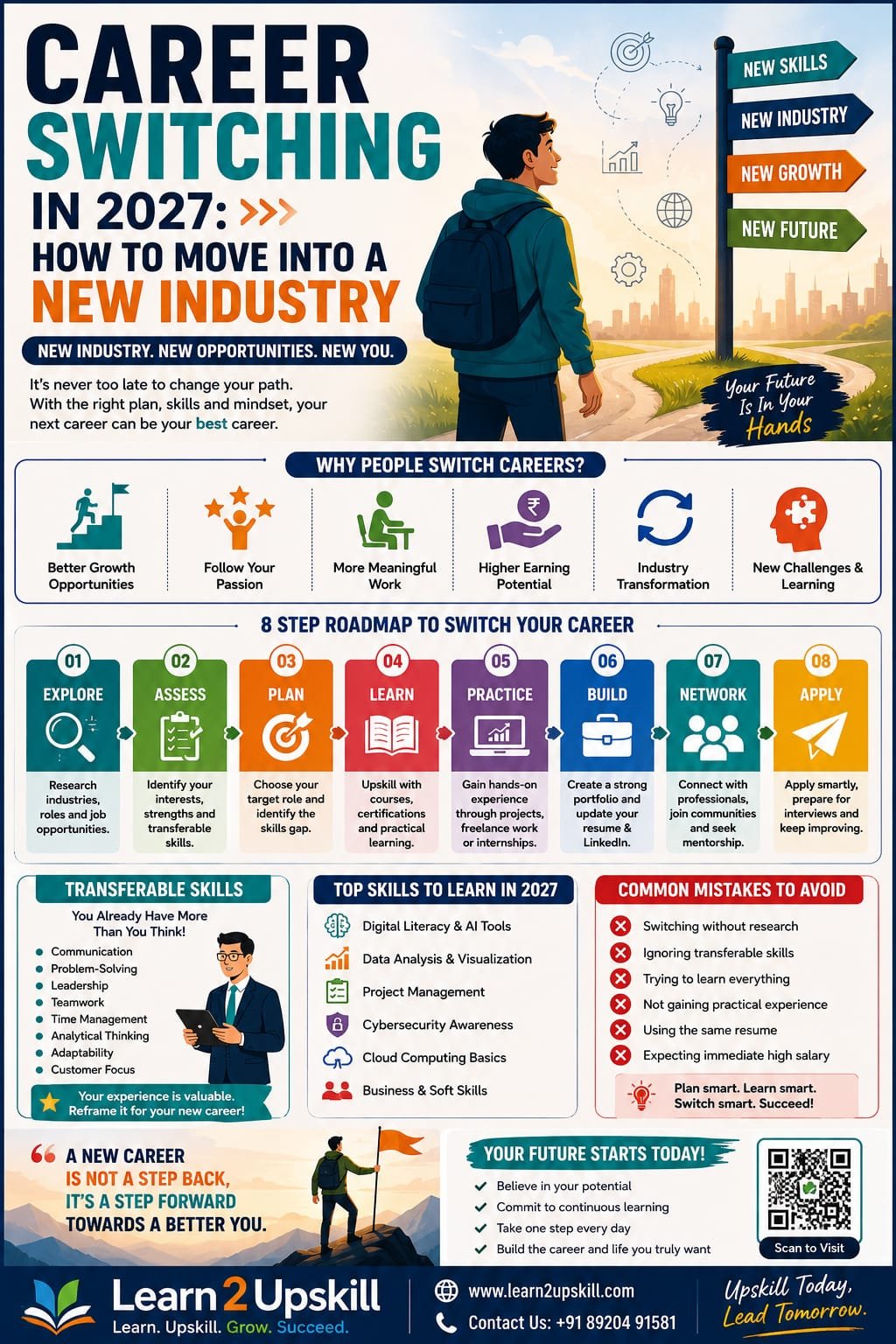
    Planning a career switch in 2027? Learn how to change industries successfully, identify transferable skills, gain new qualifications, build experience and prepare for a new career.

    Suggested URL Slug:

    “/career-switching-in-2027-how-to-move-into-a-new-industry/”

    —

    Career Switching in 2027: How to Move Into a New Industry

    Changing careers is no longer as unusual as it once was.

    In the past, many people chose one profession and expected to remain in the same industry for most of their working lives. Today, the world of work is changing much faster. New technologies are transforming industries, artificial intelligence is changing job roles, businesses are creating new types of positions, and professionals are increasingly looking for careers that offer better opportunities, flexibility and long-term growth.

    As we move towards 2027, career switching is likely to become an increasingly important part of professional development.

    You may be thinking:

    – Should I change my career?

    – Can I move into a completely different industry?

    – Do I need another degree?

    – How can I get a job without experience in the new field?

    – Am I too late to start again?

    – Which skills should I learn before switching careers?

    The good news is that a successful career switch does not always mean starting from zero.

    You already have experience.

    You already have skills.

    The key is learning how to identify your transferable skills, develop the right new capabilities and position yourself effectively for a different industry.

    This guide will help you understand how to plan and successfully manage a career transition in 2027.

    —

    What Does Career Switching Mean?

    Career switching means moving from your current career, profession or industry into a different professional field.

    For example:

    – A teacher moving into corporate training

    – A customer service professional moving into HR

    – An accountant moving into financial analysis

    – A sales professional moving into digital marketing

    – An IT professional moving into cybersecurity

    – A finance professional moving into data analytics

    – A journalist moving into content marketing

    – An administrative professional moving into project management

    Some career changes are closely related to your previous work.

    Others may involve moving into a completely new industry.

    The important thing to remember is this:

    «A career switch does not mean your previous experience becomes useless.»

    Many of your existing skills can be valuable in your next career.

    —

    Why Are More Professionals Considering Career Changes?

    There are many reasons why professionals decide to switch careers.

    1. Technology Is Changing Jobs

    Artificial intelligence, automation and digital transformation are changing how businesses operate.

    Some jobs are evolving.

    Some tasks are becoming automated.

    At the same time, completely new opportunities are being created.

    Professionals who continue learning and adapting may find new career paths opening up.

    —

    1. People Want Better Career Opportunities

    Sometimes a person enjoys their work but sees limited opportunities for growth.

    A career switch may offer:

    – Better job opportunities

    – Higher earning potential

    – More flexibility

    – Greater career growth

    – New learning opportunities

    – More interesting work

    —

    1. Professionals Want New Challenges

    Doing the same type of work for many years can sometimes lead to boredom or a lack of motivation.

    Learning something new can provide fresh challenges and renewed professional energy.

    —

    1. Skills Are Becoming More Transferable

    Many modern careers require similar core abilities.

    For example:

    – Communication

    – Problem-solving

    – Critical thinking

    – Data analysis

    – Digital skills

    – Project management

    – Collaboration

    – Adaptability

    These skills can often be transferred between industries.

    —

    How to Know If It’s Time to Change Your Career

    A difficult week at work does not necessarily mean you should change your entire career.

    Before making a major decision, take time to understand what you really want.

    Ask yourself:

    Do I dislike my job or my entire industry?

    Sometimes the problem is your current company, manager or work environment—not your profession.

    Do I want better growth opportunities?

    If your current industry has limited opportunities, exploring a related field may make sense.

    What type of work interests me?

    Think about the activities you genuinely enjoy.

    What skills do I want to use?

    Your ideal career should make use of your strengths while giving you opportunities to develop new ones.

    Where do I see myself in five years?

    This question can help you identify whether your current career is moving in the right direction.

    —

    Step 1: Choose Your New Career Direction

    The first step in a successful career switch is choosing a realistic direction.

    Don’t simply choose an industry because it is popular on social media.

    Research the career carefully.

    Consider:

    – Job opportunities

    – Required skills

    – Entry-level requirements

    – Long-term growth

    – Your interests

    – Your existing experience

    – Your financial situation

    For example, if you want to move into data analytics, learn about:

    – Excel

    – SQL

    – Data visualization

    – Power BI

    – Statistics

    – Business analysis

    – AI tools for data analysis

    You don’t necessarily need to learn everything at once.

    Start by understanding what employers expect.

    —

    Step 2: Identify Your Transferable Skills

    This is one of the most important steps in career switching.

    Transferable skills are abilities you can take from one career and use in another.

    For example, a teacher may have:

    – Presentation skills

    – Communication skills

    – Training skills

    – Planning skills

    – Leadership skills

    These abilities could be valuable in:

    – Corporate training

    – Learning and development

    – HR

    – Content development

    – Education technology

    Similarly, a sales professional may have:

    – Communication

    – Negotiation

    – Customer relationship management

    – Presentation

    – Problem-solving

    These skills could transfer to:

    – Marketing

    – Business development

    – Customer success

    – Account management

    – Consulting

    Create a list of everything you already know how to do.

    You may discover that you are much closer to your new career than you think.

    —

    Step 3: Identify Your Skills Gap

    Once you know where you want to go, compare your current skills with the skills required for your target career.

    Ask:

    What do I already know?

    What do I need to learn?

    For example, imagine you are moving from finance into data analytics.

    You may already understand:

    – Business processes

    – Financial data

    – Reporting

    – Problem-solving

    But you may need to develop:

    – Advanced Excel

    – SQL

    – Power BI

    – Data visualization

    – Basic Python

    – AI-assisted data analysis

    This is called your skills gap.

    The goal is to close that gap through focused learning.

    —

    Step 4: Upskill and Reskill Strategically

    One of the biggest mistakes career changers make is trying to learn everything.

    You don’t need 25 certificates.

    You need the right skills for your target role.

    Create a focused learning plan.

    For example:

    Month 1

    Learn the fundamentals of your new industry.

    Month 2

    Develop essential technical or professional skills.

    Month 3

    Practice through projects.

    Month 4

    Build a portfolio and update your professional profile.

    Month 5

    Start networking and applying for opportunities.

    The exact timeline will depend on your career goals, but having a structured plan can make the transition feel more manageable.

    —

    Step 5: Gain Experience Before You Get the Job

    One of the biggest challenges career changers face is:

    «”How can I get experience if nobody gives me a job?”»

    The answer is to create experience wherever possible.

    You can gain relevant experience through:

    – Personal projects

    – Freelance work

    – Volunteer opportunities

    – Internships

    – Case studies

    – Online projects

    – Simulations

    – Portfolio work

    For example, if you want to become a data analyst, you can analyze publicly available datasets and create dashboards.

    If you want to move into digital marketing, you can create sample campaigns and analyze marketing strategies.

    If you want to become a project manager, you can demonstrate how you planned and managed a project.

    Experience does not always have to come from a traditional full-time job.

    —

    Step 6: Build a Strong Portfolio

    A portfolio can be especially valuable when switching careers.

    Your portfolio shows employers:

    «”I may be new to this industry, but I can demonstrate my abilities.”»

    Depending on your career, your portfolio could include:

    – Projects

    – Case studies

    – Reports

    – Dashboards

    – Presentations

    – Marketing campaigns

    – Writing samples

    – Business analyses

    – Websites

    – Certifications

    Focus on quality rather than quantity.

    Three strong projects can be more valuable than twenty incomplete ones.

    —

    Step 7: Update Your Resume for Your New Career

    Do not simply send your old resume to employers in a new industry.

    Your resume should reflect your new career direction.

    Highlight:

    – Transferable skills

    – Relevant projects

    – New certifications

    – Industry-related learning

    – Achievements

    – Relevant experience

    For example, instead of only writing your previous job title, explain the skills you used.

    Traditional approach:

    Sales Executive

    Better career-transition approach:

    Sales Executive

    – Analyzed customer requirements and business needs

    – Prepared presentations and proposals

    – Managed client relationships

    – Used data to identify sales opportunities

    – Collaborated with cross-functional teams

    Now, if you are applying for a business analyst or customer success role, your transferable experience becomes easier to understand.

    —

    Step 8: Rewrite Your LinkedIn Profile

    Your LinkedIn profile should also reflect where you are going—not only where you have been.

    Your headline could include your new professional direction.

    For example:

    Finance Professional | Learning Data Analytics | Excel, SQL & Power BI

    As you gain experience, your profile can evolve.

    Share useful content related to your target industry.

    You can post about:

    – What you are learning

    – Projects you have completed

    – Industry insights

    – Professional achievements

    – Lessons from your career transition

    This can help demonstrate genuine interest and professional development.

    —

    Step 9: Network With People in Your Target Industry

    Networking is not simply asking strangers for jobs.

    It is about learning from people.

    Connect with:

    – Professionals in your target field

    – Recruiters

    – Industry experts

    – Alumni

    – Career communities

    – Professional groups

    Ask thoughtful questions such as:

    – What skills are most important in this field?

    – What challenges do beginners face?

    – What would you recommend learning first?

    – How did you enter this industry?

    The information you gain can help you make better career decisions.

    —

    Step 10: Prepare Your Career Change Story

    During interviews, employers will probably ask:

    «”Why are you changing careers?”»

    This question is important.

    Your answer should be positive and professional.

    Avoid saying:

    «”I hated my previous job.”»

    Instead, focus on your future.

    For example:

    «”My previous role helped me develop strong business and communication skills. Over time, I became increasingly interested in data analysis and how organizations use data to make decisions. I started developing skills in Excel, SQL and Power BI and completed several practical projects. Now I am ready to apply my previous professional experience and new analytical skills in a data-focused role.”»

    This answer shows:

    – Professional maturity

    – Clear motivation

    – Relevant preparation

    – Career direction

    —

    Common Career Switching Mistakes to Avoid

    ❌ Changing Careers Without Research

    Don’t choose a career only because someone online says it pays well.

    Research the actual work.

    —

    ❌ Trying to Learn Everything

    Focus on the skills required for your target role.

    —

    ❌ Ignoring Transferable Skills

    Your previous career has given you valuable experience.

    Use it.

    —

    ❌ Waiting Until You Feel Completely Ready

    You may never feel 100% ready.

    Start applying when you have developed a realistic foundation.

    —

    ❌ Applying With the Same Resume Everywhere

    Customize your resume for your target role.

    —

    ❌ Expecting an Immediate Salary Increase

    Some career transitions may involve starting at a different level.

    Think about long-term growth as well as short-term income.

    —

    Career Switching in the AI Era

    As we prepare for 2027, professionals should understand that AI is becoming part of many industries.

    This doesn’t mean everyone needs to become an AI engineer.

    However, professionals in many fields can benefit from learning:

    – How AI tools work

    – How to use AI responsibly

    – Prompting and communication with AI tools

    – AI-assisted productivity

    – Data literacy

    – Critical thinking

    – Digital skills

    The strongest professionals may increasingly combine:

    Industry Knowledge + Technical Skills + AI Literacy + Human Skills

    For example:

    A marketer who understands AI.

    A finance professional who understands data.

    An HR professional who understands digital tools.

    A business professional who understands automation.

    This combination can create new career opportunities.

    —

    A Simple Career Switching Plan for 2027

    Here is a practical roadmap.

    Phase 1: Explore

    Research industries and identify possible career paths.

    Phase 2: Assess

    Identify your transferable skills and skills gaps.

    Phase 3: Learn

    Develop the essential skills for your new career.

    Phase 4: Practice

    Complete projects and gain practical experience.

    Phase 5: Build

    Create a portfolio, resume and LinkedIn profile.

    Phase 6: Connect

    Network with professionals in your target industry.

    Phase 7: Apply

    Start applying strategically for relevant opportunities.

    Phase 8: Improve

    Learn from interviews, feedback and experience.

    Career switching is a process—not a single decision.

    —

    Frequently Asked Questions

    Is 2027 a good time to change careers?

    The right time depends on your personal situation, financial responsibilities, career goals and preparation. However, professionals who continuously develop relevant skills can position themselves more effectively for changing opportunities.


    Can I change careers without going back to university?

    In many fields, yes. Depending on the career, practical skills, certifications, projects and experience may help demonstrate your capabilities. Some professions, however, require formal qualifications or licenses.


    How long does a career change take?

    A career transition can take several months or longer depending on the industry, your existing skills and the amount of preparation required.


    Am I too old to change careers?

    There is no universal age limit for career change. Your experience can provide valuable transferable skills, professional maturity and industry knowledge.


    What are transferable skills?

    Transferable skills are abilities that can be useful across different jobs and industries, such as communication, leadership, problem-solving, project management and teamwork.


    Should I quit my current job before changing careers?


    This depends on your financial situation and personal circumstances. Many professionals choose to upskill and prepare for a new career while continuing in their current role.


    —

    Conclusion

    Career switching can feel challenging because it involves uncertainty.

    You may worry about starting again.

    You may worry about competition.

    You may worry about whether employers will accept your previous experience.

    But remember:

    «You are not starting from zero. You are starting with experience.»

    Your previous career has helped you develop knowledge, professional habits and transferable skills.

    The key is to combine that experience with the new skills required for your future.

    As we move towards 2027, adaptability and continuous learning will remain essential for career growth.

    Research your target industry.

    Identify your transferable skills.

    Close your skills gap.

    Build practical experience.

    Create a strong professional profile.

    And take the first step.

    A successful career change does not happen overnight.

    But with the right strategy and consistent effort, you can move towards a career that offers new opportunities, growth and professional satisfaction.

    Your career journey does not have to follow one straight line.

    Sometimes, changing direction can be the beginning of your next great opportunity.

    —

    🚀 Prepare for Your Next Career With Learn2Upskill

    Thinking about changing your career or learning new professional skills?

    Build practical, career-ready skills and prepare yourself for the changing world of work with Learn2Upskill.

    🌐 www.coral-kudu-326218.hostingersite.com

    📞 Contact Us: +91 89204 91581

    Learn. Upskill. Grow. Succeed.

    —

    🔗 Recommended Internal Links for Learn2Upskill

    For stronger SEO and internal linking, connect this article with related blogs such as:

    – The Top Skills Employers Are Looking for in 2026

    – How AI Is Changing Jobs—and How to Prepare Your Career

    – The Best Skills to Add to Your Resume

    – How Freshers Can Stay Competitive in the AI Job Market

    – 10 Effective Communication Skills Every Professional Needs

    – Critical Thinking in the AI Era

    – How to Build a Strong Resume With No Work Experience

    – How to Build a Professional LinkedIn Profile

    – AI for Non-Tech Professionals: How Anyone Can Start Using AI

    Suggested Featured Image Alt Text:

    “Career switching in 2027 guide for moving into a new industry”

    Suggested Image Caption:

    “Build new skills, use your transferable experience and confidently prepare for a successful career transition.”

    Suggested CTA:

    Ready to prepare for your next career opportunity? Visit www.coral-kudu-326218.hostingersite.com or contact us at +91 89204 91581.
  • The First Job Is Already Being Decided in College

    The First Job Is Already Being Decided in College

    The First Job Is Already Being Decided in College

    Your degree may take four years. Your employability takes four years too.

    Imagine two students entering college on the same day.

    Both are intelligent.

    Both attend the same number of classes.

    Both eventually receive a degree.

    Both graduate in the same year.

    But when the first job opportunity arrives, something unexpected happens.

    One student says:

    «“I have a degree.”»

    The other says:

    «“I have a degree. Here are the skills I’ve built, the projects I’ve completed, the internships I’ve done and the problems I’ve learned to solve.”»

    Who has the stronger career story?

    That difference is becoming increasingly important in today’s employment market.

    Because your first job usually isn’t something you suddenly start preparing for during your final semester.

    It is being built quietly throughout college.

    —

    The Biggest College Mistake Students Make

    For many students, college becomes:

    Attend lectures → complete assignments → pass exams → graduate → start job hunting.

    And then, during the final year:

    «“I need a job. What should I put on my resume?”»

    That’s when the panic begins.

    No meaningful internship.

    No strong projects.

    Few practical skills.

    Limited professional network.

    No portfolio.

    Little interview experience.


    And suddenly, the student realises:

    The degree is almost complete. But the career preparation hasn’t started.

    This is avoidable.

    The better approach is:

    «Don’t wait until graduation to become job-ready. Use college to become job-ready.»

    —

    The Degree Still Matters — But It Is Only One Part of the Story

    Let’s be clear.

    This isn’t an argument against degrees.

    Degrees matter.

    They can provide:

    – academic foundations

    – structured learning

    – recognised qualifications

    – professional networks

    – access to certain careers

    – opportunities for higher education

    – exposure to different subjects and ideas

    But the employment market is increasingly asking another question:

    «“What can you actually do?”»

    Recent NITI Aayog analysis shows that graduate employability in India has improved over time, while also highlighting continuing room for improvement in areas such as pedagogy, practical learning and industry exposure.

    The World Economic Forum’s analysis of India’s future workforce also points toward increasing skills-based hiring, with employers looking at diverse talent pools and, in some cases, reducing degree requirements for emerging roles.

    The message isn’t:

    Degrees don’t matter.

    The message is:

    «Degrees and demonstrable capability increasingly need to work together.»

    —

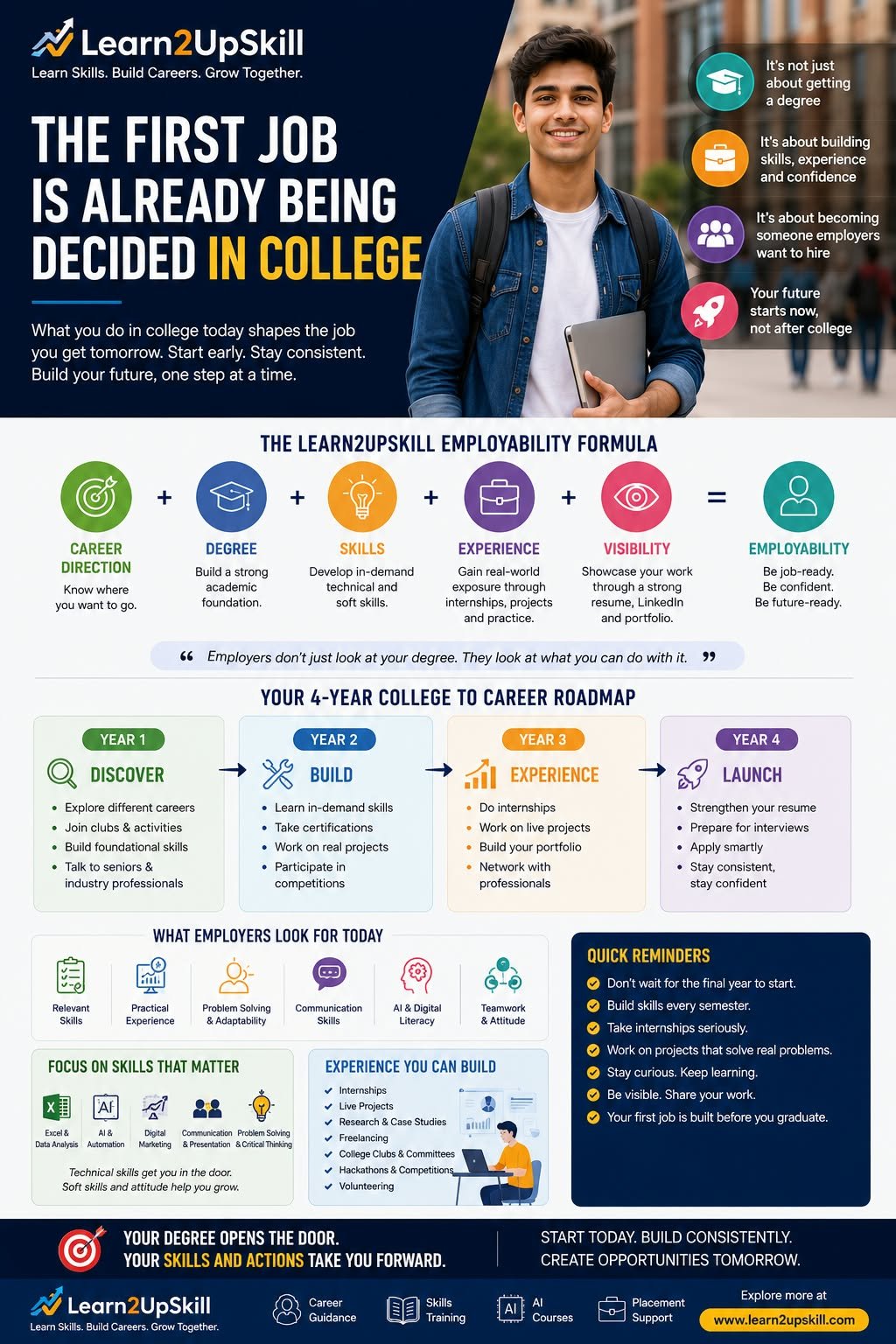
    The Learn2UpSkill Employability Formula

    We introduced our career equation in our previous guide:

    Career Direction + Degree + Skills + Experience + Visibility = Employability

    Now let’s take it one step further.

    For college students:

    Learn → Build → Experience → Demonstrate → Connect → Launch

    That’s the journey we want students to follow.

    —

    Year 1: Don’t Rush to Specialise — Explore

    The first year is not about having everything figured out.

    It is about discovering possibilities.

    A student might think:

    «“I’m doing BBA, so I must become a manager.”»

    Not necessarily.

    A BBA student could eventually explore:

    – marketing

    – sales

    – business analytics

    – consulting

    – HR

    – operations

    – entrepreneurship

    – product management

    – finance

    – customer success

    Similarly, a computer science student might discover interests in:

    – software development

    – cybersecurity

    – data

    – AI

    – product

    – cloud

    – technology consulting

    – entrepreneurship

    The first year should create exposure.

    Your Year 1 mission:

    Discover what interests you.

    Try different things.

    Attend workshops.

    Talk to professionals.

    Explore industries.

    Take small courses.

    Participate in competitions.

    Experiment.

    You don’t need a final answer.

    You need better questions.

    —

    Year 2: Start Building

    This is where students should move from:

    “I know about it.”

    to:

    “I can do it.”

    Suppose you are interested in marketing.

    Don’t simply read about digital marketing.

    Try creating a campaign.

    Interested in data?

    Analyse a dataset.

    Interested in coding?

    Build something.

    Interested in finance?

    Create a financial model.

    Interested in design?


    Build a portfolio.

    Interested in content?

    Create and publish.

    Interested in AI?

    Use AI to solve a real problem.

    The objective is simple:

    «Turn knowledge into evidence.»

    —

    Year 3: Get Real Experience

    This is where internships become extremely valuable.

    An internship isn’t simply something you add to your resume.

    It is an opportunity to discover:

    What does the real workplace actually look like?

    You learn:

    – how teams work

    – how deadlines work

    – how managers think

    – how meetings work

    – how customers behave

    – how problems are solved

    – how communication works

    – how much theory translates into practice

    – where your own skills are still weak

    And sometimes the most valuable discovery is:

    «“I thought I wanted this career. Now I know I don’t.”»

    That’s not failure.

    That’s information.

    Better to discover it during college than after spending five years in the wrong career.

    —

    Year 4: Don’t Just Apply — Position Yourself

    By the final year, your goal should not be:

    «“I need a job.”»

    It should be:

    «“I know what I can offer, and I can demonstrate it.”»

    Your career assets should include:

    Resume

    Clear, focused and evidence-based.

    LinkedIn

    A professional identity rather than an empty profile.

    Portfolio

    Evidence of your work.

    Projects

    Real examples of your capabilities.

    Internships

    Practical experience.

    Skills

    Relevant to your target roles.

    Interview preparation

    Ability to communicate what you know.

    Network

    People who know what you are interested in and what you can do.

    That is a very different graduate from someone who simply has a degree certificate.

    —

    The Certificate Problem

    Let’s imagine two resumes.

    Resume A

    B.Com

    CGPA: 7.8

    Completed several academic assignments.

    Completed online certification in Excel.

    Resume B

    B.Com

    CGPA: 7.8

    Built a sales-analysis dashboard using Excel.

    Completed a finance internship.

    Created a market-analysis project.

    Presented findings to a college entrepreneurship group.

    Built a professional LinkedIn profile.

    Completed an AI productivity course.

    Which resume gives an employer more to discuss?

    The degree is identical.

    The evidence is not.

    —

    Skills Are Becoming the Bridge Between Education and Employment

    India’s employment landscape is changing.

    The World Economic Forum’s Future of Jobs research identifies AI and big data, networks and cybersecurity, and technological literacy among the fastest-growing skill areas globally, alongside human capabilities such as creative thinking, resilience, flexibility, analytical thinking and lifelong learning.

    For India specifically, employers are expecting strong technological change and increasing demand for roles connected with big data, AI and machine learning, and security. The same research also points to growing use of skills-based hiring.

    This doesn’t mean every student needs to become a programmer.

    It means students need to understand:

    «What skills will make me more valuable in the profession I choose?»

    —

    The AI Question Every Student Should Ask

    Don’t ask only:

    «“Will AI take my job?”»

    Ask:

    «“How can AI help me become better at my job?”»

    Consider a marketing student.

    Traditional skill:

    Digital marketing

    Future-ready combination:

    Digital marketing + analytics + AI + creativity + communication

    A finance student:

    Finance + Excel + data + AI + business judgement

    An HR student:

    HR + analytics + AI tools + communication + people skills

    A designer:

    Design + AI-assisted creation + storytelling + user understanding

    A teacher:

    Subject expertise + AI + digital learning + communication

    A business student:

    Business fundamentals + analytics + AI + presentation + problem-solving

    The future is not necessarily:

    Human OR AI.

    It increasingly looks like:

    Human + Domain Knowledge + AI + Judgement

    Recent industry reporting on India’s BFSI sector similarly describes AI as changing the skills required for roles rather than simply eliminating them, with domain expertise and human judgement remaining important.

    —

    Don’t Collect Courses. Build Capability.

    This is another trap.

    Students sometimes collect certificates.

    One certificate.

    Then another.

    Then another.

    Then:

    «“I have 12 certifications.”»

    But ask:

    What can you actually do?

    Five certificates with no application may be less useful than one skill demonstrated through a meaningful project.

    Instead of asking:

    «“How many courses have I completed?”»

    ask:

    «“What capability have I developed?”»

    And then:

    «“What evidence can I show?”»

    That is a much stronger approach.

    —

    The 70-20-10 Student Learning Mindset

    Here’s a simple way students can think about learning.

    70% — Application

    Projects.

    Practice.

    Real-world assignments.

    Experiments.

    20% — Exposure

    Mentors.

    Professionals.

    Internships.

    Networking.

    Industry events.

    10% — Formal Learning

    Courses.

    Certifications.

    Structured academic learning.

    The exact percentages aren’t a scientific rule.

    The point is:

    «Learning becomes more powerful when knowledge is applied and connected to experience.»

    —

    Your College Resume Should Start Before Your Final Year

    Don’t open your resume for the first time in Year 4.

    Start building your professional story from Year 1.

    Year 1

    Interests + activities + foundational skills

    Year 2

    Projects + certifications + competitions

    Year 3

    Internships + stronger projects + professional exposure

    Year 4

    Achievements + experience + portfolio + targeted applications

    By graduation, your resume should feel like the result of four years of development.

    Not four weeks of panic.

    —

    Build a Portfolio, Not Just a Resume

    A resume says:

    «“I can do this.”»

    A portfolio can say:

    «“Here is what I actually did.”»

    For different students, a portfolio might contain:

    Data student

    Dashboards, analyses and case studies.

    Marketing student

    Campaigns, content and performance analysis.

    Developer

    Applications, websites and GitHub projects.

    Designer

    Design work and case studies.

    Finance student

    Models, analysis and research.

    Content creator

    Published work and campaigns.

    Business student

    Business plans, market research and presentations.

    Your portfolio doesn’t have to be perfect.

    It has to be real.

    —

    Networking Is Not Asking People for Jobs

    Many students misunderstand networking.

    Networking isn’t:

    «“Sir, please give me a job.”»

    It is:

    «“I’m interested in data analytics and I’m trying to understand the industry. Could you share how you started your career?”»

    That’s a much better conversation.

    Connect with:

    – alumni

    – professors

    – industry professionals

    – internship supervisors

    – founders

    – recruiters

    – mentors

    – people working in careers you’re exploring

    Build relationships before you need something.

    —

    The First Job Is Also a Learning Decision

    Students sometimes choose their first job only by salary.

    Salary matters.

    But it shouldn’t be the only variable.

    Consider:

    What will I learn?

    Who will I learn from?

    What problems will I solve?

    What technology will I use?

    What industry exposure will I receive?

    Will I get mentorship?

    Will I have opportunities to grow?

    Does this role strengthen my future profile?

    Your first job is not merely your first salary.

    It can become:

    «The first chapter of your professional identity.»

    —

    A ₹5,000 Difference Can Sometimes Matter Less Than a Learning Difference

    Imagine:

    Job A: ₹5 lakh package, repetitive work, little learning.

    Job B: ₹4.5 lakh package, strong mentorship, meaningful projects, better exposure.

    The right choice depends on the individual and circumstances, but students should understand the broader equation.

    Your first few years can create:

    Skills → Experience → Reputation → Network → Better Opportunities

    So don’t only ask:

    «“What will I earn today?”»

    Ask:

    «“What will I become capable of tomorrow?”»

    —

    What Employers Should See When They See Your Resume

    Ideally, your resume should answer five questions quickly:

    1. What did you study?

    Your degree.

    1. What can you do?

    Your skills.

    1. Have you actually done it?

    Projects and experience.

    1. Can you communicate it?

    Your presentation and interview ability.

    1. Why should we remember you?

    Your achievements, unique experiences or strong professional story.

    That’s employability.

    —

    The Learn2UpSkill College-to-Career Roadmap

    Here’s the roadmap every student can save.

    YEAR 1 — DISCOVER

    Explore careers.

    Understand yourself.

    Build foundational skills.

    Start professional exposure.

    —

    YEAR 2 — BUILD

    Build capabilities.

    Take relevant courses.

    Create projects.

    Develop digital and AI literacy.

    —

    YEAR 3 — EXPERIENCE

    Get real-world exposure.

    Intern.

    Volunteer.

    Freelance.

    Work on industry projects.

    Build your network.

    —

    YEAR 4 — LAUNCH

    Become career-ready.

    Strengthen your resume.

    Build your portfolio.

    Prepare for interviews.

    Apply strategically.

    Build professional relationships.

    —

    The “Am I Job-Ready?” Test

    Before graduation, ask yourself:

    Skills

    Can I demonstrate at least 2–3 meaningful professional skills?

    Projects

    Can I show actual work?

    Experience

    Have I worked in a real or simulated professional environment?

    AI

    Do I understand how AI can support my profession?

    Communication

    Can I explain my ideas clearly?

    Resume

    Does my resume demonstrate outcomes rather than simply activities?

    Portfolio

    Can an employer see examples of my work?

    Interviews

    Can I confidently explain what I know and what I have done?

    Network

    Do I know people working in the field I want to enter?

    If most answers are “no,” don’t panic.

    That’s not a verdict.

    It’s a roadmap.

    You still have time to build.

    —

    For Parents: Don’t Ask Only About Marks

    Marks matter.

    Academic performance matters.

    But ask other questions too.

    Instead of only:

    «“What did you score?”»

    also ask:

    «“What did you learn?”»

    «“What did you build?”»

    «“What career are you exploring?”»

    «“What skills are you developing?”»

    «“Did you speak to anyone working in that industry?”»

    «“What did your internship teach you?”»

    These questions can shift a student’s focus from marks alone to capability.

    —

    For Students: Stop Waiting to Feel Ready

    You may think:

    «“I’ll start next semester.”»

    Then:

    «“I’ll start next year.”»

    Then:

    «“I’ll do an internship in final year.”»

    Then:

    «“I’ll learn AI after graduation.”»

    Then suddenly:

    Graduation.

    Don’t wait for the perfect time.

    Start small.

    One project.

    One skill.

    One internship application.

    One professional conversation.

    One useful course.

    One portfolio piece.

    One improvement at a time.

    Careers are rarely built in one dramatic moment.

    They are built through small decisions repeated for years.

    —

    The New Definition of a Graduate

    Perhaps the definition of a graduate needs to change.

    A graduate shouldn’t simply be someone who says:

    «“I completed my degree.”»

    A career-ready graduate should be able to say:

    «“I understand my direction.

    I have a strong academic foundation.

    I have relevant skills.

    I have applied them.

    I have experienced the workplace.

    I can demonstrate what I can do.

    And I know how to keep learning.”»

    That is a much stronger starting point.

    —

    Your First Job Doesn’t Begin When You Apply

    It begins much earlier.

    It begins when you decide to take your education seriously.

    It begins when you stop thinking only about marks and start thinking about capability.

    It begins when you build your first project.

    It begins when you take your first internship.

    It begins when you learn how AI can improve your profession.

    It begins when you speak to someone already doing the work.

    It begins when you put your first meaningful achievement on your resume.

    And eventually, it becomes:

    your first job.

    —

    The Learn2UpSkill Career Principle

    We believe students shouldn’t wait until graduation to ask:

    «“What can I do?”»

    They should start asking that question from the beginning of college.

    Because the future belongs not simply to people who know more.

    It increasingly belongs to people who can:

    Learn → Apply → Adapt → Create → Communicate → Grow

    Your degree matters.

    Your skills matter.

    Your experience matters.

    Your ability to adapt matters.

    And your willingness to keep learning may matter most of all.

    Don’t wait for graduation to become career-ready.

    Start building your career while you’re building your degree.

    Learn Skills. Build Careers. Grow Together.

    Explore Learn2UpSkill’s career guidance, practical skill-development programmes, AI learning and career-focused opportunities to start building a stronger path from education to employment.

    —

    Frequently Asked Questions

    When should college students start preparing for their first job?

    Ideally, preparation should begin from the first year. The focus can evolve from exploration in Year 1 to skills and projects in Year 2, internships and experience in Year 3, and focused job preparation in Year 4.

    Is a degree enough to get a job?

    A degree can provide an important academic foundation, but employment also depends on relevant skills, practical experience, communication, problem-solving, adaptability and the ability to demonstrate capability.

    What skills should students learn during college?

    The right skills depend on the student’s career direction. Useful areas can include communication, digital literacy, AI literacy, Excel, data skills, presentation, problem-solving, teamwork and profession-specific technical skills.

    Should students learn AI during college?

    AI literacy is becoming increasingly useful across professions. Students don’t necessarily need to become AI engineers; they should understand how AI can support and enhance the work they want to do.

    Are internships really important for students?

    Internships can provide valuable exposure to workplace expectations, professional communication, teamwork and real-world problem-solving. They can also help students test whether a career path suits them.

    What is more important: skills or a degree?

    It is not an either-or choice. A degree can provide the foundation, while relevant skills and experience help students apply that foundation. The strongest approach is to build both.

    How can a student become job-ready before graduation?

    Start by identifying a career direction, building relevant skills, completing projects, gaining internships or practical experience, developing a professional network, strengthening a resume and portfolio, and practising interviews.

    —


    Suggested URL:

    “/how-to-become-job-ready-before-graduation/”

    Suggested category:

    Career Guidance / Employability

    Suggested tags:

    Career Planning, Employability Skills, College Students, Internships, AI Skills, Career Development, Job Readiness

  • Untitled post 27341

    Degree vs Skills: What Actually Makes a Student Job-Ready in 2026?

    The answer isn’t “degree or skills.” It’s what you can do with both.

    Imagine this.

    Two students walk into the same interview.

    Both have respectable degrees.

    Both have similar marks.

    Both have completed their college education.

    The interviewer asks:

    «“Tell me something you have actually built, solved or improved.”»

    Student A starts talking about subjects studied.

    Student B opens a laptop.

    «“Here is the dashboard I built.”»

    «“Here is the marketing campaign I worked on.”»

    «“Here is the analysis I completed.”»

    «“Here is the project I built during my internship.”»

    Suddenly, the conversation changes.

    The question is no longer:

    “What did you study?”

    It becomes:

    «“What can you do?”»

    And that may be one of the most important questions for students entering the workforce in 2026.

    —

    The Degree vs Skills Debate Is Asking the Wrong Question

    For years, the debate has sounded like this:

    Team Degree

    «“Without a degree, you won’t get anywhere.”»

    Team Skills

    «“Degrees don’t matter anymore. Skills are everything.”»

    Both statements are incomplete.

    A degree can provide:

    – academic foundation

    – structured learning

    – credibility

    – professional eligibility

    – exposure

    – networks

    – opportunities for higher education

    Skills can provide:

    – practical capability

    – adaptability

    – workplace readiness

    – problem-solving ability

    – productivity

    – evidence of competence

    So the real question isn’t:

    Degree OR Skills?

    It is:

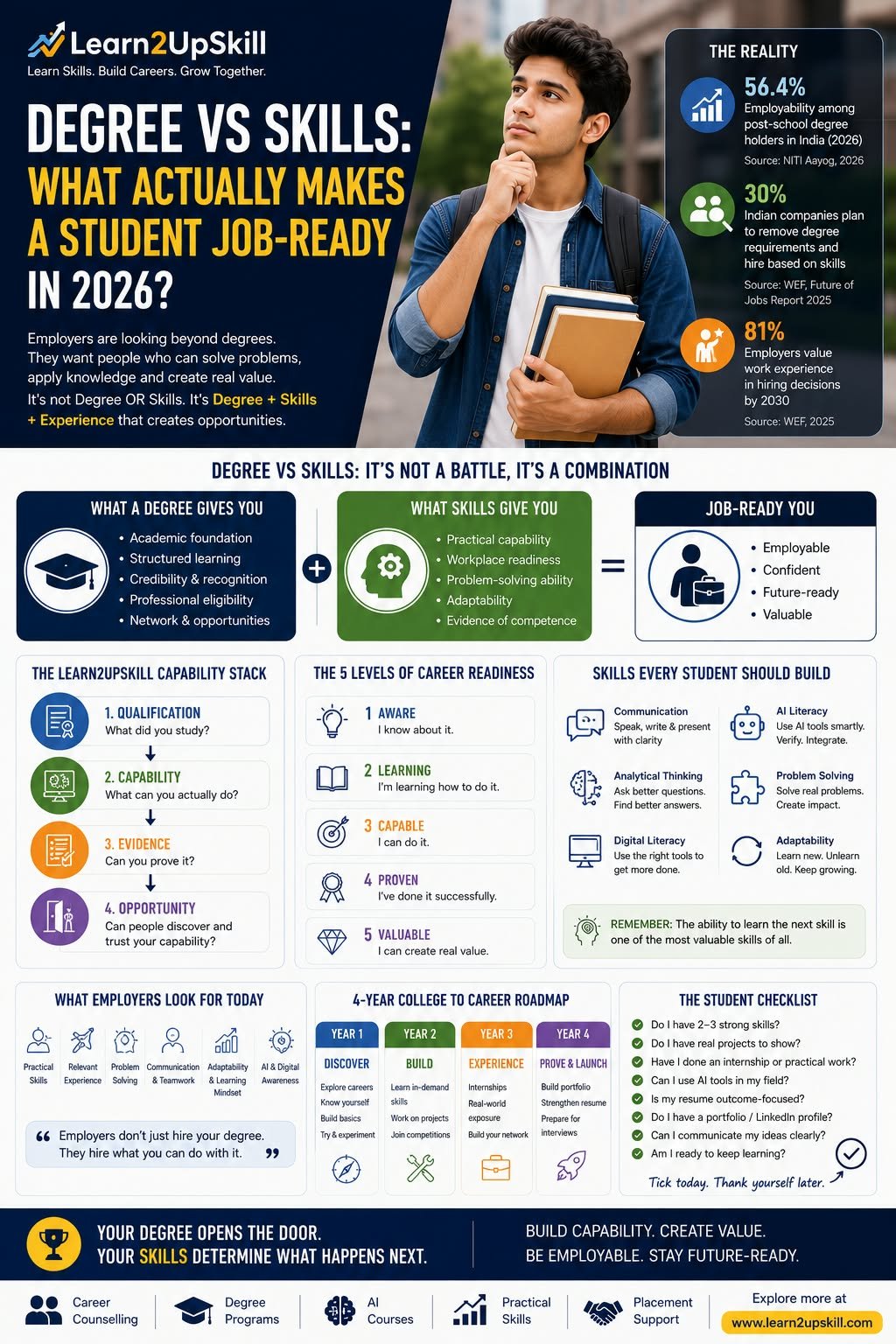
    Degree + Skills + Experience = Stronger Employability

    And that distinction matters.

    —

    The Reality Behind the Numbers

    India’s employability story is improving, but there is still a gap between education and workplace readiness.

    A 2026 NITI Aayog working paper reports that employability among post-school degree holders—including polytechnic graduates—rose from 47.3% in 2019 to 56.4% in 2026. The same analysis notes scope for improving pedagogy, practical learning and industry exposure.

    That number tells us something important.

    Millions of students are earning qualifications.

    But qualification and employability are not the same thing.

    And that is precisely where skills become important.

    —

    The Hiring World Is Changing Too

    The shift isn’t happening only inside classrooms.

    Employers are changing how they look for talent.

    The World Economic Forum’s Future of Jobs Report 2025 says 81% of businesses expect work experience to remain a hiring assessment mechanism through 2030, while 48% expect to use skills assessments. University degrees remain important, but the report also describes growing recognition of skills-first hiring.

    For India specifically, the WEF reports that 30% of companies expect removing degree requirements and using skills-based hiring to help address talent needs, compared with 19% globally. It also identifies Big Data Specialists, AI and Machine Learning Specialists, and Security Management Specialists among India’s fastest-growing roles.

    LinkedIn’s 2025 skills-based hiring research likewise found that applying skills-first approaches can substantially expand the potential talent pool in India.

    So something important is happening.

    The hiring conversation is slowly moving from:

    «“Where did you study?”»

    toward:

    «“What can you contribute?”»

    Not everywhere.

    Not for every profession.

    But enough to matter.

    —

    Here’s the Career Mistake We Need to Stop Making

    Students are often told:

    «“Get good marks.”»

    Then:

    «“Get into a good college.”»

    Then:

    «“Get your degree.”»

    Then:

    «“You’ll get a good job.”»

    But there is a missing middle.

    What happens between the degree and the job?

    That’s where employability is built.

    Think of it as a bridge.

    One side:

    Education

    Other side:

    Employment

    The bridge:

    Skills + Experience + Projects + Communication + Adaptability + Visibility

    Without the bridge, students may find themselves standing on one side with a qualification and wondering why the other side feels so far away.

    —

    The Learn2UpSkill “Capability Stack”

    Here’s a framework I want students to remember.

    Qualification → Capability → Evidence → Opportunity

    1. Qualification

    What did you study?

    Your degree, diploma or formal education.

    1. Capability

    What can you actually do?

    Your technical and professional skills.

    1. Evidence

    Can you prove it?

    Projects, internships, portfolio, achievements and real-world work.

    1. Opportunity

    Can someone discover and trust your capability?

    Resume, LinkedIn, networking, interviews and professional visibility.

    This is the journey from:

    «“I have a degree.”»

    to:

    «“I can create value.”»

    —

    Your Degree Is the Map. Skills Are the Ability to Travel.

    Here’s another way to think about it.

    A degree is like a map.

    It gives you:

    – direction

    – concepts

    – frameworks

    – foundational knowledge

    But a map doesn’t move you forward.

    You still need:

    skills

    practice

    experience

    judgement

    adaptability

    Think of a student studying finance.

    The degree may teach:

    – accounting

    – economics

    – financial management

    – taxation

    – business concepts

    Excellent.

    Now add:

    – Excel

    – data analysis

    – financial modelling

    – AI tools

    – presentation

    – business communication

    Then add:

    – internship

    – project

    – portfolio

    Now the student has something much more powerful.

    Academic knowledge + practical capability.

    —

    The “Certificate Collector” Trap

    This deserves a warning.

    A student completes:

    Certificate 1

    Then:

    Certificate 2

    Then:

    Certificate 3

    Then:

    Certificate 7

    And proudly says:

    «“I have seven certifications.”»

    But the interviewer asks:

    «“What have you done with those skills?”»

    Silence.

    Certificates can be useful.

    They can demonstrate structured learning.

    But a certificate should be the beginning of application, not the end.

    Instead of asking:

    «“How many certificates do I have?”»

    ask:

    «“What can I demonstrate because I completed them?”»

    One strong project can sometimes tell a better story than several certificates sitting unused on a resume.

    —

    The 5 Levels of Career Readiness

    Let’s make this simple.

    LEVEL 1 — AWARE

    “I know about it.”

    You understand the concept.

    —

    LEVEL 2 — LEARNING

    “I’m learning how to do it.”

    You are building the skill.

    —

    LEVEL 3 — CAPABLE

    “I can do it.”

    You can complete tasks independently.

    —

    LEVEL 4 — PROVEN

    “I’ve done it successfully.”

    You have projects, internships or outcomes demonstrating the skill.

    —

    LEVEL 5 — VALUABLE

    “I can use it to solve a real problem.”

    This is where employability becomes powerful.

    The journey isn’t:

    Degree → Job

    It is:

    Learn → Practise → Apply → Prove → Create Value

    —

    So What Skills Should Students Actually Build?

    Not every student needs the same skills.

    That’s important.

    A student shouldn’t blindly collect whatever skill is trending on social media.

    Instead:

    Start with the career direction.

    Then identify the skills that support it.

    But several broad capabilities are becoming increasingly useful across professions.

    —

    1. Communication

    You can be technically brilliant.

    If you cannot explain your thinking, your value may remain invisible.

    Students should practise:

    – speaking

    – writing

    – presentations

    – professional email

    – storytelling

    – active listening

    – explaining complex ideas simply

    Communication isn’t just an HR skill.

    It is a career multiplier.

    —

    1. Analytical Thinking

    Employers don’t only need people who can follow instructions.

    They need people who can ask:

    «“What is actually happening here?”»

    and:

    «“Why?”»

    and:

    «“What should we do next?”»

    Analytical thinking is valuable across:

    – finance

    – marketing

    – technology

    – operations

    – HR

    – consulting

    – healthcare

    – entrepreneurship

    —

    1. Digital Literacy

    Every profession is becoming more digital.

    Students should understand the tools relevant to their field.

    That might include:

    – spreadsheets

    – collaboration platforms

    – data tools

    – presentation tools

    – digital marketing platforms

    – analytics

    – cloud tools

    – automation

    You don’t need to know everything.

    You need to know what matters for your career.

    —

    1. AI Literacy

    This is becoming impossible to ignore.

    But AI literacy doesn’t mean:

    «“I know how to ask ChatGPT questions.”»

    It means understanding:

    – how AI works at a practical level

    – where it can help

    – where it can fail

    – how to verify outputs

    – how to use AI responsibly

    – how to integrate AI into workflows

    – how to combine AI with professional judgement

    The goal isn’t:

    AI instead of your profession.

    It is:

    AI + your profession

    —

    1. Problem-Solving

    This may be one of the most valuable skills of all.

    Companies don’t hire people simply because they know things.

    They hire people who can help solve problems.

    A student should practise asking:

    «What is the problem?»

    «What is causing it?»

    «What information do I need?»

    «What options exist?»

    «What would I recommend?»

    «How would I measure the result?»

    That is the beginning of professional thinking.

    —

    1. Adaptability

    The job you enter in 2030 may not look exactly like the job described today.

    Technology changes.

    Industries change.

    Business models change.

    Customer behaviour changes.

    The people who remain employable are often those who can keep learning.

    The WEF continues to highlight resilience, flexibility, creative thinking and lifelong learning alongside technological capabilities as important workplace skills.

    So perhaps one of the most valuable skills is:

    «The ability to learn the next skill.»

    —

    The AI + Human Advantage

    There is a dangerous misunderstanding about AI.

    Some students think:

    «“AI will replace me.”»

    Others think:

    «“AI is just a tool. I don’t need to worry about it.”»

    Both can be problematic.

    The stronger mindset is:

    «“I will become good at my profession and learn how AI can make me better at it.”»

    Imagine:

    Accountant + AI

    Faster analysis and reporting.

    Marketer + AI

    Faster research, ideation and experimentation.

    HR professional + AI

    More efficient information processing and workflow support.

    Data analyst + AI

    Faster exploration and interpretation.

    Designer + AI

    Faster ideation and iteration.

    Entrepreneur + AI

    More leverage with limited resources.

    The winning combination may increasingly be:

    Domain Expertise + AI Literacy + Human Judgement

    —

    Don’t Become “AI Guy” Without Becoming Good at Something

    This is important.

    A student tells an interviewer:

    «“I know ChatGPT, Gemini, Copilot and several AI tools.”»

    The interviewer asks:

    «“Excellent. What can you do with them?”»

    That’s the real question.

    AI is not a profession by itself for everyone.

    It is increasingly becoming a capability layer across professions.

    So don’t just learn:

    AI tools.

    Learn:

    AI + Marketing

    AI + Finance

    AI + HR

    AI + Data

    AI + Education

    AI + Design

    AI + Operations

    That’s where the opportunity becomes more meaningful.

    —

    The Project Test

    Here’s a simple test for students.

    Suppose you say:

    «“I know digital marketing.”»

    Can you build a campaign?

    Suppose you say:

    «“I know Excel.”»

    Can you analyse a business dataset?

    Suppose you say:

    «“I know AI.”»

    Can you improve a real workflow?

    Suppose you say:

    «“I know Python.”»

    Can you build something useful?

    Suppose you say:

    «“I know finance.”»

    Can you analyse a company’s financial performance?

    If the answer is yes:

    you are moving from knowledge to capability.

    —

    Build “Proof of Skill”

    This is one of the biggest changes students can make.

    For every important skill, ask:

    What is my proof?

    Excel

    Build a dashboard.

    Digital Marketing

    Run a campaign.

    Data Analytics

    Analyse data and present insights.

    Coding

    Build an application.

    Design

    Create a portfolio.

    AI

    Automate or improve a workflow.

    Communication

    Present something publicly.

    Business

    Build a business case.

    Now your resume becomes much stronger.

    Because you aren’t merely saying:

    «“I know this.”»

    You’re saying:

    «“Here is what I did.”»

    —

    What Should a Student Do During College?

    Here’s the Learn2UpSkill Capability Calendar.

    Year 1 — DISCOVER

    Explore careers.

    Identify interests.

    Learn digital fundamentals.

    Improve communication.

    Try different areas.

    —

    Year 2 — BUILD

    Choose 2–3 relevant skills.

    Complete meaningful projects.

    Learn AI relevant to your field.

    Participate in competitions.

    —

    Year 3 — EXPERIENCE

    Intern.

    Freelance.

    Volunteer.

    Work on real-world projects.

    Build your network.

    —

    Year 4 — PROVE

    Strengthen your resume.

    Build your portfolio.

    Practise interviews.

    Create professional visibility.

    Target relevant opportunities.

    —

    What Should Parents Tell Their Children?

    Not:

    «“Just get a good degree.”»

    Instead:

    «“Get a good education—and learn how to use it.”»

    Not:

    «“Just get good marks.”»

    Instead:

    «“Get good marks and build useful capabilities.”»

    Not:

    «“Do what everyone else is doing.”»

    Instead:

    «“Understand where your strengths and opportunities intersect.”»

    And perhaps most importantly:

    «“Don’t be afraid to experiment.”»

    A student who discovers the wrong career direction during college has gained valuable information.

    A professional who discovers it ten years later may face a much harder transition.

    —

    What Employers Should See

    Imagine your future resume.

    Instead of:

    BBA — XYZ University

    Certificate — Digital Marketing

    Certificate — AI

    Certificate — Excel

    Try:

    BBA — XYZ University

    Digital Marketing: Planned and executed a student-led campaign.

    Analytics: Built an Excel dashboard analysing campaign performance.

    AI: Designed an AI-assisted content workflow that reduced repetitive research work.

    Experience: Marketing internship with XYZ company.

    Portfolio: Three projects demonstrating campaign, analytics and AI-assisted workflows.

    Same degree.

    Completely different story.

    —

    The New Career Currency

    For decades, one of the strongest signals was:

    Degree.

    Today, degree still matters.

    But the career conversation is increasingly adding:

    Skills

    Experience

    Evidence

    Adaptability

    AI literacy

    Problem-solving

    Communication

    So perhaps the new career currency isn’t one thing.

    It’s a combination.

    Knowledge + Capability + Evidence + Adaptability

    That is what makes someone increasingly valuable.

    —

    The Most Important Question Students Should Ask

    Not:

    «“What salary will I get?”»

    Not:

    «“Which course is trending?”»

    Not:

    «“Which college is famous?”»

    Not even:

    «“Which degree has the highest scope?”»

    Start with:

    “What problems do I want to become good at solving?”

    That question changes everything.

    Because careers are ultimately built around problems.

    Businesses have problems.

    Customers have problems.

    Society has problems.

    Technology creates problems—and opportunities.

    The people who can understand problems, learn quickly and create useful solutions will continue to have opportunities.

    —

    The Learn2UpSkill 4-Part Career Test

    Before graduation, every student should be able to answer:

    1. WHAT DO I KNOW?

    My academic foundation.

    1. WHAT CAN I DO?

    My practical skills.

    1. WHAT HAVE I DONE?

    My projects and experience.

    1. WHAT VALUE CAN I CREATE?

    My ability to solve real problems.

    If you can answer all four confidently, you are moving toward genuine employability.

    —

    Degree vs Skills: The Final Answer

    So, which is more important?

    Degree or skills?

    The answer is:

    Neither one is enough by itself for most students.

    A degree can give you the foundation.

    Skills help you apply it.

    Experience teaches you how the real world works.

    Projects create evidence.

    AI literacy gives you another layer of leverage.

    Communication helps you make your value visible.

    Adaptability helps you stay relevant.

    And continuous learning keeps the whole system moving.

    So don’t choose between:

    Degree OR Skills.

    Build:

    Degree + Skills + Experience + AI + Evidence

    That is a much stronger career equation.

    —

    Don’t Graduate With a Question Mark

    Imagine your final day of college.

    You receive your degree.

    You take the photographs.

    You celebrate with your family.

    And then Monday arrives.

    The world asks:

    «“So, what can you do?”»

    Your degree is one answer.

    But it shouldn’t be your only answer.

    You should be able to say:

    «“I can analyse.”»

    «“I can communicate.”»

    «“I can build.”»

    «“I can solve.”»

    «“I can use AI responsibly.”»

    «“I have experience.”»

    «“Here is my work.”»

    «“And I’m ready to keep learning.”»

    That’s what job readiness looks like.

    —

    Your Degree Opens the Door. Your Capability Determines What Happens Next.

    A degree matters.

    Never underestimate it.

    But don’t stop there.

    Build skills.

    Get experience.

    Create projects.

    Learn AI.

    Develop communication.

    Build your professional identity.

    Stay curious.

    Keep upgrading.

    Because the goal of education shouldn’t simply be:

    «“I have a qualification.”»

    The bigger goal is:

    «“I am capable.”»

    And that’s the difference between graduating and becoming career-ready.

    Learn Skills. Build Careers. Grow Together.

    At Learn2UpSkill, we believe students should not have to choose between education and employability.

    The future belongs to people who can learn, apply, adapt and grow.

    Start building that future today.

    —

    Frequently Asked Questions

    Is a degree more important than skills?

    A degree and skills serve different purposes. A degree can provide academic foundation and credentials, while skills demonstrate practical capability. For many careers, combining both provides a stronger foundation.

    Can skills replace a degree?

    In some roles and industries, skills-first hiring is expanding. However, many professions still require formal qualifications, and degrees remain important for numerous career paths. Students should understand the requirements of their target profession rather than assume one approach works everywhere.

    What are the most important employability skills for students?

    Useful employability skills can include communication, analytical thinking, problem-solving, digital literacy, AI literacy, teamwork, adaptability and profession-specific technical skills.

    How can students become job-ready before graduation?

    Students can build job readiness by developing relevant skills, completing projects, gaining internships, learning AI tools relevant to their profession, building portfolios, networking and practising interviews.

    Are certificates enough to get a job?

    Certificates can demonstrate learning, but they are stronger when supported by practical application and evidence. Employers may want to understand what you can actually do with the knowledge.


    Should every college student learn AI?

    AI literacy is becoming increasingly useful across many professions. Students do not necessarily need to become AI engineers, but understanding how AI can support their chosen field can be valuable.


    What is skills-based hiring?

    Skills-based hiring is an approach where employers place greater emphasis on candidates’ demonstrated abilities and competencies rather than relying exclusively on formal qualifications or traditional career signals.

    —


    Suggested URL:

    “/degree-vs-skills-job-ready-students/”


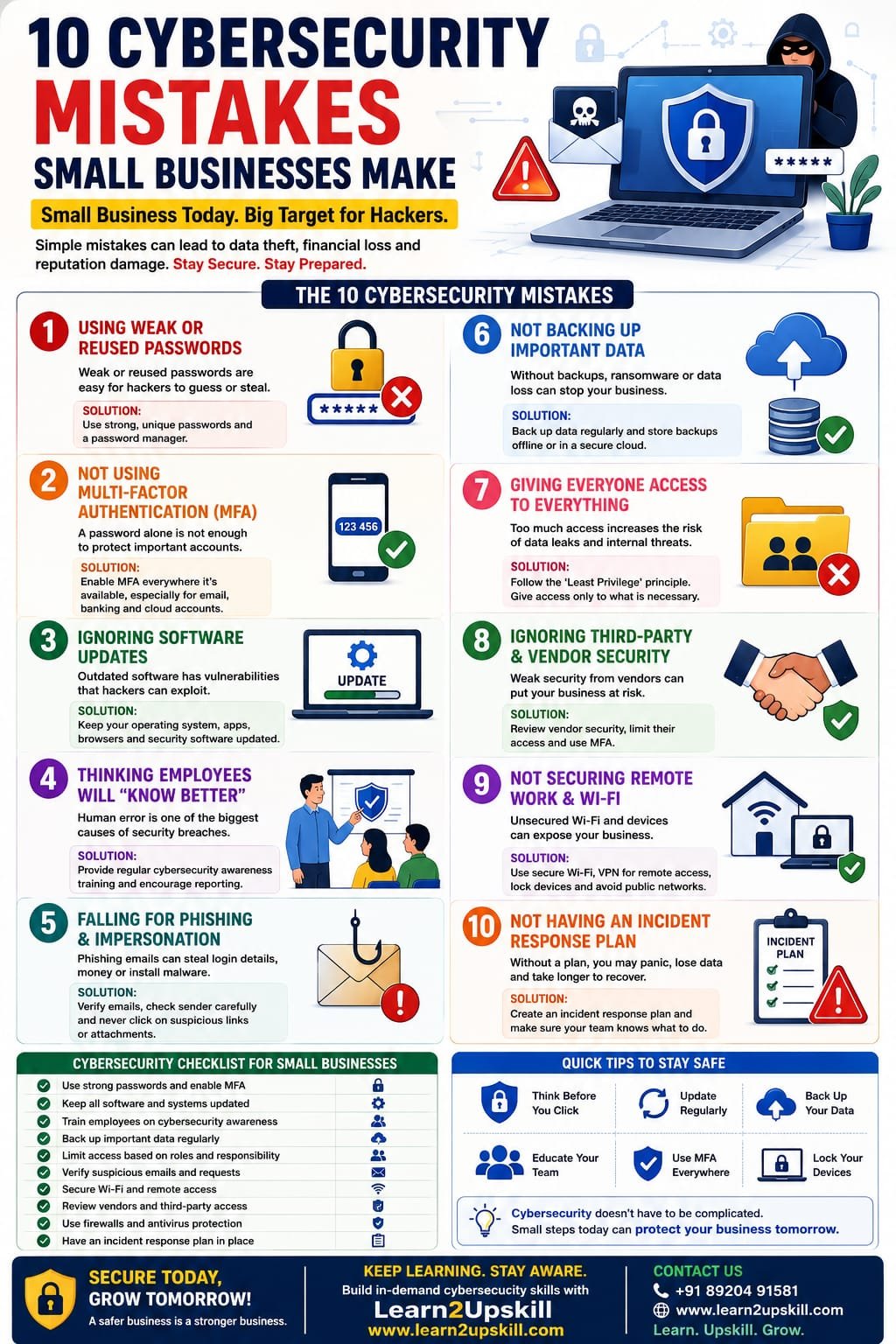
  • 10 Cybersecurity Mistakes Small Businesses Make

    10 Cybersecurity Mistakes Small Businesses Make

    10 Cybersecurity Mistakes Small Businesses Make

    Discover 10 common cybersecurity mistakes small businesses make and learn practical ways to protect your business, employees, data, devices and customers from cyber threats.

    Suggested URL Slug:

    10-cybersecurity-mistakes-small-businesses-make

    Introduction

    Many small-business owners believe that cybercriminals primarily target large corporations.

    That’s a dangerous assumption.

    Small businesses handle valuable information every day, including customer details, employee information, financial records, passwords, payment information and business documents. Cybercriminals can target organizations of any size, and the Federal Trade Commission specifically recommends that businesses of all sizes implement basic cybersecurity practices such as strong passwords, multi-factor authentication, software updates, backups, encryption and employee training. �

    Federal Trade Commission +1

    The good news?

    You don’t necessarily need a massive cybersecurity budget to improve your security.

    You need to avoid the basics going wrong.

    In this article, we’ll explore 10 cybersecurity mistakes small businesses make, why they are risky and what businesses can do to reduce their exposure.

    1. Using Weak or Reused Passwords

    One of the simplest cybersecurity mistakes is also one of the most common:

    Weak passwords.

    Employees may use passwords that are:

    Easy to guess

    Short

    Based on personal information

    Used across multiple accounts

    Shared with colleagues

    The bigger problem is password reuse.

    If one account is compromised and the same password is used elsewhere, attackers may attempt to access other systems.

    The FTC recommends strong passwords and specifically advises businesses not to reuse or share passwords. �

    Federal Trade Commission

    How to improve password security

    Encourage employees to:

    Use long, unique passwords or passphrases

    Never reuse passwords across important accounts

    Use a reputable password manager

    Never share passwords

    Change compromised credentials immediately

    1. Not Using Multi-Factor Authentication

    A password alone may not provide enough protection for important accounts.

    Multi-factor authentication (MFA) adds another verification step.

    For example:

    Password + authenticator app

    or:

    Password + security key

    Even if an attacker obtains a password, MFA can provide an additional barrier.

    The FTC recommends using multi-factor authentication to protect sensitive business information and network access. �

    Federal Trade Commission

    Small-business action

    Enable MFA wherever it is available, especially for:

    Business email

    Cloud storage

    Banking and financial services

    Website administration

    CRM systems

    Social media accounts

    Remote-access systems

    1. Ignoring Software Updates

    “Remind me later” can become a cybersecurity problem.

    Outdated operating systems, browsers, applications, plugins and other software may contain vulnerabilities that attackers can exploit.

    The FTC recommends keeping software and security tools updated and enabling automatic updates where possible. �

    Federal Trade Commission +1

    What should be updated?

    Don’t focus only on computers.

    Remember:

    Operating systems

    Web browsers

    Mobile devices

    Business applications

    Website software

    Plugins

    Routers

    Security software

    Better approach

    Create a regular update process and enable automatic updates where appropriate.

    1. Assuming Employees Will “Know Better”

    Cybersecurity isn’t only an IT problem.

    Employees interact with:

    Emails

    Websites

    Attachments

    Cloud applications

    Customers

    Vendors

    Payment systems

    Business accounts

    One careless click can create a serious security incident.

    Phishing messages can impersonate vendors, colleagues or executives and may attempt to steal credentials, financial information or install malicious software. �

    Federal Trade Commission +1

    What businesses should do

    Provide regular cybersecurity awareness training covering:

    Phishing

    Suspicious links

    Malicious attachments

    Password security

    MFA

    Social engineering

    Safe remote working

    Incident reporting

    Training shouldn’t happen only once during employee onboarding.

    Cybersecurity awareness should be ongoing.

    1. Falling for Phishing and Business Impersonation

    Phishing attacks are designed to make people perform an action they shouldn’t.

    An email may appear to come from:

    Your CEO

    Your bank

    A supplier

    A customer

    Microsoft

    A colleague

    The message might say:

    “Urgent: Your account will be closed today.”

    Or:

    “Please transfer the payment immediately.”

    Attackers often create urgency to discourage careful verification.

    The FTC recommends employees verify suspicious requests using a known, trusted contact method rather than relying on contact information contained in the suspicious message. �

    Federal Trade Commission +1

    Create a simple rule

    STOP → CHECK → VERIFY → THEN ACT

    Never allow urgency to override security procedures.

    1. Not Backing Up Important Data

    Imagine losing:

    Customer records

    Financial files

    Contracts

    Employee documents

    Business databases

    Website files

    Project information

    What happens next?

    Without reliable backups, recovery can become much harder.

    The FTC recommends regularly backing up important files and, for ransomware protection, keeping backups separated from the network so attackers cannot simply compromise the backups along with the primary systems. �

    Federal Trade Commission +1

    A good backup strategy

    Identify critical business data and establish:

    What gets backed up

    How frequently

    Where backups are stored

    Who manages them

    How recovery works

    Most importantly:

    Test your backups.

    A backup you have never tested may not be a backup you can confidently recover from.

    1. Giving Everyone Access to Everything

    Another common mistake is giving employees more access than they actually need.

    For example:

    Why should someone in marketing have access to sensitive financial files?

    Why should a temporary contractor have permanent access to customer databases?

    The principle of least privilege means people should have access appropriate to their responsibilities.

    The FTC recommends limiting access to sensitive information to people who need it for their jobs. �

    Federal Trade Commission +1

    Review access regularly

    When an employee:

    Changes departments

    Leaves the company

    Finishes a project

    Stops working with a vendor

    their access should be reviewed and, when appropriate, removed.

    1. Ignoring Third-Party and Vendor Security

    Your business may use:

    Cloud software

    Payment providers

    Marketing platforms

    Accounting services

    Website hosting

    CRM systems

    Freelancers

    IT providers

    Your security can be affected by the security practices of those providers.

    The FTC recommends considering vendor security, controlling vendor access, using MFA and limiting vendors to the information they actually need. �

    Federal Trade Commission

    Before giving a vendor access, ask:

    What information will they access?

    Why do they need it?

    How is it protected?

    Is MFA available?

    How is access removed?

    What happens if they experience a breach?

    Don’t assume that “it’s a trusted vendor” means security can be ignored.

    1. Not Securing Remote Work and Wi-Fi

    Remote work has created more flexibility for businesses—but it can also introduce additional security considerations.

    Employees may work from:

    Home

    Cafés

    Hotels

    Airports

    Coworking spaces

    Business devices may connect to different networks and environments.

    The FTC recommends secure remote access and properly secured wireless networks, including modern encryption and strong router credentials. �

    Federal Trade Commission

    Basic remote-work security

    Employees should:

    Use company-approved devices where possible

    Keep devices updated

    Use strong passwords

    Enable MFA

    Avoid unsecured public networks where possible

    Use approved secure remote-access methods

    Lock devices when unattended

    Report lost devices immediately

    1. Not Having an Incident Response Plan

    Here’s a question every small-business owner should be able to answer:

    “What will we do if we are hacked tomorrow?”

    If the answer is:

    “We’ll figure it out.”

    that’s a problem.

    A cyber incident can create confusion.

    Employees may not know:

    Who to contact

    Which systems to disconnect

    Who communicates with customers

    Who contacts the IT provider

    How to preserve evidence

    How to restore data

    When to report the incident

    The FTC recommends businesses develop an incident response plan covering actions such as protecting data, keeping the business operating and handling notifications following a breach. �

    Federal Trade Commission

    Your incident response plan should identify:

    Who responds?

    Who makes decisions?

    Who contacts IT/security providers?

    Who communicates with customers?

    Where are backups?

    Which accounts should be secured immediately?

    Preparation is much easier when you’re not trying to solve everything during an active attack.

    Bonus Mistake: Thinking “We’re Too Small to Be Targeted”

    This mindset can create unnecessary risk.

    Cybersecurity shouldn’t be based on:

    “Nobody will attack us.”

    It should be based on:

    “What would happen if someone tried?”

    A small business may have fewer resources than a large enterprise, which makes practical security controls particularly important.

    The FTC explicitly notes that cybercriminals target companies of all sizes. �

    Federal Trade Commission

    Small Business Cybersecurity Checklist

    Use this quick checklist to assess your business.

    Account Security

    ☐ Strong unique passwords

    ☐ Password manager where appropriate

    ☐ MFA enabled

    ☐ Former employee accounts disabled

    ☐ Access reviewed regularly

    Device Security

    ☐ Operating systems updated

    ☐ Applications updated

    ☐ Security software maintained

    ☐ Devices protected with passwords

    ☐ Lost devices can be remotely secured where appropriate

    Data Security

    ☐ Important files backed up

    ☐ Backups tested

    ☐ Sensitive information encrypted where appropriate

    ☐ Access limited to people who need it

    Email Security

    ☐ Employees trained on phishing

    ☐ Suspicious messages can be reported

    ☐ Payment-change requests are independently verified

    ☐ Business email authentication is configured appropriately

    Network Security

    ☐ Business Wi-Fi secured

    ☐ Router credentials changed from defaults

    ☐ Remote access secured

    ☐ Guest devices separated where appropriate

    People

    ☐ Employees receive cybersecurity awareness training

    ☐ New employees receive security guidance

    ☐ Staff know how to report incidents

    Incident Response

    ☐ Incident response plan exists

    ☐ Key contacts are documented

    ☐ Backup recovery process is understood

    ☐ Important vendors and security contacts are listed

    How Small Businesses Can Build Better Cybersecurity

    Cybersecurity doesn’t have to be an overwhelming project.

    Start with the basics.

    Step 1: Identify Your Important Data

    Know what you’re protecting.

    Step 2: Identify Who Has Access

    Review employees, contractors and vendors.

    Step 3: Secure Accounts

    Implement strong passwords and MFA.

    Step 4: Update Everything

    Patch software and devices regularly.

    Step 5: Back Up Critical Data

    Create and test reliable backups.

    Step 6: Train Employees

    Teach people how to identify and report suspicious activity.

    Step 7: Prepare for Incidents

    Create a simple response plan.

    Step 8: Review Regularly

    Cybersecurity isn’t a one-time project.

    The FTC describes security as an ongoing process and recommends maintaining security procedures as vulnerabilities and threats change. �

    Federal Trade Commission

    Why Cybersecurity Awareness Training Matters

    Technology alone cannot solve every security problem.

    A business may have:

    Firewalls

    Antivirus software

    Email filtering

    MFA

    Backups

    But if an employee unknowingly provides an attacker with credentials, technical controls can still be challenged.

    That’s why cybersecurity awareness training is so important.

    Employees should know:

    What does a suspicious email look like?

    What should I do if I click a suspicious link?

    Who should I tell?

    Should I transfer money based on an urgent email?

    How do I report a suspicious message?

    A strong security culture makes every employee part of the defense.

    The Bottom Line

    Small businesses don’t need to become cybersecurity experts overnight.

    They need to stop making avoidable mistakes.

    Start with the fundamentals:

    Strong passwords

    MFA

    Software updates

    Employee training

    Phishing awareness

    Backups

    Access controls

    Vendor security

    Secure remote work

    Incident response planning

    These measures won’t guarantee that a business can never experience a cyberattack—but they can significantly strengthen its security posture and improve its ability to respond and recover.

    Conclusion

    Cybersecurity is no longer something only large corporations need to worry about.

    Small businesses handle valuable data, accounts, devices and financial information every day.

    The biggest cybersecurity problems often don’t begin with an extremely sophisticated attack.

    They can begin with something much simpler:

    A reused password.

    An unpatched application.

    An unchecked email.

    An unnecessary user permission.

    An untested backup.

    Or an employee who doesn’t know what to do.

    The solution is not fear.

    The solution is preparation.

    Build good cybersecurity habits across your business, train your employees regularly and create a plan before something goes wrong.

    Cybersecurity is not just an IT responsibility. It’s a business responsibility.

    Frequently Asked Questions

    1. What are the most common cybersecurity mistakes small businesses make?

    Common mistakes include weak or reused passwords, lack of MFA, outdated software, inadequate employee training, poor backup practices, excessive access permissions and failure to prepare an incident response plan.

    1. Why are small businesses targeted by cybercriminals?

    Cybercriminals can target organizations of all sizes. Small businesses may also have valuable data and accounts while having fewer dedicated cybersecurity resources.

    1. What is the most important cybersecurity step for a small business?

    There isn’t one single solution. Start with the fundamentals: MFA, strong unique passwords, software updates, backups, employee training and access controls.

    1. How can small businesses prevent phishing attacks?

    Train employees to recognize suspicious messages, verify unusual requests independently, avoid unexpected links and attachments, and provide an easy way to report suspected phishing.

    1. How often should employees receive cybersecurity training?

    Cybersecurity awareness should be ongoing rather than a one-time event. Threats and scam techniques change, so businesses should regularly refresh employee awareness.

    1. Should small businesses use MFA?

    Yes. MFA provides an additional layer of protection beyond a password and is particularly important for sensitive business accounts.

    1. Why are backups important for cybersecurity?

    Backups can help businesses recover from incidents such as ransomware, accidental deletion or hardware failure. Backups should be protected and periodically tested.

    1. What should a small business do after a cyberattack?

    Activate its incident-response procedures, contain the incident where appropriate, secure compromised accounts and systems, contact qualified IT/security professionals and follow applicable reporting and notification requirements.

    Learn Cybersecurity Skills with Learn2Upskill

    Cybersecurity isn’t just for IT professionals.

    Every modern business needs people who understand cybersecurity awareness, phishing, data protection, AI-powered threats and safe digital practices.

    Build practical, future-focused skills with Learn2Upskill.

    🌐 www.coral-kudu-326218.hostingersite.com⁠�

    📞 Contact Us: +91 89204 91581

    Learn. Upskill. Grow.


  • AI Skills Employers Will Look for in 2027

    AI Skills Employers Will Look for in 2027

    AI Skills Employers Will Look for in 2027

    Discover the top AI skills employers will look for in 2027, including AI literacy, prompt engineering, AI automation, data analysis, AI agents, cybersecurity and human skills.

    Suggested URL Slug:

    “/ai-skills-employers-will-look-for-in-2027/”

    Introduction

    Artificial intelligence is no longer limited to technology companies or specialist AI teams. It is becoming part of everyday work across marketing, finance, human resources, customer service, education, operations, sales, IT and many other fields.

    As we move toward 2027, employers are increasingly looking for professionals who can work effectively with AI—not simply people who know that AI exists.

    The most valuable employees of the future are likely to combine AI literacy, technical understanding, business knowledge, analytical thinking and human skills.

    According to LinkedIn, AI literacy is already among the fastest-growing skills across regions and job functions, while large language model proficiency is also emerging as an important skill. LinkedIn also estimates that 70% of the skills used in most jobs could change by 2030, with AI acting as a major catalyst.

    The World Economic Forum’s Future of Jobs Report 2025 similarly identifies AI and big data as the fastest-growing skill area, alongside networks and cybersecurity and technological literacy. At the same time, analytical thinking, creative thinking, resilience, flexibility and collaboration remain important.

    So, what should students, job seekers and working professionals learn now?

    Let’s explore the top AI skills employers are likely to value in 2027.

    —

    1. AI Literacy

    The first and most important skill is AI literacy.

    You don’t necessarily need to become an AI engineer to benefit from artificial intelligence. Professionals in almost every department can benefit from understanding:

    – What AI can and cannot do

    – How Generative AI works at a basic level

    – How to use AI tools responsibly

    – How to evaluate AI-generated information

    – How AI can improve everyday workflows

    – Basic AI terminology

    – AI risks and limitations

    – Data privacy and responsible AI use

    AI literacy is increasingly becoming a workplace skill rather than a niche technical capability.

    LinkedIn reported in 2025 that AI literacy was one of the most in-demand skills employers were seeking across jobs, while more C-suite executives were adding AI-related skills to their profiles.

    Why employers value it

    An employee who understands AI can identify opportunities to:

    – Reduce repetitive work

    – Improve productivity

    – Analyze information faster

    – Generate first drafts

    – Automate routine processes

    – Support decision-making

    AI literacy should therefore be the foundation of your 2027 skill set.

    —

    1. Generative AI Skills

    Generative AI tools can create text, images, presentations, code, summaries and other forms of content.

    By 2027, employers are likely to expect professionals to understand how to use Generative AI appropriately within their jobs.

    Useful capabilities include:

    – Writing effective AI instructions

    – Generating and improving content

    – Summarizing documents

    – Brainstorming ideas

    – Research assistance

    – Creating presentations

    – Analyzing information

    – Generating basic code

    – Automating repetitive knowledge work

    However, simply knowing how to open ChatGPT is not enough.

    The real advantage comes from understanding how to integrate Generative AI into your workflow.

    —

    1. Prompt Engineering

    Prompt engineering remains a useful AI skill, particularly when it is combined with strong domain knowledge.

    A good prompt can help an AI system understand:

    – The objective

    – The context

    – The desired format

    – The target audience

    – Constraints

    – Examples

    – Evaluation criteria

    For example, instead of asking:

    «”Write a report.”»

    A professional might specify the audience, business objective, data, structure, tone and expected output.

    Why prompt engineering matters

    Professionals who can communicate clearly with AI systems can potentially obtain more useful and consistent results.

    LinkedIn has reported significant growth in professionals adding AI skills such as prompt engineering and Generative AI tools to their profiles.

    By 2027, however, prompt engineering is likely to be most valuable when combined with business, technical or industry expertise.

    —

    1. AI Automation

    One of the biggest opportunities for professionals is learning how to use AI to automate repetitive work.

    AI automation can support tasks such as:

    – Email processing

    – Data entry

    – Report generation

    – Customer support

    – Lead management

    – Document processing

    – Meeting summaries

    – Content workflows

    – Research

    – Administrative tasks

    The key skill isn’t simply knowing an automation tool.

    It is knowing how to identify a repetitive business process and determine:

    What should be automated?

    What should remain human-controlled?

    How should the workflow be monitored?

    This combination of AI knowledge and process thinking can become extremely valuable.

    —

    1. AI Agents and Agentic AI

    A major development heading into 2027 is the growth of AI agents.

    Unlike a basic chatbot that responds to individual prompts, AI agents can be designed to perform multi-step tasks, interact with tools and work toward defined objectives.

    Microsoft’s 2026 Work Trend Index describes a workplace where AI and agents increasingly take on execution while humans focus more on directing work, making decisions and owning outcomes.

    Professionals should therefore begin understanding:

    – What AI agents are

    – How agentic workflows operate

    – How agents use tools

    – Human oversight

    – Agent evaluation

    – Workflow design

    – AI governance

    – Business applications of agents

    You don’t necessarily need to build sophisticated agents immediately.

    Understanding how businesses can use AI agents will itself become a valuable capability.

    —

    1. Data Analysis and AI-Assisted Analytics

    AI is changing how people work with data.

    Professionals who combine data literacy + AI skills can become more valuable because they can use AI to accelerate parts of the analytical process while still applying human judgment.

    Important skills include:

    – Excel

    – Power BI

    – Data visualization

    – Data cleaning

    – Basic statistics

    – SQL

    – Dashboard creation

    – AI-assisted data analysis

    – Interpreting business data

    – Communicating insights

    The World Economic Forum identifies AI and big data among the fastest-growing skill areas through 2030.

    For many professionals, learning AI + Excel + Power BI may be more immediately useful than trying to become a machine-learning engineer.

    —

    1. AI-Powered Productivity

    Employers don’t simply want employees who know AI tools.

    They want employees who can get better results with them.

    AI-powered productivity skills can include:

    – Faster research

    – Better document creation

    – Meeting summarization

    – Email assistance

    – Presentation creation

    – Information organization

    – Task prioritization

    – Knowledge management

    – Workflow optimization

    Microsoft’s 2026 Work Trend Index found that nearly half of analyzed Copilot conversations supported cognitive work such as analysis, problem-solving, evaluation and creative thinking.

    This suggests an important shift:

    AI skills are increasingly connected to how people think and work, not just how they use technology.

    —

    1. AI and Cybersecurity Awareness

    As organizations adopt AI, cybersecurity becomes even more important.

    Professionals should understand risks such as:

    – Phishing powered by AI

    – Deepfakes

    – AI-generated scams

    – Data leakage

    – Prompt injection

    – Unsafe use of confidential information

    – Malicious AI-generated content

    – Identity impersonation

    The World Economic Forum expects networks and cybersecurity to remain among the fastest-growing skill areas alongside AI and big data.

    Even non-technical employees should understand basic AI-related security practices.

    —

    1. AI Ethics and Responsible AI

    AI can produce inaccurate, biased or inappropriate results.

    Professionals therefore need to understand responsible AI principles such as:

    – Privacy

    – Transparency

    – Bias

    – Accuracy

    – Human oversight

    – Data security

    – Accountability

    – Appropriate AI use

    This will become increasingly important as organizations integrate AI into business processes.

    Employers will not only ask:

    “Can you use AI?”

    They may also ask:

    “Can you use AI responsibly?”

    —

    1. Analytical Thinking

    AI does not eliminate the need for human thinking.

    In fact, the ability to evaluate AI output may become even more important.

    Employees need to be able to:

    – Identify problems

    – Evaluate information

    – Compare alternatives

    – Question assumptions

    – Interpret results

    – Make decisions

    – Identify errors

    The World Economic Forum’s Future of Jobs research identifies analytical thinking as a leading core skill, while AI and big data rank among the fastest-growing technical skill areas.

    This creates an important combination:

    AI capability + analytical thinking = stronger workplace performance.

    —

    1. Creative Thinking

    AI can generate many ideas quickly, but humans still need to determine which ideas are useful.

    Creative thinking can help professionals:

    – Develop new products

    – Create marketing campaigns

    – Solve business problems

    – Improve processes

    – Develop new services

    – Find new opportunities

    The World Economic Forum expects creative thinking to remain an important skill as technology changes the workplace.

    —

    1. Communication Skills

    One of the biggest mistakes people make when discussing future skills is assuming that technical skills will replace communication skills.

    The opposite may be closer to reality.

    As AI handles more routine work, employees may spend more time:

    – Explaining ideas

    – Presenting recommendations

    – Collaborating with teams

    – Managing stakeholders

    – Communicating with customers

    – Making decisions

    LinkedIn’s research on India highlights the continuing importance of communication, creative thinking, innovative thinking, adaptability and collaboration alongside AI literacy.

    So don’t build an AI-only skill set.

    Build an AI + human skills combination.

    —

    1. Adaptability and Continuous Learning

    AI tools are changing rapidly.

    A tool that is popular today may be replaced or significantly changed tomorrow.

    That’s why one of the most valuable career skills for 2027 may be the ability to learn continuously.

    Professionals should develop a habit of:

    1. Learning new tools
    2. Testing them
    3. Understanding their limitations
    4. Applying them to real work
    5. Measuring the results
    6. Updating their skills

    The ability to learn may become more valuable than memorizing a particular AI tool.

    —

    1. Domain Expertise + AI

    Here’s an important career lesson:

    You don’t have to compete with AI. Learn how to combine AI with your existing expertise.

    For example:

    Finance + AI

    Marketing + AI

    HR + AI

    Excel + AI

    Cybersecurity + AI

    Business Analysis + AI

    Education + AI

    Software Development + AI

    This combination can create a powerful professional profile.

    AI knowledge by itself is useful.

    AI knowledge combined with real-world domain expertise can be even more valuable.

    —

    —

    How to Build Your AI Skill Set Before 2027

    You don’t need to learn everything at once.

    Follow this simple progression.

    Step 1: Learn AI Fundamentals

    Understand:

    – Artificial intelligence

    – Machine learning

    – Generative AI

    – Large language models

    – AI agents

    – Automation

    Step 2: Master One or Two AI Tools

    Don’t try to learn every tool available.

    Become highly comfortable with tools relevant to your work.

    Step 3: Learn Prompting

    Practice creating structured prompts for:

    – Research

    – Writing

    – Analysis

    – Brainstorming

    – Productivity

    – Problem-solving

    Step 4: Automate a Real Task

    Choose one repetitive task and create an AI-assisted workflow.

    Step 5: Combine AI With Your Career Skill

    For example:

    Excel + AI

    Marketing + AI

    Finance + AI

    HR + AI

    Coding + AI

    Step 6: Build Projects

    Don’t just collect certificates.

    Create practical examples that demonstrate what you can actually do.

    For example:

    – AI-powered report

    – Automated workflow

    – Excel dashboard

    – AI chatbot

    – Data analysis project

    – AI-assisted marketing campaign

    Projects can make your skills easier to demonstrate during interviews.

    —

    What Employers Will Really Want in 2027

    The biggest misconception is that employers will simply hire people who know the most AI tools.

    That’s unlikely to be enough.

    The strongest candidates will increasingly combine:

    AI Skills + Business Knowledge + Data Skills + Human Skills

    Think of it as:

    «Know AI. Use AI. Question AI. Improve work with AI.»

    That’s a much stronger professional profile than simply listing “ChatGPT” on a resume.

    —

    Final Thoughts

    The workplace is changing quickly, and professionals who wait until 2027 to start learning AI skills may find themselves playing catch-up.

    Current research already points toward a growing importance of AI literacy, AI and big data, technological literacy and cybersecurity, while analytical thinking, creativity, communication, adaptability and other human skills remain critical.


    At the same time, Microsoft’s 2026 research points toward a future where AI agents take on more execution while humans increasingly focus on judgment, direction and outcomes.

    The message is clear:

    Don’t prepare for a future where AI replaces every skill. Prepare for a future where people who know how to work effectively with AI have an advantage.

    Start learning today, practice with real projects, combine AI with your professional expertise and keep updating your skills.

    2027 isn’t far away. Your AI upskilling journey should start now.

    —

    —

    Learn2Upskill: Build Skills for the Future

    The future belongs to professionals who continuously upgrade their skills.

    At Learn2Upskill, you can develop practical skills in areas such as AI, Generative AI, productivity, technology, data and career development.

    Don’t wait for the job market to change. Start preparing for it today.

    🌐 www.coral-kudu-326218.hostingersite.com

    Learn. Upskill. Grow.


  • How AI Is Changing Jobs in Finance, HR, Marketing and IT

    How AI Is Changing Jobs in Finance, HR, Marketing and IT

    How AI Is Changing Jobs in Finance, HR, Marketing and IT

    Discover how AI is changing jobs in finance, HR, marketing and IT, which tasks are being automated, what skills professionals need and how to prepare for the future of work.

    Suggested URL Slug:

    “how-ai-is-changing-jobs-finance-hr-marketing-it”

    Introduction

    Artificial intelligence is changing the way businesses operate—and the transformation is happening across almost every department.

    Finance teams are using AI to analyze data, identify unusual transactions and automate repetitive processes. HR teams are using AI to support recruitment, employee analytics and workforce planning. Marketing professionals are using AI for content creation, customer insights and campaign optimization. IT teams are using AI for coding, cybersecurity, troubleshooting and automation.

    This does not necessarily mean that AI will simply replace these professionals.

    Instead, AI is changing what people do, how they work and which skills employers value.

    The World Economic Forum’s Future of Jobs Report 2025 found that 86% of surveyed employers expect AI and information-processing technologies to transform their businesses by 2030. The report also identifies AI and big data, networks and cybersecurity, and technological literacy among the fastest-growing skill areas.

    The important question is therefore not:

    “Will AI take my job?”

    A better question is:

    “How will AI change my job, and which skills should I develop?”

    Let’s look at how AI is transforming four major professional areas: Finance, HR, Marketing and IT.

    —

    1. How AI Is Changing Jobs in Finance

    Finance is one of the industries where AI can have a significant impact because financial professionals work with large amounts of structured data, repetitive processes and analytical tasks.

    The World Economic Forum reports particularly high expected AI exposure in financial services, with 97% of employers in the sector expecting AI to transform their business by 2030.


    AI applications in finance


    Finance teams can use AI for:


    – Financial data analysis

    – Expense categorization

    – Fraud detection

    – Risk analysis

    – Forecasting

    – Financial reporting

    – Invoice processing

    – Reconciliation support

    – Document analysis

    – Customer service

    – Research and summarization

    What changes for finance professionals?

    Traditionally, finance employees may have spent significant time collecting information, preparing reports and performing repetitive calculations.

    AI can increasingly assist with these activities.

    This means finance professionals may have more time for:

    – Financial planning

    – Business advisory

    – Strategic analysis

    – Risk management

    – Decision-making

    – Scenario planning

    – Communicating financial insights

    Skills finance professionals should develop

    Finance professionals should consider learning:

    Finance + AI + Data Analytics + Excel/Power BI

    This combination can help professionals move from purely transactional work toward more analytical and strategic responsibilities.

    —

    1. How AI Is Changing Jobs in Human Resources

    Human Resources is another field undergoing significant AI transformation.

    HR teams manage large amounts of employee and candidate information, making many HR processes suitable for AI-assisted workflows.

    AI applications in HR

    AI can support:

    – Resume screening

    – Candidate sourcing

    – Interview scheduling

    – Employee communication

    – HR chatbots

    – Workforce analytics

    – Employee engagement analysis

    – Learning recommendations

    – Job-description creation

    – HR reporting

    – Attrition analysis

    – Workforce planning

    Modern AI systems are also moving beyond basic HR chatbots toward decision-support applications that can help HR teams identify patterns in areas such as recruitment, employee retention and workforce planning.

    Does AI replace HR professionals?

    Not entirely.

    HR involves highly human responsibilities such as:

    – Employee relationships

    – Conflict resolution

    – Leadership

    – Organizational culture

    – Sensitive conversations

    – Ethical decision-making

    – Talent development

    AI can provide information and recommendations, but organizations still need people to make responsible decisions.

    The future HR professional

    The HR professional of the future may need a combination of:

    HR Expertise + AI Literacy + Data Analytics + Communication Skills

    For example, instead of spending hours preparing a workforce report manually, an HR professional could use AI to analyze the information and then focus on interpreting the results and recommending actions to management.

    —

    1. How AI Is Changing Jobs in Marketing

    Marketing may be one of the most visible areas of AI adoption.

    Generative AI can help marketing teams create content, analyze audiences and accelerate campaign development.

    AI applications in marketing

    Marketing professionals can use AI for:

    – Blog outlines

    – Social media content

    – Email campaigns

    – Market research

    – Customer segmentation

    – Ad copy

    – SEO research

    – Content personalization

    – Competitor analysis

    – Campaign analysis

    – Image and video creation

    – Customer sentiment analysis

    AI can significantly reduce the time required to create initial drafts and analyze information.

    But this does not mean marketers can simply let AI do everything.

    The human role in AI-powered marketing

    Human marketers still need to understand:

    – Brand strategy

    – Customer psychology

    – Positioning

    – Creativity

    – Storytelling

    – Market trends

    – Business objectives

    – Brand voice

    – Ethical considerations

    AI can generate ten marketing ideas in seconds.

    The marketer still has to determine:

    Which idea is actually worth using?

    That is why creative thinking, strategic thinking and AI literacy are becoming an increasingly powerful combination.

    —

    1. How AI Is Changing Jobs in IT

    The IT industry is experiencing perhaps one of the most direct transformations from AI.

    AI-assisted coding tools can help developers write, explain, test and debug code. AI can also assist IT teams with troubleshooting, documentation, cybersecurity and infrastructure management.

    AI applications in IT

    AI can support:

    – Software development

    – Code generation

    – Code debugging

    – Software testing

    – Documentation

    – IT support

    – Cybersecurity monitoring

    – Threat detection

    – System troubleshooting

    – Data analysis

    – Cloud management

    – Workflow automation

    The World Economic Forum identifies AI and machine learning specialists, software developers and big data specialists among the fastest-growing technology-related roles through 2030.

    Does AI make programmers unnecessary?

    AI can automate parts of software development, but professional developers still need to understand:

    – Software architecture

    – Security

    – Testing

    – System design

    – Business requirements

    – Code quality

    – Problem-solving

    – Technical decision-making

    The future may therefore favor developers who know how to work with AI coding tools rather than developers who ignore them.

    —

    1. AI Is Automating Tasks—Not Simply Entire Jobs

    One of the most important concepts to understand is the difference between job automation and task automation.

    A job usually contains many different tasks.

    AI may automate some of those tasks while leaving other responsibilities to humans.

    For example:

    Finance

    AI: Data processing

    Human: Financial decision-making

    HR

    AI: Resume screening

    Human: Candidate evaluation and relationship building

    Marketing

    AI: Content drafts

    Human: Strategy and creative direction

    IT

    AI: Code suggestions

    Human: Architecture and technical decisions

    This is why professionals should focus on understanding which parts of their work AI can improve.

    The World Economic Forum expects both job creation and displacement from technological change, with its 2025 report projecting 170 million jobs created and 92 million displaced globally by 2030 across major macrotrends.

    The takeaway isn’t that everyone should panic.

    It is that skills are changing.

    —

    1. The Rise of AI-Augmented Professionals

    The future workplace is increasingly likely to include people working alongside AI systems.

    Think of the difference between:

    Employee → AI

    and

    Employee + AI → Better workflow

    The second model is much more useful.

    An AI-augmented finance professional may analyze larger datasets faster.

    An AI-augmented HR professional may spend less time on administration.

    An AI-augmented marketer may test more ideas.

    An AI-augmented developer may build and test software more efficiently.

    The value comes from combining human expertise with AI capabilities.

    —

    1. Skills Professionals Need in the AI Era

    Regardless of whether you work in Finance, HR, Marketing or IT, several skills are becoming increasingly important.

    AI Literacy

    Understand what AI can do, what it cannot do and how to use it responsibly.

    Generative AI

    Learn how to use AI tools for research, writing, analysis, productivity and problem-solving.

    Prompt Engineering

    Learn how to provide clear instructions and context to AI systems.

    Data Literacy

    Understand data, dashboards, analytics and how to interpret AI-generated insights.

    Automation

    Identify repetitive tasks and learn how AI and automation tools can improve workflows.

    Critical Thinking

    AI can make mistakes. Professionals must be able to evaluate AI-generated information.

    Communication

    People still need to explain recommendations, influence stakeholders and collaborate with teams.

    Adaptability

    AI tools will continue to change. Continuous learning will become increasingly important.

    The World Economic Forum reports that, on average, 39% of workers’ existing skill sets are expected to be transformed or become outdated between 2025 and 2030.

    —

    1. AI Skills by Profession

    Here’s a simple roadmap.

    Profession| AI Skills to Consider

    Finance| AI analytics, Excel, Power BI, automation, forecasting

    HR| AI recruitment, HR analytics, automation, workforce insights

    Marketing| Generative AI, prompting, SEO, content automation, analytics

    IT| AI coding, automation, cybersecurity, cloud, AI agents

    Business| AI productivity, data analysis, automation, decision support

    Students| AI literacy, prompting, research, communication, digital skills

    The key is to avoid learning AI in isolation.

    Instead, learn:

    AI + Your Existing Profession

    —

    1. Should Professionals Be Worried About AI?

    Some concern is understandable.

    AI will automate certain tasks, and some roles may change significantly.

    The World Economic Forum reports that 41% of employers surveyed expect to reduce their workforce in areas where AI can automate tasks, while 77% plan to upskill workers in response to AI adoption.

    This shows why upskilling is so important.

    Instead of asking:

    «”How do I protect my job from AI?”»

    Ask:

    «”How can I become the person in my organization who knows how to use AI effectively?”»

    That shift in mindset can change your career strategy.

    —

    1. How to Prepare for an AI-Powered Workplace

    You don’t need to become an AI engineer overnight.

    Start with a practical approach.

    Step 1: Learn AI Fundamentals

    Understand:

    – Artificial intelligence

    – Machine learning

    – Generative AI

    – Large language models

    – AI agents

    – Automation

    Step 2: Learn AI Tools Relevant to Your Job

    A finance professional does not need exactly the same tools as a marketer or developer.

    Focus on tools that solve problems in your profession.

    Step 3: Identify Repetitive Tasks

    Make a list of tasks you perform repeatedly.

    Then ask:

    Can AI help me complete this faster?

    Step 4: Build Practical Projects

    Don’t only watch tutorials.

    Create real examples such as:

    – AI-powered financial report

    – Automated HR workflow

    – AI marketing campaign

    – Data-analysis dashboard

    – AI-assisted software project

    Step 5: Develop Human Skills

    Strengthen:

    – Communication

    – Leadership

    – Critical thinking

    – Creativity

    – Problem-solving

    – Collaboration

    Step 6: Keep Learning

    AI is evolving rapidly.

    Your learning journey should evolve with it.

    —

    1. The Future Belongs to AI-Ready Professionals

    AI is not transforming only technology departments.

    It is changing the entire organization.

    Finance professionals need AI and analytics.

    HR professionals need AI and people skills.

    Marketers need AI and creativity.

    IT professionals need AI and technical expertise.

    This leads to one simple formula:

    «AI Skills + Domain Expertise + Human Skills = Future-Ready Professional»

    The most successful professionals may not necessarily be those who know every AI tool.

    They will be the people who know how to use AI to solve meaningful business problems.

    —

    Conclusion

    AI is changing jobs in Finance, HR, Marketing and IT, but the transformation is more complex than simply replacing people with machines.

    AI can automate repetitive activities, accelerate analysis, support decision-making and increase productivity. At the same time, organizations still need human judgment, creativity, communication, leadership and domain expertise.

    The World Economic Forum’s research makes one thing particularly clear: technology is reshaping both jobs and skills, while employers are responding through a combination of workforce transformation and upskilling.

    The professionals who prepare now can be better positioned for the changing workplace.

    Don’t wait for AI to change your job. Learn how to change your job with AI.

    —

    Learn2Upskill: Prepare for the Future of Work

    The workplace is changing—and upskilling is becoming a career advantage.

    Learn practical skills in AI, Generative AI, automation, data, Excel, business, cybersecurity and other future-focused areas through Learn2Upskill.


    🌐 www.coral-kudu-326218.hostingersite.com

    Learn. Upskill. Grow.

    —


  • Cybersecurity Career Roadmap for Beginners: From Zero to Job-Ready

    Cybersecurity Career Roadmap for Beginners: From Zero to Job-Ready

    Cybersecurity Career Roadmap for Beginners: From Zero to Job-Ready

    Learn the complete cybersecurity career roadmap for beginners. Discover essential skills, tools, certifications, projects and entry-level cybersecurity jobs.

    Suggested URL Slug:

    cybersecurity-career-roadmap-for-beginners

    Introduction

    Cybersecurity has become an important part of almost every modern organization.

    Businesses depend on computers, cloud services, applications, networks, databases and digital communication. As organizations become more connected, they also need professionals who can help protect systems, information and users.

    This creates opportunities for people interested in building a career in cybersecurity.

    But there’s one major problem for beginners:

    Where do you start?

    Should you learn networking first?

    Should you learn ethical hacking?

    Do you need programming?

    Which certification should you take?

    How do you get your first cybersecurity job?

    The cybersecurity field is also much broader than many beginners realize. NIST’s NICE Framework provides a common language for describing cybersecurity work, including tasks, knowledge, skills, competencies and work roles. Its current framework has continued to evolve, including updates in 2026. �

    NIST +1

    This means there isn’t one single “cybersecurity career.”

    There are many possible paths.

    In this guide, we’ll create a practical cybersecurity career roadmap for beginners, starting with the fundamentals and progressing toward job-ready skills.

    What Is a Cybersecurity Career?

    Cybersecurity is the practice of protecting digital systems, networks, applications, devices and information from unauthorized access, attacks, disruption and misuse.

    Cybersecurity professionals may work in areas such as:

    Security operations

    Network security

    Cloud security

    Application security

    Incident response

    Digital forensics

    Risk management

    Governance and compliance

    Penetration testing

    Security engineering

    Threat intelligence

    Identity and access management

    Security awareness

    The NIST NICE Framework organizes cybersecurity work into work roles and the knowledge and skills needed to perform them. �

    NIST

    So don’t think:

    “I need to learn everything about cybersecurity.”

    Think:

    “I need to build the skills required for the cybersecurity role I want.”

    That’s a much more realistic approach.

    Step 1: Understand Computer Fundamentals

    If you’re completely new to technology, start here.

    Before learning advanced cybersecurity concepts, understand how computers work.

    Learn the basics of:

    Hardware

    Operating systems

    Files and folders

    Applications

    Processes

    Users and permissions

    Storage

    Memory

    Basic troubleshooting

    You don’t need to become a computer engineer.

    You simply need enough knowledge to understand what you’re protecting.

    Step 2: Learn Networking Fundamentals

    Networking is one of the most important foundations for cybersecurity.

    Why?

    Because many security problems involve communication between:

    Devices → Networks → Servers → Applications → Users

    Start by learning:

    IP addresses

    MAC addresses

    TCP/IP

    DNS

    DHCP

    HTTP and HTTPS

    Ports

    Protocols

    Routers

    Switches

    Firewalls

    VPNs

    LAN and WAN

    Subnets

    Network traffic

    For example, you should understand what happens when you type:

    www.example.com⁠�

    into a browser.

    You don’t need to become a network administrator first, but you should understand the basic journey of the request.

    Beginner goal

    Be able to explain:

    How does a device communicate with another device over a network?

    Once you understand that, cybersecurity concepts become much easier.

    Step 3: Learn Operating Systems

    You should become comfortable with both Windows and Linux.

    Windows

    Learn:

    Users and groups

    File permissions

    Processes

    Services

    Event Viewer

    Windows Defender

    Basic PowerShell

    System configuration

    Linux

    Learn:

    Linux file system

    Commands

    Users

    Groups

    Permissions

    Processes

    Services

    Package management

    Logs

    Shell basics

    Linux is particularly useful because many security tools and servers use Linux-based environments.

    Beginner Linux commands

    Learn commands such as:

    pwd

    ls

    cd

    mkdir

    cp

    mv

    rm

    cat

    grep

    find

    chmod

    ps

    top

    You don’t need to memorize hundreds of commands.

    Focus on understanding what they do.

    Step 4: Learn Cybersecurity Fundamentals

    Now you can start studying core cybersecurity concepts.

    Begin with:

    Confidentiality

    Only authorized people should access information.

    Integrity

    Information should not be changed without authorization.

    Availability

    Systems and information should be available when needed.

    Together, these are commonly known as the:

    CIA Triad

    Also learn about:

    Authentication

    Authorization

    Access control

    Encryption

    Hashing

    Malware

    Phishing

    Social engineering

    Ransomware

    Vulnerabilities

    Threats

    Risk

    Security controls

    These concepts form the foundation for many cybersecurity roles.

    Step 5: Learn Common Cyber Threats

    A cybersecurity professional needs to understand how attacks happen.

    Study concepts such as:

    Phishing

    Credential theft

    Malware

    Ransomware

    Password attacks

    Social engineering

    Denial-of-service attacks

    Web application attacks

    Insider threats

    Data breaches

    Vulnerability exploitation

    You don’t need to learn how to attack real systems.

    Instead, focus on understanding:

    How the threat works → What it looks like → How to detect it → How to prevent or respond to it

    This defensive mindset is extremely important.

    Step 6: Learn Security Tools

    Once you understand the fundamentals, start getting familiar with common cybersecurity tools.

    Depending on your career path, these might include:

    Network Analysis

    Wireshark

    Used to inspect and analyze network traffic.

    Security Scanning

    Nmap

    Used for network discovery and security auditing in authorized environments.

    SIEM

    Security information and event management platforms help security teams collect and analyze logs and alerts.

    Examples include:

    Microsoft Sentinel

    Splunk

    IBM QRadar

    Endpoint Security

    Learn the basic concepts behind:

    Endpoint detection and response

    Antivirus

    Endpoint monitoring

    Device management

    Don’t try to master every tool.

    Learn the concept first and the tool second.

    Step 7: Learn Basic Scripting

    Do you need to become a programmer to work in cybersecurity?

    No.

    But basic scripting can be extremely useful.

    Start with:

    Python

    Learn:

    Variables

    Conditions

    Loops

    Functions

    Lists

    Dictionaries

    Reading files

    Basic automation

    PowerShell

    Useful for Windows administration and automation.

    Bash

    Useful for Linux environments.

    Your goal isn’t to become a software developer.

    Your goal is to automate repetitive tasks and understand scripts.

    For example:

    Manually checking 500 files

    vs.

    Writing a script that checks them automatically

    That’s where scripting becomes valuable.

    Step 8: Choose Your Cybersecurity Career Path

    This is one of the most important steps.

    You don’t need to specialize immediately, but eventually you should choose a direction.

    Path 1: SOC Analyst

    A Security Operations Center analyst monitors security alerts and investigates suspicious activity.

    You may work with:

    Security alerts

    Logs

    SIEM platforms

    Network traffic

    Endpoint alerts

    Incident investigations

    Skills to develop

    Networking + Windows/Linux + SIEM + Incident Response

    Path 2: Cybersecurity Analyst

    A cybersecurity analyst may work across multiple security functions.

    Responsibilities can include:

    Monitoring

    Risk analysis

    Security assessments

    Incident response

    Vulnerability management

    Security reporting

    This can be a good broad path for beginners.

    Path 3: Penetration Tester / Ethical Hacker

    Penetration testers assess systems for security weaknesses with authorization.

    You may learn:

    Networking

    Linux

    Web applications

    Vulnerability assessment

    Security testing

    Scripting

    Security tools

    This path requires strong technical foundations.

    Always practice only in authorized environments.

    Path 4: Cloud Security

    As businesses increasingly use cloud platforms, cloud security has become an important specialization.

    Learn:

    Cloud fundamentals

    Identity and access management

    Network security

    Encryption

    Cloud logging

    Security monitoring

    Secure configurations

    You can then specialize in platforms such as:

    AWS

    Microsoft Azure

    Google Cloud

    Path 5: Application Security

    Application security focuses on protecting software and applications.

    Learn about:

    Secure coding

    Authentication

    Authorization

    Vulnerability management

    Web application security

    Security testing

    Secure software development

    Knowledge of programming becomes more useful in this path.

    Path 6: Governance, Risk and Compliance

    Not every cybersecurity career is deeply technical.

    GRC professionals may work with:

    Security policies

    Risk assessments

    Compliance

    Audits

    Security controls

    Documentation

    Governance

    This can be suitable for professionals who enjoy:

    Business + Security + Risk + Documentation

    rather than hands-on technical testing.

    Step 9: Build a Home Cybersecurity Lab

    This is where your learning becomes practical.

    Instead of only watching cybersecurity tutorials, build a safe practice environment.

    For example, you can create a lab using virtual machines.

    You might have:

    Linux machine


    Windows machine


    Security tools


    Network monitoring

    Then practice authorized activities such as:

    Log analysis

    Network monitoring

    System hardening

    User permissions

    Security configuration

    Incident investigation

    A lab gives you something valuable:

    Hands-on experience.

    Step 10: Build Cybersecurity Projects

    Projects can make your learning more practical and give you something to discuss during interviews.

    Beginner Project 1: Password Security Analysis

    Create a project explaining:

    Password risks

    Password policies

    MFA

    Password managers

    Security recommendations

    Beginner Project 2: Phishing Awareness Project

    Create:

    Sample phishing indicators

    Awareness checklist

    Employee training material

    Reporting process

    Beginner Project 3: Network Monitoring

    Use a lab environment to capture and analyze network traffic.

    Document:

    What you observed

    What protocols appeared

    What unusual activity could indicate

    Security recommendations

    Beginner Project 4: Security Incident Report

    Create a fictional incident scenario.

    Document:

    Detection → Investigation → Containment → Recovery → Lessons Learned

    Beginner Project 5: Vulnerability Assessment Report

    Using an authorized lab environment, document:

    Systems tested

    Findings

    Risk levels

    Recommended remediation

    These projects can become part of your portfolio.

    Step 11: Consider Certifications

    Certifications aren’t the only way to enter cybersecurity, but they can provide structured learning and help demonstrate foundational knowledge.

    For beginners, possible certifications include:

    CompTIA Security+

    ISC2 Certified in Cybersecurity (CC)

    Cisco Certified Support Technician Cybersecurity

    Microsoft security-related fundamentals

    ISC2 currently positions its Certified in Cybersecurity (CC) as an entry-level credential for people starting in the field, including those without prior cybersecurity experience. �

    ISC2

    ISC2’s 2026 career guidance also emphasizes that cybersecurity entry routes can include skills-focused learning, certifications, internships and apprenticeships—not only traditional four-year degrees. �

    ISC2

    Important

    Don’t collect certifications just for the sake of collecting them.

    A strong combination is:

    Knowledge + Hands-on Practice + Projects + Certification

    Step 12: Develop Soft Skills

    Cybersecurity isn’t only about technical knowledge.

    You also need to communicate.

    NIST explicitly recognizes workplace skills such as teamwork, problem-solving and time management as important in cybersecurity work. �

    NIST

    ISC2’s 2025 workforce research similarly identified problem-solving, teamwork/collaboration and communication among the leading nontechnical skills needed in cybersecurity. �

    ISC2

    Develop:

    Communication

    Problem-solving

    Critical thinking

    Teamwork

    Documentation

    Time management

    Attention to detail

    Incident reporting

    Presentation skills

    Imagine detecting a security incident.

    Knowing what happened is only half the job.

    You also need to explain:

    What happened?

    How serious is it?

    What systems are affected?

    What should management do?

    That’s why communication matters.

    Step 13: Create a Cybersecurity Portfolio

    Don’t rely only on your resume.

    Create evidence of your skills.

    Your portfolio could contain:

    Project 1

    Network Security Analysis

    Project 2

    Phishing Awareness Program

    Project 3

    Security Incident Investigation

    Project 4

    Vulnerability Assessment

    Project 5

    Linux Security Hardening

    For each project include:

    Objective

    Environment

    Tools

    Process

    Findings

    Recommendations

    Lessons learned

    This makes your learning tangible.

    Step 14: Prepare for Entry-Level Cybersecurity Jobs

    Possible entry-level or early-career roles include:

    SOC Analyst

    Junior Cybersecurity Analyst

    Security Operations Analyst

    IT Security Analyst

    Vulnerability Management Analyst

    Security Support Specialist

    Junior GRC Analyst

    Security Administrator

    IT Support with Security Responsibilities

    Not every cybersecurity job is truly “entry-level,” and requirements vary by employer.

    ISC2’s 2025 hiring research found that hiring managers continue to value hands-on experience and certifications, while also noting that entry-level candidates can bring useful perspectives and perform foundational tasks. �

    ISC2

    This is why practical projects matter.

    Step 15: Don’t Ignore IT Experience

    One of the biggest misconceptions among beginners is:

    “I need a cybersecurity job before I can get cybersecurity experience.”

    Not necessarily.

    IT can be a useful pathway.

    For example:

    IT Support

    ↓

    Network/System Administration

    ↓

    Security Responsibilities

    ↓

    Cybersecurity Analyst

    ISC2’s 2025 workforce study found that IT experience remained the most commonly reported pathway into cybersecurity, although younger professionals also entered through education, certifications, internships, self-learning and other routes. �

    ISC2

    So don’t automatically reject an IT support or system administration opportunity if cybersecurity is your long-term goal.

    A 6-Month Cybersecurity Roadmap for Beginners

    Here’s a practical example.

    Month 1: Computer + Networking Fundamentals

    Learn:

    Computer basics

    Operating systems

    TCP/IP

    DNS

    DHCP

    Ports

    Protocols

    Firewalls

    Goal: Understand how systems communicate.

    Month 2: Cybersecurity Fundamentals

    Learn:

    CIA Triad

    Authentication

    Authorization

    Encryption

    Malware

    Phishing

    Vulnerabilities

    Threats

    Risk

    Goal: Understand the cybersecurity landscape.

    Month 3: Linux + Windows Security

    Learn:

    Linux commands

    File permissions

    Windows users

    Processes

    Services

    Logs

    Basic PowerShell

    Goal: Understand operating-system security.

    Month 4: Security Tools

    Practice with authorized labs:

    Wireshark

    Nmap

    SIEM concepts

    Endpoint security

    Log analysis

    Goal: Learn how security professionals investigate activity.

    Month 5: Specialization + Projects

    Choose a direction:

    SOC

    Ethical Hacking

    Cloud Security

    Application Security

    GRC

    Then build 2–3 projects.

    Month 6: Certification + Job Preparation

    Work on:

    Certification preparation

    Resume

    LinkedIn profile

    Portfolio

    Interview preparation

    Job applications

    Networking

    Goal: Become job-ready.

    Cybersecurity Skills Roadmap

    Stage

    Skills

    Beginner

    Computer fundamentals

    Foundation

    Networking

    Foundation

    Windows + Linux

    Core

    Cybersecurity concepts

    Core

    Threats and vulnerabilities

    Technical

    Security tools

    Technical

    SIEM and log analysis

    Technical

    Basic scripting

    Advanced

    Specialization

    Career

    Projects

    Career

    Certification

    Career

    Portfolio + interviews

    Do You Need a Cybersecurity Degree?

    Not necessarily.

    A degree can be valuable for many employers and specialized paths, but it isn’t the only possible route into cybersecurity.

    Current industry guidance recognizes multiple pathways, including skills-focused learning, certifications, internships, apprenticeships, university education and self-directed learning. �

    ISC2

    What matters is building demonstrable capability.

    A strong beginner profile might combine:

    Education


    Cybersecurity training


    Certification


    Hands-on labs


    Projects


    Communication skills

    Do You Need Coding for Cybersecurity?

    It depends on your role.

    Less coding-intensive paths

    GRC

    Security awareness

    Some SOC roles

    Risk management

    Compliance

    More technical paths

    Penetration testing

    Application security

    Security engineering

    Malware analysis

    Security automation

    Start with basic scripting.

    Then increase your programming knowledge if your chosen career path requires it.

    Cybersecurity + AI: A New Skill Combination

    Cybersecurity is also being affected by artificial intelligence.

    AI can assist defenders with:

    Security monitoring

    Alert analysis

    Threat intelligence

    Log analysis

    Automation

    Security research

    Incident investigation

    But attackers can also use AI to improve scams, social engineering and other malicious activity.

    NIST’s NICE Framework has continued adding and updating cybersecurity competencies, including AI Security, and its 2026 update added a Cybersecurity Supply Chain Risk Management work role and a DevSecOps competency area. �

    NIST

    For beginners, this suggests an increasingly useful combination:

    Cybersecurity + AI Literacy + Automation

    You don’t need to become an AI researcher.

    Understand how AI affects security—and how security professionals can use AI responsibly.

    Common Mistakes Cybersecurity Beginners Should Avoid

    Mistake 1: Trying to Learn Everything

    Cybersecurity is huge.

    Choose a direction.

    Mistake 2: Only Watching Videos

    Hands-on practice matters.

    Mistake 3: Collecting Certifications

    Knowledge matters more than certificates alone.

    Mistake 4: Ignoring Networking

    Networking is fundamental.

    Mistake 5: Avoiding Linux

    Linux knowledge can be extremely useful.

    Mistake 6: Ignoring Communication

    Security professionals must explain problems clearly.

    Mistake 7: Practicing on Systems Without Permission

    Only test systems and networks where you have explicit authorization.

    Mistake 8: Not Building Projects

    Projects demonstrate practical ability.

    The Cybersecurity Career Formula

    A simple way to think about your career development is:

    Fundamentals

    ↓

    Technical Skills

    ↓

    Hands-on Practice

    ↓

    Specialization

    ↓

    Projects

    ↓

    Certification

    ↓

    Portfolio

    ↓

    Job Applications

    ↓

    Continuous Learning

    This isn’t a rigid sequence.

    You can work on several areas simultaneously as you progress.

    Final Cybersecurity Career Checklist

    Before applying for your first cybersecurity role, ask yourself:

    ☐ Do I understand networking fundamentals?

    ☐ Can I work with Windows and Linux?

    ☐ Do I understand common cyber threats?

    ☐ Can I explain authentication and access control?

    ☐ Have I practiced with security tools?

    ☐ Can I analyze basic logs?

    ☐ Have I completed hands-on labs?

    ☐ Have I built cybersecurity projects?

    ☐ Do I have a portfolio?

    ☐ Have I considered an entry-level certification?

    ☐ Can I explain cybersecurity concepts clearly?

    ☐ Do I understand the role I’m applying for?

    If you can confidently answer most of these questions, you’re moving in the right direction.

    Conclusion

    Starting a cybersecurity career can seem overwhelming because the field is so broad.

    You don’t need to learn everything at once.

    Start with:

    Computer Fundamentals

    ↓

    Networking

    ↓

    Windows + Linux

    ↓

    Cybersecurity Fundamentals

    ↓

    Security Tools

    ↓

    Hands-on Labs

    ↓

    Specialization

    ↓

    Projects

    ↓

    Certification

    ↓

    Job Preparation

    The most important lesson is this:

    Don’t just learn cybersecurity. Practice cybersecurity.

    Build labs.

    Analyze logs.

    Document projects.

    Learn from mistakes.

    Develop communication skills.

    Understand the career path you’re targeting.

    And keep learning as technology changes.

    Cybersecurity is not a career where learning stops after your first job. The field evolves continuously, which makes continuous upskilling one of the most valuable habits you can develop.

    Start with the fundamentals. Build practical skills. Create evidence of your ability. Then take the next step toward your cybersecurity career.

    Frequently Asked Questions

    1. Can I start a cybersecurity career with no experience?

    Yes. There are multiple entry pathways, including skills-focused training, certifications, internships, apprenticeships, education and self-directed learning. Practical projects and hands-on experience can help demonstrate your capabilities. �

    ISC2

    1. What should I learn first for cybersecurity?

    Start with computer fundamentals, networking, Windows/Linux, basic cybersecurity concepts and common threats.

    1. Do I need programming for cybersecurity?

    Not for every role. Basic scripting is useful, while advanced programming becomes more important for areas such as application security, penetration testing, malware analysis and security engineering.

    1. Which cybersecurity certification should a beginner consider?

    Options include entry-level certifications such as ISC2 Certified in Cybersecurity (CC) and CompTIA Security+, depending on your goals and budget. ISC2 specifically positions CC as an entry-level credential for newcomers. �

    ISC2

    1. Is cybersecurity a good career for students?

    It can be a strong career option for students interested in technology, problem-solving, investigation and continuous learning. Students can start with networking and security fundamentals and build practical projects.

    1. Can I move into cybersecurity from another career?

    Yes. Career changers can build cybersecurity skills through training, certifications, labs and projects. Your previous experience can also be useful—for example, finance experience can complement GRC or security-risk roles.

    1. What is the easiest cybersecurity job to get?

    There isn’t one universally easiest role. Entry requirements vary by employer. IT support, security operations, junior security analysis and GRC-related roles can be possible starting points depending on your skills and experience.

    1. How long does it take to become job-ready in cybersecurity?

    It depends on your starting point, learning time and target role. A focused six-month roadmap can build a foundation, but becoming genuinely job-ready may take longer and requires hands-on practice.

    1. Is cybersecurity only for IT professionals?

    No. Cybersecurity includes technical and nontechnical roles. Governance, risk, compliance, security awareness and policy work can suit people with strong business, communication or analytical backgrounds.

    Start Your Cybersecurity Journey with Learn2Upskill

    Want to build practical, future-focused cybersecurity skills?

    Learn about:

    Cybersecurity Fundamentals

    Cybersecurity Awareness

    Ethical Hacking

    Network Security

    AI & Cybersecurity

    Data Protection

    Cybersecurity Best Practices

    🌐 www.coral-kudu-326218.hostingersite.com⁠�

    📞 Contact Us: +91 89204 91581

    Learn. Upskill. Grow.


  • Untitled post 27281

    AI Productivity Skills: How to Save 5+ Hours Every Week

    Learn how AI productivity skills can help you save 5+ hours every week. Discover practical AI tools, automation techniques, prompts and workflows for smarter work.

    Suggested URL Slug:

    “ai-productivity-skills-save-5-hours-every-week”

    —

    Introduction

    What if you could get back 5 or more hours every week without working longer hours?

    For many professionals, the problem isn’t a lack of effort. It’s the amount of time spent on repetitive activities such as writing emails, preparing documents, searching for information, creating reports, organizing meetings, summarizing information and performing routine administrative work.

    This is where AI productivity skills can make a significant difference.

    Artificial intelligence is increasingly becoming a practical workplace assistant. Instead of thinking about AI only as a technology for developers or data scientists, professionals in finance, HR, marketing, sales, education, operations and management can use AI to reduce repetitive work and focus more on higher-value activities.

    The key isn’t simply learning dozens of AI tools.

    The real skill is learning how to identify time-consuming tasks and use AI effectively to improve the workflow.

    In this guide, we’ll explore practical AI productivity skills that can help you save 5+ hours every week.

    —

    What Are AI Productivity Skills?

    AI productivity skills are the abilities required to use artificial intelligence effectively to complete work faster, improve quality and reduce repetitive tasks.

    These skills include:

    – Writing effective AI prompts

    – Using Generative AI tools

    – Summarizing information

    – Creating documents

    – Research assistance

    – Data analysis

    – Email assistance

    – Meeting summarization

    – Workflow automation

    – Content creation

    – Task organization

    – AI-assisted decision-making

    – Evaluating AI-generated information

    The objective isn’t to let AI do everything.

    Instead:

    «Use AI for repetitive work so you can spend more time on work that requires human judgment.»

    —

    Why AI Productivity Matters in the Modern Workplace

    A typical professional may spend several hours each week on tasks that don’t directly create strategic value.

    For example:

    – Writing routine emails

    – Formatting reports

    – Searching for information

    – Summarizing meetings

    – Creating presentation drafts

    – Rewriting documents

    – Preparing repetitive reports

    – Organizing notes

    – Creating social media drafts

    – Copying information between systems

    Individually, these tasks may seem small.

    Together, they can consume a surprising amount of time.

    AI can help reduce the time spent on many of these activities.

    The biggest productivity gains often come from combining several small improvements into one AI-powered workflow.


    —

    1. Master AI Prompting

    One of the most useful AI productivity skills is prompt engineering.

    The quality of your instructions can significantly influence the usefulness of an AI response.

    Instead of writing:

    «”Write an email.”»

    Give AI more context:

    «”Write a professional follow-up email to a client who attended our product demonstration yesterday. Keep it under 150 words, thank them for their time, summarize the next steps and maintain a friendly professional tone.”»

    The second instruction gives the AI:

    – Context

    – Audience

    – Objective

    – Length

    – Tone

    – Expected output

    A simple prompt formula

    Try:

    Role + Context + Task + Requirements + Format

    For example:

    «”Act as a business analyst. Review the following sales information. Identify the three biggest trends, explain what they could mean for the business and present the findings as five concise bullet points.”»

    Better prompts can reduce the amount of editing and follow-up required.

    Potential time saving

    10–20 minutes per day

    —

    1. Use AI for Email Productivity

    Email can consume a large portion of the working day.

    AI can help with:

    – Drafting emails

    – Rewriting emails

    – Summarizing long messages

    – Changing tone

    – Creating follow-ups

    – Extracting action items

    – Preparing responses

    – Translating messages

    – Making emails more concise

    For example, instead of spending 15 minutes writing a difficult response, you can provide AI with the situation and ask for three versions:

    Professional

    Friendly

    Concise

    You can then select and edit the version that best fits your situation.

    Important rule

    Never blindly send AI-generated emails.

    Always review:

    – Names

    – Dates

    – Numbers

    – Commitments

    – Tone

    – Confidential information

    AI should assist your communication—not replace your judgment.

    —

    1. Let AI Summarize Information

    Professionals often spend significant time reading long documents, meeting notes, reports and research material.

    AI can help summarize information into:

    – Key points

    – Action items

    – Decisions

    – Risks

    – Questions

    – Deadlines

    – Executive summaries

    For example, after a long meeting, you could organize your notes and ask AI to produce:

    Meeting Summary

    Key Decisions

    Action Items

    Responsible Person

    Deadline

    This can turn a messy collection of notes into a structured document quickly.

    Potential time saving

    30–60 minutes per week

    —

    1. Use AI for Research

    Research is another area where AI can help accelerate the early stages of work.

    You can use AI to:

    – Generate research questions

    – Organize topics

    – Explain unfamiliar concepts

    – Compare ideas

    – Create research frameworks

    – Summarize information

    – Identify areas requiring further investigation

    However, AI-generated information should not automatically be treated as fact.

    For important business, financial, legal, academic or technical work:

    Verify the information using reliable sources.

    AI can accelerate research, but critical thinking remains essential.

    —

    1. Create Documents Faster

    Professionals frequently create:

    – Reports

    – Proposals

    – Business plans

    – SOPs

    – Project updates

    – Meeting agendas

    – Training material

    – Job descriptions

    – Internal communications

    Instead of starting from a blank page, AI can help create a first draft.

    A useful workflow is:

    Idea → AI outline → AI draft → Human review → Final document

    This is often much faster than:

    Blank page → staring at screen → typing → rewriting → formatting

    Potential time saving

    30–90 minutes per week

    —

    1. Use AI for Presentations

    Creating presentations can also become faster with AI.

    AI can help you:

    – Develop presentation structures

    – Generate slide ideas

    – Summarize reports into presentation points

    – Create speaker notes

    – Rewrite complex information

    – Suggest examples

    – Develop presentation narratives

    For example, you can give AI a 10-page business report and ask it to create a proposed 10-slide executive presentation structure.

    You still need to verify the content and design the final presentation appropriately, but the initial planning stage can become much faster.

    —

    1. Automate Repetitive Tasks

    This is where AI productivity can become particularly powerful.

    Start by identifying tasks that you perform repeatedly.

    Ask yourself:

    «”What do I do every week that follows almost the same process?”»

    Examples include:

    – Weekly reports

    – Customer follow-ups

    – Lead categorization

    – Data entry

    – Meeting summaries

    – Content scheduling

    – Invoice processing

    – Spreadsheet updates

    – Status reports

    – Routine notifications

    Some of these workflows can be partially or fully automated using AI and automation platforms.

    The basic automation formula

    Trigger → AI processing → Action

    For example:

    New customer inquiry

    ↓

    AI analyzes inquiry

    ↓

    Categorizes the lead

    ↓

    Creates a response draft

    ↓

    Adds information to a CRM


    Instead of manually handling every step, AI can support the workflow.


    —

    1. Use AI for Data Analysis

    You don’t need to be a data scientist to benefit from AI-assisted analytics.

    AI can help professionals work with:

    – Excel spreadsheets

    – CSV files

    – Sales data

    – Survey results

    – Customer information

    – Marketing data

    – Financial data

    It can assist with:

    – Finding patterns

    – Identifying trends

    – Creating formulas

    – Explaining calculations

    – Generating summaries

    – Suggesting charts

    – Identifying unusual values

    However, professionals still need to understand the underlying data.

    AI can help analyze data, but you remain responsible for interpreting the business meaning.

    —

    1. Create a Personal AI Assistant Workflow

    One of the best ways to develop AI productivity skills is to create a repeatable personal workflow.

    For example:

    Morning

    Use AI to:

    – Review priorities

    – Organize tasks

    – Summarize important information

    – Prepare for meetings

    During the Workday

    Use AI for:

    – Writing

    – Research

    – Analysis

    – Brainstorming

    – Documentation

    End of Day

    Use AI to:

    – Summarize completed work

    – Organize notes

    – Identify unfinished tasks

    – Prepare tomorrow’s priorities

    This doesn’t mean handing your entire day over to AI.

    It means using AI as a productivity layer around your existing workflow.

    —

    1. Learn AI-Powered Spreadsheet Productivity

    For professionals working with Excel, AI can make many spreadsheet tasks easier.

    AI can help with:

    – Formula creation

    – Formula explanations

    – Data cleaning

    – Data summaries

    – Chart suggestions

    – Data analysis

    – Dashboard planning

    – Identifying trends

    For example, instead of spending time trying to remember a complicated Excel formula, you can describe the result you need and use AI to help construct the formula.

    But you should still understand what the formula does before using it in important work.

    AI + Excel = Powerful combination

    For professionals in:

    – Finance

    – Operations

    – Sales

    – HR

    – Business analysis

    – Marketing

    learning Excel + AI can be a highly practical productivity skill.

    —

    1. Improve Your Meeting Productivity

    Meetings generate another category of repetitive work.

    AI can assist with:

    – Meeting agendas

    – Notes

    – Summaries

    – Action items

    – Follow-up messages

    – Decision tracking

    Imagine finishing a one-hour meeting and having a structured summary ready within minutes.

    Instead of spending another 30 minutes organizing notes, you can spend that time executing the decisions made during the meeting.

    —

    1. Use AI for Content Creation

    AI productivity tools can accelerate content workflows for:

    – Marketing teams

    – Social media managers

    – Bloggers

    – Entrepreneurs

    – Teachers

    – Trainers

    – Communication teams

    AI can help generate:

    – Topic ideas

    – Content outlines

    – Headlines

    – First drafts

    – Social media captions

    – Email newsletters

    – Video scripts

    – FAQs

    The best approach is:

    AI generates → Human improves → Brand approves

    AI should support originality and efficiency rather than produce generic content without human editing.

    —

    1. Build an AI Productivity System Instead of Using Random Tools

    One common mistake is collecting too many AI tools.

    You don’t need 30 applications.

    Start with a small toolkit.

    For example:

    Tool 1: AI Assistant

    For:

    – Writing

    – Brainstorming

    – Research

    – Analysis

    Tool 2: Productivity/Office AI

    For:

    – Documents

    – Email

    – Presentations

    – Spreadsheets

    Tool 3: Automation Platform

    For:

    – Connecting applications

    – Automating repetitive processes

    – Trigger-based workflows

    Tool 4: Data/Analytics Tool

    For:

    – Dashboards

    – Data analysis

    – Reporting

    The objective is not:

    “How many AI tools do I know?”

    The objective is:

    “How much useful work can I accomplish with the tools I know?”

    —

    1. A Practical 5-Hour Weekly AI Productivity Plan

    Let’s make the goal measurable.

    Monday — Email & Communication

    Use AI to improve email drafting and summarization.

    Target saving: 45 minutes

    Tuesday — Documents

    Use AI for reports, proposals and document outlines.

    Target saving: 60 minutes

    Wednesday — Research & Analysis

    Use AI to organize research and analyze information.

    Target saving: 60 minutes

    Thursday — Meetings

    Use AI to create agendas, summaries and action items.

    Target saving: 45 minutes

    Friday — Automation

    Identify one repetitive process and improve it with AI.

    Target saving: 90 minutes

    Total potential time recovered:

    5 hours per week

    That’s approximately:

    20+ hours per month

    And more than:

    250 hours per year

    Even if your actual saving is lower, the exercise demonstrates an important principle:

    «Small AI productivity improvements can add up to significant time savings.»

    —

    1. The 5 Rules of Responsible AI Productivity

    Saving time shouldn’t mean sacrificing quality.

    Follow these five rules.

    Rule 1: Verify Important Information

    AI can make mistakes.

    Rule 2: Protect Confidential Information

    Don’t enter sensitive company, customer or personal information into AI tools without understanding the organization’s policies.

    Rule 3: Keep Human Oversight

    AI should support important decisions rather than automatically make every decision.

    Rule 4: Review AI-Generated Content

    Check facts, numbers, tone and context.

    Rule 5: Measure Results

    Don’t assume an AI tool is useful simply because it looks impressive.

    Ask:

    Did it actually save time?

    Did it improve quality?

    Did it reduce repetitive work?

    —

    1. AI Productivity Skills Every Professional Should Learn

    If you’re starting from scratch, focus on these skills:

    1. AI literacy
    2. Prompt engineering
    3. Generative AI
    4. AI-assisted research
    5. AI writing and communication
    6. AI data analysis
    7. Workflow automation
    8. AI-powered productivity tools
    9. Critical evaluation of AI output
    10. Responsible AI usage

    These skills can be useful across industries.

    Whether you work in finance, HR, marketing, education, sales, operations or IT, the fundamentals are similar.

    —

    AI Productivity Is About Working Smarter, Not Simply Faster

    There is an important distinction between being busy and being productive.

    If AI helps you write 50 emails instead of 30, you may simply become busier.

    But if AI helps you eliminate unnecessary repetitive work, organize information faster and focus on strategic activities, that’s genuine productivity.

    The ultimate goal isn’t to fill your extra five hours with more tasks.

    It’s to use those hours for work that creates more value.

    —

    Conclusion

    AI productivity skills are becoming essential workplace skills.

    Professionals who learn how to use AI effectively can reduce repetitive work, accelerate research, improve communication, analyze information faster and automate routine workflows.

    The key is not to become dependent on AI.

    The key is to become AI-enabled.

    Start small.

    Choose one repetitive task.

    Use AI to improve it.

    Measure the time saved.

    Then move to the next task.

    If you save just 15–30 minutes across several activities each day, you can potentially recover 5 or more hours every week.

    The future of productivity isn’t about working longer.

    It’s about working smarter with the right combination of human expertise and AI.

    Learn AI. Apply AI. Automate wisely. Work smarter.

    —

    Start Your AI Upskilling Journey with Learn2Upskill

    The future belongs to professionals who know how to combine human expertise with AI productivity skills.

    At Learn2Upskill, develop practical, future-focused skills in AI, Generative AI, automation, Excel, data analytics, cybersecurity, business and more.

    🌐 www.coral-kudu-326218.hostingersite.com

    Learn. Upskill. Grow.

    —


  • Public Speaking in the Age of AI: Why Human Communication Skills Matter More Than Ever

    Public Speaking in the Age of AI: Why Human Communication Skills Matter More Than Ever

    Public Speaking in the Age of AI: Why Human Communication Skills Matter More Than Ever

    Public Speaking in the Age of AI: Why Human Skills Matter

    Meta Description: Discover why public speaking and human communication skills are becoming more valuable in the age of AI. Learn how to communicate, present, persuade and lead effectively in an AI-powered workplace.

    Suggested URL Slug: “/public-speaking-in-the-age-of-ai/”

    —

    Public Speaking in the Age of AI: Why Human Communication Skills Matter More Than Ever

    Artificial intelligence is changing the way we work.

    AI can write emails, create presentations, summarize documents, analyze data, generate ideas and even help prepare speeches in seconds.

    So, does that mean communication and public speaking skills are becoming less important?

    Quite the opposite.

    As AI becomes better at generating information, the ability to communicate that information clearly, confidently and persuasively can become even more valuable.

    A report from the World Economic Forum identifies leadership and social influence, creative thinking, resilience, flexibility and agility among important core skills for today’s workforce. It also highlights the growing importance of technological skills alongside human capabilities.

    The future isn’t simply about AI versus humans.

    It’s increasingly about humans who know how to work effectively with AI.

    And public speaking sits right at the intersection of these two worlds.

    —

    What Is Public Speaking in the Age of AI?

    Public speaking traditionally means communicating with an audience through a speech, presentation, seminar, meeting or event.

    Today, the definition is much broader.

    Public speaking includes:

    – Presenting an idea to your manager

    – Leading a team meeting

    – Pitching to a client

    – Giving a project update

    – Conducting a webinar

    – Speaking at a conference

    – Delivering a training session

    – Participating in a panel discussion

    – Presenting business results

    – Explaining technical information to non-technical people

    – Answering questions during a presentation

    You may not consider yourself a “public speaker,” but if your career involves communicating ideas to other people, you are already using public-speaking skills.

    AI can help prepare the content.

    You still have to deliver it.

    —

    Why Public Speaking Is Becoming More Important

    AI is making information increasingly accessible.

    Anyone can ask an AI tool to:

    – Explain a concept

    – Generate a report

    – Create presentation ideas

    – Write a speech

    – Summarize research

    – Produce talking points

    This creates a new challenge.

    If everyone can access similar information, how do you stand out?

    One answer is communication.

    The ability to take information and turn it into something that people understand, trust and act upon is a powerful professional skill.

    Recent commentary on presentation skills in the AI era similarly emphasizes human presence, trust, empathy, storytelling and credibility as important differentiators.

    —

    AI Can Generate Information. Humans Create Connection.

    Imagine two professionals presenting exactly the same AI-generated report.

    One reads the slides word-for-word.

    The other:

    – Explains the key message clearly

    – Uses an engaging story

    – Understands the audience

    – Makes eye contact

    – Responds naturally to questions

    – Shows confidence

    – Connects the information to real business problems

    Which presentation is more likely to be remembered?

    The information may be identical.

    The human experience is different.

    That’s why communication matters.

    —

    1. Public Speaking Builds Trust

    People don’t simply respond to information.

    They respond to the person delivering it.

    When you speak confidently and authentically, your audience gets clues about:

    – Your confidence

    – Your expertise

    – Your judgment

    – Your personality

    – Your credibility

    – Your ability to handle pressure

    This is particularly important in leadership, sales, management, consulting, teaching and client-facing roles.

    A well-written AI-generated presentation may provide excellent information.

    But someone still needs to stand in front of the audience and build trust.

    —

    1. Storytelling Is a Human Advantage

    Facts are important.

    But stories help people remember facts.

    A good speaker can transform:

    «“Customer satisfaction increased by 18%.”»

    into:

    «“Six months ago, our customers were waiting days for a response. We changed the process, reduced the waiting time, and today satisfaction has increased by 18%.”»

    The second version creates context.

    AI can help you structure a story.

    But effective storytelling requires understanding:

    – Your audience

    – Their concerns

    – Their expectations

    – Their emotions

    – The purpose of your message

    That’s where human judgment becomes important.

    —

    1. Public Speaking Develops Leadership Skills

    Leadership isn’t simply about giving instructions.

    Good leaders need to:

    – Explain ideas

    – Communicate change

    – Motivate teams

    – Handle difficult conversations

    – Build trust

    – Influence stakeholders

    – Present a vision

    – Respond to questions

    – Manage uncertainty

    The World Economic Forum’s Future of Jobs research places leadership and social influence among the core skills employers value, alongside analytical thinking, resilience and technological literacy.

    This means public speaking isn’t only a presentation skill.

    It can be a leadership skill.

    —

    1. AI Makes Communication Skills More Valuable

    This may sound surprising.

    If AI is becoming better at communication, why would human communication become more important?

    Because AI can make creating content easier.

    That means the ability to interpret, personalize, challenge and communicate that content effectively becomes more important.

    For example, AI might generate:

    – 20 presentation slides

    – 10 marketing ideas

    – A business report

    – A speech

    – A customer proposal

    But a human still needs to decide:

    What actually matters?

    What should the audience know?

    What should they do next?

    What information should be questioned?

    How should the message be delivered?

    That requires judgment.

    —

    1. Public Speaking Helps You Explain Complex Ideas

    One of the most valuable professional skills is the ability to make complicated information simple.

    Consider a data analyst presenting a dashboard.

    They could say:

    «“The conversion rate decreased by 7.4% in Q2.”»

    Or they could explain:

    «“Our conversion rate dropped by 7.4% mainly because mobile visitors increased while our mobile checkout process had the highest abandonment rate. Improving the mobile checkout experience should therefore be our first priority.”»

    The second explanation provides:

    Data → Meaning → Action

    That’s what decision-makers need.

    AI can help analyze the numbers.

    A strong communicator explains what those numbers mean for people and the business.

    —

    1. Public Speaking Improves Career Visibility

    Being good at your job is important.

    Being able to communicate your work is also important.

    Consider two employees.

    Employee A

    Does excellent work but rarely speaks in meetings.

    Employee B

    Does excellent work and confidently explains projects, results and ideas.

    Over time, Employee B may become more visible to:

    – Managers

    – Senior leaders

    – Clients

    – Colleagues

    – Recruiters

    – Professional networks

    This doesn’t mean you should constantly talk.

    It means that when you have something valuable to say, you should be able to communicate it effectively.

    —

    1. Public Speaking Helps You Stand Out in Interviews

    Job interviews are also communication exercises.

    Your resume tells recruiters what you have done.

    Your interview shows them how you think and communicate.

    Strong communication can help you:

    – Explain your achievements

    – Answer difficult questions

    – Tell your career story

    – Demonstrate confidence

    – Explain technical concepts

    – Handle unexpected questions

    This becomes especially important as employers increasingly look for combinations of technical and human skills.

    The World Economic Forum’s research highlights the need for workers to combine technology-related capabilities with human skills such as creative thinking, resilience, leadership and social influence.

    —

    1. Public Speaking Helps With AI-Generated Content

    AI-generated content isn’t automatically effective content.

    A presentation can be technically correct and still be boring.

    A speech can contain excellent information and still fail to connect with the audience.

    A report can have accurate data and still fail to influence a decision.

    That’s where communication skills come in.

    Use AI as your assistant, not your replacement.

    AI can help you:

    – Brainstorm topics

    – Structure presentations

    – Create outlines

    – Generate examples

    – Simplify complex language

    – Suggest questions

    – Practice interview scenarios

    – Provide alternative explanations

    Then add the human layer:

    – Your experience

    – Your judgment

    – Your stories

    – Your personality

    – Your examples

    – Your audience understanding

    That’s where the real value appears.

    —

    1. The Best Future Skill Is AI + Human Communication

    Instead of choosing between technology skills and communication skills, develop both.

    Think of your career skills as a combination:

    Technical Skills

    – AI

    – Data analysis

    – Excel

    – SQL

    – Power BI

    – Automation

    – Digital tools

    Human Skills

    – Public speaking

    – Storytelling

    – Leadership

    – Emotional intelligence

    – Critical thinking

    – Collaboration

    – Active listening

    – Persuasion

    The strongest professionals increasingly need a combination of both.

    The World Economic Forum reports that technological skills are among the fastest-growing skill areas, while creative thinking, resilience, flexibility, leadership and social influence are also rising in importance.

    —

    1. How to Use AI to Become a Better Public Speaker

    You don’t need to avoid AI when developing communication skills.

    Use it intelligently.

    Use AI to brainstorm

    Ask:

    «“Give me five engaging ways to introduce a presentation about digital transformation.”»


    Use AI to simplify

    Ask:

    «“Explain this technical concept in language a non-technical manager can understand.”»

    Use AI to practice

    Ask:

    «“Act as a skeptical client and ask me five difficult questions about my presentation.”»

    Use AI for feedback

    Provide your speech and ask:

    «“Identify sections that are unclear, repetitive or too technical.”»

    Use AI for storytelling

    Ask:

    «“Help me turn this business result into a short professional story.”»

    AI can become your virtual practice partner.

    —

    1. But Don’t Let AI Write Your Entire Personality

    This is where many people make a mistake.

    If every presentation sounds like it was generated by the same AI system, audiences may notice.

    Your presentation should sound like you.

    Use your own:

    – Experiences

    – Examples

    – Opinions

    – Stories

    – Humor

    – Lessons

    – Observations

    AI can help polish your message.

    It shouldn’t erase your personality.

    —

    1. Develop These 10 Public Speaking Skills

    If you want to become a stronger communicator in the AI era, focus on these skills:

    1. Clarity

    Make your message easy to understand.

    1. Confidence

    Speak with calmness and conviction.

    1. Storytelling

    Use stories to make ideas memorable.

    1. Voice modulation

    Avoid speaking in one monotonous tone.

    1. Body language

    Use posture, gestures and eye contact effectively.

    1. Active listening

    Understand the audience before responding.

    1. Persuasion

    Learn how to influence decisions ethically.

    1. Q&A handling

    Stay calm when unexpected questions appear.

    1. Impromptu speaking

    Practice answering without a prepared script.

    1. Audience awareness

    Adapt your message to the people listening.

    —

    1. How Students Can Benefit From Public Speaking

    Public speaking isn’t only for executives.

    Students can use it for:

    – School presentations

    – College projects

    – Viva examinations

    – Group discussions

    – Interviews

    – Competitions

    – Seminars

    – Internships

    – Networking

    A student who learns to communicate confidently can carry that skill into the workplace.

    Start small.

    Speak in class.

    Present projects.

    Join debates.

    Participate in group discussions.

    Record yourself explaining a topic.

    Confidence grows through repeated practice.

    —

    1. How Professionals Can Improve Public Speaking

    You don’t need to become a motivational speaker.

    Start with everyday communication.

    Try this:

    Week 1: Speak for two minutes about your work.

    Week 2: Record a five-minute explanation of a professional topic.

    Week 3: Present an idea to a colleague or friend.

    Week 4: Volunteer to present part of a team meeting.

    Gradually increase the difficulty.

    Public speaking is a skill.

    And like most skills, it improves through practice.

    —

    1. Public Speaking Is Not About Being Perfect

    Many people avoid speaking because they think they need to sound like a professional presenter.

    You don’t.

    You need to be:

    – Clear

    – Prepared

    – Authentic

    – Useful

    – Engaging

    You may make mistakes.

    You may forget a word.

    You may become nervous.

    That’s normal.

    Confidence doesn’t mean never feeling nervous.

    It means learning how to communicate effectively even when you are nervous.

    —

    The Future Belongs to People Who Can Work With AI—and With People

    The workplace of the future won’t simply reward people who know the most technology.

    It will increasingly reward people who can combine technology with human capabilities.

    The World Economic Forum estimates that around 39% of workers’ existing skill sets may be transformed or become outdated by 2030, highlighting the importance of continuous upskilling. At the same time, employers continue to emphasize human-centered skills such as resilience, leadership, social influence, creative thinking and empathy.

    That creates a powerful career combination:

    AI literacy + technical expertise + communication + human connection

    If you can analyze information and explain it…

    If you can use AI and challenge its output…

    If you can create a presentation and deliver it confidently…

    If you can understand data and persuade people to act on it…

    you become much more adaptable in a changing workplace.

    —

    Final Thoughts

    AI isn’t making public speaking obsolete.

    It may actually make strong human communication more valuable.

    As technology makes information easier to generate, people who can communicate that information with clarity, credibility, empathy and confidence can stand out.

    AI can help you write the speech.

    You bring it to life.

    AI can help create the presentation.

    You build the connection.

    AI can analyze the data.

    You explain what it means.

    AI can suggest the answer.

    You use judgment to decide what to say.

    That’s why public speaking is becoming an important career skill in the age of AI.

    Don’t choose between becoming more technical and becoming a better communicator.

    Become both.

    Learn AI. Build communication skills. Speak with confidence. Future-proof your career.

    —

    Public Speaking in the AI Era: Quick Checklist

    – [ ] Learn how to structure a clear message.

    – [ ] Practice speaking without reading every word.

    – [ ] Improve your storytelling skills.

    – [ ] Work on voice modulation.

    – [ ] Improve your body language.

    – [ ] Learn to handle Q&A sessions.

    – [ ] Practice impromptu speaking.

    – [ ] Use AI to prepare and practice.

    – [ ] Add your own experiences and personality.

    – [ ] Learn to explain complex ideas simply.

    – [ ] Develop active listening skills.

    – [ ] Combine AI skills with human communication skills.

    —

    Ready to Build Future-Ready Skills?

    At Learn2upskill, we believe the future of work isn’t just about technology. It’s about combining technology with practical human skills.

    Explore learning opportunities in:

    AI • Public Speaking • Communication • Excel • Business Analysis • Digital Marketing • Cybersecurity • Professional Development

    Learn. Upskill. Grow.

    🌐 www.coral-kudu-326218.hostingersite.com

    Contact Us: +91-89204 91581

    —


  • Communication Skills: The Complete Guide for Students and Professionals

    Communication Skills: The Complete Guide for Students and Professionals

    Communication Skills: The Complete Guide for Students and Professionals

    Learn the importance of communication skills for students and professionals. Discover practical tips to improve speaking, listening, writing, body language and workplace communication.

    Suggested URL Slug: /communication-skills-complete-guide/

    What Are Communication Skills?

    Communication skills are the abilities that help you share information, ideas, opinions and feelings clearly while understanding what other people are communicating.

    Communication happens in many forms:

    Speaking

    Listening

    Writing

    Reading

    Body language

    Facial expressions

    Presentations

    Emails

    Phone conversations

    Video meetings

    Workplace discussions

    Interviews

    Group discussions

    Good communication is not simply about talking more. It is about communicating the right message to the right person at the right time and in the right way.

    For example, imagine a student explaining a project to a teacher. Knowing the subject is important, but the student also needs to organize the explanation, speak clearly, listen to questions and respond appropriately.

    The same principle applies at work.

    Why Are Communication Skills Important?

    Communication affects almost every part of education, career development and professional life.

    Research published by NCERT’s Indian Journal of Vocational Education identifies communication, teamwork, problem-solving, critical thinking and other employability skills as highly valued in industry. �

    E-Journals NCERT

    Here are some major reasons communication skills matter.

    1. They Improve Academic Performance

    Students regularly need to:

    Ask questions

    Participate in discussions

    Give presentations

    Write assignments

    Work on group projects

    Explain ideas

    Communicate with teachers

    Strong communication can make it easier to express what you know.

    1. They Help During Job Interviews

    An interview is not only about what you know.

    Recruiters also observe how you:

    Answer questions

    Explain your experience

    Listen to the interviewer

    Organize your thoughts

    Maintain professional body language

    Handle unexpected questions

    Communication therefore becomes particularly important for freshers who may have limited work experience.

    1. They Improve Workplace Relationships

    Good communication helps employees work with:

    Managers

    Colleagues

    Customers

    Clients

    Vendors

    Team members

    Clear communication can reduce misunderstandings and help teams coordinate their work more effectively.

    Indeed’s workplace guidance similarly highlights active listening, emotional management, non-verbal cues, soft skills and feedback as practical areas for improving workplace communication. �

    Indeed

    The 7 Most Important Communication Skills

    Communication is a combination of several skills. Here are seven that students and professionals should develop.

    1. Verbal Communication

    Verbal communication is the way you communicate through spoken words.

    It includes:

    Vocabulary

    Pronunciation

    Tone

    Clarity

    Pace

    Confidence

    Choice of words

    Example

    Instead of saying:

    “I don’t know.”

    You could say:

    “I’m not completely sure, but I’ll check the information and get back to you.”

    The second response communicates uncertainty while also demonstrating responsibility.

    How to improve verbal communication

    Speak slowly and clearly.

    Avoid unnecessary filler words.

    Organize your thoughts before speaking.

    Use simple language.

    Adjust your tone according to the situation.

    Practice explaining complex ideas in simple terms.

    1. Active Listening

    Communication is a two-way process.

    Listening is just as important as speaking.

    Active listening means paying attention to the speaker, understanding the message and responding thoughtfully instead of simply waiting for your turn to speak.

    Active listening is also recognized as an important career-readiness skill. �

    Career Resources Rutgers Newark

    Active listening techniques

    Try to:

    Maintain appropriate eye contact.

    Avoid interrupting.

    Ask relevant questions.

    Summarize important points.

    Observe non-verbal signals.

    Clarify anything you don’t understand.

    Example

    Instead of immediately replying:

    “Okay.”

    Try:

    “So, if I understand correctly, you want the report completed by Friday. Is that right?”

    This confirms your understanding and reduces mistakes.

    1. Written Communication

    Written communication is especially important in the professional world.

    It includes:

    Emails

    Reports

    Messages

    Proposals

    Presentations

    Assignments

    Resumes

    Cover letters

    Professional writing should generally be clear, concise, accurate and appropriate for the audience.

    Tips for better professional writing

    Before sending an email or document, ask:

    Is it clear?

    Can the reader understand what I mean?

    Is it concise?

    Can I remove unnecessary words?

    Is it professional?

    Is the tone appropriate?

    Is it accurate?

    Have I checked grammar, spelling and facts?

    Is there a clear action?

    Does the reader know what they need to do next?

    1. Non-Verbal Communication

    Sometimes your body communicates before you say a word.

    Non-verbal communication includes:

    Facial expressions

    Eye contact

    Posture

    Gestures

    Hand movements

    Personal space

    Tone of voice

    Appearance

    For example, looking at your phone while someone is speaking may communicate disinterest—even if you say, “I’m listening.”

    That is why communication skills and body language should be developed together.

    1. Presentation Skills

    Students and professionals frequently need to present information.

    You may have to:

    Present a college project

    Explain a business proposal

    Present sales results

    Deliver a training session

    Speak during a meeting

    Give a seminar

    A good presentation requires more than attractive slides.

    You need to communicate your message clearly.

    A simple presentation structure

    Beginning:

    Introduce the topic and explain why it matters.

    Middle:

    Present the key information, examples and evidence.

    End:

    Summarize the main points and explain the next step.

    Presentation tip

    Don’t fill every slide with text.

    Use slides to support your explanation rather than reading every word from the screen.

    1. Emotional Intelligence

    Communication isn’t only about words.

    Your emotions—and your ability to understand other people’s emotions—can strongly influence conversations.

    Emotional intelligence can help you:

    Manage frustration

    Respond calmly

    Understand different perspectives

    Handle disagreements

    Give constructive feedback

    Build professional relationships

    For example, if a colleague criticizes your work, immediately becoming defensive may escalate the situation.

    A more effective response could be:

    “Thanks for pointing that out. Could you explain which part you think I should improve?”

    This turns criticism into an opportunity to learn.

    1. Adaptability

    Different people need different communication styles.

    You may communicate differently with:

    A close friend

    A teacher

    A manager

    A customer

    A senior executive

    A new colleague

    Effective communication means understanding your audience.

    For example, a message to a friend might be informal, while an email to a client should be professional.

    Communication Skills Every Student Should Develop

    Students can start developing communication skills long before entering the workplace.

    Here are some valuable skills to practice.

    1. Speaking confidently

    Practice speaking for a few minutes every day.

    Choose a topic and explain it without reading from a script.

    1. Listening carefully

    Don’t interrupt unnecessarily. Focus on understanding the speaker.

    1. Asking questions

    Don’t be afraid to ask for clarification.

    A good question can demonstrate curiosity and critical thinking.

    1. Presentation skills

    Volunteer for presentations and classroom activities whenever possible.

    1. Group discussion

    Participate in discussions while allowing others to speak.

    1. Writing

    Practice writing emails, summaries, essays and professional messages.

    1. Body language

    Work on posture, facial expressions and appropriate eye contact.

    Communication Skills Every Professional Should Develop

    Professionals need communication skills across almost every stage of work.

    Important areas include:

    Professional email writing

    Meeting communication

    Presentation skills

    Active listening

    Giving feedback

    Receiving feedback

    Negotiation

    Conflict resolution

    Customer communication

    Team communication

    Leadership communication

    Virtual communication

    Communication also becomes particularly important as professionals move into leadership roles.

    A manager needs to explain expectations, provide feedback, resolve disagreements and motivate employees—not simply complete technical tasks.

    How to Improve Communication Skills

    The good news is that communication is a learnable skill.

    You don’t have to be naturally confident.

    You can improve through deliberate practice.

    1. Read Regularly

    Reading improves vocabulary, comprehension and your ability to organize ideas.

    Read:

    Books

    Newspapers

    Industry articles

    Blogs

    Business reports

    After reading something, try explaining the main idea in your own words.

    1. Practice Speaking Every Day

    Choose a topic and speak for 2–5 minutes.

    For example:

    My career goal

    My favorite subject

    A recent news story

    A book I read

    A business idea

    A skill I want to learn

    Record yourself and listen back.

    Look for:

    Repeated words

    Long pauses

    Unclear pronunciation

    Speaking too quickly

    Lack of structure

    1. Use the PREP Technique

    The PREP technique is useful when you need to answer questions clearly.

    P – Point

    State your main idea.

    R – Reason

    Explain why.

    E – Example

    Give an example.

    P – Point

    Return to your main message.

    Example

    Question: Why are communication skills important?

    Point: Communication skills are essential for career growth.

    Reason: They help professionals explain ideas and collaborate effectively.

    Example: During a team project, clear communication can prevent misunderstandings and improve coordination.

    Point: Therefore, developing communication skills can make professionals more effective.

    This simple structure is especially useful for interviews, presentations and group discussions.

    1. Think Before You Speak

    You don’t need to respond immediately to every question.

    Take a moment to understand the question and organize your answer.

    A short pause can often make your answer clearer and more confident.

    1. Expand Your Vocabulary—But Don’t Overcomplicate It

    A strong vocabulary can help, but using complicated words doesn’t automatically make you a better communicator.

    The goal is clarity, not complexity.

    Instead of trying to impress people with difficult vocabulary, focus on choosing words that your audience understands.

    1. Ask for Feedback

    Ask a teacher, colleague, mentor or friend:

    “What is one thing I could improve about my communication?”

    Specific feedback can help you identify habits you don’t notice yourself.

    1. Practice Active Listening

    During your next conversation, focus completely on the speaker.

    Put away distractions.

    Don’t prepare your response while they are still talking.

    Listen first.

    Respond second.

    1. Join Activities That Require Communication

    You can improve through:

    Debates

    Public speaking

    Group discussions

    Presentations

    Workshops

    Volunteer activities

    Networking

    Team projects

    Practice creates confidence.

    Common Communication Mistakes to Avoid

    Even strong communicators make mistakes.

    Here are some common ones:

    ❌ Interrupting people

    Allow people to finish their thoughts.

    ❌ Using too many filler words

    Words such as “um,” “actually,” “like” and “basically” can distract from your message when overused.

    ❌ Speaking too quickly

    Slow down so your audience can follow your ideas.

    ❌ Using unclear language

    Avoid unnecessary jargon when simple language will work.

    ❌ Ignoring body language

    Your facial expressions and posture can influence how your message is received.

    ❌ Not listening

    Communication is not just about speaking.

    ❌ Becoming defensive

    Constructive feedback can help you grow.

    ❌ Sending messages without proofreading

    A quick review can prevent embarrassing mistakes in professional communication.

    Communication Skills and Career Growth

    Technical skills can help you qualify for a job, but communication skills can help you demonstrate your knowledge, collaborate with others and grow within an organization.

    For students and freshers, this is particularly important because employers often assess communication alongside other employability skills. India’s National Careers Service describes communication as a soft skill used across many jobs, including writing emails, reading instructions and working with customers. �

    National Careers Service

    In India specifically, a 2026 ETS report highlighted the growing importance of English proficiency and communication in an increasingly global and AI-enabled workforce. �

    ETS

    However, remember one important point:

    Good communication does not mean speaking perfect English.

    Good communication means being able to express ideas clearly, understand others and adapt your message to the situation.

    Communication Skills in the Age of AI

    AI is changing how people work, but that doesn’t make human communication irrelevant.

    In fact, as AI takes over more repetitive tasks, skills such as:

    Critical thinking

    Judgment

    Problem framing

    Collaboration

    Communication

    Leadership

    Creativity

    can become even more valuable.

    The 2026 SPJIMR research on India’s workforce specifically discusses the growing importance of communication and other higher-order human capabilities in AI-enabled organizations. �

    SPJIMR

    So the future isn’t simply:

    Technical skills OR communication skills

    It is increasingly:

    Technical skills + AI literacy + communication + human skills

    A Simple 30-Day Communication Skills Challenge

    Want to improve your communication? Try this simple plan.

    Week 1 – Speaking

    Speak for 5 minutes every day.

    Record yourself.

    Work on clarity and pace.

    Week 2 – Listening

    Practice active listening.

    Don’t interrupt.

    Ask follow-up questions.

    Summarize what others say.

    Week 3 – Writing

    Write one professional email every day.

    Practice short summaries.

    Proofread everything before sending.

    Week 4 – Confidence

    Give a 5-minute presentation.

    Practice answering interview questions.

    Participate in a group discussion.

    Ask someone for feedback.

    By the end of 30 days, you’ll have created a consistent communication practice routine.

    Quick Communication Skills Checklist

    Before an important conversation, meeting, interview or presentation, ask yourself:

    [ ] Do I know my main message?

    [ ] Is my message clear?

    [ ] Am I using language my audience understands?

    [ ] Am I listening carefully?

    [ ] Is my body language appropriate?

    [ ] Am I speaking at a comfortable pace?

    [ ] Have I prepared examples?

    [ ] Am I open to questions and feedback?

    [ ] Have I removed unnecessary information?

    [ ] Do I know what action should happen next?

    Frequently Asked Questions

    What are the most important communication skills?

    Some of the most important communication skills include speaking, active listening, writing, non-verbal communication, presentation skills, emotional intelligence and adaptability.

    How can students improve communication skills?

    Students can improve by reading regularly, practicing speaking, participating in presentations and group discussions, developing active listening habits and asking for constructive feedback.

    How can I improve my communication skills at work?

    Practice active listening, write clearer emails, participate in meetings, ask questions, adapt your communication style and regularly seek feedback from colleagues or managers.

    Is English fluency the same as communication skills?

    No. English fluency can be useful in many professional settings, but communication is broader. Effective communication includes clarity, listening, body language, writing, empathy and adapting your message to your audience.

    Why are communication skills important for freshers?

    Communication skills help freshers perform better in interviews, group discussions, presentations, teamwork and workplace interactions. They can also help candidates demonstrate their technical knowledge more effectively.

    Can communication skills be learned?

    Yes. Communication skills can be improved through regular practice, feedback, observation, reading, speaking exercises, presentations and real-world interactions.

    Conclusion

    Communication is not a single skill.

    It is a combination of speaking, listening, writing, body language, presentation, emotional intelligence and adaptability.

    For students, developing communication skills can improve classroom participation, presentations, interviews and confidence.

    For professionals, strong communication can support teamwork, leadership, client relationships, presentations and career growth.

    The best part?

    You don’t have to become a perfect communicator overnight.

    Start small.

    Speak a little more clearly.

    Listen a little more carefully.

    Write a little more professionally.

    Ask better questions.

    Practice consistently.

    Over time, these small improvements can make a significant difference.

    🚀 Build Your Career-Ready Skills with Learn2Upskill

    Ready to improve your communication, professional skills and career confidence?

    Explore practical learning resources and career-focused courses at Learn2Upskill.

    🌐 www.coral-kudu-326218.hostingersite.com⁠�

    📞 Contact Us: +91 89204 91581

    Learn. Upskill. Grow. Succeed.