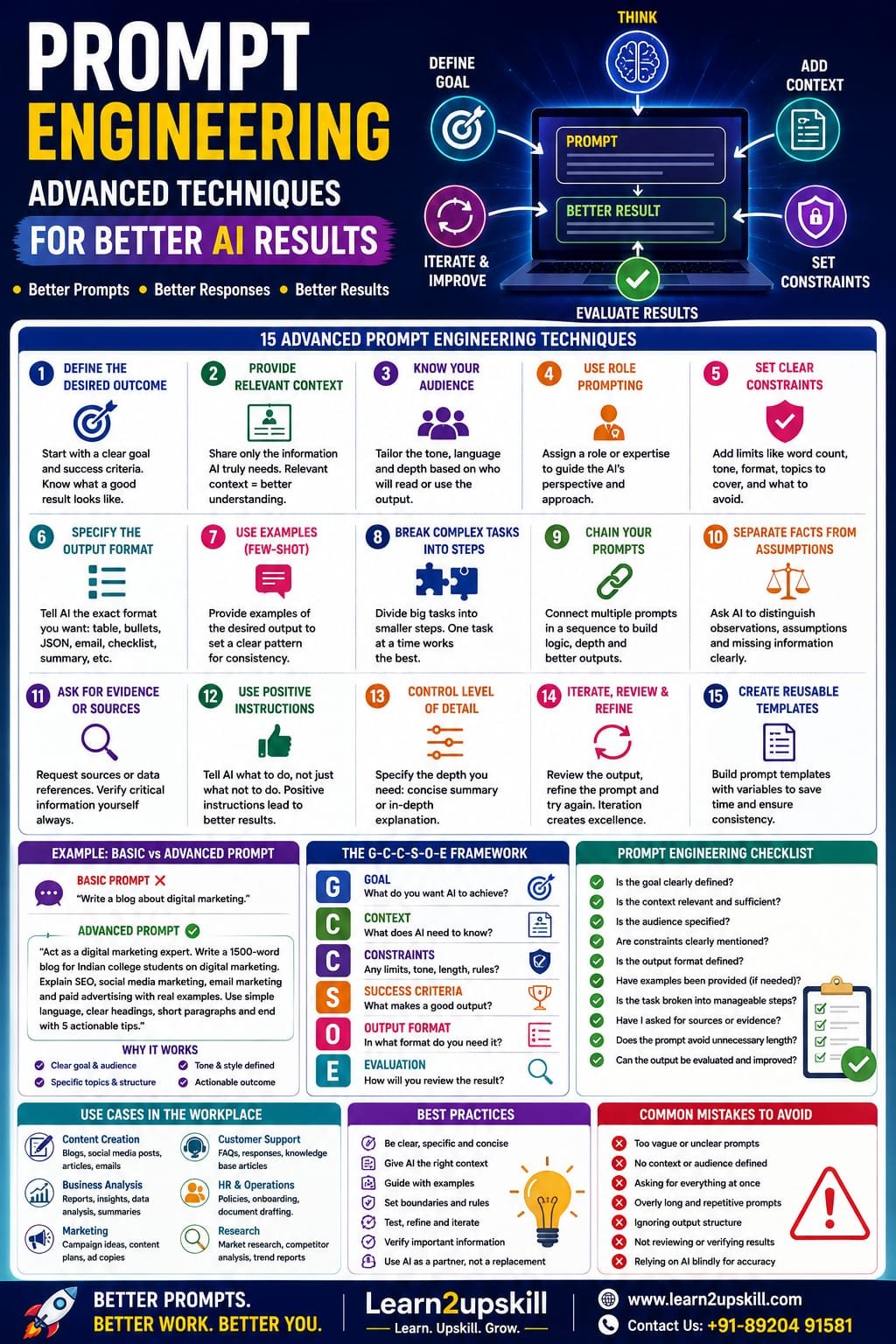
Prompt Engineering: Advanced Techniques for Better AI Results
Learn advanced prompt engineering techniques to get better AI results using clear goals, context, examples, constraints, structured outputs, iteration, evaluation and AI workflows.
Suggested URL Slug: /advanced-prompt-engineering-techniques/
Prompt Engineering: Advanced Techniques for Better AI Results
You ask an AI tool a question.
It gives you an answer.
But sometimes the answer is excellent—and sometimes it is vague, generic, too long, inaccurate or simply not what you wanted.
Why?
Often, the problem isn’t the AI model itself.
It’s the way the task was communicated.
This is where prompt engineering becomes important.
Prompt engineering is the practice of designing instructions and context so an AI system has a better understanding of the task, desired outcome, constraints and expected response.
For beginners, prompt engineering might mean learning how to write a clear question.
For advanced users, it goes much further.
You learn how to:
Define outcomes
Provide useful context
Give examples
Set constraints
Specify output formats
Break down complex tasks
Ask AI to evaluate its work
Build reusable prompt templates
Create multi-step workflows
Connect AI with tools and data
Test prompts systematically
OpenAI’s current model guidance emphasizes clear outcomes, success criteria, relevant context, constraints and desired output, while also recommending leaner prompts rather than unnecessary layers of instructions. �
OpenAI Developers +1
So let’s move beyond basic “write me a prompt” advice and explore advanced techniques that can make AI interactions more useful and reliable.
What Is Prompt Engineering?
Prompt engineering is the process of creating effective instructions for an AI model to achieve a particular result.
A basic prompt might be:
“Write a blog about digital marketing.”
An improved prompt might be:
“Write a 1,500-word beginner-friendly blog about digital marketing for Indian college students. Explain SEO, social media marketing, email marketing and paid advertising. Use practical examples, short paragraphs and clear headings. End with five actionable tips.”
The second prompt provides much more useful information.
It tells the AI:
What to write + who it’s for + how long + what to cover + how to structure it.
But advanced prompting goes further than simply adding more instructions.
Why Prompt Engineering Matters
AI models are powerful, but they don’t automatically know:
What your real objective is
Who your audience is
What information matters most
What constraints you’re working under
What a successful answer looks like
Which format you prefer
What the AI should avoid
A well-designed prompt reduces ambiguity.
This can help you get more:
Relevant answers
Consistent outputs
Useful ideas
Structured content
Actionable recommendations
Professional results
However, better prompting does not guarantee factual accuracy. Important information should still be verified.
Basic Prompt vs Advanced Prompt
Consider this basic request:
“Analyze my business.”
There are many possible interpretations.
Now consider:
“Act as a business analyst. Analyze the following monthly sales data for a small online education business. Identify the three biggest trends, unusual changes, possible causes, and five practical actions management should consider. Separate observations from assumptions. Present the result in a table followed by a short executive summary.”
The second prompt establishes:
Role
Context
Objective
Analysis criteria
Evidence boundaries
Output format
That’s the difference between a casual prompt and a more advanced one.
- Start With the Desired Outcome
One of the most useful advanced prompting techniques is to describe what success looks like.
Instead of:
“Help me improve my website.”
Try:
“Identify the five highest-impact improvements I can make to increase course-enrollment conversions on my website. Prioritize the recommendations by expected impact and effort.”
The second prompt defines an outcome.
OpenAI’s current guidance recommends outcome-first prompting: describe the target result, success criteria, constraints and available context, while avoiding unnecessary step-by-step instructions when the exact process isn’t important. �
OpenAI Developers
Better prompt formula:
Goal → Success criteria → Context → Constraints → Output
- Give the AI Relevant Context
Context is one of the most important ingredients in a useful prompt.
Suppose you ask:
“Create a marketing strategy.”
AI doesn’t know:
What you’re selling
Who your customers are
Your budget
Your location
Your competitors
Your marketing channels
Your objective
Add context:
“I run an online learning website offering short courses for students and working professionals. Courses are priced affordably, and our current marketing channels include Instagram, Facebook, LinkedIn and YouTube. Create a 30-day content strategy focused on increasing website visits and course enquiries.”
Now the AI has something to work with.
Remember:
More information isn’t always better.
Give the AI relevant information, not a giant pile of unrelated details.
- Define the Audience
AI output should change depending on who will consume it.
Compare:
“Explain Generative AI.”
with:
“Explain Generative AI to Class 8 students using simple language and two everyday examples.”
And:
“Explain Generative AI to senior business executives focusing on productivity, risk and implementation.”
Same topic.
Completely different communication.
Always consider:
Who is reading or using the output?
- Specify the Role When It Helps
You can tell an AI model what perspective or expertise to adopt.
For example:
“Act as an experienced SEO strategist.”
Or:
“Act as a career counsellor helping recent graduates.”
Or:
“Act as a financial analyst reviewing business performance.”
This can help establish the desired perspective.
But don’t assume the phrase “Act as an expert” magically makes the answer correct.
Role prompting helps communicate the intended perspective; it doesn’t replace verification or real expertise.
- Use Constraints
Constraints tell the AI what boundaries it needs to respect.
For example:
“Write a 700-word article using simple language, no unnecessary jargon, no more than five main sections, and include practical examples.”
Useful constraints include:
Word count
Number of sections
Audience level
Tone
Format
Required topics
Forbidden content
Reading level
Geographic context
Business limitations
Constraints are especially useful when you need consistent outputs.
- Specify the Output Format
Don’t leave the final format completely open when structure matters.
You can request:
Table
Bullet points
Checklist
Step-by-step guide
Executive summary
FAQ
JSON
Presentation outline
Comparison matrix
For example:
“Compare these five AI tools in a table with columns for price, primary use, strengths, limitations and ideal user.”
This is much more predictable than:
“Compare these AI tools.”
OpenAI’s current guidance also recommends explicitly specifying output shape and verbosity when those details matter. �
OpenAI Developers
- Use Examples: Few-Shot Prompting
One powerful advanced technique is giving the AI examples of the kind of output you want.
This is often called few-shot prompting.
For example:
“Convert product descriptions into short social-media captions.
Example: Product: Online Excel course
Caption: Learn Excel skills that help you work smarter, faster and more confidently.
Now create captions for these five products.”
The example gives the model a pattern to follow.
This can be useful when you want:
Consistent formatting
Specific tone
Repeated content structures
Classification
Categorization
Standardized responses
- Break Complex Tasks Into Smaller Tasks
Don’t always ask AI to complete a complicated project in one enormous prompt.
Instead of:
“Create my entire marketing strategy.”
Break it into stages.
Step 1
Analyze the target audience.
Step 2
Identify their problems.
Step 3
Develop content themes.
Step 4
Create a content calendar.
Step 5
Create distribution ideas.
Step 6
Define metrics.
This approach makes it easier to review each stage.
It also helps you catch mistakes earlier.
- Use Prompt Chaining
Prompt chaining means connecting multiple AI tasks together.
For example:
Prompt 1
“Analyze this customer feedback.”
↓
Prompt 2
“Group the feedback into five major themes.”
↓
Prompt 3
“Identify the three biggest customer problems.”
↓
Prompt 4
“Suggest solutions for each problem.”
↓
Prompt 5
“Create an executive summary.”
Instead of asking AI to do everything simultaneously, you create a workflow.
This is especially useful for research, analysis, content creation and business processes.
- Ask AI to Identify Assumptions
AI can sometimes make assumptions without clearly telling you.
You can explicitly ask:
“Separate information directly supported by the provided data from assumptions or interpretations.”
This is particularly useful for:
Business analysis
Market research
Strategy
Financial analysis
Research
Decision support
It helps you distinguish:
Known → Inferred → Unknown
That’s a very useful habit when working with AI.
- Ask for Evidence or Sources
For research-oriented tasks, ask AI to distinguish between information and evidence.
For example:
“For each major claim, identify the source or evidence supporting it. If evidence is unavailable, clearly mark the claim as unverified.”
For current information, use a tool or workflow that can actually access current sources.
Don’t assume that an AI-generated citation is genuine.
Always check important sources yourself.
- Use AI for Critique, Not Just Creation
Most people use AI like this:
Create something → Done.
Advanced users can use another approach:
Create → Critique → Improve → Evaluate
For example:
“Review this article as an SEO editor. Identify weak headings, repetitive sections, unclear explanations and missing search intent. Do not rewrite the article yet.”
Then:
“Now revise the article based on the highest-priority issues.”
This creates a feedback loop.
- Ask AI to Compare Multiple Options
Instead of asking:
“Which option is best?”
ask:
“Compare these three options using cost, implementation difficulty, scalability, risk and expected impact. Identify the best option for a small business with a limited budget.”
Now the model has criteria.
This is much better for decision support.
You can also ask it to explain:
Why Option A wins
When Option B would be better
What assumptions influence the recommendation
That makes the result more useful.
- Use Decision Criteria
When you’re making a decision, tell AI what matters.
For example:
“Recommend an online learning platform. Prioritize low cost, easy setup, mobile access, recording capability and beginner-friendly administration. Treat advanced customization as less important.”
Without priorities, AI may optimize for the wrong thing.
Advanced prompting isn’t about writing longer prompts.
It’s about making the decision criteria clear.
- Use Positive Instructions
Instead of only telling AI what not to do, explain what you want.
Weak:
“Don’t make the article boring.”
Better:
“Use short paragraphs, practical examples, conversational language and specific takeaways.”
Weak:
“Don’t use complicated words.”
Better:
“Use simple language suitable for a general audience.”
Tell the model what success looks like.
- Use Delimiters for Important Context
When working with large amounts of text, clearly separate instructions from the material you’re asking AI to analyze.
For example:
TASK: Summarize the document.
DOCUMENT:
[Insert document here]
OUTPUT:
Give five key findings and three recommended actions.
This reduces ambiguity between:
Instructions
and
Information being analyzed.
It becomes particularly useful when working with documents, datasets and long inputs.
- Ask for Structured Data
If you’re processing repeated information, structured output can make AI much more useful.
For example:
“Extract the following information from each customer review:
Product
Main complaint
Sentiment
Urgency
Suggested action”
You could request a table.
For software applications, structured-output features can provide stronger machine-readable consistency than relying entirely on natural-language formatting. OpenAI’s API documentation currently supports Structured Outputs for responses that adhere to a specified schema. �
OpenAI Platform
- Control the Level of Detail
Sometimes AI gives you too much information.
Sometimes it gives you too little.
Specify the level you need.
For example:
“Give me a concise executive summary in 150 words.”
Or:
“Explain this concept in depth with examples, edge cases and practical recommendations.”
OpenAI’s current model guidance recommends explicitly controlling response length and verbosity when the application requires consistent output. �
OpenAI Developers
- Use Iterative Prompting
Don’t expect your first prompt to be perfect.
Start.
Review.
Improve.
Try again.
For example:
First prompt
“Create a blog outline about AI automation.”
Follow-up
“Make it more suitable for small-business owners.”
Follow-up
“Add practical examples from marketing, HR and finance.”
Follow-up
“Make the headings more SEO-friendly.”
Follow-up
“Identify missing search-intent questions.”
This is often more effective than trying to write one giant prompt containing every possible instruction.
- Create Reusable Prompt Templates
If you perform the same task repeatedly, don’t start from scratch every time.
Create a template.
Example: Blog Prompt Template
Role: SEO content strategist
Topic: [TOPIC]
Audience: [AUDIENCE]
Goal: [GOAL]
Length: [WORD COUNT]
Primary keyword: [KEYWORD]
Secondary keywords: [KEYWORDS]
Required sections: [SECTIONS]
Tone: [TONE]
Output: [FORMAT]
Then fill in the variables.
This saves time and creates more consistent results.
- Build Prompts Around Success Criteria
One of the most powerful advanced techniques is explicitly defining what a successful result must contain.
For example:
Create a 1,000-word beginner guide to AI automation. Success means the article:
Explains AI automation clearly
Includes three real-world examples
Uses simple language
Includes practical steps
Avoids unsupported statistics
Ends with a five-point checklist
Now the AI knows how you will judge the result.
This outcome-first approach is emphasized in current OpenAI guidance for newer models. �
OpenAI Developers
- Add Stop Conditions
For complex AI workflows, tell the system when it should stop, ask a question or report that it cannot complete something.
For example:
“If the information provided is insufficient to make a reliable recommendation, identify the missing information rather than guessing.”
This is particularly useful for:
Research
Business analysis
AI agents
Automated workflows
Customer support
Decision-support systems
A good AI system shouldn’t simply produce an answer at all costs.
Sometimes the correct output is:
“I need more information.”
- Use AI Evaluation
Advanced prompting isn’t just about creating prompts.
It’s also about measuring whether they work.
Suppose you create a prompt for generating customer-support responses.
Test it against 20 realistic customer questions.
Evaluate:
Accuracy
Relevance
Tone
Completeness
Policy compliance
Consistency
Then improve the prompt.
For applications, OpenAI recommends using representative evaluations and rerunning them after prompt changes rather than assuming that a prompt improvement is actually an improvement. �
OpenAI Developers +1
Think:
Prompt → Test → Measure → Improve → Test again
- Don’t Make Prompts Unnecessarily Long
This is an important advanced lesson.
Many people believe:
Longer prompt = Better answer
Not necessarily.
Current OpenAI guidance specifically recommends leaner prompts, removing repeated instructions and unnecessary examples while keeping the context and requirements that genuinely affect behavior. �
OpenAI Developers
A good prompt is:
Clear, relevant, specific and purposeful.
Not:
Long, repetitive and complicated.
- Use the Right Level of Specificity
Too little information:
“Create a business strategy.”
Too much information:
A 3,000-word instruction containing dozens of unnecessary rules.
The goal is the middle ground.
Give the model:
Goal
Context
Constraints
Success criteria
Output requirements
Then let it solve the task.
For newer reasoning-capable models, OpenAI recommends avoiding unnecessary step-by-step process instructions when the exact process isn’t important. �
OpenAI Developers
- Prompt Engineering for Research
Research prompts should clearly define:
Research question
Geographic scope
Time period
Target audience
Required evidence
Sources
Output structure
Example:
“Research the growth of AI skills in the Indian job market from 2024–2026. Use reliable current sources. Separate confirmed facts from interpretation. Summarize the findings in a table and identify five implications for students.”
For current or important claims, verify the sources independently.
- Prompt Engineering for Marketing
Marketing prompts can include:
Product + Audience + Problem + Platform + Objective + Tone
Example:
“Create five LinkedIn post ideas promoting an online Excel course for working professionals. Focus on productivity and career development. Use a professional but approachable tone. Each idea should include a hook, three key points and a CTA.”
That’s much more useful than:
“Write LinkedIn posts for my Excel course.”
- Prompt Engineering for Business Analysis
Try:
“Act as a business analyst. Review this sales dataset and identify revenue trends, underperforming categories, unusual changes and three business questions management should investigate. Clearly distinguish observations from assumptions. Present the results in a concise executive format.”
This kind of prompt is useful because it defines:
Role + data + objective + analysis criteria + evidence boundary + output.
- Prompt Engineering for Public Speaking
You can also use advanced prompting for your public-speaking content.
Example:
“Act as a public-speaking coach. I’m preparing a five-minute presentation for college students about AI and future careers. Create an engaging opening, three key points, one story, two audience questions and a memorable conclusion. Use simple conversational language.”
Then:
“Now act as a skeptical audience member and ask me 10 difficult questions.”
Then:
“Evaluate my answers for clarity, confidence and relevance.”
This turns AI into a practice partner, not just a content generator.
- Prompt Engineering for AI Agents
Prompt engineering becomes even more important when AI is connected to tools and business systems.
An agent may need instructions covering:
Goal
Available tools
Permissions
Evidence requirements
Allowed actions
Approval requirements
Error handling
Escalation rules
Stop conditions
For example:
Goal: Resolve customer requests.
Success: Provide an accurate response or escalate appropriately.
Constraints: Never modify customer billing information without approval.
Evidence: Use approved knowledge sources.
Escalation: If information is missing or confidence is low, ask for clarification or route to a human.
This is much closer to AI workflow design than simple prompt writing.
The Advanced Prompt Engineering Framework
Here’s a framework you can remember:
G-C-C-S-O-E
G — Goal
What do you want?
C — Context
What does the AI need to know?
C — Constraints
What boundaries should it follow?
S — Success Criteria
What does a good answer look like?
O — Output
What format do you want?
E — Evaluation
How will you judge the result?
Example
Goal: Create a career-development article.
Context: Audience is Indian college students.
Constraints: 1,500 words, simple English, practical examples.
Success: Clear, useful and actionable.
Output: SEO article with headings, FAQs and checklist.
Evaluation: Check clarity, relevance and keyword coverage.
This is a strong starting point for advanced prompting.
10 Advanced Prompt Templates You Can Use
- Expert Analysis
“Act as a [ROLE]. Analyze [INPUT] for [OBJECTIVE]. Use [CRITERIA]. Separate facts from assumptions. Present the result as [FORMAT].”
- Content Creation
“Create a [CONTENT TYPE] for [AUDIENCE] about [TOPIC]. The goal is [GOAL]. Use [TONE]. Include [REQUIRED ELEMENTS]. Keep it within [LENGTH].”
- Critique
“Review the following [CONTENT] as a [ROLE]. Identify the five highest-impact weaknesses and explain how to improve each. Do not rewrite it yet.”
- Comparison
“Compare [OPTIONS] using [CRITERIA]. Explain the trade-offs, identify the best option for [CONTEXT], and state the assumptions behind your recommendation.”
- Research
“Research [QUESTION] using reliable sources from [TIME PERIOD/REGION]. Separate evidence from interpretation and summarize the findings in [FORMAT].”
- Data Analysis
“Analyze the provided data. Identify [METRICS/TRENDS]. Flag anomalies. Separate observations from assumptions. End with [NUMBER] recommended actions.”
- Summarization
“Summarize this material for [AUDIENCE]. Extract [KEY INFORMATION]. Preserve important caveats. Present the result in [FORMAT].”
- Brainstorming
“Generate [NUMBER] ideas for [OBJECTIVE]. Group them by category and rank them by [CRITERIA]. Explain the top five.”
- Decision Support
“Help me decide between [OPTIONS]. Prioritize [CRITERIA]. Show the main trade-offs, risks and assumptions before recommending an option.”
- AI Agent
“Your goal is [GOAL]. You may use [TOOLS]. Success means [CRITERIA]. You must follow [CONSTRAINTS]. Ask for clarification when [CONDITION]. Stop when [STOP CONDITION].”
Common Prompt Engineering Mistakes
❌ Mistake 1: Being Too Vague
“Make this better.”
Better:
“Improve the introduction so it is clearer, more engaging and suitable for beginners.”
❌ Mistake 2: Giving No Context
AI can’t read your mind.
Explain the situation.
❌ Mistake 3: Asking for Everything at Once
Break complex tasks into stages when useful.
❌ Mistake 4: Adding Endless Instructions
More instructions aren’t automatically better.
Remove repetition.
❌ Mistake 5: Not Defining Success
Tell AI what a good result looks like.
❌ Mistake 6: Trusting the First Answer
Review and refine.
❌ Mistake 7: Ignoring Accuracy
Verify important claims.
❌ Mistake 8: Not Testing Prompts
If you’re using AI repeatedly, evaluate whether the prompt actually performs better.
Prompt Engineering in 2026: What’s Changing?
Prompt engineering is becoming more sophisticated.
The focus is gradually moving from:
“Write the perfect prompt.”
to:
“Design the right AI interaction.”
That can involve:
Prompts
Context
Files
Knowledge sources
Tools
Structured outputs
Evaluation
Memory
Workflows
Agents
Modern AI platforms increasingly combine models with tools, file search, web search, structured outputs and agent capabilities. �
OpenAI Platform +1
So advanced prompt engineering is increasingly connected to context engineering, workflow design and AI application development.
Do You Need Coding to Learn Prompt Engineering?
No.
Basic and intermediate prompt engineering can be learned without programming.
You can use prompting for:
Content
Marketing
Education
Presentations
Research
Business analysis
Customer service
Career development
However, technical professionals can take prompting further by combining it with:
APIs
Automation
RAG
AI agents
Structured outputs
Evaluation
Software development
That’s where prompt engineering becomes part of larger AI systems.
Prompt Engineering for Students
Students can use advanced prompting to:
Understand difficult concepts
Create study plans
Generate practice questions
Prepare presentations
Practice interviews
Brainstorm projects
Summarize notes
Improve writing
Explore career options
But students should use AI to learn, not simply submit AI-generated work without understanding it.
The best approach is:
Ask → Understand → Question → Practice → Create
Prompt Engineering for Professionals
Professionals can use prompting to improve:
Productivity
Summaries, emails and planning.
Analysis
Reports, trends and structured insights.
Communication
Presentations, proposals and explanations.
Research
Information gathering and synthesis.
Automation
Repeatable AI workflows.
Decision Support
Comparing options and identifying risks.
The real advantage comes when AI becomes part of your workflow rather than a tool you open only when you have a question.
The Future of Prompt Engineering
Prompt engineering will continue to evolve as AI models become better at understanding context and user intent.
The skill is unlikely to disappear.
But it may change.
Instead of spending all your time trying to find the perfect wording, you’ll increasingly need to understand:
What should AI do?
What information should AI receive?
What tools should it use?
What should it be allowed to do?
How do we know the result is good?
When should a human take over?
That’s a much broader skill.
And it’s why prompt engineering is becoming part of AI literacy, workflow design and AI strategy.
Final Thoughts
Prompt engineering isn’t about discovering a magical sentence that makes AI perfect.
It’s about communicating goals clearly and designing useful AI interactions.
The most effective approach is to:
Define the goal.
Provide relevant context.
Specify constraints.
Define success.
Choose the right output format.
Use examples when helpful.
Break complex tasks into manageable stages.
Iterate.
Evaluate the results.
Verify important information.
And remember:
A better prompt can improve an AI response—but good judgment still belongs to the human.
The future isn’t about writing longer prompts.
It’s about becoming better at working with intelligent systems.
Learn the prompt. Understand the process. Evaluate the result. Build better with AI.
Quick Prompt Engineering Checklist
Before sending an important prompt, ask:
[ ] Is my goal clear?
[ ] Did I provide relevant context?
[ ] Did I define the audience?
[ ] Did I explain the desired outcome?
[ ] Did I specify important constraints?
[ ] Did I define what success looks like?
[ ] Did I request the right output format?
[ ] Would an example improve consistency?
[ ] Should the task be broken into smaller steps?
[ ] Can I verify the result?
[ ] Should the AI ask for clarification if information is missing?
[ ] Am I giving unnecessary instructions?
[ ] Can this prompt become a reusable template?
[ ] If used repeatedly, have I tested its performance?
Build Advanced AI Skills With Learn2upskill
Prompt engineering is just one part of becoming an advanced AI user.
At Learn2upskill, learners can explore practical skills across:
Advanced AI • Generative AI • Prompt Engineering • AI Agents • AI Automation • ChatGPT • Business Analysis • Excel • Digital Marketing • Cybersecurity • Professional Development
The goal isn’t simply to learn how to ask AI questions.
It’s to learn how to use AI to solve real problems, improve productivity and build future-ready skills.
Learn. Upskill. Grow.
🌐 www.coral-kudu-326218.hostingersite.com�
Contact Us: +91-89204 91581
Leave a Reply