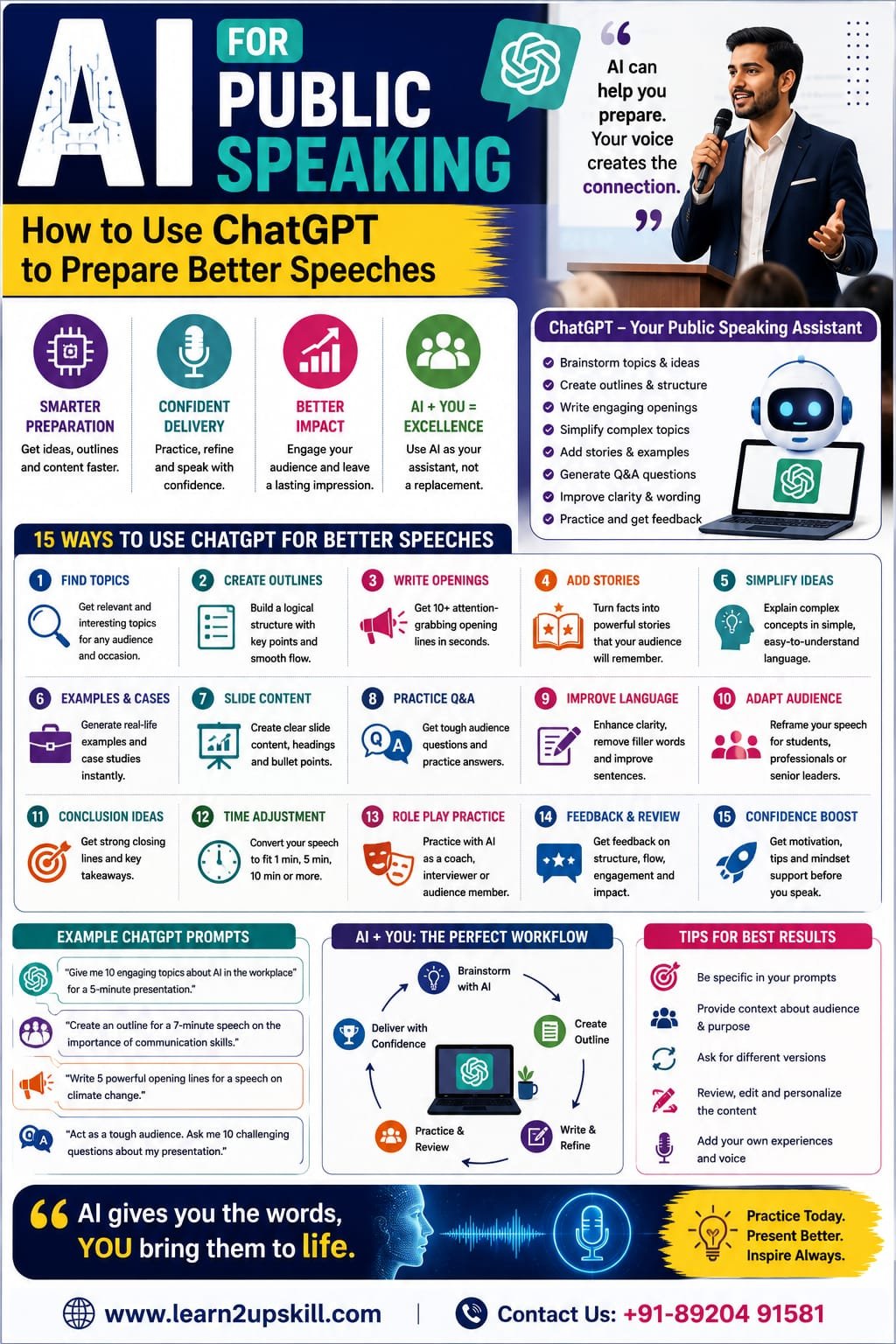
AI for Public Speaking: How to Use ChatGPT for Better Speeches
Learn how to use ChatGPT for public speaking to create speech ideas, outlines, openings, stories, Q&A questions, practice sessions and presentation content.
Suggested URL Slug: /ai-for-public-speaking-how-to-use-chatgpt/
AI for Public Speaking: How to Use ChatGPT to Prepare Better Speeches
Public speaking can be challenging.
You may know your subject well but struggle to organize your thoughts. You may have difficulty finding the right opening, worry about forgetting your points, or feel nervous about questions from the audience.
This is where AI can become a useful preparation partner.
Tools such as ChatGPT can help you brainstorm ideas, create speech outlines, improve wording, generate practice questions, simplify complicated topics and rehearse different speaking situations.
But there is an important distinction:
AI can help you prepare a better speech. It cannot replace your voice, experience, judgment or connection with the audience.
The strongest approach is therefore:
AI + Human Expertise + Practice = Better Public Speaking
OpenAI recommends giving ChatGPT clear, specific instructions, providing relevant context, specifying the desired format or tone, and refining the response through follow-up prompts. �
OpenAI Help Center +1
Let’s look at how you can put that into practice.
What Is AI for Public Speaking?
AI for public speaking means using artificial intelligence tools to support different stages of speech preparation and delivery.
For example, you can use ChatGPT to help with:
Choosing a speech topic
Brainstorming ideas
Creating an outline
Writing an introduction
Developing stories
Simplifying complex information
Creating examples
Preparing presentation slides
Generating audience questions
Practicing interviews
Rehearsing difficult conversations
Improving clarity
Creating different versions for different audiences
Think of ChatGPT as a virtual preparation assistant.
You remain the speaker.
Why Use ChatGPT for Public Speaking?
Preparing a speech can take considerable time.
You may stare at a blank document wondering:
“How do I even begin?”
ChatGPT can help you get past that first hurdle.
It can quickly give you several possible directions, which you can then evaluate and adapt.
For example, instead of asking:
“Write a speech about AI.”
you could provide more useful context:
“I’m a college student preparing a five-minute presentation about how AI is changing education. My audience has basic knowledge of AI. Create a simple structure with an engaging opening, three main points, one real-world example and a memorable conclusion.”
The second prompt gives the AI much more information about your goal.
- Use ChatGPT to Find Speech Ideas
Sometimes the hardest part is choosing what to talk about.
You can ask ChatGPT for topic ideas based on:
Your audience
Your industry
Your interests
Your time limit
The event
Your level of expertise
Try this prompt:
“Give me 15 public-speaking topics for college students about AI, careers and future workplace skills. Make the topics practical, interesting and suitable for a five-minute speech.”
You can then choose the topic that best matches your knowledge and audience.
Don’t automatically choose the first idea AI gives you.
Evaluate it.
Ask:
Is this relevant?
Do I understand it?
Will my audience care?
- Ask ChatGPT to Create a Speech Outline
Once you have a topic, create a structure before writing the entire speech.
Example prompt:
“Create a seven-minute speech outline on ‘Why Communication Skills Matter in the Age of AI.’ Include an attention-grabbing opening, three main arguments, two examples, one audience question and a strong conclusion.”
A good outline might look like:
Opening question
How AI is changing work
Why communication remains important
Examples from the workplace
AI + human skills
Practical advice
Conclusion
Now you have a roadmap.
- Create a Powerful Opening
The first few seconds of a speech can be challenging.
ChatGPT can help you brainstorm different openings.
Prompt:
“Give me 10 different opening lines for a five-minute speech about public speaking in the age of AI. Include questions, surprising statements, short stories and thought-provoking openings. Keep them natural rather than overly dramatic.”
You can choose the strongest option and adapt it to your personality.
For example:
“If AI can write a speech in seconds, why should we still learn how to speak?”
That’s a question that immediately creates curiosity.
- Generate Different Speech Hooks
A hook is something that captures attention at the beginning.
ChatGPT can generate hooks based on different approaches.
Question hook
“What would happen if everyone in this room suddenly lost access to AI?”
Story hook
“Last year, I watched a colleague turn a complicated business problem into a simple story—and everyone immediately understood it.”
Contrarian hook
“AI may actually make communication skills more valuable, not less.”
Statistics hook
If you’re using statistics, verify important figures with reliable sources rather than assuming an AI-generated number is correct.
- Turn Facts Into Stories
A speech full of statistics can become difficult to follow.
Stories create context.
Suppose your topic is cybersecurity.
Instead of simply saying:
“Phishing attacks can cause serious business damage.”
you could build a short scenario:
“Imagine receiving an email that appears to come from your manager. It asks you to urgently approve a payment. The logo looks correct, the language sounds professional, and the request appears genuine. Would you click?”
ChatGPT can help you develop scenarios like this.
Prompt:
“Turn these three facts about phishing into a short workplace story that I can use during a five-minute presentation. Keep it realistic and easy for non-technical employees to understand.”
Then review the result and make it your own.
- Simplify Complicated Topics
This is particularly useful for students and professionals.
You may understand a technical concept but struggle to explain it to a non-technical audience.
Ask ChatGPT:
“Explain machine learning in simple language that a group of high-school students can understand. Use one everyday example and avoid technical jargon.”
You can then ask:
“Now explain the same concept to business managers who don’t have a technical background.”
This helps you adapt your message to different audiences.
- Create Examples and Analogies
Analogies can make difficult concepts easier to understand.
For example, you could ask:
“Give me five simple analogies for explaining artificial intelligence to beginners.”
You might compare AI with:
A smart assistant
A pattern-recognition system
A highly trained helper
A recommendation engine
Choose an analogy that actually fits your subject.
Don’t use an analogy simply because AI generated it.
Make sure the comparison is accurate.
- Improve Your Speech Language
Sometimes your ideas are good but your wording is too complicated.
Give ChatGPT your draft and ask:
“Rewrite this speech using simple, natural language suitable for a general audience. Keep my original meaning and avoid making it sound overly formal or AI-generated.”
You can also ask it to:
Remove repetition
Shorten long sentences
Improve transitions
Make the introduction stronger
Make the conclusion clearer
OpenAI recommends iterative prompting—reviewing the output and refining the request rather than expecting one perfect response from the first prompt. �
OpenAI Help Center +1
- Practice Different Speech Lengths
Sometimes you need a:
30-second introduction
1-minute elevator pitch
3-minute speech
5-minute presentation
10-minute seminar
30-minute workshop
ChatGPT can help you adapt the same idea to different time limits.
Try:
“Turn this five-minute speech into a 60-second version while keeping the main message, one example and the conclusion.”
This is especially useful when you’re suddenly asked:
“Can you explain this in one minute?”
- Prepare for Audience Questions
Q&A sessions can make speakers nervous.
Use ChatGPT to create a practice list.
Prompt:
“I am presenting a 10-minute presentation about digital marketing to small-business owners. Act as a challenging audience and ask me 15 questions they might ask after the presentation.”
Then answer the questions yourself.
After that, you can ask:
“Review my answers and tell me where my explanations are unclear.”
This creates a simple practice loop:
AI asks → You answer → AI gives feedback → You improve.
- Practice Difficult Questions
You can make the simulation more challenging.
For example:
“Act as a skeptical senior manager. Ask me five challenging questions about my proposed AI project. Do not make the questions easy.”
Or:
“Act as a customer who disagrees with my proposal. Ask difficult questions and challenge my assumptions one at a time.”
This can help you prepare for real-world situations where the audience isn’t simply listening politely.
- Use ChatGPT for Interview Speaking Practice
Job interviews are another form of professional speaking.
You can ask ChatGPT to simulate an interviewer.
Prompt:
“Act as a job interviewer for a Business Analyst position. Ask me one question at a time. After each answer, give concise feedback on my clarity, structure and communication.”
You can practice:
Tell me about yourself
Explain your biggest achievement
Describe a difficult situation
Why should we hire you?
Why are you changing jobs?
Explain a technical concept
Tell me about a project
This is especially useful if you become nervous during interviews.
- Practice Your Elevator Pitch
An elevator pitch is a short introduction that explains who you are and what you do.
For example:
“I’m a digital marketing professional specializing in SEO and content strategy. I help businesses improve their online visibility through data-driven content and search optimization.”
Ask ChatGPT:
“Help me create a 30-second professional introduction for a digital marketing professional. Make it confident, natural and conversational rather than sales-focused.”
Then customize it.
Your final version should sound like you, not like a chatbot.
- Ask ChatGPT to Challenge Your Speech
Don’t only ask AI to praise your presentation.
Ask it to find weaknesses.
Prompt:
“Review this speech as a critical public-speaking coach. Identify unclear arguments, weak transitions, repetitive points, unnecessary information and places where the audience may lose interest. Give practical improvements.”
This is much more useful than simply asking:
“Is my speech good?”
Specific questions produce more useful feedback.
- Improve Your Transitions
A speech can feel disorganized if you jump from one idea to another.
Use ChatGPT to create smoother transitions.
Prompt:
“Write natural transition sentences connecting these three sections of my speech. Keep them short and conversational.”
For example:
“Now that we’ve looked at the problem, let’s examine what we can actually do about it.”
A good transition tells the audience where you’re going next.
- Create a Strong Conclusion
Never underestimate the importance of the final 30 seconds.
Ask:
“Give me five memorable ways to conclude a five-minute presentation about communication skills in the age of AI. Include a call to action and avoid clichés.”
Your conclusion might include:
A final question
A call to action
A memorable statement
Three key takeaways
A connection back to your opening
A strong ending gives your audience something to remember.
- Use ChatGPT as a Speech Coach
You can create a repeatable workflow.
Step 1: Choose your topic
Ask AI for ideas.
Step 2: Define your audience
Tell ChatGPT who will listen.
Step 3: Create an outline
Ask for a logical structure.
Step 4: Write your first draft
Use AI for brainstorming and organization.
Step 5: Add your own experiences
Insert personal stories and examples.
Step 6: Improve the language
Ask AI to simplify and strengthen the draft.
Step 7: Generate questions
Practice likely audience questions.
Step 8: Rehearse
Speak aloud.
Step 9: Get feedback
Ask AI or another person to identify weaknesses.
Step 10: Deliver
Use your own voice.
This approach makes AI part of your preparation—not a replacement for preparation.
- Create a Personalized Prompt
The quality of your output depends heavily on the information you give the AI.
A weak prompt:
“Write a speech about leadership.”
A better prompt:
“I am a 25-year-old professional preparing a seven-minute presentation for 30 employees about leadership in an AI-powered workplace. The audience has basic knowledge of AI. Create a practical speech with a strong opening, three key lessons, two workplace examples, one audience question and a memorable conclusion. Use simple, conversational language.”
The second prompt provides:
Audience
Topic
Duration
Purpose
Knowledge level
Structure
Tone
OpenAI’s prompting guidance similarly recommends being clear and specific, providing context, defining the desired outcome and breaking complex requests into smaller steps. �
OpenAI Help Center +1
- Use the “Role + Context + Task + Format” Formula
Here’s an easy formula for better public-speaking prompts.
Role
Tell ChatGPT what role it should take.
“Act as an experienced public-speaking coach…”
Context
Explain your situation.
“I’m preparing a five-minute college presentation…”
Task
Explain what you need.
“Help me create a compelling speech…”
Format
Specify the output.
“Give me an opening, three main points, examples and a conclusion.”
Put them together:
“Act as an experienced public-speaking coach. I’m preparing a five-minute college presentation about AI and future careers. Help me create an engaging speech for students with an attention-grabbing opening, three practical points, two examples, one audience question and a memorable conclusion. Keep the language simple and conversational.”
That’s a much stronger prompt.
- Don’t Let ChatGPT Replace Your Personality
This is perhaps the most important rule.
If ChatGPT writes every word and you simply memorize it, your speech may sound unnatural.
Your audience doesn’t want to hear a machine.
They want to hear you.
Add:
Your personal experience
Your examples
Your opinions
Your humor
Your observations
Your lessons
Your speaking style
AI should help you become a better communicator—not make every speaker sound identical.
- Verify Important Facts
AI-generated content should not automatically be treated as fact.
If your speech contains:
Statistics
Research findings
Historical facts
Financial information
Medical claims
Legal information
Current events
Company information
verify important claims using reliable sources.
For current information, ChatGPT can use web search when available, but you should still review important sources and citations before presenting them publicly. OpenAI notes that ChatGPT can search the web for up-to-date information with citations in supported experiences. �
OpenAI Help Center +1
Your credibility is ultimately your responsibility.
- Protect Confidential Information
If you’re preparing a workplace presentation, be careful about what information you put into an AI tool.
Don’t casually paste:
Confidential company documents
Customer information
Passwords
Private employee information
Trade secrets
Sensitive financial information
Proprietary business plans
Use only information you’re authorized to share with the tool, and follow your organization’s AI policies.
AI can help with communication—but professional judgment and data protection still matter.
- Build a Complete Speech With ChatGPT
Here’s a practical workflow you can reuse.
Prompt 1: Topic
“Give me five presentation topics about AI and workplace productivity.”
Prompt 2: Audience
“My audience is working professionals with basic AI knowledge.”
Prompt 3: Structure
“Create a seven-minute presentation structure with an opening, three main points and a conclusion.”
Prompt 4: Opening
“Give me five engaging opening options.”
Prompt 5: Examples
“Give me three realistic workplace examples.”
Prompt 6: Questions
“Generate 10 challenging audience questions.”
Prompt 7: Feedback
“Review my draft as a public-speaking coach.”
Prompt 8: Final polish
“Make the speech clear, natural and conversational while preserving my personal examples.”
This is much more effective than asking:
“Write my entire speech.”
- ChatGPT Prompts You Can Copy and Use
Prompt 1: Speech Ideas
“Give me 10 engaging speech topics about [topic] for [audience]. Make them practical and suitable for a [5/10]-minute presentation.”
Prompt 2: Speech Outline
“Create a clear outline for a [duration]-minute speech about [topic]. Include an engaging opening, three main points, examples and a memorable conclusion.”
Prompt 3: Opening
“Give me five attention-grabbing opening ideas for a speech about [topic]. Include a question, story, surprising statement and thought-provoking option.”
Prompt 4: Storytelling
“Turn this information into a short, realistic story that I can use in a professional presentation: [information].”
Prompt 5: Simplify
“Explain this concept in simple language for [audience]. Avoid unnecessary technical jargon and include one everyday example.”
Prompt 6: Q&A Practice
“Act as a challenging audience member. Ask me 10 questions about my presentation on [topic], one at a time.”
Prompt 7: Speech Feedback
“Act as a public-speaking coach. Review my speech and identify weak areas in structure, clarity, engagement, transitions and conclusion. Give practical suggestions.”
Prompt 8: Interview Practice
“Act as an interviewer for a [job title] position. Ask me one question at a time and give feedback on the clarity and confidence of my answers.”
Prompt 9: Shorten a Speech
“Reduce this 10-minute speech to five minutes while keeping the main message, strongest examples and conclusion.”
Prompt 10: Make It Sound Natural
“Rewrite this speech so it sounds natural and conversational. Keep my ideas and personal examples. Avoid overly formal or generic AI-style language.”
AI for Public Speaking: What ChatGPT Can and Cannot Do
ChatGPT Can Help With
You Still Need to Do
Brainstorm topics
Choose the best topic
Create outlines
Decide what matters
Suggest opening hooks
Deliver the opening naturally
Generate examples
Check whether examples are appropriate
Prepare questions
Practice answering them
Improve wording
Add your personality
Simplify complex ideas
Confirm accuracy
Suggest stories
Make them authentic
Help structure slides
Design for your actual audience
Provide practice scenarios
Build real speaking experience
The biggest lesson is simple:
AI can accelerate preparation. It cannot replace human communication.
AI + Public Speaking: The Future Skill Combination
The future of public speaking isn’t necessarily:
Humans vs AI
It’s:
Humans using AI effectively.
A professional who can:
Use AI to research
Analyze information
Create a presentation
Tell a compelling story
Explain complex ideas
Answer questions
Build trust
Communicate confidently
has a powerful combination of skills.
AI makes information easier to create.
Human communication makes information meaningful.
Final Thoughts
ChatGPT can become an extremely useful partner when preparing for a speech.
It can help you move from:
Blank page → Ideas → Outline → Draft → Practice → Feedback → Better speech
But don’t make the mistake of thinking that the best speech is the one AI writes for you.
The best speech is the one you understand, believe in and can deliver naturally.
Use ChatGPT to brainstorm.
Use it to structure.
Use it to challenge you.
Use it to help you practice.
Use it to improve your wording.
Then put the AI aside and speak like yourself.
Because audiences don’t connect with perfect sentences.
They connect with people.
Use AI to prepare better. Use your voice to connect better.
Quick AI Public Speaking Checklist
[ ] Define your audience.
[ ] Define your speaking goal.
[ ] Ask ChatGPT for topic ideas.
[ ] Create a clear speech structure.
[ ] Develop an engaging opening.
[ ] Add personal stories and examples.
[ ] Simplify complicated information.
[ ] Generate possible audience questions.
[ ] Practice difficult Q&A scenarios.
[ ] Ask ChatGPT for feedback.
[ ] Verify important facts.
[ ] Protect confidential information.
[ ] Practice the speech aloud.
[ ] Keep your own personality.
[ ] Don’t memorize AI-generated text word-for-word.
[ ] Deliver the final speech in your own voice.
Build AI & Communication Skills With Learn2upskill
The future of work requires more than technical knowledge.
Professionals need to understand AI and communicate effectively.
At Learn2upskill, we help students, professionals, job seekers and career changers develop practical skills for the modern workplace.
Explore learning opportunities in:
AI • Public Speaking • Communication • Excel • Business Analysis • Digital Marketing • Cybersecurity • Professional Development
Don’t just learn how AI works.
Learn how to use AI to communicate, create and grow.
Learn. Upskill. Grow.
🌐 www.coral-kudu-326218.hostingersite.com�
Contact Us: +91-89204 91581
Leave a Reply