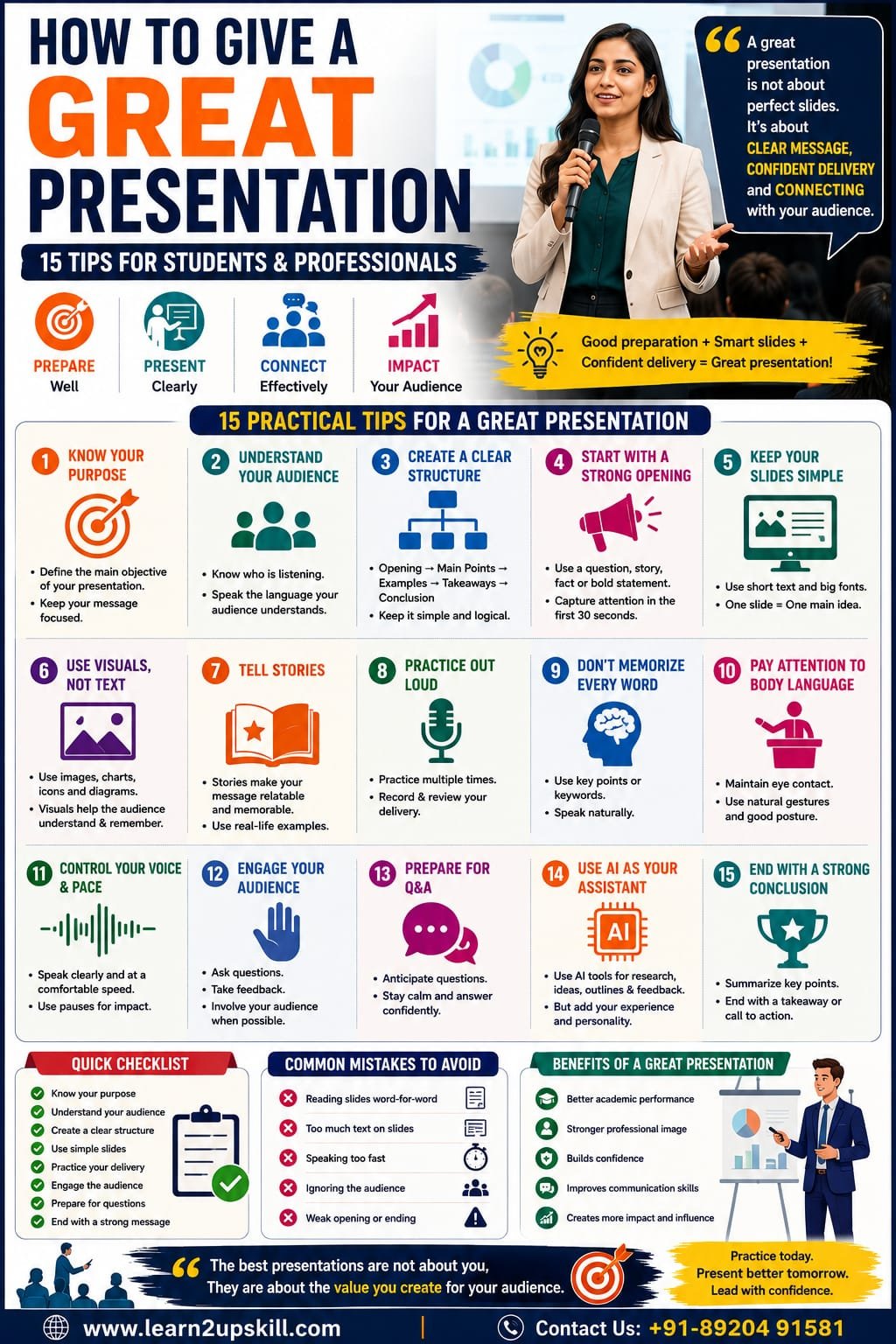
How to Give a Great Presentation: 15 Tips for Students & Professionals
Meta Description: Learn how to give a great presentation with 15 practical tips for students and professionals, including preparation, slide design, storytelling, body language, delivery, Q&A and AI tools.
Suggested URL Slug: /how-to-give-a-great-presentation/
How to Give a Great Presentation: 15 Tips for Students and Professionals
Whether you’re a student presenting a college project or a professional presenting an important business proposal, giving a great presentation is a valuable skill.
A good presentation isn’t simply about putting information on slides and reading it aloud.
It is about communicating an idea clearly, keeping your audience interested, and helping them understand what you want them to remember or do.
You may have excellent knowledge of your subject, but if your presentation is confusing, overloaded with text, or delivered without confidence, your message can easily get lost.
The good news is that presentation skills can be learned.
You don’t need to be a naturally confident speaker.
With proper preparation, a clear structure, good visual design and regular practice, you can significantly improve your presentations.
In this guide, we’ll explore 15 practical presentation tips that students and professionals can use immediately.
What Makes a Great Presentation?
Before discussing the tips, let’s understand what separates an average presentation from a great one.
A strong presentation usually has:
A clear objective
A logical structure
Relevant information
Simple and attractive slides
An engaging opening
Good storytelling
Confident delivery
Effective body language
Audience interaction
A memorable conclusion
The best presentations aren’t necessarily the longest.
They’re the ones where the audience understands the right message.
- Know the Purpose of Your Presentation
Before creating your first slide, answer one simple question:
“What do I want my audience to understand, remember or do after this presentation?”
Your answer becomes the foundation of your presentation.
For example:
Student presentation
“I want my classmates to understand how climate change affects water resources.”
Business presentation
“I want management to approve our proposed digital marketing budget.”
Training presentation
“I want employees to understand how to identify phishing emails.”
Once your purpose is clear, deciding what information to include becomes much easier.
- Understand Your Audience
A presentation should be designed for the people listening—not just for the person presenting.
Ask:
Who is my audience?
What do they already know?
What do they need to learn?
What questions might they have?
What language will they understand?
Why should they care about this topic?
For example, a presentation about AI would look very different for:
School students → simple examples and visuals.
Business leaders → productivity, cost and business impact.
Technology professionals → technical details and implementation.
Knowing your audience helps you choose the right message.
- Create a Clear Presentation Structure
A strong presentation usually follows a simple structure.
Opening
Introduce the topic and capture attention.
Problem or Context
Explain why the topic matters.
Main Points
Present two to five important ideas.
Examples or Evidence
Show how the ideas work in practice.
Recommendations or Takeaways
Explain what the audience should remember or do.
Conclusion
End with a clear final message.
This structure prevents your presentation from becoming a collection of unrelated facts.
- Start With a Strong Opening
Your first minute matters.
Avoid starting with a long definition or a slide full of text.
Instead, try:
A question
“How many hours do you think employees lose every week to repetitive tasks?”
A surprising fact
“Most people remember only a fraction of a presentation if the information isn’t structured effectively.”
A short story
“Last year, our team faced a problem that seemed impossible to solve…”
A bold statement
“AI isn’t eliminating the need for human skills. It’s changing which human skills matter most.”
A strong opening creates curiosity.
- Keep Your Slides Simple
One of the most common presentation mistakes is putting too much information on slides.
A slide should support your speech—not become a document that the audience has to read.
Avoid:
Large paragraphs
Tiny fonts
Too many bullet points
Excessive animations
Unnecessary graphics
Too many different fonts
Instead, use:
Short phrases
Large headings
Relevant images
Simple diagrams
Charts
Key statistics
Think:
One slide → One main idea.
- Use Visuals Instead of Too Much Text
People generally process visual information differently from large blocks of written text.
Instead of explaining a process using six bullet points, consider using:
Step 1 → Step 2 → Step 3 → Result
Instead of describing data in a paragraph, use a chart.
Instead of listing a complicated concept, use a diagram.
Visuals should make the information easier to understand, not simply make the slide look attractive.
- Use Storytelling
Facts provide information.
Stories provide context.
Suppose you’re presenting a cybersecurity topic.
Instead of saying:
“Phishing attacks are increasing.”
you could say:
“Imagine an employee receives an email that appears to come from the company’s CEO asking for an urgent payment. The email looks completely legitimate. Within minutes, the employee transfers the money.”
Now the audience has a situation they can imagine.
Storytelling can make presentations:
More memorable
More relatable
More engaging
Easier to understand
You don’t need dramatic stories.
A simple real-world example can be enough.
- Practice Your Presentation Out Loud
Reading your slides silently isn’t practice.
You need to actually speak.
Practice:
In front of a mirror
In front of a friend
In front of family
In an empty room
Using your phone camera
Record yourself when possible.
Look for:
Speaking too quickly
Repeated words
Unnecessary pauses
Weak openings
Unclear explanations
Poor posture
Don’t try to fix everything at once.
Choose one or two areas to improve each time.
- Don’t Memorize Every Word
Memorizing a complete presentation can create unnecessary pressure.
Instead, understand your content and remember the key ideas.
For example:
Problem → Cause → Solution → Result
Those four words can guide an entire section of your presentation.
Use speaker notes if necessary.
But avoid reading every sentence directly from the screen.
Your audience should feel that you’re talking to them, not reciting a script.
- Pay Attention to Your Body Language
Your body communicates before you even say a word.
During a presentation:
Stand confidently
Keep your posture comfortable and upright.
Make eye contact
Look around the audience naturally.
Use gestures
Let your hands support your message.
Avoid distracting movements
Don’t constantly:
Touch your face
Play with objects
Look at the floor
Rock from side to side
Hide behind the podium
You don’t need exaggerated movements.
Natural body language is enough.
- Control Your Voice and Speaking Speed
A presentation can become boring if you speak in the same tone from beginning to end.
Use voice modulation.
Change:
Speed
Pitch
Volume
Pauses
Emphasis
Slow down when discussing an important idea.
Pause before revealing an important point.
Speak more energetically when telling a story.
Your voice should help guide the audience through the presentation.
- Engage Your Audience
Don’t make the presentation a one-way conversation.
Depending on the setting, you can ask:
“How many of you have experienced this problem?”
or:
“What would you do in this situation?”
You can also use:
Polls
Questions
Short activities
Demonstrations
Audience examples
Quick discussions
Even a small interaction can make people more attentive.
- Prepare for the Q&A Session
Many presentations become uncomfortable during questions.
Don’t wait until the end to think about possible questions.
Before your presentation, identify:
What are the five most likely questions?
Prepare your answers.
Also think about difficult questions.
If you don’t know something, don’t panic.
You can say:
“That’s a good question. I don’t have enough information to answer that accurately right now, but I’d be happy to follow up on it.”
Honesty is better than guessing.
- Use AI to Prepare a Better Presentation
AI can be a useful presentation assistant.
You can use AI tools to:
Brainstorm topics
“Give me five presentation ideas about AI in education.”
Create an outline
“Create a 10-slide presentation structure about digital marketing for beginners.”
Improve your wording
“Make this slide easier for a non-technical audience to understand.”
Generate questions
“Act as a critical audience member and ask me 10 challenging questions about this presentation.”
Practice delivery
You can even use AI as a simulated audience for presentation practice.
But don’t let AI do all the thinking.
Your presentation should include:
Your analysis
Your experience
Your examples
Your perspective
Your judgment
Use AI as an assistant—not as a substitute for your expertise.
- End With a Memorable Conclusion
Don’t finish with:
“That’s all. Thank you.”
Instead, summarize your key message.
For example:
“AI can help us work faster, but the ability to communicate ideas clearly is what helps people understand and act on them. So don’t just learn the technology—learn how to communicate its value.”
You can also finish with:
A memorable statement
A question
A call to action
A short story
Three key takeaways
Your final words are often what people remember.
Make them count.
A Simple Presentation Formula
If you’re a beginner, use this structure:
- Hook
Get attention.
- Problem
Explain what matters.
- Main Ideas
Present three key points.
- Examples
Make the ideas practical.
- Solution
Explain what can be done.
- Key Takeaways
Summarize.
- Call to Action
Tell the audience what to do next.
This formula can work for many student and professional presentations.
Presentation Tips for Students
Students can use these techniques for:
School projects
College presentations
Seminars
Viva preparation
Group projects
Debates
Competitions
Internship presentations
Student tip:
Don’t try to make your presentation complicated just to sound intelligent.
Clear + Interesting + Well-Organized is better than complicated.
Use examples that your classmates can relate to.
Practice your presentation several times before the actual event.
Presentation Tips for Professionals
Professionals often present to:
Managers
Clients
Colleagues
Senior executives
Investors
Customers
Business partners
The focus should be on business value.
Instead of presenting ten slides of data, answer:
What does this information mean for the business?
For example:
Don’t simply say:
“Website traffic increased 25%.”
Explain:
“Website traffic increased 25%, mainly because of our organic search strategy. The next opportunity is to improve conversion rates on the pages receiving the most traffic.”
That’s the difference between presenting information and presenting insight.
Common Presentation Mistakes to Avoid
❌ Too much text
Simplify your slides.
❌ Reading slides word-for-word
Talk to the audience.
❌ No clear objective
Know what you want people to remember.
❌ Too many statistics
Use only relevant information.
❌ Too many animations
Design should support the message.
❌ No practice
Practice before presenting.
❌ Ignoring the audience
Make the presentation relevant to them.
❌ Weak ending
Finish with a strong takeaway.
❌ Speaking too quickly
Slow down and pause.
❌ Overloading the presentation
Less can be more.
A 7-Day Presentation Improvement Challenge
Want to improve quickly?
Try this:
Day 1
Choose a topic and create a simple outline.
Day 2
Create five to seven slides.
Day 3
Practice your opening and closing.
Day 4
Give the presentation aloud.
Day 5
Record yourself and review your delivery.
Day 6
Ask a friend to watch and provide feedback.
Day 7
Present again using the feedback.
Compare your first and final recordings.
You’ll begin to see where your confidence and delivery have improved.
The Future of Presentations: AI + Human Skills
AI is changing how presentations are created.
Today, AI can help with:
Brainstorming
Research
Outlining
Writing
Slide ideas
Data analysis
Visual concepts
Practice questions
But technology doesn’t automatically make a presentation effective.
Someone still needs to:
Understand the audience
Decide what matters
Tell the story
Interpret the information
Build trust
Answer questions
Communicate with confidence
This is why presentation skills remain an important professional capability in the AI era.
The strongest combination is:
AI Skills + Presentation Skills + Critical Thinking + Human Communication
Final Thoughts
A great presentation isn’t about having the perfect slides.
It isn’t about speaking like a professional news anchor.
And it isn’t about memorizing a 30-minute speech.
A great presentation is about making your audience understand something important and remember it.
Start with a clear purpose.
Know your audience.
Structure your message.
Keep your slides simple.
Use stories and examples.
Practice out loud.
Improve your body language.
Control your speaking pace.
Prepare for questions.
Use AI intelligently.
And finish with a strong takeaway.
Whether you’re a student giving your first classroom presentation or a professional presenting to senior management, these skills can help you communicate more effectively.
Prepare well. Present clearly. Connect with your audience.
Quick Presentation Checklist
Before your presentation, ask:
[ ] Is my objective clear?
[ ] Do I understand my audience?
[ ] Does my presentation have a logical structure?
[ ] Is my opening engaging?
[ ] Are my slides simple?
[ ] Have I removed unnecessary text?
[ ] Have I included relevant visuals?
[ ] Have I practiced aloud?
[ ] Do I know my key points?
[ ] Am I speaking at a comfortable pace?
[ ] Is my body language natural?
[ ] Have I prepared for questions?
[ ] Have I tested my presentation equipment?
[ ] Do I have a strong conclusion?
[ ] Have I prepared a clear call to action?
Build Your Presentation & Communication Skills With Learn2upskill
Great presentation skills can help you perform better in academics, interviews and the workplace.
At Learn2upskill, we help students, professionals, job seekers and career changers develop practical skills for the modern workplace.
Explore learning opportunities in:
Public Speaking • Presentation Skills • Communication • AI • Excel • Business Analysis • Digital Marketing • Cybersecurity • Professional Development
Don’t just create better slides.
Learn to communicate better.
Learn. Upskill. Grow.
🌐 www.coral-kudu-326218.hostingersite.com�
Contact Us: +91-89204 91581
Leave a Reply