Category: Skill Development

  • Cybersecurity for Non-Technical Professionals: A Beginner’s Guide

    Cybersecurity for Non-Technical Professionals: A Beginner’s Guide

    Cybersecurity for Non-Technical Professionals: A Beginner’s Guide

    Description: Learn cybersecurity basics for non-technical professionals. Discover common cyber threats, phishing, passwords, data protection and essential cybersecurity practices for the workplace.

    Suggested URL Slug:

    “/cybersecurity-for-non-technical-professionals/”


    —

    Cybersecurity for Non-Technical Professionals: A Beginner’s Guide

    When people hear the word cybersecurity, they often imagine:

    – Hackers writing complex code

    – Cybersecurity experts monitoring computer systems

    – IT teams responding to cyberattacks

    – Highly technical software and networks

    But cybersecurity is no longer only the responsibility of IT professionals.

    Every employee who uses:

    – Email

    – A computer

    – A smartphone

    – Online accounts

    – Company data

    plays an important role in cybersecurity.

    In fact, many cyberattacks do not begin with someone breaking through a complicated technical security system.

    They often begin with something much simpler.

    A suspicious email.

    A fake login page.

    A weak password.

    A dangerous attachment.

    One small mistake can sometimes create a serious security problem.

    That is why every professional—not just technical employees—should understand the basics of cybersecurity.

    The good news is that you do not need to become a cybersecurity expert to become more secure online.

    You simply need to understand the common risks and develop safer digital habits.

    In this beginner’s guide, you will learn the essential cybersecurity knowledge every non-technical professional should understand.

    —

    What Is Cybersecurity?

    Cybersecurity is the practice of protecting:

    – Computers

    – Networks

    – Devices

    – Accounts

    – Information

    – Digital systems

    from unauthorized access, attacks and damage.

    In simple words:

    «Cybersecurity is about protecting digital information and systems from threats.»

    For a business, cybersecurity may involve protecting:

    – Customer information

    – Employee data

    – Financial information

    – Business documents

    – Passwords

    – Company systems

    Cybersecurity combines technology, processes and people.

    And people are an extremely important part of the security process.

    —

    Why Cybersecurity Matters for Non-Technical Professionals

    You might think:

    «”I’m not in IT, so cybersecurity isn’t really my responsibility.”»

    But consider how many digital activities you perform every day.

    You may:

    – Open emails

    – Download files

    – Click links

    – Share documents

    – Access company accounts

    – Communicate with customers

    – Use cloud platforms

    Each of these activities can potentially create a security risk if handled carelessly.

    Cybersecurity awareness helps professionals recognize threats before they become serious problems.

    —

    The Human Side of Cybersecurity

    Cybercriminals often target people rather than technology.

    Why?

    Because convincing a person to:

    – Click a link

    – Share a password

    – Download a file

    – Provide information

    can sometimes be easier than attacking a secure computer system directly.

    This type of manipulation is often called social engineering.

    Cybercriminals may create messages that make people feel:

    – Afraid

    – Curious

    – Excited

    – Urgent

    For example:

    «URGENT: Your account will be closed today! Click here immediately.»

    The goal is to make you react quickly without thinking carefully.

    That is why cybersecurity requires both:

    «Technology + Human Awareness»

    —

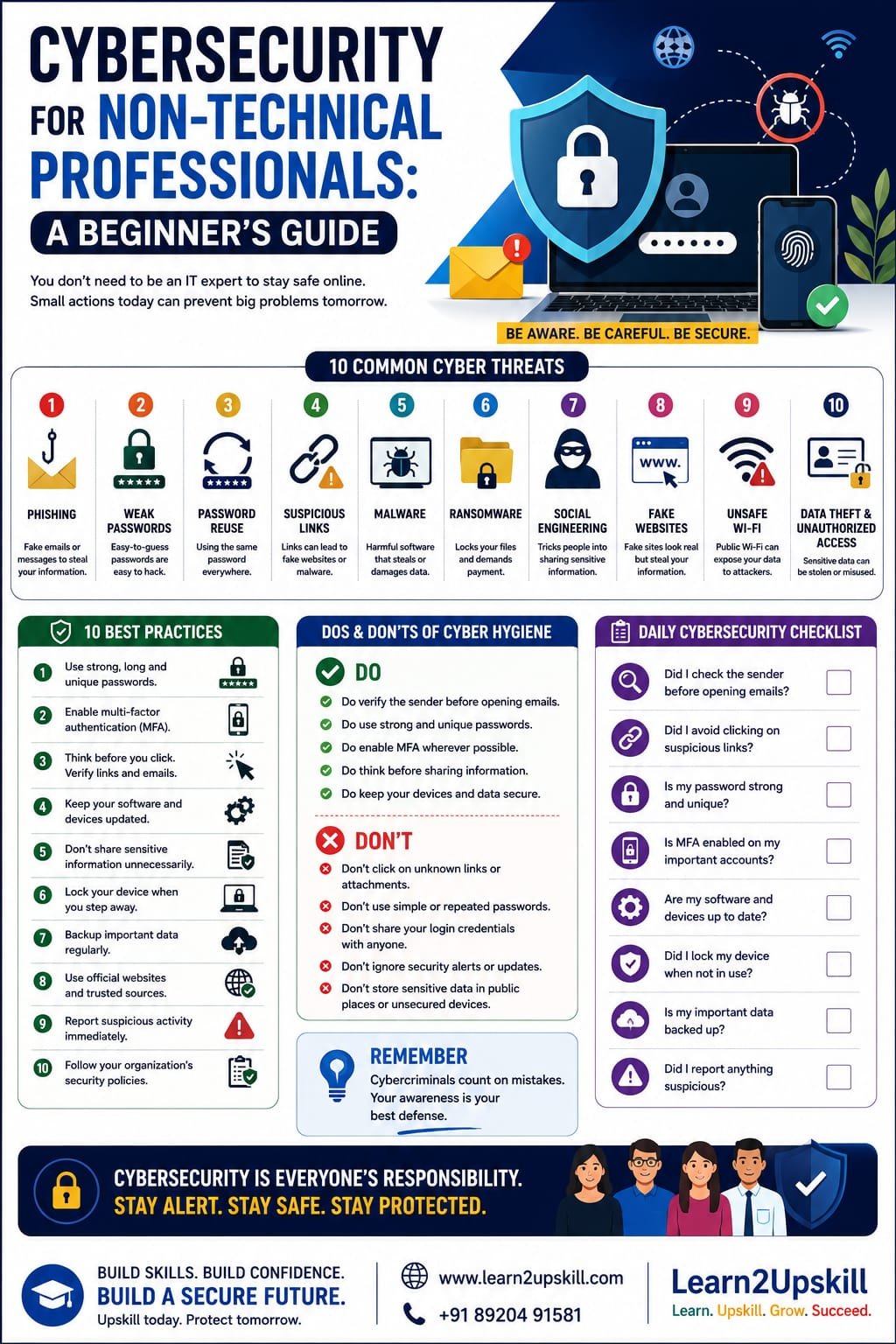
    10 Common Cybersecurity Threats Every Professional Should Know

    Let’s look at some common threats.

    —

    1. Phishing Emails 🎣

    Phishing is one of the most common cyber threats.

    A phishing email attempts to trick you into:

    – Clicking a malicious link

    – Providing login information

    – Sharing sensitive data

    – Downloading dangerous files


    A phishing message may pretend to come from:

    – Your bank

    – A company

    – Your manager

    – A government organization

    – A delivery service

    The message may look convincing.

    But small details may reveal the scam.

    —

    How to Identify a Suspicious Email

    Look for warning signs such as:

    🚩 Unexpected requests

    🚩 Urgent language

    🚩 Suspicious sender addresses

    🚩 Spelling or grammar mistakes

    🚩 Unknown links

    🚩 Unexpected attachments

    Before clicking, stop and ask:

    «Is this message really what it appears to be?»

    —

    1. Weak Passwords 🔑

    Weak passwords make accounts easier to compromise.

    Avoid passwords such as:

    – “123456”

    – “password”

    – Your name

    – Your date of birth


    A stronger password should be:

    – Long

    – Unique

    – Difficult to guess


    One of the most important rules is:

    «Do not reuse the same password across multiple important accounts.»

    If one password is exposed, reused passwords can put other accounts at risk.

    —

    1. Password Reuse

    Imagine using the same password for:

    – Email

    – Social media

    – Work accounts

    – Banking

    If one service suffers a security breach, criminals may try the same password on other accounts.

    Use unique passwords for important accounts.

    A reputable password manager can help people manage strong, unique passwords.

    —

    1. Suspicious Links 🔗

    A dangerous link may lead to:

    – Fake websites

    – Malware

    – Phishing pages

    Before clicking:

    – Check the sender.

    – Consider whether you expected the message.

    – Look carefully at the website address.

    If something feels suspicious, don’t rush.

    —

    1. Malware 🦠

    Malware is harmful software designed to damage systems, steal information or perform unauthorized activities.

    Malware may arrive through:

    – Email attachments

    – Suspicious downloads

    – Fake websites

    – Infected software

    Avoid downloading files or software from untrusted sources.

    —

    1. Ransomware 🔒

    Ransomware is a type of malicious software that can lock or encrypt data.

    Cybercriminals may then demand payment.

    Ransomware attacks can seriously affect organizations by disrupting:

    – Business operations

    – Access to important information

    – Customer services

    Regular backups and strong cybersecurity practices can help organizations reduce risks.

    —

    1. Social Engineering 🎭

    Social engineering involves manipulating people.

    A criminal may pretend to be:

    – An IT employee

    – A manager

    – A customer

    – A trusted company

    They may ask for information or request urgent action.

    Remember:

    «Don’t trust a request simply because it sounds confident or urgent.»

    Verify unusual requests using an official communication channel.

    —

    1. Fake Websites 🌐

    Cybercriminals may create websites that look similar to real websites.

    The goal may be to steal:

    – Usernames

    – Passwords

    – Financial information

    Always check the website address carefully before entering sensitive information.

    —

    1. Unsafe Public Wi-Fi 📶

    Public Wi-Fi networks can create security risks.

    Avoid performing highly sensitive activities on untrusted networks when possible.

    Follow your organization’s policies when accessing company systems remotely.

    —

    1. Data Theft and Unauthorized Access 🔐

    Sensitive information can be exposed through:

    – Lost devices

    – Weak passwords

    – Unauthorized sharing

    – Phishing attacks

    Treat business and customer information responsibly.

    —

    The Golden Rule: Think Before You Click

    One of the simplest cybersecurity habits is:

    «STOP. THINK. CHECK.»

    Before clicking a link or downloading a file, ask:

    Who sent this?

    Was I expecting it?

    Does the request make sense?

    Is the message creating unnecessary urgency?

    A few seconds of careful thinking can prevent a serious problem.

    —

    How to Create Stronger Password Habits

    Good password security is essential.

    Use Long Passwords

    Long passwords are generally harder to guess.

    Use Unique Passwords

    Don’t reuse important passwords.

    Consider a Password Manager

    Password managers can help securely manage multiple unique passwords.

    Never Share Passwords

    Legitimate organizations generally should not ask you to reveal your password through email or messages.

    —

    What Is Multi-Factor Authentication?

    Multi-factor authentication (MFA) adds another layer of account security.

    Instead of relying only on a password, you may also need:

    – A verification code

    – An authentication app

    – A security key

    – Another approved verification method

    This makes unauthorized access more difficult.

    Whenever available and appropriate, enable MFA on important accounts.

    —

    How to Protect Sensitive Information

    Professionals often handle important information.

    This may include:

    – Customer details

    – Employee information

    – Financial documents

    – Business strategies

    Follow these basic principles:

    Share Information Only When Necessary

    Don’t send sensitive information to unnecessary recipients.

    Verify the Recipient

    Before sending important information, check the email address carefully.

    Follow Company Policies

    Your organization may have specific rules for handling information.

    Lock Your Devices

    Don’t leave devices unlocked and unattended.

    —

    Cybersecurity and Remote Work

    Remote and hybrid work have created new cybersecurity challenges.

    Employees may work from:

    – Home

    – Shared workspaces

    – Hotels

    – Public locations

    When working remotely:

    Keep Devices Updated

    Install approved security updates.

    Secure Your Devices

    Use strong authentication and screen locks.

    Be Careful With Public Networks

    Follow your organization’s security guidelines.

    Protect Your Workspace

    Avoid exposing confidential information to people nearby.

    —

    What Should You Do If You Receive a Suspicious Email?

    Do not panic.

    Follow these steps:

    1. Don’t Click Links

    Avoid interacting with suspicious content.

    1. Don’t Download Attachments

    Unless you are certain they are legitimate.

    1. Verify the Sender

    Use an official channel if necessary.

    1. Report the Message

    Follow your organization’s reporting process.

    1. Delete or Follow IT Instructions

    Your IT or security team may provide guidance.

    The faster suspicious activity is reported, the faster an organization can respond.

    —

    What Should You Do If You Accidentally Clicked Something Suspicious?

    Mistakes can happen.

    The important thing is to act quickly.

    Don’t Hide the Mistake

    Report it immediately according to your organization’s procedures.

    Follow Security Instructions

    Your IT or cybersecurity team can investigate.

    Change Passwords if Recommended

    Follow official guidance.

    Remember:

    «Reporting a mistake quickly is usually much better than hiding it.»

    —

    Cybersecurity in Everyday Workplace Communication

    Cybersecurity awareness should be part of everyday work.

    For example:

    Before sending an email, check:

    – Is the recipient correct?

    – Does this attachment contain sensitive information?

    – Should this information be shared?

    Before clicking a link, ask:

    – Is this expected?

    – Is the sender trustworthy?

    Before sharing information, ask:

    – Does this person need access?

    Small habits can make a big difference.

    —

    Common Cybersecurity Mistakes to Avoid

    ❌ Clicking Without Checking

    Always pause before interacting with suspicious messages.

    —

    ❌ Using Weak Passwords

    Weak passwords create unnecessary risks.

    —

    ❌ Reusing Passwords Everywhere

    Use unique passwords for important accounts.

    —

    ❌ Ignoring Software Updates

    Updates can include important security improvements.

    —

    ❌ Sharing Sensitive Information Carelessly

    Always verify recipients and follow policies.

    —

    ❌ Assuming “It Won’t Happen to Me”

    Cybersecurity awareness is everyone’s responsibility.

    —

    A Simple Daily Cybersecurity Checklist

    Before finishing your workday, consider:

    ✅ Did I lock my device?

    ✅ Did I handle sensitive information appropriately?

    ✅ Did I avoid suspicious links?

    ✅ Did I report anything unusual?

    ✅ Are my accounts protected with strong authentication?

    Good cybersecurity often begins with good habits.

    —

    Cybersecurity Skills for Career Growth

    Cybersecurity awareness is becoming an increasingly valuable professional skill.

    Even if you do not want to become a cybersecurity specialist, understanding basic security can help you become:

    – A more responsible employee

    – A safer digital professional

    – A more valuable team member

    Organizations need employees who understand the importance of protecting information.

    Cybersecurity awareness is therefore becoming an important part of modern workplace readiness.

    —

    Cybersecurity and Artificial Intelligence

    AI is creating new opportunities and new cybersecurity challenges.

    Cybercriminals may use advanced technologies to create more convincing:

    – Phishing messages

    – Fake content

    – Social engineering attempts

    This makes critical thinking even more important.

    Don’t assume that a professional-looking message is automatically trustworthy.

    The best defense often begins with:

    «Awareness + Verification + Responsible Action»

    —

    Frequently Asked Questions

    Do non-technical professionals need cybersecurity knowledge?

    Yes. Anyone who uses digital devices, email, online accounts or workplace information can benefit from cybersecurity awareness.


    What is the most common cybersecurity threat employees face?

    Phishing and social engineering are common threats that attempt to manipulate people into taking unsafe actions.


    What should I do if I receive a suspicious email?

    Avoid clicking links or downloading attachments. Verify the message and report it according to your organization’s security procedures.


    What is MFA?

    Multi-factor authentication adds an additional verification step beyond a password to help protect an account.


    Can one employee cause a cybersecurity incident?

    Human mistakes can contribute to security incidents, which is why cybersecurity awareness and safe digital habits are important across an organization.

    —

    Conclusion

    Cybersecurity is not only about technology.

    It is also about people.

    Every professional can help protect themselves and their organization by developing simple habits:

    🔍 Think before clicking.

    📧 Verify suspicious messages.

    🔑 Use strong and unique passwords.

    🔐 Protect sensitive information.

    🚨 Report suspicious activity.

    You don’t need to become a cybersecurity engineer to make a difference.

    You simply need awareness.

    Because in today’s digital workplace:

    «Cybersecurity is everyone’s responsibility.»

    The more informed and careful employees become, the stronger an organization’s overall security can be.

    —

    🚀 Build Future-Ready Cybersecurity Skills With Learn2Upskill

    The modern workplace requires professionals to understand more than just their job role.

    Build practical skills in:

    – Cybersecurity Awareness

    – AI and Digital Skills

    – Data Privacy

    – Professional Communication

    – Critical Thinking

    – Workplace Safety

    with Learn2Upskill.

    🌐 www.coral-kudu-326218.hostingersite.com

    📞 Contact Us: +91 89204 91581

    Learn. Upskill. Grow. Succeed.

    —


  • Active Listening Skills: How to Become a Better Listener

    Active Listening Skills: How to Become a Better Listener

    Active Listening Skills: How to Become a Better Listener

    Learn what active listening is and how to become a better listener. Discover essential active listening skills, practical techniques, examples and tips to improve communication at work and in everyday life.

    Suggested URL Slug:

    “/active-listening-skills-how-to-become-a-better-listener/”

    —

    Active Listening Skills: How to Become a Better Listener

    When people think about communication skills, they often think about speaking.

    They focus on:

    – Speaking confidently

    – Giving presentations

    – Explaining ideas

    – Improving vocabulary

    But there is another communication skill that is equally important—and often overlooked:

    «Listening.»

    The ability to listen effectively can improve your relationships, workplace performance, teamwork and communication skills.

    Unfortunately, hearing and listening are not the same thing.

    You may hear someone speaking while your mind is thinking about something completely different.

    You may hear the words but fail to understand the real message.

    That is where active listening becomes important.

    Active listening means giving your full attention to the speaker, understanding their message and responding thoughtfully.

    It is not simply waiting for your turn to speak.

    It is about genuinely trying to understand.

    In this guide, you will learn what active listening is, why it matters and how you can become a better listener in both your professional and personal life.

    —

    What Is Active Listening?

    Active listening is the process of fully concentrating on what someone is saying and making an effort to understand their message.

    A good listener does not simply hear words.

    They pay attention to:

    – The message

    – The speaker’s tone

    – Important details

    – Emotions

    – Context

    Active listening also involves responding in a way that shows the speaker that you understand them.

    For example, instead of immediately giving your opinion, you might say:

    «So, if I understand correctly, the main problem is the deadline. Is that right?»

    This shows that you are paying attention and checking your understanding.

    —

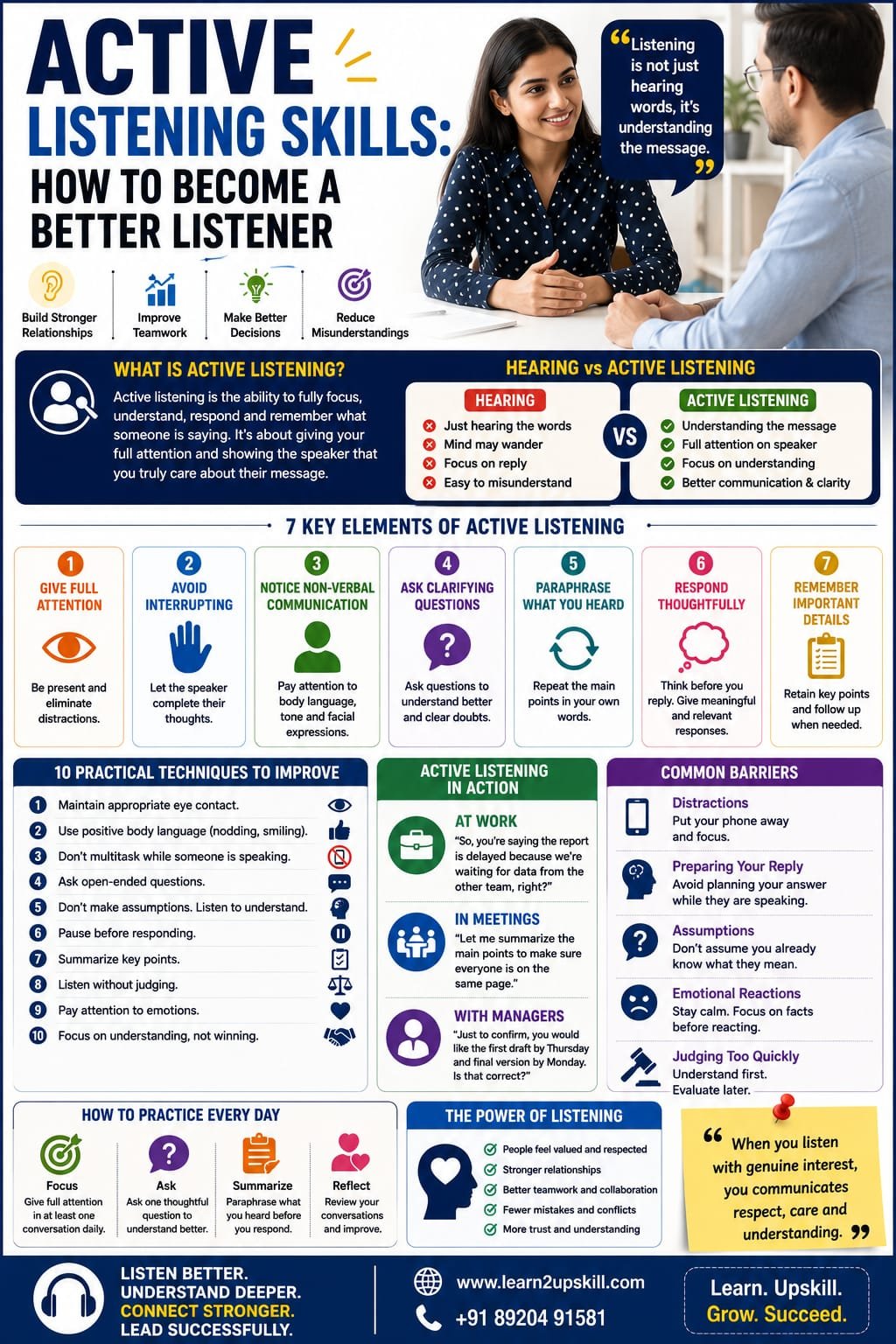
    Hearing vs Active Listening: What’s the Difference?

    Hearing

    Hearing is a physical process.

    Your ears receive sound.

    You may hear someone talking without paying attention.

    Active Listening

    Active listening requires mental effort.

    You focus on the speaker and try to understand the message.

    Hearing:

    «I heard the words.»

    Active Listening:

    «I understood what the person meant.»

    This difference is extremely important in professional communication.

    —

    Why Are Active Listening Skills Important?

    Strong listening skills can help you:

    🤝 Build Better Relationships

    People feel valued when they feel heard.

    💼 Perform Better at Work

    Listening carefully helps you understand instructions and expectations.

    👥 Improve Teamwork

    Good listeners understand different perspectives.

    🧠 Make Better Decisions

    You can make better decisions when you understand all relevant information.

    ⚠️ Reduce Misunderstandings

    Listening carefully can prevent costly mistakes.

    ❤️ Improve Emotional Intelligence

    Listening helps you understand other people’s thoughts and emotions.

    In many situations, communication problems happen not because people cannot speak clearly—but because someone did not listen carefully.

    —

    The 7 Key Elements of Active Listening

    To become a better listener, focus on these important elements.

    —

    1. Give Your Full Attention

    One of the most important rules of active listening is simple:

    «Be present.»

    When someone is speaking, avoid distractions.

    This means:

    – Don’t constantly check your phone.

    – Don’t look around the room.

    – Don’t work on something else.

    – Don’t prepare your response while they are still speaking.

    Giving attention communicates respect.

    —

    1. Avoid Interrupting

    Interrupting can make people feel ignored.

    Sometimes we interrupt because:

    – We are excited to share an idea.

    – We think we already know the answer.

    – We disagree.

    – We want to finish the person’s sentence.

    Try to allow the speaker to complete their thoughts.

    Pause before responding.

    You may discover that the person has more important information to share.

    —

    1. Pay Attention to Non-Verbal Communication

    Communication is not only about words.

    Pay attention to:

    – Facial expressions

    – Tone of voice

    – Body language

    For example, someone might say:

    «”Everything is fine.”»

    But their tone and body language may suggest that something is wrong.

    Active listening involves understanding both verbal and non-verbal communication.

    —

    1. Ask Clarifying Questions

    Good listeners do not pretend to understand something they don’t understand.

    They ask questions.

    For example:

    «Could you explain what you mean by that?»

    «Can you give me an example?»

    «Just to confirm, is the deadline Friday?»

    Clarifying questions can prevent misunderstandings.

    —

    1. Paraphrase What You Heard

    Paraphrasing means repeating the main idea in your own words.

    For example:

    «So, you’re saying that the customer is unhappy because the delivery was delayed.»

    The speaker can then confirm or correct your understanding.

    This is especially useful in:

    – Meetings

    – Team discussions

    – Client conversations

    – Problem-solving situations

    —

    1. Respond Thoughtfully

    Don’t rush to give advice.

    Sometimes people simply want to be understood.

    Before responding, ask yourself:

    «What is the most helpful response right now?»

    A thoughtful response is often more valuable than a quick response.

    —

    1. Remember Important Details

    Active listening includes remembering important information.

    If your manager explains a task, take notes.

    If a client shares a concern, remember the important details.

    Remembering information demonstrates attention and professionalism.

    —

    10 Active Listening Techniques You Can Practice

    Here are practical techniques to improve your listening skills.

    1. Maintain Appropriate Eye Contact

    Natural eye contact shows attention.

    Avoid staring, but don’t constantly look away.

    —

    1. Use Positive Body Language

    Simple actions can show that you are engaged.

    Examples include:

    – Nodding naturally

    – Maintaining good posture

    – Facing the speaker

    —

    1. Don’t Multitask

    You cannot fully listen while focusing on five other things.

    Give important conversations your attention.

    —

    1. Ask Open-Ended Questions

    Instead of asking questions that require only “yes” or “no,” try asking:

    «What happened after that?»

    «How do you think we should approach this problem?»

    Open-ended questions encourage meaningful conversation.

    —

    1. Don’t Make Assumptions

    Listen to the complete message before deciding what the speaker means.

    —

    1. Pause Before Responding

    A short pause gives you time to think.

    You don’t need to answer immediately.

    —

    1. Summarize Important Points

    At the end of a discussion, summarize:

    «So, we agreed on these three next steps…»

    This helps everyone remain aligned.

    —

    1. Listen Without Immediately Judging

    Try to understand before deciding whether you agree.

    You can disagree respectfully after listening.

    —

    1. Pay Attention to Emotions

    Sometimes the emotional message is as important as the factual message.

    —

    1. Focus on Understanding, Not Winning

    Communication is not always a competition.

    The goal should often be understanding and solving problems.

    —

    Active Listening in the Workplace

    Active listening can make you a stronger professional.

    Imagine your manager gives you instructions for a project.

    A poor listener might:

    – Assume they understand everything.

    – Forget important details.

    – Start working immediately.


    A good listener might:

    – Listen carefully.

    – Take notes.

    – Ask questions.

    – Confirm the deadline.


    For example:

    «Just to confirm, you would like the first draft completed by Thursday and the final version ready by Monday. Is that correct?»

    This small step can prevent mistakes.

    —

    Active Listening During Meetings

    Meetings can become ineffective when participants are distracted.

    Good active listening during meetings includes:

    Preparing Before the Meeting

    Understand the purpose and agenda.

    Paying Attention

    Focus on the discussion.

    Taking Notes

    Record important decisions and action items.

    Asking Relevant Questions

    Ask questions that help clarify important points.

    Summarizing

    Confirm the next steps.

    Good listeners often become valuable team members because they understand what needs to happen.

    —

    Active Listening and Teamwork

    Teams often include people with different:

    – Experiences

    – Opinions

    – Working styles

    – Perspectives

    Listening helps teams understand these differences.

    When team members feel heard, they may be more willing to:

    – Share ideas

    – Participate

    – Collaborate

    – Solve problems

    Good teamwork begins with communication.

    And good communication begins with listening.

    —

    Active Listening and Leadership

    Strong leaders are not simply good speakers.

    They are also good listeners.

    Leaders need to understand:

    – Employee concerns

    – Team challenges

    – Customer feedback

    – Different perspectives

    A leader who never listens may make decisions without understanding the real situation.

    Listening helps leaders gather better information.

    Better information can lead to better decisions.

    —

    Common Barriers to Active Listening

    Several things can prevent effective listening.

    —

    1. Distractions 📱

    Phones, notifications and multitasking can reduce attention.

    Solution:

    Remove unnecessary distractions during important conversations.

    —

    1. Preparing Your Response Too Early

    Sometimes people stop listening because they are thinking about what they want to say next.

    Solution:

    Focus on understanding first.

    —

    1. Assumptions

    You may believe you already know what the person is going to say.

    Solution:

    Listen to the complete message.

    —

    1. Emotional Reactions

    Strong emotions can make it difficult to listen.

    Solution:

    Pause and focus on the facts before responding.

    —

    1. Judging Too Quickly

    You may disagree before fully understanding the other person’s perspective.

    Solution:

    Understand first.

    Evaluate later.

    —

    How to Improve Your Listening Skills Every Day

    You can improve active listening through small habits.

    Practice 1: The 5-Minute Focus Challenge

    During one conversation every day:

    – Put your phone away.

    – Give the person your full attention.

    – Don’t interrupt.

    – Ask one thoughtful question.

    —

    Practice 2: Summarize Before Responding

    Before sharing your opinion, summarize what the other person said.

    For example:

    «If I understand correctly, you are suggesting that…»

    —

    Practice 3: Ask Better Questions

    Try asking questions that help you understand more deeply.

    —

    Practice 4: Notice Your Interruptions

    Pay attention to how often you interrupt.

    Try to reduce unnecessary interruptions.

    —

    Active Listening Examples

    Example 1: At Work

    Your colleague says:

    «I’m struggling to finish this project because I’m waiting for information from another department.»

    Instead of saying:

    «You should just finish it somehow.»

    Try:

    «It sounds like the missing information is delaying your work. Is there anything we can do to help get the information faster?»

    This response demonstrates understanding.

    —

    Example 2: During a Team Meeting

    A team member explains a problem.

    You say:

    «So, the main issue is that the current process is taking too much time. Is that correct?»

    This confirms understanding.

    —

    Example 3: With a Manager

    Your manager provides several instructions.

    You respond:

    «Let me summarize the main priorities to make sure I understood everything correctly.»

    This shows professionalism and attention.

    —

    Active Listening and Emotional Intelligence

    Active listening is closely connected to emotional intelligence.

    Emotionally intelligent people try to understand:

    – What people say

    – How people feel

    – Why they may be reacting in a certain way

    This does not mean you must agree with everyone.

    It means you make an effort to understand their perspective.

    Understanding someone does not require agreement.

    You can say:

    «I understand why you feel that way, although I see the situation differently.»

    This creates more respectful communication.

    —

    How AI and Digital Communication Affect Listening

    Today, communication happens through:

    – Video meetings

    – Voice calls

    – Messaging platforms

    – Emails

    Digital communication creates new listening challenges.

    During a video meeting, it can be tempting to:

    – Check emails

    – Read messages

    – Work on other tasks

    But multitasking can reduce understanding.

    When possible, treat important online conversations with the same attention you would give an in-person meeting.

    —

    Active Listening in the AI Era

    As technology and AI become more common, human skills are becoming increasingly valuable.

    AI can:

    – Process information

    – Generate responses

    – Summarize conversations

    But human relationships still depend on:

    – Empathy

    – Understanding

    – Attention

    – Emotional intelligence

    Active listening is therefore not becoming less important.

    It is becoming a powerful human advantage.

    The professionals who can combine technology skills with strong human communication skills will be better prepared for the future workplace.

    —

    7-Day Active Listening Challenge

    Want to improve your listening skills?

    Try this simple challenge.

    Day 1: Eliminate Distractions

    Focus completely during one important conversation.

    Day 2: Don’t Interrupt

    Allow people to finish their thoughts.

    Day 3: Ask Clarifying Questions

    Ask at least two thoughtful questions.

    Day 4: Practice Paraphrasing

    Summarize what someone says.

    Day 5: Pay Attention to Body Language

    Notice non-verbal communication.

    Day 6: Listen Without Judging

    Try to understand a different opinion.

    Day 7: Review Your Progress

    Ask yourself:

    – Did I interrupt less?

    – Did I understand people better?

    – Did I become more patient?

    Small improvements can create better communication habits.

    —

    Frequently Asked Questions

    What is active listening?

    Active listening is the process of giving full attention to a speaker, understanding their message and responding thoughtfully.


    Why is active listening important?

    It helps improve communication, teamwork, relationships, decision-making and understanding.


    What are examples of active listening?

    Examples include asking clarifying questions, paraphrasing, maintaining attention, avoiding interruptions and summarizing important points.


    How can I become a better listener?

    Practice focusing on the speaker, removing distractions, asking questions and avoiding interruptions.


    Is active listening important at work?

    Yes. Active listening helps professionals understand instructions, collaborate effectively and reduce misunderstandings.

    —

    Conclusion

    Communication is not only about speaking well.

    It is also about listening well.

    Active listening can help you become:

    – A better student

    – A stronger professional

    – A better teammate

    – A more effective leader

    – A better communicator

    The next time someone is speaking, don’t simply wait for your opportunity to respond.

    Focus on understanding.

    Ask questions.

    Pay attention.

    Listen actively.

    Because sometimes, one of the most powerful things you can communicate to another person is:

    «”I hear you, and I understand.”»

    —

    🚀 Build Strong Communication Skills With Learn2Upskill

    Effective communication is one of the most valuable skills for career and personal growth.

    Develop practical, career-focused skills in:

    – Communication Skills

    – Active Listening

    – Professional Email Writing

    – Presentation Skills

    – Emotional Intelligence

    – Workplace Communication

    – Career Development

    with Learn2Upskill.

    🌐 www.coral-kudu-326218.hostingersite.com

    📞 Contact Us: +91 89204 91581

    Learn. Upskill. Grow. Succeed.

    —
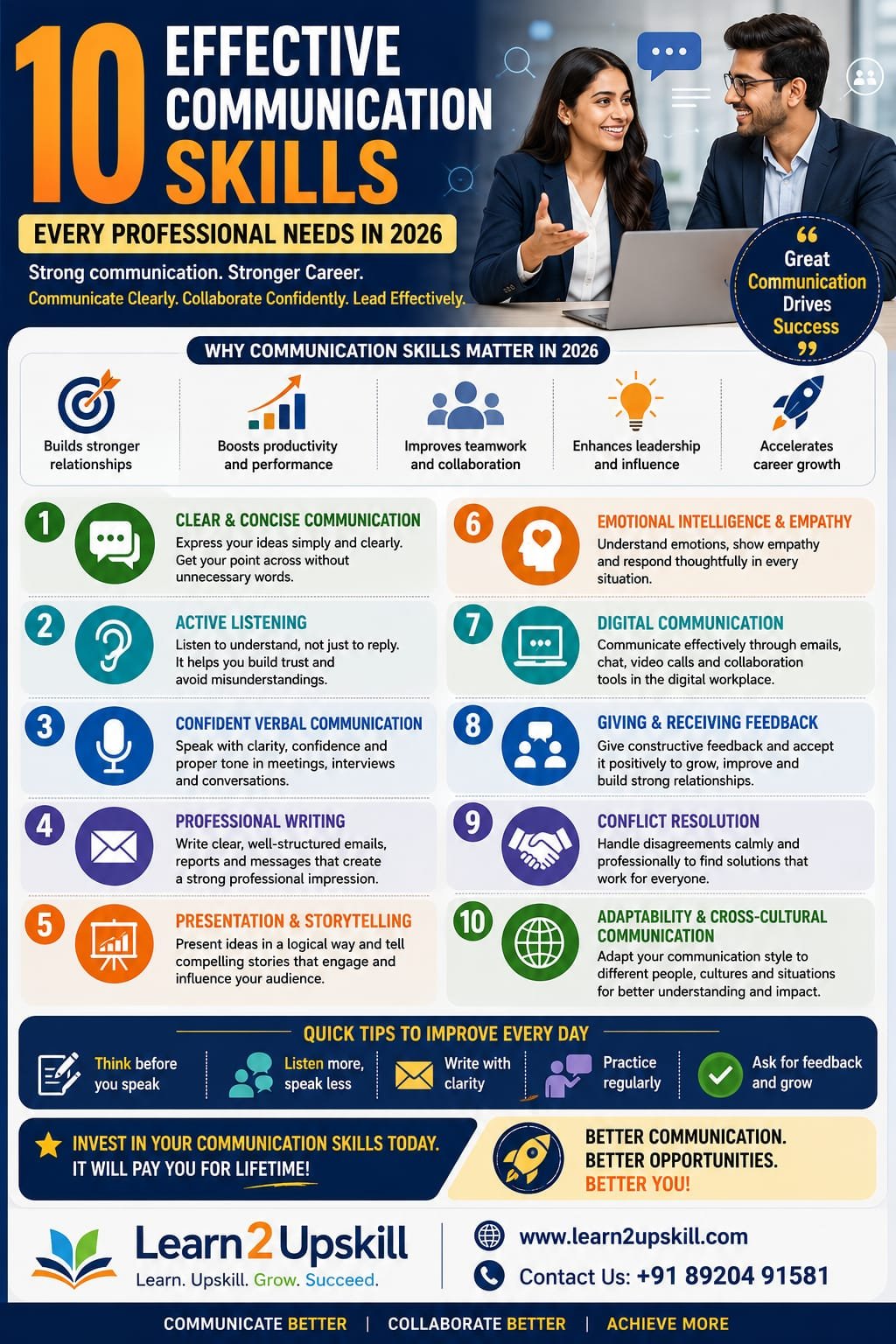
  • Communication Skills for Freshers: What Employers Expect

    Communication Skills for Freshers: What Employers Expect

    Communication Skills for Freshers: What Employers Expect

    Description: Discover the communication skills employers expect from freshers. Learn how verbal communication, email writing, listening, teamwork and presentation skills can improve your job opportunities and career growth.

    Suggested URL Slug:

    “/communication-skills-for-freshers-what-employers-expect/”


    —

    Communication Skills for Freshers: What Employers Expect

    Starting your first job can be exciting.

    It can also be challenging.

    As a fresher, you may spend a lot of time preparing your resume, improving your technical knowledge and searching for job opportunities.

    But there is another skill that employers often notice from your very first interaction:

    «Your communication skills.»

    Communication begins even before you get the job.

    It can be seen in:

    – Your resume

    – Your job application

    – Your emails

    – Your interview answers

    – The questions you ask

    – The way you interact with recruiters

    Once you join an organization, communication becomes even more important.

    You may need to:

    – Understand instructions

    – Ask questions

    – Participate in meetings

    – Write professional emails

    – Work with colleagues

    – Present your ideas

    – Communicate with managers or clients

    This is why strong communication skills can give freshers a significant advantage.

    The good news?

    You don’t need to be an extrovert or a perfect public speaker to become a good communicator.

    Effective communication is a skill that can be learned and improved.

    In this guide, we will explore what employers expect from freshers and how you can build strong communication skills for career success.

    —

    Why Communication Skills Matter for Freshers

    Employers understand that freshers may not have years of professional experience.

    They may not expect you to know everything.

    But they often expect you to show that you can:

    – Learn

    – Listen

    – Communicate

    – Collaborate

    – Adapt

    Imagine a manager giving instructions to two new employees.

    Employee A

    Doesn’t listen carefully.

    Doesn’t ask questions.

    Makes assumptions.

    Later, completes the wrong task.


    Employee B

    Listens carefully.

    Takes notes.

    Asks relevant questions.

    Confirms their understanding.

    Employee B is more likely to avoid misunderstandings.

    That is the practical value of communication.

    —

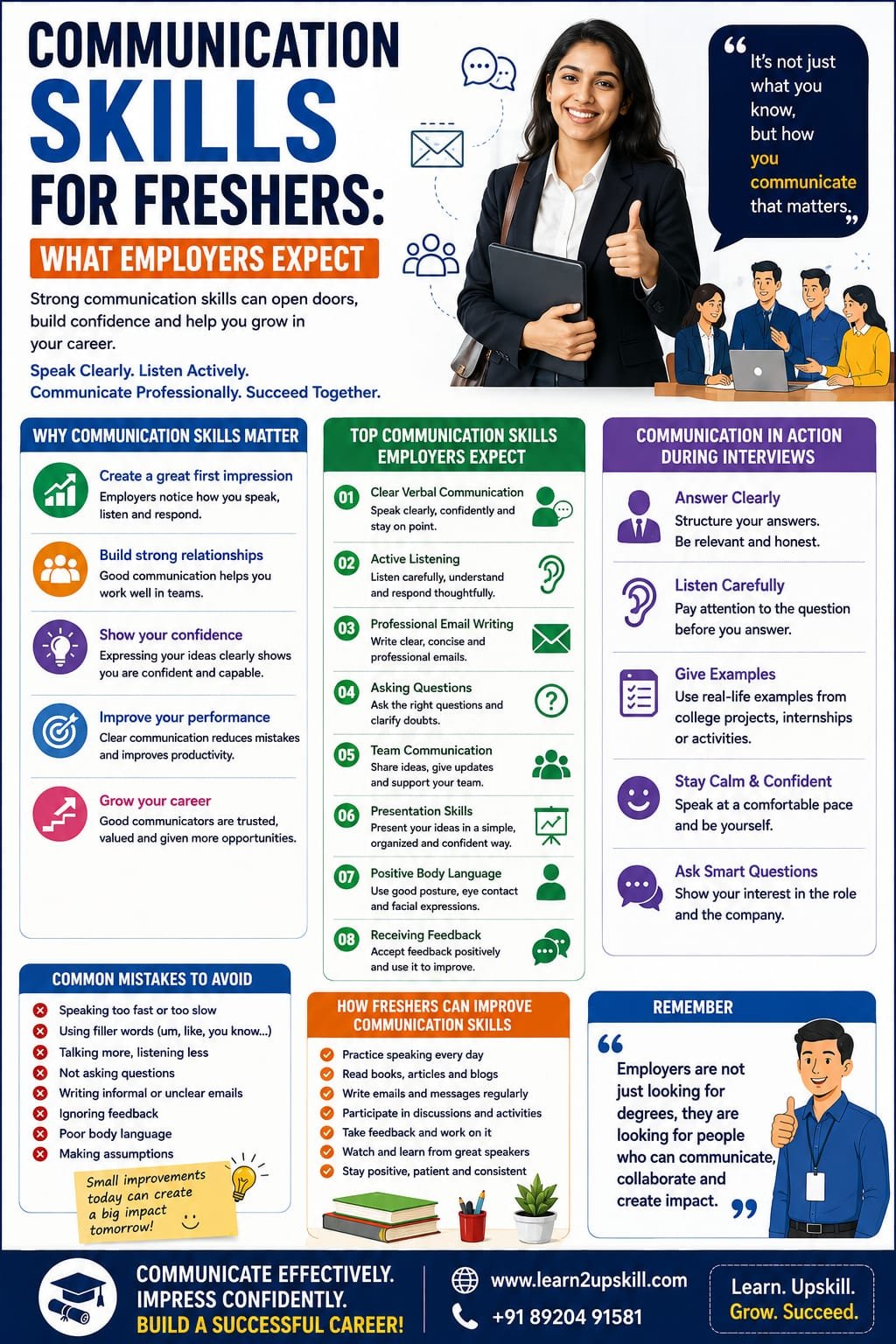
    What Do Employers Expect From Freshers?

    Employers generally look for more than academic qualifications.

    They want employees who can work effectively in a professional environment.

    Some of the most important communication-related expectations include:

    ✅ Clear Speaking

    ✅ Active Listening

    ✅ Professional Email Writing

    ✅ Confidence

    ✅ Team Communication

    ✅ Asking Questions

    ✅ Presentation Skills

    ✅ Positive Body Language

    Let’s explore each of these skills.

    —

    1. Clear and Confident Verbal Communication

    Freshers should be able to explain their thoughts clearly.

    This does not mean using difficult English or speaking continuously.

    Good verbal communication means:

    – Speaking clearly

    – Organizing your thoughts

    – Using appropriate language

    – Staying focused on the topic

    For example, during an interview, a recruiter may ask:

    «Tell me about yourself.»

    A weak response may be unstructured and confusing.

    A stronger response follows a simple flow:

    «Who you are → Your education or background → Your skills → Your career goal»

    Clear structure makes communication easier to understand.

    —

    1. Active Listening

    Communication is not only about speaking.

    Listening is equally important.

    Freshers often focus heavily on preparing answers.

    But successful workplace communication also requires understanding what others are saying.

    Active listening includes:

    – Paying attention

    – Avoiding unnecessary interruptions

    – Asking questions when needed

    – Confirming important information

    For example:

    «Just to confirm, would you like me to complete the report by Friday?»

    This simple question can prevent misunderstandings.

    —

    1. Professional Email Communication

    Email is an important workplace skill.

    Freshers should understand how to write emails that are:

    – Clear

    – Polite

    – Professional

    – Concise

    A professional email should generally include:

    A clear subject line

    A professional greeting

    The purpose of the email

    Important details

    A clear next step

    A professional closing

    For example:

    Subject: Request for Clarification Regarding Project Task

    Hello [Name],

    I would like to clarify one point regarding the project task assigned during today’s meeting.

    Could you please confirm the expected submission date?

    Thank you.

    Kind regards,

    [Your Name]

    Simple.

    Clear.

    Professional.

    —

    1. The Confidence to Ask Questions

    Many freshers are afraid to ask questions because they don’t want to appear inexperienced.

    But asking thoughtful questions is often better than making incorrect assumptions.

    For example:

    «Could you please explain this process once more? I want to make sure I understand it correctly.»

    This demonstrates responsibility.

    The key is to ask questions professionally and thoughtfully.

    Before asking, first try to understand the available information.

    Then ask specific questions.

    —

    1. Team Communication Skills

    Most jobs involve teamwork.

    Freshers may need to work with:

    – Colleagues

    – Managers

    – Different departments

    – Clients


    Good team communication involves:

    – Sharing information

    – Listening to others

    – Respecting different opinions

    – Giving updates

    – Asking for support when necessary


    Remember:

    «Good teamwork depends on good communication.»

    A highly skilled employee who cannot communicate with the team may struggle to create the same impact as someone who combines skills with collaboration.

    —

    1. Presentation Skills

    Freshers may be asked to:

    – Present a project

    – Explain an idea

    – Share an update

    – Participate in meetings

    You don’t need to be a professional public speaker.

    Start by developing basic skills:

    – Organize your ideas

    – Speak slowly and clearly

    – Maintain appropriate eye contact

    – Avoid reading directly from slides

    – Practice before presenting

    Confidence improves through experience.

    The more you practice, the more comfortable you can become.

    —

    1. Positive Body Language

    Communication is also non-verbal.

    Employers may notice:

    – Eye contact

    – Posture

    – Facial expressions

    – Attention

    – Confidence

    During an interview, for example, constantly looking at the floor may make you appear nervous or disengaged.

    Try to maintain:

    – Comfortable posture

    – Natural eye contact

    – Calm movements

    – An attentive expression

    You don’t need to act artificially.

    The goal is simply to appear engaged and professional.

    —

    1. The Ability to Receive Feedback

    Freshers have a lot to learn.

    Feedback is part of professional growth.

    Employers value employees who can listen to feedback without becoming defensive.

    Instead of thinking:

    «I made a mistake. I’m not good enough.»

    Try thinking:

    «What can I learn from this feedback?»

    Good communication includes the ability to:

    – Listen

    – Understand

    – Respond professionally

    – Improve

    Feedback can become one of your most valuable learning tools.

    —

    Communication Skills During Job Interviews

    Your communication skills are being evaluated throughout an interview.

    Recruiters may notice:

    – How clearly you answer

    – Whether you listen carefully

    – How confidently you speak

    – How you respond to questions

    – Your professionalism

    You don’t need perfect answers.

    But you should try to be:

    Clear

    Honest

    Relevant

    Professional

    —

    How to Answer Interview Questions More Effectively

    Use a simple structure.

    For example:

    Situation

    Explain the context.

    Action

    Explain what you did.

    Result

    Explain what happened.

    This structure can help you give organized answers.

    For freshers, examples can come from:

    – College projects

    – Internships

    – Volunteer work

    – Group assignments

    – Competitions

    You don’t always need full-time work experience to demonstrate communication skills.

    —

    Common Communication Mistakes Freshers Should Avoid

    ❌ Trying to Sound Too Complicated

    Simple and clear communication is better than difficult language.

    —

    ❌ Pretending to Understand Everything

    If you don’t understand something important, ask.

    —

    ❌ Interrupting Others

    Listen before responding.

    —

    ❌ Writing Informal Workplace Emails

    Professional communication requires an appropriate tone.

    —

    ❌ Giving Very Long Answers

    Stay focused on the question.

    —

    ❌ Being Afraid to Speak

    Your ideas cannot contribute if you never communicate them.

    —

    ❌ Ignoring Feedback

    Feedback can help you improve faster.

    —

    How Freshers Can Improve Communication Skills

    The best way to improve is through regular practice.

    1. Read and Learn

    Read professional articles, emails and business communication examples.

    Notice how information is structured.

    —

    1. Practice Speaking

    Talk about a topic for two or three minutes.

    Record yourself if helpful.

    Listen for:

    – Clarity

    – Speed

    – Repeated words

    – Confidence

    —

    1. Improve Your Writing

    Practice writing:

    – Emails

    – Short reports

    – Professional messages

    —

    1. Participate in Group Activities

    Join:

    – Discussions

    – Presentations

    – Workshops

    – Debates

    Practice builds confidence.

    —

    1. Ask for Feedback

    Ask a teacher, mentor or trusted professional:

    «What can I improve about my communication?»

    Specific feedback can help you identify areas for improvement.

    —

    Communication Skills and Technical Skills: Freshers Need Both

    One of the biggest mistakes job seekers make is focusing only on technical skills.

    Technical knowledge is important.

    But employers also need people who can:

    – Explain their work

    – Work in teams

    – Understand instructions

    – Ask questions

    – Communicate with others

    For example, imagine two candidates applying for the same role.

    Candidate A

    Has strong technical knowledge but struggles to explain their work.

    Candidate B

    Has good technical knowledge and can clearly explain their projects and ideas.

    Candidate B may have an advantage because they can demonstrate both technical and communication abilities.

    The strongest strategy is:

    «Build technical skills + communication skills together.»

    —

    Communication Skills in the AI Era

    Artificial Intelligence is changing workplace communication.

    AI tools can help professionals:

    – Draft emails

    – Improve grammar

    – Summarize information

    – Prepare presentations

    These tools can be useful.

    However, freshers should not become completely dependent on AI.

    You still need to develop your own ability to:

    – Think critically

    – Communicate clearly

    – Understand people

    – Make decisions

    AI can help you improve productivity.

    But human communication remains important.

    The future professional needs:

    «Digital Skills + AI Skills + Communication Skills + Critical Thinking»

    —

    A 30-Day Communication Improvement Plan for Freshers

    Here is a simple plan.

    Week 1: Improve Listening

    Focus on listening carefully.

    Practice summarizing what others say.

    —

    Week 2: Improve Speaking

    Practice explaining one topic every day.

    Focus on clarity rather than complicated vocabulary.

    —

    Week 3: Improve Writing

    Practice writing professional emails and short messages.

    —

    Week 4: Practice Professional Communication

    Participate in a presentation, discussion or mock interview.

    At the end of 30 days, ask yourself:

    – Am I more confident?

    – Can I explain ideas more clearly?

    – Do I listen better?

    – Has my professional writing improved?

    Small daily improvements can create significant progress.

    —

    The Top 10 Communication Skills Employers Expect From Freshers

    Here is a quick summary:

    1️⃣ Verbal Communication

    2️⃣ Active Listening

    3️⃣ Professional Email Writing

    4️⃣ Team Communication

    5️⃣ Presentation Skills

    6️⃣ Confidence

    7️⃣ Positive Body Language

    8️⃣ Asking Good Questions

    9️⃣ Giving and Receiving Feedback

    🔟 Professional Etiquette

    Developing these skills can help you become more workplace-ready.

    —

    Frequently Asked Questions

    Why are communication skills important for freshers?

    Communication skills help freshers perform effectively in interviews and workplaces by improving teamwork, understanding, professional interactions and confidence.


    What communication skills do employers expect?

    Employers often expect clear speaking, active listening, professional writing, teamwork, presentation skills and the ability to receive feedback.


    Can introverts have strong communication skills?

    Yes. Strong communication is not about being the loudest person. It is about communicating clearly, listening effectively and interacting appropriately.


    How can freshers improve communication skills?

    Freshers can improve through regular speaking practice, professional writing, active listening, presentations and feedback.


    Are communication skills more important than technical skills?

    Both are important. Technical skills help you perform job-specific tasks, while communication skills help you work effectively with people and explain your ideas.

    —

    Conclusion

    As a fresher, you may not have years of professional experience.

    And employers understand that.

    But they want to see potential.

    Strong communication skills demonstrate that you can:

    – Learn

    – Listen

    – Collaborate

    – Adapt

    – Grow

    You don’t need to become a perfect speaker overnight.

    Start with small improvements.

    Listen more carefully.

    Write more clearly.

    Ask better questions.

    Practice speaking.

    Learn from feedback.

    Remember:

    «Your qualifications may help you get noticed. Your communication skills can help you create an impact.»

    The best investment you can make as a fresher is to develop both your professional knowledge and your ability to communicate it.

    —

    🚀 Become Career-Ready With Learn2Upskill

    Starting your career requires more than academic qualifications.

    Build practical skills in:

    – Communication

    – Professional Email Writing

    – Presentation Skills

    – Workplace Etiquette

    – AI and Digital Skills

    – Career Development

    with Learn2Upskill.

    🌐 www.coral-kudu-326218.hostingersite.com

    📞 Contact Us: +91 89204 91581

    Learn. Upskill. Grow. Succeed.

    —
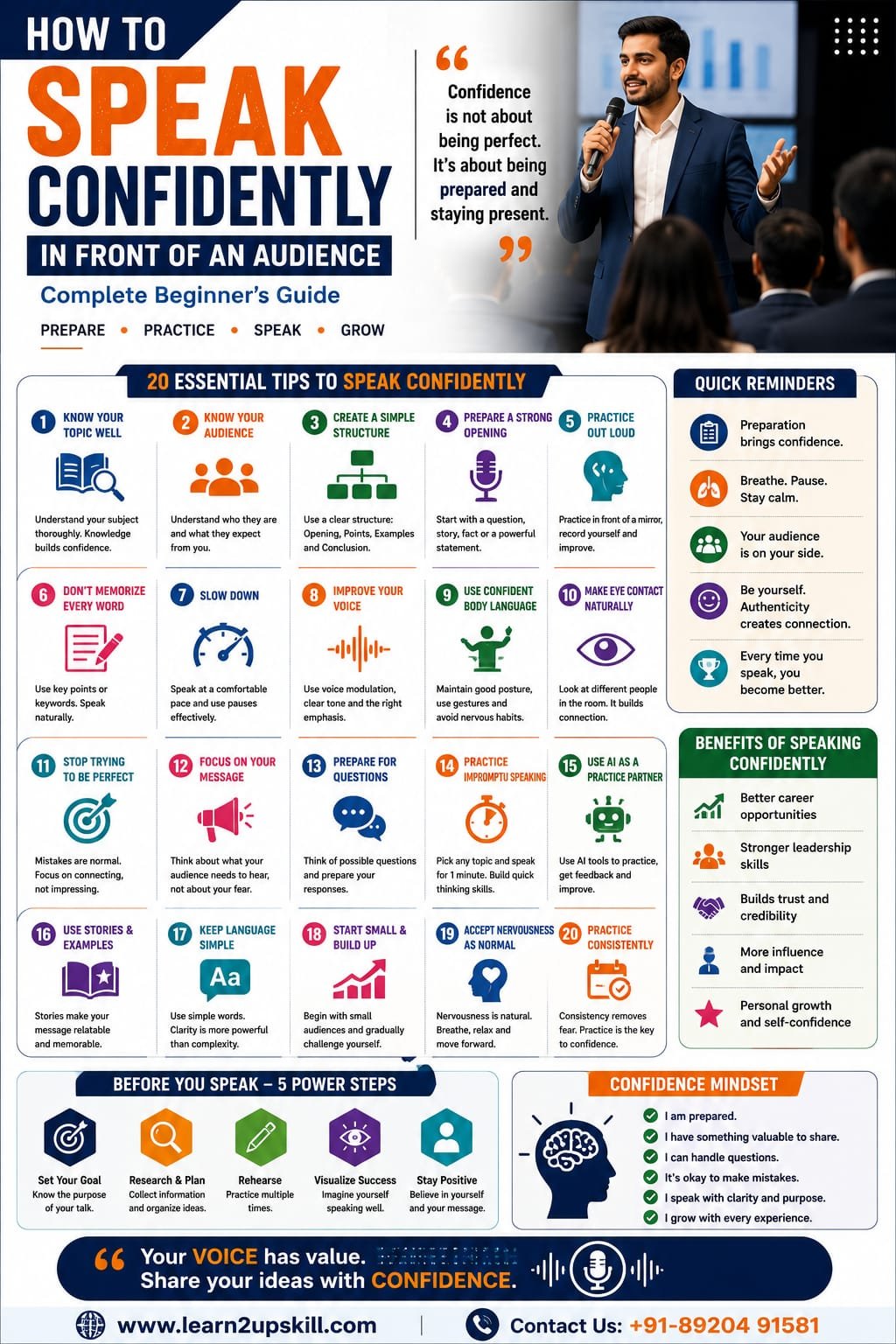
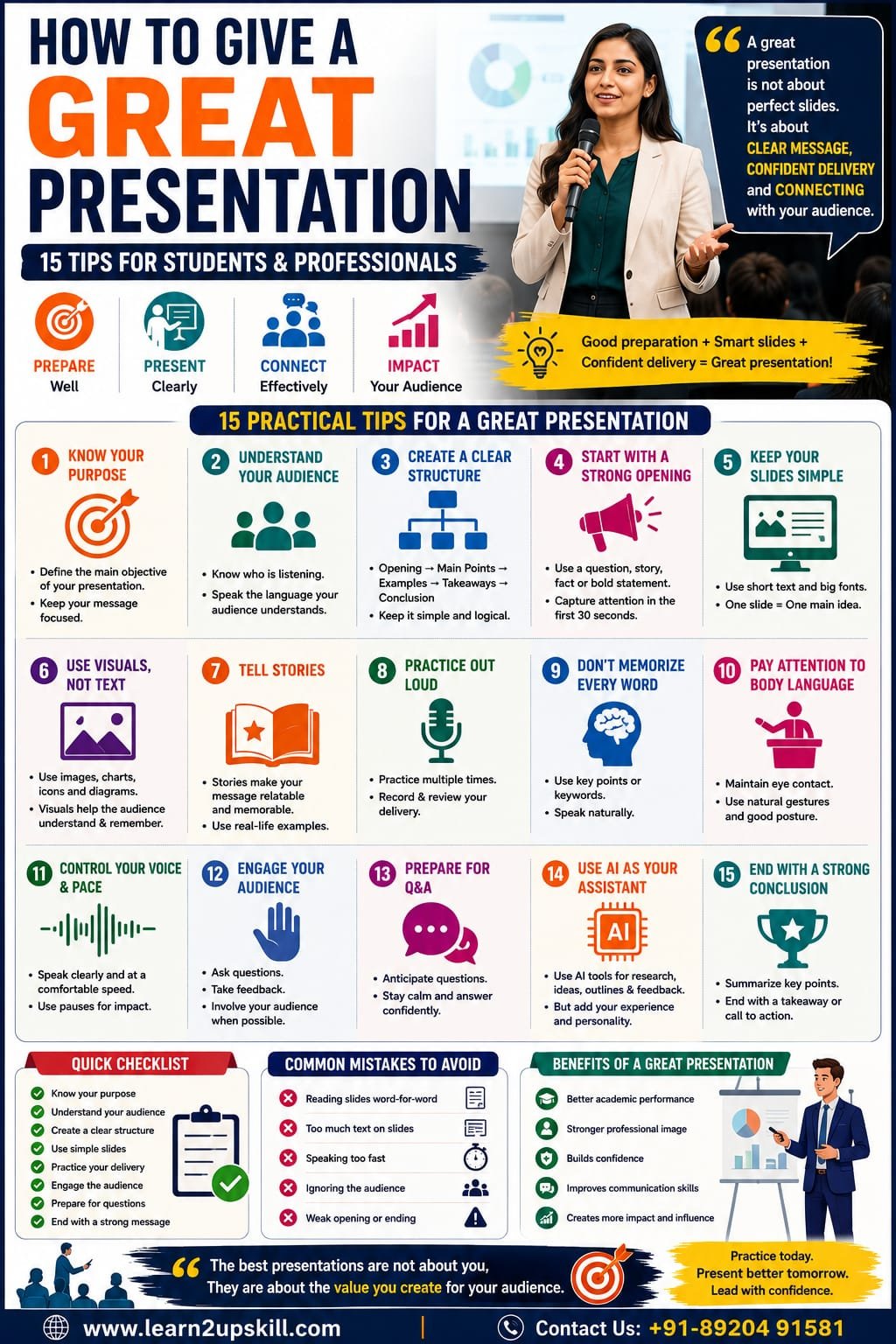
  • Presentation Skills and Communication: How to Deliver Powerful and Confident Presentations

    Presentation Skills and Communication: How to Deliver Powerful and Confident Presentations

    Presentation Skills and Communication: How to Deliver Powerful and Confident Presentations

    Description: Learn how to improve presentation skills and communication. Discover practical techniques to speak confidently, engage your audience, structure presentations and deliver powerful messages.

    Suggested URL Slug:

    “/presentation-skills-and-communication/”

    —

    Presentation Skills and Communication: How to Deliver Powerful and Confident Presentations

    Imagine standing in front of a classroom, meeting room or online audience.

    Everyone is looking at you.

    Your presentation is about to begin.

    You know your topic—but suddenly, your hands feel nervous, your voice becomes uncertain and you forget what you planned to say.

    This is a situation many students and professionals experience.

    The good news is that great presentation skills are not something that only a few people are born with.

    They can be learned.

    They can be practiced.

    And they can be improved.

    Strong presentation skills combine several important abilities:

    «Clear Communication + Confidence + Preparation + Body Language + Audience Engagement»

    Whether you are a student presenting a project, a professional speaking in a meeting, a manager explaining a strategy or an entrepreneur presenting an idea, your ability to communicate clearly can influence how people understand and respond to your message.

    In today’s workplace, presentation skills are becoming increasingly valuable.

    Having a great idea is important.

    But being able to explain that idea clearly and confidently is equally important.

    This guide will help you understand the connection between presentation skills and communication and provide practical techniques to deliver more powerful and effective presentations.

    —

    What Are Presentation Skills?

    Presentation skills are the abilities that help you communicate information, ideas or messages effectively to an audience.

    They include:

    – Verbal communication

    – Non-verbal communication

    – Public speaking

    – Confidence

    – Body language

    – Active audience engagement

    – Storytelling

    – Visual communication

    – Preparation

    – Listening and responding to questions

    A good presentation is not simply reading information from slides.


    It is about helping your audience:

    – Understand your message

    – Remember important ideas

    – Stay interested

    – Take action when necessary


    The goal is not to impress people with complicated words.

    The goal is to communicate clearly.

    —

    Why Are Presentation Skills Important?

    Presentation skills are useful in almost every stage of education and professional life.


    Students may need to present:

    – Projects

    – Research

    – Assignments

    – Group activities


    Professionals may need to present:

    – Business ideas

    – Reports

    – Sales proposals

    – Project updates

    – Training sessions

    – Strategies


    Leaders may need to present:

    – Vision

    – Goals

    – Decisions

    – Organizational changes


    Strong presentation skills can help you:

    Build Confidence

    Regular practice helps you become more comfortable speaking in front of others.

    Communicate Ideas Clearly

    A structured presentation makes complex information easier to understand.

    Create Professional Credibility

    Clear and confident communication can improve how others perceive your professionalism.

    Influence Decisions

    A well-presented idea is more likely to receive attention and consideration.

    Advance Your Career

    Professionals who can communicate effectively are often better prepared for leadership and client-facing opportunities.

    —

    The Connection Between Presentation Skills and Communication

    A presentation is essentially a form of communication.

    But it involves more than words.

    A powerful presentation combines:

    What You Say

    Your message and the words you choose.

    How You Say It

    Your tone, pace, volume and confidence.

    What Your Body Communicates

    Your facial expressions, posture and gestures.

    How You Engage the Audience

    Your ability to maintain attention and respond to reactions.

    This means a presentation can fail even when the information is correct.

    For example, a person may have excellent research but:

    – Speak too quietly

    – Read directly from slides

    – Use confusing language

    – Avoid eye contact

    – Speak too quickly

    Communication skills help solve these problems.

    —

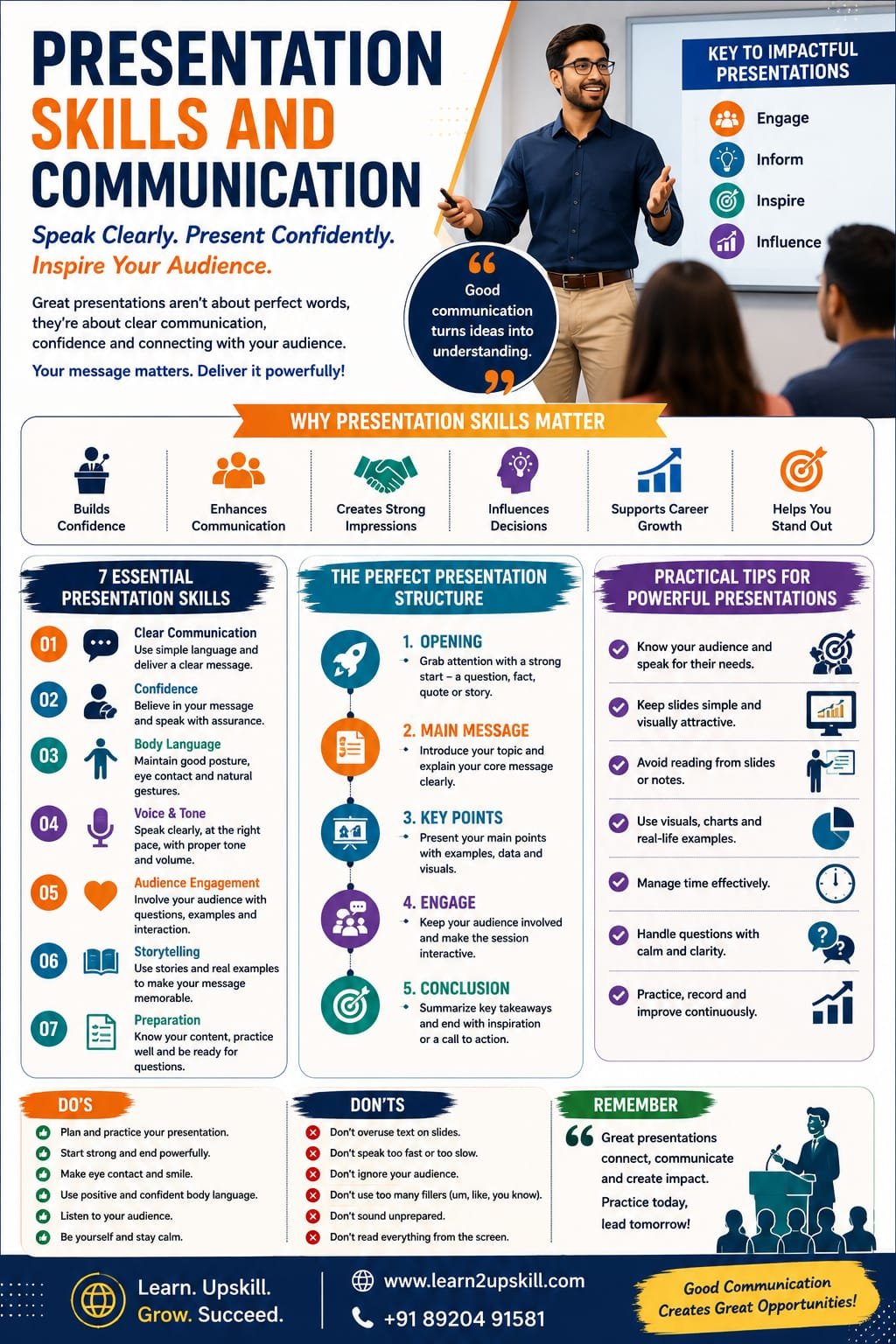
    The 7 Essential Presentation Skills

    1. Clear Communication

    Your audience should understand your main message.

    Avoid making your presentation unnecessarily complicated.

    Instead of using long and confusing explanations, focus on:

    – Simple language

    – Clear examples

    – Short sentences

    – Logical structure


    Ask yourself:

    «If someone remembers only one thing from my presentation, what should it be?»

    That question can help you focus your message.

    —

    1. Confidence

    Confidence does not mean you never feel nervous.

    Even experienced speakers can feel nervous.

    Confidence means continuing to communicate effectively despite nervousness.

    Preparation is one of the best ways to build confidence.

    The better you understand your topic, the more comfortable you will feel discussing it.

    —

    1. Body Language

    Your body communicates even when you are not speaking.

    Positive body language can include:

    – Standing with good posture

    – Natural hand gestures

    – Appropriate eye contact

    – A calm facial expression

    – Controlled movement

    Try to avoid:

    – Constantly looking at the floor

    – Crossing your arms defensively

    – Repeatedly touching your face

    – Moving nervously from side to side


    You don’t need to become completely still.

    Natural movement is often better.

    —

    1. Voice and Tone

    Your voice is one of your most important presentation tools.

    Consider:

    Volume

    Can everyone hear you?


    Pace

    Are you speaking too quickly?


    Tone

    Does your voice sound interested and confident?


    Pauses

    Are you giving the audience time to understand important points?


    A useful technique is to pause after an important idea.

    For example:

    «”Communication is not just about speaking.”»

    Pause.

    «”It’s about making sure your message is understood.”»


    The pause creates emphasis.

    —

    1. Storytelling

    People often remember stories better than lists of facts.

    Instead of beginning with:

    «”Today I will discuss the importance of communication.”»


    You could begin with a situation:

    «”Imagine having a brilliant idea—but being unable to explain it clearly to anyone.”»


    This immediately creates interest.

    Stories can help your audience:

    – Connect emotionally

    – Understand complex ideas

    – Remember your message

    You don’t need to tell a long story.

    Even a short example can make a presentation more engaging.

    —

    1. Audience Engagement

    A presentation should not always feel like a one-way lecture.

    Find ways to involve your audience.

    You can:

    – Ask questions

    – Use examples

    – Tell short stories

    – Ask for opinions

    – Use relatable situations

    For example:

    «”How many of you have ever felt nervous before giving a presentation?”»

    This simple question creates connection.

    —

    1. Preparation

    Good presentations rarely happen by accident.

    Preparation includes:

    – Understanding your topic

    – Researching information

    – Organizing your ideas

    – Creating slides

    – Practicing your delivery

    – Preparing for questions


    The more prepared you are, the more confident you are likely to feel.

    —

    How to Structure a Powerful Presentation

    One of the easiest ways to improve your presentation is to organize it clearly.

    A simple structure is:

    1. Opening

    Capture attention and introduce your topic.

    You can begin with:

    – A question

    – A surprising fact

    – A short story

    – A relatable situation

    —

    1. Main Message

    Explain the most important idea.

    Tell the audience:

    «What is the key message?»

    —

    1. Supporting Points

    Provide your main arguments, examples or evidence.

    Try to keep the number of major points manageable.

    Three strong points are often easier to remember than ten weak ones.

    —

    1. Conclusion

    Summarize the most important message.

    End with something memorable.

    For example:

    «”Great presentations don’t require perfect speakers. They require clear thinking, preparation and the courage to communicate.”»

    —

    The Power of the First 60 Seconds

    The beginning of your presentation matters.

    Your opening should answer:

    – Why should the audience listen?

    – What will they learn?

    – Why does this topic matter?


    Avoid starting with:

    «”Good morning. My name is…”»

    and immediately reading the title.

    Instead, create interest.

    For example:

    «”You may have the best idea in the room. But if you cannot communicate it clearly, people may never understand its value.”»

    Then introduce your topic.

    —

    How to Overcome Presentation Nervousness

    Feeling nervous before a presentation is normal.

    The goal is not necessarily to eliminate nervousness completely.

    The goal is to manage it.

    Practice Your Opening

    The first few seconds are often the most difficult.

    Practice your opening several times.

    —

    Take Deep Breaths

    Slow breathing can help you feel calmer.

    —

    Focus on Your Message

    Instead of thinking:

    «”What if people judge me?”»

    Think:

    «”How can I help the audience understand this topic?”»

    —

    Don’t Try to Memorize Every Word

    Memorizing every sentence can make you panic if you forget one word.

    Instead, understand your key points.

    —

    Practice in Front of Others

    Ask a friend or family member to listen.

    The more you practice speaking in front of people, the easier it can become.

    —

    How to Create Better Presentation Slides

    Your slides should support your message—not replace you.


    A common mistake is putting too much text on every slide.

    Then the presenter simply reads the slide.

    Instead:

    Keep Slides Simple

    Use short points instead of large paragraphs.

    One Main Idea Per Slide

    Avoid mixing too many concepts.

    Use Visuals Carefully

    Images, diagrams and charts can help explain ideas.

    Make Text Easy to Read

    Use clear and readable text.

    Don’t Overuse Animations

    Too many effects can distract the audience.

    Remember:

    «You are the presenter. The slides are your support.»

    —

    Verbal and Non-Verbal Communication in Presentations

    A successful presentation uses both.


    Verbal Communication

    This includes:

    – Words

    – Tone

    – Volume

    – Pace

    – Clarity


    Non-Verbal Communication

    This includes:

    – Eye contact

    – Facial expressions

    – Gestures

    – Posture

    – Movement


    Your verbal and non-verbal communication should support each other.

    If you say:

    «”I’m very excited about this idea.”»

    But your voice sounds bored and you avoid eye contact, the audience may receive a different message.

    —

    How to Handle Questions During a Presentation

    Questions can sometimes make presenters nervous.

    But they can also show that the audience is engaged.


    When someone asks a question:

    Listen Completely

    Don’t interrupt.

    Take a Moment

    You don’t need to answer immediately.

    Clarify if Necessary

    You can say:

    «”Just to make sure I understand your question, are you asking…?”»


    Answer Clearly

    Keep your response focused.

    Be Honest

    If you don’t know the answer, don’t invent one.


    You can say:

    «”That’s a good question. I don’t have the exact information right now, but I can check and share it later.”»

    Professional honesty builds trust.

    —

    Common Presentation Mistakes to Avoid

    ❌ Reading Every Word From the Slide

    Your audience can read.

    Focus on explaining the information.

    —

    ❌ Speaking Too Quickly

    Slow down and allow people to process important ideas.

    —

    ❌ Using Too Much Information

    Don’t try to explain everything.

    Focus on your main message.

    —

    ❌ Ignoring the Audience

    Watch for reactions and engagement.

    —

    ❌ Using Complicated Language

    Simple communication is often more effective.

    —

    ❌ Avoiding Practice

    Practice improves timing, confidence and clarity.

    —

    Presentation Skills for Online Meetings

    Virtual presentations require additional communication skills.

    When presenting online:

    Check Your Technology

    Test your:

    – Internet connection

    – Microphone

    – Camera

    – Screen sharing

    Look at the Camera

    This can create a stronger sense of eye contact.

    Reduce Distractions

    Choose a professional and quiet environment when possible.

    Engage Participants

    Ask questions and encourage participation.

    Keep Your Energy Up

    Online audiences can become distracted more easily.

    Use clear communication and engaging delivery.

    —

    Presentation Skills for Students

    Students can develop presentation skills through:

    – Classroom presentations

    – Group projects

    – Debates

    – Competitions

    – School activities


    These experiences help build confidence before entering professional life.

    Students should focus on:

    – Understanding the topic

    – Speaking clearly

    – Organizing ideas

    – Practicing regularly

    – Using confident body language


    Perfection is not the goal.

    Improvement is the goal.

    —

    Presentation Skills for Professionals

    For professionals, presentation skills can influence career growth.

    Professionals may need to:

    – Present ideas to managers

    – Explain reports

    – Train employees

    – Speak with clients

    – Lead meetings

    – Present strategies


    A professional presentation should be:

    – Clear

    – Structured

    – Relevant

    – Confident

    – Audience-focused

    Before presenting, ask:

    «What does my audience need to understand or do after this presentation?»

    This helps you design the presentation around the audience rather than around yourself.

    —

    Presentation Skills in the AI Era

    Artificial intelligence can help professionals prepare presentations.

    AI tools may assist with:

    – Brainstorming ideas

    – Organizing content

    – Improving language

    – Creating outlines

    – Generating visual concepts

    However, AI cannot completely replace human communication.

    A successful presenter still needs:

    – Judgment

    – Confidence

    – Empathy

    – Audience awareness

    – Authenticity

    AI can help prepare your presentation.

    But you still need to connect with your audience.

    The future professional will increasingly combine:

    «AI Skills + Presentation Skills + Communication Skills + Human Intelligence»

    —

    A Simple Formula for Better Presentations

    Remember:

    P-R-E-S-E-N-T

    P — Prepare

    Know your topic and audience.


    R — Research

    Use accurate and relevant information.


    E — Engage

    Keep the audience interested.


    S — Simplify

    Make complex ideas easy to understand.


    E — Express

    Use your voice and body language effectively.


    N — Notice

    Pay attention to audience reactions.


    T — Tell a Story

    Use examples that people can remember.

    —

    Frequently Asked Questions

    What are presentation skills?

    Presentation skills are the abilities needed to communicate ideas and information effectively to an audience using clear speech, confidence, body language and audience engagement.


    How can I improve my presentation skills?

    Practice regularly, understand your topic, organize your presentation, improve your body language and ask for feedback.


    How can I speak confidently during a presentation?

    Preparation and practice can improve confidence. Focus on communicating your message rather than trying to appear perfect.


    What should I do if I forget something?

    Pause and return to your key points. Avoid panicking. Most audiences may not know what you originally planned to say.


    How important is body language?

    Body language is an important part of communication and can influence how confident and engaged you appear.


    Should I memorize my presentation?

    It is usually better to understand your main points rather than memorizing every word.

    —

    Conclusion

    Presentation skills are not just about standing in front of an audience and speaking.

    They are about:

    – Communicating clearly

    – Connecting with people

    – Explaining ideas

    – Building confidence

    – Creating understanding


    You don’t need to become a perfect speaker.

    You simply need to become a better communicator.

    Start small.

    Practice regularly.

    Learn from every presentation.

    And remember:

    «Your audience does not need perfection. They need clarity, value and connection.»

    Every presentation is an opportunity to improve.

    The more you communicate, the more confident you can become.

    So prepare your message.

    Take a deep breath.

    Stand with confidence.

    And share your ideas.

    Your voice deserves to be heard.

    —

    🌟 Develop Powerful Presentation and Communication Skills With Learn2Upskill

    Strong communication can create stronger opportunities.

    Develop practical skills in presentation, communication, public speaking, leadership and professional development with Learn2Upskill.

    🌐 www.coral-kudu-326218.hostingersite.com

    📞 Contact Us: +91 89204 91581

    Learn. Upskill. Grow. Succeed.

    —
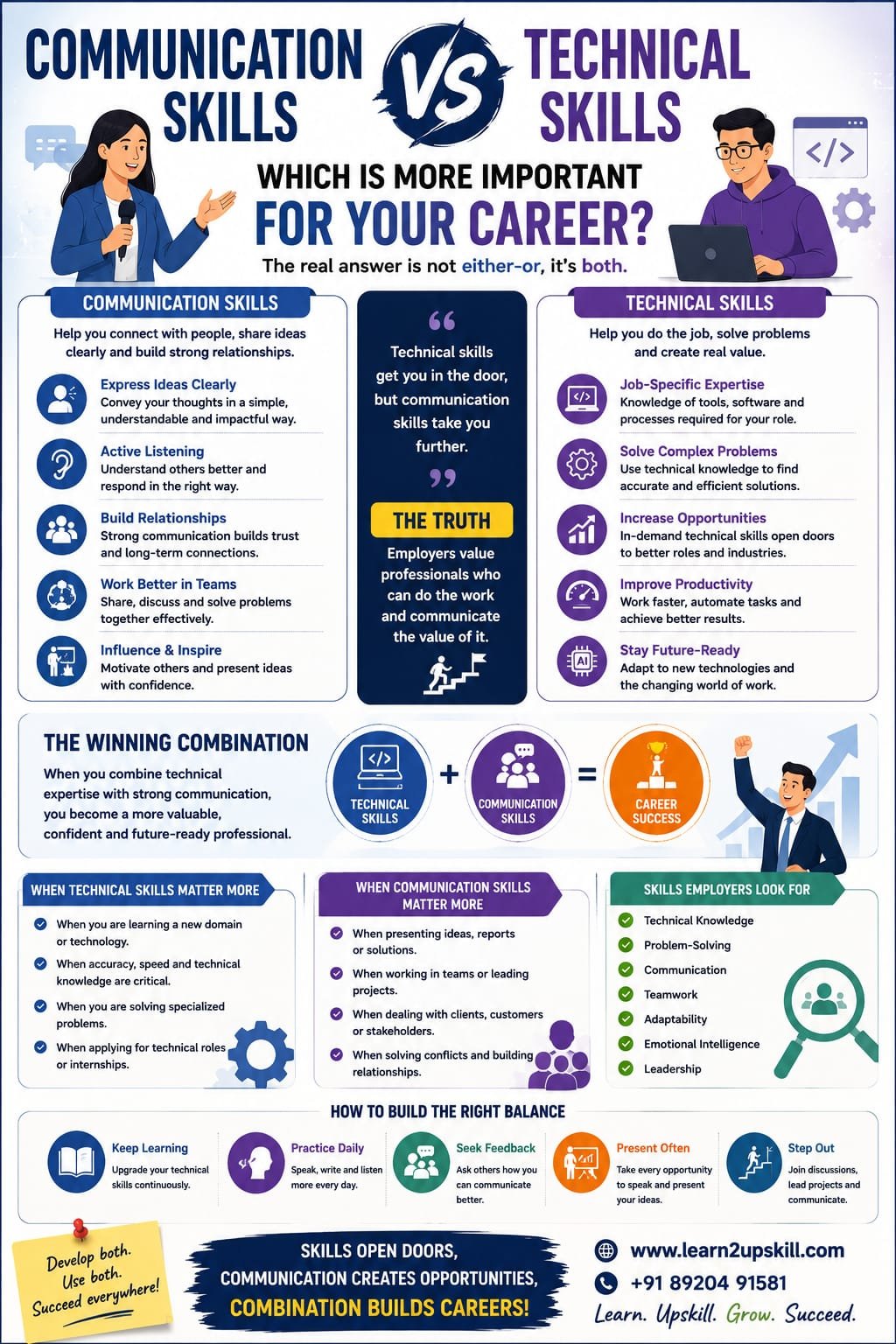
  • Communication Skills vs Technical Skills: Which Is More Important for Your Career?

    Communication Skills vs Technical Skills: Which Is More Important for Your Career?

    Communication Skills vs Technical Skills: Which Is More Important for Your Career?

    Description: Communication skills vs technical skills—which matters more for career success? Discover the differences, why both are important and how to build the right balance for professional growth.

    Suggested URL Slug:

    “/communication-skills-vs-technical-skills-career/”

    —

    Communication Skills vs Technical Skills: Which Is More Important for Your Career?

    Imagine two professionals.


    The first person has excellent technical knowledge. They understand the tools, software and processes required for their job and can solve complex technical problems.


    The second person communicates clearly, works well with others, explains ideas effectively and builds strong professional relationships.

    Now imagine a third professional.

    This person has both technical knowledge and strong communication skills.

    Who is likely to have the strongest advantage?

    In many careers, the answer is the third professional.

    The debate between communication skills vs technical skills often creates the wrong question.

    It is not always about choosing one over the other.

    Modern careers increasingly require professionals to combine:

    «Technical Skills + Communication Skills = Stronger Career Potential»

    Technical skills may help you get the job.

    Communication skills can help you perform effectively, collaborate with others, explain your work and grow into new opportunities.

    As workplaces continue to change, professionals need more than knowledge of tools and technology. They also need the ability to communicate, collaborate, solve problems and work effectively with people.

    So, which is more important for your career—communication skills or technical skills?

    Let’s explore the answer.

    —

    What Are Technical Skills?

    Technical skills are the specific abilities and knowledge required to perform particular tasks.

    They are often learned through:

    – Education

    – Training

    – Certifications

    – Courses

    – Practical experience

    – On-the-job learning


    Technical skills depend on the profession.

    For example:

    A Data Analyst May Need:

    – Excel

    – SQL

    – Power BI

    – Data visualization

    – Basic statistics


    A Digital Marketer May Need:

    – SEO

    – Social media marketing

    – Google Analytics

    – Content marketing

    – Advertising platforms


    A Software Developer May Need:

    – Programming languages

    – Databases

    – Web development

    – Cloud technologies


    A Finance Professional May Need:

    – Financial analysis

    – Excel

    – Financial modelling

    – Accounting knowledge


    Technical skills help professionals perform the specific responsibilities of their jobs.

    —

    What Are Communication Skills?

    Communication skills are the abilities that help you share and receive information effectively.

    They include:

    – Verbal communication

    – Written communication

    – Active listening

    – Presentation skills

    – Non-verbal communication

    – Professional communication

    – Email communication

    – Giving and receiving feedback

    Good communication is not simply about speaking a lot.

    It is about making sure your message is:

    – Clear

    – Relevant

    – Respectful

    – Appropriate for the audience

    Communication skills also involve listening.

    A professional who speaks clearly but never listens is not necessarily an effective communicator.

    —

    Technical Skills vs Communication Skills: The Key Difference

    Technical Skills| Communication Skills

    Help you perform specific tasks| Help you interact and work effectively with people

    Often job-specific| Useful across almost every career

    May involve tools and technology| Focus on sharing and understanding information

    Can be measured through practical ability| Often demonstrated through behavior and interaction

    Examples: Excel, Python, SEO| Examples: speaking, listening, presenting

    Both are important—but they serve different purposes.

    —

    Why Technical Skills Are Important for Your Career

    Technical skills provide the foundation for your professional work.


    1. They Help You Qualify for Jobs

    Employers often look for specific skills when hiring.

    For example, a company hiring a data analyst may expect knowledge of:

    – Excel

    – SQL

    – Data visualization tools


    Without relevant technical knowledge, it may be difficult to perform the role.

    —

    1. They Help You Perform Your Job

    Technical skills allow you to complete professional tasks effectively.

    The more capable you become, the more value you may be able to provide.

    —

    1. They Can Increase Career Opportunities

    Learning new technical skills can open doors to new roles and industries.

    For example:

    – Learning data analytics can create opportunities in business analysis.

    – Learning AI tools can improve productivity across many professions.

    – Learning cybersecurity can create opportunities in digital security roles.

    —

    1. Technology Is Changing Quickly

    Many technical skills need regular updating.

    Professionals must continue learning to remain relevant.

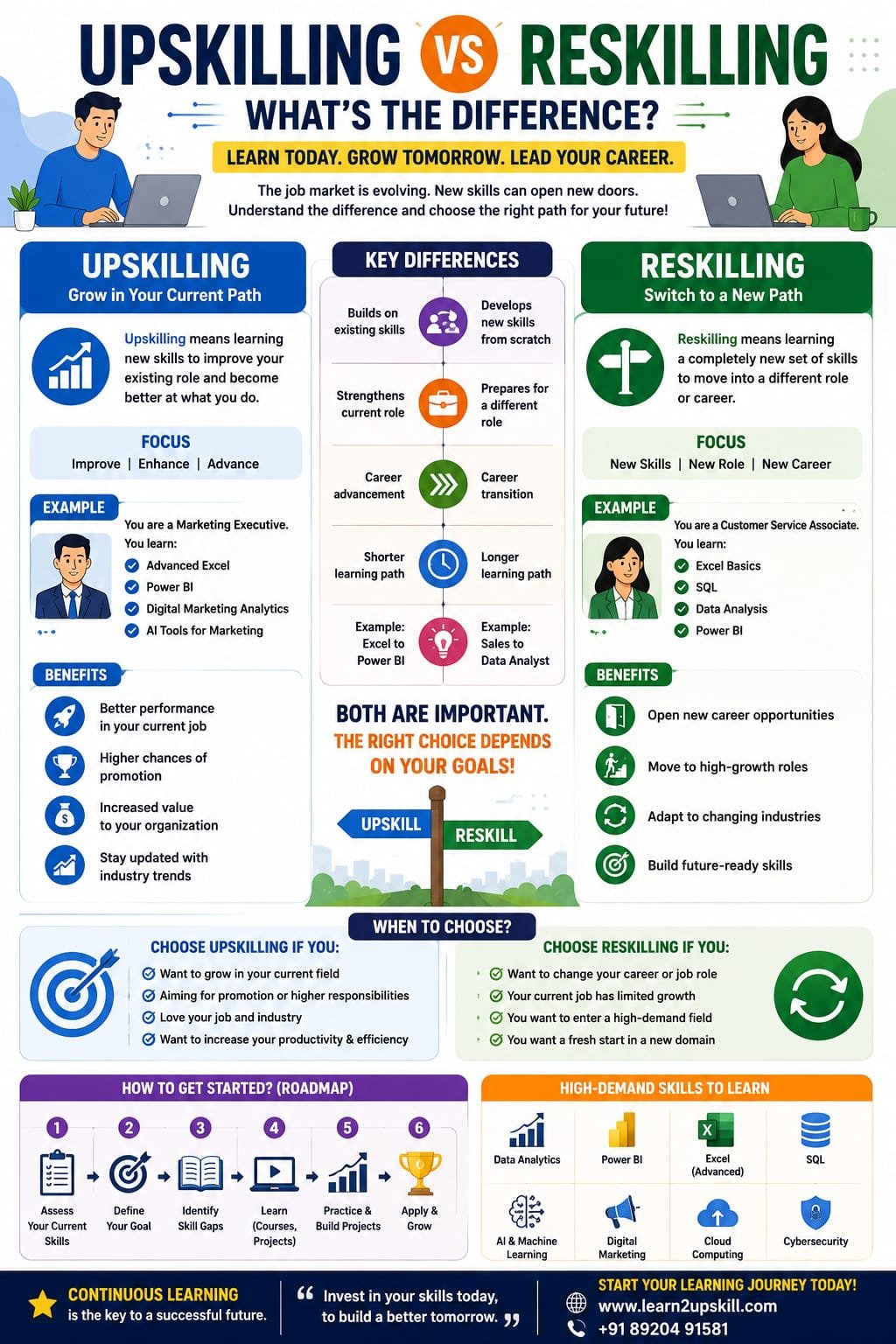
    This is why upskilling and reskilling are becoming increasingly important.

    —

    Why Communication Skills Are Important for Your Career

    Technical knowledge alone does not guarantee career success.

    You may have a brilliant idea—but can you explain it?

    You may discover an important problem—but can you communicate it to your manager?

    You may create an excellent report—but can your audience understand it?

    This is where communication skills become essential.

    —

    1. Communication Helps You Explain Technical Work

    Imagine a data analyst discovers an important trend.

    The analysis is excellent.

    But the presentation is confusing.

    Decision-makers may not understand what action they should take.

    A professional with strong communication skills can explain:

    – What happened

    – Why it happened

    – Why it matters

    – What should happen next

    This makes technical work more valuable to the organization.

    —

    1. Communication Improves Teamwork

    Most professionals do not work alone.

    They collaborate with:

    – Managers

    – Colleagues

    – Clients

    – Customers

    – Different departments

    Clear communication helps teams:

    – Avoid misunderstandings

    – Share information

    – Solve problems

    – Complete projects

    —

    1. Communication Builds Professional Relationships

    Career growth often involves working effectively with people.

    Strong communication can help build:

    – Trust

    – Professional credibility

    – Collaboration

    – Stronger networks

    —

    1. Communication Is Essential for Leadership

    As professionals move into leadership roles, their responsibilities often change.

    They may spend less time completing individual technical tasks and more time:

    – Leading teams

    – Explaining strategies

    – Giving feedback

    – Making decisions

    – Managing stakeholders


    Communication becomes increasingly important.

    —

    So, Which Skill Is More Important?

    The honest answer is:

    «It depends on your career stage, role and goals—but the strongest professionals develop both.»

    Technical skills are often essential for entering and performing a specific profession.

    Communication skills help you apply that knowledge effectively in the real world.

    Think of it this way:

    Technical Skills Help You Do the Work

    Communication Skills Help You Share the Value of Your Work

    Both are powerful.

    —

    A Simple Example: The Skilled Professional

    Imagine two employees create the same excellent report.

    Employee A

    Creates a highly accurate report but sends it without explanation.

    The manager struggles to understand the main findings.


    Employee B

    Creates the same quality report and clearly explains:

    – The key findings

    – Important trends

    – Business impact

    – Recommended actions


    Which report is likely to create more impact?

    Employee B’s work is easier to understand and use.

    The technical skill produced the report.

    The communication skill made the report useful to others.

    —

    The Growing Importance of Hybrid Skills

    The future workplace increasingly values hybrid professionals.

    These are people who combine different abilities.

    For example:

    Data + Communication

    A professional who can analyze data and explain it clearly.

    AI + Business Understanding

    A professional who understands AI tools and business needs.

    Technology + Leadership

    A professional who understands technical systems and can lead people.

    Finance + Presentation Skills

    A finance professional who can explain complex information to decision-makers.

    The ability to combine skills can create a strong professional advantage.

    —

    Communication Skills in Technical Careers

    Some people believe technical professionals do not need strong communication skills.

    This is a myth.

    Technical professionals regularly communicate with:

    – Team members

    – Managers

    – Clients

    – Non-technical stakeholders


    For example, a software developer may need to explain a technical problem to a manager who does not understand programming.

    A cybersecurity professional may need to explain a security risk to business leaders.

    A data analyst may need to present insights to executives.

    The ability to simplify complex information is a valuable communication skill.

    —

    Technical Skills in Non-Technical Careers

    The opposite is also true.

    Even professionals in traditionally non-technical careers increasingly need digital skills.

    For example:

    Marketing Professionals

    May need analytics and AI tools.

    HR Professionals

    May need HR technology and data analysis.

    Finance Professionals

    May need advanced Excel and automation tools.

    Sales Professionals

    May need CRM systems and data analysis.

    This means the line between technical and non-technical careers is becoming less clear.

    —

    Communication Skills vs Technical Skills in the AI Era

    Artificial intelligence is changing the workplace.

    AI can help professionals:

    – Write drafts

    – Analyze information

    – Create summaries

    – Automate tasks

    – Generate ideas


    This makes technical and digital skills increasingly important.

    But AI also highlights the importance of human skills.

    AI may help generate information.

    Humans still need to:

    – Communicate

    – Build relationships

    – Show empathy

    – Make judgments

    – Lead teams

    – Resolve conflicts

    The future professional will need a combination of:

    «Technical Knowledge + AI Skills + Communication + Critical Thinking + Emotional Intelligence»

    This combination can help professionals adapt to changing careers.

    —

    Skills Employers Look For

    Employers often look for a combination of hard and soft skills.

    Technical and Professional Skills:

    – Digital literacy

    – Industry knowledge

    – Data skills

    – AI awareness

    – Software knowledge


    Human and Communication Skills:

    – Communication

    – Teamwork

    – Problem-solving

    – Adaptability

    – Leadership

    – Emotional intelligence


    The strongest candidates are often those who can demonstrate both categories.

    —

    How to Develop Technical Skills

    Here are practical ways to improve your technical abilities.

    1. Take Structured Courses

    Online and offline courses can provide a clear learning path.

    —

    1. Practice Regularly

    Knowledge becomes stronger through practical use.

    —

    1. Work on Projects

    Projects help demonstrate your skills.

    —

    1. Earn Relevant Certifications

    Certifications can demonstrate structured learning.

    —

    1. Stay Updated

    Technology and tools continue to change.

    Make learning a regular habit.

    —

    How to Improve Communication Skills

    Communication skills also require practice.

    1. Practice Active Listening

    Focus on understanding before responding.

    —

    1. Improve Your Writing

    Practice writing:

    – Emails

    – Reports

    – Professional messages

    —

    1. Practice Public Speaking

    Look for opportunities to present.

    —

    1. Ask for Feedback

    Ask trusted colleagues:

    «”How can I communicate more effectively?”»

    —

    1. Learn to Simplify

    Practice explaining complex ideas in simple language.

    A good test is:

    «Can someone outside your industry understand your explanation?»

    —

    A Career Development Plan: Build Both Skills

    Instead of choosing between technical and communication skills, create a balanced learning plan.

    For example:

    Month 1

    Learn a technical skill relevant to your career.

    Month 2

    Practice communication through presentations and writing.

    Month 3

    Complete a practical project.

    Month 4

    Present or explain your project to others.

    This approach helps you develop both your ability to do the work and communicate the value of that work.

    —

    Common Mistakes Professionals Make

    ❌ Focusing Only on Technical Skills

    Technical expertise is important, but your work often needs to be understood by others.

    —

    ❌ Ignoring Continuous Learning

    Skills can become outdated.

    Continue developing yourself.

    —

    ❌ Thinking Communication Is Only for Managers

    Every professional communicates.

    —

    ❌ Collecting Certificates Without Practice

    Skills become stronger when applied.

    —

    ❌ Using Complicated Language to Sound Smart

    Clear communication is often more impressive than complicated communication.

    —

    The Ideal Balance for Career Success

    The ideal professional is not necessarily the person with the most certificates.

    And it is not necessarily the person who talks the most.

    A strong professional can:

    ✅ Perform their work effectively.

    ✅ Learn new tools and technologies.

    ✅ Communicate ideas clearly.

    ✅ Work well with others.

    ✅ Solve problems.

    ✅ Adapt to change.

    The goal is balance.

    —

    Frequently Asked Questions

    Are communication skills more important than technical skills?

    Both are important. Technical skills help professionals perform specific job responsibilities, while communication skills help them explain ideas, collaborate and build relationships.


    Can I get a job with good communication skills but no technical skills?

    This depends on the role. Some jobs require specific technical knowledge, while others place greater emphasis on communication and interpersonal abilities.


    Do technical professionals need communication skills?

    Yes. Technical professionals often need to explain complex ideas, work with teams and communicate with non-technical stakeholders.


    Which skills should students focus on?

    Students should develop a combination of technical knowledge, communication, critical thinking, digital literacy and problem-solving skills.


    How is AI changing the importance of skills?

    AI is increasing the importance of digital and AI literacy while also highlighting human skills such as communication, judgment, creativity and emotional intelligence.

    —

    Conclusion

    The question should not be:

    «Communication Skills or Technical Skills?»

    A better question is:

    «How can I develop both?»

    Technical skills can help you perform your job.

    Communication skills can help people understand your ideas and recognize the value of your work.

    In the modern workplace, success increasingly depends on combining:

    💻 Technical Skills

    💬 Communication Skills

    🤖 AI and Digital Skills

    🧠 Critical Thinking

    🤝 Human Skills

    Your technical knowledge gives you the ability to create value.

    Your communication skills help you share that value with the world.

    The strongest career strategy is simple:

    «Learn continuously. Communicate clearly. Apply your skills confidently.»

    —

    🚀 Build Career-Ready Skills With Learn2Upskill

    The future belongs to professionals who combine technical knowledge with strong communication and professional skills.

    Develop practical, career-focused skills with Learn2Upskill.

    🌐 www.coral-kudu-326218.hostingersite.com

    📞 Contact Us: +91 89204 91581


    Learn. Upskill. Grow. Succeed.

    —
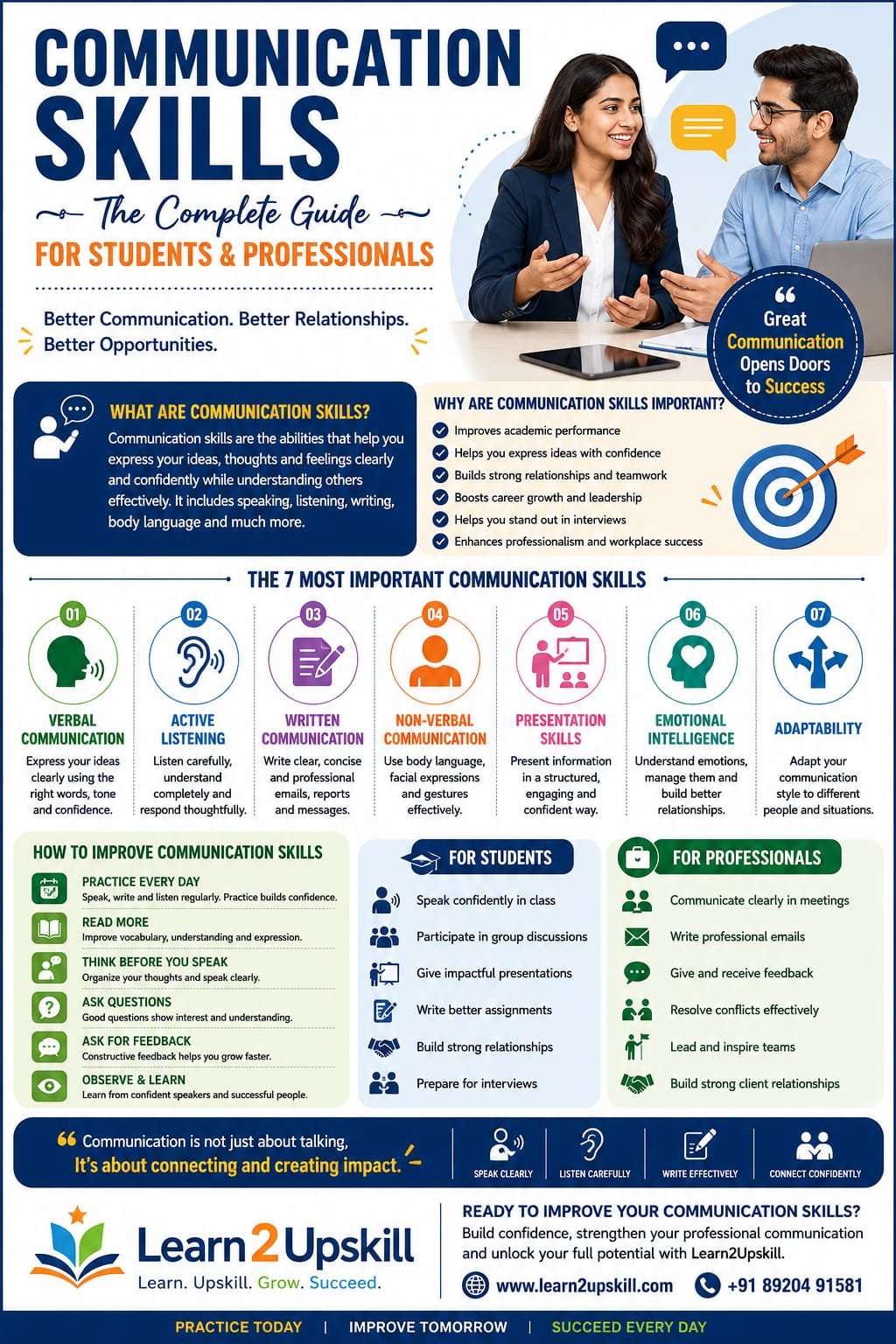


  • Communication Skills: The Complete Guide for Students and Professionals

    Communication Skills: The Complete Guide for Students and Professionals

    Communication Skills: The Complete Guide for Students and Professionals

    Learn the importance of communication skills for students and professionals. Discover practical tips to improve speaking, listening, writing, body language and workplace communication.

    Suggested URL Slug: /communication-skills-complete-guide/

    What Are Communication Skills?

    Communication skills are the abilities that help you share information, ideas, opinions and feelings clearly while understanding what other people are communicating.

    Communication happens in many forms:

    Speaking

    Listening

    Writing

    Reading

    Body language

    Facial expressions

    Presentations

    Emails

    Phone conversations

    Video meetings

    Workplace discussions

    Interviews

    Group discussions

    Good communication is not simply about talking more. It is about communicating the right message to the right person at the right time and in the right way.

    For example, imagine a student explaining a project to a teacher. Knowing the subject is important, but the student also needs to organize the explanation, speak clearly, listen to questions and respond appropriately.

    The same principle applies at work.

    Why Are Communication Skills Important?

    Communication affects almost every part of education, career development and professional life.

    Research published by NCERT’s Indian Journal of Vocational Education identifies communication, teamwork, problem-solving, critical thinking and other employability skills as highly valued in industry. �

    E-Journals NCERT

    Here are some major reasons communication skills matter.

    1. They Improve Academic Performance

    Students regularly need to:

    Ask questions

    Participate in discussions

    Give presentations

    Write assignments

    Work on group projects

    Explain ideas

    Communicate with teachers

    Strong communication can make it easier to express what you know.

    1. They Help During Job Interviews

    An interview is not only about what you know.

    Recruiters also observe how you:

    Answer questions

    Explain your experience

    Listen to the interviewer

    Organize your thoughts

    Maintain professional body language

    Handle unexpected questions

    Communication therefore becomes particularly important for freshers who may have limited work experience.

    1. They Improve Workplace Relationships

    Good communication helps employees work with:

    Managers

    Colleagues

    Customers

    Clients

    Vendors

    Team members

    Clear communication can reduce misunderstandings and help teams coordinate their work more effectively.

    Indeed’s workplace guidance similarly highlights active listening, emotional management, non-verbal cues, soft skills and feedback as practical areas for improving workplace communication. �

    Indeed

    The 7 Most Important Communication Skills

    Communication is a combination of several skills. Here are seven that students and professionals should develop.

    1. Verbal Communication

    Verbal communication is the way you communicate through spoken words.

    It includes:

    Vocabulary

    Pronunciation

    Tone

    Clarity

    Pace

    Confidence

    Choice of words

    Example

    Instead of saying:

    “I don’t know.”

    You could say:

    “I’m not completely sure, but I’ll check the information and get back to you.”

    The second response communicates uncertainty while also demonstrating responsibility.

    How to improve verbal communication

    Speak slowly and clearly.

    Avoid unnecessary filler words.

    Organize your thoughts before speaking.

    Use simple language.

    Adjust your tone according to the situation.

    Practice explaining complex ideas in simple terms.

    1. Active Listening

    Communication is a two-way process.

    Listening is just as important as speaking.

    Active listening means paying attention to the speaker, understanding the message and responding thoughtfully instead of simply waiting for your turn to speak.

    Active listening is also recognized as an important career-readiness skill. �

    Career Resources Rutgers Newark

    Active listening techniques

    Try to:

    Maintain appropriate eye contact.

    Avoid interrupting.

    Ask relevant questions.

    Summarize important points.

    Observe non-verbal signals.

    Clarify anything you don’t understand.

    Example

    Instead of immediately replying:

    “Okay.”

    Try:

    “So, if I understand correctly, you want the report completed by Friday. Is that right?”

    This confirms your understanding and reduces mistakes.

    1. Written Communication

    Written communication is especially important in the professional world.

    It includes:

    Emails

    Reports

    Messages

    Proposals

    Presentations

    Assignments

    Resumes

    Cover letters

    Professional writing should generally be clear, concise, accurate and appropriate for the audience.

    Tips for better professional writing

    Before sending an email or document, ask:

    Is it clear?

    Can the reader understand what I mean?

    Is it concise?

    Can I remove unnecessary words?

    Is it professional?

    Is the tone appropriate?

    Is it accurate?

    Have I checked grammar, spelling and facts?

    Is there a clear action?

    Does the reader know what they need to do next?

    1. Non-Verbal Communication

    Sometimes your body communicates before you say a word.

    Non-verbal communication includes:

    Facial expressions

    Eye contact

    Posture

    Gestures

    Hand movements

    Personal space

    Tone of voice

    Appearance

    For example, looking at your phone while someone is speaking may communicate disinterest—even if you say, “I’m listening.”

    That is why communication skills and body language should be developed together.

    1. Presentation Skills

    Students and professionals frequently need to present information.

    You may have to:

    Present a college project

    Explain a business proposal

    Present sales results

    Deliver a training session

    Speak during a meeting

    Give a seminar

    A good presentation requires more than attractive slides.

    You need to communicate your message clearly.

    A simple presentation structure

    Beginning:

    Introduce the topic and explain why it matters.

    Middle:

    Present the key information, examples and evidence.

    End:

    Summarize the main points and explain the next step.

    Presentation tip

    Don’t fill every slide with text.

    Use slides to support your explanation rather than reading every word from the screen.

    1. Emotional Intelligence

    Communication isn’t only about words.

    Your emotions—and your ability to understand other people’s emotions—can strongly influence conversations.

    Emotional intelligence can help you:

    Manage frustration

    Respond calmly

    Understand different perspectives

    Handle disagreements

    Give constructive feedback

    Build professional relationships

    For example, if a colleague criticizes your work, immediately becoming defensive may escalate the situation.

    A more effective response could be:

    “Thanks for pointing that out. Could you explain which part you think I should improve?”

    This turns criticism into an opportunity to learn.

    1. Adaptability

    Different people need different communication styles.

    You may communicate differently with:

    A close friend

    A teacher

    A manager

    A customer

    A senior executive

    A new colleague

    Effective communication means understanding your audience.

    For example, a message to a friend might be informal, while an email to a client should be professional.

    Communication Skills Every Student Should Develop

    Students can start developing communication skills long before entering the workplace.

    Here are some valuable skills to practice.

    1. Speaking confidently

    Practice speaking for a few minutes every day.

    Choose a topic and explain it without reading from a script.

    1. Listening carefully

    Don’t interrupt unnecessarily. Focus on understanding the speaker.

    1. Asking questions

    Don’t be afraid to ask for clarification.

    A good question can demonstrate curiosity and critical thinking.

    1. Presentation skills

    Volunteer for presentations and classroom activities whenever possible.

    1. Group discussion

    Participate in discussions while allowing others to speak.

    1. Writing

    Practice writing emails, summaries, essays and professional messages.

    1. Body language

    Work on posture, facial expressions and appropriate eye contact.

    Communication Skills Every Professional Should Develop

    Professionals need communication skills across almost every stage of work.

    Important areas include:

    Professional email writing

    Meeting communication

    Presentation skills

    Active listening

    Giving feedback

    Receiving feedback

    Negotiation

    Conflict resolution

    Customer communication

    Team communication

    Leadership communication

    Virtual communication

    Communication also becomes particularly important as professionals move into leadership roles.

    A manager needs to explain expectations, provide feedback, resolve disagreements and motivate employees—not simply complete technical tasks.

    How to Improve Communication Skills

    The good news is that communication is a learnable skill.

    You don’t have to be naturally confident.

    You can improve through deliberate practice.

    1. Read Regularly

    Reading improves vocabulary, comprehension and your ability to organize ideas.

    Read:

    Books

    Newspapers

    Industry articles

    Blogs

    Business reports

    After reading something, try explaining the main idea in your own words.

    1. Practice Speaking Every Day

    Choose a topic and speak for 2–5 minutes.

    For example:

    My career goal

    My favorite subject

    A recent news story

    A book I read

    A business idea

    A skill I want to learn

    Record yourself and listen back.

    Look for:

    Repeated words

    Long pauses

    Unclear pronunciation

    Speaking too quickly

    Lack of structure

    1. Use the PREP Technique

    The PREP technique is useful when you need to answer questions clearly.

    P – Point

    State your main idea.

    R – Reason

    Explain why.

    E – Example

    Give an example.

    P – Point

    Return to your main message.

    Example

    Question: Why are communication skills important?

    Point: Communication skills are essential for career growth.

    Reason: They help professionals explain ideas and collaborate effectively.

    Example: During a team project, clear communication can prevent misunderstandings and improve coordination.

    Point: Therefore, developing communication skills can make professionals more effective.

    This simple structure is especially useful for interviews, presentations and group discussions.

    1. Think Before You Speak

    You don’t need to respond immediately to every question.

    Take a moment to understand the question and organize your answer.

    A short pause can often make your answer clearer and more confident.

    1. Expand Your Vocabulary—But Don’t Overcomplicate It

    A strong vocabulary can help, but using complicated words doesn’t automatically make you a better communicator.

    The goal is clarity, not complexity.

    Instead of trying to impress people with difficult vocabulary, focus on choosing words that your audience understands.

    1. Ask for Feedback

    Ask a teacher, colleague, mentor or friend:

    “What is one thing I could improve about my communication?”

    Specific feedback can help you identify habits you don’t notice yourself.

    1. Practice Active Listening

    During your next conversation, focus completely on the speaker.

    Put away distractions.

    Don’t prepare your response while they are still talking.

    Listen first.

    Respond second.

    1. Join Activities That Require Communication

    You can improve through:

    Debates

    Public speaking

    Group discussions

    Presentations

    Workshops

    Volunteer activities

    Networking

    Team projects

    Practice creates confidence.

    Common Communication Mistakes to Avoid

    Even strong communicators make mistakes.

    Here are some common ones:

    ❌ Interrupting people

    Allow people to finish their thoughts.

    ❌ Using too many filler words

    Words such as “um,” “actually,” “like” and “basically” can distract from your message when overused.

    ❌ Speaking too quickly

    Slow down so your audience can follow your ideas.

    ❌ Using unclear language

    Avoid unnecessary jargon when simple language will work.

    ❌ Ignoring body language

    Your facial expressions and posture can influence how your message is received.

    ❌ Not listening

    Communication is not just about speaking.

    ❌ Becoming defensive

    Constructive feedback can help you grow.

    ❌ Sending messages without proofreading

    A quick review can prevent embarrassing mistakes in professional communication.

    Communication Skills and Career Growth

    Technical skills can help you qualify for a job, but communication skills can help you demonstrate your knowledge, collaborate with others and grow within an organization.

    For students and freshers, this is particularly important because employers often assess communication alongside other employability skills. India’s National Careers Service describes communication as a soft skill used across many jobs, including writing emails, reading instructions and working with customers. �

    National Careers Service

    In India specifically, a 2026 ETS report highlighted the growing importance of English proficiency and communication in an increasingly global and AI-enabled workforce. �

    ETS

    However, remember one important point:

    Good communication does not mean speaking perfect English.

    Good communication means being able to express ideas clearly, understand others and adapt your message to the situation.

    Communication Skills in the Age of AI

    AI is changing how people work, but that doesn’t make human communication irrelevant.

    In fact, as AI takes over more repetitive tasks, skills such as:

    Critical thinking

    Judgment

    Problem framing

    Collaboration

    Communication

    Leadership

    Creativity

    can become even more valuable.

    The 2026 SPJIMR research on India’s workforce specifically discusses the growing importance of communication and other higher-order human capabilities in AI-enabled organizations. �

    SPJIMR

    So the future isn’t simply:

    Technical skills OR communication skills

    It is increasingly:

    Technical skills + AI literacy + communication + human skills

    A Simple 30-Day Communication Skills Challenge

    Want to improve your communication? Try this simple plan.

    Week 1 – Speaking

    Speak for 5 minutes every day.

    Record yourself.

    Work on clarity and pace.

    Week 2 – Listening

    Practice active listening.

    Don’t interrupt.

    Ask follow-up questions.

    Summarize what others say.

    Week 3 – Writing

    Write one professional email every day.

    Practice short summaries.

    Proofread everything before sending.

    Week 4 – Confidence

    Give a 5-minute presentation.

    Practice answering interview questions.

    Participate in a group discussion.

    Ask someone for feedback.

    By the end of 30 days, you’ll have created a consistent communication practice routine.

    Quick Communication Skills Checklist

    Before an important conversation, meeting, interview or presentation, ask yourself:

    [ ] Do I know my main message?

    [ ] Is my message clear?

    [ ] Am I using language my audience understands?

    [ ] Am I listening carefully?

    [ ] Is my body language appropriate?

    [ ] Am I speaking at a comfortable pace?

    [ ] Have I prepared examples?

    [ ] Am I open to questions and feedback?

    [ ] Have I removed unnecessary information?

    [ ] Do I know what action should happen next?

    Frequently Asked Questions

    What are the most important communication skills?

    Some of the most important communication skills include speaking, active listening, writing, non-verbal communication, presentation skills, emotional intelligence and adaptability.

    How can students improve communication skills?

    Students can improve by reading regularly, practicing speaking, participating in presentations and group discussions, developing active listening habits and asking for constructive feedback.

    How can I improve my communication skills at work?

    Practice active listening, write clearer emails, participate in meetings, ask questions, adapt your communication style and regularly seek feedback from colleagues or managers.

    Is English fluency the same as communication skills?

    No. English fluency can be useful in many professional settings, but communication is broader. Effective communication includes clarity, listening, body language, writing, empathy and adapting your message to your audience.

    Why are communication skills important for freshers?

    Communication skills help freshers perform better in interviews, group discussions, presentations, teamwork and workplace interactions. They can also help candidates demonstrate their technical knowledge more effectively.

    Can communication skills be learned?

    Yes. Communication skills can be improved through regular practice, feedback, observation, reading, speaking exercises, presentations and real-world interactions.

    Conclusion

    Communication is not a single skill.

    It is a combination of speaking, listening, writing, body language, presentation, emotional intelligence and adaptability.

    For students, developing communication skills can improve classroom participation, presentations, interviews and confidence.

    For professionals, strong communication can support teamwork, leadership, client relationships, presentations and career growth.

    The best part?

    You don’t have to become a perfect communicator overnight.

    Start small.

    Speak a little more clearly.

    Listen a little more carefully.

    Write a little more professionally.

    Ask better questions.

    Practice consistently.

    Over time, these small improvements can make a significant difference.

    🚀 Build Your Career-Ready Skills with Learn2Upskill

    Ready to improve your communication, professional skills and career confidence?

    Explore practical learning resources and career-focused courses at Learn2Upskill.

    🌐 www.coral-kudu-326218.hostingersite.com⁠�

    📞 Contact Us: +91 89204 91581

    Learn. Upskill. Grow. Succeed.


  • How to Speak Confidently in Front of an Audience

    How to Speak Confidently in Front of an Audience

    How to Speak Confidently in Front of an Audience

    Learn how to speak confidently in front of an audience with practical tips for preparation, body language, voice, storytelling, presentations, Q&A, and overcoming nervousness.

    Suggested URL Slug: /how-to-speak-confidently-in-front-of-an-audience/

    How to Speak Confidently in Front of an Audience: Complete Beginner’s Guide

    Standing in front of an audience and speaking confidently can feel intimidating.

    Your heart may beat faster. Your hands may become sweaty. You may suddenly forget what you wanted to say.

    And sometimes, even when you know your subject extremely well, speaking in front of others can feel difficult.

    The good news is that confidence in public speaking is not something you either have or don’t have. It is a skill you can develop.

    You don’t need to be naturally outgoing.

    You don’t need to have a powerful voice.

    You don’t need to become a professional motivational speaker.

    You simply need the right preparation, regular practice, and a willingness to improve.

    Whether you’re a student preparing for a school presentation, a professional presenting to management, a job seeker attending an interview, or someone who simply wants to communicate more confidently, this beginner’s guide will help you get started.

    What Does It Mean to Speak Confidently?

    Speaking confidently doesn’t mean speaking loudly or talking continuously.

    A confident speaker is someone who can:

    Communicate ideas clearly

    Maintain comfortable eye contact

    Speak at a controlled pace

    Use appropriate body language

    Organize thoughts logically

    Handle questions calmly

    Recover from mistakes

    Connect with the audience

    Express opinions respectfully

    Adapt to different audiences

    Most importantly, confidence doesn’t mean never feeling nervous.

    You can feel nervous and still speak well.

    Real confidence is the ability to communicate effectively even when you feel some pressure.

    Why Do People Lose Confidence While Speaking?

    Before improving your confidence, understand what may be holding you back.

    Common causes include:

    Lack of preparation

    Fear of being judged

    Fear of making mistakes

    Lack of speaking experience

    Poor knowledge of the topic

    Trying to memorize everything

    Speaking too quickly

    Comparing yourself with experienced speakers

    Negative self-talk

    Fear of difficult questions

    Sometimes the biggest obstacle is not the audience.

    It’s the conversation happening inside your own head.

    You may think:

    “Everyone is going to notice I’m nervous.”

    “What if I forget everything?”

    “What if someone asks me something I don’t know?”

    Instead of trying to eliminate every possible problem, prepare yourself to handle these situations.

    1. Know Your Topic

    The foundation of confident speaking is preparation.

    You don’t have to know every possible detail about your subject.

    But you should understand your key points.

    Before speaking, ask:

    What is my main message?

    What are the three most important points?

    Who is my audience?

    What examples can I use?

    What questions might people ask?

    What should the audience remember?

    When you understand your topic, you don’t have to depend completely on notes.

    That makes you more flexible and confident.

    Remember:

    Understand your message instead of memorizing every sentence.

    1. Know Your Audience

    A confident speaker doesn’t simply think about what they want to say.

    They think about what the audience needs to hear.

    For example, you wouldn’t explain artificial intelligence in exactly the same way to:

    School students

    Business executives

    Software developers

    Marketing professionals

    Senior citizens

    Before your presentation, understand:

    Who is listening?

    What do they already know?

    What do they want to learn?

    Why should they care?

    This allows you to adjust your language, examples and level of detail.

    1. Create a Simple Structure

    A complicated speech is difficult to remember.

    Use a simple structure.

    Opening

    Introduce the topic and capture attention.

    Main Point 1

    Explain the first important idea.

    Main Point 2

    Provide another important idea or example.

    Main Point 3

    Give a practical takeaway.

    Conclusion

    Summarize your message and end strongly.

    This structure gives your brain a roadmap.

    If you forget a sentence, you can simply return to the next key point.

    1. Prepare a Strong Opening

    The beginning of your speech can determine how comfortable you feel during the rest of the presentation.

    Instead of starting with:

    “Good morning everyone. Today I am going to talk about…”

    try something more engaging.

    Ask a question

    “How many of you have ever been nervous before speaking in public?”

    Tell a short story

    “Three years ago, I was terrified of speaking in front of five people.”

    Share a surprising fact

    “We communicate every day, but most of us rarely receive formal training in communication.”

    Make a strong statement

    “Confidence isn’t something you’re born with. It’s something you build.”

    A strong opening immediately gives you direction.

    1. Practice Out Loud

    Reading your speech silently is not enough.

    Your brain needs to experience the actual speaking process.

    Practice aloud.

    You can speak:

    In front of a mirror

    In front of family

    In front of friends

    In front of colleagues

    Into your phone camera

    Recording yourself is particularly useful.

    Watch the recording and notice:

    Speaking speed

    Voice clarity

    Eye contact

    Facial expressions

    Body movement

    Filler words

    Long pauses

    Don’t criticize everything you do.

    Choose one or two things to improve at a time.

    1. Don’t Memorize Every Word

    Memorizing a complete speech can actually increase anxiety.

    Imagine you’ve memorized:

    “There are three major reasons why communication skills…”

    Then you forget the next sentence.

    Your brain may freeze because you’re trying to remember the exact wording.

    Instead, use keywords.

    For example:

    Communication → AI → Leadership → Career Growth

    These four words can remind you what you want to discuss.

    Speak naturally around the key ideas.

    This makes your delivery sound more authentic.

    1. Slow Down When You Speak

    Nervous speakers often speak too quickly.

    You may feel that finishing quickly will make the nervousness disappear.

    Usually, the opposite happens.

    Speaking too quickly can:

    Make your message difficult to understand

    Increase mistakes

    Make you appear more nervous

    Reduce audience engagement

    Instead, deliberately slow down.

    Use pauses.

    For example:

    “AI is changing the workplace.”

    Pause.

    “But technology isn’t the only skill professionals need.”

    Pause.

    “Human communication still matters.”

    Pauses can make your speech more powerful.

    1. Improve Your Voice

    Your voice is an important part of communication.

    Avoid speaking in exactly the same tone from beginning to end.

    Use voice modulation.

    Change:

    Pitch

    Speed

    Volume

    Pauses

    Emphasis

    For example, emphasize an important word:

    “The most important skill is communication.”

    Your voice should support your message.

    You don’t need a dramatic speaker’s voice.

    You simply need a clear and natural one.

    1. Use Confident Body Language

    Your audience notices your body language even when you’re not thinking about it.

    Focus on:

    Posture

    Stand comfortably upright.

    Eye contact

    Look at different people naturally.

    Hands

    Use natural gestures when appropriate.

    Facial expression

    Allow your expression to match your message.

    Movement

    Move purposefully rather than constantly walking around.

    Avoid repeatedly:

    Looking at the floor

    Touching your face

    Playing with objects

    Crossing your arms

    Hiding behind a podium

    Checking your notes every few seconds

    Your body should support your words.

    1. Make Eye Contact Naturally

    You don’t need to stare at one person throughout your presentation.

    Instead, move your attention around the room.

    Try looking toward:

    Left → Centre → Right → Centre

    Spend a few seconds with each area.

    If direct eye contact feels uncomfortable initially, look near people’s eyes.

    With practice, natural eye contact becomes easier.

    Eye contact helps create connection and makes your presentation feel more like a conversation.

    1. Stop Trying to Be Perfect

    Perfectionism is one of the biggest confidence killers.

    You may think:

    “I cannot make any mistakes.”

    But experienced speakers make mistakes too.

    They may:

    Forget a word

    Mispronounce something

    Lose their place

    Need to restart a sentence

    Receive an unexpected question

    What matters is how they recover.

    If you make a mistake, pause.

    Take a breath.

    Correct yourself if necessary.

    Continue.

    Most audiences are far more forgiving than nervous speakers imagine.

    1. Focus on Your Message, Not Your Nervousness

    Instead of constantly thinking:

    “Am I looking nervous?”

    focus on:

    “Am I helping my audience understand this?”

    This small mental shift can make a major difference.

    Think about your audience as people who have come to hear something useful.

    Your job is not to prove that you’re perfect.

    Your job is to communicate something valuable.

    1. Learn to Handle Questions

    Many beginners fear the Q&A session more than the presentation.

    Prepare beforehand.

    Think of five to ten questions someone might ask.

    Prepare your responses.

    But don’t feel pressured to know everything.

    If you don’t know an answer, say:

    “That’s a good question. I don’t have enough information to answer that accurately right now, but I can look into it.”

    This is better than giving incorrect information.

    A confident speaker knows that saying “I don’t know” when appropriate is not a weakness.

    It’s professionalism.

    1. Practice Impromptu Speaking

    Not every speaking situation gives you time to prepare.

    Your manager may suddenly ask for your opinion.

    A client may ask an unexpected question.

    A teacher may ask you to explain something.

    A colleague may ask:

    “Can you quickly present this?”

    Practice impromptu speaking.

    Choose a random topic and speak for one minute.

    Try topics such as:

    Social media

    AI

    Education

    Your favorite book

    Your career goals

    Remote work

    A recent project

    Your favorite technology

    This exercise trains your brain to organize thoughts quickly.

    1. Use AI as a Practice Partner

    AI can be a useful tool for developing speaking confidence.

    You can ask AI to:

    Create a speech outline

    “Create a five-minute presentation outline about digital marketing for beginners.”

    Generate questions

    “Act as an audience member and ask me 10 difficult questions about my presentation.”

    Improve your language

    “Make this speech clearer and easier for a beginner audience to understand.”

    Practice interviews

    “Act as a job interviewer and ask me five communication-related questions.”

    Find weak points

    “Review this presentation and identify areas where the message is unclear or repetitive.”

    AI can help you prepare.

    But remember:

    AI should support your voice—not replace it.

    Add your own experiences, examples and personality.

    1. Use Stories to Make Your Speech Memorable

    People often remember stories better than lists of facts.

    Suppose you’re presenting about time management.

    Instead of saying:

    “Time management improves productivity.”

    tell a short story:

    “Last year, I noticed that I was spending almost an hour every morning simply deciding what to work on. I started planning my top three priorities the night before, and my mornings became much more productive.”

    The story gives the idea context.

    You don’t need dramatic stories.

    Even simple personal experiences can make your presentation more human.

    1. Use Simple Language

    Confident speakers don’t necessarily use complicated vocabulary.

    In fact, simple language often makes communication stronger.

    Instead of:

    “We need to optimize our organizational operational efficiency.”

    say:

    “We need to improve how efficiently our team works.”

    Simple language is easier to understand.

    Your goal is not to impress people with vocabulary.

    Your goal is to make your message clear.

    1. Practice With Smaller Audiences

    If speaking in front of a large audience scares you, start small.

    Try:

    1 person → 3 people → 5 people → 10 people → larger audience

    Each successful experience builds evidence that you can do it.

    Confidence grows through experience.

    You don’t have to wait until you “feel confident” before speaking.

    Often, speaking creates confidence.

    1. Prepare for Different Speaking Situations

    Public speaking isn’t limited to formal speeches.

    Practice speaking confidently in:

    Meetings

    Share your opinion clearly.

    Interviews

    Explain your achievements confidently.

    Presentations

    Organize your message logically.

    Networking

    Introduce yourself naturally.

    Group discussions

    Listen and contribute thoughtfully.

    Client meetings

    Explain solutions clearly.

    Webinars

    Maintain energy even when speaking online.

    Everyday communication creates public-speaking confidence.

    1. Create a 7-Day Confidence Challenge

    Want to start immediately?

    Try this:

    Day 1

    Record yourself speaking for two minutes.

    Day 2

    Practice your body language.

    Day 3

    Give a three-minute presentation.

    Day 4

    Practice answering five unexpected questions.

    Day 5

    Speak for five minutes using only keywords.

    Day 6

    Present to a friend or family member.

    Day 7

    Record yourself again and compare it with Day 1.

    Look for improvement rather than perfection.

    Common Mistakes Beginners Should Avoid

    ❌ Reading every word from your slides

    Use slides as visual support.

    ❌ Speaking too quickly

    Slow down.

    ❌ Using too much text

    Keep your presentation simple.

    ❌ Avoiding eye contact

    Connect naturally with the audience.

    ❌ Memorizing everything

    Remember key ideas instead.

    ❌ Using complicated language

    Keep your message clear.

    ❌ Ignoring questions

    Prepare for likely questions.

    ❌ Comparing yourself with expert speakers

    Everyone starts somewhere.

    ❌ Avoiding speaking opportunities

    Practice requires participation.

    ❌ Expecting instant confidence

    Confidence develops over time.

    Public Speaking and Career Growth

    Speaking confidently can influence your professional development.

    It can help you:

    Perform better in interviews

    Present ideas to management

    Lead meetings

    Communicate with clients

    Explain technical concepts

    Build professional relationships

    Participate in discussions

    Lead teams

    Deliver training

    Represent your organization

    In an AI-powered workplace, technical skills are increasingly important—but human communication remains essential.

    A professional who can use technology and communicate effectively can bring a powerful combination of skills to the workplace.

    Public Speaking for Students

    Students can start developing speaking confidence early.

    Practice through:

    Classroom presentations

    Debates

    Group discussions

    School events

    Seminars

    Project presentations

    Competitions

    Interviews

    Start with small opportunities.

    Don’t worry about sounding perfect.

    Every presentation gives you another chance to improve.

    Public Speaking for Professionals

    Professionals can build confidence through everyday workplace situations.

    Try volunteering to:

    Present a project update

    Explain a report

    Lead a short meeting

    Demonstrate a new process

    Train a colleague

    Present an idea

    Speak during a team discussion

    Small opportunities eventually prepare you for bigger ones.

    What If You Still Feel Nervous?

    You may practice regularly and still feel nervous.

    That’s completely normal.

    The goal isn’t:

    “I must never feel nervous.”

    Instead, aim for:

    “I can feel nervous and still communicate effectively.”

    That is real confidence.

    Your heart may beat faster.

    Your hands may feel slightly shaky.

    You may need to pause.

    And you can still deliver a successful presentation.

    Final Thoughts

    Learning how to speak confidently in front of an audience takes time.

    You don’t need to transform yourself overnight.

    Start with small steps.

    Know your topic.

    Prepare your structure.

    Practice out loud.

    Slow down.

    Use natural eye contact.

    Improve your body language.

    Prepare for questions.

    Use AI as a practice partner.

    Accept mistakes.

    Keep practicing.

    Most importantly, remember that confidence isn’t about becoming someone else.

    It’s about becoming comfortable expressing your own ideas, knowledge and personality.

    Your voice has value.

    Your ideas deserve to be heard.

    And with consistent practice, you can become a much more confident speaker.

    Prepare. Practice. Speak. Grow.

    Quick Confident Speaking Checklist

    [ ] Know your topic.

    [ ] Understand your audience.

    [ ] Create a simple structure.

    [ ] Prepare a strong opening.

    [ ] Practice out loud.

    [ ] Don’t memorize every word.

    [ ] Slow down.

    [ ] Use pauses.

    [ ] Improve voice modulation.

    [ ] Maintain natural eye contact.

    [ ] Use confident body language.

    [ ] Prepare for questions.

    [ ] Practice impromptu speaking.

    [ ] Use AI as a practice partner.

    [ ] Use stories and examples.

    [ ] Keep your language simple.

    [ ] Start with small audiences.

    [ ] Accept mistakes.

    [ ] Practice consistently.

    Build Your Communication Skills With Learn2upskill

    Public speaking is not just a presentation skill. It is a valuable career and workplace communication skill.

    At Learn2upskill, we help students, professionals, job seekers and career changers develop practical skills for today’s changing workplace.

    Explore learning opportunities in:

    Public Speaking • Communication • AI • Excel • Business Analysis • Digital Marketing • Cybersecurity • Professional Development

    Don’t let nervousness stop you from sharing your ideas.

    Learn. Upskill. Grow.

    🌐 www.coral-kudu-326218.hostingersite.com⁠�

    Contact Us: +91-89204 91581


  • How to Give a Great Presentation: 15 Tips for Students & Professionals

    How to Give a Great Presentation: 15 Tips for Students & Professionals

    How to Give a Great Presentation: 15 Tips for Students & Professionals

    Meta Description: Learn how to give a great presentation with 15 practical tips for students and professionals, including preparation, slide design, storytelling, body language, delivery, Q&A and AI tools.

    Suggested URL Slug: /how-to-give-a-great-presentation/

    How to Give a Great Presentation: 15 Tips for Students and Professionals

    Whether you’re a student presenting a college project or a professional presenting an important business proposal, giving a great presentation is a valuable skill.

    A good presentation isn’t simply about putting information on slides and reading it aloud.

    It is about communicating an idea clearly, keeping your audience interested, and helping them understand what you want them to remember or do.

    You may have excellent knowledge of your subject, but if your presentation is confusing, overloaded with text, or delivered without confidence, your message can easily get lost.

    The good news is that presentation skills can be learned.

    You don’t need to be a naturally confident speaker.

    With proper preparation, a clear structure, good visual design and regular practice, you can significantly improve your presentations.

    In this guide, we’ll explore 15 practical presentation tips that students and professionals can use immediately.

    What Makes a Great Presentation?

    Before discussing the tips, let’s understand what separates an average presentation from a great one.

    A strong presentation usually has:

    A clear objective

    A logical structure

    Relevant information

    Simple and attractive slides

    An engaging opening

    Good storytelling

    Confident delivery

    Effective body language

    Audience interaction

    A memorable conclusion

    The best presentations aren’t necessarily the longest.

    They’re the ones where the audience understands the right message.

    1. Know the Purpose of Your Presentation

    Before creating your first slide, answer one simple question:

    “What do I want my audience to understand, remember or do after this presentation?”

    Your answer becomes the foundation of your presentation.

    For example:

    Student presentation

    “I want my classmates to understand how climate change affects water resources.”

    Business presentation

    “I want management to approve our proposed digital marketing budget.”

    Training presentation

    “I want employees to understand how to identify phishing emails.”

    Once your purpose is clear, deciding what information to include becomes much easier.

    1. Understand Your Audience

    A presentation should be designed for the people listening—not just for the person presenting.

    Ask:

    Who is my audience?

    What do they already know?

    What do they need to learn?

    What questions might they have?

    What language will they understand?

    Why should they care about this topic?

    For example, a presentation about AI would look very different for:

    School students → simple examples and visuals.

    Business leaders → productivity, cost and business impact.

    Technology professionals → technical details and implementation.

    Knowing your audience helps you choose the right message.

    1. Create a Clear Presentation Structure

    A strong presentation usually follows a simple structure.

    Opening

    Introduce the topic and capture attention.

    Problem or Context

    Explain why the topic matters.

    Main Points

    Present two to five important ideas.

    Examples or Evidence

    Show how the ideas work in practice.

    Recommendations or Takeaways

    Explain what the audience should remember or do.

    Conclusion

    End with a clear final message.

    This structure prevents your presentation from becoming a collection of unrelated facts.

    1. Start With a Strong Opening

    Your first minute matters.

    Avoid starting with a long definition or a slide full of text.

    Instead, try:

    A question

    “How many hours do you think employees lose every week to repetitive tasks?”

    A surprising fact

    “Most people remember only a fraction of a presentation if the information isn’t structured effectively.”

    A short story

    “Last year, our team faced a problem that seemed impossible to solve…”

    A bold statement

    “AI isn’t eliminating the need for human skills. It’s changing which human skills matter most.”

    A strong opening creates curiosity.

    1. Keep Your Slides Simple

    One of the most common presentation mistakes is putting too much information on slides.

    A slide should support your speech—not become a document that the audience has to read.

    Avoid:

    Large paragraphs

    Tiny fonts

    Too many bullet points

    Excessive animations

    Unnecessary graphics

    Too many different fonts

    Instead, use:

    Short phrases

    Large headings

    Relevant images

    Simple diagrams

    Charts

    Key statistics

    Think:

    One slide → One main idea.

    1. Use Visuals Instead of Too Much Text

    People generally process visual information differently from large blocks of written text.

    Instead of explaining a process using six bullet points, consider using:

    Step 1 → Step 2 → Step 3 → Result

    Instead of describing data in a paragraph, use a chart.

    Instead of listing a complicated concept, use a diagram.

    Visuals should make the information easier to understand, not simply make the slide look attractive.

    1. Use Storytelling

    Facts provide information.

    Stories provide context.

    Suppose you’re presenting a cybersecurity topic.

    Instead of saying:

    “Phishing attacks are increasing.”

    you could say:

    “Imagine an employee receives an email that appears to come from the company’s CEO asking for an urgent payment. The email looks completely legitimate. Within minutes, the employee transfers the money.”

    Now the audience has a situation they can imagine.

    Storytelling can make presentations:

    More memorable

    More relatable

    More engaging

    Easier to understand

    You don’t need dramatic stories.

    A simple real-world example can be enough.

    1. Practice Your Presentation Out Loud

    Reading your slides silently isn’t practice.

    You need to actually speak.

    Practice:

    In front of a mirror

    In front of a friend

    In front of family

    In an empty room

    Using your phone camera

    Record yourself when possible.

    Look for:

    Speaking too quickly

    Repeated words

    Unnecessary pauses

    Weak openings

    Unclear explanations

    Poor posture

    Don’t try to fix everything at once.

    Choose one or two areas to improve each time.

    1. Don’t Memorize Every Word

    Memorizing a complete presentation can create unnecessary pressure.

    Instead, understand your content and remember the key ideas.

    For example:

    Problem → Cause → Solution → Result

    Those four words can guide an entire section of your presentation.

    Use speaker notes if necessary.

    But avoid reading every sentence directly from the screen.

    Your audience should feel that you’re talking to them, not reciting a script.

    1. Pay Attention to Your Body Language

    Your body communicates before you even say a word.

    During a presentation:

    Stand confidently

    Keep your posture comfortable and upright.

    Make eye contact

    Look around the audience naturally.

    Use gestures

    Let your hands support your message.

    Avoid distracting movements

    Don’t constantly:

    Touch your face

    Play with objects

    Look at the floor

    Rock from side to side

    Hide behind the podium

    You don’t need exaggerated movements.

    Natural body language is enough.

    1. Control Your Voice and Speaking Speed

    A presentation can become boring if you speak in the same tone from beginning to end.

    Use voice modulation.

    Change:

    Speed

    Pitch

    Volume

    Pauses

    Emphasis

    Slow down when discussing an important idea.

    Pause before revealing an important point.

    Speak more energetically when telling a story.

    Your voice should help guide the audience through the presentation.

    1. Engage Your Audience

    Don’t make the presentation a one-way conversation.

    Depending on the setting, you can ask:

    “How many of you have experienced this problem?”

    or:

    “What would you do in this situation?”

    You can also use:

    Polls

    Questions

    Short activities

    Demonstrations

    Audience examples

    Quick discussions

    Even a small interaction can make people more attentive.

    1. Prepare for the Q&A Session

    Many presentations become uncomfortable during questions.

    Don’t wait until the end to think about possible questions.

    Before your presentation, identify:

    What are the five most likely questions?

    Prepare your answers.

    Also think about difficult questions.

    If you don’t know something, don’t panic.

    You can say:

    “That’s a good question. I don’t have enough information to answer that accurately right now, but I’d be happy to follow up on it.”

    Honesty is better than guessing.

    1. Use AI to Prepare a Better Presentation

    AI can be a useful presentation assistant.

    You can use AI tools to:

    Brainstorm topics

    “Give me five presentation ideas about AI in education.”

    Create an outline

    “Create a 10-slide presentation structure about digital marketing for beginners.”

    Improve your wording

    “Make this slide easier for a non-technical audience to understand.”

    Generate questions

    “Act as a critical audience member and ask me 10 challenging questions about this presentation.”

    Practice delivery

    You can even use AI as a simulated audience for presentation practice.

    But don’t let AI do all the thinking.

    Your presentation should include:

    Your analysis

    Your experience

    Your examples

    Your perspective

    Your judgment

    Use AI as an assistant—not as a substitute for your expertise.

    1. End With a Memorable Conclusion

    Don’t finish with:

    “That’s all. Thank you.”

    Instead, summarize your key message.

    For example:

    “AI can help us work faster, but the ability to communicate ideas clearly is what helps people understand and act on them. So don’t just learn the technology—learn how to communicate its value.”

    You can also finish with:

    A memorable statement

    A question

    A call to action

    A short story

    Three key takeaways

    Your final words are often what people remember.

    Make them count.

    A Simple Presentation Formula

    If you’re a beginner, use this structure:

    1. Hook

    Get attention.

    1. Problem

    Explain what matters.

    1. Main Ideas

    Present three key points.

    1. Examples

    Make the ideas practical.

    1. Solution

    Explain what can be done.

    1. Key Takeaways

    Summarize.

    1. Call to Action

    Tell the audience what to do next.

    This formula can work for many student and professional presentations.

    Presentation Tips for Students

    Students can use these techniques for:

    School projects

    College presentations

    Seminars

    Viva preparation

    Group projects

    Debates

    Competitions

    Internship presentations

    Student tip:

    Don’t try to make your presentation complicated just to sound intelligent.

    Clear + Interesting + Well-Organized is better than complicated.

    Use examples that your classmates can relate to.

    Practice your presentation several times before the actual event.

    Presentation Tips for Professionals

    Professionals often present to:

    Managers

    Clients

    Colleagues

    Senior executives

    Investors

    Customers

    Business partners

    The focus should be on business value.

    Instead of presenting ten slides of data, answer:

    What does this information mean for the business?

    For example:

    Don’t simply say:

    “Website traffic increased 25%.”

    Explain:

    “Website traffic increased 25%, mainly because of our organic search strategy. The next opportunity is to improve conversion rates on the pages receiving the most traffic.”

    That’s the difference between presenting information and presenting insight.

    Common Presentation Mistakes to Avoid

    ❌ Too much text

    Simplify your slides.

    ❌ Reading slides word-for-word

    Talk to the audience.

    ❌ No clear objective

    Know what you want people to remember.

    ❌ Too many statistics

    Use only relevant information.

    ❌ Too many animations

    Design should support the message.

    ❌ No practice

    Practice before presenting.

    ❌ Ignoring the audience

    Make the presentation relevant to them.

    ❌ Weak ending

    Finish with a strong takeaway.

    ❌ Speaking too quickly

    Slow down and pause.

    ❌ Overloading the presentation

    Less can be more.

    A 7-Day Presentation Improvement Challenge

    Want to improve quickly?

    Try this:

    Day 1

    Choose a topic and create a simple outline.

    Day 2

    Create five to seven slides.

    Day 3

    Practice your opening and closing.

    Day 4

    Give the presentation aloud.

    Day 5

    Record yourself and review your delivery.

    Day 6

    Ask a friend to watch and provide feedback.

    Day 7

    Present again using the feedback.

    Compare your first and final recordings.

    You’ll begin to see where your confidence and delivery have improved.

    The Future of Presentations: AI + Human Skills

    AI is changing how presentations are created.

    Today, AI can help with:

    Brainstorming

    Research

    Outlining

    Writing

    Slide ideas

    Data analysis

    Visual concepts

    Practice questions

    But technology doesn’t automatically make a presentation effective.

    Someone still needs to:

    Understand the audience

    Decide what matters

    Tell the story

    Interpret the information

    Build trust

    Answer questions

    Communicate with confidence

    This is why presentation skills remain an important professional capability in the AI era.

    The strongest combination is:

    AI Skills + Presentation Skills + Critical Thinking + Human Communication

    Final Thoughts

    A great presentation isn’t about having the perfect slides.

    It isn’t about speaking like a professional news anchor.

    And it isn’t about memorizing a 30-minute speech.

    A great presentation is about making your audience understand something important and remember it.

    Start with a clear purpose.

    Know your audience.

    Structure your message.

    Keep your slides simple.

    Use stories and examples.

    Practice out loud.

    Improve your body language.

    Control your speaking pace.

    Prepare for questions.

    Use AI intelligently.

    And finish with a strong takeaway.

    Whether you’re a student giving your first classroom presentation or a professional presenting to senior management, these skills can help you communicate more effectively.

    Prepare well. Present clearly. Connect with your audience.

    Quick Presentation Checklist

    Before your presentation, ask:

    [ ] Is my objective clear?

    [ ] Do I understand my audience?

    [ ] Does my presentation have a logical structure?

    [ ] Is my opening engaging?

    [ ] Are my slides simple?

    [ ] Have I removed unnecessary text?

    [ ] Have I included relevant visuals?

    [ ] Have I practiced aloud?

    [ ] Do I know my key points?

    [ ] Am I speaking at a comfortable pace?

    [ ] Is my body language natural?

    [ ] Have I prepared for questions?

    [ ] Have I tested my presentation equipment?

    [ ] Do I have a strong conclusion?

    [ ] Have I prepared a clear call to action?

    Build Your Presentation & Communication Skills With Learn2upskill

    Great presentation skills can help you perform better in academics, interviews and the workplace.

    At Learn2upskill, we help students, professionals, job seekers and career changers develop practical skills for the modern workplace.

    Explore learning opportunities in:

    Public Speaking • Presentation Skills • Communication • AI • Excel • Business Analysis • Digital Marketing • Cybersecurity • Professional Development

    Don’t just create better slides.

    Learn to communicate better.

    Learn. Upskill. Grow.

    🌐 www.coral-kudu-326218.hostingersite.com⁠�

    Contact Us: +91-89204 91581


  • 10 Effective Communication Skills Every Professional Needs in 2026

    10 Effective Communication Skills Every Professional Needs in 2026

    10 Effective Communication Skills Every Professional Needs in 2026

    Discover the 10 most important communication skills professionals need in 2026, including active listening, AI-era communication, presentation, empathy, writing and leadership.

    Suggested URL Slug:

    /10-effective-communication-skills-professionals-2026/

    What Are Professional Communication Skills?

    Professional communication skills are the abilities that help you exchange information, ideas, instructions and feedback effectively in a workplace.

    They include:

    Speaking

    Listening

    Writing

    Presentation

    Body language

    Emotional intelligence

    Digital communication

    Collaboration

    Feedback

    Conflict management

    Good professional communication is not about using complicated words or sounding overly formal.

    It’s about being:

    Clear + Concise + Confident + Respectful + Audience-focused

    And in 2026, there is another important element:

    Knowing when and how to use AI without losing your human voice.

    Why Are Communication Skills So Important in 2026?

    The modern workplace increasingly combines human capabilities with technology.

    The World Economic Forum’s Future of Jobs Report 2025 identifies skills such as leadership and social influence, empathy and active listening, resilience, flexibility and agility, and technological literacy among important workforce capabilities. �

    World Economic Forum +1

    LinkedIn’s 2026 skills research similarly shows that employers are increasingly focusing on what professionals can actually do rather than relying only on degrees or traditional career paths. �

    LinkedIn Pressroom

    And in India, communication has particular importance. ETS reported in 2026 that 91% of Indian employers surveyed said a more competitive job market increases the need for English proficiency, while 94% said global collaboration drives this need. �

    ETS

    The message is clear:

    Technical skills can help you get noticed. Communication skills can help you make an impact.

    1. Clear and Concise Communication

    One of the most valuable professional communication skills is the ability to explain something clearly without unnecessary complexity.

    Think about the number of messages professionals receive every day:

    Emails

    Slack or Teams messages

    Reports

    Presentations

    Meetings

    Customer requests

    Project updates

    Nobody wants to spend ten minutes figuring out what a two-line message means.

    Poor communication:

    “Regarding the issue that we discussed previously, I wanted to provide an update concerning the current situation and some possible things that we may potentially consider.”

    Better communication:

    “Here’s the latest update: the issue has been identified, and the team expects to resolve it by Friday.”

    Same basic message.

    Much better communication.

    How to improve:

    Start with your main point.

    Use short sentences.

    Remove unnecessary words.

    Use simple language.

    Organize information logically.

    Tell people what action is required.

    Professional rule:

    Don’t make people work hard to understand you.

    1. Active Listening

    Many people think communication is primarily about speaking.

    It’s not.

    Great communicators are great listeners.

    Active listening means paying attention to what someone is saying, understanding the meaning behind their words and responding appropriately.

    It involves:

    Paying attention

    Avoiding unnecessary interruptions

    Asking questions

    Clarifying information

    Summarizing key points

    Noticing tone and body language

    The World Economic Forum identifies empathy and active listening among important core skills for today’s workforce. �

    World Economic Forum

    Example

    A manager says:

    “The client isn’t happy with the latest version.”

    Instead of immediately saying:

    “But we delivered everything they asked for.”

    A better response would be:

    “What specific parts of the latest version did the client want changed?”

    Now you’re solving the problem instead of defending yourself.

    Practice active listening by:

    Listen → Understand → Clarify → Respond

    Not:

    Listen → Interrupt → Defend → Argue

    1. Confident Verbal Communication

    Professional confidence doesn’t mean speaking loudly or dominating conversations.

    It means communicating your ideas with clarity, composure and purpose.

    You should be able to:

    Explain an idea

    Answer questions

    Give an opinion

    Participate in meetings

    Speak with clients

    Talk to senior leaders

    Handle unexpected questions

    Try this technique

    Before speaking, quickly organize your answer:

    Point → Reason → Example → Conclusion

    For example:

    Point: “I recommend launching the campaign next month.”

    Reason: “We need more time to test the landing page.”

    Example: “Our previous campaign had conversion issues because testing was rushed.”

    Conclusion: “A one-month delay should give us enough time to improve performance.”

    This structure makes your communication easier to follow.

    1. Professional Writing and Email Communication

    Written communication is everywhere in modern workplaces.

    A professional may write:

    Emails

    Reports

    Proposals

    Project updates

    Messages

    Documentation

    Presentations

    Customer responses

    Your writing creates an impression of your professionalism.

    A strong professional email should usually have:

    1. Clear subject line

    Example:

    Project Update – Website Launch – August 30

    1. Purpose

    Explain why you’re writing.

    1. Key information

    Keep the details organized.

    1. Action

    Clearly state what you need from the recipient.

    1. Professional closing

    Keep it appropriate and courteous.

    2026 tip: Don’t outsource your personality to AI

    AI can help you draft and edit workplace communication, but you should still review the message.

    Ask:

    Does it sound like me?

    Is the tone appropriate?

    Are the facts correct?

    Is the message too generic?

    Did AI accidentally change the meaning?

    AI should make communication better, not make everyone sound like the same corporate robot.

    1. Presentation and Storytelling Skills

    Professionals often need to communicate ideas through presentations.

    You might present:

    Sales results

    Financial information

    Project updates

    Business proposals

    Marketing strategies

    Research

    Performance reports

    But simply putting information onto slides isn’t enough.

    You need a story.

    A simple presentation structure:

    Problem → Insight → Solution → Action

    For example:

    Problem: Customer retention has declined.

    Insight: Most customers leave after their first purchase.

    Solution: Introduce a personalized follow-up campaign.

    Action: Launch a pilot program next month.

    This structure helps your audience understand not only what is happening but why it matters.

    1. Emotional Intelligence and Empathy

    Imagine two managers giving the same feedback.

    Manager A:

    “This work isn’t good enough. Fix it.”

    Manager B:

    “There are a few areas we can improve. Let’s look at them together and see how we can strengthen the final version.”

    Both communicate dissatisfaction.

    But the second approach is more likely to encourage collaboration.

    Emotional intelligence helps professionals:

    Understand emotions

    Control reactions

    Show empathy

    Handle difficult conversations

    Build relationships

    Respond thoughtfully

    In an AI-driven workplace, these human capabilities can become especially valuable because technology can generate information, but people still need to interpret situations and manage relationships.

    GMAC’s 2026 recruiter research similarly emphasizes communication, adaptability and human capabilities alongside rising demand for AI and technology skills. �

    GMAC +1

    1. Digital Communication Skills

    Communication is no longer limited to face-to-face conversations.

    Professionals communicate through:

    Email

    Microsoft Teams

    Slack

    Video meetings

    Workplace messaging

    Project management platforms

    Collaborative documents

    Digital communication requires additional awareness.

    For example:

    Not every message needs to be a meeting.

    Not every issue should be handled through a private DM.

    And not every message should simply say:

    “Hi”

    …and then wait for the other person to respond.

    Give context.

    Instead:

    “Hi Rahul, I need your approval on the campaign budget before 4 PM today. I’ve attached the revised proposal. Could you please review it?”

    Much easier.

    Interestingly, workplace leaders are increasingly emphasizing accessible documentation of important decisions and information so that both people and AI systems can find and use organizational knowledge effectively. �

    The Wall Street Journal

    Digital communication rule:

    Context saves time.

    1. Giving and Receiving Feedback

    Feedback is essential for professional growth.

    But giving feedback badly can create conflict.

    Instead of:

    “Your presentation was confusing.”

    Try:

    “The main idea was strong, but the presentation would be easier to follow if we reduced the amount of information on slides 3 and 4.”

    This is more specific and actionable.

    A useful feedback formula:

    Situation → Observation → Impact → Improvement

    Example:

    “During today’s client presentation, the pricing explanation moved very quickly. Some clients appeared unsure about the different plans. Next time, we could slow down and include a simple comparison.”

    Receiving feedback

    Don’t automatically become defensive.

    Try:

    “Thank you. Can you give me an example so I can understand what I should improve?”

    That’s professional maturity.

    1. Conflict Resolution and Difficult Conversations

    Disagreements are normal in professional environments.

    The goal isn’t to eliminate every disagreement.

    The goal is to handle disagreement constructively.

    Strong conflict communication involves:

    Staying calm

    Listening to the other person

    Separating facts from assumptions

    Avoiding personal attacks

    Focusing on the issue

    Looking for common ground

    Agreeing on next steps

    Instead of:

    “You’re always changing the requirements.”

    Try:

    “We’ve had several requirement changes this week. Can we confirm the final scope before development continues?”

    Notice the difference?

    The second statement focuses on the problem, not the person.

    1. Cross-Cultural and Adaptable Communication

    Modern workplaces often involve people from different:

    Countries

    Cultures

    Age groups

    Professional backgrounds

    Communication styles

    A message that seems perfectly normal to one person may sound rude or confusing to another.

    That’s why adaptability matters.

    Good cross-cultural communication includes:

    Avoiding assumptions

    Respecting differences

    Using clear language

    Being aware of cultural expectations

    Asking questions when unsure

    Avoiding unnecessary slang or idioms

    Adjusting communication style when appropriate

    This becomes especially important for Indian professionals working with international clients and global teams.

    Bonus Skill: AI-Assisted Communication

    There is one communication skill that deserves special attention in 2026:

    Knowing how to communicate effectively with and through AI.

    AI can help professionals:

    Draft emails

    Summarize documents

    Improve grammar

    Create presentations

    Brainstorm ideas

    Translate content

    Prepare meeting summaries

    But professionals still need human judgment.

    For example, AI can write an email.

    You decide:

    Whether the email should be sent

    Whether the information is accurate

    Whether the tone is appropriate

    Whether sensitive information should be included

    Whether the message represents your organization correctly

    LinkedIn reported in 2026 that AI proficiency is increasingly important to professionals, while other research shows employers continue to value human skills such as communication and adaptability. �

    LinkedIn Pressroom +1

    The winning combination isn’t:

    AI OR communication

    It’s:

    AI + communication + judgment

    Communication Skills Professionals Should Practice Every Day

    You don’t need a six-month communication boot camp to start improving.

    Try these small habits.

    Every morning

    Write down your three most important priorities.

    This improves clarity.

    During meetings

    Ask at least one meaningful question.

    During conversations

    Practice active listening.

    Before sending an email

    Read it once from the recipient’s perspective.

    Before a presentation

    Practice explaining your main idea in 30 seconds.

    After receiving feedback

    Write down one improvement you can make.

    At the end of the day

    Ask yourself:

    “Did I communicate clearly today?”

    Simple habits compound.

    30-Day Communication Skills Challenge

    Want to improve your professional communication?

    Try this:

    Week 1 – Speak Clearly

    Practice speaking for five minutes every day.

    Record yourself twice during the week.

    Week 2 – Listen Better

    Practice active listening in meetings and conversations.

    Don’t interrupt.

    Ask follow-up questions.

    Week 3 – Write Better

    Review your emails before sending them.

    Remove unnecessary words.

    Use clear subject lines.

    Week 4 – Communicate With Confidence

    Practice:

    One presentation

    Three interview questions

    One difficult conversation

    One professional feedback conversation

    At the end of 30 days, review your progress.

    10 Communication Skills at a Glance

    Skill

    Why It Matters

    Clear communication

    Reduces confusion

    Active listening

    Improves understanding

    Verbal communication

    Helps express ideas confidently

    Professional writing

    Creates credibility

    Presentation skills

    Helps influence and inform

    Emotional intelligence

    Improves relationships

    Digital communication

    Supports modern teamwork

    Feedback

    Enables continuous improvement

    Conflict resolution

    Prevents unnecessary escalation

    Adaptability

    Helps communicate across people and cultures

    Common Communication Mistakes Professionals Should Avoid

    Even experienced professionals can fall into communication traps.

    ❌ Talking more than listening

    Good communication is a two-way process.

    ❌ Using complicated language

    Simple doesn’t mean unprofessional.

    ❌ Sending vague messages

    Always provide enough context.

    ❌ Ignoring tone

    Written words can easily be misunderstood.

    ❌ Avoiding difficult conversations

    Problems rarely disappear because we don’t discuss them.

    ❌ Reacting emotionally

    Pause before responding when a conversation becomes difficult.

    ❌ Depending completely on AI

    AI can assist communication, but human judgment remains essential.

    ❌ Forgetting the audience

    Your communication should be designed for the person receiving it.

    How Communication Skills Can Boost Your Career

    Strong communication can support your career in several ways.

    Better Interviews

    You can explain your skills and experience more effectively.

    Better Teamwork

    You can collaborate with colleagues more smoothly.

    Better Leadership

    You can communicate expectations and motivate teams.

    Better Client Relationships

    You can understand needs and explain solutions.

    Better Presentations

    You can communicate ideas with greater impact.

    Better Career Visibility

    Professionals who communicate their contributions clearly are often better positioned to demonstrate their value.

    The goal isn’t to become the loudest person in the room.

    It’s to become someone whose ideas are understood, trusted and remembered.

    Conclusion

    The workplace of 2026 isn’t simply about having the right technical skills.

    It’s about combining technical capability with human capability.

    Professionals who can analyze information, use AI tools and communicate their ideas clearly will be better prepared to collaborate, lead and adapt.

    The 10 communication skills to focus on are:

    Clear and concise communication

    Active listening

    Confident verbal communication

    Professional writing

    Presentation and storytelling

    Emotional intelligence

    Digital communication

    Giving and receiving feedback

    Conflict resolution

    Cross-cultural adaptability

    And remember:

    Communication isn’t just about speaking well. It’s about making your message understood and making other people feel heard.

    Start practicing one skill today.

    Then build from there.

    🚀 Develop Your Professional Skills With Learn2Upskill

    Want to become more confident, professional and career-ready?

    Explore career-focused learning resources and practical courses at Learn2Upskill.

    🌐 www.coral-kudu-326218.hostingersite.com⁠�

    📞 Contact Us: +91 89204 91581

    Learn. Upskill. Grow. Succeed.


  • Upskilling vs Reskilling: What’s the Difference?

    Upskilling vs Reskilling: What’s the Difference?

    Upskilling vs Reskilling: What’s the Difference?

    Understand the difference between upskilling and reskilling, why both matter for career growth, and how to choose the right learning path for the future of work.

    Suggested URL Slug:

    upskilling-vs-reskilling-difference

    Introduction

    The workplace is changing faster than ever.

    Artificial intelligence, automation, cloud computing, data analytics and other technologies are transforming how organizations operate—and they are also changing the skills employers need.

    For professionals, students and job seekers, this creates an important question:

    Should you upskill or reskill?

    Although the two terms are often used together, they don’t mean exactly the same thing.

    Upskilling means learning new skills that build on your existing role or expertise.

    Reskilling means learning a different set of skills to move into a new role, career or area of work.

    Understanding the difference can help you make smarter decisions about your career development.

    The World Economic Forum’s Future of Jobs Report 2025 estimates that around 39% of workers’ existing skill sets could be transformed or become outdated between 2025 and 2030, highlighting the importance of continuous learning.

    So, should you upskill, reskill—or do both?

    Let’s find out.

    What Is Upskilling?

    Upskilling means improving or expanding the skills you already use in your current career or profession.

    The goal is usually to become:

    Better at your current job

    More productive

    Eligible for higher responsibilities

    Ready for promotion

    More competitive in the job market

    Example

    Imagine you work as an accountant and primarily use Excel.

    You could upskill by learning:

    Advanced Excel

    Power BI

    Data analytics

    AI productivity tools

    Financial modelling

    Automation

    You are still working in finance, but you’re expanding your capabilities.

    That’s upskilling.

    Simple definition

    Upskilling = Getting better at what you already do.

    What Is Reskilling?

    Reskilling means learning a new set of skills to move into a different role or career area.

    For example, imagine someone working in customer service who wants to become a data analyst.

    They might need to learn:

    Excel

    SQL

    Power BI

    Data visualization

    Statistics

    Data analysis

    They’re not simply improving their existing customer-service skills.

    They’re preparing for a different career path.

    That’s reskilling.

    Simple definition

    Reskilling = Learning new skills for a new type of work.

    Upskilling vs Reskilling: The Key Difference

    The easiest way to understand the difference is to look at the direction of your career.

    Upskilling

    Reskilling

    Builds on existing skills

    Develops a new skill set

    Usually supports your current career

    Often supports a career change

    Helps improve performance

    Helps prepare for a new role

    Can support promotion

    Can support career transition

    Adds depth to existing expertise

    Adds a new professional capability

    Example: Excel → Power BI

    Example: Customer Service → Data Analytics

    In one sentence:

    Upskilling takes your current career forward. Reskilling can take your career in a new direction.

    Why Are Upskilling and Reskilling Important?

    Technology is changing the workplace.

    AI can automate certain tasks.

    Software can change workflows.

    New tools can make old processes more efficient.

    As a result, professionals can’t always depend on the same skills throughout their entire career.

    The World Economic Forum identifies AI and big data, networks and cybersecurity, and technological literacy among the fastest-growing skill areas through 2030. It also highlights analytical thinking, creative thinking, resilience, flexibility and agility as important core skills.

    This means career development increasingly involves asking:

    What skills do I have today?

    and:

    What skills will I need tomorrow?

    Benefits of Upskilling

    1. Improve Your Current Performance

    Learning new tools can help you work more efficiently.

    For example:

    Excel → Advanced Excel → Power BI

    can help a reporting professional move from manual reports toward interactive dashboards.

    1. Prepare for Promotion

    Employees who develop skills beyond their current responsibilities may be better prepared to take on more complex work.

    For example:

    An HR executive could learn:

    HR Analytics + Power BI + AI

    and become better prepared for analytical HR responsibilities.

    1. Increase Your Career Options

    Upskilling doesn’t necessarily mean staying in exactly the same position.

    Your new skills may open opportunities for related roles.

    For example:

    Marketing Executive

    ↓

    Digital Marketing Specialist

    ↓

    Marketing Analytics

    The career direction evolves without starting completely from scratch.

    1. Stay Relevant

    Technology changes quickly.

    Regular learning helps professionals keep their skills current.

    Instead of waiting until a skill becomes outdated, continuous upskilling lets you prepare earlier.

    Benefits of Reskilling

    1. Change Careers

    One of the biggest reasons people reskill is to move into a new profession.

    For example:

    Teacher → Instructional Designer

    Customer Service → Business Analyst

    Sales Executive → Digital Marketing Specialist

    Finance Executive → Data Analyst

    1. Enter a Growing Field

    Reskilling can help professionals move toward areas experiencing strong demand.

    Examples include:

    Data analytics

    Artificial intelligence

    Cybersecurity

    Cloud computing

    Digital marketing

    Business intelligence

    Software development

    However, choosing a new career should involve researching actual job requirements rather than following trends blindly.

    1. Adapt to Industry Changes

    Sometimes reskilling becomes necessary because an industry changes.

    New technologies, automation or changing business models can create demand for different skills.

    Developing those skills can help professionals adapt.

    Real-World Examples of Upskilling

    Example 1: Finance Professional

    Current skills:

    Accounting

    Excel

    Financial reporting

    Upskilling:

    Advanced Excel

    Power BI

    Financial analytics

    AI productivity

    Result: Better reporting and analytical capabilities.

    Example 2: HR Professional

    Current skills:

    Recruitment

    Employee management

    HR operations

    Upskilling:

    HR analytics

    Excel

    Power BI

    AI tools

    Result: Ability to work with workforce data and analytics.

    Example 3: Marketing Professional

    Current skills:

    Social media

    Content

    Campaign management

    Upskilling:

    SEO

    Marketing analytics

    Generative AI

    Automation

    Result: More data-driven and technology-enabled marketing capabilities.

    Real-World Examples of Reskilling

    Example 1: Customer Service → Data Analyst

    A customer service professional learns:

    Excel

    SQL

    Power BI

    Statistics

    Data visualization

    They are preparing for a new career path.

    Example 2: Graphic Designer → UX Designer

    A graphic designer learns:

    UX research

    User journeys

    Wireframing

    Prototyping

    Usability testing

    Their existing design knowledge provides a foundation, but they develop a new skill set.

    Example 3: Sales Professional → Business Analyst

    A sales professional learns:

    Excel

    SQL

    Power BI

    Business analysis

    Data visualization

    Their knowledge of customers and business processes can complement their new analytical skills.

    Can You Upskill and Reskill at the Same Time?

    Absolutely.

    Career development isn’t always one or the other.

    You can upskill in your current field while developing skills for a potential future career.

    For example:

    A marketing professional could upskill by learning:

    AI + Marketing Automation

    while simultaneously reskilling toward:

    Marketing Analytics + Data Analysis

    This creates a broader career profile.

    Which Is Better: Upskilling or Reskilling?

    There is no universal answer.

    It depends on your goal.

    Choose Upskilling If:

    You like your current career

    You want a promotion

    Your industry is changing

    You want to increase productivity

    You want to take on more responsibility

    You want to stay competitive

    Choose Reskilling If:

    You want a career change

    Your current role has limited opportunities

    You want to enter a new industry

    You want to move into technology

    You want to pursue a different professional path

    Choose Both If:

    You want to remain competitive in your current role while preparing for future opportunities.

    How AI Is Changing Upskilling and Reskilling

    Artificial intelligence is becoming an important part of both strategies.

    Professionals can upskill by learning how AI applies to their existing jobs.

    For example:

    Finance + AI

    Marketing + AI

    HR + AI

    Excel + AI

    Cybersecurity + AI

    At the same time, AI can be part of a reskilling journey.

    Someone moving into data analytics might learn:

    Excel + Power BI + SQL + AI-assisted analytics

    Someone moving into digital marketing might learn:

    SEO + Generative AI + Analytics + Automation

    The important idea is:

    Don’t learn AI separately from your career. Learn how AI applies to your career.

    How to Choose the Right Skills to Learn

    Before enrolling in a course or starting a learning program, ask yourself five questions.

    1. What Do I Do Today?

    List your current responsibilities and skills.

    1. Where Do I Want to Go?

    Define your next career goal.

    1. What Skills Are Missing?

    Compare your current skills with the requirements of your target role.

    1. Which Skills Have Practical Value?

    Prioritize skills that you can demonstrate through projects or workplace applications.

    1. How Can I Practice?

    Don’t rely only on certificates.

    Build:

    Projects

    Dashboards

    Reports

    Portfolios

    Case studies

    Practical workflows

    A Simple Upskilling Roadmap

    Step 1: Assess Your Current Skills

    Create a list of:

    Strong Skills

    Average Skills

    Skills to Improve

    Step 2: Identify Your Career Goal

    For example:

    Current: MIS Executive

    Goal: Data Analyst

    Step 3: Find the Skill Gap

    You might discover that you need:

    Advanced Excel

    Power BI

    SQL

    Data analytics

    Business communication

    Step 4: Learn One Skill at a Time

    Don’t try to learn ten technologies simultaneously.

    A better approach is:

    Excel → Power BI → SQL → Projects

    Step 5: Build Practical Projects

    Create something employers can see.

    For example:

    Sales Dashboard

    HR Analytics Dashboard

    Financial Analysis

    Marketing Performance Report

    Step 6: Update Your Resume and LinkedIn Profile

    Show what you can actually do.

    Instead of:

    “Completed Power BI course.”

    Use:

    “Built an interactive Power BI sales dashboard analyzing regional revenue, product performance and monthly trends.”

    The second statement demonstrates practical ability.

    A Simple Reskilling Roadmap

    If you’re changing careers, follow a similar process.

    Step 1: Choose the Target Career

    For example:

    Data Analyst

    Step 2: Research Job Requirements

    Look at multiple job descriptions.

    Identify common requirements.

    Step 3: Build the Foundation

    Learn:

    Excel

    Data analysis

    SQL

    Power BI

    Step 4: Build Projects

    Create portfolio projects based on realistic business problems.

    Step 5: Develop Supporting Skills

    Add:

    Communication

    Presentation

    Problem-solving

    Business understanding

    Step 6: Apply for Entry-Level or Transition Roles

    Look for roles where your previous experience can provide an advantage.

    Upskilling and Reskilling for Students

    Students don’t have to wait until they get their first job.

    They can begin developing future-ready skills early.

    Useful areas include:

    AI literacy

    Excel

    Data analytics

    Communication

    Presentation skills

    Digital marketing

    Cybersecurity

    Programming

    Problem-solving

    Critical thinking

    The goal isn’t to learn everything.

    It’s to develop a strong foundation and discover areas of interest.

    Upskilling and Reskilling for Working Professionals

    Working professionals have one major advantage:

    They already have industry experience.

    That experience can make new skills more valuable.

    For example:

    Finance experience + Power BI

    may be more meaningful for a finance analytics role than Power BI knowledge alone.

    Similarly:

    HR experience + HR analytics

    can create a strong combination.

    Marketing experience + AI automation

    can create another valuable skill stack.

    Your existing experience doesn’t have to be discarded when you learn something new.

    Use it as a foundation.

    The Future of Career Development

    The traditional idea of learning everything at school or college and then using those skills for decades is becoming less realistic.

    Modern careers increasingly require continuous learning.

    A professional may:

    Learn → Work → Upskill → Grow → Reskill → Transition → Upskill again

    That’s not career failure.

    That’s modern career development.

    The World Economic Forum reports that employers are responding to changing skill requirements through strategies including upskilling, while many also expect workforce transformation and job creation/displacement from technological change.

    Upskilling vs Reskilling: Quick Comparison

    Question

    Upskilling

    Reskilling

    Main goal

    Improve current career

    Move toward a new career

    Starting point

    Existing role

    Existing experience

    Skill direction

    Deeper/broader

    Different/new

    Career change

    Usually not required

    Often involved

    Example

    Excel → Power BI

    Sales → Data Analytics

    Best for

    Promotion & growth

    Career transition

    Duration

    Often shorter

    May require more learning

    Main benefit

    Career advancement

    New career opportunities

    The Most Powerful Strategy: Build a Skill Stack

    Instead of learning isolated skills, combine them.

    For example:

    Data Analyst Skill Stack

    Excel + SQL + Power BI + AI + Communication

    Digital Marketing Skill Stack

    SEO + Analytics + Generative AI + Automation + Content

    Finance Skill Stack

    Accounting + Excel + Power BI + AI + Financial Analysis

    Business Analyst Skill Stack

    Excel + SQL + Power BI + Business Analysis + Communication

    A skill stack can make your profile more distinctive than knowing one tool in isolation.

    Conclusion

    The difference between upskilling and reskilling is simple:

    Upskilling means adding to your existing career skills.

    Reskilling means developing new skills for a different role or career direction.

    Both are important in a rapidly changing workplace.

    You don’t have to wait until your job is threatened to start learning.

    You don’t have to completely change careers just because technology is evolving.

    Instead, look at your current skills, understand where your industry is heading and identify the capabilities that can help you move forward.

    Whether you choose to upskill, reskill or combine both, the most important step is to keep learning.

    Your current skills are your foundation. Your next skills can shape your future.

    Frequently Asked Questions

    1. What is the difference between upskilling and reskilling?

    Upskilling means improving or expanding skills related to your existing role, while reskilling means learning a different set of skills to move into a new role or career.

    1. Is upskilling better than reskilling?

    Neither is universally better. Upskilling is generally suitable when you want to grow in your current career, while reskilling is useful when you want to transition into a different career.

    1. What is an example of upskilling?

    An accountant who already uses Excel learns Power BI and financial analytics to improve their reporting and analytical capabilities.

    1. What is an example of reskilling?

    A customer-service professional who learns Excel, SQL, Power BI and data analytics to transition into a data analyst role is reskilling.

    1. Can I upskill and reskill at the same time?

    Yes. You can strengthen your current career while developing skills for future opportunities or a possible career transition.

    1. Which skills are useful for upskilling in 2027?

    AI literacy, data analytics, Excel, Power BI, cybersecurity, automation, communication, analytical thinking and other technology-related skills can be useful depending on your profession.

    1. How long does reskilling take?

    There is no fixed timeline. It depends on your starting skills, target career, available learning time and the requirements of the target role.

    1. Do employers value upskilling and reskilling?

    Employers increasingly recognize the importance of workforce learning as technology and job requirements change. Practical skills and demonstrated ability are particularly valuable.

    Start Your Upskilling Journey with Learn2Upskill

    Whether you want to advance in your current career or prepare for a new one, developing practical skills can help you stay ready for changing opportunities.

    Explore career-focused learning in:

    AI

    Excel

    Power BI

    Data Analytics

    Business Analysis

    Cybersecurity

    Digital Skills

    Professional Skills

    🌐 www.coral-kudu-326218.hostingersite.com⁠�

    📞 Contact Us: +91 89204 91581

    Learn. Upskill. Grow.