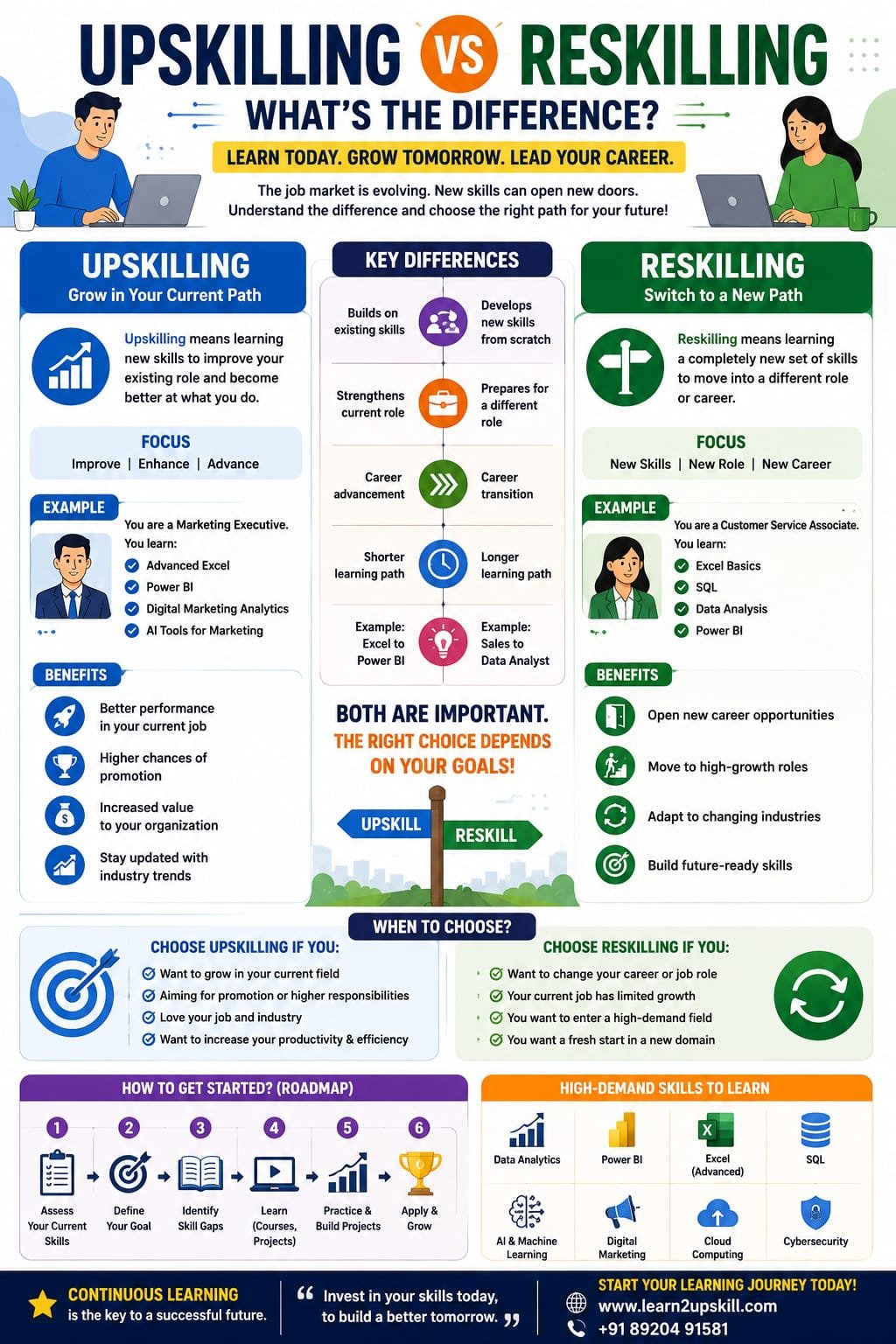
Upskilling vs Reskilling: What’s the Difference?
Understand the difference between upskilling and reskilling, why both matter for career growth, and how to choose the right learning path for the future of work.
Suggested URL Slug:
upskilling-vs-reskilling-difference
Introduction
The workplace is changing faster than ever.
Artificial intelligence, automation, cloud computing, data analytics and other technologies are transforming how organizations operate—and they are also changing the skills employers need.
For professionals, students and job seekers, this creates an important question:
Should you upskill or reskill?
Although the two terms are often used together, they don’t mean exactly the same thing.
Upskilling means learning new skills that build on your existing role or expertise.
Reskilling means learning a different set of skills to move into a new role, career or area of work.
Understanding the difference can help you make smarter decisions about your career development.
The World Economic Forum’s Future of Jobs Report 2025 estimates that around 39% of workers’ existing skill sets could be transformed or become outdated between 2025 and 2030, highlighting the importance of continuous learning.
So, should you upskill, reskill—or do both?
Let’s find out.
What Is Upskilling?
Upskilling means improving or expanding the skills you already use in your current career or profession.
The goal is usually to become:
Better at your current job
More productive
Eligible for higher responsibilities
Ready for promotion
More competitive in the job market
Example
Imagine you work as an accountant and primarily use Excel.
You could upskill by learning:
Advanced Excel
Power BI
Data analytics
AI productivity tools
Financial modelling
Automation
You are still working in finance, but you’re expanding your capabilities.
That’s upskilling.
Simple definition
Upskilling = Getting better at what you already do.
What Is Reskilling?
Reskilling means learning a new set of skills to move into a different role or career area.
For example, imagine someone working in customer service who wants to become a data analyst.
They might need to learn:
Excel
SQL
Power BI
Data visualization
Statistics
Data analysis
They’re not simply improving their existing customer-service skills.
They’re preparing for a different career path.
That’s reskilling.
Simple definition
Reskilling = Learning new skills for a new type of work.
Upskilling vs Reskilling: The Key Difference
The easiest way to understand the difference is to look at the direction of your career.
Upskilling
Reskilling
Builds on existing skills
Develops a new skill set
Usually supports your current career
Often supports a career change
Helps improve performance
Helps prepare for a new role
Can support promotion
Can support career transition
Adds depth to existing expertise
Adds a new professional capability
Example: Excel → Power BI
Example: Customer Service → Data Analytics
In one sentence:
Upskilling takes your current career forward. Reskilling can take your career in a new direction.
Why Are Upskilling and Reskilling Important?
Technology is changing the workplace.
AI can automate certain tasks.
Software can change workflows.
New tools can make old processes more efficient.
As a result, professionals can’t always depend on the same skills throughout their entire career.
The World Economic Forum identifies AI and big data, networks and cybersecurity, and technological literacy among the fastest-growing skill areas through 2030. It also highlights analytical thinking, creative thinking, resilience, flexibility and agility as important core skills.
This means career development increasingly involves asking:
What skills do I have today?
and:
What skills will I need tomorrow?
Benefits of Upskilling
- Improve Your Current Performance
Learning new tools can help you work more efficiently.
For example:
Excel → Advanced Excel → Power BI
can help a reporting professional move from manual reports toward interactive dashboards.
- Prepare for Promotion
Employees who develop skills beyond their current responsibilities may be better prepared to take on more complex work.
For example:
An HR executive could learn:
HR Analytics + Power BI + AI
and become better prepared for analytical HR responsibilities.
- Increase Your Career Options
Upskilling doesn’t necessarily mean staying in exactly the same position.
Your new skills may open opportunities for related roles.
For example:
Marketing Executive
↓
Digital Marketing Specialist
↓
Marketing Analytics
The career direction evolves without starting completely from scratch.
- Stay Relevant
Technology changes quickly.
Regular learning helps professionals keep their skills current.
Instead of waiting until a skill becomes outdated, continuous upskilling lets you prepare earlier.
Benefits of Reskilling
- Change Careers
One of the biggest reasons people reskill is to move into a new profession.
For example:
Teacher → Instructional Designer
Customer Service → Business Analyst
Sales Executive → Digital Marketing Specialist
Finance Executive → Data Analyst
- Enter a Growing Field
Reskilling can help professionals move toward areas experiencing strong demand.
Examples include:
Data analytics
Artificial intelligence
Cybersecurity
Cloud computing
Digital marketing
Business intelligence
Software development
However, choosing a new career should involve researching actual job requirements rather than following trends blindly.
- Adapt to Industry Changes
Sometimes reskilling becomes necessary because an industry changes.
New technologies, automation or changing business models can create demand for different skills.
Developing those skills can help professionals adapt.
Real-World Examples of Upskilling
Example 1: Finance Professional
Current skills:
Accounting
Excel
Financial reporting
Upskilling:
Advanced Excel
Power BI
Financial analytics
AI productivity
Result: Better reporting and analytical capabilities.
Example 2: HR Professional
Current skills:
Recruitment
Employee management
HR operations
Upskilling:
HR analytics
Excel
Power BI
AI tools
Result: Ability to work with workforce data and analytics.
Example 3: Marketing Professional
Current skills:
Social media
Content
Campaign management
Upskilling:
SEO
Marketing analytics
Generative AI
Automation
Result: More data-driven and technology-enabled marketing capabilities.
Real-World Examples of Reskilling
Example 1: Customer Service → Data Analyst
A customer service professional learns:
Excel
SQL
Power BI
Statistics
Data visualization
They are preparing for a new career path.
Example 2: Graphic Designer → UX Designer
A graphic designer learns:
UX research
User journeys
Wireframing
Prototyping
Usability testing
Their existing design knowledge provides a foundation, but they develop a new skill set.
Example 3: Sales Professional → Business Analyst
A sales professional learns:
Excel
SQL
Power BI
Business analysis
Data visualization
Their knowledge of customers and business processes can complement their new analytical skills.
Can You Upskill and Reskill at the Same Time?
Absolutely.
Career development isn’t always one or the other.
You can upskill in your current field while developing skills for a potential future career.
For example:
A marketing professional could upskill by learning:
AI + Marketing Automation
while simultaneously reskilling toward:
Marketing Analytics + Data Analysis
This creates a broader career profile.
Which Is Better: Upskilling or Reskilling?
There is no universal answer.
It depends on your goal.
Choose Upskilling If:
You like your current career
You want a promotion
Your industry is changing
You want to increase productivity
You want to take on more responsibility
You want to stay competitive
Choose Reskilling If:
You want a career change
Your current role has limited opportunities
You want to enter a new industry
You want to move into technology
You want to pursue a different professional path
Choose Both If:
You want to remain competitive in your current role while preparing for future opportunities.
How AI Is Changing Upskilling and Reskilling
Artificial intelligence is becoming an important part of both strategies.
Professionals can upskill by learning how AI applies to their existing jobs.
For example:
Finance + AI
Marketing + AI
HR + AI
Excel + AI
Cybersecurity + AI
At the same time, AI can be part of a reskilling journey.
Someone moving into data analytics might learn:
Excel + Power BI + SQL + AI-assisted analytics
Someone moving into digital marketing might learn:
SEO + Generative AI + Analytics + Automation
The important idea is:
Don’t learn AI separately from your career. Learn how AI applies to your career.
How to Choose the Right Skills to Learn
Before enrolling in a course or starting a learning program, ask yourself five questions.
- What Do I Do Today?
List your current responsibilities and skills.
- Where Do I Want to Go?
Define your next career goal.
- What Skills Are Missing?
Compare your current skills with the requirements of your target role.
- Which Skills Have Practical Value?
Prioritize skills that you can demonstrate through projects or workplace applications.
- How Can I Practice?
Don’t rely only on certificates.
Build:
Projects
Dashboards
Reports
Portfolios
Case studies
Practical workflows
A Simple Upskilling Roadmap
Step 1: Assess Your Current Skills
Create a list of:
Strong Skills
Average Skills
Skills to Improve
Step 2: Identify Your Career Goal
For example:
Current: MIS Executive
Goal: Data Analyst
Step 3: Find the Skill Gap
You might discover that you need:
Advanced Excel
Power BI
SQL
Data analytics
Business communication
Step 4: Learn One Skill at a Time
Don’t try to learn ten technologies simultaneously.
A better approach is:
Excel → Power BI → SQL → Projects
Step 5: Build Practical Projects
Create something employers can see.
For example:
Sales Dashboard
HR Analytics Dashboard
Financial Analysis
Marketing Performance Report
Step 6: Update Your Resume and LinkedIn Profile
Show what you can actually do.
Instead of:
“Completed Power BI course.”
Use:
“Built an interactive Power BI sales dashboard analyzing regional revenue, product performance and monthly trends.”
The second statement demonstrates practical ability.
A Simple Reskilling Roadmap
If you’re changing careers, follow a similar process.
Step 1: Choose the Target Career
For example:
Data Analyst
Step 2: Research Job Requirements
Look at multiple job descriptions.
Identify common requirements.
Step 3: Build the Foundation
Learn:
Excel
Data analysis
SQL
Power BI
Step 4: Build Projects
Create portfolio projects based on realistic business problems.
Step 5: Develop Supporting Skills
Add:
Communication
Presentation
Problem-solving
Business understanding
Step 6: Apply for Entry-Level or Transition Roles
Look for roles where your previous experience can provide an advantage.
Upskilling and Reskilling for Students
Students don’t have to wait until they get their first job.
They can begin developing future-ready skills early.
Useful areas include:
AI literacy
Excel
Data analytics
Communication
Presentation skills
Digital marketing
Cybersecurity
Programming
Problem-solving
Critical thinking
The goal isn’t to learn everything.
It’s to develop a strong foundation and discover areas of interest.
Upskilling and Reskilling for Working Professionals
Working professionals have one major advantage:
They already have industry experience.
That experience can make new skills more valuable.
For example:
Finance experience + Power BI
may be more meaningful for a finance analytics role than Power BI knowledge alone.
Similarly:
HR experience + HR analytics
can create a strong combination.
Marketing experience + AI automation
can create another valuable skill stack.
Your existing experience doesn’t have to be discarded when you learn something new.
Use it as a foundation.
The Future of Career Development
The traditional idea of learning everything at school or college and then using those skills for decades is becoming less realistic.
Modern careers increasingly require continuous learning.
A professional may:
Learn → Work → Upskill → Grow → Reskill → Transition → Upskill again
That’s not career failure.
That’s modern career development.
The World Economic Forum reports that employers are responding to changing skill requirements through strategies including upskilling, while many also expect workforce transformation and job creation/displacement from technological change.
Upskilling vs Reskilling: Quick Comparison
Question
Upskilling
Reskilling
Main goal
Improve current career
Move toward a new career
Starting point
Existing role
Existing experience
Skill direction
Deeper/broader
Different/new
Career change
Usually not required
Often involved
Example
Excel → Power BI
Sales → Data Analytics
Best for
Promotion & growth
Career transition
Duration
Often shorter
May require more learning
Main benefit
Career advancement
New career opportunities
The Most Powerful Strategy: Build a Skill Stack
Instead of learning isolated skills, combine them.
For example:
Data Analyst Skill Stack
Excel + SQL + Power BI + AI + Communication
Digital Marketing Skill Stack
SEO + Analytics + Generative AI + Automation + Content
Finance Skill Stack
Accounting + Excel + Power BI + AI + Financial Analysis
Business Analyst Skill Stack
Excel + SQL + Power BI + Business Analysis + Communication
A skill stack can make your profile more distinctive than knowing one tool in isolation.
Conclusion
The difference between upskilling and reskilling is simple:
Upskilling means adding to your existing career skills.
Reskilling means developing new skills for a different role or career direction.
Both are important in a rapidly changing workplace.
You don’t have to wait until your job is threatened to start learning.
You don’t have to completely change careers just because technology is evolving.
Instead, look at your current skills, understand where your industry is heading and identify the capabilities that can help you move forward.
Whether you choose to upskill, reskill or combine both, the most important step is to keep learning.
Your current skills are your foundation. Your next skills can shape your future.
Frequently Asked Questions
- What is the difference between upskilling and reskilling?
Upskilling means improving or expanding skills related to your existing role, while reskilling means learning a different set of skills to move into a new role or career.
- Is upskilling better than reskilling?
Neither is universally better. Upskilling is generally suitable when you want to grow in your current career, while reskilling is useful when you want to transition into a different career.
- What is an example of upskilling?
An accountant who already uses Excel learns Power BI and financial analytics to improve their reporting and analytical capabilities.
- What is an example of reskilling?
A customer-service professional who learns Excel, SQL, Power BI and data analytics to transition into a data analyst role is reskilling.
- Can I upskill and reskill at the same time?
Yes. You can strengthen your current career while developing skills for future opportunities or a possible career transition.
- Which skills are useful for upskilling in 2027?
AI literacy, data analytics, Excel, Power BI, cybersecurity, automation, communication, analytical thinking and other technology-related skills can be useful depending on your profession.
- How long does reskilling take?
There is no fixed timeline. It depends on your starting skills, target career, available learning time and the requirements of the target role.
- Do employers value upskilling and reskilling?
Employers increasingly recognize the importance of workforce learning as technology and job requirements change. Practical skills and demonstrated ability are particularly valuable.
Start Your Upskilling Journey with Learn2Upskill
Whether you want to advance in your current career or prepare for a new one, developing practical skills can help you stay ready for changing opportunities.
Explore career-focused learning in:
AI
Excel
Power BI
Data Analytics
Business Analysis
Cybersecurity
Digital Skills
Professional Skills
🌐 www.coral-kudu-326218.hostingersite.com�
📞 Contact Us: +91 89204 91581
Learn. Upskill. Grow.
Leave a Reply