Author: Learn2Up Skill

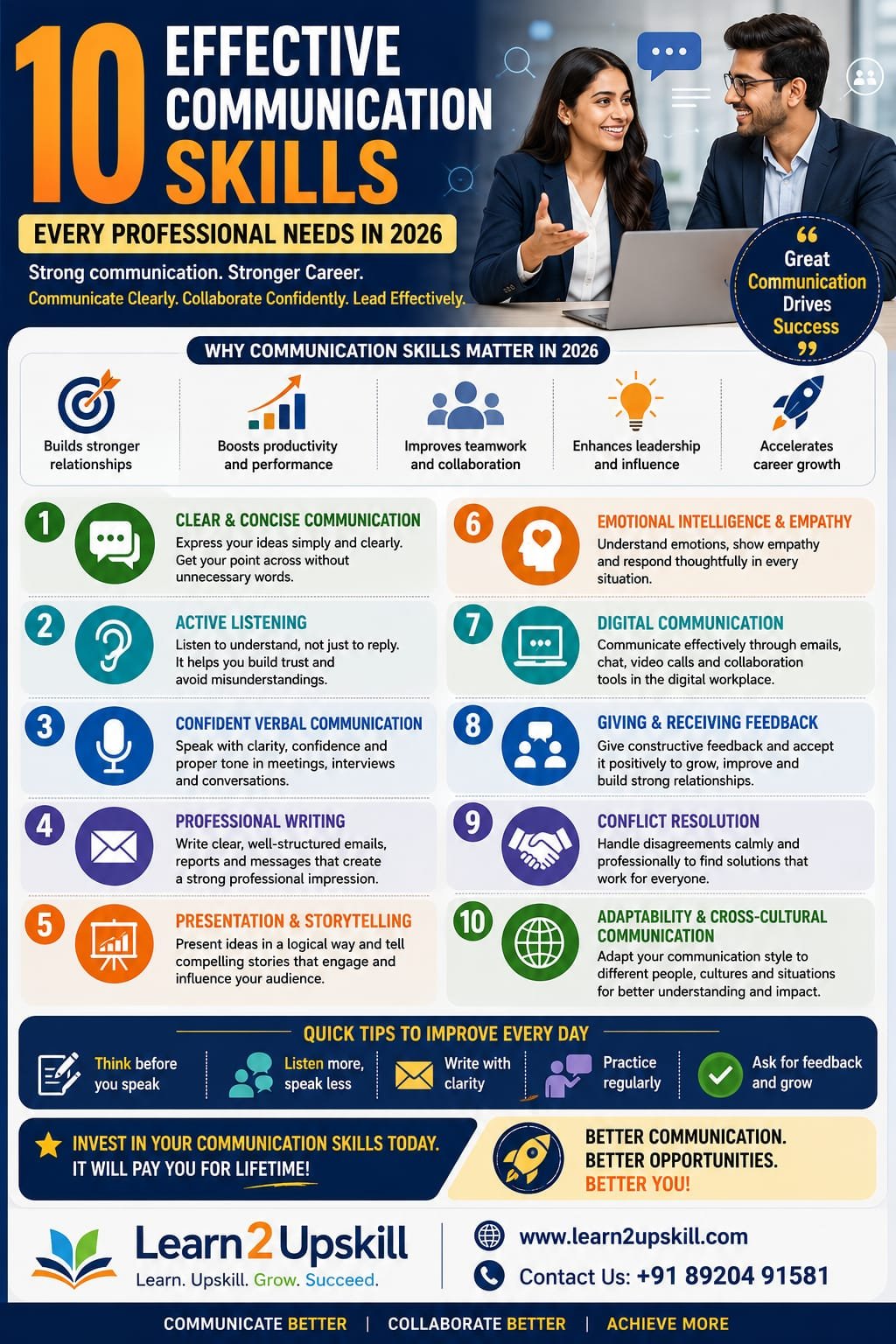
  • 10 Effective Communication Skills Every Professional Needs in 2026

    10 Effective Communication Skills Every Professional Needs in 2026

    10 Effective Communication Skills Every Professional Needs in 2026

    Discover the 10 most important communication skills professionals need in 2026, including active listening, AI-era communication, presentation, empathy, writing and leadership.

    Suggested URL Slug:

    /10-effective-communication-skills-professionals-2026/

    What Are Professional Communication Skills?

    Professional communication skills are the abilities that help you exchange information, ideas, instructions and feedback effectively in a workplace.

    They include:

    Speaking

    Listening

    Writing

    Presentation

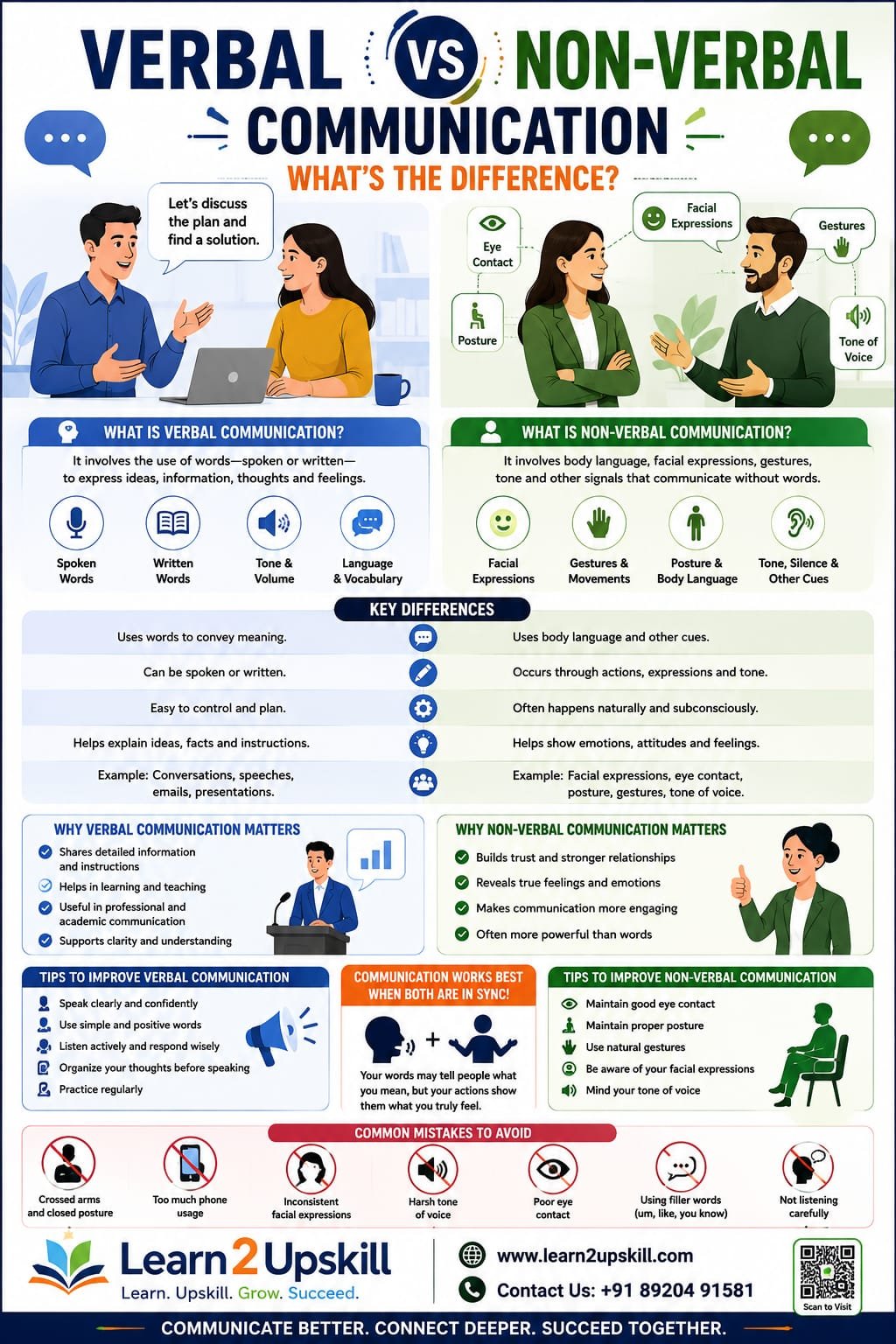
    Body language

    Emotional intelligence

    Digital communication

    Collaboration

    Feedback

    Conflict management

    Good professional communication is not about using complicated words or sounding overly formal.

    It’s about being:

    Clear + Concise + Confident + Respectful + Audience-focused

    And in 2026, there is another important element:

    Knowing when and how to use AI without losing your human voice.

    Why Are Communication Skills So Important in 2026?

    The modern workplace increasingly combines human capabilities with technology.

    The World Economic Forum’s Future of Jobs Report 2025 identifies skills such as leadership and social influence, empathy and active listening, resilience, flexibility and agility, and technological literacy among important workforce capabilities. �

    World Economic Forum +1

    LinkedIn’s 2026 skills research similarly shows that employers are increasingly focusing on what professionals can actually do rather than relying only on degrees or traditional career paths. �

    LinkedIn Pressroom

    And in India, communication has particular importance. ETS reported in 2026 that 91% of Indian employers surveyed said a more competitive job market increases the need for English proficiency, while 94% said global collaboration drives this need. �

    ETS

    The message is clear:

    Technical skills can help you get noticed. Communication skills can help you make an impact.

    1. Clear and Concise Communication

    One of the most valuable professional communication skills is the ability to explain something clearly without unnecessary complexity.

    Think about the number of messages professionals receive every day:

    Emails

    Slack or Teams messages

    Reports

    Presentations

    Meetings

    Customer requests

    Project updates

    Nobody wants to spend ten minutes figuring out what a two-line message means.

    Poor communication:

    “Regarding the issue that we discussed previously, I wanted to provide an update concerning the current situation and some possible things that we may potentially consider.”

    Better communication:

    “Here’s the latest update: the issue has been identified, and the team expects to resolve it by Friday.”

    Same basic message.

    Much better communication.

    How to improve:

    Start with your main point.

    Use short sentences.

    Remove unnecessary words.

    Use simple language.

    Organize information logically.

    Tell people what action is required.

    Professional rule:

    Don’t make people work hard to understand you.

    1. Active Listening

    Many people think communication is primarily about speaking.

    It’s not.

    Great communicators are great listeners.

    Active listening means paying attention to what someone is saying, understanding the meaning behind their words and responding appropriately.

    It involves:

    Paying attention

    Avoiding unnecessary interruptions

    Asking questions

    Clarifying information

    Summarizing key points

    Noticing tone and body language

    The World Economic Forum identifies empathy and active listening among important core skills for today’s workforce. �

    World Economic Forum

    Example

    A manager says:

    “The client isn’t happy with the latest version.”

    Instead of immediately saying:

    “But we delivered everything they asked for.”

    A better response would be:

    “What specific parts of the latest version did the client want changed?”

    Now you’re solving the problem instead of defending yourself.

    Practice active listening by:

    Listen → Understand → Clarify → Respond

    Not:

    Listen → Interrupt → Defend → Argue

    1. Confident Verbal Communication

    Professional confidence doesn’t mean speaking loudly or dominating conversations.

    It means communicating your ideas with clarity, composure and purpose.

    You should be able to:

    Explain an idea

    Answer questions

    Give an opinion

    Participate in meetings

    Speak with clients

    Talk to senior leaders

    Handle unexpected questions

    Try this technique

    Before speaking, quickly organize your answer:

    Point → Reason → Example → Conclusion

    For example:

    Point: “I recommend launching the campaign next month.”

    Reason: “We need more time to test the landing page.”

    Example: “Our previous campaign had conversion issues because testing was rushed.”

    Conclusion: “A one-month delay should give us enough time to improve performance.”

    This structure makes your communication easier to follow.

    1. Professional Writing and Email Communication

    Written communication is everywhere in modern workplaces.

    A professional may write:

    Emails

    Reports

    Proposals

    Project updates

    Messages

    Documentation

    Presentations

    Customer responses

    Your writing creates an impression of your professionalism.

    A strong professional email should usually have:

    1. Clear subject line

    Example:

    Project Update – Website Launch – August 30

    1. Purpose

    Explain why you’re writing.

    1. Key information

    Keep the details organized.

    1. Action

    Clearly state what you need from the recipient.

    1. Professional closing

    Keep it appropriate and courteous.

    2026 tip: Don’t outsource your personality to AI

    AI can help you draft and edit workplace communication, but you should still review the message.

    Ask:

    Does it sound like me?

    Is the tone appropriate?

    Are the facts correct?

    Is the message too generic?

    Did AI accidentally change the meaning?

    AI should make communication better, not make everyone sound like the same corporate robot.

    1. Presentation and Storytelling Skills

    Professionals often need to communicate ideas through presentations.

    You might present:

    Sales results

    Financial information

    Project updates

    Business proposals

    Marketing strategies

    Research

    Performance reports

    But simply putting information onto slides isn’t enough.

    You need a story.

    A simple presentation structure:

    Problem → Insight → Solution → Action

    For example:

    Problem: Customer retention has declined.

    Insight: Most customers leave after their first purchase.

    Solution: Introduce a personalized follow-up campaign.

    Action: Launch a pilot program next month.

    This structure helps your audience understand not only what is happening but why it matters.

    1. Emotional Intelligence and Empathy

    Imagine two managers giving the same feedback.

    Manager A:

    “This work isn’t good enough. Fix it.”

    Manager B:

    “There are a few areas we can improve. Let’s look at them together and see how we can strengthen the final version.”

    Both communicate dissatisfaction.

    But the second approach is more likely to encourage collaboration.

    Emotional intelligence helps professionals:

    Understand emotions

    Control reactions

    Show empathy

    Handle difficult conversations

    Build relationships

    Respond thoughtfully

    In an AI-driven workplace, these human capabilities can become especially valuable because technology can generate information, but people still need to interpret situations and manage relationships.

    GMAC’s 2026 recruiter research similarly emphasizes communication, adaptability and human capabilities alongside rising demand for AI and technology skills. �

    GMAC +1

    1. Digital Communication Skills

    Communication is no longer limited to face-to-face conversations.

    Professionals communicate through:

    Email

    Microsoft Teams

    Slack

    Video meetings

    Workplace messaging

    Project management platforms

    Collaborative documents

    Digital communication requires additional awareness.

    For example:

    Not every message needs to be a meeting.

    Not every issue should be handled through a private DM.

    And not every message should simply say:

    “Hi”

    …and then wait for the other person to respond.

    Give context.

    Instead:

    “Hi Rahul, I need your approval on the campaign budget before 4 PM today. I’ve attached the revised proposal. Could you please review it?”

    Much easier.

    Interestingly, workplace leaders are increasingly emphasizing accessible documentation of important decisions and information so that both people and AI systems can find and use organizational knowledge effectively. �

    The Wall Street Journal

    Digital communication rule:

    Context saves time.

    1. Giving and Receiving Feedback

    Feedback is essential for professional growth.

    But giving feedback badly can create conflict.

    Instead of:

    “Your presentation was confusing.”

    Try:

    “The main idea was strong, but the presentation would be easier to follow if we reduced the amount of information on slides 3 and 4.”

    This is more specific and actionable.

    A useful feedback formula:

    Situation → Observation → Impact → Improvement

    Example:

    “During today’s client presentation, the pricing explanation moved very quickly. Some clients appeared unsure about the different plans. Next time, we could slow down and include a simple comparison.”

    Receiving feedback

    Don’t automatically become defensive.

    Try:

    “Thank you. Can you give me an example so I can understand what I should improve?”

    That’s professional maturity.

    1. Conflict Resolution and Difficult Conversations

    Disagreements are normal in professional environments.

    The goal isn’t to eliminate every disagreement.

    The goal is to handle disagreement constructively.

    Strong conflict communication involves:

    Staying calm

    Listening to the other person

    Separating facts from assumptions

    Avoiding personal attacks

    Focusing on the issue

    Looking for common ground

    Agreeing on next steps

    Instead of:

    “You’re always changing the requirements.”

    Try:

    “We’ve had several requirement changes this week. Can we confirm the final scope before development continues?”

    Notice the difference?

    The second statement focuses on the problem, not the person.

    1. Cross-Cultural and Adaptable Communication

    Modern workplaces often involve people from different:

    Countries

    Cultures

    Age groups

    Professional backgrounds

    Communication styles

    A message that seems perfectly normal to one person may sound rude or confusing to another.

    That’s why adaptability matters.

    Good cross-cultural communication includes:

    Avoiding assumptions

    Respecting differences

    Using clear language

    Being aware of cultural expectations

    Asking questions when unsure

    Avoiding unnecessary slang or idioms

    Adjusting communication style when appropriate

    This becomes especially important for Indian professionals working with international clients and global teams.

    Bonus Skill: AI-Assisted Communication

    There is one communication skill that deserves special attention in 2026:

    Knowing how to communicate effectively with and through AI.

    AI can help professionals:

    Draft emails

    Summarize documents

    Improve grammar

    Create presentations

    Brainstorm ideas

    Translate content

    Prepare meeting summaries

    But professionals still need human judgment.

    For example, AI can write an email.

    You decide:

    Whether the email should be sent

    Whether the information is accurate

    Whether the tone is appropriate

    Whether sensitive information should be included

    Whether the message represents your organization correctly

    LinkedIn reported in 2026 that AI proficiency is increasingly important to professionals, while other research shows employers continue to value human skills such as communication and adaptability. �

    LinkedIn Pressroom +1

    The winning combination isn’t:

    AI OR communication

    It’s:

    AI + communication + judgment

    Communication Skills Professionals Should Practice Every Day

    You don’t need a six-month communication boot camp to start improving.

    Try these small habits.

    Every morning

    Write down your three most important priorities.

    This improves clarity.

    During meetings

    Ask at least one meaningful question.

    During conversations

    Practice active listening.

    Before sending an email

    Read it once from the recipient’s perspective.

    Before a presentation

    Practice explaining your main idea in 30 seconds.

    After receiving feedback

    Write down one improvement you can make.

    At the end of the day

    Ask yourself:

    “Did I communicate clearly today?”

    Simple habits compound.

    30-Day Communication Skills Challenge

    Want to improve your professional communication?

    Try this:

    Week 1 – Speak Clearly

    Practice speaking for five minutes every day.

    Record yourself twice during the week.

    Week 2 – Listen Better

    Practice active listening in meetings and conversations.

    Don’t interrupt.

    Ask follow-up questions.

    Week 3 – Write Better

    Review your emails before sending them.

    Remove unnecessary words.

    Use clear subject lines.

    Week 4 – Communicate With Confidence

    Practice:

    One presentation

    Three interview questions

    One difficult conversation

    One professional feedback conversation

    At the end of 30 days, review your progress.

    10 Communication Skills at a Glance

    Skill

    Why It Matters

    Clear communication

    Reduces confusion

    Active listening

    Improves understanding

    Verbal communication

    Helps express ideas confidently

    Professional writing

    Creates credibility

    Presentation skills

    Helps influence and inform

    Emotional intelligence

    Improves relationships

    Digital communication

    Supports modern teamwork

    Feedback

    Enables continuous improvement

    Conflict resolution

    Prevents unnecessary escalation

    Adaptability

    Helps communicate across people and cultures

    Common Communication Mistakes Professionals Should Avoid

    Even experienced professionals can fall into communication traps.

    ❌ Talking more than listening

    Good communication is a two-way process.

    ❌ Using complicated language

    Simple doesn’t mean unprofessional.

    ❌ Sending vague messages

    Always provide enough context.

    ❌ Ignoring tone

    Written words can easily be misunderstood.

    ❌ Avoiding difficult conversations

    Problems rarely disappear because we don’t discuss them.

    ❌ Reacting emotionally

    Pause before responding when a conversation becomes difficult.

    ❌ Depending completely on AI

    AI can assist communication, but human judgment remains essential.

    ❌ Forgetting the audience

    Your communication should be designed for the person receiving it.

    How Communication Skills Can Boost Your Career

    Strong communication can support your career in several ways.

    Better Interviews

    You can explain your skills and experience more effectively.

    Better Teamwork

    You can collaborate with colleagues more smoothly.

    Better Leadership

    You can communicate expectations and motivate teams.

    Better Client Relationships

    You can understand needs and explain solutions.

    Better Presentations

    You can communicate ideas with greater impact.

    Better Career Visibility

    Professionals who communicate their contributions clearly are often better positioned to demonstrate their value.

    The goal isn’t to become the loudest person in the room.

    It’s to become someone whose ideas are understood, trusted and remembered.

    Conclusion

    The workplace of 2026 isn’t simply about having the right technical skills.

    It’s about combining technical capability with human capability.

    Professionals who can analyze information, use AI tools and communicate their ideas clearly will be better prepared to collaborate, lead and adapt.

    The 10 communication skills to focus on are:

    Clear and concise communication

    Active listening

    Confident verbal communication

    Professional writing

    Presentation and storytelling

    Emotional intelligence

    Digital communication

    Giving and receiving feedback

    Conflict resolution

    Cross-cultural adaptability

    And remember:

    Communication isn’t just about speaking well. It’s about making your message understood and making other people feel heard.

    Start practicing one skill today.

    Then build from there.

    🚀 Develop Your Professional Skills With Learn2Upskill

    Want to become more confident, professional and career-ready?

    Explore career-focused learning resources and practical courses at Learn2Upskill.

    🌐 www.coral-kudu-326218.hostingersite.com⁠�

    📞 Contact Us: +91 89204 91581

    Learn. Upskill. Grow. Succeed.
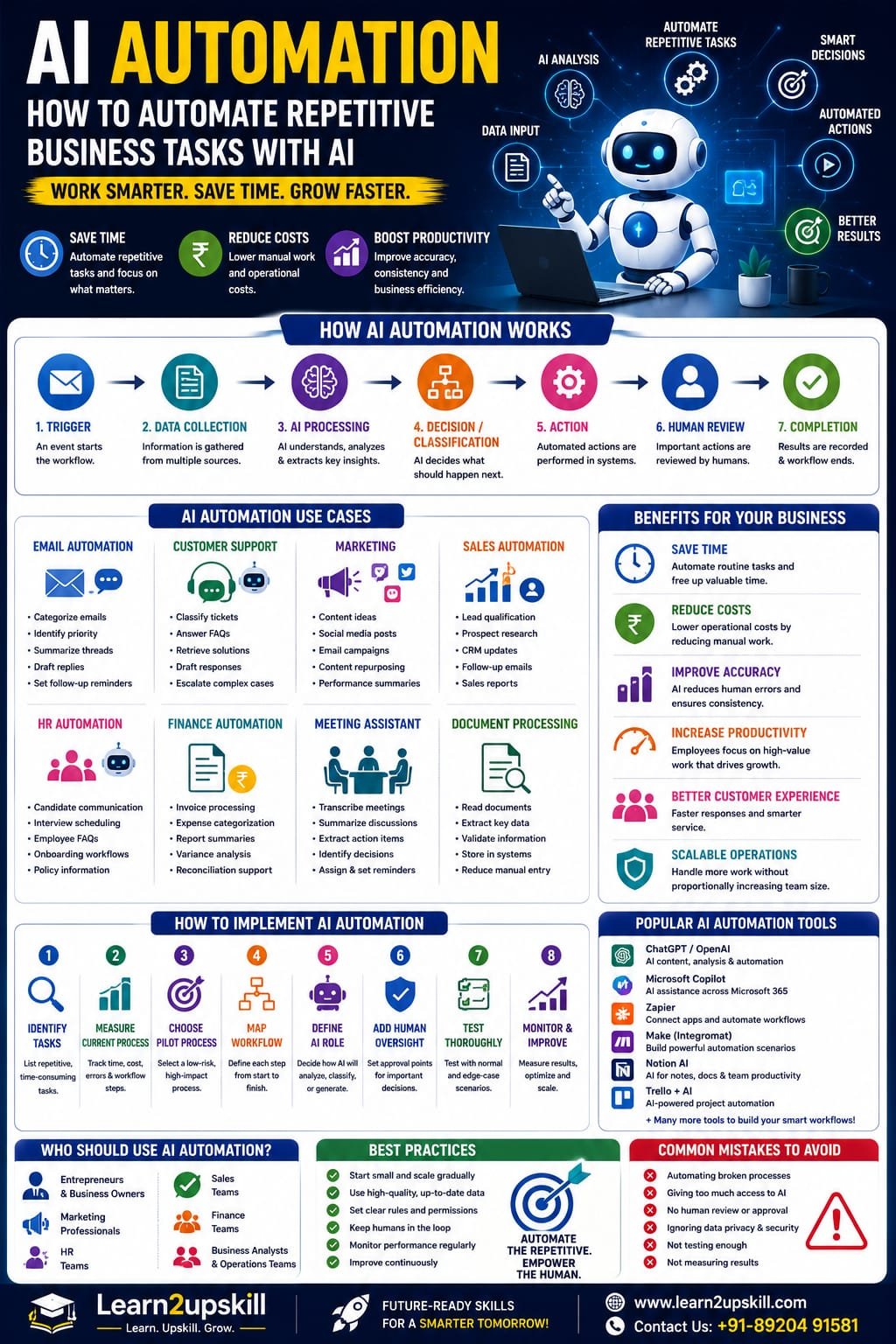


  • AI Automation: How to Automate Repetitive Business Tasks With AI

    AI Automation: How to Automate Repetitive Business Tasks With AI

    AI Automation: How to Automate Repetitive Business Tasks With AI

    Suggested URL Slug: /ai-automation-repetitive-business-tasks/

    AI Automation: How to Automate Repetitive Business Tasks With AI

    Imagine starting your workday and discovering that several hours of routine work have already been completed.

    Emails have been categorized.

    Customer enquiries have been sorted.

    Meeting notes have been summarized.

    Reports have been prepared.

    Data has been entered into the right systems.

    Follow-up reminders have been created.

    A first draft of the weekly report is ready for review.

    This isn’t science fiction anymore.

    AI automation is changing how businesses approach repetitive work.

    Traditional automation has been used for years to perform predictable tasks based on predefined rules.

    AI adds another layer.

    Instead of only following fixed instructions, AI-powered systems can work with text, documents, conversations, images, unstructured information and changing situations.

    When AI is combined with automation tools, businesses can create workflows that can analyze information, generate content, classify requests, extract data, make recommendations and trigger actions.

    The World Economic Forum’s Future of Jobs Report 2025 found that 86% of employers expect AI and information-processing technologies to transform their businesses by 2030, while automation is expected to change the share of work performed by humans, technology and human-machine collaboration. �

    World Economic Forum +1

    The opportunity isn’t simply to “replace people with AI.”

    A better goal is:

    Automate repetitive work so people can spend more time on valuable work.

    Let’s understand how AI automation works, where businesses can use it, and how you can start.

    What Is AI Automation?

    AI automation is the use of artificial intelligence together with software workflows and automation technologies to perform tasks with less manual intervention.

    Traditional automation usually follows predetermined rules.

    For example:

    If a customer submits a form → send an email.

    AI automation can handle more flexible situations.

    For example:

    Read the customer enquiry → understand the customer’s issue → classify the request → find relevant information → draft a response → send it for approval.

    The AI component helps interpret information.

    The automation component helps move the task through the workflow.

    Simple formula:

    AI + Data + Workflow + Automation = AI-Powered Process

    Traditional Automation vs AI Automation

    Traditional Automation

    AI Automation

    Rule-based

    Can interpret information

    Works best with structured data

    Can work with unstructured information

    “If X, do Y”

    Can analyze context

    Predictable workflows

    More flexible workflows

    Fixed instructions

    Can use AI-generated reasoning/output

    Limited interpretation

    Can summarize, classify and generate

    Best for repetitive rules

    Useful for repetitive knowledge tasks

    Traditional automation isn’t disappearing.

    In fact, the two can work together.

    Example:

    Traditional automation:

    Move a file to a folder.

    AI:

    Read and summarize the file.

    Traditional automation:

    Send the summary to a manager.

    Together, they create a more capable workflow.

    Why Is AI Automation Important in 2026?

    Businesses are under constant pressure to:

    Reduce repetitive work

    Improve productivity

    Respond faster

    Control operating costs

    Improve customer experience

    Handle more information

    Scale operations

    Make better use of employee time

    At the same time, employees are dealing with growing volumes of:

    Emails

    Documents

    Meetings

    Data

    Customer enquiries

    Reports

    Administrative tasks

    AI automation can help organizations process some of this workload more efficiently.

    The World Economic Forum reports that employers expect automation and AI to significantly reshape work through 2030. It also finds that AI and big data, networks and cybersecurity, and technological literacy are among the fastest-growing skill areas. �

    World Economic Forum

    This means AI automation is becoming both a business opportunity and a career skill.

    How Does AI Automation Work?

    A typical AI automation workflow can look like this:

    1. Trigger

    Something happens.

    Example:

    New customer email arrives.

    ↓

    1. Data Collection

    The system gathers relevant information.

    ↓

    1. AI Analysis

    AI interprets the information.

    ↓

    1. Decision or Classification

    The system determines what should happen next.

    ↓

    1. Action

    An automated workflow performs an approved task.

    ↓

    1. Human Review

    A person checks important or sensitive outputs.

    ↓

    1. Completion

    The system records the result.

    Example

    Imagine a company receives 500 customer enquiries every week.

    Without automation:

    Customer email → Employee reads → Employee researches → Employee writes response → Employee updates system

    With AI automation:

    Customer email → AI classifies → Retrieves relevant information → Drafts response → Human approval → CRM update

    The employee is still involved.

    But the repetitive parts become much faster.

    1. AI Automation for Email Management

    Email is one of the easiest places to identify repetitive work.

    AI automation can potentially help with:

    Categorizing emails

    Identifying urgent messages

    Summarizing long conversations

    Extracting action items

    Drafting replies

    Routing messages

    Creating follow-up reminders

    Extracting customer information

    Example workflow:

    Email arrives

    ↓

    AI identifies topic

    ↓

    Classifies priority

    ↓

    Summarizes message

    ↓

    Drafts response

    ↓

    Human reviews

    ↓

    Reply is sent

    This can reduce the amount of time employees spend processing routine email.

    1. AI Automation for Customer Support

    Customer support teams often handle similar questions repeatedly.

    AI automation can help with:

    FAQ responses

    Ticket classification

    Sentiment analysis

    Information retrieval

    Response drafting

    Ticket routing

    Customer-history summaries

    Escalation

    Example:

    A customer writes:

    “My payment was deducted, but my course access hasn’t been activated.”

    The AI system could:

    Identify the issue as a payment/access problem.

    Retrieve the customer’s account information.

    Check approved troubleshooting information.

    Draft an appropriate response.

    Escalate the issue if it requires human intervention.

    This doesn’t mean every customer interaction should be fully automated.

    For sensitive or complex cases, human support remains important.

    1. AI Automation for Marketing

    Marketing involves many repetitive activities.

    AI can assist with:

    Content ideas

    Social media drafts

    Email campaigns

    Content repurposing

    Keyword clustering

    Competitor research

    Campaign summaries

    Customer segmentation

    Performance analysis

    Example workflow:

    Blog published

    ↓

    AI extracts key points

    ↓

    Creates LinkedIn post

    ↓

    Creates Instagram caption

    ↓

    Creates email newsletter draft

    ↓

    Creates short-video script

    ↓

    Human reviews

    This allows one piece of content to be repurposed across multiple channels.

    1. AI Automation for Sales

    Sales teams spend significant time researching prospects and updating systems.

    AI automation can assist with:

    Lead qualification

    Prospect research

    CRM updates

    Follow-up reminders

    Meeting summaries

    Proposal drafts

    Sales reporting

    Customer communication

    Example:

    New lead

    ↓

    AI analyzes lead information

    ↓

    Identifies relevant characteristics

    ↓

    Assigns a qualification category

    ↓

    Creates CRM summary

    ↓

    Drafts follow-up email

    ↓

    Salesperson reviews

    This gives sales professionals more time for actual customer conversations.

    1. AI Automation for HR

    Human Resources involves large amounts of administrative work.

    AI automation can assist with:

    Job-description drafting

    Candidate communication

    Interview scheduling

    Employee FAQs

    Onboarding documents

    Training recommendations

    Policy information retrieval

    Meeting summaries

    Example onboarding workflow:

    New employee joins

    ↓

    Collect required information

    ↓

    Generate onboarding checklist

    ↓

    Send approved documents

    ↓

    Schedule orientation

    ↓

    Create reminders

    ↓

    Track completion

    AI can support the process while HR professionals retain responsibility for important people-related decisions.

    1. AI Automation for Finance

    Finance teams work with large amounts of structured and unstructured information.

    AI automation can assist with:

    Invoice data extraction

    Expense categorization

    Report summaries

    Variance analysis

    Document processing

    Financial research

    Reconciliation support

    Management reporting

    Example:

    Invoice received

    ↓

    AI extracts vendor, amount and date

    ↓

    Checks required fields

    ↓

    Routes information into accounting workflow

    ↓

    Flags exceptions

    ↓

    Human reviews

    This can reduce repetitive data-entry work.

    1. AI Automation for Business Analysts

    Business Analysts can benefit significantly from AI automation.

    Possible applications include:

    Meeting transcription

    Requirements extraction

    User-story drafting

    Process documentation

    Data analysis

    Report generation

    Stakeholder-question generation

    Requirement-gap identification

    Example workflow:

    Stakeholder meeting

    ↓

    Transcript generated

    ↓

    AI extracts requirements

    ↓

    Groups requirements by theme

    ↓

    Identifies missing information

    ↓

    Drafts user stories

    ↓

    Business Analyst reviews

    This doesn’t replace the Business Analyst.

    It reduces documentation workload and gives the analyst more time for stakeholder discussions and problem-solving.

    1. AI Automation for Document Processing

    Businesses process thousands of documents.

    Examples include:

    Invoices

    Contracts

    Applications

    Forms

    Reports

    Receipts

    Policies

    Customer documents

    AI can help extract information from these documents.

    For example:

    Document → AI extraction → Structured data → Validation → Business workflow

    This is especially useful when documents don’t follow exactly the same format.

    1. AI Automation for Meetings

    Meetings can generate a lot of administrative work.

    An AI-powered workflow can potentially:

    Record or transcribe a meeting.

    Summarize the discussion.

    Identify decisions.

    Extract action items.

    Identify owners.

    Create follow-up reminders.

    Draft a meeting report.

    Example:

    Meeting ends

    ↓

    AI creates summary

    ↓

    Action items identified

    ↓

    Tasks assigned

    ↓

    Follow-up reminders created

    Instead of spending 30–60 minutes writing notes, employees can review the AI-generated summary.

    1. AI Automation for Reports

    Many employees repeatedly create similar reports.

    AI automation can help transform:

    Raw data → Analysis → Summary → Report

    For example:

    A sales dashboard updates automatically.

    AI reviews the changes.

    It identifies:

    Revenue growth

    Declining products

    Unusual changes

    Regional differences

    Key trends

    Then it creates an executive summary.

    The manager reviews the result before making decisions.

    1. AI Automation for Data Entry

    Data entry is one of the most repetitive workplace activities.

    AI can assist when information needs to be extracted from:

    Emails

    PDFs

    Forms

    Documents

    Images

    Receipts

    Example:

    PDF invoice

    ↓

    AI reads information

    ↓

    Extracts:

    Vendor

    Invoice number

    Date

    Amount

    Tax

    ↓

    Sends structured information into the appropriate workflow.

    This can reduce manual copying and pasting.

    1. AI Automation for Internal Knowledge

    Employees frequently ask questions such as:

    “What’s our leave policy?”

    “Where is the onboarding document?”

    “What is the refund procedure?”

    “How do I create this report?”

    A company can create an AI-powered internal knowledge assistant that retrieves information from approved documents.

    Workflow:

    Employee question

    ↓

    AI searches knowledge source

    ↓

    Relevant information retrieved

    ↓

    AI generates answer

    ↓

    Source or document reference provided

    This can reduce the time employees spend searching through internal documents.

    AI Automation and AI Agents

    AI automation and Agentic AI are closely related.

    Traditional AI automation may follow a predefined workflow.

    An AI agent can potentially interpret a goal, select tools and perform multiple steps within defined boundaries.

    For example:

    Basic automation

    New lead → Add lead to CRM.

    AI automation

    New lead → Analyze information → Categorize lead → Create CRM record.

    Agentic workflow

    “Prepare this new lead for the sales team.”

    The agent may:

    Research the company

    Analyze the lead

    Retrieve relevant information

    Update approved CRM fields

    Prepare a summary

    Draft follow-up questions

    Notify the salesperson

    The more autonomy you give a system, the more important permissions, testing, monitoring and human oversight become.

    AI Automation vs AI Agents

    AI Automation

    AI Agents

    Often follows predefined workflows

    Can pursue a goal through multiple steps

    More predictable

    More flexible

    Rule + AI based

    AI + tools + planning

    Best for repeatable processes

    Useful for variable workflows

    Easier to control

    Requires stronger governance

    Usually narrower

    Potentially broader

    They are not competitors.

    A business may use both.

    Which Business Tasks Should You Automate?

    Not every task is a good candidate.

    Start with tasks that are:

    Repetitive

    The same task happens frequently.

    Time-consuming

    Employees spend significant time on it.

    Rules-based

    There are clear guidelines.

    Digital

    The information already exists electronically.

    Low-risk

    Errors don’t create severe consequences.

    Measurable

    You can measure whether automation helped.

    A Simple AI Automation Test

    Ask these five questions:

    1. Does this task happen frequently?

    If yes, automation may be worthwhile.

    1. Is the task repetitive?

    If employees perform the same steps repeatedly, investigate automation.

    1. Can AI interpret the information?

    If the task involves emails, documents or natural language, AI may help.

    1. Can success be measured?

    Define a metric.

    1. Can a human review important decisions?

    If yes, you can create a safer workflow.

    Tasks You Should Be Careful About Automating

    Avoid giving AI unrestricted control over high-risk decisions.

    Be particularly careful with:

    Employment decisions

    Financial approvals

    Legal decisions

    Medical decisions

    Security actions

    Sensitive customer data

    Account deletion

    Large financial transactions

    Access-control changes

    For these tasks, use appropriate human approval and organizational controls.

    How to Start AI Automation in Your Business

    Don’t try to automate everything at once.

    Use a phased approach.

    Step 1: List Repetitive Tasks

    Ask employees:

    “What do you do every day that feels repetitive?”

    You may discover dozens of opportunities.

    Step 2: Measure the Current Process

    Record:

    Time spent

    Number of tasks

    Error rate

    Employees involved

    Current cost

    Delays

    Step 3: Choose One Pilot

    Select a low-risk, high-volume process.

    For example:

    Meeting summaries

    or

    Customer-email classification

    Step 4: Map the Workflow

    Document:

    Trigger → Input → AI → Decision → Action → Human Review → Completion

    Step 5: Define the AI’s Role

    Be specific.

    Does AI:

    Classify?

    Summarize?

    Generate?

    Recommend?

    Extract?

    Search?

    Take an action?

    Step 6: Add Human Oversight

    Determine where employees must review the output.

    Step 7: Test

    Test:

    Normal situations

    Difficult cases

    Missing information

    Incorrect information

    Unexpected inputs

    Security risks

    Step 8: Measure Results

    Compare:

    Before automation

    vs.

    After automation

    Track:

    Time saved

    Accuracy

    Cost

    Response time

    Employee satisfaction

    Customer satisfaction

    Example: Automating a Customer Enquiry Workflow

    Let’s build a simple example.

    Before

    Customer email arrives.

    Employee reads it.

    Employee identifies issue.

    Employee searches documents.

    Employee writes response.

    Employee updates CRM.

    Time: potentially several minutes per enquiry.

    After

    Customer email arrives.

    ↓

    AI identifies topic.

    ↓

    AI retrieves relevant information.

    ↓

    AI drafts response.

    ↓

    Employee reviews.

    ↓

    Approved response is sent.

    ↓

    CRM is updated.

    The employee still controls the important decision.

    But repetitive work has been reduced.

    AI Automation Tools

    The technology stack depends on your needs.

    A typical AI automation system may include:

    AI Model

    Used for:

    Understanding

    Classification

    Generation

    Summarization

    Automation Platform

    Connects different applications and triggers workflows.

    Business Applications

    Such as:

    CRM

    Email

    Accounting software

    Project-management tools

    HR systems

    Knowledge Sources

    Such as:

    Documents

    Databases

    Internal knowledge bases

    APIs

    Allow different applications to communicate.

    Monitoring

    Tracks performance and errors.

    The exact tools you choose should depend on your business requirements, data sensitivity, budget and technical capability.

    AI Automation for Small Businesses

    You don’t need a huge technology department to start.

    Small businesses can begin with simple workflows such as:

    Marketing

    Blog → Social posts → Email draft

    Customer Support

    Customer enquiry → Categorization → Response draft

    Sales

    Lead form → Qualification → CRM entry

    Administration

    Invoice → Data extraction → Record

    Meetings

    Meeting → Transcript → Summary → Action items

    Content

    Long article → Short posts → Newsletter → Video script

    Start small.

    Prove the value.

    Then expand.

    AI Automation for Learn2upskill-Type Businesses

    For an online learning business, AI automation can be especially useful.

    For example:

    Student Enquiry Workflow

    Website enquiry

    ↓

    AI identifies course interest

    ↓

    AI categorizes enquiry

    ↓

    Drafts personalized response

    ↓

    Human reviews

    ↓

    CRM/database updated

    Content Marketing Workflow

    New blog

    ↓

    AI creates:

    Social media caption

    LinkedIn post

    Email draft

    Short-video script

    Carousel ideas

    ↓

    Human reviews

    ↓

    Content scheduled

    Course Development Workflow

    Course topic

    ↓

    AI creates:

    Course outline

    Module ideas

    Quiz questions

    Practice exercises

    Learning objectives

    ↓

    Trainer reviews

    ↓

    Final course prepared

    AI doesn’t replace the trainer’s expertise.

    It reduces the time spent on repetitive preparation.

    How AI Automation Can Improve Employee Productivity

    The real value of automation isn’t simply:

    “We used AI.”

    It’s:

    “Our employees spent less time on repetitive work and more time on meaningful work.”

    For example, an employee might previously spend:

    2 hours/day on repetitive administrative tasks

    After automation:

    45 minutes/day

    That could free more than an hour every working day for:

    Customer conversations

    Strategy

    Problem-solving

    Creative work

    Learning

    Collaboration

    The World Economic Forum expects the human-machine frontier to shift substantially by 2030, with employers anticipating a much more even distribution among tasks performed primarily by people, technology and human-technology collaboration. �

    World Economic Forum

    Does AI Automation Replace Employees?

    This is the question that worries many professionals.

    The answer isn’t simply yes or no.

    AI automation can reduce the need for certain repetitive tasks.

    But businesses can also use automation to augment employees.

    The World Economic Forum projects both job creation and displacement through 2030 and notes that automation will change how tasks are delivered, while human-machine collaboration also expands. �

    World Economic Forum +1

    The practical lesson for employees is:

    Don’t compete with automation on repetitive tasks.

    Instead, develop skills that complement it.

    Learn:

    AI literacy

    Data analysis

    Critical thinking

    Communication

    Problem-solving

    Creativity

    Business knowledge

    AI workflow design

    Skills Needed for AI Automation

    If you want to build AI automation skills, learn these areas:

    AI Fundamentals

    Understand what AI can and cannot do.

    Prompt Engineering

    Learn how to communicate effectively with AI models.

    Workflow Design

    Understand processes and dependencies.

    Automation Platforms

    Learn how applications connect.

    APIs

    Understand how systems communicate.

    Data Literacy

    Understand data quality and structure.

    RAG

    Learn how AI can work with external knowledge.

    AI Agents

    Understand more autonomous workflows.

    AI Security

    Understand data protection and permissions.

    AI Governance

    Understand responsible deployment.

    AI Automation Career Opportunities

    AI automation skills can complement many careers.

    Potential roles include:

    AI Automation Specialist

    AI Workflow Specialist

    AI Consultant

    Automation Consultant

    AI Business Analyst

    AI Solutions Specialist

    Business Process Analyst

    AI Product Specialist

    Digital Transformation Specialist

    AI Operations Specialist

    You don’t necessarily need to become a programmer.

    There are no-code, low-code and technical paths into AI automation.

    AI Automation Roadmap for Beginners

    If you’re starting from zero, follow this sequence:

    Step 1

    Learn AI fundamentals.

    ↓

    Step 2

    Learn Generative AI.

    ↓

    Step 3

    Learn Prompt Engineering.

    ↓

    Step 4

    Learn workflow automation.

    ↓

    Step 5

    Learn APIs and integrations.

    ↓

    Step 6

    Learn RAG and knowledge retrieval.

    ↓

    Step 7

    Explore AI agents.

    ↓

    Step 8

    Learn AI security and governance.

    ↓

    Step 9

    Build practical automation projects.

    ↓

    Step 10

    Apply AI automation to your industry.

    5 AI Automation Projects to Practice

    Project 1: Email Classification

    Build a workflow that categorizes incoming emails.

    Project 2: Meeting Assistant

    Turn meeting transcripts into summaries and action items.

    Project 3: Lead Qualification

    Analyze new leads and create structured summaries.

    Project 4: Content Repurposing

    Convert one blog into multiple content formats.

    Project 5: Document Data Extraction

    Extract structured information from invoices or forms.

    These projects help you develop a portfolio rather than just collecting theoretical knowledge.

    Common AI Automation Mistakes

    ❌ Automating Everything

    Not every task should be automated.

    ❌ No Human Review

    Important decisions may require human approval.

    ❌ Giving Excessive Permissions

    Limit what an AI system can access and change.

    ❌ Ignoring Data Privacy

    Sensitive information needs appropriate protection.

    ❌ Automating a Broken Process

    First improve the process.

    Then automate it.

    ❌ Measuring Only Cost

    Also measure:

    Quality

    Accuracy

    Customer experience

    Employee experience

    Risk

    ❌ Using AI Without Testing

    Always test before deploying at scale.

    AI Automation Best Practices

    Start Small

    Choose one workflow.

    Keep Humans in the Loop

    Especially for sensitive decisions.

    Limit Permissions

    Give systems only the access they need.

    Use Approved Data

    Don’t connect sensitive information casually.

    Monitor Results

    Track performance.

    Create Escalation Rules

    Know when AI should stop and involve a person.

    Evaluate Regularly

    AI systems can behave differently as inputs and surrounding systems change.

    Train Employees

    People need to understand how the automation works.

    The Future of AI Automation

    The next phase of workplace automation will likely combine:

    Generative AI + AI Agents + Automation + Business Applications

    Instead of isolated AI tools, organizations may increasingly build interconnected workflows.

    For example:

    Customer enquiry

    ↓

    AI agent understands request

    ↓

    Retrieves customer information

    ↓

    Checks knowledge base

    ↓

    Drafts response

    ↓

    Updates CRM

    ↓

    Schedules follow-up

    ↓

    Human reviews sensitive cases

    This is more than simple automation.

    It is an AI-powered business workflow.

    The World Economic Forum’s 2026 workplace coverage notes that AI agents are moving from pilots toward real-world deployment, while also highlighting that governance, autonomy, safety, integration and trust need to keep pace. �

    World Economic Forum

    Final Thoughts

    AI automation isn’t about making humans unnecessary.

    It’s about making work less repetitive and more valuable.

    Businesses can use AI to:

    Process information

    Classify requests

    Extract data

    Draft content

    Summarize meetings

    Analyze information

    Support customers

    Prepare reports

    Connect workflows

    But successful automation requires more than technology.

    It requires:

    Good processes + good data + appropriate AI + human oversight + security + measurement

    The biggest opportunity isn’t simply automating more tasks.

    It’s redesigning work so people can spend more time on the things humans do best:

    Think. Create. Communicate. Solve problems. Build relationships. Make decisions.

    So don’t ask:

    “What can I automate?”

    Start with:

    “What repetitive work is preventing my team from creating more value?”

    That’s where AI automation becomes truly useful.

    Automate the repetitive. Empower the human. Build smarter workflows.

    Quick AI Automation Checklist

    [ ] Identify repetitive tasks

    [ ] Measure current time and cost

    [ ] Choose a low-risk process

    [ ] Map the workflow

    [ ] Define the AI’s role

    [ ] Provide relevant data

    [ ] Set clear rules

    [ ] Add human review

    [ ] Limit permissions

    [ ] Test unusual cases

    [ ] Monitor performance

    [ ] Measure time saved

    [ ] Measure accuracy

    [ ] Improve continuously

    [ ] Train employees

    Build AI Automation Skills With Learn2upskill

    AI automation is becoming an important part of the modern workplace.

    At Learn2upskill, we help students, professionals, job seekers and business learners develop practical, future-ready skills.

    Explore learning opportunities in:

    Advanced AI • Generative AI • Prompt Engineering • AI Agents • AI Automation • ChatGPT • Business Analysis • Excel • Digital Marketing • Cybersecurity • Professional Development

    Don’t just learn how AI works.

    Learn how to apply AI to real business problems.

    Learn. Upskill. Grow.

    🌐 www.coral-kudu-326218.hostingersite.com⁠�

    Contact Us: +91-89204 91581


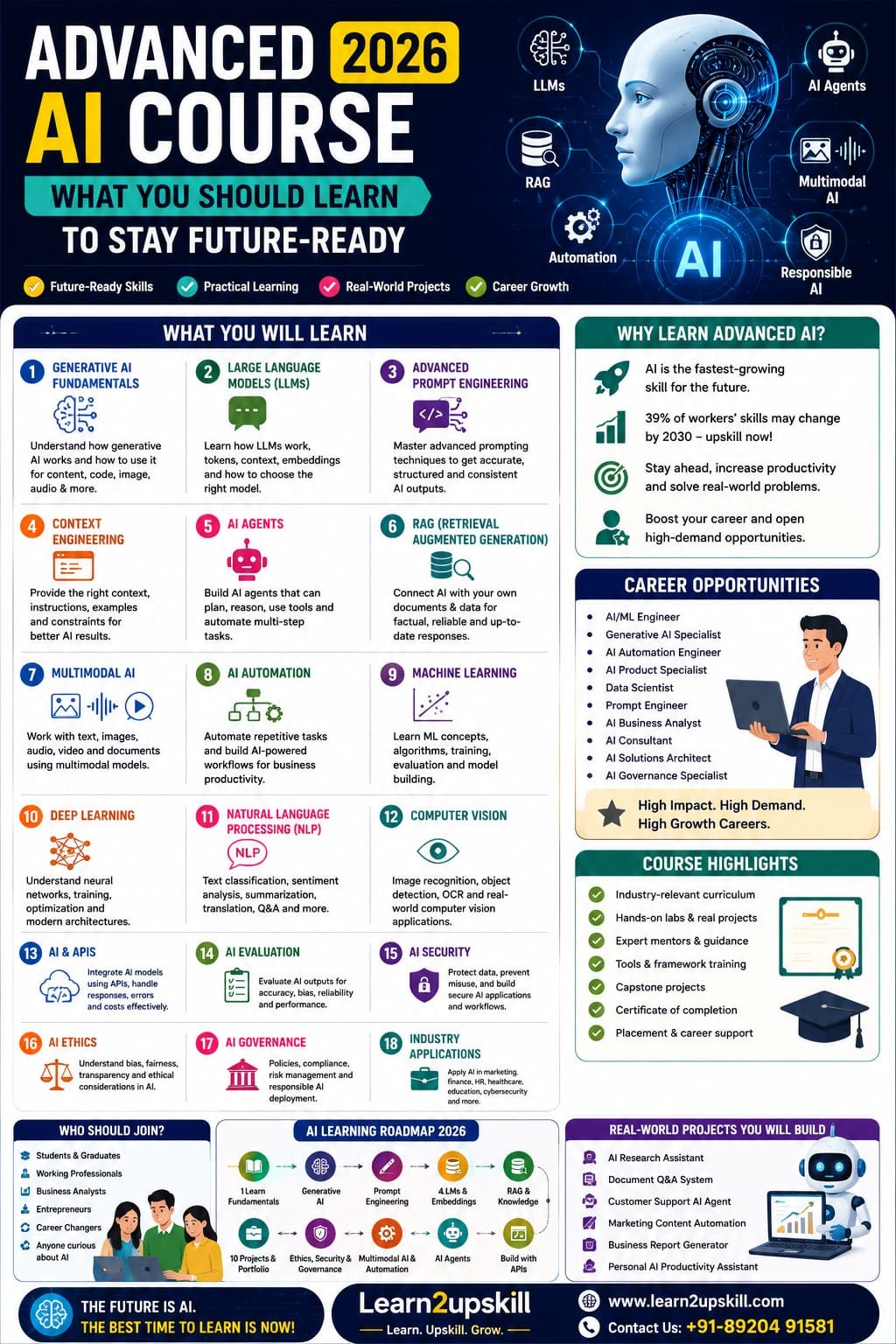
  • Advanced AI Course 2026: Skills, Syllabus & Career Guide

    Advanced AI Course 2026: Skills, Syllabus & Career Guide

    Advanced AI Course 2026: Skills, Syllabus & Career Guide

    Suggested URL Slug: /advanced-ai-course-2026/
    Advanced AI Course: What You Should Learn in 2026
    Artificial intelligence has moved far beyond simple chatbots and basic AI tools.
    A few years ago, learning AI might have meant understanding machine learning fundamentals or experimenting with a chatbot.
    Today, the AI landscape includes Generative AI, large language models, AI agents, multimodal AI, retrieval-augmented generation, AI automation, computer vision, AI security and responsible AI.
    For students and professionals, this creates an important question:
    What should you actually learn if you want to build advanced AI skills in 2026?
    The answer isn’t simply “learn ChatGPT.”
    An advanced AI learner should understand how AI works, how to use AI effectively, how to build AI-powered workflows, how AI systems interact with data, and how to apply AI responsibly in real-world situations.
    The World Economic Forum’s Future of Jobs Report 2025 identifies AI and big data as the fastest-growing skill area, followed by networks and cybersecurity and technological literacy. It also emphasizes that human capabilities such as analytical thinking, creative thinking, resilience and leadership remain important. �
    World Economic Forum +1
    India’s current national AI-skilling initiatives reflect a similar direction, covering areas from foundational AI through advanced topics such as Agentic AI, LLMs, Deep Learning, Computer Vision, AI Security and AI Governance. �
    Press Information Bureau +1
    So, what should an Advanced AI Course in 2026 actually include?
    Let’s break it down.
    What Is an Advanced AI Course?
    An advanced AI course goes beyond learning how to use individual AI tools.
    It should teach you how to understand, evaluate, build and apply AI systems.
    A good advanced AI course can include:
    Generative AI
    Large Language Models
    Advanced Prompt Engineering
    Context Engineering
    AI Agents
    Retrieval-Augmented Generation
    AI Automation
    Multimodal AI
    Machine Learning
    Deep Learning
    Natural Language Processing
    Computer Vision
    AI APIs
    AI-powered applications
    AI Security
    AI Ethics
    AI Governance
    Real-world AI projects
    You don’t necessarily need to become a machine-learning researcher.
    The right depth depends on your career goal.
    Why Learn Advanced AI in 2026?
    AI is rapidly changing how organizations work.
    The World Economic Forum reports that AI and information-processing technologies are among the technologies employers expect to have a major transformative impact through 2030. AI and big data also rank at the top of its fastest-growing skills list. �
    World Economic Forum
    The report also estimates that around 39% of workers’ existing skill sets could be transformed or become outdated between 2025 and 2030. �
    World Economic Forum
    That doesn’t mean everyone needs to become an AI engineer.
    It does mean that understanding AI is becoming increasingly useful across many professions.
    For example:
    Marketing + AI
    Finance + AI
    HR + AI
    Business Analysis + AI
    Cybersecurity + AI
    Education + AI
    Healthcare + AI
    Operations + AI
    The future isn’t necessarily about becoming an AI specialist.
    For many people, it’s about becoming a professional who knows how to work effectively with AI.
    1. Start With Advanced Generative AI
    Generative AI is one of the most important areas to understand.
    You should learn how AI systems can generate:
    Text
    Images
    Audio
    Video
    Code
    Summaries
    Reports
    Structured information
    But don’t stop at simply generating content.
    Learn how to:
    Give effective instructions
    Provide context
    Control outputs
    Evaluate results
    Refine responses
    Build repeatable workflows
    Use AI responsibly
    The goal is to move from:
    “I know how to use an AI chatbot.”
    to:
    “I know how to integrate generative AI into my work.”
    2. Learn Large Language Models (LLMs)
    Large Language Models, or LLMs, power many modern generative-AI applications.
    You don’t necessarily need to train a giant model from scratch.
    But you should understand concepts such as:
    What an LLM is
    How language models process information
    Tokens
    Context windows
    Model limitations
    Hallucinations
    Model evaluation
    Fine-tuning concepts
    Embeddings
    APIs
    Model selection
    Understanding these concepts helps you make better decisions when using AI tools.
    3. Master Advanced Prompt Engineering
    Basic prompting is only the beginning.
    Advanced AI learners should understand how to design prompts systematically.
    Topics can include:
    Role prompting
    Few-shot prompting
    Structured prompting
    Output constraints
    Context management
    Prompt templates
    Multi-step prompting
    Evaluation prompts
    Prompt refinement
    Task decomposition
    For example, instead of:
    “Analyze this data.”
    an advanced workflow might specify:
    The role of the AI
    The business objective
    The available data
    The analysis criteria
    The expected output format
    Limitations
    Validation requirements
    The result is usually much more useful.
    4. Learn Context Engineering
    As AI systems become more capable, simply writing a clever prompt isn’t always enough.
    You need to understand what information the AI should receive and how that information should be structured.
    This includes:
    Relevant context
    User instructions
    Reference documents
    Examples
    Data sources
    Constraints
    Conversation history
    Output requirements
    Think of it as giving AI the right information at the right time.
    This becomes especially important when building AI applications and agents.
    5. Understand AI Agents
    This is one of the most important advanced AI topics to learn in 2026.
    A traditional chatbot generally responds to your request.
    An AI agent can be designed to perform multiple steps toward a goal, potentially using tools, retrieving information and taking actions according to defined rules and permissions.
    For example:
    Traditional chatbot
    User asks:
    “What are the latest sales numbers?”
    AI provides an answer.
    AI-powered agent
    A business agent could potentially:
    Retrieve sales data.
    Analyze performance.
    Identify unusual changes.
    Create a summary.
    Prepare a report.
    Route the report to the appropriate person.
    The exact capabilities depend on the system, tools, permissions and implementation.
    AI agents are increasingly becoming part of workplace AI discussions, and the World Economic Forum’s 2026 outlook specifically highlights AI agents entering the workplace and the need for understandable, reliable and accountable systems. �
    World Economic Forum
    6. Learn Retrieval-Augmented Generation (RAG)
    RAG stands for:
    Retrieval-Augmented Generation.
    It is an important concept for building AI applications that need to work with specific information sources.
    For example, imagine a company has:
    HR policies
    Product manuals
    Training documents
    Customer FAQs
    Internal knowledge bases
    A RAG-based application can retrieve relevant information from an approved knowledge source and use it to help generate a response.
    Potential applications include:
    Internal knowledge assistants
    Customer-support systems
    Research tools
    Document assistants
    HR information systems
    Educational assistants
    Understanding RAG is valuable for anyone moving from AI tool usage toward AI application development.
    7. Understand Multimodal AI
    AI is no longer limited to text.
    Modern AI systems can work across multiple types of information, including:
    Text
    Images
    Audio
    Video
    Documents
    Structured data
    This is known as multimodal AI.
    For example, an AI application might:
    Read a document → Analyze an image → Listen to audio → Generate a written report.
    This opens opportunities across:
    Education
    Healthcare
    Marketing
    Manufacturing
    Customer service
    Research
    Finance
    An advanced AI course should introduce learners to these possibilities.
    8. Learn AI Automation
    AI becomes particularly valuable when connected to workflows.
    Instead of using AI only for individual tasks, learn how it can support repeatable processes.
    For example:
    Marketing workflow
    Customer data → AI analysis → Content recommendation → Draft → Human review
    HR workflow
    Job description → Candidate information → AI-assisted screening → Summary → Human decision
    Customer service
    Customer request → Classification → Knowledge retrieval → Draft response → Human approval
    Business reporting
    Data → Analysis → AI-generated summary → Dashboard → Management report
    The goal is not to automate everything.
    The goal is to identify where AI can reduce repetitive work while keeping appropriate human oversight.
    9. Learn Machine Learning Fundamentals
    Even if your primary goal is Generative AI, understanding machine learning provides valuable context.
    An advanced AI curriculum can introduce:
    Supervised learning
    Unsupervised learning
    Classification
    Regression
    Clustering
    Training data
    Validation
    Model evaluation
    Overfitting
    Feature engineering
    You don’t necessarily need advanced mathematics unless you’re pursuing a technical AI/ML career.
    But you should understand the basic concepts behind machine learning.
    10. Explore Deep Learning
    Deep learning is an important part of modern AI.
    At an introductory advanced level, learn about:
    Neural networks
    Training
    Layers
    Weights
    Optimization
    Deep neural networks
    Transformers
    Transformers are particularly important for understanding modern language and multimodal AI systems.
    The objective isn’t to memorize complicated equations.
    It’s to understand why these architectures matter.
    11. Understand Natural Language Processing
    Natural Language Processing, or NLP, focuses on how computers work with human language.
    Applications include:
    Text classification
    Sentiment analysis
    Translation
    Summarization
    Information extraction
    Question answering
    Search
    Chatbots
    NLP is particularly relevant for anyone interested in:
    Customer service
    Marketing
    Research
    Document analysis
    AI assistants
    12. Learn Computer Vision Basics
    Computer Vision allows AI systems to work with images and visual information.
    You can explore:
    Image classification
    Object detection
    Image recognition
    Document processing
    Optical character recognition
    Visual inspection
    Business applications can include:
    Manufacturing quality control
    Document processing
    Retail analytics
    Security systems
    Healthcare imaging
    Product recognition
    You don’t need to become a computer-vision engineer to understand the possibilities.
    13. Learn How AI APIs Work
    An important step toward advanced AI development is learning how applications communicate with AI models.
    You should understand basic concepts such as:
    APIs
    Authentication
    Requests and responses
    Structured outputs
    Model parameters
    Rate limits
    Error handling
    Cost considerations
    Even professionals who aren’t full-time developers can benefit from understanding how AI applications are connected.
    14. Learn AI Evaluation
    One of the biggest mistakes beginners make is assuming:
    “The AI gave me an answer, so it must be correct.”
    Advanced AI learning should include evaluation.
    Learn how to ask:
    Is the output accurate?
    Is the source reliable?
    Is the response consistent?
    Is there bias?
    Did the AI follow instructions?
    Are important details missing?
    Can the result be reproduced?
    Does it meet the business requirement?
    AI evaluation becomes especially important when AI is used in professional or high-impact environments.
    15. Understand AI Hallucinations
    AI systems can sometimes produce information that sounds convincing but is incorrect or unsupported.
    These outputs are commonly described as hallucinations.
    You should learn:
    Why hallucinations occur
    How to detect them
    How to verify information
    How retrieval can help
    Why human review matters
    When AI should not be trusted without verification
    This is an essential professional AI skill.
    16. Learn Responsible AI, Ethics and Governance
    Advanced AI isn’t just about what technology can do.
    It’s also about what it should do.
    Important topics include:
    Bias
    Fairness
    Privacy
    Transparency
    Accountability
    Human oversight
    Data protection
    AI safety
    Responsible deployment
    AI governance is becoming an increasingly relevant professional skill.
    India’s current AI-skilling ecosystem explicitly includes AI Ethics and AI Governance, alongside AI Security and advanced technical domains. �
    Press Information Bureau
    17. Learn AI Security
    As AI becomes integrated into business systems, security becomes increasingly important.
    An advanced course can introduce:
    Data privacy
    Prompt injection
    Sensitive information exposure
    Model misuse
    Access controls
    AI application security
    Secure AI workflows
    Human approval mechanisms
    This creates an important connection between:
    AI + Cybersecurity
    which is particularly valuable for business professionals and security teams.
    18. Develop Human Skills Alongside AI
    Don’t make the mistake of learning only technology.
    The World Economic Forum identifies human capabilities such as analytical thinking, creative thinking, resilience, flexibility, agility and leadership/social influence as important alongside rapidly growing technology skills. �
    World Economic Forum +1
    Develop:
    Communication
    Critical thinking
    Problem-solving
    Creativity
    Leadership
    Public speaking
    Collaboration
    Adaptability
    AI can generate an answer.
    You still need to decide what to do with it.
    19. Build Practical AI Projects
    This is one of the most important parts of an advanced AI course.
    Don’t finish the course with only notes and certificates.
    Build projects.
    Project 1: AI Research Assistant
    Create a workflow that summarizes information and produces structured research notes.
    Project 2: Document Q&A Assistant
    Create a basic system that answers questions from a selected document collection.
    Project 3: AI Customer Support Assistant
    Design an AI workflow that classifies questions and drafts responses.
    Project 4: AI Marketing Assistant
    Create a workflow for content ideas, audience analysis and campaign planning.
    Project 5: AI Business Reporting Assistant
    Combine business data with AI-generated summaries and insights.
    Project 6: AI Career Assistant
    Create a system that helps analyze job descriptions and identify relevant skill gaps.
    Projects give learners something much more valuable than theoretical knowledge:
    evidence of practical ability.
    20. Learn AI for Your Specific Industry
    You don’t have to learn every AI technology.
    Choose applications relevant to your career.
    AI for Finance
    Financial analysis
    Document processing
    Reporting
    Forecasting support
    Risk analysis
    AI for Marketing
    Content
    Customer insights
    Campaign analysis
    Personalization
    SEO workflows
    AI for HR
    Job descriptions
    Candidate communication
    Learning and development
    Workforce analytics
    AI for Business Analysts
    Requirements analysis
    Data interpretation
    Reporting
    Process automation
    AI-assisted documentation
    AI for Cybersecurity
    Threat analysis
    Security operations
    Detection support
    Security awareness
    AI security
    AI for Education
    Personalized learning
    Content generation
    Assessment support
    Research assistance
    Learning analytics
    This industry-specific approach can make your AI skills much more useful.
    Advanced AI Course: Suggested 2026 Syllabus
    If you’re designing an Advanced AI Course for Learn2upskill, I recommend a compact, practical structure like this:
    Module 1: Advanced AI Foundations
    AI landscape
    Machine learning overview
    Generative AI
    AI capabilities and limitations
    Module 2: Large Language Models
    LLM fundamentals
    Tokens
    Context
    Embeddings
    Model selection
    Module 3: Advanced Prompt Engineering
    Structured prompting
    Few-shot prompting
    Prompt templates
    Task decomposition
    Output control
    Module 4: Context Engineering
    Context design
    Knowledge sources
    Instructions
    Examples
    Constraints
    Module 5: AI Agents
    What are AI agents?
    Agent architecture
    Tools
    Planning
    Memory
    Multi-step workflows
    Module 6: RAG
    RAG concepts
    Retrieval
    Embeddings
    Vector databases
    Knowledge assistants
    Module 7: Multimodal AI
    Text
    Images
    Audio
    Video
    Document intelligence
    Module 8: AI Automation
    Workflow design
    AI-powered automation
    Business processes
    Human-in-the-loop systems
    Module 9: AI Development Basics
    APIs
    AI applications
    Structured outputs
    Testing
    Evaluation
    Module 10: Responsible AI
    Ethics
    Privacy
    Security
    Governance
    Bias
    Human oversight
    Module 11: Industry Applications
    Finance
    Marketing
    HR
    Education
    Business analysis
    Cybersecurity
    Module 12: Capstone Project
    Build a practical AI-powered solution.
    Who Should Take an Advanced AI Course?
    An advanced AI course can be suitable for:
    Students
    Graduates
    Working professionals
    Business analysts
    Digital marketers
    Finance professionals
    HR professionals
    Entrepreneurs
    Managers
    Trainers
    Technology professionals
    Career changers
    Freelancers
    However, the right course depends on your starting point.
    Do You Need Programming Experience?
    Not necessarily.
    There are different paths.
    Non-technical professionals
    Focus on:
    Generative AI
    Prompt engineering
    AI productivity
    AI automation
    AI agents
    Responsible AI
    Industry applications
    Technical learners
    Go deeper into:
    Python
    Machine learning
    Deep learning
    APIs
    RAG
    Vector databases
    Model evaluation
    AI application development
    A good advanced AI course should clearly explain which parts are no-code, low-code and technical.
    Advanced AI vs Basic AI Course
    Basic AI Course
    Advanced AI Course
    AI fundamentals
    Advanced AI concepts
    Basic ChatGPT use
    Advanced AI workflows
    Simple prompts
    Prompt engineering
    AI productivity
    AI automation
    Basic AI tools
    AI agents
    General applications
    Industry-specific applications
    AI awareness
    AI implementation
    Basic ethics
    AI governance and security
    Simple exercises
    Real-world projects
    The goal isn’t to make the advanced course unnecessarily complicated.
    The goal is to move learners from using AI toward understanding and applying AI strategically.
    What Jobs Can Advanced AI Skills Support?
    Advanced AI skills can complement many career paths.
    Potential roles include:
    AI Specialist
    Generative AI Specialist
    AI Automation Specialist
    AI/ML Engineer
    Machine Learning Engineer
    Data Scientist
    AI Product Specialist
    AI Business Analyst
    AI Consultant
    Prompt Engineer
    AI Solutions Specialist
    AI Governance Specialist
    AI Security Specialist
    Job titles vary by company, and many AI skills are increasingly being incorporated into existing roles rather than creating entirely new titles.
    The broader trend is clear: AI, big data and technological literacy are among the fastest-growing skill areas, while AI and machine-learning-related roles are among the fastest-growing occupations identified by the World Economic Forum. �
    World Economic Forum +1
    How to Choose the Right Advanced AI Course
    Before enrolling in a course, check whether it includes:
    ✔ Practical projects
    Not just theory.
    ✔ Current AI topics
    Look for GenAI, LLMs, agents, RAG and automation.
    ✔ Industry applications
    Learn how AI is used beyond technology companies.
    ✔ Responsible AI
    Ethics, privacy and governance matter.
    ✔ Hands-on practice
    You should actually build and test things.
    ✔ Portfolio work
    Ideally, finish with projects you can demonstrate.
    ✔ Appropriate difficulty
    The course should match your background.
    ✔ Updated content
    AI changes quickly, so outdated material can lose value.
    2026 AI Learning Roadmap
    If you’re starting today, here’s a practical sequence:
    Step 1
    Learn AI fundamentals.
    ↓
    Step 2
    Learn Generative AI.
    ↓
    Step 3
    Master Prompt Engineering.
    ↓
    Step 4
    Learn LLMs and embeddings.
    ↓
    Step 5
    Understand RAG.
    ↓
    Step 6
    Learn AI Agents.
    ↓
    Step 7
    Build AI automation workflows.
    ↓
    Step 8
    Explore multimodal AI.
    ↓
    Step 9
    Learn AI security, ethics and governance.
    ↓
    Step 10
    Build real-world AI projects.
    This approach gives you a progression from AI user → AI practitioner → AI problem-solver.
    The Biggest Mistake to Avoid
    Don’t try to learn every AI tool available.
    There are new AI products appearing constantly.
    If you chase every new tool, you’ll spend more time switching tools than developing useful skills.
    Instead, focus on concepts.
    Learn:
    How AI works.
    How to evaluate AI.
    How to design AI workflows.
    How to connect AI with data.
    How to automate tasks.
    How to use AI responsibly.
    Tools will change.
    The underlying skills will remain useful.
    Final Thoughts
    Advanced AI in 2026 is much bigger than knowing how to write good prompts.
    The next stage of AI learning is about understanding how different technologies fit together:
    Generative AI + LLMs + Prompt Engineering + Context + RAG + AI Agents + Automation + Multimodal AI + Security + Governance
    But technical knowledge alone isn’t enough.
    The most valuable AI professionals will also understand their industry, business problems, communication and human needs.
    The World Economic Forum’s research points to exactly this combination: rapidly growing AI and big-data skills alongside analytical thinking, creativity, adaptability and leadership. �
    World Economic Forum +1
    So don’t ask:
    “What AI tool should I learn next?”
    Ask:
    “What problem can I solve better because I understand AI?”
    That’s the mindset that turns AI learning into career value.
    Learn AI. Build practical skills. Solve real problems. Future-proof your career.
    Advanced AI Skills Checklist
    [ ] AI fundamentals
    [ ] Generative AI
    [ ] Large Language Models
    [ ] Advanced Prompt Engineering
    [ ] Context Engineering
    [ ] AI Agents
    [ ] Retrieval-Augmented Generation
    [ ] Embeddings
    [ ] Multimodal AI
    [ ] AI Automation
    [ ] Machine Learning fundamentals
    [ ] Deep Learning basics
    [ ] NLP
    [ ] Computer Vision
    [ ] AI APIs
    [ ] AI Evaluation
    [ ] AI Security
    [ ] AI Ethics
    [ ] AI Governance
    [ ] Industry-specific AI
    [ ] Real-world AI projects
    [ ] Human and communication skills
    Build Advanced AI Skills With Learn2upskill
    The AI landscape is changing quickly.
    At Learn2upskill, our goal is to help students, professionals, job seekers and career changers develop practical, future-ready skills.
    Explore learning opportunities in:
    Advanced AI • Generative AI • ChatGPT • Prompt Engineering • AI Automation • Business Analysis • Excel • Digital Marketing • Cybersecurity • Professional Development
    Don’t just learn how to use AI.
    Learn how to apply AI.
    Learn. Upskill. Grow.
    🌐 www.coral-kudu-326218.hostingersite.com⁠�

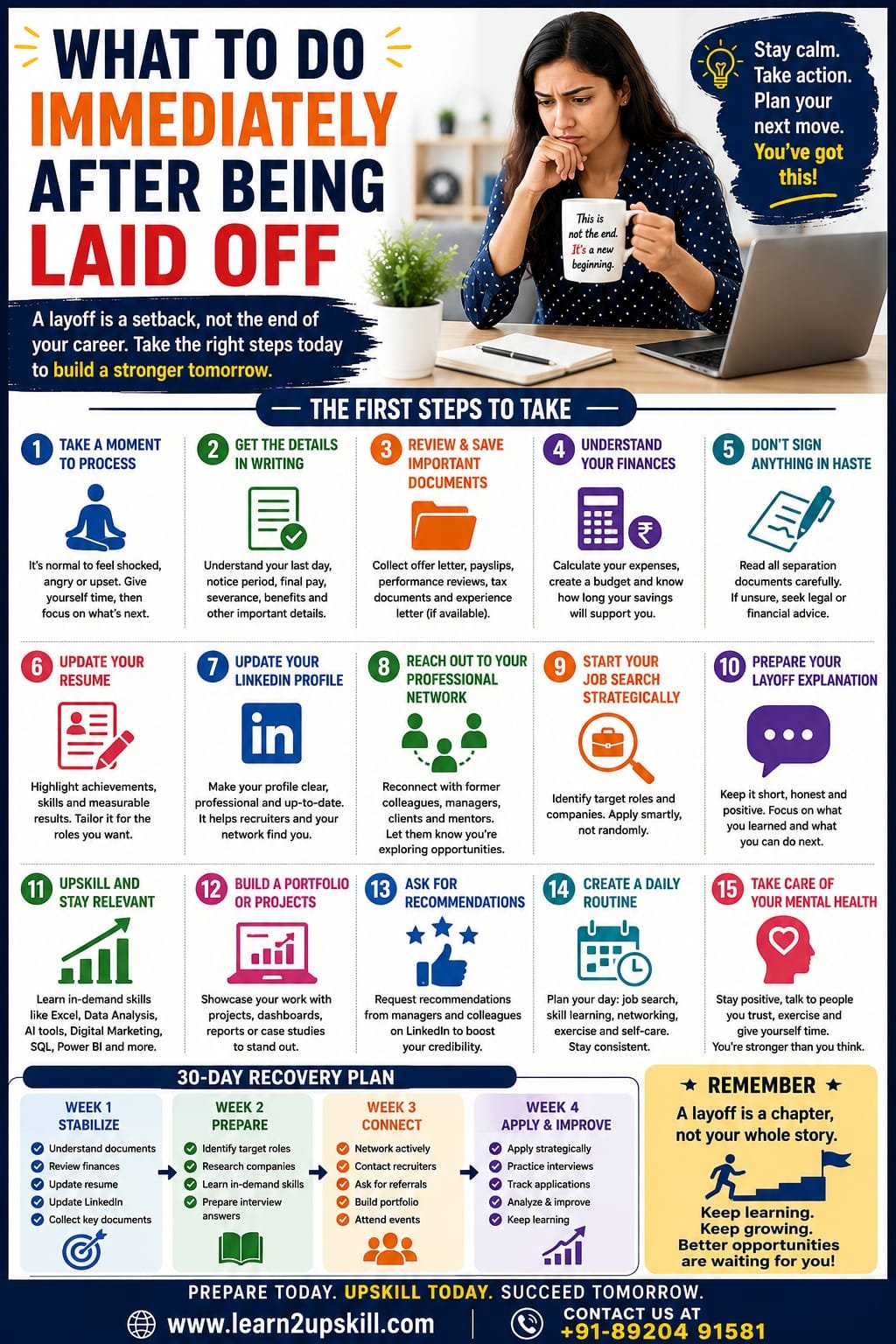
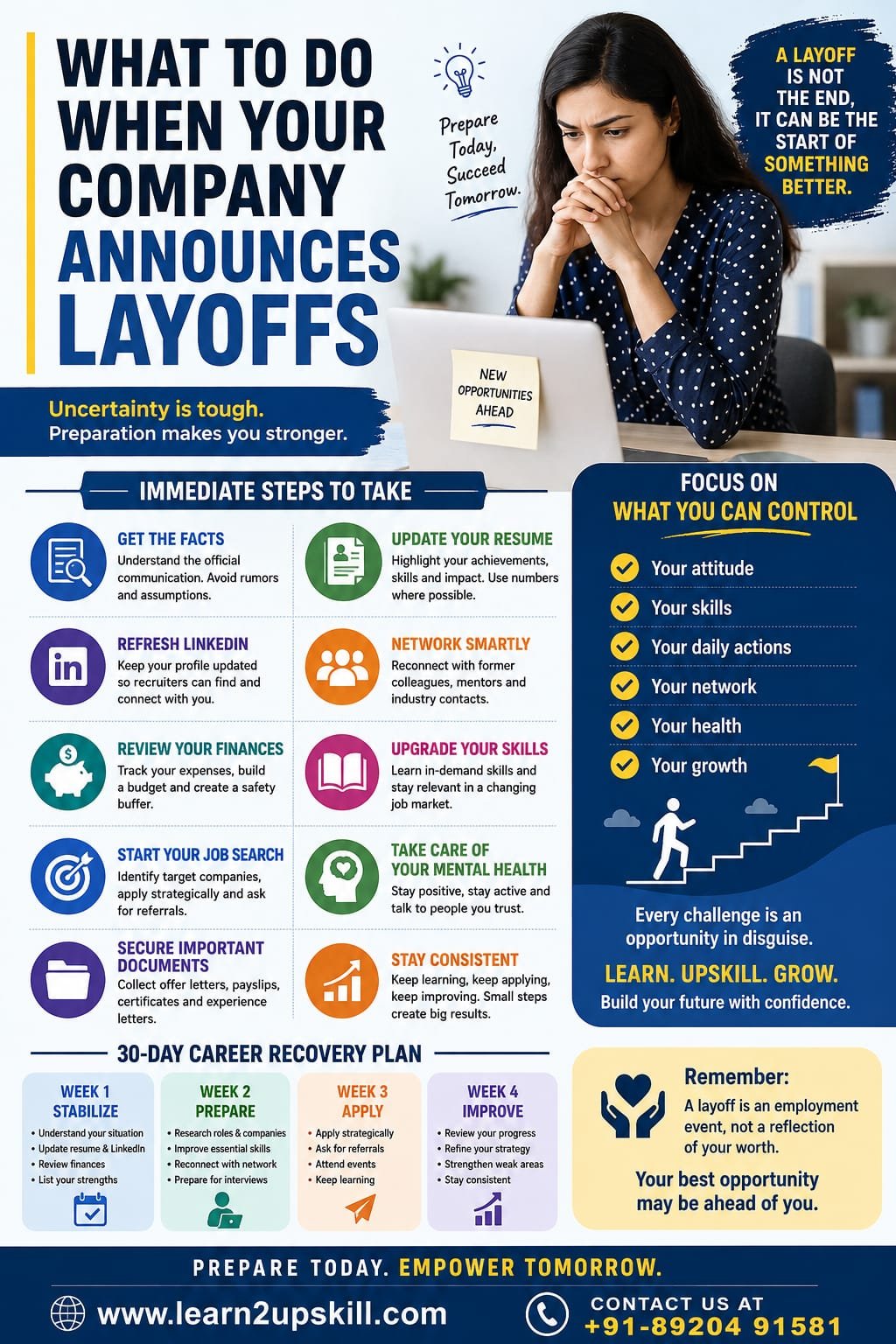
  • What to Do Immediately After Being Laid Off

    What to Do Immediately After Being Laid Off

    What to Do Immediately After Being Laid Off

    Just been laid off? Learn what to do immediately after losing your job, from reviewing documents and finances to updating your resume, networking, applying for jobs, and planning your next career move.

    —

    What to Do Immediately After Being Laid Off

    Being laid off can feel overwhelming.

    One moment, you have a regular job, income, routine, and professional identity. The next, you are suddenly expected to figure out what comes next.

    You may feel angry, worried, confused, or even relieved. All of these reactions are understandable.

    But after the initial shock, the most important thing is to slow down, understand your situation, and take practical steps.

    A layoff is a major career transition, but it does not have to become a career setback.

    The experience, skills, knowledge, and professional relationships you built in your previous role still belong to you.

    This guide explains what you should do immediately after being laid off—and how to turn an uncertain situation into a structured career recovery plan.

    —

    1. Take a Moment Before Making Major Decisions

    Your first reaction may be emotional.

    You might want to immediately call everyone you know, post about the situation online, or accept the first job opportunity you see.

    Don’t rush.

    Give yourself some time to process what happened.

    You don’t need to solve your entire career on the same day.

    Take a breath, talk to someone you trust, and then start working through the practical steps.

    Your first goal is stability, not speed.

    —

    1. Get the Layoff Details in Writing

    Before leaving the company, make sure you understand exactly what is happening.

    Ask HR or your manager for written information about:

    – Your official last working day

    – Notice period

    – Final salary

    – Severance or separation benefits, if applicable

    – Unused leave

    – Bonus or incentive payments

    – Insurance and other benefits

    – Retirement-related benefits

    – Provident fund procedures, where applicable

    – Stock or equity arrangements, if applicable

    – Company property that must be returned

    – Experience and relieving letters

    – Final settlement procedures

    Don’t rely only on verbal explanations.

    Keep copies of documents that you are legally entitled to retain.

    If you don’t understand a separation document, ask HR for clarification and consider qualified legal or financial advice where necessary.

    Employment rules differ by country, state, contract, and circumstances.

    —

    1. Don’t Sign Something You Don’t Understand

    You may be asked to sign a separation agreement, acknowledgment, settlement document, or other paperwork.

    Read it carefully.

    Pay attention to:

    – Payment terms

    – Notice provisions

    – Confidentiality clauses

    – Non-compete or non-solicitation provisions

    – Benefits

    – Claims or waivers

    – Deadlines

    – Return-of-property requirements

    If you’re unsure about your rights or obligations, get appropriate professional advice before signing.

    A few minutes of careful review can prevent significant problems later.

    —

    1. Secure Your Important Personal Employment Documents

    Before your access to company systems ends, make sure you have legitimate copies of documents you are entitled to keep.

    These may include:

    – Offer letter

    – Employment contract

    – Salary documents

    – Payslips

    – Promotion letters

    – Performance reviews

    – Training certificates

    – Experience letter

    – Tax documents

    – Benefits information

    However, be extremely careful about company information.

    Never take confidential or proprietary company data.

    Do not copy:

    – Customer databases

    – Internal financial information

    – Passwords

    – Confidential presentations

    – Proprietary software

    – Trade secrets

    – Private company documents

    Keep your personal employment records—but respect company confidentiality.

    —

    1. Understand Your Financial Situation

    This should be one of your immediate priorities.

    Your income may have stopped or may stop soon, so calculate how much money you need each month.


    Separate your expenses into two categories.

    Essential expenses

    – Rent or home loan

    – Food

    – Utilities

    – Education

    – Insurance

    – Transportation

    – Loan payments

    – Other essential commitments

    Non-essential expenses

    – Shopping

    – Dining out

    – Entertainment

    – Subscriptions

    – Luxury purchases

    – Unplanned spending

    Temporarily reducing non-essential expenses can give you more financial breathing room.

    The goal isn’t to panic.

    The goal is to understand how long your current financial resources can support you.

    —

    1. Create a Temporary Budget

    Once you understand your expenses, create a realistic short-term budget.

    For example:

    Monthly income: ₹0 or reduced income

    Essential expenses: ₹X

    Available savings: ₹X

    Expected payments: ₹X

    Emergency buffer: ₹X

    This gives you a clearer picture of your situation.


    If you have outstanding loans or major financial commitments, contact the relevant institution if necessary rather than ignoring the problem.

    Financial uncertainty becomes much easier to manage when you know the numbers.

    —

    1. Don’t Hide the Layoff From Everyone

    You don’t need to announce your situation to the entire internet.

    But don’t isolate yourself either.

    Tell people you trust.

    Your family and close friends may provide emotional support.

    Former colleagues may know about job openings.

    Professional contacts may introduce you to recruiters.

    A simple message can be enough:

    «“I’ve recently been affected by a company restructuring and am now exploring opportunities in my field. I’d appreciate it if you could keep me in mind for relevant roles.”»

    You don’t need to sound desperate.

    You need to make people aware that you’re available.

    —

    1. Update Your Resume Immediately

    Don’t wait until you find a job opening.

    Update your resume while your previous role is still fresh in your mind.

    Focus on:

    – Achievements

    – Projects

    – Skills

    – Certifications

    – Responsibilities

    – Measurable results

    For example:

    Instead of:

    «Managed social media accounts.»

    Write:

    «Managed social media campaigns across multiple platforms and improved audience engagement through data-driven content strategies.»

    Instead of:

    «Prepared reports.»

    Write:

    «Automated recurring business reports using Excel, reducing manual reporting time and improving reporting accuracy.»

    Your resume should show what you contributed, not just what your job title was.

    —

    1. Update Your LinkedIn Profile

    Your LinkedIn profile is an important part of your professional identity.

    Review your:

    – Headline

    – About section

    – Experience

    – Skills

    – Certifications

    – Projects

    – Profile photograph

    Make your professional direction clear.

    For example:

    «Business Analyst | Excel | SQL | Power BI | Business Intelligence»

    is more useful than:

    «Open to Work | Looking for a Job»

    If you’re comfortable using LinkedIn’s job-seeking features, make sure your profile communicates the types of opportunities you’re interested in.

    —

    1. Reconnect With Your Professional Network

    Networking should become part of your job search.

    Contact:

    – Former colleagues

    – Former managers

    – College classmates

    – Clients

    – Mentors

    – Industry professionals

    – Recruiters

    Don’t send the exact same generic message to everyone.

    Personalize your conversations.

    For example:

    «“Hi, I hope you’re doing well. I recently completed my role at [company] following a restructuring and I’m exploring opportunities in business analysis. Since you’ve worked in this area, I wanted to reconnect and stay in touch.”»

    Professional relationships can lead to opportunities that never appear on job portals.

    —

    1. Start Searching for Jobs—but Don’t Apply Randomly

    Once your basic preparation is complete, begin your job search.

    But don’t apply to every vacancy you see.

    Identify:

    Your target roles

    For example:

    – Business Analyst

    – Data Analyst

    – Digital Marketing Executive

    – Financial Analyst

    – Project Coordinator

    Your target industries

    Identify industries where your experience is relevant.

    Your target companies

    Create a list of companies where you’d genuinely like to work.

    Then customize your resume and application for relevant positions.

    Quality applications are generally more useful than sending hundreds of generic applications.

    —

    1. Prepare an Answer for “Why Did You Leave Your Last Job?”

    This question can make candidates nervous.

    You don’t need to be embarrassed about a layoff.

    Keep your answer short and professional.

    For example:

    «“My previous company underwent a restructuring that resulted in workforce reductions, and my position was affected. I’m now looking for an opportunity where I can apply my experience in business analysis and continue developing professionally.”»

    Then move the conversation toward your strengths.

    Avoid criticizing your previous employer.

    Don’t blame your manager.

    Don’t share confidential information.

    And don’t spend ten minutes explaining everything that happened.

    State the situation, then focus on the future.

    —

    1. Start Upskilling

    A job search doesn’t mean learning should stop.

    In fact, this may be one of the best times to upgrade your skills.

    Look at job descriptions for your target roles.

    Identify the skills employers repeatedly request.

    Depending on your career, consider learning:

    Business & Analytics

    – Advanced Excel

    – SQL

    – Power BI

    – Data analysis

    – Business intelligence

    Digital Marketing

    – SEO

    – Google Ads

    – Social media marketing

    – Analytics

    – AI marketing tools

    Finance

    – Financial modelling

    – Advanced Excel

    – Power BI

    – Data analytics

    – AI tools for finance

    Technology

    – AI

    – Automation

    – Cloud

    – Cybersecurity

    – Software development

    Don’t try to learn everything.

    Choose one or two relevant skills and build practical knowledge.

    —

    1. Learn How AI Can Help Your Career

    AI is becoming part of everyday work across many industries.

    Instead of simply worrying about whether AI will replace certain tasks, learn how to use it to improve your productivity.

    Depending on your role, AI can help with:

    – Research

    – Data analysis

    – Content creation

    – Presentations

    – Brainstorming

    – Reporting

    – Customer communication

    – Marketing

    – Automation

    – Administrative work


    However, always review AI-generated output and follow the rules of your future employer regarding confidential information and approved tools.

    A professional who understands both their industry and modern AI tools can become more adaptable in a changing job market.

    —

    1. Build a Daily Job-Search Routine

    Job searching without structure can quickly become exhausting.

    Create a daily routine.

    For example:

    Morning

    – Review job openings

    – Submit targeted applications

    Afternoon

    – Skill development

    – Portfolio or project work

    Evening

    – Networking

    – Interview preparation

    Night

    – Disconnect from job searching

    You don’t need to spend 12 hours every day applying for jobs.

    Consistent, focused effort is more sustainable.

    —

    1. Build or Improve Your Professional Portfolio

    A portfolio can help demonstrate your skills, especially if you’re moving into a new role.

    Depending on your profession, you could create:

    – Excel dashboards

    – Power BI reports

    – Data analysis projects

    – Marketing campaigns

    – SEO case studies

    – Writing samples

    – Business presentations

    – Financial models

    – AI productivity examples

    – Project management case studies

    A practical project can sometimes communicate your ability better than a list of certificates.

    —

    1. Ask for Recommendations

    If you had a positive relationship with former managers, colleagues, or clients, consider asking for professional recommendations.

    You can also request LinkedIn recommendations from people familiar with your work.

    A recommendation that describes your:

    – Reliability

    – Problem-solving

    – Leadership

    – Communication

    – Technical skills

    – Teamwork

    can strengthen your professional profile.

    Ask respectfully, and don’t pressure anyone.

    —

    1. Take Care of Your Mental Health

    Being laid off can affect more than your finances.

    It can affect your:

    – Confidence

    – Sleep

    – Motivation

    – Relationships

    – Sense of identity

    Don’t judge yourself for feeling upset.

    Give yourself permission to process the experience.

    Maintain basic routines:

    – Sleep properly

    – Exercise

    – Eat regularly

    – Spend time with supportive people

    – Take breaks from job searching

    – Avoid constantly checking job portals

    If stress becomes overwhelming or seriously interferes with daily life, consider talking with a qualified mental-health professional.

    Taking care of yourself is part of your career recovery.

    —

    1. Don’t Rush Into the Wrong Job

    Financial pressure can make you want to accept the first offer available.

    Sometimes accepting a temporary role is completely reasonable.

    But if you have enough financial flexibility, evaluate opportunities carefully.

    Consider:

    – Salary

    – Role responsibilities

    – Career growth

    – Learning opportunities

    – Work culture

    – Location

    – Working hours

    – Stability

    – Management

    – Long-term career value

    Your next job doesn’t have to be perfect.

    But it should ideally help you move forward.

    —

    1. Create a 30-Day Recovery Plan

    Having a plan can make a difficult period feel more manageable.

    Week 1: Stabilize

    – Understand your separation documents.

    – Review your finances.

    – Update your resume.

    – Update LinkedIn.

    – Collect legitimate employment records.

    Week 2: Prepare

    – Identify target roles.

    – Research companies.

    – Identify skill gaps.

    – Begin learning one relevant skill.

    – Prepare interview answers.

    Week 3: Connect

    – Contact former colleagues.

    – Reach out to recruiters.

    – Ask for referrals.

    – Attend relevant professional events.

    – Build your professional portfolio.

    Week 4: Apply and Improve

    – Submit targeted applications.

    – Practice interviews.

    – Continue upskilling.

    – Track applications.

    – Review your results.

    – Improve your strategy.

    —

    Common Mistakes to Avoid After a Layoff

    1. Panicking

    Don’t make major decisions while overwhelmed.

    1. Spending savings without a plan

    Know your financial runway.

    1. Applying for every job

    Focus on relevant opportunities.

    1. Ignoring skill development

    Use the transition period to become more employable.

    1. Criticizing your former employer publicly

    Protect your professional reputation.

    1. Isolating yourself

    Your network can become an important source of support.

    1. Giving up after a few rejections

    Job searches can take time.

    1. Comparing yourself with former colleagues

    Everyone’s career timeline is different.

    1. Ignoring your mental well-being

    Career recovery requires emotional as well as professional resilience.

    —

    Final Thoughts

    Being laid off can feel like your career has suddenly been put on pause.

    But a pause isn’t the same as an ending.

    Your experience is still valuable.

    Your skills are still valuable.

    Your professional relationships are still valuable.

    And you can continue building new skills and creating new opportunities.

    The most important thing is to move from panic to preparation.

    Take care of your finances.

    Understand your employment documents.

    Update your resume.

    Strengthen your network.

    Improve your LinkedIn profile.

    Learn in-demand skills.

    Prepare for interviews.

    And keep moving forward one step at a time.

    A layoff may have changed your current situation, but it does not have to determine your future.

    Your next opportunity may be closer than you think.

    —

    Quick “What to Do After Being Laid Off” Checklist

    – [ ] Take time to process the situation.

    – [ ] Get layoff details in writing.

    – [ ] Review your employment documents.

    – [ ] Understand your final payments and benefits.

    – [ ] Save legitimate personal employment records.

    – [ ] Review your finances.

    – [ ] Create a temporary budget.

    – [ ] Update your resume.

    – [ ] Update LinkedIn.

    – [ ] Contact your professional network.

    – [ ] Start a targeted job search.

    – [ ] Prepare for interviews.

    – [ ] Identify skill gaps.

    – [ ] Start learning relevant skills.

    – [ ] Build a professional portfolio.

    – [ ] Ask for recommendations.

    – [ ] Maintain a healthy daily routine.

    – [ ] Track your job-search progress.

    —

    Ready to Build Your Next Career Chapter?

    A job loss can be a difficult transition, but it can also be an opportunity to learn something new and strengthen your professional skills.

    At Learn2upskill, we provide practical learning resources for students, professionals, job seekers, and career changers.

    Explore skills in areas such as:

    AI • Excel • Business Analysis • Digital Marketing • Cybersecurity • Data Skills • Professional Development

    Don’t wait for your next job to teach you what you need to know.

    Learn. Upskill. Grow.

    🌐 www.coral-kudu-326218.hostingersite.com

    Contact Us: +91-89204 91581

    –

  • Signs Your Company May Be Planning Layoffs: 15 Warning Signs to Watch

    Signs Your Company May Be Planning Layoffs: 15 Warning Signs to Watch

    Signs Your Company May Be Planning Layoffs: 15 Warning Signs to Watch

    Learn the common signs your company may be planning layoffs, from hiring freezes and budget cuts to restructuring and reduced workloads—and what you can do to prepare.

    —

    Signs Your Company May Be Planning Layoffs

    Nobody wants to hear the words “workforce reduction” or “organizational restructuring.”

    But when a company starts experiencing financial pressure or changing its business strategy, there may be warning signs before layoffs are officially announced.

    The important thing to remember is that one warning sign does not automatically mean layoffs are coming. Companies make changes for many reasons, and some restructuring decisions have nothing to do with job cuts.

    However, if several signs appear at the same time, it may be sensible to start preparing for different career scenarios.

    The goal isn’t to panic or spread workplace rumors.

    The goal is simple:

    «Stay informed, stay professional, and make sure you are prepared.»

    Here are 15 signs that may indicate your company is considering layoffs—and what you can do about them.

    —

    1. Hiring Suddenly Stops

    A company that was previously hiring aggressively may suddenly announce a hiring freeze.

    Open positions may disappear from the careers page, recruitment may slow down, or managers may be told not to replace employees who leave.

    A hiring freeze doesn’t necessarily mean layoffs are coming. It can simply mean the company wants to control costs.

    However, if a hiring freeze appears alongside other cost-cutting measures, it is worth paying attention.

    What you can do:

    – Keep your resume updated.

    – Monitor your industry’s job market.

    – Strengthen your professional network.

    – Continue developing relevant skills.

    —

    1. Vacant Positions Are Not Being Replaced

    Imagine someone leaves your department and management decides not to hire a replacement.

    Instead, their responsibilities are distributed among existing employees.

    If this happens repeatedly, it may indicate that management is trying to reduce staffing costs.

    You may notice phrases such as:

    – “We’ll manage with the current team.”

    – “Let’s see if we can absorb the workload.”

    – “This position is on hold.”

    Pay attention to patterns rather than one isolated vacancy.

    —

    1. Budgets Are Being Cut

    Budget reductions can be an early warning sign of financial pressure.

    You may notice:

    – Training budgets being reduced

    – Business travel restricted

    – Office events cancelled

    – Software subscriptions being reviewed

    – Team-building activities reduced

    – Equipment purchases delayed

    – Department budgets frozen

    Some cost-cutting is completely normal.

    But when multiple departments are being asked to reduce expenses at the same time, employees should take notice.

    —

    1. Projects Are Suddenly Cancelled

    If important projects are repeatedly postponed, cancelled, or put “on hold,” it may indicate changing business priorities.

    This can happen because of:

    – Lower revenue

    – Loss of customers

    – Changing market conditions

    – New leadership

    – Budget restrictions

    – Strategic restructuring

    If your role depends heavily on a project that has been cancelled, think about how your skills can transfer to other areas.

    —

    1. Your Workload Drops Unexpectedly

    A sudden and unexplained reduction in workload can sometimes be concerning.

    For example, you may notice:

    – Fewer projects

    – Fewer meetings

    – Reduced responsibilities

    – Important tasks being reassigned

    – Long-term projects disappearing

    However, don’t immediately assume you’re being targeted.

    Workloads naturally change.

    The important question is whether the reduction is part of a broader organizational pattern.

    —

    1. Senior Management Starts Talking About “Cost Optimization”

    Pay attention to the language used by leadership.

    Terms such as:

    – Cost optimization

    – Efficiency

    – Restructuring

    – Operational efficiency

    – Organizational redesign

    – Business transformation

    – Workforce optimization

    – Strategic realignment

    can sometimes indicate that management is reviewing staffing and operating costs.

    These phrases do not automatically mean layoffs.

    But if they’re repeatedly mentioned alongside declining business performance or budget cuts, employees should prepare themselves.

    —

    1. Your Company Reports Financial Problems

    Financial difficulties can increase the possibility of workforce reductions.

    Watch for official announcements about:

    – Declining revenue

    – Losses

    – Falling profits

    – Major customer losses

    – Debt problems

    – Reduced forecasts

    – Store or office closures

    – Business-unit restructuring

    Public companies usually provide financial information through official disclosures and investor communications.

    Don’t rely solely on workplace gossip.

    —

    1. Leadership Changes Suddenly Increase

    A sudden change in senior leadership can sometimes lead to restructuring.

    A new CEO, CFO, business head, or department leader may review:

    – Teams

    – Budgets

    – Projects

    – Processes

    – Organizational structures

    – Performance

    This doesn’t mean layoffs will definitely happen.

    But leadership transitions can create changes in priorities, and some roles may be affected.

    If your company has recently undergone major leadership changes, stay informed about its strategic direction.

    —

    1. Departments Start Getting Merged

    If two departments are suddenly combined, management may be looking for ways to eliminate duplicated responsibilities.

    For example:

    Marketing + Communications

    or

    Customer Support + Operations

    When two teams perform overlapping functions, some roles may be redesigned or eliminated.

    If your department is being merged with another, focus on demonstrating the skills that make you valuable to the combined team.

    —

    1. Outsourcing and Automation Increase

    Companies often adopt technology, automation, or outsourcing to reduce costs or improve efficiency.

    You may notice:

    – Repetitive work being automated

    – External vendors taking over certain tasks

    – AI tools replacing manual processes

    – Customer service moving to external providers

    – Finance or HR processes being outsourced

    – New software reducing manual work

    This doesn’t necessarily mean everyone performing those tasks will lose their jobs.

    It does mean your skills may need to evolve.

    The smart response:

    Don’t compete with technology by refusing to use it.

    Learn how to work with technology.

    For example, an employee who understands both business processes and AI automation may become more valuable than someone who only performs manual tasks.

    —

    1. Performance Reviews Become More Frequent or Strict

    Changes in performance management can sometimes accompany restructuring.

    You may notice:

    – More frequent performance reviews

    – New performance targets

    – Increased documentation

    – Tighter deadlines

    – New productivity measurements

    – More formal performance improvement processes

    This doesn’t automatically indicate layoffs.

    Companies may simply be improving performance management.

    However, if these changes happen at the same time as cost reductions and restructuring, employees should take them seriously.

    —

    1. Travel and Training Are Suddenly Restricted

    Training and business travel are often among the first discretionary expenses companies reduce when budgets become tighter.

    You might hear:

    «“Only essential travel is approved.”»

    or:

    «“Training budgets are temporarily frozen.”»

    Again, this isn’t proof that layoffs are coming.

    But if travel restrictions appear together with hiring freezes, project cancellations, and other cost-cutting measures, the overall picture becomes more important.

    —

    1. Communication From Leadership Becomes Less Clear

    Employees sometimes notice a change in communication before major organizational decisions are announced.

    For example:

    – Town halls become less frequent.

    – Questions about future plans receive vague answers.

    – Meetings are cancelled.

    – Leadership avoids discussing budgets.

    – Managers appear unable to provide clear information.

    This can happen for innocent reasons too.

    Management may simply be waiting for decisions to be finalized.

    Avoid filling information gaps with rumors.

    Instead, rely on official communication.

    —

    1. Employees Are Being Asked to Do More With Less

    If teams are repeatedly told to:

    «“Do more with fewer resources.”»

    it may indicate that management is trying to improve productivity without increasing headcount.

    This can lead to:

    – Increased workloads

    – Hiring restrictions

    – Role consolidation

    – Process automation

    – Reduced team sizes

    If you find yourself taking on additional responsibilities, document what you’re doing.

    Those responsibilities can strengthen your resume and demonstrate your adaptability.

    —

    1. Former Colleagues or Entire Teams Start Leaving

    If experienced employees begin leaving unexpectedly—or entire teams are being reorganized—pay attention.

    Sometimes employees leave because they see changes coming.

    But don’t assume that every resignation is connected to layoffs.

    Instead, look for the broader pattern:

    Are people leaving? Are vacancies being replaced? Are budgets shrinking? Are projects disappearing? Is management restructuring teams?

    The combination matters more than any single event.

    —

    What Should You Do If You Notice Several Warning Signs?

    Seeing multiple warning signs can be stressful.

    But panic isn’t productive.

    Instead, take practical steps.

    1. Update Your Resume

    Don’t wait until you’re unemployed.

    Add:

    – Recent achievements

    – New skills

    – Projects

    – Certifications

    – Measurable results

    —

    1. Update LinkedIn

    Make sure recruiters can understand your professional background quickly.

    Highlight your strongest skills and achievements.

    —

    1. Build Your Professional Network

    Reconnect with:

    – Former colleagues

    – Managers

    – College friends

    – Recruiters

    – Industry professionals

    – Mentors

    Networking is much easier when you’re still employed.

    —

    1. Strengthen Your Skills

    Look at current job descriptions and identify the skills employers want.

    Consider learning:

    – AI tools

    – Advanced Excel

    – Data analysis

    – Power BI

    – SQL

    – Digital marketing

    – Cybersecurity

    – Financial modelling

    – Business communication

    – Project management

    Choose skills that match your career goals rather than trying to learn everything.

    —

    1. Review Your Finances

    Calculate your essential monthly expenses.

    If your job security is uncertain, temporarily reduce unnecessary spending and work toward building an emergency financial buffer.

    —

    1. Start Exploring the Job Market

    You don’t necessarily need to resign.

    You can quietly research:

    – Available jobs

    – Companies hiring

    – Salary expectations

    – Required skills

    – Career opportunities

    This helps you understand your options.

    —

    1. Keep Doing Your Job Well

    This is extremely important.

    Don’t become disengaged simply because you are worried.

    Continue to:

    – Meet deadlines

    – Communicate professionally

    – Support your team

    – Deliver quality work

    – Document your achievements

    Your professional reputation can help you long after you leave your current employer.

    —

    What NOT to Do When You Suspect Layoffs

    Don’t spread rumors

    You may accidentally create unnecessary panic.

    Don’t confront management aggressively

    Ask professional questions through appropriate channels.

    Don’t stop working

    Keep maintaining your performance.

    Don’t post angry messages about your company online

    Social media posts can affect your future opportunities.

    Don’t share confidential information

    Protect your employer’s information and your own professional reputation.

    Don’t wait until the last minute

    Preparation is most powerful when you start early.

    —

    Remember: Warning Signs Are Not Guarantees

    It’s important to maintain perspective.

    A hiring freeze doesn’t automatically mean layoffs.

    A cancelled project doesn’t automatically mean layoffs.

    A new CEO doesn’t automatically mean layoffs.

    Budget cuts don’t automatically mean layoffs.

    Companies change their strategies all the time.

    The purpose of watching for warning signs isn’t to predict the future with certainty.

    It’s to make sure you aren’t caught completely unprepared if your situation changes.

    Think of it as career insurance.

    —

    Build a Career That Can Adapt

    The safest career isn’t necessarily the one with the most impressive job title.

    It’s the career built around valuable, transferable, and continuously updated skills.

    Ask yourself regularly:

    «“If my current job disappeared tomorrow, what could I offer another employer?”»


    If the answer is clear, you’re already in a stronger position.

    Keep learning.

    Keep networking.

    Keep documenting your achievements.

    Keep your resume updated.

    And learn how technology—including AI—is changing your industry.

    —

    Final Thoughts

    Corporate layoffs are difficult, but uncertainty doesn’t have to leave you powerless.

    If you notice several warning signs—such as hiring freezes, budget cuts, project cancellations, restructuring, outsourcing, or declining business performance—don’t panic.

    Instead, prepare quietly and professionally.

    Update your resume.

    Strengthen your network.

    Build in-demand skills.

    Review your finances.

    Explore the job market.

    And most importantly, continue doing good work.

    Your company may change its strategy.

    Your department may change.

    Your job title may change.

    But the skills and experience you build throughout your career belong to you.

    Don’t wait for a layoff announcement to start thinking about your next opportunity.

    Prepare today. Upskill today. Stay ready for tomorrow.

    —

    Quick Layoff Warning Signs Checklist

    – [ ] Hiring freeze

    – [ ] Vacant positions aren’t being replaced

    – [ ] Department budgets are being reduced

    – [ ] Projects are being cancelled

    – [ ] Workloads are declining

    – [ ] Management discusses cost optimization

    – [ ] Company financial performance is weakening

    – [ ] Senior leadership changes

    – [ ] Departments are being merged

    – [ ] Outsourcing or automation is increasing

    – [ ] Performance monitoring becomes stricter

    – [ ] Travel and training budgets are reduced

    – [ ] Leadership communication becomes unclear

    – [ ] Employees are asked to do more with fewer resources

    – [ ] Teams are being reorganized

    —

    Future-Proof Your Career With Learn2upskill

    The workplace is changing quickly. AI, automation, new technologies, and evolving business requirements are changing the skills employers need.

    At Learn2upskill, we help students and professionals develop practical skills for today’s changing workplace.

    Explore learning opportunities in areas such as:

    AI • Excel • Business Analysis • Digital Marketing • Cybersecurity • Data Skills • Professional Development

    Don’t wait for a career crisis to start learning.

    Learn. Upskill. Grow.

    🌐 www.coral-kudu-326218.hostingersite.com

    Contact Us: +91-89204 91581

    —


  • How to Survive Corporate Layoffs Without Losing Your Career

    How to Survive Corporate Layoffs Without Losing Your Career

    How to Survive Corporate Layoffs Without Losing Your Career

    Meta Title: How to Survive Corporate Layoffs Without Losing Your Career

    Meta Description: Worried about corporate layoffs? Learn how to protect your career, finances, professional reputation, skills, and future opportunities during layoffs and restructuring.


    —

    How to Survive Corporate Layoffs Without Losing Your Career

    Corporate layoffs can be frightening.

    One day, everything seems normal. The next day, your company announces restructuring, cost-cutting, or workforce reductions. Suddenly, employees begin wondering who will stay, who will leave, and what will happen next.

    Even if your job is safe today, the uncertainty can affect your confidence and productivity.

    You may start asking yourself:

    – “Will I be next?”

    – “Should I start looking for another job?”

    – “Will a layoff damage my career?”

    – “What skills should I learn?”

    – “How can I stay financially prepared?”

    – “What should I tell recruiters if I lose my job?”

    The good news is that a corporate layoff does not have to derail your career.

    Companies go through restructuring for many reasons, including changing market conditions, declining revenue, mergers, automation, business strategy, or cost reduction. Being affected by a layoff is not necessarily a reflection of your talent or performance.

    The key is to prepare early and respond strategically.

    This guide explains how to survive corporate layoffs while protecting your career and positioning yourself for your next opportunity.

    —

    1. Understand That a Layoff Is Not the End of Your Career

    The first step is psychological.

    A job is important, but it is not your entire professional identity.

    If your company eliminates your position, it doesn’t erase:

    – Your experience

    – Your skills

    – Your knowledge

    – Your achievements

    – Your professional relationships

    – Your industry experience

    – Your ability to learn and adapt

    Thousands of professionals experience layoffs during their careers and go on to find new roles, change industries, start businesses, freelance, or move into better positions.

    Instead of thinking:

    «“My career is over.”»

    Try thinking:

    «“This is a difficult career transition, and I need a plan.”»

    That small change in mindset can help you make better decisions.

    —

    1. Don’t Make Decisions Based on Workplace Rumors

    When layoffs are announced, rumors can spread faster than official information.

    Someone may say:

    «“The entire department is going.”»

    Another person may say:

    «“Only people with low performance will be removed.”»

    Someone else may claim:

    «“The company is shutting down.”»

    Don’t make important career or financial decisions based on speculation.

    Look for official communication from:

    – HR

    – Senior management

    – Your manager

    – Company announcements

    – Written employment documents

    Get the facts before reacting.

    At the same time, don’t use uncertainty as an excuse to do nothing.

    Stay calm, but start preparing.

    —

    1. Become More Valuable in Your Current Role

    If layoffs are being discussed but your position hasn’t been affected, focus on demonstrating your value.

    Ask yourself:

    “What problems do I solve for my company?”

    Employees who can clearly demonstrate business impact are better positioned to communicate their value.

    Focus on:

    – Important projects

    – Revenue-generating activities

    – Cost reduction

    – Customer satisfaction

    – Process improvement

    – Productivity

    – Technology adoption

    – Team leadership

    – Business-critical responsibilities

    For example, instead of saying:

    «“I prepare monthly reports.”»

    You could demonstrate:

    «“I automated monthly reporting and reduced the reporting process from two days to four hours.”»

    The second statement clearly communicates business value.

    —

    1. Document Your Achievements

    Don’t wait until your last day to remember what you accomplished.

    Create a personal career achievement record.

    Include:

    – Major projects

    – Awards

    – Promotions

    – Certifications

    – Performance achievements

    – Problems you solved

    – Processes you improved

    – Revenue you helped generate

    – Costs you helped reduce

    – Teams you supported

    – Positive feedback

    Use numbers whenever possible.

    For example:

    Weak:

    «Managed customer support.»

    Stronger:

    «Managed customer support operations for 500+ customers while improving response times and maintaining service quality.»

    These achievements can later become powerful resume bullet points and interview stories.

    —

    1. Update Your Resume Before You Need It

    One of the biggest career mistakes is waiting until you lose your job before updating your resume.

    If layoffs are happening, update it now.

    Your resume should communicate three things quickly:

    What do you do?

    Your professional role or specialization.

    What are you good at?

    Your key skills.

    What results have you achieved?

    Your measurable accomplishments.

    Don’t turn your resume into a list of responsibilities.

    Recruiters want to understand your contribution.

    —

    1. Strengthen Your LinkedIn Presence

    Your LinkedIn profile can become an important career asset during uncertain times.

    Make sure it includes:

    – A professional photograph

    – A clear headline

    – Updated work experience

    – Relevant skills

    – Certifications

    – Projects

    – Achievements

    – A strong About section

    Your headline should be specific.

    Instead of:

    «“Professional | Looking for Opportunities”»

    Consider:

    «“Business Analyst | Excel, SQL & Power BI | Data-Driven Business Insights”»

    This makes it easier for recruiters and professional contacts to understand your expertise.

    —

    1. Build Your Professional Network Before You Need It

    Networking is much easier when you are employed than when you urgently need a job.

    Don’t wait until you’re laid off to contact everyone you know.

    Reconnect gradually with:

    – Former colleagues

    – College classmates

    – Previous managers

    – Clients

    – Mentors

    – Industry professionals

    – Recruiters

    – Professional communities

    You don’t need to ask everyone for a job.

    Simply stay connected.


    Share useful information, congratulate people on their achievements, participate in professional discussions, and occasionally check in with former colleagues.

    A strong network can open doors that job portals cannot.

    —

    1. Build an Emergency Financial Buffer

    Career survival and financial survival are closely connected.

    If your income suddenly stops, financial pressure can force you to accept an unsuitable job.

    That’s why an emergency fund matters.

    Review your monthly expenses and determine how much money you need for essential costs.

    Prioritize:

    – Housing

    – Food

    – Utilities

    – Education

    – Insurance

    – Transportation

    – Loan payments

    – Other essential commitments

    Temporarily reduce unnecessary expenses if your job situation is uncertain.

    The objective isn’t to panic about money.

    It’s to create financial breathing room.

    If you have savings available, you may have more flexibility to search for a suitable opportunity rather than accepting the first offer you receive.

    —

    1. Understand Your Employment Benefits

    If layoffs become a possibility, review your employment documents.

    Understand your:

    – Notice period

    – Salary structure

    – Leave balance

    – Insurance coverage

    – Bonus conditions

    – Retirement-related benefits

    – Provident fund procedures, where applicable

    – Stock or equity arrangements, if applicable

    – Experience and relieving letter procedures

    – Final settlement process

    If the company provides a separation or severance document, read it carefully.

    If you don’t understand a clause, ask HR for clarification or seek professional advice where appropriate.

    Employment rights and benefits depend on your country, state, employment contract, and circumstances.

    Don’t rely on advice from colleagues or social media when dealing with important employment documents.

    —

    1. Upgrade Skills That Increase Your Employability

    One of the best ways to protect your career is to remain employable.

    Ask:

    «“If I had to apply for a new job tomorrow, would my current skills be competitive?”»

    Look at current job descriptions in your industry.

    Identify skills employers repeatedly request.

    Depending on your career, these might include:

    Business & Analytics

    – Advanced Excel

    – SQL

    – Power BI

    – Data visualization

    – Business analysis

    – AI productivity tools

    Digital Marketing

    – SEO

    – Google Ads

    – Social media marketing

    – Analytics

    – Content strategy

    – AI-assisted marketing

    Finance

    – Financial modelling

    – Advanced Excel

    – Power BI

    – Data analytics

    – Business intelligence

    – AI tools for finance

    Technology

    – Cloud computing

    – Cybersecurity

    – Data analytics

    – AI

    – Automation

    – Software development

    Don’t attempt to learn everything.

    Choose one or two skills that are relevant to your target career and build genuine competence.

    —

    1. Learn to Work With AI

    AI is changing how many organizations operate.

    Instead of viewing AI only as a threat, learn how to use it as a productivity tool.

    Depending on your profession, AI can help with:

    – Research

    – Data analysis

    – Writing

    – Presentations

    – Brainstorming

    – Customer service

    – Marketing

    – Reporting

    – Automation

    – Administrative tasks

    The valuable skill isn’t simply knowing the name of an AI tool.

    It’s knowing how to use AI responsibly to produce better business outcomes.

    For example, an employee who can use AI to reduce repetitive work, analyze information faster, and improve productivity may become more valuable to an organization.

    At the same time, always review AI-generated information and follow your employer’s rules regarding confidential data and approved tools.

    —

    1. Don’t Stop Performing Just Because You’re Worried

    This can be difficult.

    When employees become anxious about layoffs, their productivity can sometimes decline.

    They may think:

    «“Why should I work so hard if I might be laid off anyway?”»

    But maintaining professionalism is important.

    Continue to:

    – Meet deadlines

    – Communicate clearly

    – Support colleagues

    – Complete important projects

    – Document your work

    – Maintain professional relationships

    Even if you eventually leave the company, your reputation can follow you.

    Your manager may become a future reference.

    Your colleague may work at your next company.

    Your client may recommend you for an opportunity.

    Never underestimate the long-term value of a professional reputation.

    —

    1. Prepare for Multiple Career Scenarios

    Don’t create only one plan.

    Create three.

    Plan A: I stay with the company

    Focus on:

    – Increasing your value

    – Taking on meaningful projects

    – Building skills

    – Growing your internal network

    Plan B: I am laid off

    Focus on:

    – Financial stability

    – Job searching

    – Networking

    – Skill development

    – Interview preparation

    Plan C: I decide to change direction

    Consider:

    – Career change

    – Freelancing

    – Consulting

    – Entrepreneurship

    – Further education

    – Remote work

    – A different industry

    Having multiple possibilities can reduce the feeling that everything depends on one outcome.

    —

    1. Start a Quiet Job Search

    If your company is going through significant restructuring, you can begin exploring the market without announcing that you’re leaving.

    Research:

    – Companies hiring in your field

    – Salary ranges

    – Required skills

    – Job titles

    – Career progression

    – Industry trends

    Set up job alerts.

    Update your resume.

    Connect with recruiters.

    Apply selectively to relevant opportunities.

    You don’t necessarily need to quit.

    Preparation is not betrayal.

    It’s responsible career planning.

    —

    1. Prepare Your Layoff Explanation

    If you are eventually laid off, don’t feel ashamed.

    A simple and professional explanation is usually enough.

    For example:

    «“My previous company went through a restructuring and my position was impacted as part of the workforce reduction. I’m now looking for an opportunity where I can use my experience in [field] and continue growing professionally.”»

    Then move the conversation toward your skills and achievements.

    Avoid:

    – Blaming your manager

    – Criticizing the company

    – Sharing confidential information

    – Complaining about colleagues

    – Giving a long emotional explanation

    Recruiters generally want to know what happened and whether you’re ready for the next opportunity.

    —

    1. Protect Your Professional Reputation

    During a layoff, emotions can run high.

    You may feel angry, disappointed, or betrayed.

    That’s understandable.

    But think carefully before posting about your employer publicly.

    Avoid angry LinkedIn posts, social media arguments, or sharing confidential information.

    You never know who may see your post.

    Instead, leave professionally whenever possible.

    Thank people who supported you.

    Stay connected with good colleagues.

    Ask for recommendations from people who know your work.

    Your final impression matters.

    —

    1. Take Care of Your Mental Health

    Career uncertainty can affect your confidence.

    You may compare yourself with colleagues who kept their jobs.

    You may worry about your future.

    You may feel embarrassed about telling friends or relatives.

    Remember:

    A company decision does not determine your personal worth.

    Maintain a healthy routine.

    Exercise.

    Sleep properly.

    Spend time with people you trust.

    Limit excessive doom-scrolling and constant checking of workplace rumors.

    If stress becomes overwhelming or starts interfering significantly with daily life, consider speaking ith a qualified mental-health professional.

    —

    1. Don’t Let a Layoff Stop Your Learning

    One of the biggest risks after a layoff is losing momentum.

    A person may spend weeks applying for jobs without improving their skills.

    Instead, combine job searching with learning.

    For example:

    2 hours: Job applications

    1 hour: Networking

    1–2 hours: Skill development

    30 minutes: Interview preparation

    This approach keeps you moving forward.

    Even if the job search takes longer than expected, you’re becoming more capable during the process.

    —

    1. Consider a Career Pivot

    A layoff can sometimes reveal that you were already ready for a change.

    Perhaps you’ve wanted to move:

    – From administration to business analysis

    – From traditional marketing to digital marketing

    – From finance operations to financial analytics

    – From HR administration to HR analytics

    – From manual reporting to data analytics

    – From a general role to a specialized role

    A career pivot requires planning.

    Research the target role.

    Identify skill gaps.

    Take relevant courses.

    Build practical projects.

    Update your resume.

    Network with professionals in the new field.

    Don’t make a sudden career decision based solely on fear.

    Make it based on research and preparation.

    —

    1. Build Your Career Around Skills, Not Just Job Titles

    Job titles can disappear.

    Skills remain transferable.

    For example, someone working as an “Operations Executive” may have developed:

    – Data analysis

    – Customer management

    – Process improvement

    – Reporting

    – Team coordination

    – Problem-solving

    Those skills can potentially transfer into other roles.

    This is why you should regularly ask:

    «“What skills am I building through my current job?”»

    The stronger your transferable skills, the easier it becomes to adapt when the job market changes.

    —

    Your 30-Day Corporate Layoff Survival Plan

    Here’s a simple action plan you can follow.

    Week 1: Assess

    – Understand the official situation.

    – Review your employment documents.

    – Calculate your essential expenses.

    – Identify your strongest skills.

    – Start documenting achievements.

    Week 2: Prepare

    – Update your resume.

    – Refresh LinkedIn.

    – Research target roles.

    – Identify skill gaps.

    – Begin learning one relevant skill.

    Week 3: Connect

    – Reconnect with former colleagues.

    – Contact professional connections.

    – Speak with recruiters.

    – Ask for referrals where appropriate.

    – Join relevant professional communities.

    Week 4: Act

    – Apply for suitable positions.

    – Practice interviews.

    – Continue learning.

    – Review your progress.

    – Improve your job-search strategy.

    Don’t measure success only by the number of job offers.

    Measure progress by the actions you control.

    —

    Common Mistakes to Avoid During Corporate Layoffs

    1. Panicking

    Fear can lead to poor decisions.

    1. Believing every rumor

    Always verify important information.

    1. Waiting until the last day

    Start preparing early.

    1. Ignoring your finances

    Understand your financial runway.

    1. Stopping skill development

    The job market rewards adaptability.

    1. Burning professional bridges

    Your network may help you later.

    1. Taking rejection personally

    Job searches can take time.

    1. Applying randomly

    Focus on relevant opportunities.

    1. Sharing confidential information

    Protect your professional reputation.

    1. Giving up on yourself

    A difficult career transition isn’t the same as career failure.

    —

    Final Thoughts: Your Career Is Bigger Than One Company

    Corporate layoffs can be painful, but they don’t have to define your career.

    The professionals who navigate uncertainty successfully aren’t necessarily the ones who never face setbacks.

    They are often the ones who learn how to adapt, prepare, communicate, and keep developing their skills.

    Your company may change.

    Your role may change.

    The economy may change.

    Technology may change.

    But your ability to learn and adapt can continue to grow.

    So if your company has announced layoffs, don’t wait for the worst-case scenario.

    Start preparing today.

    Update your resume.

    Strengthen your network.

    Protect your finances.

    Upgrade your skills.

    Learn AI.

    Build your professional reputation.

    Prepare for your next opportunity.

    Because your career is not defined by one employer.

    Your career is defined by the skills, experience, resilience, and choices you carry with you.

    —

    Quick Corporate Layoff Survival Checklist

    – [ ] Get the facts from official sources.

    – [ ] Assess your role and department.

    – [ ] Document your achievements.

    – [ ] Update your resume.

    – [ ] Refresh your LinkedIn profile.

    – [ ] Review your finances.

    – [ ] Understand your employment benefits.

    – [ ] Strengthen your professional network.

    – [ ] Research target companies.

    – [ ] Identify in-demand skills.

    – [ ] Learn one valuable new skill.

    – [ ] Learn how AI can improve your work.

    – [ ] Prepare interview answers.

    – [ ] Start a targeted job search.

    – [ ] Maintain your professional reputation.

    – [ ] Take care of your mental well-being.

    – [ ] Keep learning even during a job transition.

    —

    Ready to Future-Proof Your Career?

    The workplace is changing rapidly. Technology, AI, automation, and evolving business requirements are creating new opportunities—but they are also changing the skills employers expect.

    At Learn2upskill, our goal is to help students, professionals, job seekers, and career changers develop practical skills for the modern workplace.

    Explore learning opportunities in areas such as:

    AI • Digital Marketing • Excel • Business Analysis • Cybersecurity • Data Skills • Professional Development

    Don’t wait for a career crisis to start learning.

    Learn. Upskill. Grow.

    🌐 www.coral-kudu-326218.hostingersite.com

    Contact Us: +91-89204 91581

    —


  • What to Do When Your Company Announces Layoffs: A Practical Guide for Employees

    What to Do When Your Company Announces Layoffs: A Practical Guide for Employees

    What to Do When Your Company Announces Layoffs: A Practical Guide for Employees

    Meta Title: What to Do When Your Company Announces Layoffs: Complete Guide

    Meta Description: Company announced layoffs? Learn what to do next, how to protect your finances, update your resume, build your network, find a new job, and turn a difficult situation into a career opportunity.

    —

    What to Do When Your Company Announces Layoffs

    Hearing that your company is planning layoffs can be one of the most stressful experiences in your professional life.

    Even if your job is not immediately affected, uncertainty can create anxiety:

    * “Will I be next?”

    * “Should I start looking for another job?”

    * “What happens to my salary and benefits?”

    * “Should I update my resume?”

    * “What if I cannot find another job quickly?”

    * “Will a layoff hurt my career?”

    These are completely understandable concerns.

    However, a company announcing layoffs does not automatically mean that your career is over. In many cases, the best thing you can do is replace panic with preparation.

    A layoff can be difficult, but it can also become an opportunity to reassess your career, improve your skills, strengthen your professional network, and move toward a better role.

    This guide explains exactly what you should do when your company announces layoffs—whether your position is directly affected or you simply want to prepare for the possibility.

    —

    1. Don’t Panic—Get the Facts First

    Your first reaction may be emotional, and that’s normal.

    But avoid making major decisions based only on rumors.

    When layoffs are announced, employees often hear different versions of the story through colleagues, WhatsApp groups, social media, or informal conversations.

    Instead, find out what is officially known.

    Ask:

    – How many employees are affected?

    – Which departments are affected?

    – When will decisions be communicated?

    – Is the company offering voluntary separation?

    – Are certain locations or teams being reorganized?

    – What happens to employees whose roles are eliminated?

    – Is there a notice period?

    – Will severance or other benefits be provided?

    – What happens to unused leave and other employment benefits?

    – Who should employees contact for official information?

    Don’t assume that you will be laid off simply because your company has announced layoffs.

    Wait for official communication before drawing conclusions.

    At the same time, don’t ignore the warning sign. A layoff announcement is a good reason to start preparing.

    —

    1. Find Out Whether Your Job Is Actually at Risk

    Once layoffs are announced, assess your situation objectively.

    Look at your department, role, responsibilities, and recent business changes.

    Consider:

    Is your department growing or shrinking?

    If your team has recently lost projects, clients, or budgets, there may be a higher level of uncertainty.

    Is your role critical to business operations?

    Roles directly connected to revenue, customers, technology, compliance, or essential operations may sometimes have different risk levels than non-core functions.

    Has your company been restructuring?

    Mergers, acquisitions, automation, outsourcing, and business reorganizations can change which roles are needed.

    Are there signs of reduced workload?

    A sudden reduction in projects or responsibilities can be worth paying attention to.

    However, don’t try to predict everything.

    Your goal isn’t to become a workplace detective. Your goal is to become prepared.

    —

    1. Start Preparing Before You Need a Job

    One of the biggest mistakes employees make is waiting until their last working day to begin their job search.

    If layoffs have been announced, start preparing immediately.

    You don’t necessarily have to announce that you’re looking for a job.

    Begin quietly:

    – Update your resume.

    – Refresh your LinkedIn profile.

    – Reconnect with professional contacts.

    – Research companies hiring in your field.

    – Identify skills employers are currently seeking.

    – Start applying selectively.

    – Prepare for interviews.

    – Build a list of target companies.

    This gives you a significant advantage.

    If your position is eventually affected, you won’t be starting from zero.

    —

    1. Update Your Resume

    Your resume should reflect what you achieved, not simply what your job description said.

    Instead of writing:

    «Responsible for managing digital marketing campaigns.»

    Write something like:

    «Managed digital marketing campaigns across multiple channels and improved lead generation through data-driven campaign optimization.»

    Whenever possible, include measurable outcomes:

    – Increased sales by 20%

    – Reduced processing time by 30%

    – Managed a team of 10

    – Generated 500+ leads

    – Reduced operational costs by ₹5 lakh

    – Improved customer satisfaction

    – Delivered projects before deadlines


    Think about the value you created.

    Create different versions of your resume

    You don’t need to send exactly the same resume for every job.

    Create versions tailored to your target roles.

    For example:

    Resume 1: Business Analyst

    Resume 2: Data Analyst

    Resume 3: Project Coordinator

    The more closely your resume matches the role, the easier it becomes for recruiters to understand your suitability.

    —

    1. Refresh Your LinkedIn Profile

    Your LinkedIn profile is often one of the first places recruiters check.

    Make sure your profile contains:

    – A professional photograph

    – A clear headline

    – Updated experience

    – Relevant skills

    – Key achievements

    – Certifications

    – Projects

    – Education

    – A strong About section

    Don’t simply write:

    «Looking for new opportunities.»

    Instead, clearly communicate what you do and what problems you can solve.

    For example:

    «Business Analyst with experience in Excel, SQL, data visualization, reporting, and business process improvement.»

    This immediately tells recruiters what you bring to the table.

    —

    1. Start Networking Before You Need Help

    Networking becomes extremely important during uncertain employment periods.

    But networking doesn’t mean sending messages to hundreds of strangers asking:

    «“Do you have a job for me?”»

    Instead, reconnect naturally with:

    – Former colleagues

    – Former managers

    – College classmates

    – Clients

    – Industry professionals

    – Trainers

    – Recruiters

    – Professional communities

    A simple message can reopen a relationship.

    For example:

    «Hi, hope you’re doing well. It’s been a while since we connected. I’m currently exploring opportunities in business analysis and would love to stay connected and hear about any relevant opportunities you come across.»

    Networking works best when it is based on relationships rather than desperation.

    —

    1. Review Your Financial Situation

    If your job may be at risk, your financial plan becomes just as important as your career plan.

    Start by calculating your essential monthly expenses.

    Separate them into:

    Essential expenses

    – Rent or home loan

    – Food

    – Utilities

    – Education

    – Insurance

    – Transportation

    – Loan payments

    – Essential medical expenses

    Non-essential expenses

    – Dining out

    – Shopping

    – Entertainment

    – Subscriptions

    – Luxury purchases

    – Unplanned spending

    If uncertainty is increasing, temporarily reduce unnecessary expenses.

    The goal isn’t to stop living your life.

    The goal is to create financial breathing room.

    If a layoff happens, having savings can give you time to search for the right job instead of accepting the first opportunity out of desperation.

    —

    1. Understand Your Salary, Notice Period and Benefits

    If your position is affected, carefully review the documents provided by your employer.

    Understand:

    – Final salary

    – Notice period

    – Severance, if applicable

    – Unused leave

    – Bonuses or incentives

    – Insurance coverage

    – Retirement-related benefits

    – Provident fund-related procedures

    – Stock or equity, if applicable

    – Company equipment return requirements

    – Relieving and experience letters

    – Tax-related documents

    Don’t sign documents you don’t understand simply because you’re under pressure.

    If something is unclear, ask HR for an explanation and, where necessary, seek qualified legal or financial advice.

    Employment rights and benefits vary by country, state, employment contract, and circumstances.


    For example, in the United States, the federal WARN Act can require certain covered employers to provide advance notice for qualifying mass layoffs and plant closures, generally 60 days. State laws may provide additional protections.

    Important: This example applies to U.S. law. Employees in India should check their employment contract and applicable Indian employment laws rather than assuming U.S. rules apply.

    —

    1. Secure Your Professional Records—But Respect Company Confidentiality

    Before leaving a company, make sure you have copies of legitimate personal and employment records you may need later.

    These may include:

    – Offer letter

    – Promotion letters

    – Salary documents

    – Performance reviews

    – Experience letters

    – Training certificates

    – Personal payslips

    – Tax documents

    – Benefits information

    However, do not copy confidential company information.

    Do not take:

    – Customer databases

    – Proprietary files

    – Internal financial information

    – Passwords

    – Source code

    – Confidential presentations

    – Trade secrets

    – Company intellectual property

    Your career reputation matters more than one document.

    —

    1. Collect Your Achievements Before You Leave

    This is one of the most useful things you can do.

    Make a private career achievement document containing information you are allowed to retain.

    Write down:

    – Projects you completed

    – Problems you solved

    – Awards you received

    – Skills you developed

    – Processes you improved

    – Revenue or cost impact

    – Leadership responsibilities

    – Team achievements

    – Positive feedback

    – Major clients or industries you worked with

    This information will become extremely useful when preparing your resume and answering interview questions.

    Remember:

    You may lose a job. You don’t lose the experience you gained from doing it.

    —

    1. Upgrade Your Skills

    A layoff—or the possibility of one—is a good time to ask:

    «“What skills will make me more employable?”»

    Look at job descriptions for the positions you want.

    Identify the skills appearing repeatedly.

    For example:

    Business professionals

    Consider:

    – Excel

    – Power BI

    – SQL

    – Data analysis

    – Business communication

    – AI productivity tools

    Digital marketing professionals

    Consider:

    – SEO

    – Google Ads

    – Meta Ads

    – Analytics

    – Content marketing

    – AI tools

    Finance professionals

    Consider:

    – Advanced Excel

    – Financial modelling

    – Power BI

    – Data analysis

    – AI tools for finance

    HR professionals

    Consider:

    – HR analytics

    – Recruitment technology

    – Excel

    – People analytics

    – AI tools

    Don’t try to learn 20 skills simultaneously.

    Choose one or two high-value skills and become genuinely competent.

    Training and retraining can be part of the support available to displaced workers in some jurisdictions. For example, U.S. Department of Labor Rapid Response services can include career counseling, resume assistance, job-search support, and training opportunities.

    —

    1. Learn How to Use AI as a Career Advantage

    AI is changing the workplace rapidly.

    If you are already worried about job security, learning how to work effectively with AI can make you more competitive.

    Depending on your profession, learn how AI can help you with:

    – Research

    – Data analysis

    – Writing

    – Presentations

    – Customer service

    – Marketing

    – Reporting

    – Productivity

    – Automation

    – Content creation

    But don’t simply collect AI tool names.

    Learn how to use AI to solve real workplace problems.

    For example:

    Instead of saying:

    «“I know ChatGPT.”»

    Say:

    «“I use AI tools to accelerate research, generate first drafts, analyze information, and automate repetitive tasks while reviewing outputs for accuracy.”»

    That’s a much stronger professional skill.

    —

    1. Begin a Focused Job Search

    Don’t apply randomly to 50 jobs every day.

    Instead, create a targeted strategy.

    Identify:

    5–10 target companies

    and

    2–3 job roles

    that match your skills.

    Then customize your applications.

    Use multiple channels:

    – LinkedIn

    – Company career pages

    – Recruitment agencies

    – Professional networks

    – Alumni networks

    – Industry communities

    – Employee referrals

    Job searching is often a numbers game—but quality still matters.

    Ten highly relevant applications can be more useful than 100 generic applications.

    —

    1. Prepare Your Interview Stories

    After a layoff, some candidates worry:

    «“What will I say when the interviewer asks why I left my previous company?”»

    The answer doesn’t need to be complicated.

    If you were laid off because of restructuring, you can state the situation professionally:

    «“My previous company underwent a restructuring that resulted in workforce reductions, and my position was affected. I’m now looking for an opportunity where I can apply my experience in ___ and continue developing in ___.”»

    Don’t blame your previous employer.

    Don’t complain about management.

    Don’t turn the interview into a detailed explanation of everything that went wrong.

    Keep the focus on what you learned and what you can contribute next.

    —

    1. Don’t Hide a Layoff as a Personal Failure

    A layoff can feel embarrassing.

    It shouldn’t.

    Companies eliminate roles for many reasons:

    – Cost reduction

    – Restructuring

    – Mergers

    – Automation

    – Business downturns

    – Project cancellations

    – Market changes

    – Strategic shifts

    A layoff doesn’t automatically mean poor performance.

    Your job title is one part of your professional identity—not your entire identity.

    Instead of thinking:

    «“I lost my job.”»

    Try asking:

    «“What can I build from this point?”»

    That shift in thinking can make a huge difference.

    —

    1. Take Care of Your Mental Well-Being

    Career uncertainty can affect sleep, confidence, relationships, and motivation.

    Don’t spend every waking hour checking job portals.

    Create a daily routine.

    For example:

    Morning: Exercise and job applications

    Afternoon: Skill development

    Evening: Networking and interview preparation

    Night: Disconnect from job searching

    Stay connected with family and friends.

    Talk to people you trust.

    If anxiety or emotional distress becomes overwhelming, consider speaking with a qualified mental-health professional.

    Taking care of yourself isn’t wasting time.

    It helps you perform better when opportunities appear.

    —

    1. Don’t Accept the First Job Out of Fear

    If you are laid off, financial pressure can make you want to accept the first offer available.

    Sometimes that’s necessary.

    But if you have financial breathing room, evaluate the opportunity carefully.

    Consider:

    – Salary

    – Job stability

    – Growth opportunities

    – Work culture

    – Role responsibilities

    – Learning opportunities

    – Location

    – Work-from-home or hybrid options

    – Management

    – Career progression

    A new job should ideally move your career forward rather than simply replace your previous salary.

    —

    1. Create a 30-Day Career Recovery Plan

    If you are affected by layoffs, don’t try to solve your entire career in one day.

    Break it into manageable steps.

    Week 1: Stabilize

    – Understand your financial situation.

    – Review your employment documents.

    – Update your resume.

    – Update LinkedIn.

    – Identify your strongest skills.

    Week 2: Prepare

    – Identify target companies.

    – Research job descriptions.

    – Start improving one high-value skill.

    – Contact former colleagues.

    – Prepare interview answers.

    Week 3: Apply

    – Start targeted applications.

    – Ask for referrals.

    – Contact recruiters.

    – Attend professional events.

    – Continue skill development.

    Week 4: Improve

    Review your results.

    Ask:

    – How many applications did I send?

    – How many interviews did I receive?

    – Which roles responded?

    – Which skills are missing?

    – Is my resume working?

    – Do I need to improve my interview skills?

    Then adjust your strategy.

    —

    1. Turn a Layoff Into a Career Reset

    Sometimes a layoff forces you to make a decision you’ve been postponing.

    Maybe you have wanted to:

    – Change careers

    – Start freelancing

    – Learn technology

    – Move into management

    – Start a business

    – Work remotely

    – Become a consultant

    – Pursue a certification

    – Return to education

    You don’t have to make a dramatic change immediately.

    But this can be a good moment to ask:

    «“If I could redesign my career today, what would I want it to look like?”»

    Your next chapter doesn’t have to be a copy of your previous one.

    —

    Final Thoughts

    When your company announces layoffs, uncertainty is unavoidable—but helplessness isn’t.

    The best response is preparation.

    Get the facts.

    Protect your finances.

    Update your resume.

    Strengthen your LinkedIn profile.

    Reconnect with your network.

    Upgrade your skills.

    Learn how to use AI effectively.

    Prepare for interviews.

    Start your job search early.

    Most importantly, remember that a layoff is an employment event—not a definition of your worth or potential.

    The skills, experience, relationships, and knowledge you’ve built throughout your career stay with you.

    And sometimes, the career opportunity you find after a difficult transition turns out to be better than the job you lost.

    Don’t wait until your job disappears to prepare for your next opportunity. Start preparing today.

    —

    Quick Layoff Preparation Checklist

    – [ ] Understand the company’s official layoff announcement.

    – [ ] Determine whether your role or department may be affected.

    – [ ] Review your employment contract.

    – [ ] Understand your notice period and benefits.

    – [ ] Calculate your essential monthly expenses.

    – [ ] Update your resume.

    – [ ] Refresh your LinkedIn profile.

    – [ ] Document your professional achievements.

    – [ ] Reconnect with your professional network.

    – [ ] Research target companies.

    – [ ] Identify in-demand skills in your industry.

    – [ ] Learn at least one valuable new skill.

    – [ ] Improve your interview skills.

    – [ ] Begin a targeted job search.

    – [ ] Maintain a healthy daily routine.

    —

    Looking to Upskill for Your Next Career Opportunity?

    The job market keeps changing, and staying employable requires continuous learning.

    At Learn2upskill, you can explore practical learning resources and courses designed to help students, professionals, job seekers, and career changers build relevant skills for today’s workplace.

    From AI and digital skills to Excel, business analysis, digital marketing, cybersecurity, and professional development, learning the right skills can help you approach career transitions with greater confidence.

    Learn. Upskill. Grow.

    🌐 www.coral-kudu-326218.hostingersite.com

    Contact Us: +91-89204 91581

    —

  • How to Identify a Phishing Email: 15 Warning Signs You Should Never Ignore

    How to Identify a Phishing Email: 15 Warning Signs You Should Never Ignore

    How to Identify a Phishing Email: 15 Warning Signs You Should Never Ignore

    Meta Description: Learn how to identify a phishing email with 15 warning signs, including suspicious links, urgent requests, fake senders, attachments, and more.

    Introduction

    Your inbox may look completely normal—but not every email you receive is safe.

    Cybercriminals use phishing emails to trick people into revealing passwords, financial information, OTPs, company data, or other sensitive information. Modern phishing attacks can even look professional and convincing, especially with the help of artificial intelligence.

    The good news is that you don’t need to be a cybersecurity expert to spot many phishing attempts.

    By learning a few important warning signs, you can make better decisions about which emails to trust—and which ones to avoid.

    In this guide, we’ll look at 15 common warning signs of phishing emails and what you should do when you encounter one.

    —

    What Is a Phishing Email?

    A phishing email is a fraudulent message designed to make you perform an action that benefits a cybercriminal.

    The attacker may try to convince you to:

    – Click a malicious link

    – Enter your username and password

    – Share an OTP

    – Download an attachment

    – Transfer money

    – Share confidential information

    – Call a fraudulent phone number

    – Install software

    – Visit a fake website

    The email may pretend to come from a bank, company, manager, colleague, delivery service, government organization, or popular online platform.

    —

    15 Warning Signs of a Phishing Email

    1. The Email Creates a Sense of Urgency


    One of the biggest phishing warning signs is pressure to act immediately.

    You might see messages such as:

    – “Your account will be closed today.”

    – “Immediate action required.”

    – “Your payment has failed.”

    – “You have only 30 minutes to respond.”

    Cybercriminals use urgency because people are more likely to make mistakes when they feel pressured.

    What to do:

    Pause. Don’t click anything immediately. Verify the request independently.

    —

    1. The Sender’s Email Address Looks Suspicious

    Don’t judge an email only by the sender’s display name.

    A message might say:

    Your Bank

    But the actual email address could belong to an unrelated or suspicious domain.

    Look carefully at the complete sender address.

    What to do:

    Check the domain and spelling carefully. If something looks unusual, verify the message through the organization’s official website or contact channel.

    —

    1. The Email Asks for Your Password

    Legitimate organizations generally should not ask you to send your password through email.

    Be especially suspicious of messages asking you to:

    – Send your password

    – Confirm your password

    – Share an OTP

    – Provide security answers

    – Send login credentials

    Remember:

    Never share your password or OTP with someone just because an email asks for it.

    —

    1. There Is a Suspicious Link

    Phishing emails frequently contain links designed to take you to fake login pages.

    The visible text may look legitimate while the actual destination is different.

    For example:

    “Verify Your Account”

    could lead somewhere completely unrelated.

    What to do:

    Don’t click immediately. Check the destination carefully and, when possible, open the organization’s official website directly instead of using the email link.

    —

    1. The Email Contains an Unexpected Attachment

    Be cautious with unexpected attachments, particularly when you weren’t expecting a document.

    Attackers may use attachments to deliver malware or persuade you to open a fraudulent document.

    Common examples include:

    – Invoices

    – Payment documents

    – Delivery notices

    – Job offers

    – Reports

    – “Important” forms

    What to do:

    If you weren’t expecting the attachment, verify it with the sender through another channel before opening it.

    —

    1. The Email Uses Fear or Threats

    Phishing attacks often attempt to frighten the recipient.

    Examples include:

    – “Your account has been compromised.”

    – “Legal action will be taken.”

    – “Your payment is overdue.”

    – “Your account will be permanently deleted.”

    Fear can make people act without thinking.

    What to do:

    Don’t respond emotionally. Verify the claim independently.

    —

    1. The Message Offers Something That Seems Too Good to Be True

    Unexpected prizes, refunds, jobs, discounts, or financial rewards should make you cautious.

    Examples:

    “Congratulations! You’ve won ₹50,000.”

    “You have been selected for a guaranteed job.”

    “Claim your exclusive reward today.”

    What to do:

    If you never entered a competition or requested an offer, don’t assume it is legitimate.

    —

    1. The Email Requests Sensitive Information

    Be careful when an unexpected email asks for:

    – Bank details

    – Credit/debit card information

    – Aadhaar or other identity information

    – Passwords

    – OTPs

    – Employee information

    – Company documents

    – Customer information

    What to do:

    Never provide sensitive information simply because an email appears official.

    —

    1. The Email Doesn’t Match Normal Business Procedures

    Imagine your manager suddenly asks you by email to transfer money to a new bank account.

    Even if the message looks genuine, the request doesn’t match your normal process.

    This is a major warning sign.

    What to do:

    Follow your organization’s established verification procedure.

    For financial requests, verify through a separate trusted channel.

    —

    1. The Greeting Is Strange or Too Generic

    Some phishing emails use generic greetings such as:

    “Dear Customer”

    “Dear User”

    “Dear Employee”

    A generic greeting isn’t automatically proof of phishing, but it can be one clue when combined with other warning signs.

    Important:

    Don’t rely on this sign alone. Modern phishing emails can be highly personalized.

    —

    1. The Email Contains Unusual Language or Formatting

    Traditional phishing emails often contained spelling and grammar mistakes.

    However, AI tools are making this warning sign less reliable.

    Still, look for:

    – Strange wording

    – Inconsistent formatting

    – Unusual fonts

    – Unexpected language changes

    – Poorly designed logos

    – Strange spacing

    – Inconsistent company terminology

    Remember:

    Perfect grammar does NOT mean an email is safe.

    —

    1. The Email Claims to Be From Your Boss

    Executive impersonation is a common social-engineering tactic.

    You may receive a message supposedly from your CEO, manager, or senior colleague asking you to:

    – Buy gift cards

    – Transfer money

    – Share confidential files

    – Send customer information

    – Handle an urgent task

    What to do:

    Don’t rely solely on the sender’s name.

    Verify unusual requests using a trusted communication method.

    —

    1. The Email Says Your Account Has a Problem

    Another common phishing technique is pretending there is a problem with your account.

    Examples:

    – “Your account has been locked.”

    – “Your payment method has expired.”

    – “Your subscription has been cancelled.”

    – “Your security settings require verification.”

    The email then provides a link to “fix” the problem.

    What to do:

    Instead of clicking the email link, visit the organization’s official website directly and check your account.

    —

    1. The Email Encourages You to Bypass Security Rules

    This is a particularly important warning sign for employees.

    Be suspicious if someone asks you to:

    – Skip normal approval procedures

    – Share credentials

    – Disable security controls

    – Send confidential information to a personal email

    – Avoid informing your manager

    – Keep a financial transaction secret

    What to do:

    Follow company policies—even when the request appears to come from someone senior.

    Authority should never replace verification.

    —

    1. Something Just Doesn’t Feel Right

    Sometimes the biggest warning sign is your instinct.

    Maybe the sender normally communicates differently.

    Maybe the request is unusual.

    Maybe the timing seems strange.

    Maybe you’re being pressured to do something you wouldn’t normally do.

    Don’t ignore that feeling.

    What to do:

    Stop. Verify. Then act.

    Taking an extra minute to verify a message can prevent a major security incident.

    —

    Bonus: AI Has Changed the Phishing Game

    Cybercriminals are increasingly using AI to make phishing messages more convincing.

    AI can help attackers create:

    – Professional-looking emails

    – Personalized messages

    – Multilingual content

    – Realistic business communication

    – Fake customer-support messages

    – Convincing impersonation attempts

    This means you shouldn’t depend on old advice such as:

    “Phishing emails always have spelling mistakes.”

    That’s no longer a reliable rule.

    Instead, pay attention to the request, context, urgency, sender, links, and whether the action follows normal procedures.

    —

    What Should You Do When You Receive a Suspicious Email?

    Follow this simple process:

    1. Stop

    Don’t click links or open unexpected attachments.

    1. Check

    Look carefully at the sender, message, request, and links.

    1. Verify

    Use a trusted communication channel to confirm the request.

    1. Report

    Use your organization’s phishing-reporting process or email security tools.

    1. Delete

    Once properly reported, follow your organization’s instructions for removing the message.

    —

    What If You Already Clicked the Link?

    Don’t panic.

    If you accidentally clicked a suspicious link:

    – Stop interacting with the website.

    – Don’t enter additional information.

    – Contact your IT/security team if it’s a work device.

    – If you entered a password, change it through the legitimate service.

    – Follow your organization’s incident-response process.

    – Report the phishing attempt as soon as possible.

    Quick reporting can help reduce the impact.

    —

    The 5-Second Phishing Test

    Before clicking an unexpected email, ask yourself five questions:

    WHO?

    Who sent this?

    WHY?

    Why am I receiving this?

    WHAT?

    What exactly is the email asking me to do?

    WHERE?

    Where will this link or attachment take me?


    VERIFY?

    Can I confirm this request independently?

    If you can’t confidently answer these questions, don’t click yet.

    —

    Phishing Email Checklist

    Before interacting with an unexpected email, check:

    – [ ] Is the sender’s email address legitimate?

    – [ ] Was I expecting this message?

    – [ ] Is the request unusual?

    – [ ] Is there pressure to act immediately?

    – [ ] Does it ask for sensitive information?

    – [ ] Does it contain an unexpected attachment?

    – [ ] Does it contain a suspicious link?

    – [ ] Is the message asking me to bypass normal procedures?

    – [ ] Can I verify the request independently?

    If several warning signs appear together, treat the email as suspicious.

    —

    Final Thoughts

    Phishing attacks don’t always look suspicious anymore.

    Modern cybercriminals can create emails that are professional, personalized, and convincing. AI is making this challenge even greater.

    The best defense is awareness + verification + good cybersecurity habits.

    Remember:

    «Think before you click. Verify before you trust. Report before it becomes a bigger problem.»

    Cybersecurity is everyone’s responsibility—not just the IT department’s.

    Learn More with Learn2Upskill

    Want to build practical digital and cybersecurity skills?

    Explore Learn2Upskill for practical courses and learning resources designed to help students, professionals, and businesses develop job-ready skills.

    Learn Today. Lead Tomorrow.


    🌐 www.coral-kudu-326218.hostingersite.com

  • Upskilling vs Reskilling: What’s the Difference?

    Upskilling vs Reskilling: What’s the Difference?

    Upskilling vs Reskilling: What’s the Difference?

    Understand the difference between upskilling and reskilling, why both matter for career growth, and how to choose the right learning path for the future of work.

    Suggested URL Slug:

    upskilling-vs-reskilling-difference

    Introduction

    The workplace is changing faster than ever.

    Artificial intelligence, automation, cloud computing, data analytics and other technologies are transforming how organizations operate—and they are also changing the skills employers need.

    For professionals, students and job seekers, this creates an important question:

    Should you upskill or reskill?

    Although the two terms are often used together, they don’t mean exactly the same thing.

    Upskilling means learning new skills that build on your existing role or expertise.

    Reskilling means learning a different set of skills to move into a new role, career or area of work.

    Understanding the difference can help you make smarter decisions about your career development.

    The World Economic Forum’s Future of Jobs Report 2025 estimates that around 39% of workers’ existing skill sets could be transformed or become outdated between 2025 and 2030, highlighting the importance of continuous learning.

    So, should you upskill, reskill—or do both?

    Let’s find out.

    What Is Upskilling?

    Upskilling means improving or expanding the skills you already use in your current career or profession.

    The goal is usually to become:

    Better at your current job

    More productive

    Eligible for higher responsibilities

    Ready for promotion

    More competitive in the job market

    Example

    Imagine you work as an accountant and primarily use Excel.

    You could upskill by learning:

    Advanced Excel

    Power BI

    Data analytics

    AI productivity tools

    Financial modelling

    Automation

    You are still working in finance, but you’re expanding your capabilities.

    That’s upskilling.

    Simple definition

    Upskilling = Getting better at what you already do.

    What Is Reskilling?

    Reskilling means learning a new set of skills to move into a different role or career area.

    For example, imagine someone working in customer service who wants to become a data analyst.

    They might need to learn:

    Excel

    SQL

    Power BI

    Data visualization

    Statistics

    Data analysis

    They’re not simply improving their existing customer-service skills.

    They’re preparing for a different career path.

    That’s reskilling.

    Simple definition

    Reskilling = Learning new skills for a new type of work.

    Upskilling vs Reskilling: The Key Difference

    The easiest way to understand the difference is to look at the direction of your career.

    Upskilling

    Reskilling

    Builds on existing skills

    Develops a new skill set

    Usually supports your current career

    Often supports a career change

    Helps improve performance

    Helps prepare for a new role

    Can support promotion

    Can support career transition

    Adds depth to existing expertise

    Adds a new professional capability

    Example: Excel → Power BI

    Example: Customer Service → Data Analytics

    In one sentence:

    Upskilling takes your current career forward. Reskilling can take your career in a new direction.

    Why Are Upskilling and Reskilling Important?

    Technology is changing the workplace.

    AI can automate certain tasks.

    Software can change workflows.

    New tools can make old processes more efficient.

    As a result, professionals can’t always depend on the same skills throughout their entire career.

    The World Economic Forum identifies AI and big data, networks and cybersecurity, and technological literacy among the fastest-growing skill areas through 2030. It also highlights analytical thinking, creative thinking, resilience, flexibility and agility as important core skills.

    This means career development increasingly involves asking:

    What skills do I have today?

    and:

    What skills will I need tomorrow?

    Benefits of Upskilling

    1. Improve Your Current Performance

    Learning new tools can help you work more efficiently.

    For example:

    Excel → Advanced Excel → Power BI

    can help a reporting professional move from manual reports toward interactive dashboards.

    1. Prepare for Promotion

    Employees who develop skills beyond their current responsibilities may be better prepared to take on more complex work.

    For example:

    An HR executive could learn:

    HR Analytics + Power BI + AI

    and become better prepared for analytical HR responsibilities.

    1. Increase Your Career Options

    Upskilling doesn’t necessarily mean staying in exactly the same position.

    Your new skills may open opportunities for related roles.

    For example:

    Marketing Executive

    ↓

    Digital Marketing Specialist

    ↓

    Marketing Analytics

    The career direction evolves without starting completely from scratch.

    1. Stay Relevant

    Technology changes quickly.

    Regular learning helps professionals keep their skills current.

    Instead of waiting until a skill becomes outdated, continuous upskilling lets you prepare earlier.

    Benefits of Reskilling

    1. Change Careers

    One of the biggest reasons people reskill is to move into a new profession.

    For example:

    Teacher → Instructional Designer

    Customer Service → Business Analyst

    Sales Executive → Digital Marketing Specialist

    Finance Executive → Data Analyst

    1. Enter a Growing Field

    Reskilling can help professionals move toward areas experiencing strong demand.

    Examples include:

    Data analytics

    Artificial intelligence

    Cybersecurity

    Cloud computing

    Digital marketing

    Business intelligence

    Software development

    However, choosing a new career should involve researching actual job requirements rather than following trends blindly.

    1. Adapt to Industry Changes

    Sometimes reskilling becomes necessary because an industry changes.

    New technologies, automation or changing business models can create demand for different skills.

    Developing those skills can help professionals adapt.

    Real-World Examples of Upskilling

    Example 1: Finance Professional

    Current skills:

    Accounting

    Excel

    Financial reporting

    Upskilling:

    Advanced Excel

    Power BI

    Financial analytics

    AI productivity

    Result: Better reporting and analytical capabilities.

    Example 2: HR Professional

    Current skills:

    Recruitment

    Employee management

    HR operations

    Upskilling:

    HR analytics

    Excel

    Power BI

    AI tools

    Result: Ability to work with workforce data and analytics.

    Example 3: Marketing Professional

    Current skills:

    Social media

    Content

    Campaign management

    Upskilling:

    SEO

    Marketing analytics

    Generative AI

    Automation

    Result: More data-driven and technology-enabled marketing capabilities.

    Real-World Examples of Reskilling

    Example 1: Customer Service → Data Analyst

    A customer service professional learns:

    Excel

    SQL

    Power BI

    Statistics

    Data visualization

    They are preparing for a new career path.

    Example 2: Graphic Designer → UX Designer

    A graphic designer learns:

    UX research

    User journeys

    Wireframing

    Prototyping

    Usability testing

    Their existing design knowledge provides a foundation, but they develop a new skill set.

    Example 3: Sales Professional → Business Analyst

    A sales professional learns:

    Excel

    SQL

    Power BI

    Business analysis

    Data visualization

    Their knowledge of customers and business processes can complement their new analytical skills.

    Can You Upskill and Reskill at the Same Time?

    Absolutely.

    Career development isn’t always one or the other.

    You can upskill in your current field while developing skills for a potential future career.

    For example:

    A marketing professional could upskill by learning:

    AI + Marketing Automation

    while simultaneously reskilling toward:

    Marketing Analytics + Data Analysis

    This creates a broader career profile.

    Which Is Better: Upskilling or Reskilling?

    There is no universal answer.

    It depends on your goal.

    Choose Upskilling If:

    You like your current career

    You want a promotion

    Your industry is changing

    You want to increase productivity

    You want to take on more responsibility

    You want to stay competitive

    Choose Reskilling If:

    You want a career change

    Your current role has limited opportunities

    You want to enter a new industry

    You want to move into technology

    You want to pursue a different professional path

    Choose Both If:

    You want to remain competitive in your current role while preparing for future opportunities.

    How AI Is Changing Upskilling and Reskilling

    Artificial intelligence is becoming an important part of both strategies.

    Professionals can upskill by learning how AI applies to their existing jobs.

    For example:

    Finance + AI

    Marketing + AI

    HR + AI

    Excel + AI

    Cybersecurity + AI

    At the same time, AI can be part of a reskilling journey.

    Someone moving into data analytics might learn:

    Excel + Power BI + SQL + AI-assisted analytics

    Someone moving into digital marketing might learn:

    SEO + Generative AI + Analytics + Automation

    The important idea is:

    Don’t learn AI separately from your career. Learn how AI applies to your career.

    How to Choose the Right Skills to Learn

    Before enrolling in a course or starting a learning program, ask yourself five questions.

    1. What Do I Do Today?

    List your current responsibilities and skills.

    1. Where Do I Want to Go?

    Define your next career goal.

    1. What Skills Are Missing?

    Compare your current skills with the requirements of your target role.

    1. Which Skills Have Practical Value?

    Prioritize skills that you can demonstrate through projects or workplace applications.

    1. How Can I Practice?

    Don’t rely only on certificates.

    Build:

    Projects

    Dashboards

    Reports

    Portfolios

    Case studies

    Practical workflows

    A Simple Upskilling Roadmap

    Step 1: Assess Your Current Skills

    Create a list of:

    Strong Skills

    Average Skills

    Skills to Improve

    Step 2: Identify Your Career Goal

    For example:

    Current: MIS Executive

    Goal: Data Analyst

    Step 3: Find the Skill Gap

    You might discover that you need:

    Advanced Excel

    Power BI

    SQL

    Data analytics

    Business communication

    Step 4: Learn One Skill at a Time

    Don’t try to learn ten technologies simultaneously.

    A better approach is:

    Excel → Power BI → SQL → Projects

    Step 5: Build Practical Projects

    Create something employers can see.

    For example:

    Sales Dashboard

    HR Analytics Dashboard

    Financial Analysis

    Marketing Performance Report

    Step 6: Update Your Resume and LinkedIn Profile

    Show what you can actually do.

    Instead of:

    “Completed Power BI course.”

    Use:

    “Built an interactive Power BI sales dashboard analyzing regional revenue, product performance and monthly trends.”

    The second statement demonstrates practical ability.

    A Simple Reskilling Roadmap

    If you’re changing careers, follow a similar process.

    Step 1: Choose the Target Career

    For example:

    Data Analyst

    Step 2: Research Job Requirements

    Look at multiple job descriptions.

    Identify common requirements.

    Step 3: Build the Foundation

    Learn:

    Excel

    Data analysis

    SQL

    Power BI

    Step 4: Build Projects

    Create portfolio projects based on realistic business problems.

    Step 5: Develop Supporting Skills

    Add:

    Communication

    Presentation

    Problem-solving

    Business understanding

    Step 6: Apply for Entry-Level or Transition Roles

    Look for roles where your previous experience can provide an advantage.

    Upskilling and Reskilling for Students

    Students don’t have to wait until they get their first job.

    They can begin developing future-ready skills early.

    Useful areas include:

    AI literacy

    Excel

    Data analytics

    Communication

    Presentation skills

    Digital marketing

    Cybersecurity

    Programming

    Problem-solving

    Critical thinking

    The goal isn’t to learn everything.

    It’s to develop a strong foundation and discover areas of interest.

    Upskilling and Reskilling for Working Professionals

    Working professionals have one major advantage:

    They already have industry experience.

    That experience can make new skills more valuable.

    For example:

    Finance experience + Power BI

    may be more meaningful for a finance analytics role than Power BI knowledge alone.

    Similarly:

    HR experience + HR analytics

    can create a strong combination.

    Marketing experience + AI automation

    can create another valuable skill stack.

    Your existing experience doesn’t have to be discarded when you learn something new.

    Use it as a foundation.

    The Future of Career Development

    The traditional idea of learning everything at school or college and then using those skills for decades is becoming less realistic.

    Modern careers increasingly require continuous learning.

    A professional may:

    Learn → Work → Upskill → Grow → Reskill → Transition → Upskill again

    That’s not career failure.

    That’s modern career development.

    The World Economic Forum reports that employers are responding to changing skill requirements through strategies including upskilling, while many also expect workforce transformation and job creation/displacement from technological change.

    Upskilling vs Reskilling: Quick Comparison

    Question

    Upskilling

    Reskilling

    Main goal

    Improve current career

    Move toward a new career

    Starting point

    Existing role

    Existing experience

    Skill direction

    Deeper/broader

    Different/new

    Career change

    Usually not required

    Often involved

    Example

    Excel → Power BI

    Sales → Data Analytics

    Best for

    Promotion & growth

    Career transition

    Duration

    Often shorter

    May require more learning

    Main benefit

    Career advancement

    New career opportunities

    The Most Powerful Strategy: Build a Skill Stack

    Instead of learning isolated skills, combine them.

    For example:

    Data Analyst Skill Stack

    Excel + SQL + Power BI + AI + Communication

    Digital Marketing Skill Stack

    SEO + Analytics + Generative AI + Automation + Content

    Finance Skill Stack

    Accounting + Excel + Power BI + AI + Financial Analysis

    Business Analyst Skill Stack

    Excel + SQL + Power BI + Business Analysis + Communication

    A skill stack can make your profile more distinctive than knowing one tool in isolation.

    Conclusion

    The difference between upskilling and reskilling is simple:

    Upskilling means adding to your existing career skills.

    Reskilling means developing new skills for a different role or career direction.

    Both are important in a rapidly changing workplace.

    You don’t have to wait until your job is threatened to start learning.

    You don’t have to completely change careers just because technology is evolving.

    Instead, look at your current skills, understand where your industry is heading and identify the capabilities that can help you move forward.

    Whether you choose to upskill, reskill or combine both, the most important step is to keep learning.

    Your current skills are your foundation. Your next skills can shape your future.

    Frequently Asked Questions

    1. What is the difference between upskilling and reskilling?

    Upskilling means improving or expanding skills related to your existing role, while reskilling means learning a different set of skills to move into a new role or career.

    1. Is upskilling better than reskilling?

    Neither is universally better. Upskilling is generally suitable when you want to grow in your current career, while reskilling is useful when you want to transition into a different career.

    1. What is an example of upskilling?

    An accountant who already uses Excel learns Power BI and financial analytics to improve their reporting and analytical capabilities.

    1. What is an example of reskilling?

    A customer-service professional who learns Excel, SQL, Power BI and data analytics to transition into a data analyst role is reskilling.

    1. Can I upskill and reskill at the same time?

    Yes. You can strengthen your current career while developing skills for future opportunities or a possible career transition.

    1. Which skills are useful for upskilling in 2027?

    AI literacy, data analytics, Excel, Power BI, cybersecurity, automation, communication, analytical thinking and other technology-related skills can be useful depending on your profession.

    1. How long does reskilling take?

    There is no fixed timeline. It depends on your starting skills, target career, available learning time and the requirements of the target role.

    1. Do employers value upskilling and reskilling?

    Employers increasingly recognize the importance of workforce learning as technology and job requirements change. Practical skills and demonstrated ability are particularly valuable.

    Start Your Upskilling Journey with Learn2Upskill

    Whether you want to advance in your current career or prepare for a new one, developing practical skills can help you stay ready for changing opportunities.

    Explore career-focused learning in:

    AI

    Excel

    Power BI

    Data Analytics

    Business Analysis

    Cybersecurity

    Digital Skills

    Professional Skills

    🌐 www.coral-kudu-326218.hostingersite.com⁠�

    📞 Contact Us: +91 89204 91581

    Learn. Upskill. Grow.


  • Verbal vs Non-Verbal Communication: What’s the Difference?

    Verbal vs Non-Verbal Communication: What’s the Difference?

    Verbal vs Non-Verbal Communication: What’s the Difference?

    Learn the difference between verbal and non-verbal communication, with examples, benefits, common mistakes and practical tips for students and professionals.

    Suggested URL Slug: /verbal-vs-non-verbal-communication/

    Every day, we communicate through words, tone of voice, facial expressions, gestures, posture, eye contact and even silence. In professional and academic environments, understanding both verbal and non-verbal communication can help you express ideas more clearly, build stronger relationships and avoid misunderstandings.

    Imagine a professional saying:

    “I’m happy with the results.”

    But they say it with a flat voice, avoid eye contact and look visibly frustrated.

    The words say one thing.

    The non-verbal signals may suggest something completely different.

    This is why understanding verbal vs non-verbal communication is an essential part of developing effective communication skills.

    What Is Verbal Communication?

    Verbal communication is communication that uses words to share information, ideas, opinions, instructions or feelings.

    It can happen through:

    Face-to-face conversations

    Phone calls

    Meetings

    Interviews

    Presentations

    Classroom discussions

    Group discussions

    Video conferences

    Speeches

    Verbal communication can be formal or informal depending on the situation.

    Example

    A manager says:

    “Please submit the report by Friday afternoon.”

    This is verbal communication because the message is delivered through spoken words.

    What Is Non-Verbal Communication?

    Non-verbal communication is the communication of meaning without relying primarily on spoken words.

    It includes:

    Facial expressions

    Eye contact

    Gestures

    Posture

    Body movements

    Tone and vocal cues

    Personal space

    Appearance

    Physical presence

    Silence

    For example, someone may say:

    “Yes, I understand.”

    But if they are looking away, constantly checking their phone and showing confusion on their face, their non-verbal behavior may suggest that they don’t fully understand.

    Verbal vs Non-Verbal Communication: The Key Difference

    The simplest distinction is:

    Verbal communication = the words you use.

    Non-verbal communication = the signals you send through your behavior and physical cues.

    However, there is an important nuance: tone of voice and vocal qualities are often classified as non-verbal or paraverbal communication, depending on the communication framework being used.

    For practical workplace communication, it’s useful to think about three layers:

    Words → Voice → Body Language

    For example:

    “That’s a great idea.”

    Words: Positive

    Tone: Enthusiastic or sarcastic

    Body language: Open and engaged or closed and dismissive

    The complete message comes from all three.

    Verbal vs Non-Verbal Communication: Comparison

    Verbal Communication

    Non-Verbal Communication

    Uses words

    Uses physical and behavioral signals

    Can be spoken or language-based

    Often communicates without words

    Includes conversations and presentations

    Includes gestures and facial expressions

    Useful for explaining detailed information

    Useful for expressing emotions and attitudes

    Can be planned carefully

    Can sometimes happen unconsciously

    Includes vocabulary and sentence structure

    Includes posture, eye contact and gestures

    Can be formal or informal

    Can reinforce or contradict spoken words

    Important for instructions and explanations

    Important for relationships and emotional communication

    Examples of Verbal Communication

    Let’s look at some everyday examples.

    1. Job Interview

    A candidate says:

    “I enjoy working as part of a team.”

    That’s verbal communication.

    But the interviewer also notices how confidently the candidate explains the answer.

    1. Workplace Meeting

    A team leader says:

    “We need to complete this project by the end of the month.”

    The spoken statement communicates the deadline.

    1. Presentation

    A professional explains quarterly business results to senior management.

    The information delivered through spoken language is verbal communication.

    1. Classroom Discussion

    A student answers a teacher’s question and explains their reasoning.

    Again, this is verbal communication.

    Examples of Non-Verbal Communication

    1. Eye Contact

    Appropriate eye contact can demonstrate attention and engagement.

    However, cultural expectations around eye contact can vary, so it is important not to treat one level of eye contact as universally “correct.”

    1. Facial Expressions

    A smile can communicate friendliness.

    A frown may communicate concern or disagreement.

    Raised eyebrows can suggest surprise.

    Facial expressions can provide additional information alongside spoken words.

    1. Posture

    Your posture can influence how others perceive your confidence and engagement.

    For example:

    Open posture: May appear approachable and engaged.

    Closed posture: May sometimes appear defensive, uncomfortable or disengaged.

    Remember that body language should always be interpreted in context.

    1. Gestures

    Hand movements can help emphasize an idea.

    For example, a presenter may use their hands to show:

    Size

    Direction

    Sequence

    Comparison

    Too many gestures, however, can become distracting.

    1. Personal Space

    The physical distance people prefer during conversations can communicate comfort, formality or familiarity.

    Personal-space expectations vary significantly across cultures and situations.

    Why Is Non-Verbal Communication Important?

    Non-verbal communication can influence how people interpret your message.

    Imagine two employees saying:

    “I understand.”

    Employee A maintains appropriate attention, nods naturally and appears engaged.

    Employee B looks at their phone and repeatedly looks away.

    Although the words are identical, the overall impression can be very different.

    Non-verbal communication can help:

    Build trust

    Consistent verbal and non-verbal signals can make communication feel more genuine.

    Show attention

    Appropriate eye contact, posture and listening behavior can demonstrate engagement.

    Express emotions

    Facial expressions and vocal cues can communicate emotions that words don’t fully capture.

    Support presentations

    Gestures, posture and facial expressions can make presentations more engaging.

    Strengthen relationships

    Positive non-verbal behavior can help create a comfortable communication environment.

    Can Non-Verbal Communication Contradict Verbal Communication?

    Yes.

    This is one of the most important concepts to understand.

    Suppose someone says:

    “I’m not angry.”

    But they are:

    Speaking loudly

    Frowning

    Clenching their fists

    Avoiding a calm conversation

    The non-verbal signals may suggest emotional tension.

    However, you shouldn’t automatically assume the person is lying or angry.

    Context matters.

    Body language is not a perfect lie detector.

    Someone may avoid eye contact because they are:

    Nervous

    Thinking

    Uncomfortable

    Distracted

    From a culture with different eye-contact norms

    So instead of immediately interpreting one gesture, look at the overall pattern and situation.

    The Role of Tone of Voice

    Tone is extremely important in communication.

    Consider the sentence:

    “That’s interesting.”

    Depending on how it is said, it could communicate:

    Genuine interest

    Surprise

    Doubt

    Sarcasm

    Disagreement

    The words haven’t changed.

    The tone has.

    That’s why professional communication requires attention not only to what you say, but also to how you say it.

    Verbal and Non-Verbal Communication Work Together

    The most effective communication usually combines both.

    For example, imagine a manager telling an employee:

    “You’ve done a great job on this project.”

    If the manager:

    Uses a warm tone

    Makes appropriate eye contact

    Smiles naturally

    Gives specific praise

    the message may feel more sincere.

    The words and non-verbal signals support each other.

    How to Improve Your Verbal Communication Skills

    1. Think Before You Speak

    Take a moment to organize your thoughts.

    Ask:

    What is my main message?

    1. Use Simple Language

    Don’t use complicated words just to sound professional.

    Clear communication is usually more effective than unnecessarily complex communication.

    1. Speak at a Comfortable Pace

    Speaking too quickly can make your message difficult to understand.

    Pause between important points.

    1. Improve Your Vocabulary

    Reading regularly can help you develop vocabulary and become more comfortable expressing ideas.

    1. Practice Explaining Ideas

    Choose a topic and explain it aloud for two or three minutes.

    Record yourself and listen back.

    1. Ask Questions

    Good communication isn’t just about answering questions.

    Asking thoughtful questions demonstrates attention and curiosity.

    How to Improve Your Non-Verbal Communication

    1. Maintain Appropriate Eye Contact

    Look at the person you’re communicating with without staring continuously.

    In group settings, naturally distribute your attention across the group.

    1. Improve Your Posture

    Sit or stand comfortably upright.

    Avoid constantly slouching or appearing disengaged.

    1. Use Natural Facial Expressions

    Let your expressions match the conversation.

    Don’t force a smile or exaggerated reaction.

    1. Control Distracting Gestures

    Gestures can be helpful, but repetitive movements may distract your audience.

    1. Pay Attention to Your Tone

    Before an important conversation, think about whether your tone matches your intended message.

    1. Observe Others

    Watch how effective speakers communicate.

    Pay attention to:

    Their pace

    Pauses

    Facial expressions

    Gestures

    Posture

    Audience engagement

    Then practice what works for you.

    Verbal and Non-Verbal Communication in the Workplace

    Communication skills are especially important in professional environments.

    Consider a team meeting.

    A professional needs to:

    Verbally:

    Explain ideas

    Ask questions

    Give updates

    Share opinions

    Provide feedback

    Non-verbally:

    Listen attentively

    Use appropriate eye contact

    Demonstrate engagement

    Respond naturally

    Maintain professional body language

    Both work together.

    Communication During Job Interviews

    Job interviews are a perfect example of verbal and non-verbal communication working together.

    Verbal communication includes:

    How you answer questions

    How clearly you explain your experience

    Your vocabulary

    Your examples

    Your ability to structure answers

    Non-verbal communication includes:

    Posture

    Facial expressions

    Eye contact

    Hand gestures

    Listening behavior

    Tone

    Interview tip

    Don’t try to “perform” perfect body language.

    Instead, focus on:

    Listening → Understanding → Answering clearly → Staying natural

    Authenticity generally works better than trying to memorize a list of body-language tricks.

    Communication in Online Meetings

    Non-verbal communication becomes slightly different when working remotely.

    In video meetings, people may rely heavily on:

    Facial expressions

    Voice

    Camera positioning

    Eye gaze

    Head movements

    Digital reactions

    Screen-sharing behavior

    Tips for online meetings

    Check your camera position.

    Use appropriate lighting.

    Avoid constantly looking at your phone.

    Listen actively.

    Don’t interrupt unnecessarily.

    Use clear verbal responses.

    Keep your background and appearance professional where appropriate.

    Remember that online communication also includes written channels such as email, chat and collaboration tools.

    Common Verbal Communication Mistakes

    Avoid these habits:

    ❌ Speaking without organizing your thoughts

    Your audience may struggle to follow you.

    ❌ Using too many filler words

    Words like “um,” “actually,” “basically” and “like” can become distracting when overused.

    ❌ Speaking too quickly

    Slow down and allow people to process your message.

    ❌ Using unnecessary jargon

    Technical terms are useful when your audience understands them, but not when they create confusion.

    ❌ Interrupting

    Let people finish their thoughts.

    Common Non-Verbal Communication Mistakes

    ❌ Looking constantly at your phone

    This can signal disengagement.

    ❌ Closed or distracted posture

    Your physical behavior can affect how approachable you appear.

    ❌ Excessive gestures

    Too much movement can distract from your message.

    ❌ Ignoring facial expressions

    Your expression can communicate emotions you may not intend to show.

    ❌ Misinterpreting individual gestures

    Never assume one gesture has one universal meaning.

    Context is king.

    How Students Can Improve Both Skills

    Students can practice verbal and non-verbal communication through everyday activities.

    Try:

    Classroom presentations

    Debates

    Group discussions

    Public speaking

    Storytelling

    Mock interviews

    Reading aloud

    Recording presentations

    Participating in student activities

    After every presentation, ask:

    Was my message clear?

    Did I speak confidently?

    Did my body language support my message?

    Did I listen to questions carefully?

    How Professionals Can Improve Both Skills

    Professionals can practice communication during regular workplace activities.

    Before a meeting:

    Prepare your key points.

    During the meeting:

    Listen actively and contribute clearly.

    During presentations:

    Use structured explanations and natural gestures.

    During difficult conversations:

    Stay calm and pay attention to tone.

    After meetings:

    Confirm important decisions in writing when appropriate.

    This last step is particularly useful in modern workplaces because clear written records can reduce confusion.

    Verbal vs Non-Verbal Communication: Quick Example

    Imagine a manager says:

    “I’m confident we’ll complete this project successfully.”

    Verbal message:

    The manager communicates confidence.

    Tone:

    An enthusiastic and steady tone can reinforce that confidence.

    Body language:

    An open posture and attentive facial expression can further support the message.

    Overall communication:

    The words, voice and body language work together to create a stronger message.

    The 3C Formula for Better Communication

    A simple way to improve your communication is to remember the 3Cs:

    1. Clear

    Make your message easy to understand.

    1. Concise

    Avoid unnecessary information.

    1. Consistent

    Make sure your words, tone and behavior support the same message.

    When these three work together, communication becomes more effective.

    Frequently Asked Questions

    What is the difference between verbal and non-verbal communication?

    Verbal communication primarily uses words to communicate information, while non-verbal communication uses signals such as facial expressions, gestures, posture, eye behavior and other physical or behavioral cues.

    Is body language verbal or non-verbal communication?

    Body language is a form of non-verbal communication. It includes posture, gestures, facial expressions and body movements.

    Why is non-verbal communication important?

    Non-verbal communication can reinforce spoken messages, express emotions, demonstrate attention and influence how a message is interpreted.

    Which is more important: verbal or non-verbal communication?

    Neither should be considered universally more important. Effective communication depends on how words, voice, behavior and context work together.

    Can body language be misunderstood?

    Yes. Body language is highly dependent on context, culture and individual differences. One gesture should not automatically be interpreted as having a specific meaning.

    How can I improve my communication skills?

    Practice speaking clearly, listen actively, improve your writing, observe your body language, participate in presentations and discussions, and ask others for constructive feedback.

    Are verbal and non-verbal communication important for job interviews?

    Yes. Interviews involve both. Your answers communicate your knowledge and experience, while your tone, facial expressions, posture and listening behavior contribute to the overall interaction.

    Conclusion

    Verbal and non-verbal communication are two essential parts of effective communication.

    Verbal communication tells people what you want to say.

    Non-verbal communication can influence how your message is received.

    The strongest communicators understand that both matter.

    Whether you’re a student preparing for a presentation, a fresher attending a job interview or an experienced professional leading a team, developing both skills can help you communicate with greater clarity and confidence.

    Remember:

    Don’t just focus on what you say. Pay attention to how you say it, how you listen and what your behavior communicates.

    Start with small improvements.

    Speak clearly.

    Listen carefully.

    Use natural body language.

    Pay attention to tone.

    And always consider your audience.

    Better communication can lead to better understanding, stronger relationships and greater professional opportunities.

    🚀 Improve Your Communication Skills With Learn2Upskill

    Ready to become a more confident communicator?

    Develop practical communication, professional and career-ready skills with Learn2Upskill.

    🌐 www.coral-kudu-326218.hostingersite.com⁠�

    📞 Contact Us: +91 89204 91581

    Learn. Upskill. Grow. Succeed.