Category: Artificial Intelligence

  • How to Use AI at Work Without Losing Your Critical Thinking Skills

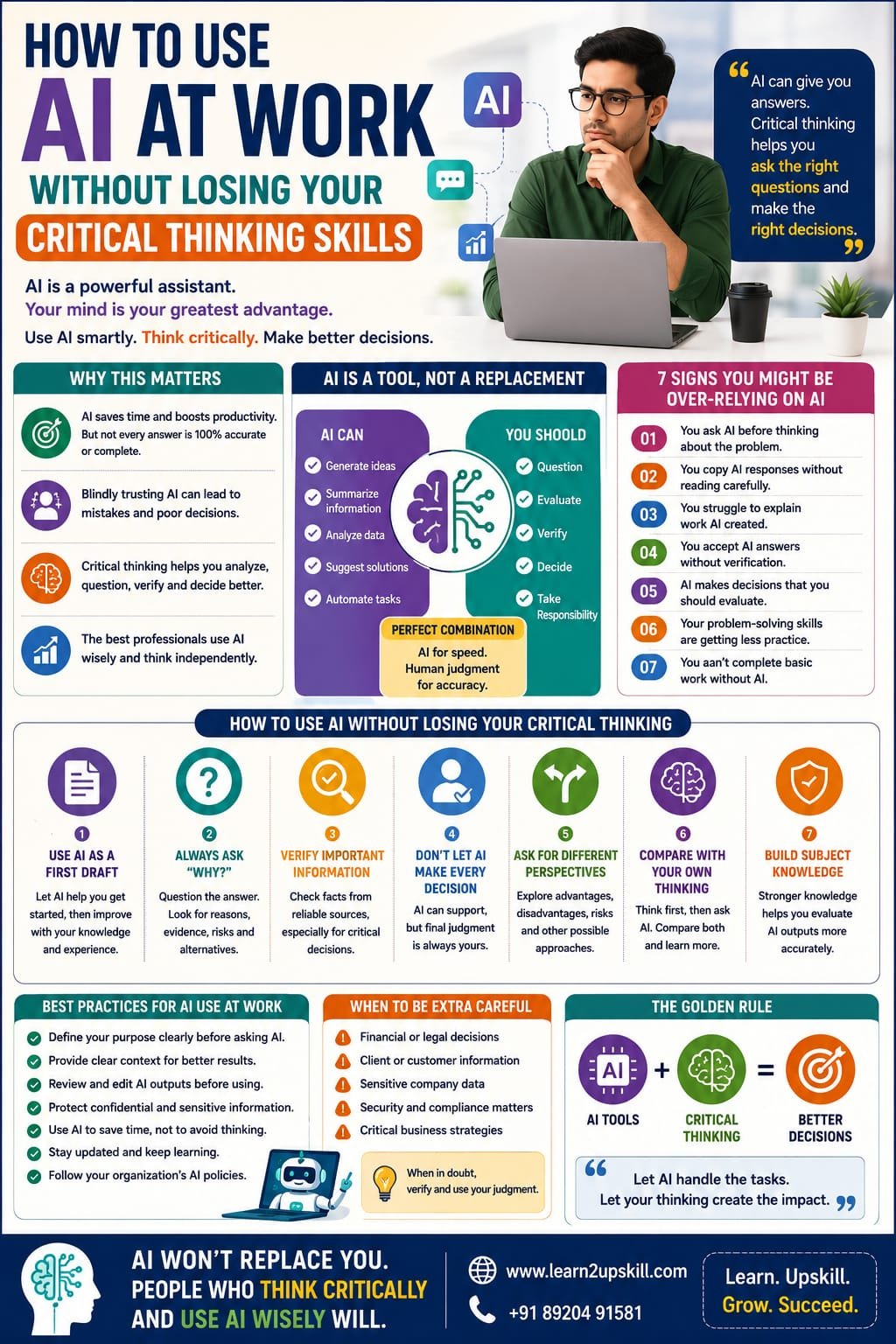
    How to Use AI at Work Without Losing Your Critical Thinking Skills

    How to Use AI at Work Without Losing Your Critical Thinking Skills

    Description: Learn how to use AI at work while protecting your critical thinking skills. Discover practical strategies to use AI responsibly, verify information, make better decisions and stay professionally valuable.

    Suggested URL Slug:

    “/use-ai-at-work-without-losing-critical-thinking/”

    —

    How to Use AI at Work Without Losing Your Critical Thinking Skills

    Artificial Intelligence is changing the way people work.

    Today, AI tools can help professionals:

    – Write emails

    – Summarize documents

    – Analyze information

    – Generate ideas

    – Create presentations

    – Automate repetitive tasks

    – Write reports

    – Solve problems faster


    For many employees, AI has become a powerful workplace assistant.

    But there is an important question that every professional should ask:

    «If AI is doing more of our thinking, are we using our own critical thinking skills less?»

    This is one of the biggest challenges of the AI era.

    AI can make work faster.

    But faster does not always mean better.

    An AI-generated answer may sound convincing while being incomplete, inaccurate or inappropriate for a particular situation.

    That is why professionals must learn an important balance:

    «Use AI to improve your work—not to replace your ability to think.»

    The future will not belong simply to people who know how to use AI.

    It will belong to people who know when to trust AI, when to question it and when to make their own decisions.

    In this guide, we will explore how to use AI effectively at work without losing your critical thinking skills.

    —

    What Is Critical Thinking?

    Critical thinking is the ability to carefully analyze information before accepting it as true or making a decision.

    A critical thinker does not simply ask:

    «What is the answer?»

    They also ask:

    – Is this information accurate?

    – Where did this information come from?

    – What evidence supports it?

    – Are there other possible explanations?

    – What information might be missing?

    – Does this answer make sense in this situation?


    Critical thinking helps professionals make better decisions.

    It is useful in almost every career, including:

    – Business

    – Finance

    – Marketing

    – Human Resources

    – Education

    – Technology

    – Healthcare

    – Management

    In the AI era, critical thinking is becoming even more important.

    —

    Why AI Can Create a Critical Thinking Problem

    AI is designed to provide information quickly.

    That convenience can sometimes create a problem.

    When people receive an answer immediately, they may stop asking questions.

    For example, imagine asking AI:

    «”What is the best strategy for our business?”»

    AI may generate a detailed answer in seconds.

    The answer may look professional.

    It may contain logical points.

    But does that mean it is automatically the right strategy for your business?

    Not necessarily.

    AI may not fully understand:

    – Your company’s goals

    – Your customers

    – Your internal challenges

    – Your financial situation

    – Your market conditions

    This is why professionals should avoid treating AI as an automatic decision-maker.

    AI can provide ideas.

    Humans must evaluate those ideas.

    —

    AI Is a Tool, Not a Replacement for Thinking

    Think of AI like a calculator.

    A calculator can perform calculations quickly.

    But you still need to understand:

    – What numbers to enter

    – What calculation is appropriate

    – Whether the final answer makes sense

    AI works in a similar way.

    It can help you:

    – Generate

    – Organize

    – Summarize

    – Analyze

    – Suggest

    But you still need to:

    – Question

    – Evaluate

    – Verify

    – Decide

    The best approach is:

    «AI assists. Humans think.»

    —

    The Biggest Risk: Blindly Trusting AI

    One of the biggest mistakes professionals can make is assuming:

    «”AI said it, so it must be correct.”»

    AI-generated information can sometimes contain:

    – Errors

    – Outdated information

    – Missing context

    – Incorrect assumptions

    – Confident but inaccurate statements

    This means you should not simply copy and paste important AI-generated content into your work.

    Instead, ask:

    Is this accurate?

    Is this relevant?

    Is this complete?

    Does this make sense?

    Should I verify this information?

    These questions are the foundation of critical thinking.

    —

    How to Use AI Without Losing Critical Thinking Skills

    Here are practical strategies for professionals.

    —

    1. Use AI as Your First Draft, Not Your Final Answer

    AI is excellent for creating a starting point.

    For example, you can ask AI to help you:

    – Create an outline

    – Generate ideas

    – Draft an email

    – Summarize a document

    – Prepare presentation points

    But don’t assume the first output is perfect.

    Review it.

    Improve it.

    Add your own knowledge.

    Ask yourself:

    «What would I change based on my experience and understanding?»

    Your expertise should improve the AI output.

    —

    1. Always Ask “Why?”

    Critical thinkers do not simply accept answers.

    They ask why.

    For example, if AI recommends a particular strategy, ask:

    «Why would this strategy work?»

    «What evidence supports this recommendation?»

    «What are the possible risks?»

    «Are there alternative approaches?»

    You can even ask the AI these questions.

    Instead of using AI only to generate answers, use it to explore different perspectives.

    —

    1. Verify Important Information

    Not every AI-generated answer requires the same level of verification.

    For simple brainstorming, extensive verification may not be necessary.

    But for important professional decisions involving areas such as:

    – Finance

    – Legal matters

    – Business strategy

    – Security

    – Customer information

    verification becomes essential.

    Use reliable sources and organizational information when accuracy matters.

    Remember:

    «The more important the decision, the more carefully the information should be checked.»

    —

    1. Don’t Let AI Make Every Decision

    AI can support decision-making.

    But it should not automatically replace human judgment.

    Imagine AI recommends:

    «”Reduce the budget for a particular department.”»

    Before making that decision, a manager should consider:

    – Business priorities

    – Employee impact

    – Long-term consequences

    – Financial data

    – Alternative solutions

    AI may provide useful analysis.

    But humans understand the wider context and consequences.

    —

    1. Ask AI for Different Perspectives

    One of the best ways to use AI for critical thinking is to avoid asking only:

    «”Give me the answer.”»

    Instead, ask:

    – What are the advantages?

    – What are the disadvantages?

    – What could go wrong?

    – What assumptions am I making?

    – What alternative solutions exist?

    This turns AI into a thinking partner rather than an answer machine.

    —

    1. Compare AI’s Answer With Your Own Thinking

    Before asking AI for a solution, try thinking about the problem yourself.

    Write down your ideas first.

    Then compare your thinking with the AI response.

    Ask:

    – What did I miss?

    – What did AI miss?

    – Where do we agree?

    – Where do we disagree?

    This approach helps you continue developing your own problem-solving ability.

    —

    1. Learn the Subject, Not Just the Prompt

    Knowing how to write prompts is useful.

    But prompting alone is not enough.

    Imagine using AI to analyze financial data.

    If you don’t understand basic finance, you may not recognize when the AI makes a mistake.

    The same applies to:

    – Marketing

    – Data analysis

    – Cybersecurity

    – Human resources

    – Business strategy

    The stronger your subject knowledge, the better you can evaluate AI outputs.

    This is why:

    «AI skills should complement professional knowledge—not replace it.»

    —

    A Simple Example: AI and Email Writing

    Suppose you are frustrated with a colleague and ask AI to write an email.

    AI may create a polite and professional message.

    That’s helpful.

    But you still need to decide:

    – Should this email be sent?

    – Is email the best communication method?

    – Is the information accurate?

    – Does the tone match the relationship?

    – Could this situation be solved through a conversation instead?

    AI can write the words.

    But professional judgment decides what should happen next.

    —

    AI Can Make You More Productive—If Used Correctly

    AI can save valuable time.

    For example, instead of spending one hour creating the first draft of a report, AI may help create a starting structure more quickly.

    You can then spend more time on:

    – Analysis

    – Strategy

    – Problem-solving

    – Creativity

    – Decision-making

    This is one of the smartest ways to use AI.

    Don’t use saved time simply to do less thinking.

    Use saved time to do better thinking.

    —

    The Difference Between AI Assistance and AI Dependence

    There is an important difference.

    AI Assistance

    You use AI to:

    – Save time

    – Generate ideas

    – Improve productivity

    – Organize information

    But you remain responsible for the final result.

    AI Dependence

    You:

    – Ask AI before thinking

    – Accept answers without checking

    – Copy outputs without understanding

    – Let AI make every decision

    The first approach builds productivity.

    The second can weaken professional skills.

    —

    7 Warning Signs You May Be Becoming Too Dependent on AI

    Ask yourself honestly.

    1. Do you ask AI questions before trying to think about the problem?
    2. Do you copy AI responses without reading them carefully?
    3. Do you struggle to explain work that AI created?
    4. Do you accept AI answers without verification?
    5. Do you use AI for decisions you should personally evaluate?
    6. Are your own problem-solving skills getting less practice?
    7. Would you be unable to complete basic work without AI?

    If the answer is yes to several of these questions, it may be time to rebalance how you use AI.

    —

    How Managers Can Encourage Critical Thinking With AI

    Organizations also have an important role.

    Managers should encourage employees to use AI responsibly.

    Instead of asking employees:

    «”Did you use AI?”»

    A better question may be:

    «”How did you evaluate the AI output?”»

    Teams can encourage employees to:

    – Explain their reasoning

    – Verify important information

    – Identify risks

    – Discuss alternatives

    – Document major decisions

    This creates a workplace culture where AI supports thinking rather than replacing it.

    —

    AI and Critical Thinking in Meetings

    AI tools can summarize meetings and generate action items.

    This can be useful.

    But participants should still think critically.

    Before accepting an AI-generated meeting summary, ask:

    – Did it capture the important decisions?

    – Is any context missing?

    – Are the action items correct?

    – Was anything misunderstood?

    AI summaries can save time.

    Human review protects accuracy.

    —

    AI and Creativity: Don’t Let AI Think of Everything First

    AI can generate hundreds of ideas quickly.

    But if you always begin with AI-generated ideas, your own creativity may get less practice.

    Try this approach:

    Step 1: Think of your own ideas.

    Step 2: Ask AI for additional ideas.

    Step 3: Compare both.

    Step 4: Create a stronger solution.

    This allows AI to expand your thinking instead of replacing it.

    —

    A Practical AI Workflow for Professionals

    Here is a simple five-step process.

    Step 1: Think

    Understand the problem yourself.

    Step 2: Ask

    Use AI to generate ideas, information or possible solutions.

    Step 3: Analyze

    Evaluate the response critically.

    Step 4: Verify

    Check important facts and information.

    Step 5: Decide

    Use your professional judgment to make the final decision.

    Remember this formula:

    «Think → Ask → Analyze → Verify → Decide»

    This is a powerful way to use AI responsibly at work.

    —

    The Importance of Human Judgment

    AI can process enormous amounts of information.

    But professional decisions often involve factors that are difficult to reduce to simple answers.

    For example:

    – Ethics

    – Human emotions

    – Organizational culture

    – Relationships

    – Personal circumstances

    – Long-term consequences

    A manager deciding how to handle an employee conflict needs more than information.

    They need empathy and judgment.

    A business leader making a strategic decision needs more than predictions.

    They need experience and responsibility.

    AI can support these decisions.

    But human judgment remains essential.

    —

    Skills You Should Develop Alongside AI Skills

    The future professional should not focus only on learning AI tools.

    You should also develop:

    🧠 Critical Thinking

    The ability to analyze and question information.

    💬 Communication Skills

    The ability to explain ideas clearly.

    🤝 Emotional Intelligence

    The ability to understand people and emotions.

    🔍 Problem-Solving

    The ability to identify and solve challenges.

    🎯 Decision-Making

    The ability to choose the right action.

    🔄 Adaptability

    The ability to learn and adjust to change.

    The strongest professionals will combine:

    «AI Skills + Human Skills + Professional Knowledge»

    —

    How Students Can Use AI Without Becoming Dependent

    Students also need to develop healthy AI habits.

    AI can help students:

    – Understand difficult concepts

    – Create study plans

    – Generate practice questions

    – Explain topics differently

    But students should avoid using AI simply to complete assignments without understanding the work.

    A better approach is:

    1. Try the problem yourself.
    2. Ask AI for guidance.
    3. Compare your answer.
    4. Understand your mistakes.
    5. Try again independently.

    The goal should be learning—not simply finishing the assignment.

    —

    Common Mistakes to Avoid

    ❌ Copying AI Content Without Understanding It

    If you cannot explain the content, you should not claim it as your work.

    —

    ❌ Trusting Every AI Answer

    AI can be useful and still make mistakes.

    —

    ❌ Sharing Confidential Information

    Never enter sensitive company or customer information into AI tools unless you are authorized and it complies with your organization’s policies.

    —

    ❌ Using AI Instead of Learning

    AI should support your learning journey.

    —

    ❌ Ignoring Your Own Experience

    Your experience and professional understanding are valuable.

    Use them.

    —

    ❌ Asking AI to Make Every Important Decision

    Use AI for support, but maintain human responsibility.

    —

    Frequently Asked Questions

    Can AI replace critical thinking?

    AI can support analysis and generate ideas, but professionals still need critical thinking to evaluate information, understand context and make responsible decisions.


    How can I use AI responsibly at work?

    Use AI as an assistant, verify important information, protect confidential data, follow workplace policies and review outputs before using them.


    Why is critical thinking important in the AI era?

    AI can generate large amounts of information quickly. Critical thinking helps professionals identify errors, question assumptions and make better decisions.


    Should employees trust AI-generated information?


    AI-generated information should be reviewed appropriately, especially when accuracy is important or decisions have significant consequences.


    What skills are important alongside AI skills?

    Critical thinking, communication, emotional intelligence, problem-solving, adaptability and professional knowledge remain highly valuable.

    —

    Conclusion

    AI is one of the most powerful workplace technologies of our time.

    Used correctly, it can help professionals become:

    – Faster

    – More productive

    – More creative

    – Better organized

    But there is one thing we should never outsource completely:

    «Our ability to think.»

    The best professionals will not compete against AI by refusing to use it.

    They will learn how to use it intelligently.

    They will ask better questions.

    They will verify important information.

    They will challenge assumptions.

    And they will use human judgment to make better decisions.

    The future of work is not:

    «Human vs AI»

    It is:

    «Human Intelligence + Artificial Intelligence»

    Use AI to save time.

    Use critical thinking to create value.

    And use both to become a smarter, more capable professional.

    —

    🚀 Build Future-Ready AI and Professional Skills With Learn2Upskill

    The workplace is changing rapidly, and professionals need the right combination of AI knowledge, critical thinking and human skills.

    Develop practical, career-focused skills with Learn2Upskill.

    🌐 www.coral-kudu-326218.hostingersite.com

    📞 Contact Us: +91 89204 91581

    Learn. Upskill. Grow. Succeed.

    —
  • Data Privacy in the AI Era: What Every Employee Should Understand

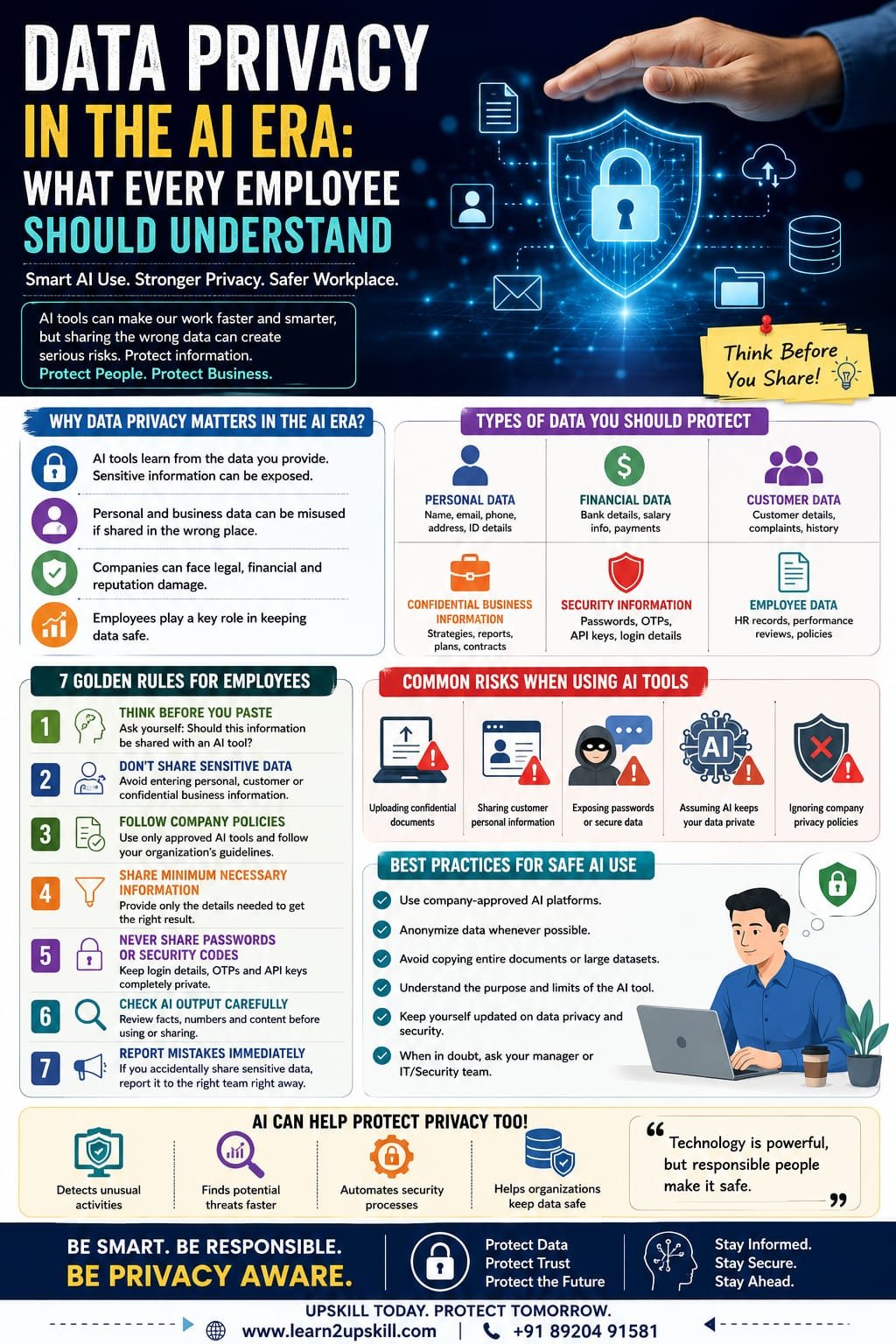
    Data Privacy in the AI Era: What Every Employee Should Understand

    Data Privacy in the AI Era: What Every Employee Should Understand

    Learn why data privacy is important in the AI era and what every employee should understand about protecting personal, customer and business information when using AI tools.

    Suggested URL Slug:

    “/data-privacy-in-the-ai-era/”

    —

    Data Privacy in the AI Era: What Every Employee Should Understand

    Artificial intelligence is changing the way people work.

    Employees now use AI tools to write emails, summarize documents, analyze information, create presentations, generate reports, brainstorm ideas and automate repetitive tasks.

    These tools can improve productivity and help employees work more efficiently.

    But there is an important question that every employee should ask before using AI:

    «What happens to the information I share with an AI tool?»

    This question is becoming increasingly important.

    AI can be incredibly useful, but careless use of AI can create serious privacy and security risks. Employees may accidentally share sensitive customer information, confidential business data, personal details or internal company information with tools that are not approved for that purpose.

    In the AI era, data privacy is no longer only the responsibility of the IT or cybersecurity department.

    Every employee has a role to play.

    Whether you work in HR, finance, marketing, sales, customer service, operations or administration, understanding the basics of data privacy can help protect both you and your organization.

    This guide explains what every employee should understand about data privacy in the AI era, the risks of sharing information with AI tools and how to use AI more responsibly in the workplace.

    —

    What Is Data Privacy?

    Data privacy refers to the proper handling, protection and use of personal and sensitive information.

    It involves questions such as:

    – Who can access the information?

    – Why is the information being collected?

    – How is the information being used?

    – Where is the information stored?

    – Who can share it?

    – How long is it kept?

    – How is it protected?

    Personal information can include details such as:

    – Names

    – Phone numbers

    – Email addresses

    – Home addresses

    – Identification information

    – Financial information

    – Employee records

    – Customer information

    Organizations may also have confidential information that is not necessarily personal data but still requires protection.

    For example:

    – Business strategies

    – Financial reports

    – Internal documents

    – Customer lists

    – Product plans

    – Contracts

    – Passwords

    – Source code

    – Research

    – Company policies

    The important point is simple:

    «Not all information should be shared everywhere.»

    —

    Why Is Data Privacy More Important in the AI Era?

    Traditional workplace software usually has clear systems for storing and managing company information.

    AI introduces additional questions.

    When employees use an AI tool, they may copy and paste information into prompts without thinking carefully about the consequences.

    For example:

    «”Please summarize this confidential customer complaint.”»

    Or:

    «”Analyze this employee performance report.”»

    Or:

    «”Rewrite this internal financial document.”»

    These requests may contain information that should not be entered into an external or unapproved AI system.

    The problem is not necessarily AI itself.

    The problem is how people use it.

    AI tools can process information quickly, which makes them extremely useful. But employees must understand their organization’s policies and use appropriate safeguards before sharing business or personal information.

    —

    What Types of Data Should Employees Protect?

    Every employee should learn to recognize sensitive information.

    1. Personal Data

    Personal data can include information connected to an identifiable individual.

    Examples include:

    – Full name

    – Phone number

    – Email address

    – Home address

    – Employee identification details

    – Customer records

    Employees should avoid unnecessarily sharing personal information with AI tools.

    —

    1. Financial Information

    Financial information may include:

    – Bank details

    – Payment information

    – Salary information

    – Financial reports

    – Tax-related information

    – Business revenue data

    This information can be highly sensitive.

    —

    1. Customer Information

    Customer data can include:

    – Contact details

    – Purchase history

    – Complaints

    – Account information

    – Support conversations

    Employees should follow company policies before using customer information in AI tools.

    —

    1. Confidential Business Information

    This can include:

    – Business strategies

    – Internal discussions

    – Product plans

    – Pricing strategies

    – Contracts

    – Company reports

    Just because information is useful for an AI prompt does not mean it should be entered into one.

    —

    1. Passwords and Security Information

    Employees should never enter passwords, authentication codes, secret keys or sensitive login information into an AI chatbot.

    This is a basic but essential security practice.

    —

    How Can AI Create Data Privacy Risks?

    Let’s look at some common situations.

    Risk 1: Copying Sensitive Information Into AI Prompts

    An employee may copy an entire confidential document into an AI tool and ask:

    «”Please summarize this.”»

    This may expose information that should remain protected.

    A safer approach may be to use an approved company AI system or remove sensitive information before requesting assistance.

    —

    Risk 2: Sharing Customer Information

    Imagine a customer service employee enters a customer’s full details and complaint into a public AI tool.

    Even if the employee’s intention is simply to improve the response, the information may not have been appropriate to share.

    Instead, remove unnecessary identifying information where possible.

    For example:

    Instead of:

    «”Customer Rahul Sharma, phone number XXXXX, living at XXXXX, complained about…”»

    Use a safer, anonymized example such as:

    «”A customer reported that their product delivery was delayed. Please help me draft a polite response.”»

    The AI can still help without receiving unnecessary personal information.

    —

    Risk 3: Uploading Confidential Documents

    Employees may upload documents to AI platforms without checking whether the platform is approved by their organization.

    Documents could contain:

    – Internal strategies

    – Customer information

    – Financial information

    – Employee details

    Before uploading any workplace document, ask:

    «Is this AI tool approved for this type of information?»

    If you don’t know, ask your manager, IT department or data security team.

    —

    Risk 4: Trusting AI Without Checking the Output

    Data privacy is not the only risk.

    AI-generated content can also contain:

    – Incorrect information

    – Misleading statements

    – Outdated information

    – Unintended confidential details

    – Fabricated references

    Employees should always review important AI-generated work.

    AI can assist.

    Human responsibility remains essential.

    —

    The Difference Between Public and Company-Approved AI Tools

    Not every AI tool is designed for the same purpose.

    Some organizations provide approved AI platforms with specific security and privacy controls.

    Other publicly available tools may have different terms, settings and data-handling practices.

    Employees should understand their organization’s rules.

    Before using an AI tool for work, ask:

    Is this tool approved by my organization?

    What type of information can I enter?

    Can I upload company documents?

    Does the organization have a policy for using AI?

    Should sensitive information be anonymized?

    When in doubt:

    «Ask before you share.»

    That simple habit can prevent serious mistakes.

    —

    The Importance of Responsible AI Use

    Responsible AI means using artificial intelligence thoughtfully and appropriately.

    For employees, responsible AI use includes:

    – Protecting sensitive information

    – Following company policies

    – Checking AI-generated content

    – Avoiding unnecessary sharing of personal data

    – Using approved tools

    – Understanding the limitations of AI

    – Maintaining human responsibility

    AI should help employees become more productive.

    It should not become an excuse for careless decision-making.

    —

    7 Data Privacy Rules Every Employee Should Follow

    Rule 1: Think Before You Paste

    Before copying information into an AI tool, stop for a moment.

    Ask:

    «”Should this information be shared?”»

    This simple pause can prevent many privacy mistakes.

    —

    Rule 2: Don’t Share Sensitive Personal Information

    Avoid entering unnecessary personal details into AI prompts.

    Remove information such as:

    – Names

    – Phone numbers

    – Addresses

    – Account numbers

    – Identification details

    Use anonymized examples whenever possible.

    —

    Rule 3: Follow Your Company’s AI Policy

    Your organization may have specific rules about:

    – Approved AI tools

    – Confidential information

    – Customer data

    – Document uploads

    – AI-generated content

    Follow these guidelines carefully.

    —

    Rule 4: Use the Minimum Information Necessary

    You often don’t need to provide an AI tool with an entire document.

    Give only the information required to complete the task.

    For example, instead of uploading a complete confidential report, you might provide a general description of the writing style or structure you need.

    —

    Rule 5: Never Share Passwords or Security Codes

    Do not enter:

    – Passwords

    – One-time passwords

    – Authentication codes

    – API keys

    – Secret credentials

    into AI tools or chatbots.

    These should always be protected.

    —

    Rule 6: Check AI Output Before Using It

    AI-generated content should not automatically be trusted.

    Review:

    – Facts

    – Names

    – Numbers

    – Recommendations

    – Tone

    – Confidential information

    The employee using the output remains responsible for the final result.

    —

    Rule 7: Report Mistakes Quickly

    If you accidentally share sensitive information with an unapproved system, don’t hide the mistake.

    Report it quickly through the appropriate internal process.

    Fast reporting can help an organization assess and manage the situation.

    —

    Data Privacy and AI in Different Departments

    AI privacy is relevant to almost every department.

    HR

    HR professionals may handle:

    – Employee records

    – Resumes

    – Salary information

    – Performance reviews

    These documents can contain highly sensitive information.

    AI should be used according to appropriate organizational policies and privacy requirements.

    —

    Finance

    Finance teams may work with:

    – Revenue data

    – Financial reports

    – Banking information

    – Salary information

    Financial data should be handled carefully.

    —

    Marketing

    Marketing teams may use AI for:

    – Content creation

    – Campaign ideas

    – Customer analysis

    – Social media planning

    Customer data should not be shared unnecessarily.

    —

    Customer Service

    Customer service employees may work with personal customer information.

    When using AI for drafting responses, anonymizing customer details can help reduce unnecessary privacy risks.

    —

    Sales

    Sales teams may have access to:

    – Customer information

    – Contracts

    – Pricing

    – Business opportunities

    Confidential business information should be protected.

    —

    Data Privacy vs Cybersecurity: What’s the Difference?

    These two concepts are related but not exactly the same.

    Data Privacy

    Data privacy focuses on the proper use and handling of information.

    Cybersecurity

    Cybersecurity focuses on protecting systems, networks and data from threats such as:

    – Hacking

    – Phishing

    – Malware

    – Unauthorized access

    A strong organization needs both.

    For example:

    A company might have excellent cybersecurity technology.

    But if an employee accidentally shares confidential information in an inappropriate place, a privacy problem can still occur.

    This is why employee awareness is so important.

    —

    How AI Can Actually Help Data Privacy

    AI is not only a source of risk.

    When used responsibly, AI can also support privacy and security work.

    Organizations may use AI to help with:

    – Detecting unusual activity

    – Identifying potential threats

    – Monitoring security events

    – Automating repetitive security tasks

    – Analyzing large volumes of information

    However, AI systems themselves must also be designed and used responsibly.

    The goal is not to avoid technology.

    The goal is to use technology intelligently.

    —

    Common AI and Data Privacy Mistakes Employees Should Avoid

    ❌ Copying confidential documents into public tools

    Always check whether the tool is approved.

    —

    ❌ Sharing customer information unnecessarily

    Use anonymized information whenever possible.

    —

    ❌ Assuming every AI tool handles data the same way

    Different tools and organizational systems may have different privacy settings and policies.

    —

    ❌ Trusting AI without reviewing the result

    Always check important outputs.

    —

    ❌ Ignoring company policies

    AI policies exist to help employees use technology safely.

    —

    ❌ Sharing passwords or security information

    Never provide sensitive credentials to an AI tool.

    —

    A Simple AI Privacy Checklist Before Using Any Tool

    Before entering workplace information into an AI system, ask yourself:

    ✅ Is this AI tool approved for work?

    ✅ Does this information contain personal data?

    ✅ Does it contain confidential business information?

    ✅ Can I remove names or identifying details?

    ✅ Do I need to share the complete document?

    ✅ Have I followed company policy?

    ✅ Will I review the AI output before using it?

    If you are unsure about any answer:

    Stop and ask for guidance.

    —

    How Employees Can Build Better Data Privacy Awareness

    Data privacy awareness is a skill.

    Employees can improve it by:

    Learning basic cybersecurity

    Understand common threats such as phishing and social engineering.

    Understanding company policies

    Know what information can and cannot be shared.

    Staying updated

    Technology changes quickly, and workplace practices may also change.

    Asking questions

    If you don’t understand whether a tool is safe to use, ask.

    Practicing responsible AI use

    Use AI to support your work without unnecessarily exposing sensitive information.

    —

    The Future of Data Privacy in the AI Workplace

    AI will continue to become part of everyday work.

    Employees may increasingly use AI assistants to:

    – Write

    – Analyze

    – Research

    – Organize

    – Automate

    – Communicate

    This means privacy awareness will become an increasingly important workplace skill.

    Future-ready employees will need more than technical knowledge.

    They will need to understand:

    AI + Data + Privacy + Security + Human Judgment

    The most valuable employees will not simply know how to use new technology.

    They will know how to use it responsibly.

    —

    Frequently Asked Questions

    What is data privacy in AI?

    Data privacy in AI refers to protecting personal, confidential and sensitive information when AI systems collect, process or use data.


    Can employees use AI tools at work?

    Employees should follow their organization’s policies and use approved tools for appropriate tasks.


    What information should not be entered into AI tools?

    Employees should avoid sharing sensitive information unnecessarily, including passwords, authentication codes, confidential business information and personal data that is not approved for sharing.


    Why is anonymizing data important?

    Anonymizing information can reduce unnecessary exposure of personal details while still allowing an AI tool to help with a general task.


    Is cybersecurity the same as data privacy?

    No. Cybersecurity focuses on protecting systems and information from threats, while data privacy focuses on how personal and sensitive information is collected, used and handled.


    Who is responsible for data privacy in an organization?

    Data privacy is a shared responsibility. Organizations need appropriate policies and systems, while employees need to follow procedures and handle information responsibly.

    —

    Conclusion

    Artificial intelligence is creating exciting opportunities for employees and businesses.

    It can improve productivity, automate repetitive work and help people complete tasks more efficiently.

    But technology should always be used responsibly.

    In the AI era, every employee should understand the importance of protecting:

    – Personal information

    – Customer data

    – Employee information

    – Financial information

    – Confidential business information

    – Passwords and security credentials

    The most important habit is also the simplest:

    «Think before you share.»

    Before entering information into an AI tool, ask whether the information is necessary, appropriate and permitted under your organization’s policies.

    AI can be a powerful workplace assistant.

    But protecting privacy requires something AI cannot replace:

    Human judgment and responsibility.

    The future workplace will increasingly depend on professionals who can combine technology skills with responsible decision-making.

    Use AI smartly. Protect data carefully. Stay privacy-aware.

    —

    🔐 Build Future-Ready Digital Skills With Learn2Upskill

    The modern workplace requires more than technical knowledge.

    Professionals need skills in AI, cybersecurity, data awareness, communication and responsible technology use.

    Develop practical, career-ready skills with Learn2Upskill.

    🌐 www.coral-kudu-326218.hostingersite.com

    📞 Contact Us: +91 89204 91581

    Learn. Upskill. Grow. Succeed.

    —
  • AI Skills Employers Will Look for in 2027

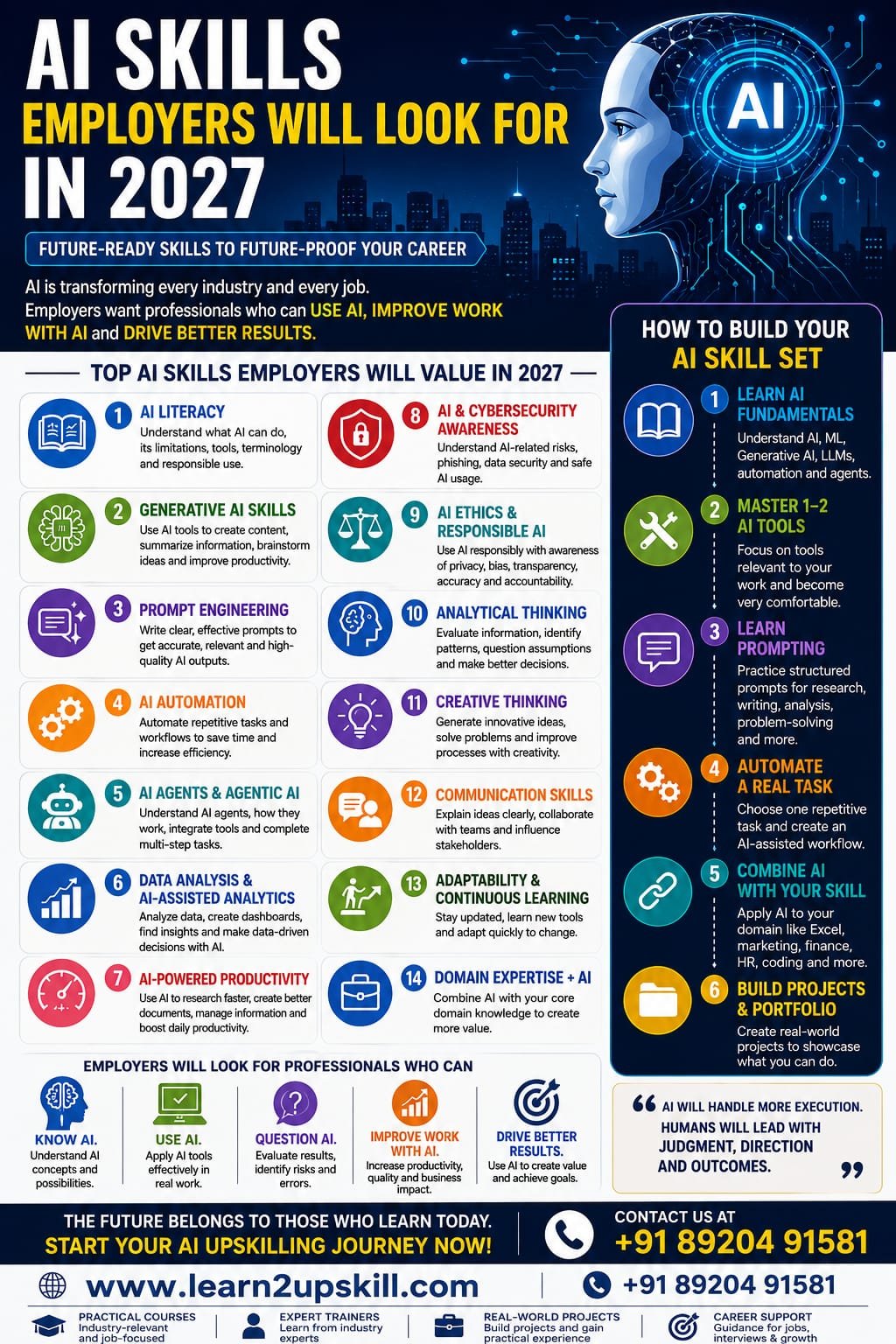
    AI Skills Employers Will Look for in 2027

    AI Skills Employers Will Look for in 2027

    Discover the top AI skills employers will look for in 2027, including AI literacy, prompt engineering, AI automation, data analysis, AI agents, cybersecurity and human skills.

    Suggested URL Slug:

    “/ai-skills-employers-will-look-for-in-2027/”

    Introduction

    Artificial intelligence is no longer limited to technology companies or specialist AI teams. It is becoming part of everyday work across marketing, finance, human resources, customer service, education, operations, sales, IT and many other fields.

    As we move toward 2027, employers are increasingly looking for professionals who can work effectively with AI—not simply people who know that AI exists.

    The most valuable employees of the future are likely to combine AI literacy, technical understanding, business knowledge, analytical thinking and human skills.

    According to LinkedIn, AI literacy is already among the fastest-growing skills across regions and job functions, while large language model proficiency is also emerging as an important skill. LinkedIn also estimates that 70% of the skills used in most jobs could change by 2030, with AI acting as a major catalyst.

    The World Economic Forum’s Future of Jobs Report 2025 similarly identifies AI and big data as the fastest-growing skill area, alongside networks and cybersecurity and technological literacy. At the same time, analytical thinking, creative thinking, resilience, flexibility and collaboration remain important.

    So, what should students, job seekers and working professionals learn now?

    Let’s explore the top AI skills employers are likely to value in 2027.

    —

    1. AI Literacy

    The first and most important skill is AI literacy.

    You don’t necessarily need to become an AI engineer to benefit from artificial intelligence. Professionals in almost every department can benefit from understanding:

    – What AI can and cannot do

    – How Generative AI works at a basic level

    – How to use AI tools responsibly

    – How to evaluate AI-generated information

    – How AI can improve everyday workflows

    – Basic AI terminology

    – AI risks and limitations

    – Data privacy and responsible AI use

    AI literacy is increasingly becoming a workplace skill rather than a niche technical capability.

    LinkedIn reported in 2025 that AI literacy was one of the most in-demand skills employers were seeking across jobs, while more C-suite executives were adding AI-related skills to their profiles.

    Why employers value it

    An employee who understands AI can identify opportunities to:

    – Reduce repetitive work

    – Improve productivity

    – Analyze information faster

    – Generate first drafts

    – Automate routine processes

    – Support decision-making

    AI literacy should therefore be the foundation of your 2027 skill set.

    —

    1. Generative AI Skills

    Generative AI tools can create text, images, presentations, code, summaries and other forms of content.

    By 2027, employers are likely to expect professionals to understand how to use Generative AI appropriately within their jobs.

    Useful capabilities include:

    – Writing effective AI instructions

    – Generating and improving content

    – Summarizing documents

    – Brainstorming ideas

    – Research assistance

    – Creating presentations

    – Analyzing information

    – Generating basic code

    – Automating repetitive knowledge work

    However, simply knowing how to open ChatGPT is not enough.

    The real advantage comes from understanding how to integrate Generative AI into your workflow.

    —

    1. Prompt Engineering

    Prompt engineering remains a useful AI skill, particularly when it is combined with strong domain knowledge.

    A good prompt can help an AI system understand:

    – The objective

    – The context

    – The desired format

    – The target audience

    – Constraints

    – Examples

    – Evaluation criteria

    For example, instead of asking:

    «”Write a report.”»

    A professional might specify the audience, business objective, data, structure, tone and expected output.

    Why prompt engineering matters

    Professionals who can communicate clearly with AI systems can potentially obtain more useful and consistent results.

    LinkedIn has reported significant growth in professionals adding AI skills such as prompt engineering and Generative AI tools to their profiles.

    By 2027, however, prompt engineering is likely to be most valuable when combined with business, technical or industry expertise.

    —

    1. AI Automation

    One of the biggest opportunities for professionals is learning how to use AI to automate repetitive work.

    AI automation can support tasks such as:

    – Email processing

    – Data entry

    – Report generation

    – Customer support

    – Lead management

    – Document processing

    – Meeting summaries

    – Content workflows

    – Research

    – Administrative tasks

    The key skill isn’t simply knowing an automation tool.

    It is knowing how to identify a repetitive business process and determine:

    What should be automated?

    What should remain human-controlled?

    How should the workflow be monitored?

    This combination of AI knowledge and process thinking can become extremely valuable.

    —

    1. AI Agents and Agentic AI

    A major development heading into 2027 is the growth of AI agents.

    Unlike a basic chatbot that responds to individual prompts, AI agents can be designed to perform multi-step tasks, interact with tools and work toward defined objectives.

    Microsoft’s 2026 Work Trend Index describes a workplace where AI and agents increasingly take on execution while humans focus more on directing work, making decisions and owning outcomes.

    Professionals should therefore begin understanding:

    – What AI agents are

    – How agentic workflows operate

    – How agents use tools

    – Human oversight

    – Agent evaluation

    – Workflow design

    – AI governance

    – Business applications of agents

    You don’t necessarily need to build sophisticated agents immediately.

    Understanding how businesses can use AI agents will itself become a valuable capability.

    —

    1. Data Analysis and AI-Assisted Analytics

    AI is changing how people work with data.

    Professionals who combine data literacy + AI skills can become more valuable because they can use AI to accelerate parts of the analytical process while still applying human judgment.

    Important skills include:

    – Excel

    – Power BI

    – Data visualization

    – Data cleaning

    – Basic statistics

    – SQL

    – Dashboard creation

    – AI-assisted data analysis

    – Interpreting business data

    – Communicating insights

    The World Economic Forum identifies AI and big data among the fastest-growing skill areas through 2030.

    For many professionals, learning AI + Excel + Power BI may be more immediately useful than trying to become a machine-learning engineer.

    —

    1. AI-Powered Productivity

    Employers don’t simply want employees who know AI tools.

    They want employees who can get better results with them.

    AI-powered productivity skills can include:

    – Faster research

    – Better document creation

    – Meeting summarization

    – Email assistance

    – Presentation creation

    – Information organization

    – Task prioritization

    – Knowledge management

    – Workflow optimization

    Microsoft’s 2026 Work Trend Index found that nearly half of analyzed Copilot conversations supported cognitive work such as analysis, problem-solving, evaluation and creative thinking.

    This suggests an important shift:

    AI skills are increasingly connected to how people think and work, not just how they use technology.

    —

    1. AI and Cybersecurity Awareness

    As organizations adopt AI, cybersecurity becomes even more important.

    Professionals should understand risks such as:

    – Phishing powered by AI

    – Deepfakes

    – AI-generated scams

    – Data leakage

    – Prompt injection

    – Unsafe use of confidential information

    – Malicious AI-generated content

    – Identity impersonation

    The World Economic Forum expects networks and cybersecurity to remain among the fastest-growing skill areas alongside AI and big data.

    Even non-technical employees should understand basic AI-related security practices.

    —

    1. AI Ethics and Responsible AI

    AI can produce inaccurate, biased or inappropriate results.

    Professionals therefore need to understand responsible AI principles such as:

    – Privacy

    – Transparency

    – Bias

    – Accuracy

    – Human oversight

    – Data security

    – Accountability

    – Appropriate AI use

    This will become increasingly important as organizations integrate AI into business processes.

    Employers will not only ask:

    “Can you use AI?”

    They may also ask:

    “Can you use AI responsibly?”

    —

    1. Analytical Thinking

    AI does not eliminate the need for human thinking.

    In fact, the ability to evaluate AI output may become even more important.

    Employees need to be able to:

    – Identify problems

    – Evaluate information

    – Compare alternatives

    – Question assumptions

    – Interpret results

    – Make decisions

    – Identify errors

    The World Economic Forum’s Future of Jobs research identifies analytical thinking as a leading core skill, while AI and big data rank among the fastest-growing technical skill areas.

    This creates an important combination:

    AI capability + analytical thinking = stronger workplace performance.

    —

    1. Creative Thinking

    AI can generate many ideas quickly, but humans still need to determine which ideas are useful.

    Creative thinking can help professionals:

    – Develop new products

    – Create marketing campaigns

    – Solve business problems

    – Improve processes

    – Develop new services

    – Find new opportunities

    The World Economic Forum expects creative thinking to remain an important skill as technology changes the workplace.

    —

    1. Communication Skills

    One of the biggest mistakes people make when discussing future skills is assuming that technical skills will replace communication skills.

    The opposite may be closer to reality.

    As AI handles more routine work, employees may spend more time:

    – Explaining ideas

    – Presenting recommendations

    – Collaborating with teams

    – Managing stakeholders

    – Communicating with customers

    – Making decisions

    LinkedIn’s research on India highlights the continuing importance of communication, creative thinking, innovative thinking, adaptability and collaboration alongside AI literacy.

    So don’t build an AI-only skill set.

    Build an AI + human skills combination.

    —

    1. Adaptability and Continuous Learning

    AI tools are changing rapidly.

    A tool that is popular today may be replaced or significantly changed tomorrow.

    That’s why one of the most valuable career skills for 2027 may be the ability to learn continuously.

    Professionals should develop a habit of:

    1. Learning new tools
    2. Testing them
    3. Understanding their limitations
    4. Applying them to real work
    5. Measuring the results
    6. Updating their skills

    The ability to learn may become more valuable than memorizing a particular AI tool.

    —

    1. Domain Expertise + AI

    Here’s an important career lesson:

    You don’t have to compete with AI. Learn how to combine AI with your existing expertise.

    For example:

    Finance + AI

    Marketing + AI

    HR + AI

    Excel + AI

    Cybersecurity + AI

    Business Analysis + AI

    Education + AI

    Software Development + AI

    This combination can create a powerful professional profile.

    AI knowledge by itself is useful.

    AI knowledge combined with real-world domain expertise can be even more valuable.

    —

    —

    How to Build Your AI Skill Set Before 2027

    You don’t need to learn everything at once.

    Follow this simple progression.

    Step 1: Learn AI Fundamentals

    Understand:

    – Artificial intelligence

    – Machine learning

    – Generative AI

    – Large language models

    – AI agents

    – Automation

    Step 2: Master One or Two AI Tools

    Don’t try to learn every tool available.

    Become highly comfortable with tools relevant to your work.

    Step 3: Learn Prompting

    Practice creating structured prompts for:

    – Research

    – Writing

    – Analysis

    – Brainstorming

    – Productivity

    – Problem-solving

    Step 4: Automate a Real Task

    Choose one repetitive task and create an AI-assisted workflow.

    Step 5: Combine AI With Your Career Skill

    For example:

    Excel + AI

    Marketing + AI

    Finance + AI

    HR + AI

    Coding + AI

    Step 6: Build Projects

    Don’t just collect certificates.

    Create practical examples that demonstrate what you can actually do.

    For example:

    – AI-powered report

    – Automated workflow

    – Excel dashboard

    – AI chatbot

    – Data analysis project

    – AI-assisted marketing campaign

    Projects can make your skills easier to demonstrate during interviews.

    —

    What Employers Will Really Want in 2027

    The biggest misconception is that employers will simply hire people who know the most AI tools.

    That’s unlikely to be enough.

    The strongest candidates will increasingly combine:

    AI Skills + Business Knowledge + Data Skills + Human Skills

    Think of it as:

    «Know AI. Use AI. Question AI. Improve work with AI.»

    That’s a much stronger professional profile than simply listing “ChatGPT” on a resume.

    —

    Final Thoughts

    The workplace is changing quickly, and professionals who wait until 2027 to start learning AI skills may find themselves playing catch-up.

    Current research already points toward a growing importance of AI literacy, AI and big data, technological literacy and cybersecurity, while analytical thinking, creativity, communication, adaptability and other human skills remain critical.


    At the same time, Microsoft’s 2026 research points toward a future where AI agents take on more execution while humans increasingly focus on judgment, direction and outcomes.

    The message is clear:

    Don’t prepare for a future where AI replaces every skill. Prepare for a future where people who know how to work effectively with AI have an advantage.

    Start learning today, practice with real projects, combine AI with your professional expertise and keep updating your skills.

    2027 isn’t far away. Your AI upskilling journey should start now.

    —

    —

    Learn2Upskill: Build Skills for the Future

    The future belongs to professionals who continuously upgrade their skills.

    At Learn2Upskill, you can develop practical skills in areas such as AI, Generative AI, productivity, technology, data and career development.

    Don’t wait for the job market to change. Start preparing for it today.

    🌐 www.coral-kudu-326218.hostingersite.com

    Learn. Upskill. Grow.


  • How AI Is Changing Jobs in Finance, HR, Marketing and IT

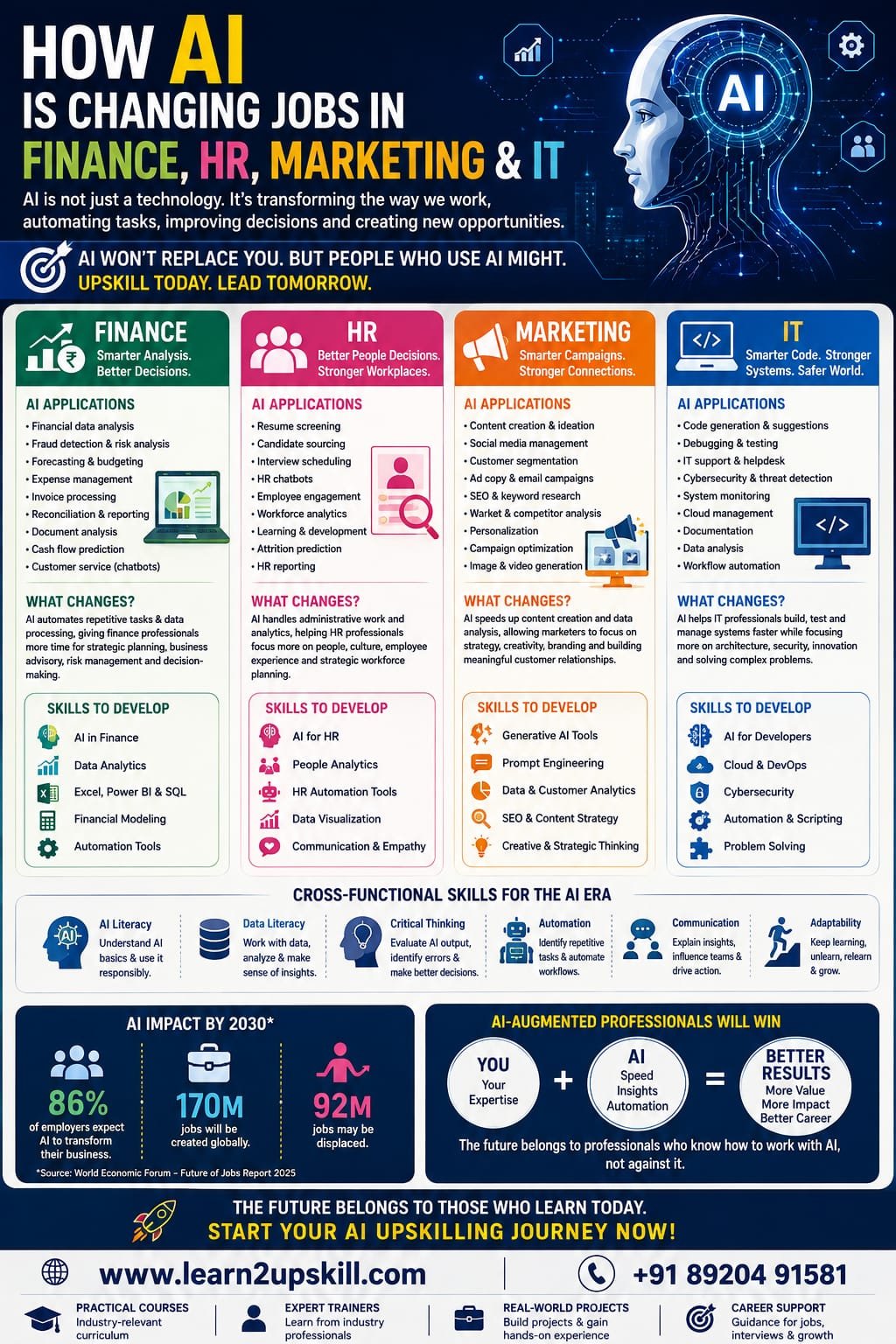
    How AI Is Changing Jobs in Finance, HR, Marketing and IT

    How AI Is Changing Jobs in Finance, HR, Marketing and IT

    Discover how AI is changing jobs in finance, HR, marketing and IT, which tasks are being automated, what skills professionals need and how to prepare for the future of work.

    Suggested URL Slug:

    “how-ai-is-changing-jobs-finance-hr-marketing-it”

    Introduction

    Artificial intelligence is changing the way businesses operate—and the transformation is happening across almost every department.

    Finance teams are using AI to analyze data, identify unusual transactions and automate repetitive processes. HR teams are using AI to support recruitment, employee analytics and workforce planning. Marketing professionals are using AI for content creation, customer insights and campaign optimization. IT teams are using AI for coding, cybersecurity, troubleshooting and automation.

    This does not necessarily mean that AI will simply replace these professionals.

    Instead, AI is changing what people do, how they work and which skills employers value.

    The World Economic Forum’s Future of Jobs Report 2025 found that 86% of surveyed employers expect AI and information-processing technologies to transform their businesses by 2030. The report also identifies AI and big data, networks and cybersecurity, and technological literacy among the fastest-growing skill areas.

    The important question is therefore not:

    “Will AI take my job?”

    A better question is:

    “How will AI change my job, and which skills should I develop?”

    Let’s look at how AI is transforming four major professional areas: Finance, HR, Marketing and IT.

    —

    1. How AI Is Changing Jobs in Finance

    Finance is one of the industries where AI can have a significant impact because financial professionals work with large amounts of structured data, repetitive processes and analytical tasks.

    The World Economic Forum reports particularly high expected AI exposure in financial services, with 97% of employers in the sector expecting AI to transform their business by 2030.


    AI applications in finance


    Finance teams can use AI for:


    – Financial data analysis

    – Expense categorization

    – Fraud detection

    – Risk analysis

    – Forecasting

    – Financial reporting

    – Invoice processing

    – Reconciliation support

    – Document analysis

    – Customer service

    – Research and summarization

    What changes for finance professionals?

    Traditionally, finance employees may have spent significant time collecting information, preparing reports and performing repetitive calculations.

    AI can increasingly assist with these activities.

    This means finance professionals may have more time for:

    – Financial planning

    – Business advisory

    – Strategic analysis

    – Risk management

    – Decision-making

    – Scenario planning

    – Communicating financial insights

    Skills finance professionals should develop

    Finance professionals should consider learning:

    Finance + AI + Data Analytics + Excel/Power BI

    This combination can help professionals move from purely transactional work toward more analytical and strategic responsibilities.

    —

    1. How AI Is Changing Jobs in Human Resources

    Human Resources is another field undergoing significant AI transformation.

    HR teams manage large amounts of employee and candidate information, making many HR processes suitable for AI-assisted workflows.

    AI applications in HR

    AI can support:

    – Resume screening

    – Candidate sourcing

    – Interview scheduling

    – Employee communication

    – HR chatbots

    – Workforce analytics

    – Employee engagement analysis

    – Learning recommendations

    – Job-description creation

    – HR reporting

    – Attrition analysis

    – Workforce planning

    Modern AI systems are also moving beyond basic HR chatbots toward decision-support applications that can help HR teams identify patterns in areas such as recruitment, employee retention and workforce planning.

    Does AI replace HR professionals?

    Not entirely.

    HR involves highly human responsibilities such as:

    – Employee relationships

    – Conflict resolution

    – Leadership

    – Organizational culture

    – Sensitive conversations

    – Ethical decision-making

    – Talent development

    AI can provide information and recommendations, but organizations still need people to make responsible decisions.

    The future HR professional

    The HR professional of the future may need a combination of:

    HR Expertise + AI Literacy + Data Analytics + Communication Skills

    For example, instead of spending hours preparing a workforce report manually, an HR professional could use AI to analyze the information and then focus on interpreting the results and recommending actions to management.

    —

    1. How AI Is Changing Jobs in Marketing

    Marketing may be one of the most visible areas of AI adoption.

    Generative AI can help marketing teams create content, analyze audiences and accelerate campaign development.

    AI applications in marketing

    Marketing professionals can use AI for:

    – Blog outlines

    – Social media content

    – Email campaigns

    – Market research

    – Customer segmentation

    – Ad copy

    – SEO research

    – Content personalization

    – Competitor analysis

    – Campaign analysis

    – Image and video creation

    – Customer sentiment analysis

    AI can significantly reduce the time required to create initial drafts and analyze information.

    But this does not mean marketers can simply let AI do everything.

    The human role in AI-powered marketing

    Human marketers still need to understand:

    – Brand strategy

    – Customer psychology

    – Positioning

    – Creativity

    – Storytelling

    – Market trends

    – Business objectives

    – Brand voice

    – Ethical considerations

    AI can generate ten marketing ideas in seconds.

    The marketer still has to determine:

    Which idea is actually worth using?

    That is why creative thinking, strategic thinking and AI literacy are becoming an increasingly powerful combination.

    —

    1. How AI Is Changing Jobs in IT

    The IT industry is experiencing perhaps one of the most direct transformations from AI.

    AI-assisted coding tools can help developers write, explain, test and debug code. AI can also assist IT teams with troubleshooting, documentation, cybersecurity and infrastructure management.

    AI applications in IT

    AI can support:

    – Software development

    – Code generation

    – Code debugging

    – Software testing

    – Documentation

    – IT support

    – Cybersecurity monitoring

    – Threat detection

    – System troubleshooting

    – Data analysis

    – Cloud management

    – Workflow automation

    The World Economic Forum identifies AI and machine learning specialists, software developers and big data specialists among the fastest-growing technology-related roles through 2030.

    Does AI make programmers unnecessary?

    AI can automate parts of software development, but professional developers still need to understand:

    – Software architecture

    – Security

    – Testing

    – System design

    – Business requirements

    – Code quality

    – Problem-solving

    – Technical decision-making

    The future may therefore favor developers who know how to work with AI coding tools rather than developers who ignore them.

    —

    1. AI Is Automating Tasks—Not Simply Entire Jobs

    One of the most important concepts to understand is the difference between job automation and task automation.

    A job usually contains many different tasks.

    AI may automate some of those tasks while leaving other responsibilities to humans.

    For example:

    Finance

    AI: Data processing

    Human: Financial decision-making

    HR

    AI: Resume screening

    Human: Candidate evaluation and relationship building

    Marketing

    AI: Content drafts

    Human: Strategy and creative direction

    IT

    AI: Code suggestions

    Human: Architecture and technical decisions

    This is why professionals should focus on understanding which parts of their work AI can improve.

    The World Economic Forum expects both job creation and displacement from technological change, with its 2025 report projecting 170 million jobs created and 92 million displaced globally by 2030 across major macrotrends.

    The takeaway isn’t that everyone should panic.

    It is that skills are changing.

    —

    1. The Rise of AI-Augmented Professionals

    The future workplace is increasingly likely to include people working alongside AI systems.

    Think of the difference between:

    Employee → AI

    and

    Employee + AI → Better workflow

    The second model is much more useful.

    An AI-augmented finance professional may analyze larger datasets faster.

    An AI-augmented HR professional may spend less time on administration.

    An AI-augmented marketer may test more ideas.

    An AI-augmented developer may build and test software more efficiently.

    The value comes from combining human expertise with AI capabilities.

    —

    1. Skills Professionals Need in the AI Era

    Regardless of whether you work in Finance, HR, Marketing or IT, several skills are becoming increasingly important.

    AI Literacy

    Understand what AI can do, what it cannot do and how to use it responsibly.

    Generative AI

    Learn how to use AI tools for research, writing, analysis, productivity and problem-solving.

    Prompt Engineering

    Learn how to provide clear instructions and context to AI systems.

    Data Literacy

    Understand data, dashboards, analytics and how to interpret AI-generated insights.

    Automation

    Identify repetitive tasks and learn how AI and automation tools can improve workflows.

    Critical Thinking

    AI can make mistakes. Professionals must be able to evaluate AI-generated information.

    Communication

    People still need to explain recommendations, influence stakeholders and collaborate with teams.

    Adaptability

    AI tools will continue to change. Continuous learning will become increasingly important.

    The World Economic Forum reports that, on average, 39% of workers’ existing skill sets are expected to be transformed or become outdated between 2025 and 2030.

    —

    1. AI Skills by Profession

    Here’s a simple roadmap.

    Profession| AI Skills to Consider

    Finance| AI analytics, Excel, Power BI, automation, forecasting

    HR| AI recruitment, HR analytics, automation, workforce insights

    Marketing| Generative AI, prompting, SEO, content automation, analytics

    IT| AI coding, automation, cybersecurity, cloud, AI agents

    Business| AI productivity, data analysis, automation, decision support

    Students| AI literacy, prompting, research, communication, digital skills

    The key is to avoid learning AI in isolation.

    Instead, learn:

    AI + Your Existing Profession

    —

    1. Should Professionals Be Worried About AI?

    Some concern is understandable.

    AI will automate certain tasks, and some roles may change significantly.

    The World Economic Forum reports that 41% of employers surveyed expect to reduce their workforce in areas where AI can automate tasks, while 77% plan to upskill workers in response to AI adoption.

    This shows why upskilling is so important.

    Instead of asking:

    «”How do I protect my job from AI?”»

    Ask:

    «”How can I become the person in my organization who knows how to use AI effectively?”»

    That shift in mindset can change your career strategy.

    —

    1. How to Prepare for an AI-Powered Workplace

    You don’t need to become an AI engineer overnight.

    Start with a practical approach.

    Step 1: Learn AI Fundamentals

    Understand:

    – Artificial intelligence

    – Machine learning

    – Generative AI

    – Large language models

    – AI agents

    – Automation

    Step 2: Learn AI Tools Relevant to Your Job

    A finance professional does not need exactly the same tools as a marketer or developer.

    Focus on tools that solve problems in your profession.

    Step 3: Identify Repetitive Tasks

    Make a list of tasks you perform repeatedly.

    Then ask:

    Can AI help me complete this faster?

    Step 4: Build Practical Projects

    Don’t only watch tutorials.

    Create real examples such as:

    – AI-powered financial report

    – Automated HR workflow

    – AI marketing campaign

    – Data-analysis dashboard

    – AI-assisted software project

    Step 5: Develop Human Skills

    Strengthen:

    – Communication

    – Leadership

    – Critical thinking

    – Creativity

    – Problem-solving

    – Collaboration

    Step 6: Keep Learning

    AI is evolving rapidly.

    Your learning journey should evolve with it.

    —

    1. The Future Belongs to AI-Ready Professionals

    AI is not transforming only technology departments.

    It is changing the entire organization.

    Finance professionals need AI and analytics.

    HR professionals need AI and people skills.

    Marketers need AI and creativity.

    IT professionals need AI and technical expertise.

    This leads to one simple formula:

    «AI Skills + Domain Expertise + Human Skills = Future-Ready Professional»

    The most successful professionals may not necessarily be those who know every AI tool.

    They will be the people who know how to use AI to solve meaningful business problems.

    —

    Conclusion

    AI is changing jobs in Finance, HR, Marketing and IT, but the transformation is more complex than simply replacing people with machines.

    AI can automate repetitive activities, accelerate analysis, support decision-making and increase productivity. At the same time, organizations still need human judgment, creativity, communication, leadership and domain expertise.

    The World Economic Forum’s research makes one thing particularly clear: technology is reshaping both jobs and skills, while employers are responding through a combination of workforce transformation and upskilling.

    The professionals who prepare now can be better positioned for the changing workplace.

    Don’t wait for AI to change your job. Learn how to change your job with AI.

    —

    Learn2Upskill: Prepare for the Future of Work

    The workplace is changing—and upskilling is becoming a career advantage.

    Learn practical skills in AI, Generative AI, automation, data, Excel, business, cybersecurity and other future-focused areas through Learn2Upskill.


    🌐 www.coral-kudu-326218.hostingersite.com

    Learn. Upskill. Grow.

    —


  • Untitled post 27281

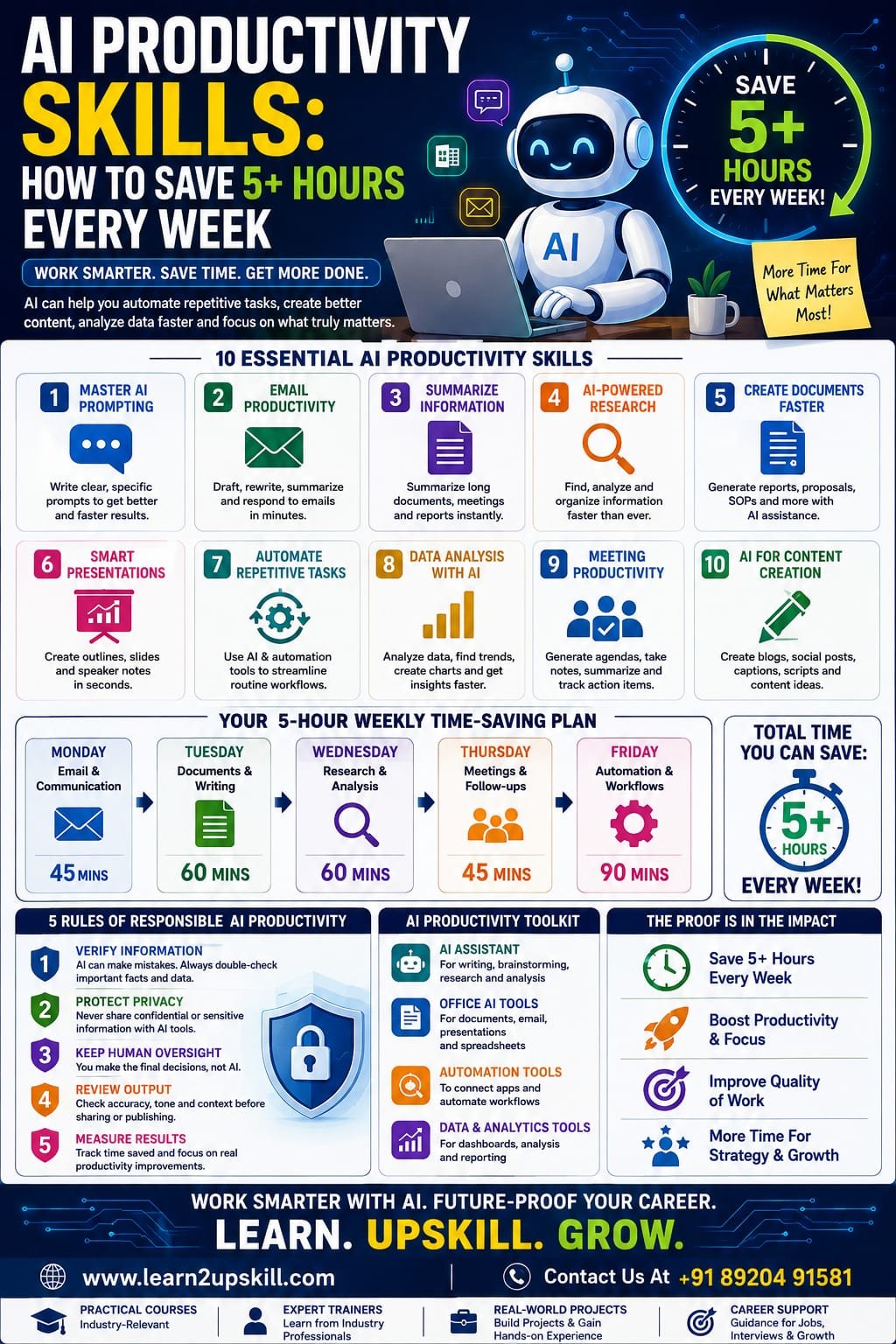
    AI Productivity Skills: How to Save 5+ Hours Every Week

    Learn how AI productivity skills can help you save 5+ hours every week. Discover practical AI tools, automation techniques, prompts and workflows for smarter work.

    Suggested URL Slug:

    “ai-productivity-skills-save-5-hours-every-week”

    —

    Introduction

    What if you could get back 5 or more hours every week without working longer hours?

    For many professionals, the problem isn’t a lack of effort. It’s the amount of time spent on repetitive activities such as writing emails, preparing documents, searching for information, creating reports, organizing meetings, summarizing information and performing routine administrative work.

    This is where AI productivity skills can make a significant difference.

    Artificial intelligence is increasingly becoming a practical workplace assistant. Instead of thinking about AI only as a technology for developers or data scientists, professionals in finance, HR, marketing, sales, education, operations and management can use AI to reduce repetitive work and focus more on higher-value activities.

    The key isn’t simply learning dozens of AI tools.

    The real skill is learning how to identify time-consuming tasks and use AI effectively to improve the workflow.

    In this guide, we’ll explore practical AI productivity skills that can help you save 5+ hours every week.

    —

    What Are AI Productivity Skills?

    AI productivity skills are the abilities required to use artificial intelligence effectively to complete work faster, improve quality and reduce repetitive tasks.

    These skills include:

    – Writing effective AI prompts

    – Using Generative AI tools

    – Summarizing information

    – Creating documents

    – Research assistance

    – Data analysis

    – Email assistance

    – Meeting summarization

    – Workflow automation

    – Content creation

    – Task organization

    – AI-assisted decision-making

    – Evaluating AI-generated information

    The objective isn’t to let AI do everything.

    Instead:

    «Use AI for repetitive work so you can spend more time on work that requires human judgment.»

    —

    Why AI Productivity Matters in the Modern Workplace

    A typical professional may spend several hours each week on tasks that don’t directly create strategic value.

    For example:

    – Writing routine emails

    – Formatting reports

    – Searching for information

    – Summarizing meetings

    – Creating presentation drafts

    – Rewriting documents

    – Preparing repetitive reports

    – Organizing notes

    – Creating social media drafts

    – Copying information between systems

    Individually, these tasks may seem small.

    Together, they can consume a surprising amount of time.

    AI can help reduce the time spent on many of these activities.

    The biggest productivity gains often come from combining several small improvements into one AI-powered workflow.


    —

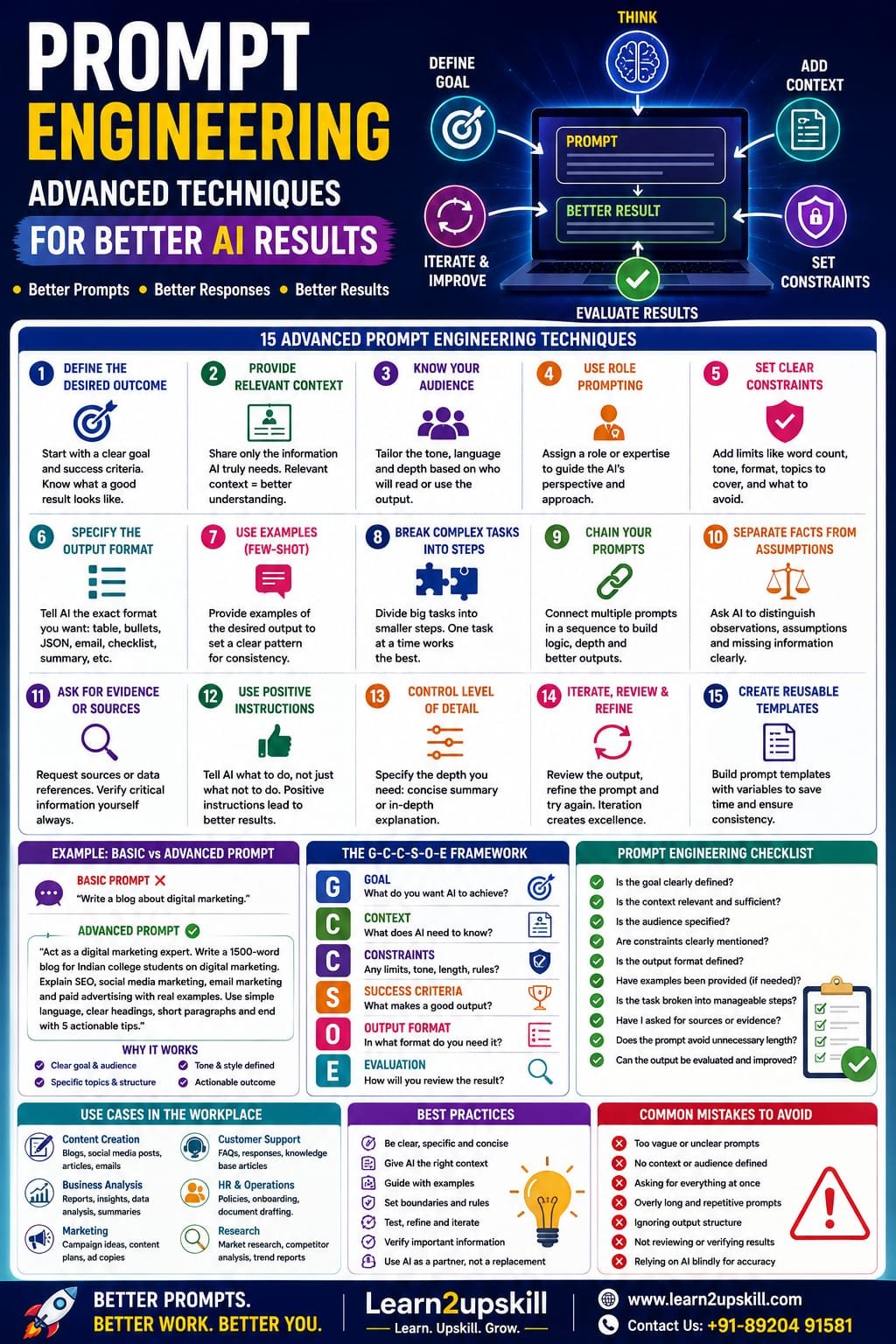
    1. Master AI Prompting

    One of the most useful AI productivity skills is prompt engineering.

    The quality of your instructions can significantly influence the usefulness of an AI response.

    Instead of writing:

    «”Write an email.”»

    Give AI more context:

    «”Write a professional follow-up email to a client who attended our product demonstration yesterday. Keep it under 150 words, thank them for their time, summarize the next steps and maintain a friendly professional tone.”»

    The second instruction gives the AI:

    – Context

    – Audience

    – Objective

    – Length

    – Tone

    – Expected output

    A simple prompt formula

    Try:

    Role + Context + Task + Requirements + Format

    For example:

    «”Act as a business analyst. Review the following sales information. Identify the three biggest trends, explain what they could mean for the business and present the findings as five concise bullet points.”»

    Better prompts can reduce the amount of editing and follow-up required.

    Potential time saving

    10–20 minutes per day

    —

    1. Use AI for Email Productivity

    Email can consume a large portion of the working day.

    AI can help with:

    – Drafting emails

    – Rewriting emails

    – Summarizing long messages

    – Changing tone

    – Creating follow-ups

    – Extracting action items

    – Preparing responses

    – Translating messages

    – Making emails more concise

    For example, instead of spending 15 minutes writing a difficult response, you can provide AI with the situation and ask for three versions:

    Professional

    Friendly

    Concise

    You can then select and edit the version that best fits your situation.

    Important rule

    Never blindly send AI-generated emails.

    Always review:

    – Names

    – Dates

    – Numbers

    – Commitments

    – Tone

    – Confidential information

    AI should assist your communication—not replace your judgment.

    —

    1. Let AI Summarize Information

    Professionals often spend significant time reading long documents, meeting notes, reports and research material.

    AI can help summarize information into:

    – Key points

    – Action items

    – Decisions

    – Risks

    – Questions

    – Deadlines

    – Executive summaries

    For example, after a long meeting, you could organize your notes and ask AI to produce:

    Meeting Summary

    Key Decisions

    Action Items

    Responsible Person

    Deadline

    This can turn a messy collection of notes into a structured document quickly.

    Potential time saving

    30–60 minutes per week

    —

    1. Use AI for Research

    Research is another area where AI can help accelerate the early stages of work.

    You can use AI to:

    – Generate research questions

    – Organize topics

    – Explain unfamiliar concepts

    – Compare ideas

    – Create research frameworks

    – Summarize information

    – Identify areas requiring further investigation

    However, AI-generated information should not automatically be treated as fact.

    For important business, financial, legal, academic or technical work:

    Verify the information using reliable sources.

    AI can accelerate research, but critical thinking remains essential.

    —

    1. Create Documents Faster

    Professionals frequently create:

    – Reports

    – Proposals

    – Business plans

    – SOPs

    – Project updates

    – Meeting agendas

    – Training material

    – Job descriptions

    – Internal communications

    Instead of starting from a blank page, AI can help create a first draft.

    A useful workflow is:

    Idea → AI outline → AI draft → Human review → Final document

    This is often much faster than:

    Blank page → staring at screen → typing → rewriting → formatting

    Potential time saving

    30–90 minutes per week

    —

    1. Use AI for Presentations

    Creating presentations can also become faster with AI.

    AI can help you:

    – Develop presentation structures

    – Generate slide ideas

    – Summarize reports into presentation points

    – Create speaker notes

    – Rewrite complex information

    – Suggest examples

    – Develop presentation narratives

    For example, you can give AI a 10-page business report and ask it to create a proposed 10-slide executive presentation structure.

    You still need to verify the content and design the final presentation appropriately, but the initial planning stage can become much faster.

    —

    1. Automate Repetitive Tasks

    This is where AI productivity can become particularly powerful.

    Start by identifying tasks that you perform repeatedly.

    Ask yourself:

    «”What do I do every week that follows almost the same process?”»

    Examples include:

    – Weekly reports

    – Customer follow-ups

    – Lead categorization

    – Data entry

    – Meeting summaries

    – Content scheduling

    – Invoice processing

    – Spreadsheet updates

    – Status reports

    – Routine notifications

    Some of these workflows can be partially or fully automated using AI and automation platforms.

    The basic automation formula

    Trigger → AI processing → Action

    For example:

    New customer inquiry

    ↓

    AI analyzes inquiry

    ↓

    Categorizes the lead

    ↓

    Creates a response draft

    ↓

    Adds information to a CRM


    Instead of manually handling every step, AI can support the workflow.


    —

    1. Use AI for Data Analysis

    You don’t need to be a data scientist to benefit from AI-assisted analytics.

    AI can help professionals work with:

    – Excel spreadsheets

    – CSV files

    – Sales data

    – Survey results

    – Customer information

    – Marketing data

    – Financial data

    It can assist with:

    – Finding patterns

    – Identifying trends

    – Creating formulas

    – Explaining calculations

    – Generating summaries

    – Suggesting charts

    – Identifying unusual values

    However, professionals still need to understand the underlying data.

    AI can help analyze data, but you remain responsible for interpreting the business meaning.

    —

    1. Create a Personal AI Assistant Workflow

    One of the best ways to develop AI productivity skills is to create a repeatable personal workflow.

    For example:

    Morning

    Use AI to:

    – Review priorities

    – Organize tasks

    – Summarize important information

    – Prepare for meetings

    During the Workday

    Use AI for:

    – Writing

    – Research

    – Analysis

    – Brainstorming

    – Documentation

    End of Day

    Use AI to:

    – Summarize completed work

    – Organize notes

    – Identify unfinished tasks

    – Prepare tomorrow’s priorities

    This doesn’t mean handing your entire day over to AI.

    It means using AI as a productivity layer around your existing workflow.

    —

    1. Learn AI-Powered Spreadsheet Productivity

    For professionals working with Excel, AI can make many spreadsheet tasks easier.

    AI can help with:

    – Formula creation

    – Formula explanations

    – Data cleaning

    – Data summaries

    – Chart suggestions

    – Data analysis

    – Dashboard planning

    – Identifying trends

    For example, instead of spending time trying to remember a complicated Excel formula, you can describe the result you need and use AI to help construct the formula.

    But you should still understand what the formula does before using it in important work.

    AI + Excel = Powerful combination

    For professionals in:

    – Finance

    – Operations

    – Sales

    – HR

    – Business analysis

    – Marketing

    learning Excel + AI can be a highly practical productivity skill.

    —

    1. Improve Your Meeting Productivity

    Meetings generate another category of repetitive work.

    AI can assist with:

    – Meeting agendas

    – Notes

    – Summaries

    – Action items

    – Follow-up messages

    – Decision tracking

    Imagine finishing a one-hour meeting and having a structured summary ready within minutes.

    Instead of spending another 30 minutes organizing notes, you can spend that time executing the decisions made during the meeting.

    —

    1. Use AI for Content Creation

    AI productivity tools can accelerate content workflows for:

    – Marketing teams

    – Social media managers

    – Bloggers

    – Entrepreneurs

    – Teachers

    – Trainers

    – Communication teams

    AI can help generate:

    – Topic ideas

    – Content outlines

    – Headlines

    – First drafts

    – Social media captions

    – Email newsletters

    – Video scripts

    – FAQs

    The best approach is:

    AI generates → Human improves → Brand approves

    AI should support originality and efficiency rather than produce generic content without human editing.

    —

    1. Build an AI Productivity System Instead of Using Random Tools

    One common mistake is collecting too many AI tools.

    You don’t need 30 applications.

    Start with a small toolkit.

    For example:

    Tool 1: AI Assistant

    For:

    – Writing

    – Brainstorming

    – Research

    – Analysis

    Tool 2: Productivity/Office AI

    For:

    – Documents

    – Email

    – Presentations

    – Spreadsheets

    Tool 3: Automation Platform

    For:

    – Connecting applications

    – Automating repetitive processes

    – Trigger-based workflows

    Tool 4: Data/Analytics Tool

    For:

    – Dashboards

    – Data analysis

    – Reporting

    The objective is not:

    “How many AI tools do I know?”

    The objective is:

    “How much useful work can I accomplish with the tools I know?”

    —

    1. A Practical 5-Hour Weekly AI Productivity Plan

    Let’s make the goal measurable.

    Monday — Email & Communication

    Use AI to improve email drafting and summarization.

    Target saving: 45 minutes

    Tuesday — Documents

    Use AI for reports, proposals and document outlines.

    Target saving: 60 minutes

    Wednesday — Research & Analysis

    Use AI to organize research and analyze information.

    Target saving: 60 minutes

    Thursday — Meetings

    Use AI to create agendas, summaries and action items.

    Target saving: 45 minutes

    Friday — Automation

    Identify one repetitive process and improve it with AI.

    Target saving: 90 minutes

    Total potential time recovered:

    5 hours per week

    That’s approximately:

    20+ hours per month

    And more than:

    250 hours per year

    Even if your actual saving is lower, the exercise demonstrates an important principle:

    «Small AI productivity improvements can add up to significant time savings.»

    —

    1. The 5 Rules of Responsible AI Productivity

    Saving time shouldn’t mean sacrificing quality.

    Follow these five rules.

    Rule 1: Verify Important Information

    AI can make mistakes.

    Rule 2: Protect Confidential Information

    Don’t enter sensitive company, customer or personal information into AI tools without understanding the organization’s policies.

    Rule 3: Keep Human Oversight

    AI should support important decisions rather than automatically make every decision.

    Rule 4: Review AI-Generated Content

    Check facts, numbers, tone and context.

    Rule 5: Measure Results

    Don’t assume an AI tool is useful simply because it looks impressive.

    Ask:

    Did it actually save time?

    Did it improve quality?

    Did it reduce repetitive work?

    —

    1. AI Productivity Skills Every Professional Should Learn

    If you’re starting from scratch, focus on these skills:

    1. AI literacy
    2. Prompt engineering
    3. Generative AI
    4. AI-assisted research
    5. AI writing and communication
    6. AI data analysis
    7. Workflow automation
    8. AI-powered productivity tools
    9. Critical evaluation of AI output
    10. Responsible AI usage

    These skills can be useful across industries.

    Whether you work in finance, HR, marketing, education, sales, operations or IT, the fundamentals are similar.

    —

    AI Productivity Is About Working Smarter, Not Simply Faster

    There is an important distinction between being busy and being productive.

    If AI helps you write 50 emails instead of 30, you may simply become busier.

    But if AI helps you eliminate unnecessary repetitive work, organize information faster and focus on strategic activities, that’s genuine productivity.

    The ultimate goal isn’t to fill your extra five hours with more tasks.

    It’s to use those hours for work that creates more value.

    —

    Conclusion

    AI productivity skills are becoming essential workplace skills.

    Professionals who learn how to use AI effectively can reduce repetitive work, accelerate research, improve communication, analyze information faster and automate routine workflows.

    The key is not to become dependent on AI.

    The key is to become AI-enabled.

    Start small.

    Choose one repetitive task.

    Use AI to improve it.

    Measure the time saved.

    Then move to the next task.

    If you save just 15–30 minutes across several activities each day, you can potentially recover 5 or more hours every week.

    The future of productivity isn’t about working longer.

    It’s about working smarter with the right combination of human expertise and AI.

    Learn AI. Apply AI. Automate wisely. Work smarter.

    —

    Start Your AI Upskilling Journey with Learn2Upskill

    The future belongs to professionals who know how to combine human expertise with AI productivity skills.

    At Learn2Upskill, develop practical, future-focused skills in AI, Generative AI, automation, Excel, data analytics, cybersecurity, business and more.

    🌐 www.coral-kudu-326218.hostingersite.com

    Learn. Upskill. Grow.

    —


  • Public Speaking in the Age of AI: Why Human Communication Skills Matter More Than Ever

    Public Speaking in the Age of AI: Why Human Communication Skills Matter More Than Ever

    Public Speaking in the Age of AI: Why Human Communication Skills Matter More Than Ever

    Public Speaking in the Age of AI: Why Human Skills Matter

    Meta Description: Discover why public speaking and human communication skills are becoming more valuable in the age of AI. Learn how to communicate, present, persuade and lead effectively in an AI-powered workplace.

    Suggested URL Slug: “/public-speaking-in-the-age-of-ai/”

    —

    Public Speaking in the Age of AI: Why Human Communication Skills Matter More Than Ever

    Artificial intelligence is changing the way we work.

    AI can write emails, create presentations, summarize documents, analyze data, generate ideas and even help prepare speeches in seconds.

    So, does that mean communication and public speaking skills are becoming less important?

    Quite the opposite.

    As AI becomes better at generating information, the ability to communicate that information clearly, confidently and persuasively can become even more valuable.

    A report from the World Economic Forum identifies leadership and social influence, creative thinking, resilience, flexibility and agility among important core skills for today’s workforce. It also highlights the growing importance of technological skills alongside human capabilities.

    The future isn’t simply about AI versus humans.

    It’s increasingly about humans who know how to work effectively with AI.

    And public speaking sits right at the intersection of these two worlds.

    —

    What Is Public Speaking in the Age of AI?

    Public speaking traditionally means communicating with an audience through a speech, presentation, seminar, meeting or event.

    Today, the definition is much broader.

    Public speaking includes:

    – Presenting an idea to your manager

    – Leading a team meeting

    – Pitching to a client

    – Giving a project update

    – Conducting a webinar

    – Speaking at a conference

    – Delivering a training session

    – Participating in a panel discussion

    – Presenting business results

    – Explaining technical information to non-technical people

    – Answering questions during a presentation

    You may not consider yourself a “public speaker,” but if your career involves communicating ideas to other people, you are already using public-speaking skills.

    AI can help prepare the content.

    You still have to deliver it.

    —

    Why Public Speaking Is Becoming More Important

    AI is making information increasingly accessible.

    Anyone can ask an AI tool to:

    – Explain a concept

    – Generate a report

    – Create presentation ideas

    – Write a speech

    – Summarize research

    – Produce talking points

    This creates a new challenge.

    If everyone can access similar information, how do you stand out?

    One answer is communication.

    The ability to take information and turn it into something that people understand, trust and act upon is a powerful professional skill.

    Recent commentary on presentation skills in the AI era similarly emphasizes human presence, trust, empathy, storytelling and credibility as important differentiators.

    —

    AI Can Generate Information. Humans Create Connection.

    Imagine two professionals presenting exactly the same AI-generated report.

    One reads the slides word-for-word.

    The other:

    – Explains the key message clearly

    – Uses an engaging story

    – Understands the audience

    – Makes eye contact

    – Responds naturally to questions

    – Shows confidence

    – Connects the information to real business problems

    Which presentation is more likely to be remembered?

    The information may be identical.

    The human experience is different.

    That’s why communication matters.

    —

    1. Public Speaking Builds Trust

    People don’t simply respond to information.

    They respond to the person delivering it.

    When you speak confidently and authentically, your audience gets clues about:

    – Your confidence

    – Your expertise

    – Your judgment

    – Your personality

    – Your credibility

    – Your ability to handle pressure

    This is particularly important in leadership, sales, management, consulting, teaching and client-facing roles.

    A well-written AI-generated presentation may provide excellent information.

    But someone still needs to stand in front of the audience and build trust.

    —

    1. Storytelling Is a Human Advantage

    Facts are important.

    But stories help people remember facts.

    A good speaker can transform:

    «“Customer satisfaction increased by 18%.”»

    into:

    «“Six months ago, our customers were waiting days for a response. We changed the process, reduced the waiting time, and today satisfaction has increased by 18%.”»

    The second version creates context.

    AI can help you structure a story.

    But effective storytelling requires understanding:

    – Your audience

    – Their concerns

    – Their expectations

    – Their emotions

    – The purpose of your message

    That’s where human judgment becomes important.

    —

    1. Public Speaking Develops Leadership Skills

    Leadership isn’t simply about giving instructions.

    Good leaders need to:

    – Explain ideas

    – Communicate change

    – Motivate teams

    – Handle difficult conversations

    – Build trust

    – Influence stakeholders

    – Present a vision

    – Respond to questions

    – Manage uncertainty

    The World Economic Forum’s Future of Jobs research places leadership and social influence among the core skills employers value, alongside analytical thinking, resilience and technological literacy.

    This means public speaking isn’t only a presentation skill.

    It can be a leadership skill.

    —

    1. AI Makes Communication Skills More Valuable

    This may sound surprising.

    If AI is becoming better at communication, why would human communication become more important?

    Because AI can make creating content easier.

    That means the ability to interpret, personalize, challenge and communicate that content effectively becomes more important.

    For example, AI might generate:

    – 20 presentation slides

    – 10 marketing ideas

    – A business report

    – A speech

    – A customer proposal

    But a human still needs to decide:

    What actually matters?

    What should the audience know?

    What should they do next?

    What information should be questioned?

    How should the message be delivered?

    That requires judgment.

    —

    1. Public Speaking Helps You Explain Complex Ideas

    One of the most valuable professional skills is the ability to make complicated information simple.

    Consider a data analyst presenting a dashboard.

    They could say:

    «“The conversion rate decreased by 7.4% in Q2.”»

    Or they could explain:

    «“Our conversion rate dropped by 7.4% mainly because mobile visitors increased while our mobile checkout process had the highest abandonment rate. Improving the mobile checkout experience should therefore be our first priority.”»

    The second explanation provides:

    Data → Meaning → Action

    That’s what decision-makers need.

    AI can help analyze the numbers.

    A strong communicator explains what those numbers mean for people and the business.

    —

    1. Public Speaking Improves Career Visibility

    Being good at your job is important.

    Being able to communicate your work is also important.

    Consider two employees.

    Employee A

    Does excellent work but rarely speaks in meetings.

    Employee B

    Does excellent work and confidently explains projects, results and ideas.

    Over time, Employee B may become more visible to:

    – Managers

    – Senior leaders

    – Clients

    – Colleagues

    – Recruiters

    – Professional networks

    This doesn’t mean you should constantly talk.

    It means that when you have something valuable to say, you should be able to communicate it effectively.

    —

    1. Public Speaking Helps You Stand Out in Interviews

    Job interviews are also communication exercises.

    Your resume tells recruiters what you have done.

    Your interview shows them how you think and communicate.

    Strong communication can help you:

    – Explain your achievements

    – Answer difficult questions

    – Tell your career story

    – Demonstrate confidence

    – Explain technical concepts

    – Handle unexpected questions

    This becomes especially important as employers increasingly look for combinations of technical and human skills.

    The World Economic Forum’s research highlights the need for workers to combine technology-related capabilities with human skills such as creative thinking, resilience, leadership and social influence.

    —

    1. Public Speaking Helps With AI-Generated Content

    AI-generated content isn’t automatically effective content.

    A presentation can be technically correct and still be boring.

    A speech can contain excellent information and still fail to connect with the audience.

    A report can have accurate data and still fail to influence a decision.

    That’s where communication skills come in.

    Use AI as your assistant, not your replacement.

    AI can help you:

    – Brainstorm topics

    – Structure presentations

    – Create outlines

    – Generate examples

    – Simplify complex language

    – Suggest questions

    – Practice interview scenarios

    – Provide alternative explanations

    Then add the human layer:

    – Your experience

    – Your judgment

    – Your stories

    – Your personality

    – Your examples

    – Your audience understanding

    That’s where the real value appears.

    —

    1. The Best Future Skill Is AI + Human Communication

    Instead of choosing between technology skills and communication skills, develop both.

    Think of your career skills as a combination:

    Technical Skills

    – AI

    – Data analysis

    – Excel

    – SQL

    – Power BI

    – Automation

    – Digital tools

    Human Skills

    – Public speaking

    – Storytelling

    – Leadership

    – Emotional intelligence

    – Critical thinking

    – Collaboration

    – Active listening

    – Persuasion

    The strongest professionals increasingly need a combination of both.

    The World Economic Forum reports that technological skills are among the fastest-growing skill areas, while creative thinking, resilience, flexibility, leadership and social influence are also rising in importance.

    —

    1. How to Use AI to Become a Better Public Speaker

    You don’t need to avoid AI when developing communication skills.

    Use it intelligently.

    Use AI to brainstorm

    Ask:

    «“Give me five engaging ways to introduce a presentation about digital transformation.”»


    Use AI to simplify

    Ask:

    «“Explain this technical concept in language a non-technical manager can understand.”»

    Use AI to practice

    Ask:

    «“Act as a skeptical client and ask me five difficult questions about my presentation.”»

    Use AI for feedback

    Provide your speech and ask:

    «“Identify sections that are unclear, repetitive or too technical.”»

    Use AI for storytelling

    Ask:

    «“Help me turn this business result into a short professional story.”»

    AI can become your virtual practice partner.

    —

    1. But Don’t Let AI Write Your Entire Personality

    This is where many people make a mistake.

    If every presentation sounds like it was generated by the same AI system, audiences may notice.

    Your presentation should sound like you.

    Use your own:

    – Experiences

    – Examples

    – Opinions

    – Stories

    – Humor

    – Lessons

    – Observations

    AI can help polish your message.

    It shouldn’t erase your personality.

    —

    1. Develop These 10 Public Speaking Skills

    If you want to become a stronger communicator in the AI era, focus on these skills:

    1. Clarity

    Make your message easy to understand.

    1. Confidence

    Speak with calmness and conviction.

    1. Storytelling

    Use stories to make ideas memorable.

    1. Voice modulation

    Avoid speaking in one monotonous tone.

    1. Body language

    Use posture, gestures and eye contact effectively.

    1. Active listening

    Understand the audience before responding.

    1. Persuasion

    Learn how to influence decisions ethically.

    1. Q&A handling

    Stay calm when unexpected questions appear.

    1. Impromptu speaking

    Practice answering without a prepared script.

    1. Audience awareness

    Adapt your message to the people listening.

    —

    1. How Students Can Benefit From Public Speaking

    Public speaking isn’t only for executives.

    Students can use it for:

    – School presentations

    – College projects

    – Viva examinations

    – Group discussions

    – Interviews

    – Competitions

    – Seminars

    – Internships

    – Networking

    A student who learns to communicate confidently can carry that skill into the workplace.

    Start small.

    Speak in class.

    Present projects.

    Join debates.

    Participate in group discussions.

    Record yourself explaining a topic.

    Confidence grows through repeated practice.

    —

    1. How Professionals Can Improve Public Speaking

    You don’t need to become a motivational speaker.

    Start with everyday communication.

    Try this:

    Week 1: Speak for two minutes about your work.

    Week 2: Record a five-minute explanation of a professional topic.

    Week 3: Present an idea to a colleague or friend.

    Week 4: Volunteer to present part of a team meeting.

    Gradually increase the difficulty.

    Public speaking is a skill.

    And like most skills, it improves through practice.

    —

    1. Public Speaking Is Not About Being Perfect

    Many people avoid speaking because they think they need to sound like a professional presenter.

    You don’t.

    You need to be:

    – Clear

    – Prepared

    – Authentic

    – Useful

    – Engaging

    You may make mistakes.

    You may forget a word.

    You may become nervous.

    That’s normal.

    Confidence doesn’t mean never feeling nervous.

    It means learning how to communicate effectively even when you are nervous.

    —

    The Future Belongs to People Who Can Work With AI—and With People

    The workplace of the future won’t simply reward people who know the most technology.

    It will increasingly reward people who can combine technology with human capabilities.

    The World Economic Forum estimates that around 39% of workers’ existing skill sets may be transformed or become outdated by 2030, highlighting the importance of continuous upskilling. At the same time, employers continue to emphasize human-centered skills such as resilience, leadership, social influence, creative thinking and empathy.

    That creates a powerful career combination:

    AI literacy + technical expertise + communication + human connection

    If you can analyze information and explain it…

    If you can use AI and challenge its output…

    If you can create a presentation and deliver it confidently…

    If you can understand data and persuade people to act on it…

    you become much more adaptable in a changing workplace.

    —

    Final Thoughts

    AI isn’t making public speaking obsolete.

    It may actually make strong human communication more valuable.

    As technology makes information easier to generate, people who can communicate that information with clarity, credibility, empathy and confidence can stand out.

    AI can help you write the speech.

    You bring it to life.

    AI can help create the presentation.

    You build the connection.

    AI can analyze the data.

    You explain what it means.

    AI can suggest the answer.

    You use judgment to decide what to say.

    That’s why public speaking is becoming an important career skill in the age of AI.

    Don’t choose between becoming more technical and becoming a better communicator.

    Become both.

    Learn AI. Build communication skills. Speak with confidence. Future-proof your career.

    —

    Public Speaking in the AI Era: Quick Checklist

    – [ ] Learn how to structure a clear message.

    – [ ] Practice speaking without reading every word.

    – [ ] Improve your storytelling skills.

    – [ ] Work on voice modulation.

    – [ ] Improve your body language.

    – [ ] Learn to handle Q&A sessions.

    – [ ] Practice impromptu speaking.

    – [ ] Use AI to prepare and practice.

    – [ ] Add your own experiences and personality.

    – [ ] Learn to explain complex ideas simply.

    – [ ] Develop active listening skills.

    – [ ] Combine AI skills with human communication skills.

    —

    Ready to Build Future-Ready Skills?

    At Learn2upskill, we believe the future of work isn’t just about technology. It’s about combining technology with practical human skills.

    Explore learning opportunities in:

    AI • Public Speaking • Communication • Excel • Business Analysis • Digital Marketing • Cybersecurity • Professional Development

    Learn. Upskill. Grow.

    🌐 www.coral-kudu-326218.hostingersite.com

    Contact Us: +91-89204 91581

    —


  • Prompt Engineering: Advanced Techniques for Better AI Results

    Prompt Engineering: Advanced Techniques for Better AI Results

    Prompt Engineering: Advanced Techniques for Better AI Results

    Learn advanced prompt engineering techniques to get better AI results using clear goals, context, examples, constraints, structured outputs, iteration, evaluation and AI workflows.

    Suggested URL Slug: /advanced-prompt-engineering-techniques/

    Prompt Engineering: Advanced Techniques for Better AI Results

    You ask an AI tool a question.

    It gives you an answer.

    But sometimes the answer is excellent—and sometimes it is vague, generic, too long, inaccurate or simply not what you wanted.

    Why?

    Often, the problem isn’t the AI model itself.

    It’s the way the task was communicated.

    This is where prompt engineering becomes important.

    Prompt engineering is the practice of designing instructions and context so an AI system has a better understanding of the task, desired outcome, constraints and expected response.

    For beginners, prompt engineering might mean learning how to write a clear question.

    For advanced users, it goes much further.

    You learn how to:

    Define outcomes

    Provide useful context

    Give examples

    Set constraints

    Specify output formats

    Break down complex tasks

    Ask AI to evaluate its work

    Build reusable prompt templates

    Create multi-step workflows

    Connect AI with tools and data

    Test prompts systematically

    OpenAI’s current model guidance emphasizes clear outcomes, success criteria, relevant context, constraints and desired output, while also recommending leaner prompts rather than unnecessary layers of instructions. �

    OpenAI Developers +1

    So let’s move beyond basic “write me a prompt” advice and explore advanced techniques that can make AI interactions more useful and reliable.

    What Is Prompt Engineering?

    Prompt engineering is the process of creating effective instructions for an AI model to achieve a particular result.

    A basic prompt might be:

    “Write a blog about digital marketing.”

    An improved prompt might be:

    “Write a 1,500-word beginner-friendly blog about digital marketing for Indian college students. Explain SEO, social media marketing, email marketing and paid advertising. Use practical examples, short paragraphs and clear headings. End with five actionable tips.”

    The second prompt provides much more useful information.

    It tells the AI:

    What to write + who it’s for + how long + what to cover + how to structure it.

    But advanced prompting goes further than simply adding more instructions.

    Why Prompt Engineering Matters

    AI models are powerful, but they don’t automatically know:

    What your real objective is

    Who your audience is

    What information matters most

    What constraints you’re working under

    What a successful answer looks like

    Which format you prefer

    What the AI should avoid

    A well-designed prompt reduces ambiguity.

    This can help you get more:

    Relevant answers

    Consistent outputs

    Useful ideas

    Structured content

    Actionable recommendations

    Professional results

    However, better prompting does not guarantee factual accuracy. Important information should still be verified.

    Basic Prompt vs Advanced Prompt

    Consider this basic request:

    “Analyze my business.”

    There are many possible interpretations.

    Now consider:

    “Act as a business analyst. Analyze the following monthly sales data for a small online education business. Identify the three biggest trends, unusual changes, possible causes, and five practical actions management should consider. Separate observations from assumptions. Present the result in a table followed by a short executive summary.”

    The second prompt establishes:

    Role

    Context

    Objective

    Analysis criteria

    Evidence boundaries

    Output format

    That’s the difference between a casual prompt and a more advanced one.

    1. Start With the Desired Outcome

    One of the most useful advanced prompting techniques is to describe what success looks like.

    Instead of:

    “Help me improve my website.”

    Try:

    “Identify the five highest-impact improvements I can make to increase course-enrollment conversions on my website. Prioritize the recommendations by expected impact and effort.”

    The second prompt defines an outcome.

    OpenAI’s current guidance recommends outcome-first prompting: describe the target result, success criteria, constraints and available context, while avoiding unnecessary step-by-step instructions when the exact process isn’t important. �

    OpenAI Developers

    Better prompt formula:

    Goal → Success criteria → Context → Constraints → Output

    1. Give the AI Relevant Context

    Context is one of the most important ingredients in a useful prompt.

    Suppose you ask:

    “Create a marketing strategy.”

    AI doesn’t know:

    What you’re selling

    Who your customers are

    Your budget

    Your location

    Your competitors

    Your marketing channels

    Your objective

    Add context:

    “I run an online learning website offering short courses for students and working professionals. Courses are priced affordably, and our current marketing channels include Instagram, Facebook, LinkedIn and YouTube. Create a 30-day content strategy focused on increasing website visits and course enquiries.”

    Now the AI has something to work with.

    Remember:

    More information isn’t always better.

    Give the AI relevant information, not a giant pile of unrelated details.

    1. Define the Audience

    AI output should change depending on who will consume it.

    Compare:

    “Explain Generative AI.”

    with:

    “Explain Generative AI to Class 8 students using simple language and two everyday examples.”

    And:

    “Explain Generative AI to senior business executives focusing on productivity, risk and implementation.”

    Same topic.

    Completely different communication.

    Always consider:

    Who is reading or using the output?

    1. Specify the Role When It Helps

    You can tell an AI model what perspective or expertise to adopt.

    For example:

    “Act as an experienced SEO strategist.”

    Or:

    “Act as a career counsellor helping recent graduates.”

    Or:

    “Act as a financial analyst reviewing business performance.”

    This can help establish the desired perspective.

    But don’t assume the phrase “Act as an expert” magically makes the answer correct.

    Role prompting helps communicate the intended perspective; it doesn’t replace verification or real expertise.

    1. Use Constraints

    Constraints tell the AI what boundaries it needs to respect.

    For example:

    “Write a 700-word article using simple language, no unnecessary jargon, no more than five main sections, and include practical examples.”

    Useful constraints include:

    Word count

    Number of sections

    Audience level

    Tone

    Format

    Required topics

    Forbidden content

    Reading level

    Geographic context

    Business limitations

    Constraints are especially useful when you need consistent outputs.

    1. Specify the Output Format

    Don’t leave the final format completely open when structure matters.

    You can request:

    Table

    Bullet points

    Checklist

    Step-by-step guide

    Executive summary

    FAQ

    JSON

    Email

    Presentation outline

    Comparison matrix

    For example:

    “Compare these five AI tools in a table with columns for price, primary use, strengths, limitations and ideal user.”

    This is much more predictable than:

    “Compare these AI tools.”

    OpenAI’s current guidance also recommends explicitly specifying output shape and verbosity when those details matter. �

    OpenAI Developers

    1. Use Examples: Few-Shot Prompting

    One powerful advanced technique is giving the AI examples of the kind of output you want.

    This is often called few-shot prompting.

    For example:

    “Convert product descriptions into short social-media captions.

    Example: Product: Online Excel course

    Caption: Learn Excel skills that help you work smarter, faster and more confidently.

    Now create captions for these five products.”

    The example gives the model a pattern to follow.

    This can be useful when you want:

    Consistent formatting

    Specific tone

    Repeated content structures

    Classification

    Categorization

    Standardized responses

    1. Break Complex Tasks Into Smaller Tasks

    Don’t always ask AI to complete a complicated project in one enormous prompt.

    Instead of:

    “Create my entire marketing strategy.”

    Break it into stages.

    Step 1

    Analyze the target audience.

    Step 2

    Identify their problems.

    Step 3

    Develop content themes.

    Step 4

    Create a content calendar.

    Step 5

    Create distribution ideas.

    Step 6

    Define metrics.

    This approach makes it easier to review each stage.

    It also helps you catch mistakes earlier.

    1. Use Prompt Chaining

    Prompt chaining means connecting multiple AI tasks together.

    For example:

    Prompt 1

    “Analyze this customer feedback.”

    ↓

    Prompt 2

    “Group the feedback into five major themes.”

    ↓

    Prompt 3

    “Identify the three biggest customer problems.”

    ↓

    Prompt 4

    “Suggest solutions for each problem.”

    ↓

    Prompt 5

    “Create an executive summary.”

    Instead of asking AI to do everything simultaneously, you create a workflow.

    This is especially useful for research, analysis, content creation and business processes.

    1. Ask AI to Identify Assumptions

    AI can sometimes make assumptions without clearly telling you.

    You can explicitly ask:

    “Separate information directly supported by the provided data from assumptions or interpretations.”

    This is particularly useful for:

    Business analysis

    Market research

    Strategy

    Financial analysis

    Research

    Decision support

    It helps you distinguish:

    Known → Inferred → Unknown

    That’s a very useful habit when working with AI.

    1. Ask for Evidence or Sources

    For research-oriented tasks, ask AI to distinguish between information and evidence.

    For example:

    “For each major claim, identify the source or evidence supporting it. If evidence is unavailable, clearly mark the claim as unverified.”

    For current information, use a tool or workflow that can actually access current sources.

    Don’t assume that an AI-generated citation is genuine.

    Always check important sources yourself.

    1. Use AI for Critique, Not Just Creation

    Most people use AI like this:

    Create something → Done.

    Advanced users can use another approach:

    Create → Critique → Improve → Evaluate

    For example:

    “Review this article as an SEO editor. Identify weak headings, repetitive sections, unclear explanations and missing search intent. Do not rewrite the article yet.”

    Then:

    “Now revise the article based on the highest-priority issues.”

    This creates a feedback loop.

    1. Ask AI to Compare Multiple Options

    Instead of asking:

    “Which option is best?”

    ask:

    “Compare these three options using cost, implementation difficulty, scalability, risk and expected impact. Identify the best option for a small business with a limited budget.”

    Now the model has criteria.

    This is much better for decision support.

    You can also ask it to explain:

    Why Option A wins

    When Option B would be better

    What assumptions influence the recommendation

    That makes the result more useful.

    1. Use Decision Criteria

    When you’re making a decision, tell AI what matters.

    For example:

    “Recommend an online learning platform. Prioritize low cost, easy setup, mobile access, recording capability and beginner-friendly administration. Treat advanced customization as less important.”

    Without priorities, AI may optimize for the wrong thing.

    Advanced prompting isn’t about writing longer prompts.

    It’s about making the decision criteria clear.

    1. Use Positive Instructions

    Instead of only telling AI what not to do, explain what you want.

    Weak:

    “Don’t make the article boring.”

    Better:

    “Use short paragraphs, practical examples, conversational language and specific takeaways.”

    Weak:

    “Don’t use complicated words.”

    Better:

    “Use simple language suitable for a general audience.”

    Tell the model what success looks like.

    1. Use Delimiters for Important Context

    When working with large amounts of text, clearly separate instructions from the material you’re asking AI to analyze.

    For example:

    TASK: Summarize the document.

    DOCUMENT:

    [Insert document here]

    OUTPUT:

    Give five key findings and three recommended actions.

    This reduces ambiguity between:

    Instructions

    and

    Information being analyzed.

    It becomes particularly useful when working with documents, datasets and long inputs.

    1. Ask for Structured Data

    If you’re processing repeated information, structured output can make AI much more useful.

    For example:

    “Extract the following information from each customer review:

    Product

    Main complaint

    Sentiment

    Urgency

    Suggested action”

    You could request a table.

    For software applications, structured-output features can provide stronger machine-readable consistency than relying entirely on natural-language formatting. OpenAI’s API documentation currently supports Structured Outputs for responses that adhere to a specified schema. �

    OpenAI Platform

    1. Control the Level of Detail

    Sometimes AI gives you too much information.

    Sometimes it gives you too little.

    Specify the level you need.

    For example:

    “Give me a concise executive summary in 150 words.”

    Or:

    “Explain this concept in depth with examples, edge cases and practical recommendations.”

    OpenAI’s current model guidance recommends explicitly controlling response length and verbosity when the application requires consistent output. �

    OpenAI Developers

    1. Use Iterative Prompting

    Don’t expect your first prompt to be perfect.

    Start.

    Review.

    Improve.

    Try again.

    For example:

    First prompt

    “Create a blog outline about AI automation.”

    Follow-up

    “Make it more suitable for small-business owners.”

    Follow-up

    “Add practical examples from marketing, HR and finance.”

    Follow-up

    “Make the headings more SEO-friendly.”

    Follow-up

    “Identify missing search-intent questions.”

    This is often more effective than trying to write one giant prompt containing every possible instruction.

    1. Create Reusable Prompt Templates

    If you perform the same task repeatedly, don’t start from scratch every time.

    Create a template.

    Example: Blog Prompt Template

    Role: SEO content strategist

    Topic: [TOPIC]

    Audience: [AUDIENCE]

    Goal: [GOAL]

    Length: [WORD COUNT]

    Primary keyword: [KEYWORD]

    Secondary keywords: [KEYWORDS]

    Required sections: [SECTIONS]

    Tone: [TONE]

    Output: [FORMAT]

    Then fill in the variables.

    This saves time and creates more consistent results.

    1. Build Prompts Around Success Criteria

    One of the most powerful advanced techniques is explicitly defining what a successful result must contain.

    For example:

    Create a 1,000-word beginner guide to AI automation. Success means the article:

    Explains AI automation clearly

    Includes three real-world examples

    Uses simple language

    Includes practical steps

    Avoids unsupported statistics

    Ends with a five-point checklist

    Now the AI knows how you will judge the result.

    This outcome-first approach is emphasized in current OpenAI guidance for newer models. �

    OpenAI Developers

    1. Add Stop Conditions

    For complex AI workflows, tell the system when it should stop, ask a question or report that it cannot complete something.

    For example:

    “If the information provided is insufficient to make a reliable recommendation, identify the missing information rather than guessing.”

    This is particularly useful for:

    Research

    Business analysis

    AI agents

    Automated workflows

    Customer support

    Decision-support systems

    A good AI system shouldn’t simply produce an answer at all costs.

    Sometimes the correct output is:

    “I need more information.”

    1. Use AI Evaluation

    Advanced prompting isn’t just about creating prompts.

    It’s also about measuring whether they work.

    Suppose you create a prompt for generating customer-support responses.

    Test it against 20 realistic customer questions.

    Evaluate:

    Accuracy

    Relevance

    Tone

    Completeness

    Policy compliance

    Consistency

    Then improve the prompt.

    For applications, OpenAI recommends using representative evaluations and rerunning them after prompt changes rather than assuming that a prompt improvement is actually an improvement. �

    OpenAI Developers +1

    Think:

    Prompt → Test → Measure → Improve → Test again

    1. Don’t Make Prompts Unnecessarily Long

    This is an important advanced lesson.

    Many people believe:

    Longer prompt = Better answer

    Not necessarily.

    Current OpenAI guidance specifically recommends leaner prompts, removing repeated instructions and unnecessary examples while keeping the context and requirements that genuinely affect behavior. �

    OpenAI Developers

    A good prompt is:

    Clear, relevant, specific and purposeful.

    Not:

    Long, repetitive and complicated.

    1. Use the Right Level of Specificity

    Too little information:

    “Create a business strategy.”

    Too much information:

    A 3,000-word instruction containing dozens of unnecessary rules.

    The goal is the middle ground.

    Give the model:

    Goal

    Context

    Constraints

    Success criteria

    Output requirements

    Then let it solve the task.

    For newer reasoning-capable models, OpenAI recommends avoiding unnecessary step-by-step process instructions when the exact process isn’t important. �

    OpenAI Developers

    1. Prompt Engineering for Research

    Research prompts should clearly define:

    Research question

    Geographic scope

    Time period

    Target audience

    Required evidence

    Sources

    Output structure

    Example:

    “Research the growth of AI skills in the Indian job market from 2024–2026. Use reliable current sources. Separate confirmed facts from interpretation. Summarize the findings in a table and identify five implications for students.”

    For current or important claims, verify the sources independently.

    1. Prompt Engineering for Marketing

    Marketing prompts can include:

    Product + Audience + Problem + Platform + Objective + Tone

    Example:

    “Create five LinkedIn post ideas promoting an online Excel course for working professionals. Focus on productivity and career development. Use a professional but approachable tone. Each idea should include a hook, three key points and a CTA.”

    That’s much more useful than:

    “Write LinkedIn posts for my Excel course.”

    1. Prompt Engineering for Business Analysis

    Try:

    “Act as a business analyst. Review this sales dataset and identify revenue trends, underperforming categories, unusual changes and three business questions management should investigate. Clearly distinguish observations from assumptions. Present the results in a concise executive format.”

    This kind of prompt is useful because it defines:

    Role + data + objective + analysis criteria + evidence boundary + output.

    1. Prompt Engineering for Public Speaking

    You can also use advanced prompting for your public-speaking content.

    Example:

    “Act as a public-speaking coach. I’m preparing a five-minute presentation for college students about AI and future careers. Create an engaging opening, three key points, one story, two audience questions and a memorable conclusion. Use simple conversational language.”

    Then:

    “Now act as a skeptical audience member and ask me 10 difficult questions.”

    Then:

    “Evaluate my answers for clarity, confidence and relevance.”

    This turns AI into a practice partner, not just a content generator.

    1. Prompt Engineering for AI Agents

    Prompt engineering becomes even more important when AI is connected to tools and business systems.

    An agent may need instructions covering:

    Goal

    Available tools

    Permissions

    Evidence requirements

    Allowed actions

    Approval requirements

    Error handling

    Escalation rules

    Stop conditions

    For example:

    Goal: Resolve customer requests.

    Success: Provide an accurate response or escalate appropriately.

    Constraints: Never modify customer billing information without approval.

    Evidence: Use approved knowledge sources.

    Escalation: If information is missing or confidence is low, ask for clarification or route to a human.

    This is much closer to AI workflow design than simple prompt writing.

    The Advanced Prompt Engineering Framework

    Here’s a framework you can remember:

    G-C-C-S-O-E

    G — Goal

    What do you want?

    C — Context

    What does the AI need to know?

    C — Constraints

    What boundaries should it follow?

    S — Success Criteria

    What does a good answer look like?

    O — Output

    What format do you want?

    E — Evaluation

    How will you judge the result?

    Example

    Goal: Create a career-development article.

    Context: Audience is Indian college students.

    Constraints: 1,500 words, simple English, practical examples.

    Success: Clear, useful and actionable.

    Output: SEO article with headings, FAQs and checklist.

    Evaluation: Check clarity, relevance and keyword coverage.

    This is a strong starting point for advanced prompting.

    10 Advanced Prompt Templates You Can Use

    1. Expert Analysis

    “Act as a [ROLE]. Analyze [INPUT] for [OBJECTIVE]. Use [CRITERIA]. Separate facts from assumptions. Present the result as [FORMAT].”

    1. Content Creation

    “Create a [CONTENT TYPE] for [AUDIENCE] about [TOPIC]. The goal is [GOAL]. Use [TONE]. Include [REQUIRED ELEMENTS]. Keep it within [LENGTH].”

    1. Critique

    “Review the following [CONTENT] as a [ROLE]. Identify the five highest-impact weaknesses and explain how to improve each. Do not rewrite it yet.”

    1. Comparison

    “Compare [OPTIONS] using [CRITERIA]. Explain the trade-offs, identify the best option for [CONTEXT], and state the assumptions behind your recommendation.”

    1. Research

    “Research [QUESTION] using reliable sources from [TIME PERIOD/REGION]. Separate evidence from interpretation and summarize the findings in [FORMAT].”

    1. Data Analysis

    “Analyze the provided data. Identify [METRICS/TRENDS]. Flag anomalies. Separate observations from assumptions. End with [NUMBER] recommended actions.”

    1. Summarization

    “Summarize this material for [AUDIENCE]. Extract [KEY INFORMATION]. Preserve important caveats. Present the result in [FORMAT].”

    1. Brainstorming

    “Generate [NUMBER] ideas for [OBJECTIVE]. Group them by category and rank them by [CRITERIA]. Explain the top five.”

    1. Decision Support

    “Help me decide between [OPTIONS]. Prioritize [CRITERIA]. Show the main trade-offs, risks and assumptions before recommending an option.”

    1. AI Agent

    “Your goal is [GOAL]. You may use [TOOLS]. Success means [CRITERIA]. You must follow [CONSTRAINTS]. Ask for clarification when [CONDITION]. Stop when [STOP CONDITION].”

    Common Prompt Engineering Mistakes

    ❌ Mistake 1: Being Too Vague

    “Make this better.”

    Better:

    “Improve the introduction so it is clearer, more engaging and suitable for beginners.”

    ❌ Mistake 2: Giving No Context

    AI can’t read your mind.

    Explain the situation.

    ❌ Mistake 3: Asking for Everything at Once

    Break complex tasks into stages when useful.

    ❌ Mistake 4: Adding Endless Instructions

    More instructions aren’t automatically better.

    Remove repetition.

    ❌ Mistake 5: Not Defining Success

    Tell AI what a good result looks like.

    ❌ Mistake 6: Trusting the First Answer

    Review and refine.

    ❌ Mistake 7: Ignoring Accuracy

    Verify important claims.

    ❌ Mistake 8: Not Testing Prompts

    If you’re using AI repeatedly, evaluate whether the prompt actually performs better.

    Prompt Engineering in 2026: What’s Changing?

    Prompt engineering is becoming more sophisticated.

    The focus is gradually moving from:

    “Write the perfect prompt.”

    to:

    “Design the right AI interaction.”

    That can involve:

    Prompts

    Context

    Files

    Knowledge sources

    Tools

    Structured outputs

    Evaluation

    Memory

    Workflows

    Agents

    Modern AI platforms increasingly combine models with tools, file search, web search, structured outputs and agent capabilities. �

    OpenAI Platform +1

    So advanced prompt engineering is increasingly connected to context engineering, workflow design and AI application development.

    Do You Need Coding to Learn Prompt Engineering?

    No.

    Basic and intermediate prompt engineering can be learned without programming.

    You can use prompting for:

    Content

    Marketing

    Education

    Presentations

    Research

    Business analysis

    Customer service

    Career development

    However, technical professionals can take prompting further by combining it with:

    APIs

    Automation

    RAG

    AI agents

    Structured outputs

    Evaluation

    Software development

    That’s where prompt engineering becomes part of larger AI systems.

    Prompt Engineering for Students

    Students can use advanced prompting to:

    Understand difficult concepts

    Create study plans

    Generate practice questions

    Prepare presentations

    Practice interviews

    Brainstorm projects

    Summarize notes

    Improve writing

    Explore career options

    But students should use AI to learn, not simply submit AI-generated work without understanding it.

    The best approach is:

    Ask → Understand → Question → Practice → Create

    Prompt Engineering for Professionals

    Professionals can use prompting to improve:

    Productivity

    Summaries, emails and planning.

    Analysis

    Reports, trends and structured insights.

    Communication

    Presentations, proposals and explanations.

    Research

    Information gathering and synthesis.

    Automation

    Repeatable AI workflows.

    Decision Support

    Comparing options and identifying risks.

    The real advantage comes when AI becomes part of your workflow rather than a tool you open only when you have a question.

    The Future of Prompt Engineering

    Prompt engineering will continue to evolve as AI models become better at understanding context and user intent.

    The skill is unlikely to disappear.

    But it may change.

    Instead of spending all your time trying to find the perfect wording, you’ll increasingly need to understand:

    What should AI do?

    What information should AI receive?

    What tools should it use?

    What should it be allowed to do?

    How do we know the result is good?

    When should a human take over?

    That’s a much broader skill.

    And it’s why prompt engineering is becoming part of AI literacy, workflow design and AI strategy.

    Final Thoughts

    Prompt engineering isn’t about discovering a magical sentence that makes AI perfect.

    It’s about communicating goals clearly and designing useful AI interactions.

    The most effective approach is to:

    Define the goal.

    Provide relevant context.

    Specify constraints.

    Define success.

    Choose the right output format.

    Use examples when helpful.

    Break complex tasks into manageable stages.

    Iterate.

    Evaluate the results.

    Verify important information.

    And remember:

    A better prompt can improve an AI response—but good judgment still belongs to the human.

    The future isn’t about writing longer prompts.

    It’s about becoming better at working with intelligent systems.

    Learn the prompt. Understand the process. Evaluate the result. Build better with AI.

    Quick Prompt Engineering Checklist

    Before sending an important prompt, ask:

    [ ] Is my goal clear?

    [ ] Did I provide relevant context?

    [ ] Did I define the audience?

    [ ] Did I explain the desired outcome?

    [ ] Did I specify important constraints?

    [ ] Did I define what success looks like?

    [ ] Did I request the right output format?

    [ ] Would an example improve consistency?

    [ ] Should the task be broken into smaller steps?

    [ ] Can I verify the result?

    [ ] Should the AI ask for clarification if information is missing?

    [ ] Am I giving unnecessary instructions?

    [ ] Can this prompt become a reusable template?

    [ ] If used repeatedly, have I tested its performance?

    Build Advanced AI Skills With Learn2upskill

    Prompt engineering is just one part of becoming an advanced AI user.

    At Learn2upskill, learners can explore practical skills across:

    Advanced AI • Generative AI • Prompt Engineering • AI Agents • AI Automation • ChatGPT • Business Analysis • Excel • Digital Marketing • Cybersecurity • Professional Development

    The goal isn’t simply to learn how to ask AI questions.

    It’s to learn how to use AI to solve real problems, improve productivity and build future-ready skills.

    Learn. Upskill. Grow.

    🌐 www.coral-kudu-326218.hostingersite.com⁠�

    Contact Us: +91-89204 91581


  • How to Build an AI-Powered Workflow for Your Business

    How to Build an AI-Powered Workflow for Your Business

    How to Build an AI-Powered Workflow for Your Business

    Learn how to build an AI-powered business workflow step by step. Discover AI workflow examples, automation ideas, tools, benefits, risks, human oversight and implementation tips.

    Suggested URL Slug: /how-to-build-ai-powered-workflow-business/

    How to Build an AI-Powered Workflow for Your Business

    Imagine a business where a new customer enquiry automatically gets categorized, relevant information is retrieved, a personalized response is drafted, the CRM is updated and a salesperson receives a notification—all without someone manually moving information between five different systems.

    Or imagine a marketing team publishing a blog and automatically turning it into:

    A LinkedIn post

    An Instagram caption

    An email newsletter

    A short-video script

    A content summary

    A human still reviews the work, but the repetitive steps happen automatically.

    This is the idea behind an AI-powered workflow.

    AI-powered workflows combine artificial intelligence, business data, software applications and automation to complete tasks more efficiently.

    The shift is important because businesses are increasingly moving beyond experimenting with individual AI tools and toward redesigning entire workflows around AI. The World Economic Forum’s 2026 research describes this as a move toward AI-first operating models, where organizations rethink operations, decision-making and human-AI collaboration rather than simply adding AI on top of existing processes. �

    World Economic Forum +1

    But building an AI workflow doesn’t mean giving an AI system unlimited control.

    A successful workflow needs:

    A clear business problem + good data + the right AI capability + automation + human oversight + security + measurement.

    So, how do you actually build one?

    Let’s go step by step.

    What Is an AI-Powered Workflow?

    An AI-powered workflow is a business process in which AI is used to perform one or more tasks within a larger workflow.

    A simple workflow might look like:

    Trigger → Data → AI Analysis → Decision → Action → Human Review → Completion

    For example:

    Customer Support Workflow

    New customer email

    ↓

    AI understands the enquiry

    ↓

    Classifies the issue

    ↓

    Retrieves relevant information

    ↓

    Drafts a response

    ↓

    Human reviews

    ↓

    Response is sent

    ↓

    CRM is updated

    The AI isn’t necessarily replacing the entire process.

    Instead, it is improving specific parts of the process.

    AI Workflow vs Traditional Workflow

    Consider a traditional customer-support process.

    Traditional workflow

    Customer sends email → Employee reads → Searches information → Writes response → Updates CRM

    Now compare that with an AI-powered workflow:

    AI-powered workflow

    Customer sends email → AI classifies → AI retrieves information → AI drafts response → Employee reviews → CRM updates automatically

    The second workflow can reduce repetitive work while keeping humans involved where judgment matters.

    Why Businesses Are Building AI-Powered Workflows in 2026

    AI adoption is moving from experimentation toward integration into business operations.

    The World Economic Forum’s 2026 work on organizational transformation says organizations are increasingly integrating AI into core workflows and that the next opportunity is to rethink how work is performed, decisions are made and operating models are designed. �

    World Economic Forum

    At the same time, businesses face growing volumes of:

    Emails

    Documents

    Customer enquiries

    Meetings

    Data

    Reports

    Administrative tasks

    Marketing content

    AI can help businesses process some of this information faster.

    But the biggest opportunity isn’t simply:

    “Use AI.”

    It’s:

    “Redesign repetitive workflows so AI and people each do the parts they’re best suited for.”

    The 7 Building Blocks of an AI-Powered Workflow

    A strong AI workflow usually contains several components.

    1. Trigger

    Something starts the workflow.

    Examples:

    New email

    New customer enquiry

    New form submission

    New document

    New sales lead

    Scheduled time

    New database record

    1. Data

    The workflow needs relevant information.

    This could come from:

    CRM

    Website

    Spreadsheet

    Database

    Email

    Documents

    Knowledge base

    Business application

    1. AI Model

    AI performs tasks such as:

    Classification

    Summarization

    Extraction

    Generation

    Analysis

    Recommendation

    1. Rules and Logic

    The workflow determines what should happen next.

    For example:

    If enquiry is urgent → escalate.

    If enquiry is routine → generate response draft.

    1. Tools and Integrations

    The AI may need to interact with:

    Email

    CRM

    Calendar

    Spreadsheet

    Project-management system

    Database

    Internal knowledge base

    1. Human Review

    Important decisions may require human approval.

    1. Monitoring

    You need to know:

    Did the workflow work?

    Was the AI accurate?

    Did anything fail?

    How much time was saved?

    Are users satisfied?

    NIST emphasizes that AI systems need monitoring after deployment because real-world inputs can produce unexpected behavior and consequences that may not appear during controlled testing. �

    NIST

    Step 1: Identify a Business Problem

    Don’t start by asking:

    “Where can we use AI?”

    Start with:

    “What business problem are we trying to solve?”

    Look for tasks that are:

    Repetitive

    Time-consuming

    High-volume

    Digital

    Relatively predictable

    Measurable

    Suitable for human review

    Examples:

    100 customer emails every day

    50 sales leads every week

    Monthly reporting

    Repeated document processing

    Social-media content creation

    These are potential workflow opportunities.

    Step 2: Map the Existing Process

    Before automating anything, understand how the task is currently performed.

    Create a simple process map.

    Example: Customer Enquiry

    Customer submits form

    ↓

    Employee receives notification

    ↓

    Employee reads enquiry

    ↓

    Employee searches course information

    ↓

    Employee writes response

    ↓

    Employee records enquiry

    ↓

    Employee follows up

    Now ask:

    Which steps are repetitive?

    Which steps require judgment?

    Which steps could AI assist with?

    Which steps should remain human-controlled?

    This prevents you from automating a process you don’t fully understand.

    Step 3: Decide Where AI Actually Adds Value

    Not every step needs AI.

    Suppose your workflow is:

    Form submission → Database entry → Email → AI analysis → Human review

    You might use AI only for:

    AI analysis

    The other steps can be handled through conventional automation.

    This is important.

    Don’t use AI simply because you can.

    Use AI where it provides genuine value.

    Step 4: Choose the Right AI Task

    AI is particularly useful for tasks involving unstructured information.

    For example:

    Classification

    “What type of customer enquiry is this?”

    Extraction

    “Extract the customer name, course and contact information.”

    Summarization

    “Summarize this meeting.”

    Generation

    “Draft a response.”

    Analysis

    “Identify the main issues in these reviews.”

    Transformation

    “Turn this blog into a LinkedIn post.”

    Retrieval + Generation

    “Find the relevant company policy and explain it.”

    Choose the AI capability based on the actual problem.

    Step 5: Design the Workflow

    Now create the complete process.

    For example:

    AI Customer Support Workflow

    Trigger

    New customer enquiry

    ↓

    AI

    Classify enquiry

    ↓

    Knowledge Retrieval

    Find relevant information

    ↓

    AI

    Draft response

    ↓

    Rule

    If low-risk → human review

    If sensitive → escalate

    ↓

    Human

    Approve/edit response

    ↓

    Automation

    Send response

    ↓

    CRM

    Record interaction

    This is much better than simply saying:

    “Let’s add ChatGPT to customer support.”

    You’re designing an actual business process.

    Step 6: Create a Strong AI Prompt

    The quality of your AI workflow depends partly on the instructions given to the model.

    A useful prompt should explain:

    Objective

    Context

    Available information

    Constraints

    Output format

    Success criteria

    Escalation conditions

    For example:

    You are assisting the customer-support team. Read the customer enquiry and classify it as Billing, Course Access, Technical Support, Course Information or Other. Summarize the issue in two sentences. Use only the approved information provided. If the information is insufficient, mark the case for human review. Do not invent policies or pricing.

    This gives the AI a clear job.

    Step 7: Connect the AI to Your Business Data

    AI becomes much more useful when it has access to relevant, authorized information.

    For example:

    Customer question

    ↓

    AI

    ↓

    Approved course database

    ↓

    Relevant information

    ↓

    AI response

    This is often associated with Retrieval-Augmented Generation (RAG).

    Instead of relying only on the model’s general knowledge, the system can retrieve relevant information from a connected knowledge source.

    Possible sources include:

    Company policies

    Product documentation

    Course information

    FAQs

    Internal manuals

    Approved databases

    This can make responses more grounded in business-specific information.

    Step 8: Add Rules and Guardrails

    AI should not have unlimited freedom inside a business workflow.

    Create clear rules.

    For example:

    AI CAN:

    Classify enquiries

    Summarize documents

    Draft emails

    Retrieve approved information

    Recommend next steps

    AI CANNOT:

    Approve refunds

    Change account permissions

    Delete customer data

    Make financial commitments

    Send sensitive communications without approval

    The exact boundaries depend on the business and risk level.

    NIST’s 2026 work on AI-agent identity and authorization emphasizes the importance of authentication, authorization, auditing and least-privilege controls when AI systems can access tools and data. �

    NIST Computer Security Resource Center +1

    Step 9: Keep Humans in the Loop

    Human oversight is one of the most important parts of a responsible AI workflow.

    You don’t have to choose between:

    100% human

    or

    100% AI

    There is a useful middle ground:

    Human + AI

    For example:

    AI creates draft

    ↓

    Human reviews

    ↓

    Human approves

    ↓

    Automation completes action

    This can provide a good balance between efficiency and control.

    NIST’s AI Risk Management Framework guidance notes that human roles and responsibilities should be clearly defined and differentiated in AI systems, with the appropriate level of human oversight depending on the use case. �

    NIST AI Resource Center

    Step 10: Test Before Launch

    Never assume that an AI workflow will work perfectly because the demo worked once.

    Test different scenarios.

    Normal input

    Does it work?

    Missing information

    Does it ask for clarification or escalate?

    Incorrect information

    Does it detect the problem?

    Unusual request

    Does it follow the rules?

    Sensitive request

    Does it route the case appropriately?

    Malicious input

    Does it resist attempts to manipulate the workflow?

    Large volume

    Does the workflow continue functioning?

    Testing should happen before full deployment.

    Step 11: Monitor the Workflow

    Once your workflow is live, keep watching it.

    Measure:

    Accuracy

    How often does AI produce an acceptable result?

    Speed

    How much time does the workflow save?

    Cost

    What does each automated task cost?

    Escalation Rate

    How often does a human need to intervene?

    Error Rate

    How often does something go wrong?

    User Satisfaction

    Do employees and customers find the workflow useful?

    NIST’s 2026 work on deployed AI monitoring highlights the importance of monitoring real-world systems because unexpected behavior may emerge after deployment. �

    NIST

    10 Practical AI-Powered Workflows for Businesses

    1. Customer Support Workflow

    Customer message

    → AI classification

    → Knowledge retrieval

    → Response draft

    → Human approval

    → CRM update

    1. Sales Lead Workflow

    New lead

    → AI analyzes lead

    → Qualification

    → CRM entry

    → Follow-up draft

    → Sales notification

    1. Marketing Workflow

    New blog

    → AI extracts key ideas

    → LinkedIn post

    → Instagram caption

    → Email draft

    → Short-video script

    → Human review

    1. Meeting Workflow

    Meeting

    → Transcription

    → AI summary

    → Decisions

    → Action items

    → Task creation

    → Follow-up reminder

    1. HR Onboarding Workflow

    New employee

    → Collect information

    → Generate checklist

    → Send approved documents

    → Schedule orientation

    → Create reminders

    → Track completion

    1. Finance Document Workflow

    Invoice received

    → AI extracts data

    → Validate required fields

    → Categorize

    → Send to accounting workflow

    → Flag exceptions

    → Human approval

    1. Business Reporting Workflow

    Data updated

    → AI analyzes changes

    → Identifies trends

    → Creates summary

    → Generates report draft

    → Manager reviews

    1. Content Creation Workflow

    Topic selected

    → Research

    → Outline

    → Draft

    → SEO review

    → Social-media content

    → Newsletter

    → Human approval

    1. Customer Feedback Workflow

    Reviews collected

    → AI sentiment analysis

    → Theme identification

    → Complaint categorization

    → Trend report

    → Management recommendations

    1. Internal Knowledge Workflow

    Employee question

    → Search approved documents

    → Retrieve relevant information

    → AI generates answer

    → Source/reference shown

    This can help employees find information without manually searching through large document collections.

    How to Build an AI-Powered Workflow for a Small Business

    You don’t need to build a huge AI platform.

    Start with one simple process.

    For example:

    Small Business Email Workflow

    New enquiry

    ↓

    AI identifies customer intent

    ↓

    AI extracts important information

    ↓

    AI drafts response

    ↓

    Owner reviews

    ↓

    Email sent

    ↓

    Lead recorded

    That’s enough to demonstrate value.

    Once it works, you can expand.

    AI Workflow Example for an Online Learning Business

    For a business like Learn2upskill, you could build a workflow around student enquiries.

    Step 1

    Student submits a course enquiry.

    Step 2

    AI identifies:

    Course interest

    Student/professional status

    Main requirement

    Urgency

    Step 3

    AI retrieves relevant course information.

    Step 4

    AI prepares a personalized response.

    Step 5

    Human reviews the response.

    Step 6

    Approved response is sent.

    Step 7

    Lead is recorded.

    Step 8

    Follow-up reminder is created.

    Step 9

    If there is no response, a follow-up workflow can be triggered.

    This can turn a manual process into a structured lead-management workflow.

    AI Workflow Example for Marketing

    Imagine you publish a new blog.

    Instead of manually creating everything separately:

    Trigger

    New blog published.

    ↓

    AI

    Extract key points.

    ↓

    AI

    Create:

    LinkedIn post

    Facebook caption

    Instagram caption

    Email newsletter

    Short-video script

    ↓

    Human

    Review content.

    ↓

    Automation

    Schedule or distribute approved content.

    This is a good example of AI-assisted content repurposing.

    AI Workflow Example for Sales

    Trigger

    New lead enters website.

    ↓

    AI

    Analyze lead information.

    ↓

    AI

    Classify lead.

    ↓

    Automation

    Add information to CRM.

    ↓

    AI

    Draft personalized follow-up.

    ↓

    Human

    Salesperson reviews.

    ↓

    Automation

    Create follow-up reminder.

    This can reduce administrative work for sales teams.

    AI Workflow Example for Business Analysts

    Business Analysts can create workflows such as:

    Meeting recording

    ↓

    Transcript

    ↓

    AI extracts requirements

    ↓

    AI identifies missing requirements

    ↓

    AI groups requirements

    ↓

    AI drafts user stories

    ↓

    Business Analyst reviews

    ↓

    Final documentation

    The AI handles much of the repetitive documentation.

    The Business Analyst remains responsible for understanding the business problem and validating the requirements.

    AI-Powered Workflow vs AI Agent

    These concepts overlap, but they aren’t identical.

    AI-Powered Workflow

    Usually follows a designed process with specific AI tasks.

    Trigger → AI → Rule → Action

    AI Agent

    May have greater autonomy to determine how to accomplish a goal using available tools.

    Goal → Planning → Tools → Actions → Evaluation

    NIST describes agentic systems as capable of understanding context, reasoning, planning, adapting and executing tasks, sometimes with limited human supervision. �

    NIST Computer Security Resource Center

    For many businesses, starting with a controlled AI workflow is easier than immediately deploying highly autonomous agents.

    How Much Automation Should You Use?

    A useful framework is:

    Level 1 — AI Assistance

    Human does the task with AI help.

    Level 2 — AI Drafting

    AI creates the first version.

    Level 3 — AI + Human Approval

    AI prepares the task; human approves.

    Level 4 — Conditional Automation

    AI performs low-risk actions automatically but escalates exceptions.

    Level 5 — Agentic Automation

    AI has greater autonomy within defined boundaries.

    For most businesses starting out, Levels 2–4 are sensible places to experiment.

    Security and Privacy Considerations

    An AI workflow may have access to sensitive information.

    That means you should consider:

    What data is being shared?

    Where is the data stored?

    Who can access it?

    What applications can the AI access?

    What actions can it perform?

    How are actions logged?

    Can access be revoked?

    What happens if the AI makes a mistake?

    NIST’s 2026 AI-agent security work highlights new security concerns that arise when AI models are connected to tools and real-world systems, including the need to constrain and monitor agent access. �

    NIST +1

    A good principle is:

    Give AI the minimum access required to complete the task.

    Common AI Workflow Mistakes

    ❌ 1. Automating a Broken Process

    Fix the process first.

    Then automate it.

    ❌ 2. Using AI Everywhere

    Some tasks are better handled with simple automation.

    ❌ 3. Giving AI Too Much Access

    Use least-privilege access.

    ❌ 4. No Human Approval

    Sensitive actions may require human review.

    ❌ 5. No Testing

    Test unusual and failure scenarios.

    ❌ 6. No Monitoring

    A workflow can behave differently in real-world conditions.

    ❌ 7. Poor Data Quality

    AI cannot magically fix unreliable business data.

    ❌ 8. No Success Metrics

    If you can’t measure the result, you don’t know whether automation actually helped.

    AI Workflow Best Practices

    Start Small

    Choose one process.

    Define the Goal

    Know exactly what you’re trying to improve.

    Use Quality Data

    AI workflows depend heavily on the information they receive.

    Keep Instructions Clear

    Give AI a specific task.

    Limit Access

    Use appropriate permissions.

    Keep Humans Involved

    Especially for high-impact decisions.

    Test Before Scaling

    Don’t deploy a workflow across the entire organization immediately.

    Monitor Continuously

    Track quality and unexpected behavior.

    Improve Iteratively

    Use feedback to refine the workflow.

    Document Everything

    Know what the workflow does, what data it uses and who is responsible.

    How to Measure AI Workflow ROI

    A workflow isn’t successful just because it uses AI.

    Measure business results.

    Time Saved

    How many employee hours are saved?

    Cost Reduction

    Has manual processing become cheaper?

    Accuracy

    Are errors decreasing?

    Response Time

    Are customers receiving faster responses?

    Productivity

    Are employees spending more time on valuable work?

    Revenue

    Does the workflow generate more leads or conversions?

    Customer Experience

    Are customers more satisfied?

    Simple formula:

    ROI = Value Created − Cost of AI Workflow

    You can also compare:

    Before automation vs After automation

    For example:

    Metric

    Before

    After

    Average processing time

    20 min

    7 min

    Manual steps

    10

    4

    Human review

    100%

    100%

    Response time

    4 hrs

    45 min

    Error rate

    8%

    3%

    The exact numbers will vary by business; the point is to measure the change.

    A 30-Day AI Workflow Implementation Plan

    Week 1: Discover

    Days 1–2

    List repetitive processes.

    Days 3–4

    Measure time and effort.

    Days 5–7

    Choose one pilot workflow.

    Week 2: Design

    Days 8–10

    Map the workflow.

    Days 11–12

    Identify AI tasks.

    Days 13–14

    Define rules, permissions and human-review points.

    Week 3: Build

    Days 15–17

    Create the workflow.

    Days 18–19

    Connect required data sources.

    Days 20–21

    Create prompts and test outputs.

    Week 4: Test & Improve

    Days 22–24

    Test normal and unusual scenarios.

    Days 25–26

    Fix errors.

    Days 27–28

    Measure results.

    Days 29–30

    Decide whether to improve, expand or stop the workflow.

    This approach keeps AI implementation practical and controlled.

    Skills You Need to Build AI Workflows

    If you want to learn AI workflow design, focus on:

    AI Fundamentals

    Understand what AI can and cannot do.

    Prompt Engineering

    Write clear instructions.

    Workflow Design

    Understand business processes.

    Automation

    Learn how applications connect.

    APIs

    Understand how systems exchange information.

    Data

    Understand data quality and structure.

    RAG

    Learn how AI can work with business knowledge.

    AI Agents

    Understand more autonomous workflows.

    Security

    Understand permissions and data protection.

    Evaluation

    Learn how to measure AI performance.

    Business Thinking

    Understand the problem before choosing the technology.

    Do You Need Coding Skills?

    Not always.

    There are three broad paths.

    No-Code

    Use visual workflow tools.

    Good for:

    Entrepreneurs

    Marketers

    Trainers

    Small-business owners

    Non-technical professionals

    Low-Code

    Use APIs and integrations with some technical configuration.

    Good for:

    Business analysts

    Operations professionals

    Automation specialists

    Technical

    Build custom AI applications using:

    Python

    APIs

    Databases

    RAG

    AI-agent frameworks

    Cloud services

    Good for:

    Developers

    AI engineers

    Data professionals

    Choose the path based on your career goals.

    The Future of AI-Powered Business Workflows

    The future is moving from isolated AI tools toward connected systems.

    Instead of:

    Employee → AI tool → Copy/paste → Business system

    we may increasingly see:

    Business event → AI → Data → Tools → Action → Human oversight → Result

    This is one reason AI agents and workflow redesign are becoming important areas of enterprise AI.

    NIST launched an AI Agent Standards Initiative in 2026 focused on secure and interoperable agent ecosystems, while its related work emphasizes identity, authorization and secure interactions between agents and digital systems. �

    NIST +1

    The World Economic Forum likewise argues that organizations should redesign workflows and operating models around AI rather than simply adding AI to existing processes. �

    World Economic Forum +1

    Final Thoughts

    Building an AI-powered workflow isn’t about finding the most impressive AI tool.

    It’s about solving a real business problem.

    Start with:

    A repetitive task.

    Then identify:

    What AI can do.

    Add:

    Automation.

    Protect it with:

    Rules, permissions and human oversight.

    Then measure:

    The actual business result.

    A well-designed AI workflow can help businesses reduce repetitive work, respond faster, organize information and give employees more time for higher-value activities.

    But don’t automate blindly.

    The strongest AI workflows combine:

    AI + Automation + Good Data + Human Judgment + Security + Measurement

    That’s the real formula for useful business AI.

    Don’t just add AI to your business. Redesign the workflow around the problem you’re trying to solve.

    Build smarter workflows. Empower your team. Grow with AI.

    AI Workflow Checklist

    Before launching an AI-powered workflow, ask:

    [ ] What problem am I solving?

    [ ] Is the task repetitive?

    [ ] How much time does it currently take?

    [ ] Where exactly can AI help?

    [ ] What data does AI need?

    [ ] Is the data accurate and authorized?

    [ ] What output should AI produce?

    [ ] What actions can automation perform?

    [ ] What actions require human approval?

    [ ] What permissions does the workflow need?

    [ ] How will errors be handled?

    [ ] How will I test the workflow?

    [ ] How will I monitor it?

    [ ] What metrics will define success?

    [ ] Can the workflow scale safely?

    Build AI Skills With Learn2upskill

    AI is moving from individual tools toward AI-powered workflows, automation and intelligent business processes.

    At Learn2upskill, we help students, professionals, job seekers and business learners develop practical, future-ready skills.

    Explore learning opportunities in:

    Advanced AI • Generative AI • Prompt Engineering • AI Agents • AI Automation • ChatGPT • Business Analysis • Excel • Digital Marketing • Cybersecurity • Professional Development

    Don’t just learn how to use AI.

    Learn how to apply AI to real business workflows.

    Learn. Upskill. Grow.

    🌐 www.coral-kudu-326218.hostingersite.com⁠�

    Contact Us: +91-89204 91581


  • Agentic AI Explained: How AI Agents Are Changing the Workplace

    Agentic AI Explained: How AI Agents Are Changing the Workplace

    Agentic AI Explained: How AI Agents Are Changing the Workplace

    Learn what Agentic AI is, how AI agents work, workplace examples, benefits, risks, skills to learn, and how AI agents are transforming business and careers in 2026.

    Suggested URL Slug: /agentic-ai-explained-ai-agents-workplace/

    Agentic AI Explained: How AI Agents Are Changing the Workplace

    Artificial intelligence has entered a new phase.

    First, businesses used AI primarily for prediction and automation.

    Then came Generative AI, which made it possible to create text, images, code, summaries and other content using natural-language instructions.

    Now another shift is taking place:

    Agentic AI.

    Instead of simply answering a question, an AI agent can be designed to reason about a goal, plan multiple steps, use tools, retrieve information and take actions with varying degrees of human supervision.

    Google Cloud describes AI agents as software systems that use AI to pursue goals and complete tasks on behalf of users, with capabilities such as reasoning, planning, memory and tool use. �

    Google Cloud

    MIT Sloan similarly describes agentic AI as a newer generation of AI systems capable of perceiving, reasoning and acting, including completing complex, multistep workflows with limited supervision. �

    MIT Sloan

    This could significantly change how work is organized.

    But what exactly is Agentic AI?

    How is it different from ChatGPT or a traditional chatbot?

    And what does it mean for employees, businesses and future careers?

    Let’s explore.

    What Is Agentic AI?

    Agentic AI refers to AI systems designed to pursue goals and perform actions rather than simply generate a response.

    A traditional chatbot might answer:

    “What are our sales numbers this month?”

    An AI agent could potentially:

    Access an authorized sales database.

    Retrieve the latest figures.

    Analyze the numbers.

    Compare them with previous months.

    Identify unusual changes.

    Create a summary.

    Prepare a report.

    Send it to the appropriate person—if permitted by its workflow and access controls.

    The important difference is action.

    Generative AI

    You ask → AI generates

    Agentic AI

    You define a goal → AI plans → uses tools → performs tasks → reports results

    The exact level of autonomy depends on how the agent is designed.

    What Is an AI Agent?

    An AI agent is a software system that combines an AI model with other components that allow it to work toward a goal.

    Depending on the application, an agent may have access to:

    Large language models

    Company databases

    Documents

    APIs

    Web resources

    Business applications

    Search systems

    Calculators

    Code execution

    Email systems

    Calendar systems

    CRM platforms

    Other AI agents

    NIST describes today’s agent paradigm as general-purpose AI models combined with software components that allow models to interact with tools and take actions beyond simply producing text. �

    NIST

    This is what makes agents different from basic chat interfaces.

    Generative AI vs Agentic AI

    These terms are related but not identical.

    Generative AI

    Agentic AI

    Generates content

    Pursues a goal

    Responds to prompts

    Can execute multistep tasks

    Often produces an answer

    Can take actions

    Usually user-directed

    Can have greater autonomy

    Creates text, images, code, etc.

    Uses AI + tools + workflows

    Great for creation

    Great for execution and automation

    Example: writing an email

    Example: managing an email workflow

    An agent may use a Generative AI model as its “brain.”

    So think of it this way:

    Generative AI = intelligence for generating and reasoning

    Agentic AI = intelligence + tools + planning + action

    How Do AI Agents Work?

    A simplified AI-agent workflow looks like this:

    1. Goal

    The user provides an objective.

    “Prepare a weekly sales report.”

    1. Planning

    The agent determines what steps may be required.

    1. Information Gathering

    It retrieves relevant data from authorized sources.

    1. Reasoning

    It analyzes the available information.

    1. Tool Use

    It may interact with software, databases or APIs.

    1. Action

    It performs permitted tasks.

    1. Evaluation

    It checks whether the result meets the defined requirements.

    1. Human Review

    For important actions, a human may approve or modify the result.

    1. Completion

    The agent reports what it did and what happened.

    This process can vary considerably between systems.

    Key Components of Agentic AI

    A workplace AI agent may contain several components.

    AI Model

    The underlying model interprets instructions and helps reason through tasks.

    Memory or State

    The system may maintain relevant information about the current task or workflow.

    Tools

    The agent can interact with external systems.

    Examples:

    Search

    Databases

    APIs

    Spreadsheets

    CRM

    Email

    Calendar

    Knowledge Sources

    The agent may retrieve information from:

    Company documents

    Knowledge bases

    Databases

    Approved websites

    Orchestration

    Software determines how the different components work together.

    Guardrails

    Rules limit what the agent is allowed to do.

    Human Oversight

    People can review or approve important actions.

    Why Is Agentic AI Important in 2026?

    AI is increasingly moving from content generation to workflow execution.

    A chatbot might help you draft an email.

    An agent could potentially:

    Read incoming messages

    Categorize them

    Identify priority

    Retrieve relevant customer information

    Draft a response

    Route complex cases

    Update a system

    The technology is therefore becoming more connected to business processes.

    Google Cloud’s 2026 discussion of the “agentic enterprise” describes organizations redesigning operations so AI agents and human experts can work together inside business processes. �

    Google Cloud

    How Agentic AI Is Changing the Workplace

    1. Customer Service

    Customer service is one of the obvious use cases.

    An AI agent could potentially:

    Receive a customer request.

    Identify the issue.

    Retrieve account information.

    Search approved knowledge sources.

    Suggest or provide an answer.

    Update the relevant system.

    Escalate complicated cases to a human.

    The human employee receives the case with more context instead of starting from scratch.

    1. Sales

    Sales teams spend significant time on repetitive activities.

    Agents can potentially support:

    Lead research

    Lead qualification

    CRM updates

    Follow-up preparation

    Meeting preparation

    Proposal drafts

    Customer research

    Sales reporting

    For example:

    New lead → Research → Qualification → CRM update → Follow-up draft → Human approval

    This can reduce administrative work.

    1. Marketing

    Marketing teams can use agentic workflows for:

    Competitor research

    Content planning

    Campaign analysis

    SEO research

    Audience analysis

    Social media planning

    Reporting

    Content repurposing

    Imagine an AI workflow that takes a completed blog and creates:

    Blog → LinkedIn post → Instagram caption → Email draft → Short-video script

    A human can then review the outputs before publishing.

    1. Human Resources

    HR teams handle large amounts of repetitive information.

    AI agents could assist with:

    Candidate communication

    Interview scheduling

    Employee FAQs

    Training recommendations

    Policy retrieval

    Onboarding workflows

    HR document organization

    However, high-impact decisions involving employment should receive appropriate human oversight.

    AI should support HR professionals—not become an unchecked decision-maker.

    1. Finance

    Finance teams can potentially use agents for:

    Report preparation

    Data collection

    Expense categorization

    Document processing

    Variance analysis

    Reconciliation support

    Financial research

    Management summaries

    For example:

    Financial data → Analysis → Variance identification → Explanation → Report draft

    A finance professional can review the result before it becomes part of an official report.

    1. Business Analysis

    Agentic AI could be particularly useful for Business Analysts.

    An AI agent might assist with:

    Requirements gathering

    Document analysis

    Meeting summaries

    Process mapping

    User-story drafting

    Data analysis

    Report generation

    Stakeholder communication

    For example:

    Meeting transcript → Extract requirements → Identify gaps → Draft user stories → Create questions for stakeholders

    This doesn’t eliminate the Business Analyst.

    Instead, it can reduce administrative work and leave more time for problem-solving and stakeholder engagement.

    1. Software Development

    AI agents are increasingly being explored for software-development workflows.

    Agents can potentially help:

    Understand requirements

    Generate code

    Review code

    Run tests

    Debug problems

    Create documentation

    Investigate issues

    NIST notes that AI agents are already being experimented with for tasks such as building software applications and browsing the internet. �

    NIST

    However, software engineers still need to review architecture, security, correctness and business requirements.

    1. IT Support

    An AI agent could potentially:

    Receive support tickets

    Categorize incidents

    Search troubleshooting documentation

    Recommend solutions

    Perform approved diagnostic actions

    Escalate serious issues

    Update tickets

    This creates a workflow such as:

    Ticket → Diagnosis → Knowledge retrieval → Suggested solution → Action → Escalation

    1. Research and Knowledge Work

    Research is another promising area.

    An agent can potentially:

    Search approved sources

    Gather information

    Compare documents

    Extract key points

    Organize findings

    Produce a research summary

    But research agents must be carefully designed to distinguish reliable information from unsupported claims.

    For important decisions, humans should verify critical evidence.

    AI Agents and Employee Productivity

    One of the biggest promises of Agentic AI is that it can reduce repetitive, high-volume work.

    Consider an employee who spends two hours every day:

    Reading emails

    Copying information

    Updating spreadsheets

    Creating reports

    Searching documents

    Scheduling meetings

    An agentic workflow could potentially automate parts of these processes.

    The employee could then spend more time on:

    Strategy

    Problem-solving

    Creativity

    Customer relationships

    Decision-making

    Collaboration

    IDC emphasizes that the value of AI agents depends not just on technical capability but on the human systems, processes, accountability and oversight surrounding them. �

    IDC

    Will AI Agents Replace Jobs?

    This is one of the biggest questions.

    The more realistic answer is:

    AI agents are likely to change tasks and jobs rather than simply eliminate every job.

    Some repetitive tasks may become highly automated.

    Some roles may shrink.

    Other roles may grow.

    New responsibilities may appear.

    McKinsey describes the future of work as increasingly involving partnerships among people, AI agents and robots, while noting that automation potential is not the same thing as predicted job loss. �

    McKinsey & Company

    This distinction is important.

    Instead of asking:

    “Will AI take my job?”

    A better question is:

    “Which parts of my job can AI do, and which human skills will become more valuable?”

    Skills Employees Should Develop

    As AI agents take on more routine work, employees can strengthen skills that are harder to automate completely.

    1. Critical Thinking

    Evaluate AI-generated recommendations.

    1. Communication

    Explain ideas clearly to people and AI systems.

    1. Problem-Solving

    Define problems that AI should solve.

    1. Domain Expertise

    Understand the business or industry deeply.

    1. AI Literacy

    Know what AI can and cannot do.

    1. Data Literacy

    Understand data quality and interpretation.

    1. Leadership

    Coordinate people and technology.

    1. Creativity

    Generate new approaches and ideas.

    1. Decision-Making

    Make judgments when information is incomplete.

    1. AI Oversight

    Review AI actions and results.

    The goal is to become someone who can work with AI agents effectively.

    Human + AI Agent: The New Workplace Model

    The future workplace may not be:

    Humans OR AI

    It may increasingly be:

    Humans + AI Agents

    Consider a marketing manager.

    The AI agent handles:

    Data collection

    Research

    Drafting

    Reporting

    Repetitive updates

    The human handles:

    Strategy

    Brand decisions

    Creativity

    Relationships

    Final approval

    This is a powerful division of labor.

    Humans provide judgment, context, empathy and accountability.

    Agents provide speed, scale and continuous execution.

    Benefits of Agentic AI

    When appropriately designed, AI agents can offer several potential benefits.

    Increased Productivity

    Automate repetitive workflows.

    Faster Execution

    Complete routine tasks more quickly.

    24/7 Availability

    Software agents can operate outside traditional working hours.

    Scalability

    One workflow can potentially support many users or tasks.

    Better Information Flow

    Agents can connect information across systems.

    Reduced Administrative Work

    Employees can spend less time on repetitive tasks.

    Faster Decision Support

    Agents can gather and organize information quickly.

    However, these benefits aren’t automatic. Good data, workflow design, integrations, testing and governance are essential.

    Risks and Challenges of Agentic AI

    Greater autonomy also creates greater risk.

    1. Incorrect Actions

    If an agent misunderstands a task, it could take the wrong action.

    1. Hallucinations

    AI-generated information may be inaccurate.

    1. Excessive Permissions

    An agent with too much system access could cause serious problems.

    1. Data Privacy

    Agents may process sensitive information.

    1. Prompt Injection

    Malicious instructions embedded in external content can potentially manipulate an agent.

    NIST specifically highlights agent hijacking/indirect prompt injection as a security concern when malicious instructions are inserted into information an agent processes. �

    NIST +1

    1. Lack of Accountability

    Organizations need to know:

    Who approved the agent?

    What was the agent allowed to do?

    What action did it take?

    Why did it take that action?

    1. Over-Automation

    Not every process should be automated.

    Some decisions require human judgment.

    How Businesses Can Implement Agentic AI Safely

    Businesses shouldn’t begin with:

    “Where can we put an AI agent?”

    Instead ask:

    “Which business problem is worth solving?”

    A practical approach is:

    Step 1: Identify a repetitive workflow

    Choose a process with clear inputs and outputs.

    Step 2: Start small

    Don’t automate an entire department immediately.

    Step 3: Define permissions

    Specify exactly what the agent can access and change.

    Step 4: Add human checkpoints

    Require approval for sensitive actions.

    Step 5: Test extensively

    Try normal and unexpected scenarios.

    Step 6: Monitor performance

    Track errors, outcomes and unusual behavior.

    Step 7: Improve continuously

    Update prompts, workflows, tools and guardrails.

    NIST’s 2026 work on AI-agent security emphasizes that agents introduce novel security risks and that traditional cybersecurity practices may need adaptation for agentic systems. �

    NIST +1

    Agentic AI vs Automation

    These concepts are related but different.

    Traditional Automation

    A predefined workflow:

    If A happens → Do B

    Agentic AI

    The system may interpret a goal and determine which steps to take within defined constraints.

    For example:

    Automation:

    If a customer submits a form → send confirmation email.

    Agentic workflow:

    Review the customer request → determine the issue → retrieve relevant information → draft a response → escalate if necessary.

    Agentic systems can therefore handle more variable workflows, although their flexibility also increases the need for testing and controls.

    Agentic AI vs Chatbots

    Chatbot

    Primarily designed to interact conversationally.

    AI Agent

    Designed to pursue goals and perform actions.

    For example:

    Chatbot:

    “Here is the company’s leave policy.”

    Agent:

    “You have 12 days of leave remaining. I’ve checked your requested dates, prepared the leave request and sent it for manager approval.”

    The second system is doing more than answering a question.

    It is interacting with business systems and carrying out a workflow.

    What Should Students Learn About Agentic AI?

    Students don’t necessarily need to become AI engineers.

    A practical learning path could be:

    Foundation

    AI fundamentals

    Generative AI

    LLMs

    Next Level

    Prompt engineering

    APIs

    Context engineering

    RAG

    Advanced

    AI agents

    Tool use

    Workflow orchestration

    Agent evaluation

    Multi-agent concepts

    Professional

    AI automation

    AI security

    AI governance

    Industry applications

    Final Step

    Build a practical AI-agent project.

    Example Agentic AI Projects for Learners

    Project 1: AI Research Agent

    Input:

    Research topic

    Output:

    Sources

    Key findings

    Summary

    Research questions

    Project 2: Customer Support Agent

    Input:

    Customer query

    Agent:

    Classifies issue

    Retrieves information

    Drafts response

    Escalates complex cases

    Project 3: AI Meeting Assistant

    Input:

    Meeting transcript

    Output:

    Summary

    Decisions

    Action items

    Owners

    Follow-up questions

    Project 4: AI Marketing Agent

    Input:

    Campaign objective

    Output:

    Audience ideas

    Content plan

    Draft content

    Performance-analysis framework

    Project 5: AI Career Agent

    Input:

    Job description + candidate profile

    Output:

    Required skills

    Skill gaps

    Resume suggestions

    Interview questions

    Learning recommendations

    These projects help learners understand the difference between using AI and building AI-powered workflows.

    The Future of Agentic AI

    Agentic AI is likely to become increasingly integrated into business software.

    We may see more systems where:

    CRM + AI Agent

    Email + AI Agent

    HR Platform + AI Agent

    Finance Software + AI Agent

    Project Management + AI Agent

    Customer Support + AI Agent

    Analytics + AI Agent

    At the same time, interoperability is becoming important. NIST launched an AI Agent Standards Initiative in February 2026 focused on secure adoption and interoperability, while industry efforts such as the Agent2Agent protocol are addressing communication between agents. �

    NIST +1

    This suggests that the future may involve not just individual agents, but networks of AI systems working across business applications.

    The Most Important Skill: Knowing When NOT to Use AI

    Advanced AI literacy isn’t about automating everything.

    Sometimes the correct decision is:

    “A human should handle this.”

    Examples might include:

    Sensitive employee decisions

    High-stakes financial decisions

    Complex legal judgments

    Critical security incidents

    Highly personal customer situations

    Responsible AI means understanding the boundaries.

    The best organizations won’t simply maximize automation.

    They’ll design the right balance between:

    Automation + Human Judgment + Accountability

    Final Thoughts

    Agentic AI represents an important shift in the evolution of artificial intelligence.

    Traditional AI could predict.

    Generative AI could create.

    Agentic AI adds another dimension:

    AI can increasingly be designed to act.

    That doesn’t mean AI should operate without boundaries.

    The future of work will depend on how organizations combine:

    AI agents + people + data + software + governance

    Employees who understand this shift will be better positioned to adapt.

    Students can learn how agents work.

    Professionals can identify useful workflows.

    Managers can learn how to govern AI systems.

    Businesses can begin with small, measurable use cases.

    And everyone can develop the human skills that remain essential.

    The goal isn’t to compete against every AI system.

    It’s to learn how to work intelligently alongside AI.

    Learn AI. Understand agents. Automate wisely. Keep humans in the loop.

    Quick Agentic AI Checklist

    [ ] Understand Generative AI

    [ ] Learn what an AI agent is

    [ ] Understand LLMs

    [ ] Learn tool use

    [ ] Understand APIs

    [ ] Explore RAG

    [ ] Learn workflow automation

    [ ] Understand AI-agent planning

    [ ] Explore multi-agent systems

    [ ] Learn AI evaluation

    [ ] Understand agent security

    [ ] Learn prompt-injection risks

    [ ] Understand permissions and access control

    [ ] Learn AI governance

    [ ] Practice human-in-the-loop design

    [ ] Build a real-world AI-agent project

    Build Advanced AI Skills With Learn2upskill

    The next generation of AI isn’t only about generating content.

    It’s about solving problems, automating workflows and helping people work more effectively.

    At Learn2upskill, we help students, professionals, job seekers and career changers develop practical skills for the changing workplace.

    Explore learning opportunities in:

    Advanced AI • Generative AI • AI Agents • ChatGPT • Prompt Engineering • AI Automation • Business Analysis • Excel • Digital Marketing • Cybersecurity • Professional Development

    Don’t just learn how to use AI.

    Learn how to work with AI.

    Learn. Upskill. Grow.

    🌐 www.coral-kudu-326218.hostingersite.com⁠�

    Contact Us: +91-89204 91581


  • AI for Public Speaking: How to Use ChatGPT for Better Speeches

    AI for Public Speaking: How to Use ChatGPT for Better Speeches

    AI for Public Speaking: How to Use ChatGPT for Better Speeches

    Learn how to use ChatGPT for public speaking to create speech ideas, outlines, openings, stories, Q&A questions, practice sessions and presentation content.

    Suggested URL Slug: /ai-for-public-speaking-how-to-use-chatgpt/

    AI for Public Speaking: How to Use ChatGPT to Prepare Better Speeches

    Public speaking can be challenging.

    You may know your subject well but struggle to organize your thoughts. You may have difficulty finding the right opening, worry about forgetting your points, or feel nervous about questions from the audience.

    This is where AI can become a useful preparation partner.

    Tools such as ChatGPT can help you brainstorm ideas, create speech outlines, improve wording, generate practice questions, simplify complicated topics and rehearse different speaking situations.

    But there is an important distinction:

    AI can help you prepare a better speech. It cannot replace your voice, experience, judgment or connection with the audience.

    The strongest approach is therefore:

    AI + Human Expertise + Practice = Better Public Speaking

    OpenAI recommends giving ChatGPT clear, specific instructions, providing relevant context, specifying the desired format or tone, and refining the response through follow-up prompts. �

    OpenAI Help Center +1

    Let’s look at how you can put that into practice.

    What Is AI for Public Speaking?

    AI for public speaking means using artificial intelligence tools to support different stages of speech preparation and delivery.

    For example, you can use ChatGPT to help with:

    Choosing a speech topic

    Brainstorming ideas

    Creating an outline

    Writing an introduction

    Developing stories

    Simplifying complex information

    Creating examples

    Preparing presentation slides

    Generating audience questions

    Practicing interviews

    Rehearsing difficult conversations

    Improving clarity

    Creating different versions for different audiences

    Think of ChatGPT as a virtual preparation assistant.

    You remain the speaker.

    Why Use ChatGPT for Public Speaking?

    Preparing a speech can take considerable time.

    You may stare at a blank document wondering:

    “How do I even begin?”

    ChatGPT can help you get past that first hurdle.

    It can quickly give you several possible directions, which you can then evaluate and adapt.

    For example, instead of asking:

    “Write a speech about AI.”

    you could provide more useful context:

    “I’m a college student preparing a five-minute presentation about how AI is changing education. My audience has basic knowledge of AI. Create a simple structure with an engaging opening, three main points, one real-world example and a memorable conclusion.”

    The second prompt gives the AI much more information about your goal.

    1. Use ChatGPT to Find Speech Ideas

    Sometimes the hardest part is choosing what to talk about.

    You can ask ChatGPT for topic ideas based on:

    Your audience

    Your industry

    Your interests

    Your time limit

    The event

    Your level of expertise

    Try this prompt:

    “Give me 15 public-speaking topics for college students about AI, careers and future workplace skills. Make the topics practical, interesting and suitable for a five-minute speech.”

    You can then choose the topic that best matches your knowledge and audience.

    Don’t automatically choose the first idea AI gives you.

    Evaluate it.

    Ask:

    Is this relevant?

    Do I understand it?

    Will my audience care?

    1. Ask ChatGPT to Create a Speech Outline

    Once you have a topic, create a structure before writing the entire speech.

    Example prompt:

    “Create a seven-minute speech outline on ‘Why Communication Skills Matter in the Age of AI.’ Include an attention-grabbing opening, three main arguments, two examples, one audience question and a strong conclusion.”

    A good outline might look like:

    Opening question

    How AI is changing work

    Why communication remains important

    Examples from the workplace

    AI + human skills

    Practical advice

    Conclusion

    Now you have a roadmap.

    1. Create a Powerful Opening

    The first few seconds of a speech can be challenging.

    ChatGPT can help you brainstorm different openings.

    Prompt:

    “Give me 10 different opening lines for a five-minute speech about public speaking in the age of AI. Include questions, surprising statements, short stories and thought-provoking openings. Keep them natural rather than overly dramatic.”

    You can choose the strongest option and adapt it to your personality.

    For example:

    “If AI can write a speech in seconds, why should we still learn how to speak?”

    That’s a question that immediately creates curiosity.

    1. Generate Different Speech Hooks

    A hook is something that captures attention at the beginning.

    ChatGPT can generate hooks based on different approaches.

    Question hook

    “What would happen if everyone in this room suddenly lost access to AI?”

    Story hook

    “Last year, I watched a colleague turn a complicated business problem into a simple story—and everyone immediately understood it.”

    Contrarian hook

    “AI may actually make communication skills more valuable, not less.”

    Statistics hook

    If you’re using statistics, verify important figures with reliable sources rather than assuming an AI-generated number is correct.

    1. Turn Facts Into Stories

    A speech full of statistics can become difficult to follow.

    Stories create context.

    Suppose your topic is cybersecurity.

    Instead of simply saying:

    “Phishing attacks can cause serious business damage.”

    you could build a short scenario:

    “Imagine receiving an email that appears to come from your manager. It asks you to urgently approve a payment. The logo looks correct, the language sounds professional, and the request appears genuine. Would you click?”

    ChatGPT can help you develop scenarios like this.

    Prompt:

    “Turn these three facts about phishing into a short workplace story that I can use during a five-minute presentation. Keep it realistic and easy for non-technical employees to understand.”

    Then review the result and make it your own.

    1. Simplify Complicated Topics

    This is particularly useful for students and professionals.

    You may understand a technical concept but struggle to explain it to a non-technical audience.

    Ask ChatGPT:

    “Explain machine learning in simple language that a group of high-school students can understand. Use one everyday example and avoid technical jargon.”

    You can then ask:

    “Now explain the same concept to business managers who don’t have a technical background.”

    This helps you adapt your message to different audiences.

    1. Create Examples and Analogies

    Analogies can make difficult concepts easier to understand.

    For example, you could ask:

    “Give me five simple analogies for explaining artificial intelligence to beginners.”

    You might compare AI with:

    A smart assistant

    A pattern-recognition system

    A highly trained helper

    A recommendation engine

    Choose an analogy that actually fits your subject.

    Don’t use an analogy simply because AI generated it.

    Make sure the comparison is accurate.

    1. Improve Your Speech Language

    Sometimes your ideas are good but your wording is too complicated.

    Give ChatGPT your draft and ask:

    “Rewrite this speech using simple, natural language suitable for a general audience. Keep my original meaning and avoid making it sound overly formal or AI-generated.”

    You can also ask it to:

    Remove repetition

    Shorten long sentences

    Improve transitions

    Make the introduction stronger

    Make the conclusion clearer

    OpenAI recommends iterative prompting—reviewing the output and refining the request rather than expecting one perfect response from the first prompt. �

    OpenAI Help Center +1

    1. Practice Different Speech Lengths

    Sometimes you need a:

    30-second introduction

    1-minute elevator pitch

    3-minute speech

    5-minute presentation

    10-minute seminar

    30-minute workshop

    ChatGPT can help you adapt the same idea to different time limits.

    Try:

    “Turn this five-minute speech into a 60-second version while keeping the main message, one example and the conclusion.”

    This is especially useful when you’re suddenly asked:

    “Can you explain this in one minute?”

    1. Prepare for Audience Questions

    Q&A sessions can make speakers nervous.

    Use ChatGPT to create a practice list.

    Prompt:

    “I am presenting a 10-minute presentation about digital marketing to small-business owners. Act as a challenging audience and ask me 15 questions they might ask after the presentation.”

    Then answer the questions yourself.

    After that, you can ask:

    “Review my answers and tell me where my explanations are unclear.”

    This creates a simple practice loop:

    AI asks → You answer → AI gives feedback → You improve.

    1. Practice Difficult Questions

    You can make the simulation more challenging.

    For example:

    “Act as a skeptical senior manager. Ask me five challenging questions about my proposed AI project. Do not make the questions easy.”

    Or:

    “Act as a customer who disagrees with my proposal. Ask difficult questions and challenge my assumptions one at a time.”

    This can help you prepare for real-world situations where the audience isn’t simply listening politely.

    1. Use ChatGPT for Interview Speaking Practice

    Job interviews are another form of professional speaking.

    You can ask ChatGPT to simulate an interviewer.

    Prompt:

    “Act as a job interviewer for a Business Analyst position. Ask me one question at a time. After each answer, give concise feedback on my clarity, structure and communication.”

    You can practice:

    Tell me about yourself

    Explain your biggest achievement

    Describe a difficult situation

    Why should we hire you?

    Why are you changing jobs?

    Explain a technical concept

    Tell me about a project

    This is especially useful if you become nervous during interviews.

    1. Practice Your Elevator Pitch

    An elevator pitch is a short introduction that explains who you are and what you do.

    For example:

    “I’m a digital marketing professional specializing in SEO and content strategy. I help businesses improve their online visibility through data-driven content and search optimization.”

    Ask ChatGPT:

    “Help me create a 30-second professional introduction for a digital marketing professional. Make it confident, natural and conversational rather than sales-focused.”

    Then customize it.

    Your final version should sound like you, not like a chatbot.

    1. Ask ChatGPT to Challenge Your Speech

    Don’t only ask AI to praise your presentation.

    Ask it to find weaknesses.

    Prompt:

    “Review this speech as a critical public-speaking coach. Identify unclear arguments, weak transitions, repetitive points, unnecessary information and places where the audience may lose interest. Give practical improvements.”

    This is much more useful than simply asking:

    “Is my speech good?”

    Specific questions produce more useful feedback.

    1. Improve Your Transitions

    A speech can feel disorganized if you jump from one idea to another.

    Use ChatGPT to create smoother transitions.

    Prompt:

    “Write natural transition sentences connecting these three sections of my speech. Keep them short and conversational.”

    For example:

    “Now that we’ve looked at the problem, let’s examine what we can actually do about it.”

    A good transition tells the audience where you’re going next.

    1. Create a Strong Conclusion

    Never underestimate the importance of the final 30 seconds.

    Ask:

    “Give me five memorable ways to conclude a five-minute presentation about communication skills in the age of AI. Include a call to action and avoid clichés.”

    Your conclusion might include:

    A final question

    A call to action

    A memorable statement

    Three key takeaways

    A connection back to your opening

    A strong ending gives your audience something to remember.

    1. Use ChatGPT as a Speech Coach

    You can create a repeatable workflow.

    Step 1: Choose your topic

    Ask AI for ideas.

    Step 2: Define your audience

    Tell ChatGPT who will listen.

    Step 3: Create an outline

    Ask for a logical structure.

    Step 4: Write your first draft

    Use AI for brainstorming and organization.

    Step 5: Add your own experiences

    Insert personal stories and examples.

    Step 6: Improve the language

    Ask AI to simplify and strengthen the draft.

    Step 7: Generate questions

    Practice likely audience questions.

    Step 8: Rehearse

    Speak aloud.

    Step 9: Get feedback

    Ask AI or another person to identify weaknesses.

    Step 10: Deliver

    Use your own voice.

    This approach makes AI part of your preparation—not a replacement for preparation.

    1. Create a Personalized Prompt

    The quality of your output depends heavily on the information you give the AI.

    A weak prompt:

    “Write a speech about leadership.”

    A better prompt:

    “I am a 25-year-old professional preparing a seven-minute presentation for 30 employees about leadership in an AI-powered workplace. The audience has basic knowledge of AI. Create a practical speech with a strong opening, three key lessons, two workplace examples, one audience question and a memorable conclusion. Use simple, conversational language.”

    The second prompt provides:

    Audience

    Topic

    Duration

    Purpose

    Knowledge level

    Structure

    Tone

    OpenAI’s prompting guidance similarly recommends being clear and specific, providing context, defining the desired outcome and breaking complex requests into smaller steps. �

    OpenAI Help Center +1

    1. Use the “Role + Context + Task + Format” Formula

    Here’s an easy formula for better public-speaking prompts.

    Role

    Tell ChatGPT what role it should take.

    “Act as an experienced public-speaking coach…”

    Context

    Explain your situation.

    “I’m preparing a five-minute college presentation…”

    Task

    Explain what you need.

    “Help me create a compelling speech…”

    Format

    Specify the output.

    “Give me an opening, three main points, examples and a conclusion.”

    Put them together:

    “Act as an experienced public-speaking coach. I’m preparing a five-minute college presentation about AI and future careers. Help me create an engaging speech for students with an attention-grabbing opening, three practical points, two examples, one audience question and a memorable conclusion. Keep the language simple and conversational.”

    That’s a much stronger prompt.

    1. Don’t Let ChatGPT Replace Your Personality

    This is perhaps the most important rule.

    If ChatGPT writes every word and you simply memorize it, your speech may sound unnatural.

    Your audience doesn’t want to hear a machine.

    They want to hear you.

    Add:

    Your personal experience

    Your examples

    Your opinions

    Your humor

    Your observations

    Your lessons

    Your speaking style

    AI should help you become a better communicator—not make every speaker sound identical.

    1. Verify Important Facts

    AI-generated content should not automatically be treated as fact.

    If your speech contains:

    Statistics

    Research findings

    Historical facts

    Financial information

    Medical claims

    Legal information

    Current events

    Company information

    verify important claims using reliable sources.

    For current information, ChatGPT can use web search when available, but you should still review important sources and citations before presenting them publicly. OpenAI notes that ChatGPT can search the web for up-to-date information with citations in supported experiences. �

    OpenAI Help Center +1

    Your credibility is ultimately your responsibility.

    1. Protect Confidential Information

    If you’re preparing a workplace presentation, be careful about what information you put into an AI tool.

    Don’t casually paste:

    Confidential company documents

    Customer information

    Passwords

    Private employee information

    Trade secrets

    Sensitive financial information

    Proprietary business plans

    Use only information you’re authorized to share with the tool, and follow your organization’s AI policies.

    AI can help with communication—but professional judgment and data protection still matter.

    1. Build a Complete Speech With ChatGPT

    Here’s a practical workflow you can reuse.

    Prompt 1: Topic

    “Give me five presentation topics about AI and workplace productivity.”

    Prompt 2: Audience

    “My audience is working professionals with basic AI knowledge.”

    Prompt 3: Structure

    “Create a seven-minute presentation structure with an opening, three main points and a conclusion.”

    Prompt 4: Opening

    “Give me five engaging opening options.”

    Prompt 5: Examples

    “Give me three realistic workplace examples.”

    Prompt 6: Questions

    “Generate 10 challenging audience questions.”

    Prompt 7: Feedback

    “Review my draft as a public-speaking coach.”

    Prompt 8: Final polish

    “Make the speech clear, natural and conversational while preserving my personal examples.”

    This is much more effective than asking:

    “Write my entire speech.”

    1. ChatGPT Prompts You Can Copy and Use

    Prompt 1: Speech Ideas

    “Give me 10 engaging speech topics about [topic] for [audience]. Make them practical and suitable for a [5/10]-minute presentation.”

    Prompt 2: Speech Outline

    “Create a clear outline for a [duration]-minute speech about [topic]. Include an engaging opening, three main points, examples and a memorable conclusion.”

    Prompt 3: Opening

    “Give me five attention-grabbing opening ideas for a speech about [topic]. Include a question, story, surprising statement and thought-provoking option.”

    Prompt 4: Storytelling

    “Turn this information into a short, realistic story that I can use in a professional presentation: [information].”

    Prompt 5: Simplify

    “Explain this concept in simple language for [audience]. Avoid unnecessary technical jargon and include one everyday example.”

    Prompt 6: Q&A Practice

    “Act as a challenging audience member. Ask me 10 questions about my presentation on [topic], one at a time.”

    Prompt 7: Speech Feedback

    “Act as a public-speaking coach. Review my speech and identify weak areas in structure, clarity, engagement, transitions and conclusion. Give practical suggestions.”

    Prompt 8: Interview Practice

    “Act as an interviewer for a [job title] position. Ask me one question at a time and give feedback on the clarity and confidence of my answers.”

    Prompt 9: Shorten a Speech

    “Reduce this 10-minute speech to five minutes while keeping the main message, strongest examples and conclusion.”

    Prompt 10: Make It Sound Natural

    “Rewrite this speech so it sounds natural and conversational. Keep my ideas and personal examples. Avoid overly formal or generic AI-style language.”

    AI for Public Speaking: What ChatGPT Can and Cannot Do

    ChatGPT Can Help With

    You Still Need to Do

    Brainstorm topics

    Choose the best topic

    Create outlines

    Decide what matters

    Suggest opening hooks

    Deliver the opening naturally

    Generate examples

    Check whether examples are appropriate

    Prepare questions

    Practice answering them

    Improve wording

    Add your personality

    Simplify complex ideas

    Confirm accuracy

    Suggest stories

    Make them authentic

    Help structure slides

    Design for your actual audience

    Provide practice scenarios

    Build real speaking experience

    The biggest lesson is simple:

    AI can accelerate preparation. It cannot replace human communication.

    AI + Public Speaking: The Future Skill Combination

    The future of public speaking isn’t necessarily:

    Humans vs AI

    It’s:

    Humans using AI effectively.

    A professional who can:

    Use AI to research

    Analyze information

    Create a presentation

    Tell a compelling story

    Explain complex ideas

    Answer questions

    Build trust

    Communicate confidently

    has a powerful combination of skills.

    AI makes information easier to create.

    Human communication makes information meaningful.

    Final Thoughts

    ChatGPT can become an extremely useful partner when preparing for a speech.

    It can help you move from:

    Blank page → Ideas → Outline → Draft → Practice → Feedback → Better speech

    But don’t make the mistake of thinking that the best speech is the one AI writes for you.

    The best speech is the one you understand, believe in and can deliver naturally.

    Use ChatGPT to brainstorm.

    Use it to structure.

    Use it to challenge you.

    Use it to help you practice.

    Use it to improve your wording.

    Then put the AI aside and speak like yourself.

    Because audiences don’t connect with perfect sentences.

    They connect with people.

    Use AI to prepare better. Use your voice to connect better.

    Quick AI Public Speaking Checklist

    [ ] Define your audience.

    [ ] Define your speaking goal.

    [ ] Ask ChatGPT for topic ideas.

    [ ] Create a clear speech structure.

    [ ] Develop an engaging opening.

    [ ] Add personal stories and examples.

    [ ] Simplify complicated information.

    [ ] Generate possible audience questions.

    [ ] Practice difficult Q&A scenarios.

    [ ] Ask ChatGPT for feedback.

    [ ] Verify important facts.

    [ ] Protect confidential information.

    [ ] Practice the speech aloud.

    [ ] Keep your own personality.

    [ ] Don’t memorize AI-generated text word-for-word.

    [ ] Deliver the final speech in your own voice.

    Build AI & Communication Skills With Learn2upskill

    The future of work requires more than technical knowledge.

    Professionals need to understand AI and communicate effectively.

    At Learn2upskill, we help students, professionals, job seekers and career changers develop practical skills for the modern workplace.

    Explore learning opportunities in:

    AI • Public Speaking • Communication • Excel • Business Analysis • Digital Marketing • Cybersecurity • Professional Development

    Don’t just learn how AI works.

    Learn how to use AI to communicate, create and grow.

    Learn. Upskill. Grow.

    🌐 www.coral-kudu-326218.hostingersite.com⁠�

    Contact Us: +91-89204 91581