Category: Artificial Intelligence

  • AI Automation: How to Automate Repetitive Business Tasks With AI

    AI Automation: How to Automate Repetitive Business Tasks With AI

    AI Automation: How to Automate Repetitive Business Tasks With AI

    Suggested URL Slug: /ai-automation-repetitive-business-tasks/

    AI Automation: How to Automate Repetitive Business Tasks With AI

    Imagine starting your workday and discovering that several hours of routine work have already been completed.

    Emails have been categorized.

    Customer enquiries have been sorted.

    Meeting notes have been summarized.

    Reports have been prepared.

    Data has been entered into the right systems.

    Follow-up reminders have been created.

    A first draft of the weekly report is ready for review.

    This isn’t science fiction anymore.

    AI automation is changing how businesses approach repetitive work.

    Traditional automation has been used for years to perform predictable tasks based on predefined rules.

    AI adds another layer.

    Instead of only following fixed instructions, AI-powered systems can work with text, documents, conversations, images, unstructured information and changing situations.

    When AI is combined with automation tools, businesses can create workflows that can analyze information, generate content, classify requests, extract data, make recommendations and trigger actions.

    The World Economic Forum’s Future of Jobs Report 2025 found that 86% of employers expect AI and information-processing technologies to transform their businesses by 2030, while automation is expected to change the share of work performed by humans, technology and human-machine collaboration. �

    World Economic Forum +1

    The opportunity isn’t simply to “replace people with AI.”

    A better goal is:

    Automate repetitive work so people can spend more time on valuable work.

    Let’s understand how AI automation works, where businesses can use it, and how you can start.

    What Is AI Automation?

    AI automation is the use of artificial intelligence together with software workflows and automation technologies to perform tasks with less manual intervention.

    Traditional automation usually follows predetermined rules.

    For example:

    If a customer submits a form → send an email.

    AI automation can handle more flexible situations.

    For example:

    Read the customer enquiry → understand the customer’s issue → classify the request → find relevant information → draft a response → send it for approval.

    The AI component helps interpret information.

    The automation component helps move the task through the workflow.

    Simple formula:

    AI + Data + Workflow + Automation = AI-Powered Process

    Traditional Automation vs AI Automation

    Traditional Automation

    AI Automation

    Rule-based

    Can interpret information

    Works best with structured data

    Can work with unstructured information

    “If X, do Y”

    Can analyze context

    Predictable workflows

    More flexible workflows

    Fixed instructions

    Can use AI-generated reasoning/output

    Limited interpretation

    Can summarize, classify and generate

    Best for repetitive rules

    Useful for repetitive knowledge tasks

    Traditional automation isn’t disappearing.

    In fact, the two can work together.

    Example:

    Traditional automation:

    Move a file to a folder.

    AI:

    Read and summarize the file.

    Traditional automation:

    Send the summary to a manager.

    Together, they create a more capable workflow.

    Why Is AI Automation Important in 2026?

    Businesses are under constant pressure to:

    Reduce repetitive work

    Improve productivity

    Respond faster

    Control operating costs

    Improve customer experience

    Handle more information

    Scale operations

    Make better use of employee time

    At the same time, employees are dealing with growing volumes of:

    Emails

    Documents

    Meetings

    Data

    Customer enquiries

    Reports

    Administrative tasks

    AI automation can help organizations process some of this workload more efficiently.

    The World Economic Forum reports that employers expect automation and AI to significantly reshape work through 2030. It also finds that AI and big data, networks and cybersecurity, and technological literacy are among the fastest-growing skill areas. �

    World Economic Forum

    This means AI automation is becoming both a business opportunity and a career skill.

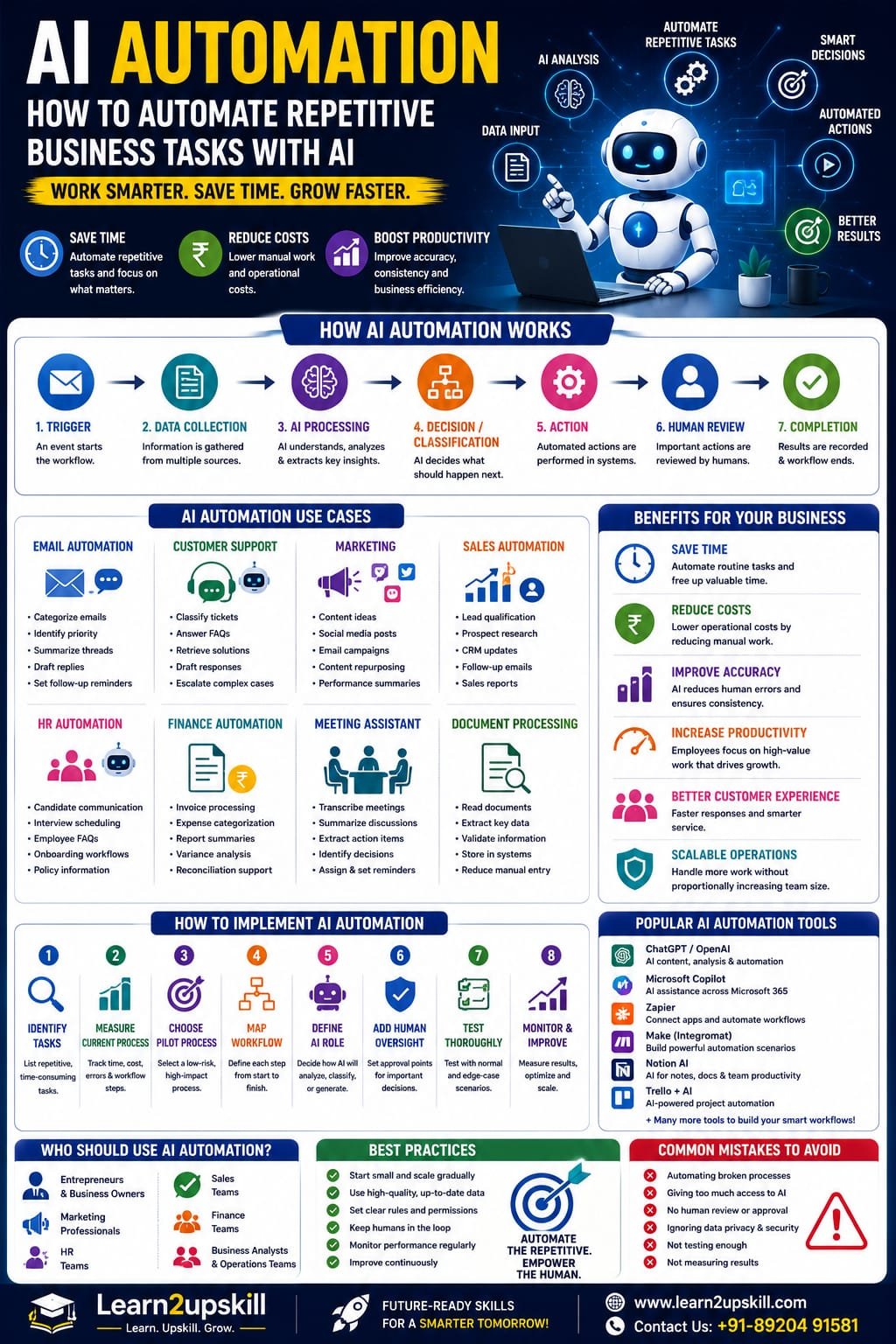
    How Does AI Automation Work?

    A typical AI automation workflow can look like this:

    1. Trigger

    Something happens.

    Example:

    New customer email arrives.

    ↓

    1. Data Collection

    The system gathers relevant information.

    ↓

    1. AI Analysis

    AI interprets the information.

    ↓

    1. Decision or Classification

    The system determines what should happen next.

    ↓

    1. Action

    An automated workflow performs an approved task.

    ↓

    1. Human Review

    A person checks important or sensitive outputs.

    ↓

    1. Completion

    The system records the result.

    Example

    Imagine a company receives 500 customer enquiries every week.

    Without automation:

    Customer email → Employee reads → Employee researches → Employee writes response → Employee updates system

    With AI automation:

    Customer email → AI classifies → Retrieves relevant information → Drafts response → Human approval → CRM update

    The employee is still involved.

    But the repetitive parts become much faster.

    1. AI Automation for Email Management

    Email is one of the easiest places to identify repetitive work.

    AI automation can potentially help with:

    Categorizing emails

    Identifying urgent messages

    Summarizing long conversations

    Extracting action items

    Drafting replies

    Routing messages

    Creating follow-up reminders

    Extracting customer information

    Example workflow:

    Email arrives

    ↓

    AI identifies topic

    ↓

    Classifies priority

    ↓

    Summarizes message

    ↓

    Drafts response

    ↓

    Human reviews

    ↓

    Reply is sent

    This can reduce the amount of time employees spend processing routine email.

    1. AI Automation for Customer Support

    Customer support teams often handle similar questions repeatedly.

    AI automation can help with:

    FAQ responses

    Ticket classification

    Sentiment analysis

    Information retrieval

    Response drafting

    Ticket routing

    Customer-history summaries

    Escalation

    Example:

    A customer writes:

    “My payment was deducted, but my course access hasn’t been activated.”

    The AI system could:

    Identify the issue as a payment/access problem.

    Retrieve the customer’s account information.

    Check approved troubleshooting information.

    Draft an appropriate response.

    Escalate the issue if it requires human intervention.

    This doesn’t mean every customer interaction should be fully automated.

    For sensitive or complex cases, human support remains important.

    1. AI Automation for Marketing

    Marketing involves many repetitive activities.

    AI can assist with:

    Content ideas

    Social media drafts

    Email campaigns

    Content repurposing

    Keyword clustering

    Competitor research

    Campaign summaries

    Customer segmentation

    Performance analysis

    Example workflow:

    Blog published

    ↓

    AI extracts key points

    ↓

    Creates LinkedIn post

    ↓

    Creates Instagram caption

    ↓

    Creates email newsletter draft

    ↓

    Creates short-video script

    ↓

    Human reviews

    This allows one piece of content to be repurposed across multiple channels.

    1. AI Automation for Sales

    Sales teams spend significant time researching prospects and updating systems.

    AI automation can assist with:

    Lead qualification

    Prospect research

    CRM updates

    Follow-up reminders

    Meeting summaries

    Proposal drafts

    Sales reporting

    Customer communication

    Example:

    New lead

    ↓

    AI analyzes lead information

    ↓

    Identifies relevant characteristics

    ↓

    Assigns a qualification category

    ↓

    Creates CRM summary

    ↓

    Drafts follow-up email

    ↓

    Salesperson reviews

    This gives sales professionals more time for actual customer conversations.

    1. AI Automation for HR

    Human Resources involves large amounts of administrative work.

    AI automation can assist with:

    Job-description drafting

    Candidate communication

    Interview scheduling

    Employee FAQs

    Onboarding documents

    Training recommendations

    Policy information retrieval

    Meeting summaries

    Example onboarding workflow:

    New employee joins

    ↓

    Collect required information

    ↓

    Generate onboarding checklist

    ↓

    Send approved documents

    ↓

    Schedule orientation

    ↓

    Create reminders

    ↓

    Track completion

    AI can support the process while HR professionals retain responsibility for important people-related decisions.

    1. AI Automation for Finance

    Finance teams work with large amounts of structured and unstructured information.

    AI automation can assist with:

    Invoice data extraction

    Expense categorization

    Report summaries

    Variance analysis

    Document processing

    Financial research

    Reconciliation support

    Management reporting

    Example:

    Invoice received

    ↓

    AI extracts vendor, amount and date

    ↓

    Checks required fields

    ↓

    Routes information into accounting workflow

    ↓

    Flags exceptions

    ↓

    Human reviews

    This can reduce repetitive data-entry work.

    1. AI Automation for Business Analysts

    Business Analysts can benefit significantly from AI automation.

    Possible applications include:

    Meeting transcription

    Requirements extraction

    User-story drafting

    Process documentation

    Data analysis

    Report generation

    Stakeholder-question generation

    Requirement-gap identification

    Example workflow:

    Stakeholder meeting

    ↓

    Transcript generated

    ↓

    AI extracts requirements

    ↓

    Groups requirements by theme

    ↓

    Identifies missing information

    ↓

    Drafts user stories

    ↓

    Business Analyst reviews

    This doesn’t replace the Business Analyst.

    It reduces documentation workload and gives the analyst more time for stakeholder discussions and problem-solving.

    1. AI Automation for Document Processing

    Businesses process thousands of documents.

    Examples include:

    Invoices

    Contracts

    Applications

    Forms

    Reports

    Receipts

    Policies

    Customer documents

    AI can help extract information from these documents.

    For example:

    Document → AI extraction → Structured data → Validation → Business workflow

    This is especially useful when documents don’t follow exactly the same format.

    1. AI Automation for Meetings

    Meetings can generate a lot of administrative work.

    An AI-powered workflow can potentially:

    Record or transcribe a meeting.

    Summarize the discussion.

    Identify decisions.

    Extract action items.

    Identify owners.

    Create follow-up reminders.

    Draft a meeting report.

    Example:

    Meeting ends

    ↓

    AI creates summary

    ↓

    Action items identified

    ↓

    Tasks assigned

    ↓

    Follow-up reminders created

    Instead of spending 30–60 minutes writing notes, employees can review the AI-generated summary.

    1. AI Automation for Reports

    Many employees repeatedly create similar reports.

    AI automation can help transform:

    Raw data → Analysis → Summary → Report

    For example:

    A sales dashboard updates automatically.

    AI reviews the changes.

    It identifies:

    Revenue growth

    Declining products

    Unusual changes

    Regional differences

    Key trends

    Then it creates an executive summary.

    The manager reviews the result before making decisions.

    1. AI Automation for Data Entry

    Data entry is one of the most repetitive workplace activities.

    AI can assist when information needs to be extracted from:

    Emails

    PDFs

    Forms

    Documents

    Images

    Receipts

    Example:

    PDF invoice

    ↓

    AI reads information

    ↓

    Extracts:

    Vendor

    Invoice number

    Date

    Amount

    Tax

    ↓

    Sends structured information into the appropriate workflow.

    This can reduce manual copying and pasting.

    1. AI Automation for Internal Knowledge

    Employees frequently ask questions such as:

    “What’s our leave policy?”

    “Where is the onboarding document?”

    “What is the refund procedure?”

    “How do I create this report?”

    A company can create an AI-powered internal knowledge assistant that retrieves information from approved documents.

    Workflow:

    Employee question

    ↓

    AI searches knowledge source

    ↓

    Relevant information retrieved

    ↓

    AI generates answer

    ↓

    Source or document reference provided

    This can reduce the time employees spend searching through internal documents.

    AI Automation and AI Agents

    AI automation and Agentic AI are closely related.

    Traditional AI automation may follow a predefined workflow.

    An AI agent can potentially interpret a goal, select tools and perform multiple steps within defined boundaries.

    For example:

    Basic automation

    New lead → Add lead to CRM.

    AI automation

    New lead → Analyze information → Categorize lead → Create CRM record.

    Agentic workflow

    “Prepare this new lead for the sales team.”

    The agent may:

    Research the company

    Analyze the lead

    Retrieve relevant information

    Update approved CRM fields

    Prepare a summary

    Draft follow-up questions

    Notify the salesperson

    The more autonomy you give a system, the more important permissions, testing, monitoring and human oversight become.

    AI Automation vs AI Agents

    AI Automation

    AI Agents

    Often follows predefined workflows

    Can pursue a goal through multiple steps

    More predictable

    More flexible

    Rule + AI based

    AI + tools + planning

    Best for repeatable processes

    Useful for variable workflows

    Easier to control

    Requires stronger governance

    Usually narrower

    Potentially broader

    They are not competitors.

    A business may use both.

    Which Business Tasks Should You Automate?

    Not every task is a good candidate.

    Start with tasks that are:

    Repetitive

    The same task happens frequently.

    Time-consuming

    Employees spend significant time on it.

    Rules-based

    There are clear guidelines.

    Digital

    The information already exists electronically.

    Low-risk

    Errors don’t create severe consequences.

    Measurable

    You can measure whether automation helped.

    A Simple AI Automation Test

    Ask these five questions:

    1. Does this task happen frequently?

    If yes, automation may be worthwhile.

    1. Is the task repetitive?

    If employees perform the same steps repeatedly, investigate automation.

    1. Can AI interpret the information?

    If the task involves emails, documents or natural language, AI may help.

    1. Can success be measured?

    Define a metric.

    1. Can a human review important decisions?

    If yes, you can create a safer workflow.

    Tasks You Should Be Careful About Automating

    Avoid giving AI unrestricted control over high-risk decisions.

    Be particularly careful with:

    Employment decisions

    Financial approvals

    Legal decisions

    Medical decisions

    Security actions

    Sensitive customer data

    Account deletion

    Large financial transactions

    Access-control changes

    For these tasks, use appropriate human approval and organizational controls.

    How to Start AI Automation in Your Business

    Don’t try to automate everything at once.

    Use a phased approach.

    Step 1: List Repetitive Tasks

    Ask employees:

    “What do you do every day that feels repetitive?”

    You may discover dozens of opportunities.

    Step 2: Measure the Current Process

    Record:

    Time spent

    Number of tasks

    Error rate

    Employees involved

    Current cost

    Delays

    Step 3: Choose One Pilot

    Select a low-risk, high-volume process.

    For example:

    Meeting summaries

    or

    Customer-email classification

    Step 4: Map the Workflow

    Document:

    Trigger → Input → AI → Decision → Action → Human Review → Completion

    Step 5: Define the AI’s Role

    Be specific.

    Does AI:

    Classify?

    Summarize?

    Generate?

    Recommend?

    Extract?

    Search?

    Take an action?

    Step 6: Add Human Oversight

    Determine where employees must review the output.

    Step 7: Test

    Test:

    Normal situations

    Difficult cases

    Missing information

    Incorrect information

    Unexpected inputs

    Security risks

    Step 8: Measure Results

    Compare:

    Before automation

    vs.

    After automation

    Track:

    Time saved

    Accuracy

    Cost

    Response time

    Employee satisfaction

    Customer satisfaction

    Example: Automating a Customer Enquiry Workflow

    Let’s build a simple example.

    Before

    Customer email arrives.

    Employee reads it.

    Employee identifies issue.

    Employee searches documents.

    Employee writes response.

    Employee updates CRM.

    Time: potentially several minutes per enquiry.

    After

    Customer email arrives.

    ↓

    AI identifies topic.

    ↓

    AI retrieves relevant information.

    ↓

    AI drafts response.

    ↓

    Employee reviews.

    ↓

    Approved response is sent.

    ↓

    CRM is updated.

    The employee still controls the important decision.

    But repetitive work has been reduced.

    AI Automation Tools

    The technology stack depends on your needs.

    A typical AI automation system may include:

    AI Model

    Used for:

    Understanding

    Classification

    Generation

    Summarization

    Automation Platform

    Connects different applications and triggers workflows.

    Business Applications

    Such as:

    CRM

    Email

    Accounting software

    Project-management tools

    HR systems

    Knowledge Sources

    Such as:

    Documents

    Databases

    Internal knowledge bases

    APIs

    Allow different applications to communicate.

    Monitoring

    Tracks performance and errors.

    The exact tools you choose should depend on your business requirements, data sensitivity, budget and technical capability.

    AI Automation for Small Businesses

    You don’t need a huge technology department to start.

    Small businesses can begin with simple workflows such as:

    Marketing

    Blog → Social posts → Email draft

    Customer Support

    Customer enquiry → Categorization → Response draft

    Sales

    Lead form → Qualification → CRM entry

    Administration

    Invoice → Data extraction → Record

    Meetings

    Meeting → Transcript → Summary → Action items

    Content

    Long article → Short posts → Newsletter → Video script

    Start small.

    Prove the value.

    Then expand.

    AI Automation for Learn2upskill-Type Businesses

    For an online learning business, AI automation can be especially useful.

    For example:

    Student Enquiry Workflow

    Website enquiry

    ↓

    AI identifies course interest

    ↓

    AI categorizes enquiry

    ↓

    Drafts personalized response

    ↓

    Human reviews

    ↓

    CRM/database updated

    Content Marketing Workflow

    New blog

    ↓

    AI creates:

    Social media caption

    LinkedIn post

    Email draft

    Short-video script

    Carousel ideas

    ↓

    Human reviews

    ↓

    Content scheduled

    Course Development Workflow

    Course topic

    ↓

    AI creates:

    Course outline

    Module ideas

    Quiz questions

    Practice exercises

    Learning objectives

    ↓

    Trainer reviews

    ↓

    Final course prepared

    AI doesn’t replace the trainer’s expertise.

    It reduces the time spent on repetitive preparation.

    How AI Automation Can Improve Employee Productivity

    The real value of automation isn’t simply:

    “We used AI.”

    It’s:

    “Our employees spent less time on repetitive work and more time on meaningful work.”

    For example, an employee might previously spend:

    2 hours/day on repetitive administrative tasks

    After automation:

    45 minutes/day

    That could free more than an hour every working day for:

    Customer conversations

    Strategy

    Problem-solving

    Creative work

    Learning

    Collaboration

    The World Economic Forum expects the human-machine frontier to shift substantially by 2030, with employers anticipating a much more even distribution among tasks performed primarily by people, technology and human-technology collaboration. �

    World Economic Forum

    Does AI Automation Replace Employees?

    This is the question that worries many professionals.

    The answer isn’t simply yes or no.

    AI automation can reduce the need for certain repetitive tasks.

    But businesses can also use automation to augment employees.

    The World Economic Forum projects both job creation and displacement through 2030 and notes that automation will change how tasks are delivered, while human-machine collaboration also expands. �

    World Economic Forum +1

    The practical lesson for employees is:

    Don’t compete with automation on repetitive tasks.

    Instead, develop skills that complement it.

    Learn:

    AI literacy

    Data analysis

    Critical thinking

    Communication

    Problem-solving

    Creativity

    Business knowledge

    AI workflow design

    Skills Needed for AI Automation

    If you want to build AI automation skills, learn these areas:

    AI Fundamentals

    Understand what AI can and cannot do.

    Prompt Engineering

    Learn how to communicate effectively with AI models.

    Workflow Design

    Understand processes and dependencies.

    Automation Platforms

    Learn how applications connect.

    APIs

    Understand how systems communicate.

    Data Literacy

    Understand data quality and structure.

    RAG

    Learn how AI can work with external knowledge.

    AI Agents

    Understand more autonomous workflows.

    AI Security

    Understand data protection and permissions.

    AI Governance

    Understand responsible deployment.

    AI Automation Career Opportunities

    AI automation skills can complement many careers.

    Potential roles include:

    AI Automation Specialist

    AI Workflow Specialist

    AI Consultant

    Automation Consultant

    AI Business Analyst

    AI Solutions Specialist

    Business Process Analyst

    AI Product Specialist

    Digital Transformation Specialist

    AI Operations Specialist

    You don’t necessarily need to become a programmer.

    There are no-code, low-code and technical paths into AI automation.

    AI Automation Roadmap for Beginners

    If you’re starting from zero, follow this sequence:

    Step 1

    Learn AI fundamentals.

    ↓

    Step 2

    Learn Generative AI.

    ↓

    Step 3

    Learn Prompt Engineering.

    ↓

    Step 4

    Learn workflow automation.

    ↓

    Step 5

    Learn APIs and integrations.

    ↓

    Step 6

    Learn RAG and knowledge retrieval.

    ↓

    Step 7

    Explore AI agents.

    ↓

    Step 8

    Learn AI security and governance.

    ↓

    Step 9

    Build practical automation projects.

    ↓

    Step 10

    Apply AI automation to your industry.

    5 AI Automation Projects to Practice

    Project 1: Email Classification

    Build a workflow that categorizes incoming emails.

    Project 2: Meeting Assistant

    Turn meeting transcripts into summaries and action items.

    Project 3: Lead Qualification

    Analyze new leads and create structured summaries.

    Project 4: Content Repurposing

    Convert one blog into multiple content formats.

    Project 5: Document Data Extraction

    Extract structured information from invoices or forms.

    These projects help you develop a portfolio rather than just collecting theoretical knowledge.

    Common AI Automation Mistakes

    ❌ Automating Everything

    Not every task should be automated.

    ❌ No Human Review

    Important decisions may require human approval.

    ❌ Giving Excessive Permissions

    Limit what an AI system can access and change.

    ❌ Ignoring Data Privacy

    Sensitive information needs appropriate protection.

    ❌ Automating a Broken Process

    First improve the process.

    Then automate it.

    ❌ Measuring Only Cost

    Also measure:

    Quality

    Accuracy

    Customer experience

    Employee experience

    Risk

    ❌ Using AI Without Testing

    Always test before deploying at scale.

    AI Automation Best Practices

    Start Small

    Choose one workflow.

    Keep Humans in the Loop

    Especially for sensitive decisions.

    Limit Permissions

    Give systems only the access they need.

    Use Approved Data

    Don’t connect sensitive information casually.

    Monitor Results

    Track performance.

    Create Escalation Rules

    Know when AI should stop and involve a person.

    Evaluate Regularly

    AI systems can behave differently as inputs and surrounding systems change.

    Train Employees

    People need to understand how the automation works.

    The Future of AI Automation

    The next phase of workplace automation will likely combine:

    Generative AI + AI Agents + Automation + Business Applications

    Instead of isolated AI tools, organizations may increasingly build interconnected workflows.

    For example:

    Customer enquiry

    ↓

    AI agent understands request

    ↓

    Retrieves customer information

    ↓

    Checks knowledge base

    ↓

    Drafts response

    ↓

    Updates CRM

    ↓

    Schedules follow-up

    ↓

    Human reviews sensitive cases

    This is more than simple automation.

    It is an AI-powered business workflow.

    The World Economic Forum’s 2026 workplace coverage notes that AI agents are moving from pilots toward real-world deployment, while also highlighting that governance, autonomy, safety, integration and trust need to keep pace. �

    World Economic Forum

    Final Thoughts

    AI automation isn’t about making humans unnecessary.

    It’s about making work less repetitive and more valuable.

    Businesses can use AI to:

    Process information

    Classify requests

    Extract data

    Draft content

    Summarize meetings

    Analyze information

    Support customers

    Prepare reports

    Connect workflows

    But successful automation requires more than technology.

    It requires:

    Good processes + good data + appropriate AI + human oversight + security + measurement

    The biggest opportunity isn’t simply automating more tasks.

    It’s redesigning work so people can spend more time on the things humans do best:

    Think. Create. Communicate. Solve problems. Build relationships. Make decisions.

    So don’t ask:

    “What can I automate?”

    Start with:

    “What repetitive work is preventing my team from creating more value?”

    That’s where AI automation becomes truly useful.

    Automate the repetitive. Empower the human. Build smarter workflows.

    Quick AI Automation Checklist

    [ ] Identify repetitive tasks

    [ ] Measure current time and cost

    [ ] Choose a low-risk process

    [ ] Map the workflow

    [ ] Define the AI’s role

    [ ] Provide relevant data

    [ ] Set clear rules

    [ ] Add human review

    [ ] Limit permissions

    [ ] Test unusual cases

    [ ] Monitor performance

    [ ] Measure time saved

    [ ] Measure accuracy

    [ ] Improve continuously

    [ ] Train employees

    Build AI Automation Skills With Learn2upskill

    AI automation is becoming an important part of the modern workplace.

    At Learn2upskill, we help students, professionals, job seekers and business learners develop practical, future-ready skills.

    Explore learning opportunities in:

    Advanced AI • Generative AI • Prompt Engineering • AI Agents • AI Automation • ChatGPT • Business Analysis • Excel • Digital Marketing • Cybersecurity • Professional Development

    Don’t just learn how AI works.

    Learn how to apply AI to real business problems.

    Learn. Upskill. Grow.

    🌐 www.coral-kudu-326218.hostingersite.com⁠�

    Contact Us: +91-89204 91581


  • Advanced AI Course 2026: Skills, Syllabus & Career Guide

    Advanced AI Course 2026: Skills, Syllabus & Career Guide

    Advanced AI Course 2026: Skills, Syllabus & Career Guide

    Suggested URL Slug: /advanced-ai-course-2026/
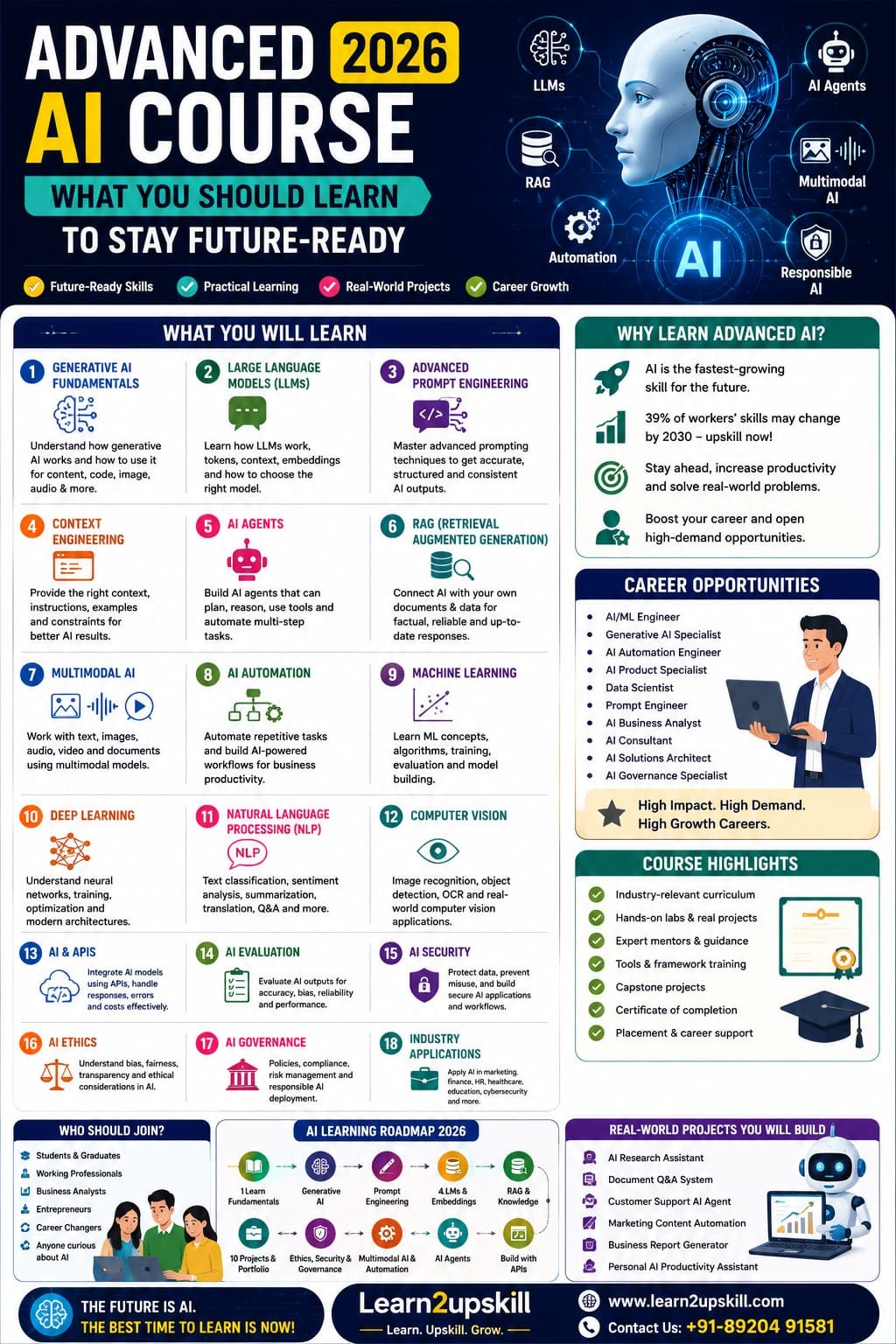
    Advanced AI Course: What You Should Learn in 2026
    Artificial intelligence has moved far beyond simple chatbots and basic AI tools.
    A few years ago, learning AI might have meant understanding machine learning fundamentals or experimenting with a chatbot.
    Today, the AI landscape includes Generative AI, large language models, AI agents, multimodal AI, retrieval-augmented generation, AI automation, computer vision, AI security and responsible AI.
    For students and professionals, this creates an important question:
    What should you actually learn if you want to build advanced AI skills in 2026?
    The answer isn’t simply “learn ChatGPT.”
    An advanced AI learner should understand how AI works, how to use AI effectively, how to build AI-powered workflows, how AI systems interact with data, and how to apply AI responsibly in real-world situations.
    The World Economic Forum’s Future of Jobs Report 2025 identifies AI and big data as the fastest-growing skill area, followed by networks and cybersecurity and technological literacy. It also emphasizes that human capabilities such as analytical thinking, creative thinking, resilience and leadership remain important. �
    World Economic Forum +1
    India’s current national AI-skilling initiatives reflect a similar direction, covering areas from foundational AI through advanced topics such as Agentic AI, LLMs, Deep Learning, Computer Vision, AI Security and AI Governance. �
    Press Information Bureau +1
    So, what should an Advanced AI Course in 2026 actually include?
    Let’s break it down.
    What Is an Advanced AI Course?
    An advanced AI course goes beyond learning how to use individual AI tools.
    It should teach you how to understand, evaluate, build and apply AI systems.
    A good advanced AI course can include:
    Generative AI
    Large Language Models
    Advanced Prompt Engineering
    Context Engineering
    AI Agents
    Retrieval-Augmented Generation
    AI Automation
    Multimodal AI
    Machine Learning
    Deep Learning
    Natural Language Processing
    Computer Vision
    AI APIs
    AI-powered applications
    AI Security
    AI Ethics
    AI Governance
    Real-world AI projects
    You don’t necessarily need to become a machine-learning researcher.
    The right depth depends on your career goal.
    Why Learn Advanced AI in 2026?
    AI is rapidly changing how organizations work.
    The World Economic Forum reports that AI and information-processing technologies are among the technologies employers expect to have a major transformative impact through 2030. AI and big data also rank at the top of its fastest-growing skills list. �
    World Economic Forum
    The report also estimates that around 39% of workers’ existing skill sets could be transformed or become outdated between 2025 and 2030. �
    World Economic Forum
    That doesn’t mean everyone needs to become an AI engineer.
    It does mean that understanding AI is becoming increasingly useful across many professions.
    For example:
    Marketing + AI
    Finance + AI
    HR + AI
    Business Analysis + AI
    Cybersecurity + AI
    Education + AI
    Healthcare + AI
    Operations + AI
    The future isn’t necessarily about becoming an AI specialist.
    For many people, it’s about becoming a professional who knows how to work effectively with AI.
    1. Start With Advanced Generative AI
    Generative AI is one of the most important areas to understand.
    You should learn how AI systems can generate:
    Text
    Images
    Audio
    Video
    Code
    Summaries
    Reports
    Structured information
    But don’t stop at simply generating content.
    Learn how to:
    Give effective instructions
    Provide context
    Control outputs
    Evaluate results
    Refine responses
    Build repeatable workflows
    Use AI responsibly
    The goal is to move from:
    “I know how to use an AI chatbot.”
    to:
    “I know how to integrate generative AI into my work.”
    2. Learn Large Language Models (LLMs)
    Large Language Models, or LLMs, power many modern generative-AI applications.
    You don’t necessarily need to train a giant model from scratch.
    But you should understand concepts such as:
    What an LLM is
    How language models process information
    Tokens
    Context windows
    Model limitations
    Hallucinations
    Model evaluation
    Fine-tuning concepts
    Embeddings
    APIs
    Model selection
    Understanding these concepts helps you make better decisions when using AI tools.
    3. Master Advanced Prompt Engineering
    Basic prompting is only the beginning.
    Advanced AI learners should understand how to design prompts systematically.
    Topics can include:
    Role prompting
    Few-shot prompting
    Structured prompting
    Output constraints
    Context management
    Prompt templates
    Multi-step prompting
    Evaluation prompts
    Prompt refinement
    Task decomposition
    For example, instead of:
    “Analyze this data.”
    an advanced workflow might specify:
    The role of the AI
    The business objective
    The available data
    The analysis criteria
    The expected output format
    Limitations
    Validation requirements
    The result is usually much more useful.
    4. Learn Context Engineering
    As AI systems become more capable, simply writing a clever prompt isn’t always enough.
    You need to understand what information the AI should receive and how that information should be structured.
    This includes:
    Relevant context
    User instructions
    Reference documents
    Examples
    Data sources
    Constraints
    Conversation history
    Output requirements
    Think of it as giving AI the right information at the right time.
    This becomes especially important when building AI applications and agents.
    5. Understand AI Agents
    This is one of the most important advanced AI topics to learn in 2026.
    A traditional chatbot generally responds to your request.
    An AI agent can be designed to perform multiple steps toward a goal, potentially using tools, retrieving information and taking actions according to defined rules and permissions.
    For example:
    Traditional chatbot
    User asks:
    “What are the latest sales numbers?”
    AI provides an answer.
    AI-powered agent
    A business agent could potentially:
    Retrieve sales data.
    Analyze performance.
    Identify unusual changes.
    Create a summary.
    Prepare a report.
    Route the report to the appropriate person.
    The exact capabilities depend on the system, tools, permissions and implementation.
    AI agents are increasingly becoming part of workplace AI discussions, and the World Economic Forum’s 2026 outlook specifically highlights AI agents entering the workplace and the need for understandable, reliable and accountable systems. �
    World Economic Forum
    6. Learn Retrieval-Augmented Generation (RAG)
    RAG stands for:
    Retrieval-Augmented Generation.
    It is an important concept for building AI applications that need to work with specific information sources.
    For example, imagine a company has:
    HR policies
    Product manuals
    Training documents
    Customer FAQs
    Internal knowledge bases
    A RAG-based application can retrieve relevant information from an approved knowledge source and use it to help generate a response.
    Potential applications include:
    Internal knowledge assistants
    Customer-support systems
    Research tools
    Document assistants
    HR information systems
    Educational assistants
    Understanding RAG is valuable for anyone moving from AI tool usage toward AI application development.
    7. Understand Multimodal AI
    AI is no longer limited to text.
    Modern AI systems can work across multiple types of information, including:
    Text
    Images
    Audio
    Video
    Documents
    Structured data
    This is known as multimodal AI.
    For example, an AI application might:
    Read a document → Analyze an image → Listen to audio → Generate a written report.
    This opens opportunities across:
    Education
    Healthcare
    Marketing
    Manufacturing
    Customer service
    Research
    Finance
    An advanced AI course should introduce learners to these possibilities.
    8. Learn AI Automation
    AI becomes particularly valuable when connected to workflows.
    Instead of using AI only for individual tasks, learn how it can support repeatable processes.
    For example:
    Marketing workflow
    Customer data → AI analysis → Content recommendation → Draft → Human review
    HR workflow
    Job description → Candidate information → AI-assisted screening → Summary → Human decision
    Customer service
    Customer request → Classification → Knowledge retrieval → Draft response → Human approval
    Business reporting
    Data → Analysis → AI-generated summary → Dashboard → Management report
    The goal is not to automate everything.
    The goal is to identify where AI can reduce repetitive work while keeping appropriate human oversight.
    9. Learn Machine Learning Fundamentals
    Even if your primary goal is Generative AI, understanding machine learning provides valuable context.
    An advanced AI curriculum can introduce:
    Supervised learning
    Unsupervised learning
    Classification
    Regression
    Clustering
    Training data
    Validation
    Model evaluation
    Overfitting
    Feature engineering
    You don’t necessarily need advanced mathematics unless you’re pursuing a technical AI/ML career.
    But you should understand the basic concepts behind machine learning.
    10. Explore Deep Learning
    Deep learning is an important part of modern AI.
    At an introductory advanced level, learn about:
    Neural networks
    Training
    Layers
    Weights
    Optimization
    Deep neural networks
    Transformers
    Transformers are particularly important for understanding modern language and multimodal AI systems.
    The objective isn’t to memorize complicated equations.
    It’s to understand why these architectures matter.
    11. Understand Natural Language Processing
    Natural Language Processing, or NLP, focuses on how computers work with human language.
    Applications include:
    Text classification
    Sentiment analysis
    Translation
    Summarization
    Information extraction
    Question answering
    Search
    Chatbots
    NLP is particularly relevant for anyone interested in:
    Customer service
    Marketing
    Research
    Document analysis
    AI assistants
    12. Learn Computer Vision Basics
    Computer Vision allows AI systems to work with images and visual information.
    You can explore:
    Image classification
    Object detection
    Image recognition
    Document processing
    Optical character recognition
    Visual inspection
    Business applications can include:
    Manufacturing quality control
    Document processing
    Retail analytics
    Security systems
    Healthcare imaging
    Product recognition
    You don’t need to become a computer-vision engineer to understand the possibilities.
    13. Learn How AI APIs Work
    An important step toward advanced AI development is learning how applications communicate with AI models.
    You should understand basic concepts such as:
    APIs
    Authentication
    Requests and responses
    Structured outputs
    Model parameters
    Rate limits
    Error handling
    Cost considerations
    Even professionals who aren’t full-time developers can benefit from understanding how AI applications are connected.
    14. Learn AI Evaluation
    One of the biggest mistakes beginners make is assuming:
    “The AI gave me an answer, so it must be correct.”
    Advanced AI learning should include evaluation.
    Learn how to ask:
    Is the output accurate?
    Is the source reliable?
    Is the response consistent?
    Is there bias?
    Did the AI follow instructions?
    Are important details missing?
    Can the result be reproduced?
    Does it meet the business requirement?
    AI evaluation becomes especially important when AI is used in professional or high-impact environments.
    15. Understand AI Hallucinations
    AI systems can sometimes produce information that sounds convincing but is incorrect or unsupported.
    These outputs are commonly described as hallucinations.
    You should learn:
    Why hallucinations occur
    How to detect them
    How to verify information
    How retrieval can help
    Why human review matters
    When AI should not be trusted without verification
    This is an essential professional AI skill.
    16. Learn Responsible AI, Ethics and Governance
    Advanced AI isn’t just about what technology can do.
    It’s also about what it should do.
    Important topics include:
    Bias
    Fairness
    Privacy
    Transparency
    Accountability
    Human oversight
    Data protection
    AI safety
    Responsible deployment
    AI governance is becoming an increasingly relevant professional skill.
    India’s current AI-skilling ecosystem explicitly includes AI Ethics and AI Governance, alongside AI Security and advanced technical domains. �
    Press Information Bureau
    17. Learn AI Security
    As AI becomes integrated into business systems, security becomes increasingly important.
    An advanced course can introduce:
    Data privacy
    Prompt injection
    Sensitive information exposure
    Model misuse
    Access controls
    AI application security
    Secure AI workflows
    Human approval mechanisms
    This creates an important connection between:
    AI + Cybersecurity
    which is particularly valuable for business professionals and security teams.
    18. Develop Human Skills Alongside AI
    Don’t make the mistake of learning only technology.
    The World Economic Forum identifies human capabilities such as analytical thinking, creative thinking, resilience, flexibility, agility and leadership/social influence as important alongside rapidly growing technology skills. �
    World Economic Forum +1
    Develop:
    Communication
    Critical thinking
    Problem-solving
    Creativity
    Leadership
    Public speaking
    Collaboration
    Adaptability
    AI can generate an answer.
    You still need to decide what to do with it.
    19. Build Practical AI Projects
    This is one of the most important parts of an advanced AI course.
    Don’t finish the course with only notes and certificates.
    Build projects.
    Project 1: AI Research Assistant
    Create a workflow that summarizes information and produces structured research notes.
    Project 2: Document Q&A Assistant
    Create a basic system that answers questions from a selected document collection.
    Project 3: AI Customer Support Assistant
    Design an AI workflow that classifies questions and drafts responses.
    Project 4: AI Marketing Assistant
    Create a workflow for content ideas, audience analysis and campaign planning.
    Project 5: AI Business Reporting Assistant
    Combine business data with AI-generated summaries and insights.
    Project 6: AI Career Assistant
    Create a system that helps analyze job descriptions and identify relevant skill gaps.
    Projects give learners something much more valuable than theoretical knowledge:
    evidence of practical ability.
    20. Learn AI for Your Specific Industry
    You don’t have to learn every AI technology.
    Choose applications relevant to your career.
    AI for Finance
    Financial analysis
    Document processing
    Reporting
    Forecasting support
    Risk analysis
    AI for Marketing
    Content
    Customer insights
    Campaign analysis
    Personalization
    SEO workflows
    AI for HR
    Job descriptions
    Candidate communication
    Learning and development
    Workforce analytics
    AI for Business Analysts
    Requirements analysis
    Data interpretation
    Reporting
    Process automation
    AI-assisted documentation
    AI for Cybersecurity
    Threat analysis
    Security operations
    Detection support
    Security awareness
    AI security
    AI for Education
    Personalized learning
    Content generation
    Assessment support
    Research assistance
    Learning analytics
    This industry-specific approach can make your AI skills much more useful.
    Advanced AI Course: Suggested 2026 Syllabus
    If you’re designing an Advanced AI Course for Learn2upskill, I recommend a compact, practical structure like this:
    Module 1: Advanced AI Foundations
    AI landscape
    Machine learning overview
    Generative AI
    AI capabilities and limitations
    Module 2: Large Language Models
    LLM fundamentals
    Tokens
    Context
    Embeddings
    Model selection
    Module 3: Advanced Prompt Engineering
    Structured prompting
    Few-shot prompting
    Prompt templates
    Task decomposition
    Output control
    Module 4: Context Engineering
    Context design
    Knowledge sources
    Instructions
    Examples
    Constraints
    Module 5: AI Agents
    What are AI agents?
    Agent architecture
    Tools
    Planning
    Memory
    Multi-step workflows
    Module 6: RAG
    RAG concepts
    Retrieval
    Embeddings
    Vector databases
    Knowledge assistants
    Module 7: Multimodal AI
    Text
    Images
    Audio
    Video
    Document intelligence
    Module 8: AI Automation
    Workflow design
    AI-powered automation
    Business processes
    Human-in-the-loop systems
    Module 9: AI Development Basics
    APIs
    AI applications
    Structured outputs
    Testing
    Evaluation
    Module 10: Responsible AI
    Ethics
    Privacy
    Security
    Governance
    Bias
    Human oversight
    Module 11: Industry Applications
    Finance
    Marketing
    HR
    Education
    Business analysis
    Cybersecurity
    Module 12: Capstone Project
    Build a practical AI-powered solution.
    Who Should Take an Advanced AI Course?
    An advanced AI course can be suitable for:
    Students
    Graduates
    Working professionals
    Business analysts
    Digital marketers
    Finance professionals
    HR professionals
    Entrepreneurs
    Managers
    Trainers
    Technology professionals
    Career changers
    Freelancers
    However, the right course depends on your starting point.
    Do You Need Programming Experience?
    Not necessarily.
    There are different paths.
    Non-technical professionals
    Focus on:
    Generative AI
    Prompt engineering
    AI productivity
    AI automation
    AI agents
    Responsible AI
    Industry applications
    Technical learners
    Go deeper into:
    Python
    Machine learning
    Deep learning
    APIs
    RAG
    Vector databases
    Model evaluation
    AI application development
    A good advanced AI course should clearly explain which parts are no-code, low-code and technical.
    Advanced AI vs Basic AI Course
    Basic AI Course
    Advanced AI Course
    AI fundamentals
    Advanced AI concepts
    Basic ChatGPT use
    Advanced AI workflows
    Simple prompts
    Prompt engineering
    AI productivity
    AI automation
    Basic AI tools
    AI agents
    General applications
    Industry-specific applications
    AI awareness
    AI implementation
    Basic ethics
    AI governance and security
    Simple exercises
    Real-world projects
    The goal isn’t to make the advanced course unnecessarily complicated.
    The goal is to move learners from using AI toward understanding and applying AI strategically.
    What Jobs Can Advanced AI Skills Support?
    Advanced AI skills can complement many career paths.
    Potential roles include:
    AI Specialist
    Generative AI Specialist
    AI Automation Specialist
    AI/ML Engineer
    Machine Learning Engineer
    Data Scientist
    AI Product Specialist
    AI Business Analyst
    AI Consultant
    Prompt Engineer
    AI Solutions Specialist
    AI Governance Specialist
    AI Security Specialist
    Job titles vary by company, and many AI skills are increasingly being incorporated into existing roles rather than creating entirely new titles.
    The broader trend is clear: AI, big data and technological literacy are among the fastest-growing skill areas, while AI and machine-learning-related roles are among the fastest-growing occupations identified by the World Economic Forum. �
    World Economic Forum +1
    How to Choose the Right Advanced AI Course
    Before enrolling in a course, check whether it includes:
    ✔ Practical projects
    Not just theory.
    ✔ Current AI topics
    Look for GenAI, LLMs, agents, RAG and automation.
    ✔ Industry applications
    Learn how AI is used beyond technology companies.
    ✔ Responsible AI
    Ethics, privacy and governance matter.
    ✔ Hands-on practice
    You should actually build and test things.
    ✔ Portfolio work
    Ideally, finish with projects you can demonstrate.
    ✔ Appropriate difficulty
    The course should match your background.
    ✔ Updated content
    AI changes quickly, so outdated material can lose value.
    2026 AI Learning Roadmap
    If you’re starting today, here’s a practical sequence:
    Step 1
    Learn AI fundamentals.
    ↓
    Step 2
    Learn Generative AI.
    ↓
    Step 3
    Master Prompt Engineering.
    ↓
    Step 4
    Learn LLMs and embeddings.
    ↓
    Step 5
    Understand RAG.
    ↓
    Step 6
    Learn AI Agents.
    ↓
    Step 7
    Build AI automation workflows.
    ↓
    Step 8
    Explore multimodal AI.
    ↓
    Step 9
    Learn AI security, ethics and governance.
    ↓
    Step 10
    Build real-world AI projects.
    This approach gives you a progression from AI user → AI practitioner → AI problem-solver.
    The Biggest Mistake to Avoid
    Don’t try to learn every AI tool available.
    There are new AI products appearing constantly.
    If you chase every new tool, you’ll spend more time switching tools than developing useful skills.
    Instead, focus on concepts.
    Learn:
    How AI works.
    How to evaluate AI.
    How to design AI workflows.
    How to connect AI with data.
    How to automate tasks.
    How to use AI responsibly.
    Tools will change.
    The underlying skills will remain useful.
    Final Thoughts
    Advanced AI in 2026 is much bigger than knowing how to write good prompts.
    The next stage of AI learning is about understanding how different technologies fit together:
    Generative AI + LLMs + Prompt Engineering + Context + RAG + AI Agents + Automation + Multimodal AI + Security + Governance
    But technical knowledge alone isn’t enough.
    The most valuable AI professionals will also understand their industry, business problems, communication and human needs.
    The World Economic Forum’s research points to exactly this combination: rapidly growing AI and big-data skills alongside analytical thinking, creativity, adaptability and leadership. �
    World Economic Forum +1
    So don’t ask:
    “What AI tool should I learn next?”
    Ask:
    “What problem can I solve better because I understand AI?”
    That’s the mindset that turns AI learning into career value.
    Learn AI. Build practical skills. Solve real problems. Future-proof your career.
    Advanced AI Skills Checklist
    [ ] AI fundamentals
    [ ] Generative AI
    [ ] Large Language Models
    [ ] Advanced Prompt Engineering
    [ ] Context Engineering
    [ ] AI Agents
    [ ] Retrieval-Augmented Generation
    [ ] Embeddings
    [ ] Multimodal AI
    [ ] AI Automation
    [ ] Machine Learning fundamentals
    [ ] Deep Learning basics
    [ ] NLP
    [ ] Computer Vision
    [ ] AI APIs
    [ ] AI Evaluation
    [ ] AI Security
    [ ] AI Ethics
    [ ] AI Governance
    [ ] Industry-specific AI
    [ ] Real-world AI projects
    [ ] Human and communication skills
    Build Advanced AI Skills With Learn2upskill
    The AI landscape is changing quickly.
    At Learn2upskill, our goal is to help students, professionals, job seekers and career changers develop practical, future-ready skills.
    Explore learning opportunities in:
    Advanced AI • Generative AI • ChatGPT • Prompt Engineering • AI Automation • Business Analysis • Excel • Digital Marketing • Cybersecurity • Professional Development
    Don’t just learn how to use AI.
    Learn how to apply AI.
    Learn. Upskill. Grow.
    🌐 www.coral-kudu-326218.hostingersite.com⁠�

  • How to Identify a Phishing Email: 15 Warning Signs You Should Never Ignore

    How to Identify a Phishing Email: 15 Warning Signs You Should Never Ignore

    How to Identify a Phishing Email: 15 Warning Signs You Should Never Ignore

    Meta Description: Learn how to identify a phishing email with 15 warning signs, including suspicious links, urgent requests, fake senders, attachments, and more.

    Introduction

    Your inbox may look completely normal—but not every email you receive is safe.

    Cybercriminals use phishing emails to trick people into revealing passwords, financial information, OTPs, company data, or other sensitive information. Modern phishing attacks can even look professional and convincing, especially with the help of artificial intelligence.

    The good news is that you don’t need to be a cybersecurity expert to spot many phishing attempts.

    By learning a few important warning signs, you can make better decisions about which emails to trust—and which ones to avoid.

    In this guide, we’ll look at 15 common warning signs of phishing emails and what you should do when you encounter one.

    —

    What Is a Phishing Email?

    A phishing email is a fraudulent message designed to make you perform an action that benefits a cybercriminal.

    The attacker may try to convince you to:

    – Click a malicious link

    – Enter your username and password

    – Share an OTP

    – Download an attachment

    – Transfer money

    – Share confidential information

    – Call a fraudulent phone number

    – Install software

    – Visit a fake website

    The email may pretend to come from a bank, company, manager, colleague, delivery service, government organization, or popular online platform.

    —

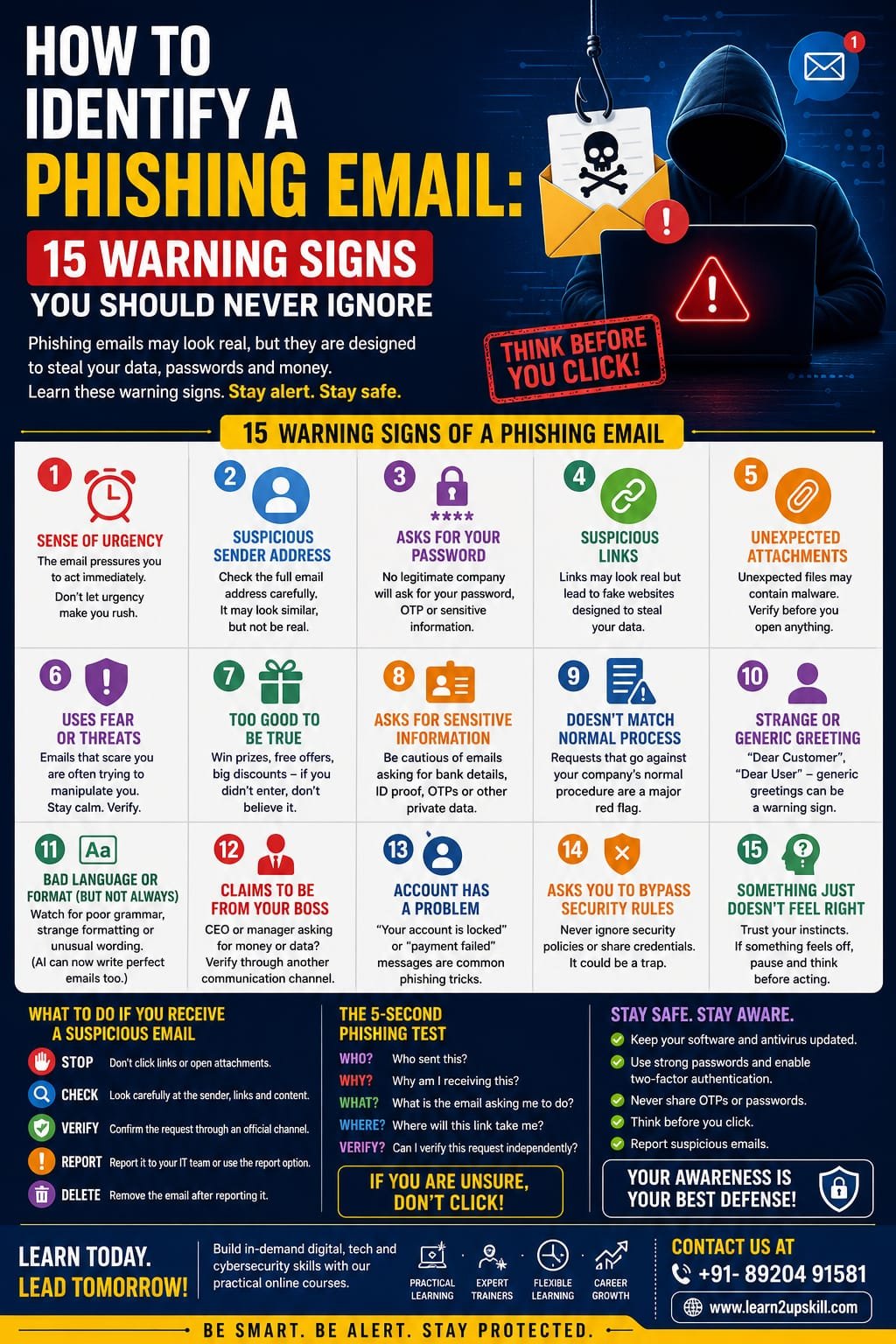
    15 Warning Signs of a Phishing Email

    1. The Email Creates a Sense of Urgency


    One of the biggest phishing warning signs is pressure to act immediately.

    You might see messages such as:

    – “Your account will be closed today.”

    – “Immediate action required.”

    – “Your payment has failed.”

    – “You have only 30 minutes to respond.”

    Cybercriminals use urgency because people are more likely to make mistakes when they feel pressured.

    What to do:

    Pause. Don’t click anything immediately. Verify the request independently.

    —

    1. The Sender’s Email Address Looks Suspicious

    Don’t judge an email only by the sender’s display name.

    A message might say:

    Your Bank

    But the actual email address could belong to an unrelated or suspicious domain.

    Look carefully at the complete sender address.

    What to do:

    Check the domain and spelling carefully. If something looks unusual, verify the message through the organization’s official website or contact channel.

    —

    1. The Email Asks for Your Password

    Legitimate organizations generally should not ask you to send your password through email.

    Be especially suspicious of messages asking you to:

    – Send your password

    – Confirm your password

    – Share an OTP

    – Provide security answers

    – Send login credentials

    Remember:

    Never share your password or OTP with someone just because an email asks for it.

    —

    1. There Is a Suspicious Link

    Phishing emails frequently contain links designed to take you to fake login pages.

    The visible text may look legitimate while the actual destination is different.

    For example:

    “Verify Your Account”

    could lead somewhere completely unrelated.

    What to do:

    Don’t click immediately. Check the destination carefully and, when possible, open the organization’s official website directly instead of using the email link.

    —

    1. The Email Contains an Unexpected Attachment

    Be cautious with unexpected attachments, particularly when you weren’t expecting a document.

    Attackers may use attachments to deliver malware or persuade you to open a fraudulent document.

    Common examples include:

    – Invoices

    – Payment documents

    – Delivery notices

    – Job offers

    – Reports

    – “Important” forms

    What to do:

    If you weren’t expecting the attachment, verify it with the sender through another channel before opening it.

    —

    1. The Email Uses Fear or Threats

    Phishing attacks often attempt to frighten the recipient.

    Examples include:

    – “Your account has been compromised.”

    – “Legal action will be taken.”

    – “Your payment is overdue.”

    – “Your account will be permanently deleted.”

    Fear can make people act without thinking.

    What to do:

    Don’t respond emotionally. Verify the claim independently.

    —

    1. The Message Offers Something That Seems Too Good to Be True

    Unexpected prizes, refunds, jobs, discounts, or financial rewards should make you cautious.

    Examples:

    “Congratulations! You’ve won ₹50,000.”

    “You have been selected for a guaranteed job.”

    “Claim your exclusive reward today.”

    What to do:

    If you never entered a competition or requested an offer, don’t assume it is legitimate.

    —

    1. The Email Requests Sensitive Information

    Be careful when an unexpected email asks for:

    – Bank details

    – Credit/debit card information

    – Aadhaar or other identity information

    – Passwords

    – OTPs

    – Employee information

    – Company documents

    – Customer information

    What to do:

    Never provide sensitive information simply because an email appears official.

    —

    1. The Email Doesn’t Match Normal Business Procedures

    Imagine your manager suddenly asks you by email to transfer money to a new bank account.

    Even if the message looks genuine, the request doesn’t match your normal process.

    This is a major warning sign.

    What to do:

    Follow your organization’s established verification procedure.

    For financial requests, verify through a separate trusted channel.

    —

    1. The Greeting Is Strange or Too Generic

    Some phishing emails use generic greetings such as:

    “Dear Customer”

    “Dear User”

    “Dear Employee”

    A generic greeting isn’t automatically proof of phishing, but it can be one clue when combined with other warning signs.

    Important:

    Don’t rely on this sign alone. Modern phishing emails can be highly personalized.

    —

    1. The Email Contains Unusual Language or Formatting

    Traditional phishing emails often contained spelling and grammar mistakes.

    However, AI tools are making this warning sign less reliable.

    Still, look for:

    – Strange wording

    – Inconsistent formatting

    – Unusual fonts

    – Unexpected language changes

    – Poorly designed logos

    – Strange spacing

    – Inconsistent company terminology

    Remember:

    Perfect grammar does NOT mean an email is safe.

    —

    1. The Email Claims to Be From Your Boss

    Executive impersonation is a common social-engineering tactic.

    You may receive a message supposedly from your CEO, manager, or senior colleague asking you to:

    – Buy gift cards

    – Transfer money

    – Share confidential files

    – Send customer information

    – Handle an urgent task

    What to do:

    Don’t rely solely on the sender’s name.

    Verify unusual requests using a trusted communication method.

    —

    1. The Email Says Your Account Has a Problem

    Another common phishing technique is pretending there is a problem with your account.

    Examples:

    – “Your account has been locked.”

    – “Your payment method has expired.”

    – “Your subscription has been cancelled.”

    – “Your security settings require verification.”

    The email then provides a link to “fix” the problem.

    What to do:

    Instead of clicking the email link, visit the organization’s official website directly and check your account.

    —

    1. The Email Encourages You to Bypass Security Rules

    This is a particularly important warning sign for employees.

    Be suspicious if someone asks you to:

    – Skip normal approval procedures

    – Share credentials

    – Disable security controls

    – Send confidential information to a personal email

    – Avoid informing your manager

    – Keep a financial transaction secret

    What to do:

    Follow company policies—even when the request appears to come from someone senior.

    Authority should never replace verification.

    —

    1. Something Just Doesn’t Feel Right

    Sometimes the biggest warning sign is your instinct.

    Maybe the sender normally communicates differently.

    Maybe the request is unusual.

    Maybe the timing seems strange.

    Maybe you’re being pressured to do something you wouldn’t normally do.

    Don’t ignore that feeling.

    What to do:

    Stop. Verify. Then act.

    Taking an extra minute to verify a message can prevent a major security incident.

    —

    Bonus: AI Has Changed the Phishing Game

    Cybercriminals are increasingly using AI to make phishing messages more convincing.

    AI can help attackers create:

    – Professional-looking emails

    – Personalized messages

    – Multilingual content

    – Realistic business communication

    – Fake customer-support messages

    – Convincing impersonation attempts

    This means you shouldn’t depend on old advice such as:

    “Phishing emails always have spelling mistakes.”

    That’s no longer a reliable rule.

    Instead, pay attention to the request, context, urgency, sender, links, and whether the action follows normal procedures.

    —

    What Should You Do When You Receive a Suspicious Email?

    Follow this simple process:

    1. Stop

    Don’t click links or open unexpected attachments.

    1. Check

    Look carefully at the sender, message, request, and links.

    1. Verify

    Use a trusted communication channel to confirm the request.

    1. Report

    Use your organization’s phishing-reporting process or email security tools.

    1. Delete

    Once properly reported, follow your organization’s instructions for removing the message.

    —

    What If You Already Clicked the Link?

    Don’t panic.

    If you accidentally clicked a suspicious link:

    – Stop interacting with the website.

    – Don’t enter additional information.

    – Contact your IT/security team if it’s a work device.

    – If you entered a password, change it through the legitimate service.

    – Follow your organization’s incident-response process.

    – Report the phishing attempt as soon as possible.

    Quick reporting can help reduce the impact.

    —

    The 5-Second Phishing Test

    Before clicking an unexpected email, ask yourself five questions:

    WHO?

    Who sent this?

    WHY?

    Why am I receiving this?

    WHAT?

    What exactly is the email asking me to do?

    WHERE?

    Where will this link or attachment take me?


    VERIFY?

    Can I confirm this request independently?

    If you can’t confidently answer these questions, don’t click yet.

    —

    Phishing Email Checklist

    Before interacting with an unexpected email, check:

    – [ ] Is the sender’s email address legitimate?

    – [ ] Was I expecting this message?

    – [ ] Is the request unusual?

    – [ ] Is there pressure to act immediately?

    – [ ] Does it ask for sensitive information?

    – [ ] Does it contain an unexpected attachment?

    – [ ] Does it contain a suspicious link?

    – [ ] Is the message asking me to bypass normal procedures?

    – [ ] Can I verify the request independently?

    If several warning signs appear together, treat the email as suspicious.

    —

    Final Thoughts

    Phishing attacks don’t always look suspicious anymore.

    Modern cybercriminals can create emails that are professional, personalized, and convincing. AI is making this challenge even greater.

    The best defense is awareness + verification + good cybersecurity habits.

    Remember:

    «Think before you click. Verify before you trust. Report before it becomes a bigger problem.»

    Cybersecurity is everyone’s responsibility—not just the IT department’s.

    Learn More with Learn2Upskill

    Want to build practical digital and cybersecurity skills?

    Explore Learn2Upskill for practical courses and learning resources designed to help students, professionals, and businesses develop job-ready skills.

    Learn Today. Lead Tomorrow.


    🌐 www.coral-kudu-326218.hostingersite.com

  • How Cybercriminals Are Using AI to Trick Employees

    How Cybercriminals Are Using AI to Trick Employees

    How Cybercriminals Are Using AI to Trick Employees

    Learn how cybercriminals are using AI to create convincing phishing emails, messages, voice scams, and fake websites—and how employees can protect themselves.

    Introduction

    Phishing has been a major cybersecurity threat for years. But artificial intelligence is making these scams more convincing, personalized, and difficult to identify.

    Traditionally, phishing emails were often easy to recognize because they contained spelling mistakes, strange formatting, suspicious links, or generic messages. Today, cybercriminals can use AI tools to create polished emails, personalize messages, imitate communication styles, generate fake websites, and even support voice-based scams.

    The result? Employees can no longer rely on poor grammar or obvious mistakes to identify a phishing attack.

    This is why AI-powered phishing awareness has become an important part of modern workplace cybersecurity.

    What Is AI-Powered Phishing?

    AI-powered phishing is the use of artificial intelligence and automation to make phishing attacks more convincing and effective.

    Instead of sending the same generic message to thousands of people, attackers can use AI to help create messages that appear relevant to a specific person, department, or organization.

    For example, an attacker might create a message that appears to come from:

    – A manager

    – The HR department

    – A bank

    – A company’s IT team

    – A supplier or business partner

    – A senior executive

    – A familiar online service

    The goal remains the same: trick the victim into revealing information, transferring money, opening a malicious attachment, or clicking a dangerous link.

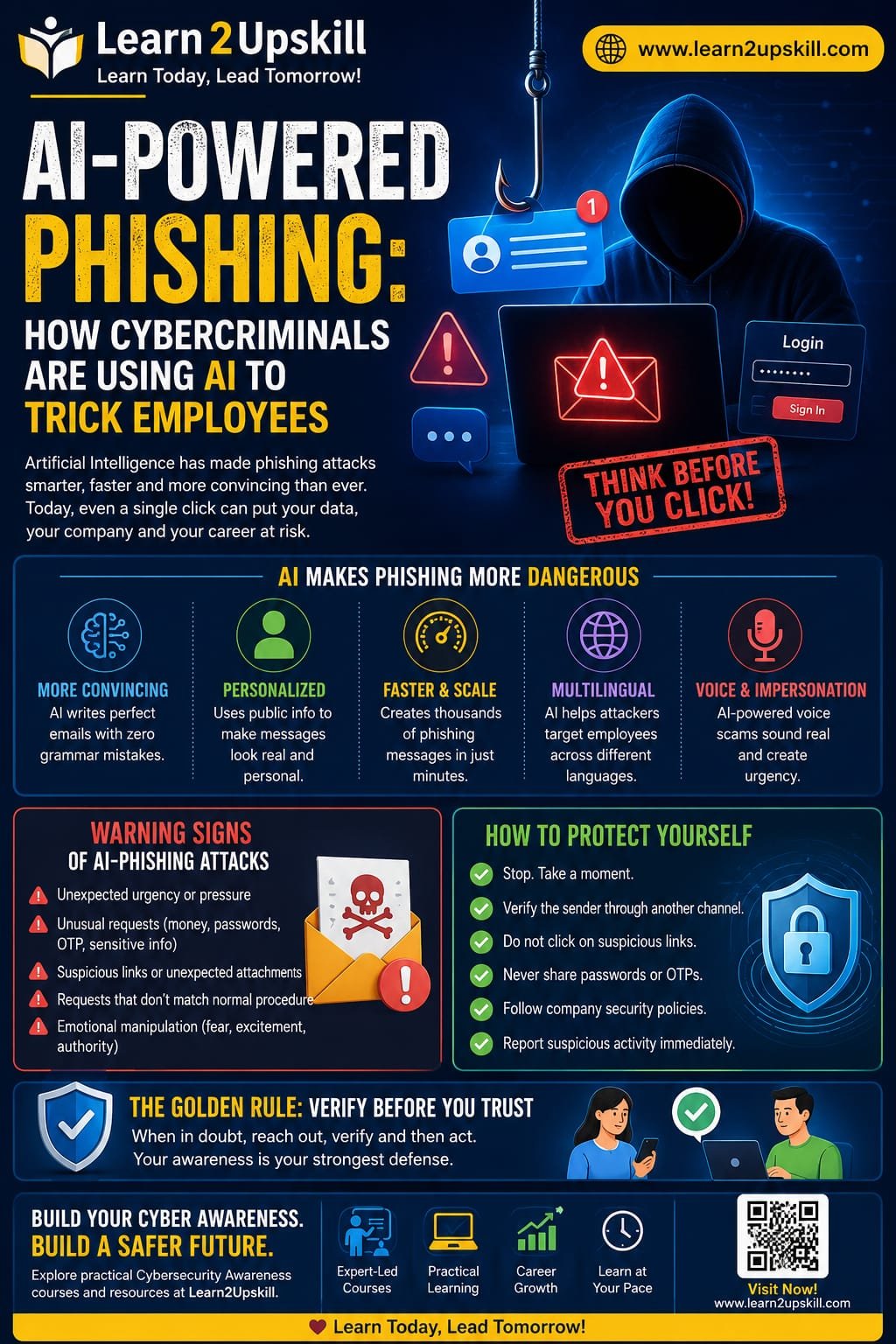
    Why Is AI Making Phishing More Dangerous?

    AI can help cybercriminals overcome some of the weaknesses that made traditional phishing easier to identify.

    1. More Convincing Writing

    AI can generate professional-looking messages with correct grammar, natural language, and appropriate formatting.

    This makes the old rule—”look for spelling mistakes”—much less reliable.

    1. Personalized Messages

    Attackers may use publicly available information to make messages appear more relevant.

    For example, information about a person’s job role, company, projects, or professional activities can potentially be used to create a more believable message.

    1. Faster Scam Creation

    AI can help attackers produce large numbers of variations of phishing messages quickly.

    Instead of manually writing hundreds of emails, criminals can automate parts of the process.

    1. Multilingual Phishing

    AI can help generate messages in different languages and writing styles.

    This makes it easier for attackers to target employees across different countries and regions.

    1. Voice and Impersonation Scams

    AI-powered technologies can also contribute to increasingly convincing impersonation scams involving voice or other media.

    For example, an employee might receive a call that appears to come from someone they know and be pressured to make an urgent payment or share confidential information.

    Common Types of AI-Enhanced Phishing

    AI isn’t limited to traditional email phishing. Modern attacks can appear across multiple communication channels.

    AI-Generated Phishing Emails

    These messages may look like normal workplace communication.

    Examples include:

    – “Your password is about to expire.”

    – “Please review this invoice.”

    – “Your account requires verification.”

    – “Updated company policy—please read.”

    – “Urgent payment approval required.”

    The message may look professional and use language appropriate for the workplace.

    Spear Phishing

    Spear phishing targets a specific individual or organization.

    AI can help attackers create highly personalized messages rather than generic ones.

    For example, a finance employee may receive a message supposedly from a senior manager requesting an urgent payment.

    Business Email Compromise

    In business email compromise, criminals attempt to impersonate executives, employees, suppliers, or other trusted contacts.

    AI can make these communications appear more natural and convincing.

    AI-Assisted Smishing

    Smishing is phishing through SMS or messaging platforms.

    An attacker may send a message claiming that:

    – A package cannot be delivered.

    – A bank account needs verification.

    – A payment failed.

    – An account has been locked.

    – A special offer is expiring.

    Voice-Based Social Engineering

    Voice scams can use impersonation and increasingly sophisticated technologies to create convincing conversations.

    The attacker may create urgency and pressure the employee to act before they have time to verify the request.

    Why Employees Are Often the Target

    Cybersecurity isn’t only about technology.

    Attackers understand that employees make decisions every day. They receive emails, approve payments, access documents, reset passwords, communicate with suppliers, and handle sensitive information.

    Instead of trying to break through a company’s technical defenses, an attacker may attempt to persuade an employee to open the door for them.

    This is why employee awareness is an important layer of cybersecurity.

    Warning Signs of an AI-Powered Phishing Attack

    AI-generated messages can look legitimate, so employees should focus on behavior and context, not just grammar.

    Watch for these warning signs:

    🚩 Unexpected Urgency

    Be cautious when a message says:

    «”Do this immediately.”»

    «”You have 10 minutes.”»

    «”Don’t contact anyone about this.”»

    Urgency is commonly used to prevent people from thinking carefully.

    🚩 Unusual Requests

    Be especially careful with unexpected requests involving:

    – Money

    – Passwords

    – One-time passwords

    – Bank information

    – Confidential documents

    – Login credentials

    – Gift cards

    – Account verification

    🚩 Suspicious Links

    Don’t click a link simply because the email looks professional.

    Instead, verify where the link actually leads and consider navigating directly to the organization’s official website or application.

    🚩 Unexpected Attachments

    An unexpected document, ZIP file, spreadsheet, or other attachment deserves additional scrutiny.

    🚩 A Request That Doesn’t Match Normal Procedure

    If your manager suddenly asks you to transfer money to a new account, don’t assume the request is legitimate.

    Follow your organization’s verification procedure.

    🚩 Emotional Pressure

    Phishing attacks often use emotions such as:

    – Fear

    – Urgency

    – Curiosity

    – Excitement

    – Authority

    – Financial pressure

    If a message makes you feel that you must act immediately, pause before acting.

    The Golden Rule: Verify Before You Trust

    One of the most effective defenses against AI-powered phishing is simple:

    Stop. Verify. Then act.

    If you receive an unusual request from someone you know, verify it through a separate communication channel.

    For example:

    Email request: Call the person using a trusted phone number.

    Payment request: Follow your organization’s payment verification process.

    Password request: Contact your IT team through the official support channel.

    Unexpected document: Confirm with the sender before opening it.

    Do not use the contact information provided in a suspicious message for verification.

    How Companies Can Protect Employees

    Organizations should combine technology, policies, and employee education.

    1. Conduct Regular Security Awareness Training

    Employees should regularly learn about:

    – Phishing

    – Social engineering

    – Password security

    – Multi-factor authentication

    – Data protection

    – Safe browsing

    – Incident reporting

    1. Run Phishing Simulations

    Organizations can conduct controlled phishing simulations to help employees recognize suspicious messages in a safe environment.

    The purpose should be education—not embarrassing employees.

    1. Use Multi-Factor Authentication

    MFA can provide an additional security layer if an employee’s password is compromised.

    1. Establish Verification Procedures

    Organizations should have clear procedures for sensitive requests such as:

    – Financial transfers

    – Vendor bank-account changes

    – Password resets

    – Confidential data sharing

    – Executive requests

    1. Encourage Employees to Report Mistakes

    Employees should feel comfortable reporting suspicious activity—even if they already clicked a link or shared information.

    Fast reporting can help security teams respond quickly.

    What Should You Do If You Clicked a Phishing Link?

    Don’t panic.

    If you accidentally clicked a suspicious link:

    1. Stop interacting with the website.
    2. Don’t enter additional information.
    3. Inform your IT/security team immediately.
    4. Change your password if you entered credentials.
    5. Follow your organization’s incident-response instructions.
    6. Monitor relevant accounts for unusual activity.
    7. Report the phishing message according to company policy.

    Quick reporting is much more useful than hiding the mistake.

    AI Is a Tool—It Can Be Used for Defense Too

    AI isn't only useful to attackers.

    Organizations can also use AI and automation to help identify suspicious behavior, detect unusual communication patterns, analyze large volumes of security data, and support security teams.

    However, AI should complement—not replace—human judgment and established security processes.

    A Simple Employee Checklist

    Before responding to an unexpected message, ask:

    STOP

    – S — Source: Do I recognize the sender?

    – T — Timing: Was I expecting this message?

    – O — Offer/Request: Is the request unusual or sensitive?

    – P — Proceed Carefully: Can I verify it through another channel?


    If something doesn't feel right, pause and verify.

    Final Thoughts

    AI is changing phishing attacks. Messages can now be more polished, personalized, and convincing than many traditional scams.

    But the most important defense remains surprisingly simple: don't let urgency replace verification.

    Employees should think before clicking, verify unusual requests, protect credentials, and report suspicious activity quickly.

    For businesses, cybersecurity awareness should be an ongoing process—not a once-a-year training session.

    As AI continues to evolve, organizations that combine technology + security policies + well-trained employees will be better prepared to defend against modern phishing attacks.

    Learn More with Learn2Upskill

    Cybersecurity is no longer only an IT department's responsibility. Every employee who uses email, messaging platforms, cloud applications, or company systems plays a role in protecting the organization.

    Explore practical learning resources and courses on Learn2Upskill to build workplace-ready digital and cybersecurity skills.

    Website: Learn2Upskill — blog-cms.learn2upskill.com/