Professional Email Communication Skills: How to Write Clear, Effective and Professional Emails
Description: Learn essential professional email communication skills. Discover how to write clear, polite and effective emails with proper subject lines, structure, tone and workplace email etiquette.
Suggested URL Slug:
“/professional-email-communication-skills/”
—
Professional Email Communication Skills: How to Write Clear, Effective and Professional Emails
Email remains one of the most important communication tools in the professional world.
Every day, employees send emails to:
– Managers
– Colleagues
– Clients
– Customers
– Recruiters
– Business partners
– Teams
A well-written email can save time, prevent misunderstandings and create a professional impression.
A poorly written email can do the opposite.
It may confuse the reader, sound rude without intention, create unnecessary back-and-forth communication or even affect your professional image.
This is why professional email communication skills are essential for students, freshers and working professionals.
Writing a professional email is not about using complicated English or making every message extremely formal.
It is about being:
«Clear + Concise + Polite + Professional»
In this guide, you will learn how to write better professional emails, understand proper workplace email etiquette and develop communication skills that can help you throughout your career.
—
Why Are Professional Email Communication Skills Important?
Email communication plays an important role in modern workplaces.
A professional email can help you:
Communicate Clearly
The reader should understand your message without confusion.
Save Time
A clear email reduces unnecessary follow-up messages.
Build Professional Credibility
Well-written communication creates a positive professional impression.
Avoid Misunderstandings
Clear language helps prevent incorrect assumptions.
Create a Written Record
Emails can provide documentation of discussions, requests and decisions.
In many situations, your email represents you before the recipient meets you personally.
That is why professional email writing matters.
—
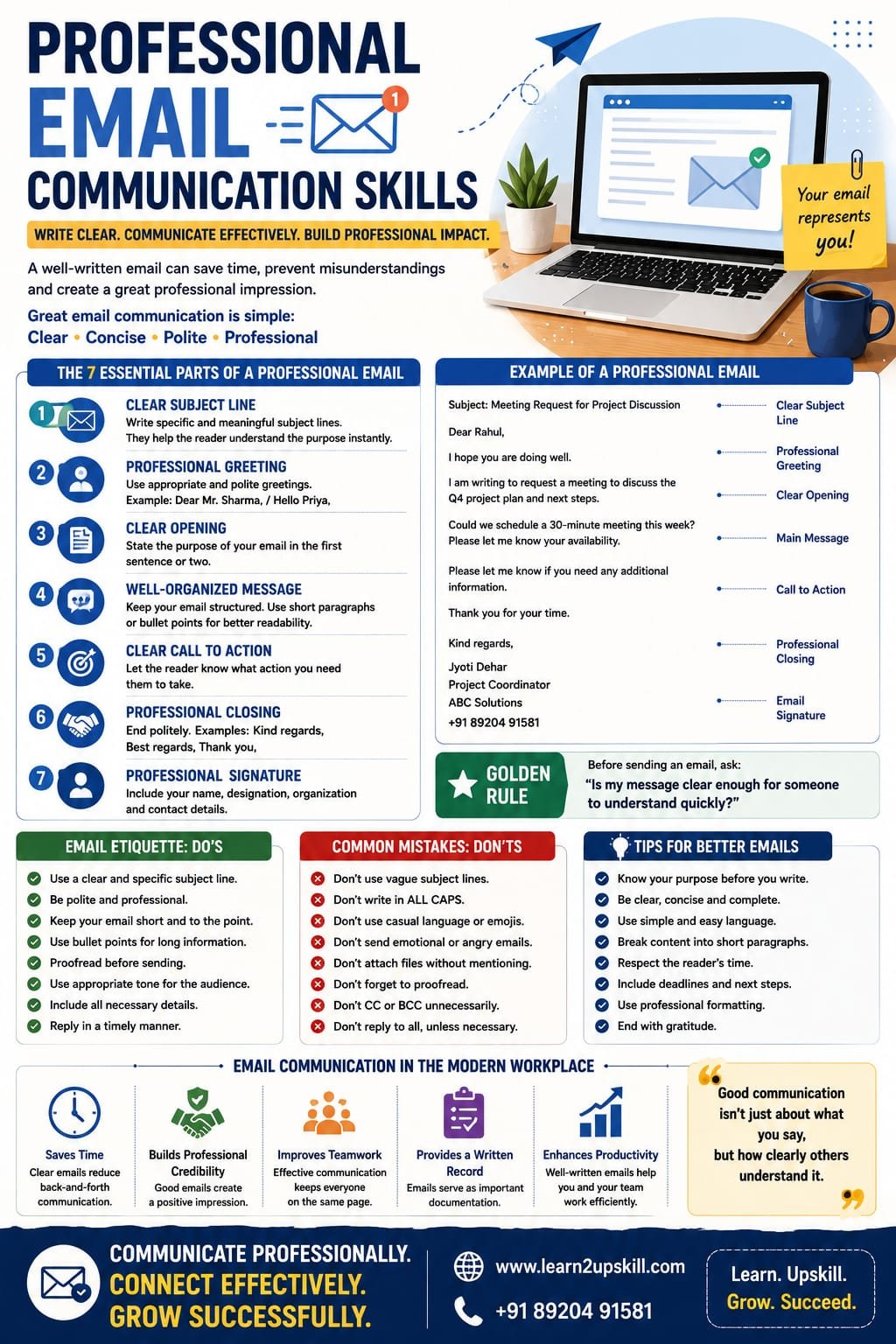
The 7 Essential Parts of a Professional Email
A strong professional email usually includes the following elements:
- A Clear Subject Line
The subject line tells the reader what your email is about.
A vague subject line such as:
❌ Hello
❌ Important
❌ Urgent
does not provide enough information.
Instead, write something specific.
✅ Meeting Request: Project Discussion
✅ Leave Request for 15 September
✅ Follow-Up: Marketing Report Submission
A good subject line should be:
– Clear
– Specific
– Relevant
—
- A Professional Greeting
Begin your email politely.
Examples include:
Formal:
Dear Mr. Sharma,
Dear Ms. Gupta,
Professional and Neutral:
Hello Rahul,
Hi Priya,
The appropriate greeting depends on your relationship and workplace culture.
Avoid overly casual greetings in formal professional situations.
—
- A Clear Opening
The first sentence should explain why you are writing.
For example:
«I am writing to request your feedback on the project report.»
Or:
«I would like to follow up regarding our discussion from yesterday’s meeting.»
This helps the reader immediately understand the purpose of the email.
—
- A Well-Organized Message
Keep your email structured.
If your message is long, divide it into short paragraphs or use bullet points.
For example:
Please find the key updates below:
– The report has been completed.
– The presentation is ready for review.
– Feedback is requested by Friday.
This is easier to read than one large paragraph.
—
- A Clear Call to Action
The recipient should understand what you need them to do.
For example:
«Please review the document and share your feedback by Friday.»
Or:
«Could you please confirm whether you are available for the meeting?»
Avoid ending an email without making the next step clear.
—
- A Professional Closing
Common professional closings include:
– Kind regards,
– Best regards,
– Regards,
– Thank you,
Follow this with your name.
For example:
Kind regards,
Jyoti
—
- A Professional Signature
Your signature may include:
– Your name
– Your job title
– Organization
– Contact information
Keep it simple and professional.
—
The Golden Rule of Professional Email Writing
Before sending an email, ask:
«Is my message clear enough for someone to understand quickly?»
A professional email does not need to be long.
In fact, unnecessary length can make communication less effective.
Try to communicate the right information using the fewest words necessary.
—
How to Write a Professional Email Step by Step
Here is a simple process.
Step 1: Know Your Purpose
Before writing, ask:
Why am I sending this email?
Your purpose might be:
– Requesting information
– Providing an update
– Asking for approval
– Following up
– Scheduling a meeting
Once you know the purpose, writing becomes easier.
—
Step 2: Write a Clear Subject Line
Make the topic easy to understand.
—
Step 3: Start Politely
Use an appropriate greeting.
—
Step 4: Explain Your Main Point
State the purpose early.
Don’t make the reader search for the important information.
—
Step 5: Add Important Details
Include only relevant information.
Ask yourself:
«Does the recipient need this information?»
If not, consider removing it.
—
Step 6: Explain the Next Step
Tell the reader what action is needed.
—
Step 7: Proofread Before Sending
Check:
– Spelling
– Grammar
– Names
– Dates
– Attachments
– Tone
A quick review can prevent embarrassing mistakes.
—
Professional Email Tone: Why It Matters
Tone is the attitude your message communicates.
The challenge with emails is that people cannot hear your voice or see your facial expressions.
A short message may sound rude even if that was not your intention.
For example:
«Send me the report.»
This may sound demanding.
A more professional version could be:
«Could you please send me the report when you have a chance?»
Or, if there is a deadline:
«Could you please send me the report by 4 PM today? Thank you.»
The message is still clear—but the tone is more professional.
—
Common Professional Email Mistakes to Avoid
❌ Writing Without a Subject Line
Always include a useful subject.
—
❌ Using Very Casual Language
Avoid workplace emails that sound like informal text messages.
—
❌ Writing Extremely Long Emails
Long emails can hide important information.
Use short paragraphs and bullet points.
—
❌ Sending Emails While Angry
Never write an emotional response and immediately press send.
Pause.
Read it again later.
Focus on facts and solutions.
—
❌ Using Too Many Capital Letters
WRITING IN ALL CAPITAL LETTERS can appear aggressive or like shouting.
Use normal formatting.
—
❌ Forgetting Attachments
If you mention an attachment, check that it is actually attached before sending.
—
❌ Sending Without Proofreading
Small mistakes can affect clarity and professionalism.
—
CC and BCC: What Employees Should Know
Understanding CC and BCC is part of professional email etiquette.
CC (Carbon Copy)
Use CC when someone should be informed about the email but is not necessarily the main person expected to respond.
BCC (Blind Carbon Copy)
BCC hides recipient email addresses from other recipients.
Use it carefully and appropriately.
Always consider your organization’s policies when using CC and BCC.
—
How to Write Emails to Your Manager
When writing to your manager:
Be Clear
State your purpose.
Be Respectful
Use a professional tone.
Be Concise
Avoid unnecessary details.
Be Specific
Include important dates and information.
Example:
Subject: Request for Feedback on Project Report
Hello [Name],
I have completed the project report and would appreciate your feedback before the final submission.
Please let me know if you would like any changes or additional information.
Kind regards,
[Your Name]
—
How to Write Emails to Clients and Customers
Client communication requires additional attention.
Your emails should be:
– Professional
– Polite
– Clear
– Helpful
– Accurate
Avoid technical language that the client may not understand.
Focus on solving the problem.
For example:
Instead of:
«This issue occurred because the system failed during processing.»
You could write:
«We apologize for the issue. Our team is reviewing the situation and working to resolve it. We will share an update as soon as possible.»
Professional communication should provide clarity and reassurance.
—
The Importance of Active Listening in Email Communication
Email communication is not only about sending messages.
It is also about understanding what others are asking.
Before replying, carefully read the email.
Ask yourself:
– What is the main question?
– What information does the person need?
– Have I answered all important points?
A common mistake is replying quickly but answering only part of the question.
Taking a few extra moments to understand the message can improve communication quality.
—
Professional Email Communication in Remote Work
Remote and hybrid work have made digital communication even more important.
When working remotely, people may not have the opportunity to quickly clarify information face-to-face.
This means emails should be especially clear.
Include:
– Context
– Important details
– Deadlines
– Required actions
Instead of writing:
«Can you complete this soon?»
Write:
«Could you please complete the report by Thursday, 3 PM?»
Specific communication reduces confusion.
—
Email Communication and Emotional Intelligence
Emotional intelligence can improve professional email communication.
Before sending an email, consider:
How might the reader interpret this message?
Does my tone sound respectful?
Am I reacting emotionally?
Should I wait before responding?
For example, if you receive a frustrating email, avoid responding immediately while angry.
A short pause can help you write a calmer and more constructive response.
Remember:
«A professional email should solve problems—not create new ones.»
—
How AI Is Changing Professional Email Communication
AI tools are increasingly helping professionals with email writing.
AI can assist with:
– Drafting messages
– Improving grammar
– Changing tone
– Summarizing long emails
– Creating professional responses
However, employees should use AI responsibly.
Before using AI for workplace communication:
– Avoid sharing confidential information unnecessarily.
– Follow your organization’s AI policies.
– Review the final email carefully.
– Make sure the message is accurate.
AI can help create a draft.
But the professional sending the email remains responsible for the final message.
—
10 Quick Tips for Better Professional Emails
- Write a clear subject line.
- Start with an appropriate greeting.
- State your purpose early.
- Keep paragraphs short.
- Use bullet points for important information.
- Maintain a polite and professional tone.
- Clearly explain the required action.
- Check names, dates and attachments.
- Avoid emotional replies.
- Proofread before sending.
These simple habits can dramatically improve your workplace communication.
—
A Simple Professional Email Template
Subject: [Clear Topic]
Hello [Name],
I hope you are doing well.
I am writing regarding [briefly explain the purpose].
[Include the important information.]
Please let me know [clearly explain the required action or next step].
Thank you.
Kind regards,
[Your Name]
—
Frequently Asked Questions
What are professional email communication skills?
Professional email communication skills involve writing clear, polite, structured and effective emails for workplace and business communication.
How can I make my emails sound more professional?
Use a clear subject line, professional greeting, concise language, respectful tone and a clear closing.
How long should a professional email be?
There is no fixed length, but professional emails should include the necessary information without unnecessary details.
Should I use emojis in professional emails?
This depends on workplace culture and your relationship with the recipient. In formal communication, it is generally safer to use them carefully or avoid them.
How do I avoid sounding rude in an email?
Use polite language, provide context and reread your email before sending.
Can AI write professional emails?
AI can help create drafts and improve writing, but the sender should review the content for accuracy, tone and confidentiality.
—
Conclusion
Professional email communication is a skill that can influence your academic and career success.
A good email does not need complicated language.
It needs:
«Clarity. Professionalism. Respect.»
Every email you send contributes to your professional image.
By improving your email communication skills, you can:
– Reduce misunderstandings
– Save time
– Build stronger professional relationships
– Communicate more confidently
– Create a positive impression
Before sending your next email, remember:
Clear Subject.
Clear Message.
Professional Tone.
Clear Next Step.
Proofread Before Sending.
Small improvements can make a big difference.
Because in the professional world:
«Good communication is not just about what you say—it is about how clearly others understand it.»
—
📧 Build Strong Professional Communication Skills With Learn2Upskill
Effective communication is one of the most valuable skills for students and professionals.
Develop practical skills in professional communication, business communication, presentation, workplace etiquette and career development with Learn2Upskill.
🌐 www.coral-kudu-326218.hostingersite.com
📞 Contact Us: +91 89204 91581
Learn. Upskill. Grow. Succeed.
—
Leave a Reply