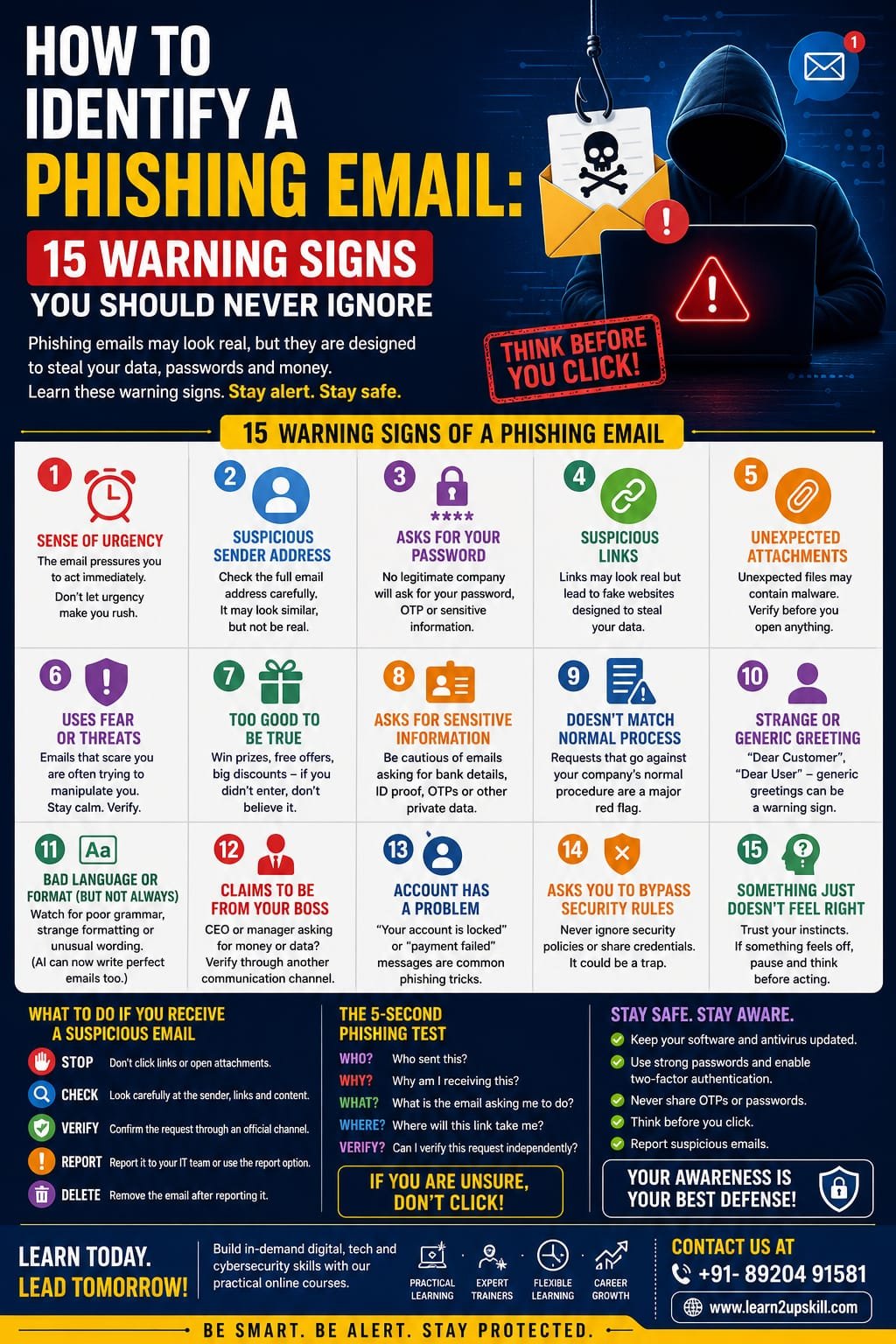
How to Identify a Phishing Email: 15 Warning Signs You Should Never Ignore
Meta Description: Learn how to identify a phishing email with 15 warning signs, including suspicious links, urgent requests, fake senders, attachments, and more.
Introduction
Your inbox may look completely normal—but not every email you receive is safe.
Cybercriminals use phishing emails to trick people into revealing passwords, financial information, OTPs, company data, or other sensitive information. Modern phishing attacks can even look professional and convincing, especially with the help of artificial intelligence.
The good news is that you don’t need to be a cybersecurity expert to spot many phishing attempts.
By learning a few important warning signs, you can make better decisions about which emails to trust—and which ones to avoid.
In this guide, we’ll look at 15 common warning signs of phishing emails and what you should do when you encounter one.
—
What Is a Phishing Email?
A phishing email is a fraudulent message designed to make you perform an action that benefits a cybercriminal.
The attacker may try to convince you to:
– Click a malicious link
– Enter your username and password
– Share an OTP
– Download an attachment
– Transfer money
– Share confidential information
– Call a fraudulent phone number
– Install software
– Visit a fake website
The email may pretend to come from a bank, company, manager, colleague, delivery service, government organization, or popular online platform.
—
15 Warning Signs of a Phishing Email
- The Email Creates a Sense of Urgency
One of the biggest phishing warning signs is pressure to act immediately.
You might see messages such as:
– “Your account will be closed today.”
– “Immediate action required.”
– “Your payment has failed.”
– “You have only 30 minutes to respond.”
Cybercriminals use urgency because people are more likely to make mistakes when they feel pressured.
What to do:
Pause. Don’t click anything immediately. Verify the request independently.
—
- The Sender’s Email Address Looks Suspicious
Don’t judge an email only by the sender’s display name.
A message might say:
Your Bank
But the actual email address could belong to an unrelated or suspicious domain.
Look carefully at the complete sender address.
What to do:
Check the domain and spelling carefully. If something looks unusual, verify the message through the organization’s official website or contact channel.
—
- The Email Asks for Your Password
Legitimate organizations generally should not ask you to send your password through email.
Be especially suspicious of messages asking you to:
– Send your password
– Confirm your password
– Share an OTP
– Provide security answers
– Send login credentials
Remember:
Never share your password or OTP with someone just because an email asks for it.
—
- There Is a Suspicious Link
Phishing emails frequently contain links designed to take you to fake login pages.
The visible text may look legitimate while the actual destination is different.
For example:
“Verify Your Account”
could lead somewhere completely unrelated.
What to do:
Don’t click immediately. Check the destination carefully and, when possible, open the organization’s official website directly instead of using the email link.
—
- The Email Contains an Unexpected Attachment
Be cautious with unexpected attachments, particularly when you weren’t expecting a document.
Attackers may use attachments to deliver malware or persuade you to open a fraudulent document.
Common examples include:
– Invoices
– Payment documents
– Delivery notices
– Job offers
– Reports
– “Important” forms
What to do:
If you weren’t expecting the attachment, verify it with the sender through another channel before opening it.
—
- The Email Uses Fear or Threats
Phishing attacks often attempt to frighten the recipient.
Examples include:
– “Your account has been compromised.”
– “Legal action will be taken.”
– “Your payment is overdue.”
– “Your account will be permanently deleted.”
Fear can make people act without thinking.
What to do:
Don’t respond emotionally. Verify the claim independently.
—
- The Message Offers Something That Seems Too Good to Be True
Unexpected prizes, refunds, jobs, discounts, or financial rewards should make you cautious.
Examples:
“Congratulations! You’ve won ₹50,000.”
“You have been selected for a guaranteed job.”
“Claim your exclusive reward today.”
What to do:
If you never entered a competition or requested an offer, don’t assume it is legitimate.
—
- The Email Requests Sensitive Information
Be careful when an unexpected email asks for:
– Bank details
– Credit/debit card information
– Aadhaar or other identity information
– Passwords
– OTPs
– Employee information
– Company documents
– Customer information
What to do:
Never provide sensitive information simply because an email appears official.
—
- The Email Doesn’t Match Normal Business Procedures
Imagine your manager suddenly asks you by email to transfer money to a new bank account.
Even if the message looks genuine, the request doesn’t match your normal process.
This is a major warning sign.
What to do:
Follow your organization’s established verification procedure.
For financial requests, verify through a separate trusted channel.
—
- The Greeting Is Strange or Too Generic
Some phishing emails use generic greetings such as:
“Dear Customer”
“Dear User”
“Dear Employee”
A generic greeting isn’t automatically proof of phishing, but it can be one clue when combined with other warning signs.
Important:
Don’t rely on this sign alone. Modern phishing emails can be highly personalized.
—
- The Email Contains Unusual Language or Formatting
Traditional phishing emails often contained spelling and grammar mistakes.
However, AI tools are making this warning sign less reliable.
Still, look for:
– Strange wording
– Inconsistent formatting
– Unusual fonts
– Unexpected language changes
– Poorly designed logos
– Strange spacing
– Inconsistent company terminology
Remember:
Perfect grammar does NOT mean an email is safe.
—
- The Email Claims to Be From Your Boss
Executive impersonation is a common social-engineering tactic.
You may receive a message supposedly from your CEO, manager, or senior colleague asking you to:
– Buy gift cards
– Transfer money
– Share confidential files
– Send customer information
– Handle an urgent task
What to do:
Don’t rely solely on the sender’s name.
Verify unusual requests using a trusted communication method.
—
- The Email Says Your Account Has a Problem
Another common phishing technique is pretending there is a problem with your account.
Examples:
– “Your account has been locked.”
– “Your payment method has expired.”
– “Your subscription has been cancelled.”
– “Your security settings require verification.”
The email then provides a link to “fix” the problem.
What to do:
Instead of clicking the email link, visit the organization’s official website directly and check your account.
—
- The Email Encourages You to Bypass Security Rules
This is a particularly important warning sign for employees.
Be suspicious if someone asks you to:
– Skip normal approval procedures
– Share credentials
– Disable security controls
– Send confidential information to a personal email
– Avoid informing your manager
– Keep a financial transaction secret
What to do:
Follow company policies—even when the request appears to come from someone senior.
Authority should never replace verification.
—
- Something Just Doesn’t Feel Right
Sometimes the biggest warning sign is your instinct.
Maybe the sender normally communicates differently.
Maybe the request is unusual.
Maybe the timing seems strange.
Maybe you’re being pressured to do something you wouldn’t normally do.
Don’t ignore that feeling.
What to do:
Stop. Verify. Then act.
Taking an extra minute to verify a message can prevent a major security incident.
—
Bonus: AI Has Changed the Phishing Game
Cybercriminals are increasingly using AI to make phishing messages more convincing.
AI can help attackers create:
– Professional-looking emails
– Personalized messages
– Multilingual content
– Realistic business communication
– Fake customer-support messages
– Convincing impersonation attempts
This means you shouldn’t depend on old advice such as:
“Phishing emails always have spelling mistakes.”
That’s no longer a reliable rule.
Instead, pay attention to the request, context, urgency, sender, links, and whether the action follows normal procedures.
—
What Should You Do When You Receive a Suspicious Email?
Follow this simple process:
- Stop
Don’t click links or open unexpected attachments.
- Check
Look carefully at the sender, message, request, and links.
- Verify
Use a trusted communication channel to confirm the request.
- Report
Use your organization’s phishing-reporting process or email security tools.
- Delete
Once properly reported, follow your organization’s instructions for removing the message.
—
What If You Already Clicked the Link?
Don’t panic.
If you accidentally clicked a suspicious link:
– Stop interacting with the website.
– Don’t enter additional information.
– Contact your IT/security team if it’s a work device.
– If you entered a password, change it through the legitimate service.
– Follow your organization’s incident-response process.
– Report the phishing attempt as soon as possible.
Quick reporting can help reduce the impact.
—
The 5-Second Phishing Test
Before clicking an unexpected email, ask yourself five questions:
WHO?
Who sent this?
WHY?
Why am I receiving this?
WHAT?
What exactly is the email asking me to do?
WHERE?
Where will this link or attachment take me?
VERIFY?
Can I confirm this request independently?
If you can’t confidently answer these questions, don’t click yet.
—
Phishing Email Checklist
Before interacting with an unexpected email, check:
– [ ] Is the sender’s email address legitimate?
– [ ] Was I expecting this message?
– [ ] Is the request unusual?
– [ ] Is there pressure to act immediately?
– [ ] Does it ask for sensitive information?
– [ ] Does it contain an unexpected attachment?
– [ ] Does it contain a suspicious link?
– [ ] Is the message asking me to bypass normal procedures?
– [ ] Can I verify the request independently?
If several warning signs appear together, treat the email as suspicious.
—
Final Thoughts
Phishing attacks don’t always look suspicious anymore.
Modern cybercriminals can create emails that are professional, personalized, and convincing. AI is making this challenge even greater.
The best defense is awareness + verification + good cybersecurity habits.
Remember:
«Think before you click. Verify before you trust. Report before it becomes a bigger problem.»
Cybersecurity is everyone’s responsibility—not just the IT department’s.
Learn More with Learn2Upskill
Want to build practical digital and cybersecurity skills?
Explore Learn2Upskill for practical courses and learning resources designed to help students, professionals, and businesses develop job-ready skills.
Learn Today. Lead Tomorrow.
🌐 www.coral-kudu-326218.hostingersite.com
Leave a Reply