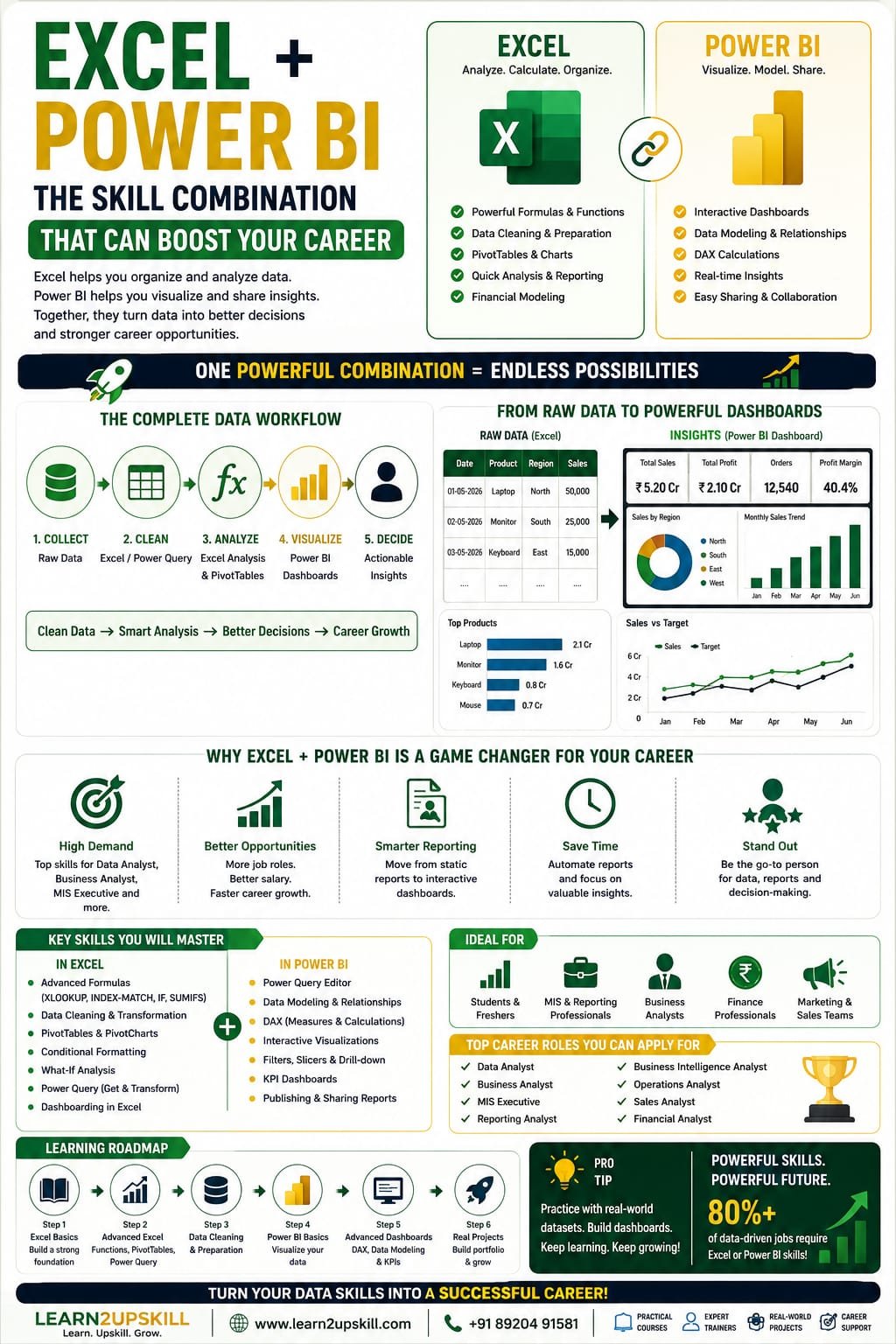
Excel + Power BI: The Skill Combination That Can Boost Your Career
Learn why Excel and Power BI are powerful career skills. Discover how combining Excel + Power BI can improve data analysis, reporting, dashboards and job opportunities.
Suggested URL Slug
excel-power-bi-skill-combination-boost-career
Introduction
Data is everywhere.
Businesses use data to understand customers, track sales, monitor expenses, measure employee performance, evaluate marketing campaigns and make important decisions.
But having data is not enough.
Organizations need professionals who can organize data, analyze it, identify trends and communicate insights clearly.
This is where Excel and Power BI become extremely valuable.
Excel has been one of the most widely used business tools for decades. It is used for calculations, data organization, reporting, budgeting, analysis and everyday business operations.
Power BI takes data analysis and visualization to another level by helping professionals build interactive dashboards, connect multiple data sources and present business insights in an easy-to-understand format.
Learning either tool can be useful.
But learning Excel + Power BI together can create a particularly practical skill combination for professionals interested in data analysis, business intelligence, reporting and business analysis.
In this guide, we’ll explore why these skills work so well together, what you can do with them and how to build your Excel + Power BI career roadmap.
What Is Excel?
Microsoft Excel is a spreadsheet application used for organizing, calculating, analyzing and presenting data.
Professionals use Excel for:
Data entry
Calculations
Financial analysis
Budgeting
Reporting
Data cleaning
Charts
Dashboards
Forecasting
Business analysis
Inventory management
Sales tracking
MIS reporting
Excel also provides powerful functions and features such as:
Formulas
PivotTables
Charts
XLOOKUP
Conditional Formatting
Data Validation
Power Query
Power Pivot
What-If Analysis
For many professionals, Excel remains a fundamental workplace skill.
What Is Power BI?
Power BI is Microsoft’s business intelligence and data visualization platform.
It allows users to connect to different data sources, transform data, create data models and build interactive reports and dashboards.
Power BI can connect with sources such as:
Excel
CSV files
Databases
Cloud services
Business applications
Web sources
Other data platforms
Professionals can use Power BI to transform large amounts of information into interactive visual reports.
For example, a company might use Power BI to create a dashboard showing:
Total sales
Monthly revenue
Profit
Sales by region
Top products
Customer trends
Sales targets
Year-over-year growth
Why Learn Excel and Power BI Together?
Here’s the interesting part.
Excel and Power BI aren’t really competitors.
They can work together.
Think of Excel as a powerful spreadsheet and analysis tool, while Power BI is designed more specifically for business intelligence, visualization and interactive reporting.
A professional who understands both can move comfortably from:
Raw Data → Cleaning → Analysis → Dashboard → Business Insight
That complete workflow is valuable.
- Excel Builds Your Data Fundamentals
If you’re new to data analysis, Excel is often a comfortable place to start.
You’ll learn concepts such as:
Rows and columns
Data types
Formulas
Functions
Sorting
Filtering
Tables
PivotTables
Charts
Data cleaning
These concepts create a foundation for more advanced analytics.
For example, learning Excel PivotTables can help you understand how data can be summarized by:
Product
Region
Customer
Month
Department
That way of thinking becomes useful when you start working with Power BI.
- Power BI Helps You Move Beyond Traditional Reporting
Excel can create excellent reports.
However, when your data becomes larger or your reporting requirements become more complex, Power BI can provide a more dedicated business-intelligence environment.
Power BI allows you to create:
Interactive dashboards
Multiple report pages
Drill-down experiences
Interactive filters
Data models
Automated refreshes
KPI reports
Visual analytics
Instead of sending a static spreadsheet, you can create a dashboard where users can explore the information themselves.
- Excel + Power BI Creates a Complete Data Workflow
One of the biggest advantages of learning both tools is that they can fit into a single workflow.
Step 1: Collect Data
You may receive data in Excel files.
Step 2: Clean the Data
Use Excel or Power Query to clean:
Duplicates
Missing values
Incorrect formats
Inconsistent categories
Extra spaces
Step 3: Analyze the Data
Use Excel for:
Formulas
PivotTables
Quick calculations
Exploratory analysis
Step 4: Build a Data Model
Move the prepared data into Power BI when appropriate.
Step 5: Create Dashboards
Build interactive Power BI reports.
Step 6: Communicate Insights
Explain:
What happened?
Why did it happen?
What trends are visible?
What should the business do next?
That’s much more valuable than simply knowing how to create a spreadsheet.
- Excel + Power BI Is Useful for Data Analysts
Data analysts need to work with data from different sources and communicate findings.
Excel provides useful skills for:
Data cleaning
Calculations
Quick analysis
PivotTables
Spreadsheet reporting
Power BI provides skills for:
Data modeling
Interactive visualization
Dashboard creation
Business intelligence
Report sharing
Together, these skills can create a strong foundation for someone beginning a data analyst career.
- Excel + Power BI for Business Analysts
Business analysts often work between business teams and data.
They need to understand both:
What does the data say?
and
What does the business need?
Excel can help with:
Data exploration
Calculations
Business models
Scenario analysis
Reporting
Power BI can help with:
KPI dashboards
Business reporting
Trend analysis
Performance monitoring
Interactive insights
This combination can be particularly useful for professionals who want to move toward business intelligence or analytics roles.
- Excel + Power BI for MIS Professionals
MIS and reporting roles frequently involve collecting information from different departments and preparing regular reports.
Typical responsibilities may include:
Daily reports
Weekly reports
Monthly reports
Sales reports
Employee reports
Inventory reports
Performance dashboards
Excel is often heavily used in these workflows.
Adding Power BI can help professionals move from manual reporting toward interactive business intelligence.
For someone working in MIS, learning both can therefore be a practical career-development strategy.
- Excel + Power BI for Finance Professionals
Finance teams frequently work with structured numerical data.
Excel is already deeply embedded in many finance workflows.
Professionals may use Excel for:
Budgeting
Financial models
Variance analysis
Forecasting
Expense analysis
Revenue analysis
Power BI can then be used to create interactive financial dashboards.
For example:
Finance Dashboard
Revenue
₹5.2 Crore
Expenses
₹3.1 Crore
Profit
₹2.1 Crore
Profit Margin
40.4%
Revenue Growth
+12%
Instead of reviewing multiple spreadsheets, management can interact with a dashboard and explore the numbers.
- Excel + Power BI for Sales and Marketing
Sales and marketing teams generate large amounts of information.
Examples include:
Leads
Customers
Revenue
Campaigns
Conversions
Regions
Products
Sales representatives
Excel can help clean and organize this information.
Power BI can turn it into dashboards.
For example:
Sales Dashboard
Total sales
Sales by region
Top-performing salesperson
Monthly growth
Product performance
Conversion rate
Target vs actual
This combination helps teams move from data collection to actionable insights.
- Excel + Power BI Can Improve Your Resume
Simply writing:
“Microsoft Excel”
on your resume may not communicate the depth of your skills.
Instead, consider demonstrating specific capabilities.
For example:
Excel
Advanced formulas
XLOOKUP
PivotTables
Data cleaning
Excel dashboards
Power Query
Power BI
Data modeling
DAX
Power Query
Interactive dashboards
Data visualization
KPI reporting
Even better, add practical projects.
For example:
Sales Performance Dashboard — Excel + Power BI
Cleaned sales data, created KPIs, analyzed regional performance and developed an interactive Power BI dashboard.
A project demonstrates what you can actually do, rather than simply listing software names.
- Excel + Power BI Projects You Can Build
If you’re learning these tools, don’t stop at tutorials.
Build projects.
Project 1: Sales Dashboard
Analyze:
Sales
Profit
Products
Regions
Customers
Project 2: HR Analytics Dashboard
Analyze:
Employees
Departments
Attrition
Attendance
Salary
Hiring
Project 3: Financial Dashboard
Analyze:
Revenue
Expenses
Profit
Budget vs actual
Monthly trends
Project 4: Marketing Dashboard
Analyze:
Leads
Campaigns
Conversion
Cost
ROI
Project 5: E-Commerce Dashboard
Analyze:
Orders
Products
Customers
Revenue
Returns
Profit
These projects can become part of your data analytics portfolio.
Excel vs Power BI: Which Should You Learn First?
This is one of the most common questions beginners ask.
The answer depends on your current skill level.
Excel
Power BI
Spreadsheet-focused
Business intelligence-focused
Excellent for calculations
Excellent for interactive dashboards
Great for smaller/medium datasets
Designed for scalable analytics workflows
Widely used across business teams
Strong for BI and reporting
Excellent for quick analysis
Excellent for interactive reporting
Beginner-friendly starting point
Easier after understanding data fundamentals
If you’re a complete beginner
Start with Excel fundamentals.
Learn:
Formulas
Functions
Tables
PivotTables
Charts
Data cleaning
Then move into:
Power Query → Power BI → DAX → Data Modeling
If you already know advanced Excel
You can start Power BI sooner.
Excel + Power BI Learning Roadmap
Here’s a practical roadmap for beginners.
Stage 1: Excel Fundamentals
Learn:
Basic formulas
SUM
AVERAGE
IF
COUNT
XLOOKUP
Text functions
Date functions
Stage 2: Advanced Excel
Learn:
PivotTables
PivotCharts
Advanced formulas
Data cleaning
Conditional Formatting
Data Validation
Excel dashboards
Stage 3: Power Query
Learn:
Importing data
Cleaning data
Removing duplicates
Changing data types
Combining datasets
Transforming data
Stage 4: Power BI Fundamentals
Learn:
Power BI interface
Data sources
Power Query
Visualizations
Filters
Slicers
Report pages
Stage 5: Data Modeling
Learn:
Relationships
Fact tables
Dimension tables
Star schema
Data modeling principles
Stage 6: DAX
Learn:
Measures
SUM
CALCULATE
FILTER
SUMX
DIVIDE
IF
Time intelligence
Stage 7: Portfolio Projects
Build at least:
Sales dashboard
HR dashboard
Finance dashboard
Now you’re not just someone who completed a course.
You’re someone who can demonstrate practical analytics skills.
What Jobs Can These Skills Support?
Excel + Power BI skills can be useful for roles such as:
Data Analyst
Business Analyst
MIS Executive
Reporting Analyst
Business Intelligence Analyst
Operations Analyst
Sales Analyst
Marketing Analyst
Finance Analyst
Data Visualization Analyst
The exact requirements vary by company and role, but these tools can form a useful foundation for many data-related positions.
How to Make Excel + Power BI More Valuable
Don’t stop at learning the software.
Add complementary skills.
Excel + Power BI + SQL
A powerful combination for data analysis.
Excel + Power BI + AI
Useful for AI-assisted productivity and analytics.
Excel + Power BI + Business Analysis
Useful for professionals who want to connect data with business decisions.
Excel + Power BI + Finance
Useful for financial reporting and analysis.
Excel + Power BI + Marketing
Useful for campaign and customer analytics.
Excel + Power BI + HR
Useful for workforce analytics and reporting.
This is where the real opportunity lies.
Don’t just learn tools. Build a skill stack.
Common Mistakes Beginners Make
- Learning Functions Without Understanding Data
Knowing 50 Excel formulas doesn’t automatically make someone a data analyst.
Understand the data first.
- Creating Beautiful Dashboards Without Useful Insights
A dashboard should answer business questions.
Not simply display colorful charts.
- Ignoring Data Cleaning
Poor-quality data leads to poor-quality analysis.
- Avoiding DAX
If you’re serious about Power BI, learn the fundamentals of DAX.
- Not Building Projects
Projects help convert theoretical knowledge into practical skills.
- Learning Tools Separately
Try to understand how Excel and Power BI can work together.
The Future of Excel + Power BI Skills
AI is changing data analysis, but that doesn’t make Excel and Power BI irrelevant.
Instead, AI can increasingly help professionals work faster with these tools.
Professionals may use AI to:
Generate formulas
Explain calculations
Analyze datasets
Create insights
Suggest visualizations
Speed up repetitive work
But human professionals still need to understand:
Data quality
Business context
Analytical logic
Data interpretation
Decision-making
That’s why a combination of:
Excel + Power BI + AI + Business Knowledge
can be a strong future-oriented skill stack.
Conclusion
Excel and Power BI are more powerful together than they are in isolation.
Excel helps professionals organize, clean, calculate and explore data.
Power BI helps transform that data into interactive dashboards and business intelligence.
Together, they can help professionals build a complete workflow:
Clean → Analyze → Model → Visualize → Explain → Decide
Whether you’re a student, fresher, working professional, MIS executive, finance professional, business analyst or aspiring data analyst, learning these skills can strengthen your professional toolkit.
But remember:
Learning Excel and Power BI isn’t the final goal. Using them to solve real business problems is.
Build projects.
Create dashboards.
Analyze real-world datasets.
Add your work to your portfolio.
And keep developing complementary skills such as SQL, AI and business analysis.
The future belongs to professionals who can turn data into decisions.
Frequently Asked Questions
- Is Excel and Power BI a good combination?
Yes. Excel is excellent for spreadsheet-based analysis, calculations and data preparation, while Power BI is designed for data modeling, visualization and interactive business intelligence.
- Should I learn Excel before Power BI?
If you’re a complete beginner, learning Excel fundamentals first can make the transition to Power BI easier. If you already have strong Excel skills, you can start Power BI directly.
- Can Excel and Power BI help me get a data analyst job?
They can provide an important foundation for data-related roles. However, job requirements vary, and learning SQL, data modeling, statistics, business analysis and practical projects can strengthen your profile.
- Is Power BI difficult for Excel users?
Excel users often find some Power BI concepts familiar, but Power BI introduces additional concepts such as data modeling, relationships, Power Query and DAX.
- Do I need coding to learn Excel and Power BI?
No. You can learn and use both tools without becoming a programmer. However, learning SQL and basic programming later can be useful for advanced data-analysis careers.
- What should I learn after Excel and Power BI?
Consider learning SQL, DAX, Power Query, data modeling, business analysis and AI-assisted analytics.
- What Excel skills should I know before learning Power BI?
Focus on formulas, tables, PivotTables, charts, data cleaning, lookup functions and basic data analysis.
- How can I demonstrate Excel and Power BI skills to employers?
Build practical projects such as sales, finance, HR or marketing dashboards and include them in your portfolio or resume.
Learn Excel + Power BI with Learn2Upskill
Ready to build practical, job-focused data skills?
Learn Excel, Power BI, Data Analytics, AI and other career-focused skills with Learn2Upskill.
🌐 www.coral-kudu-326218.hostingersite.com�
📞 Contact Us: +91 89204 91581
Learn. Upskill. Grow.
Leave a Reply