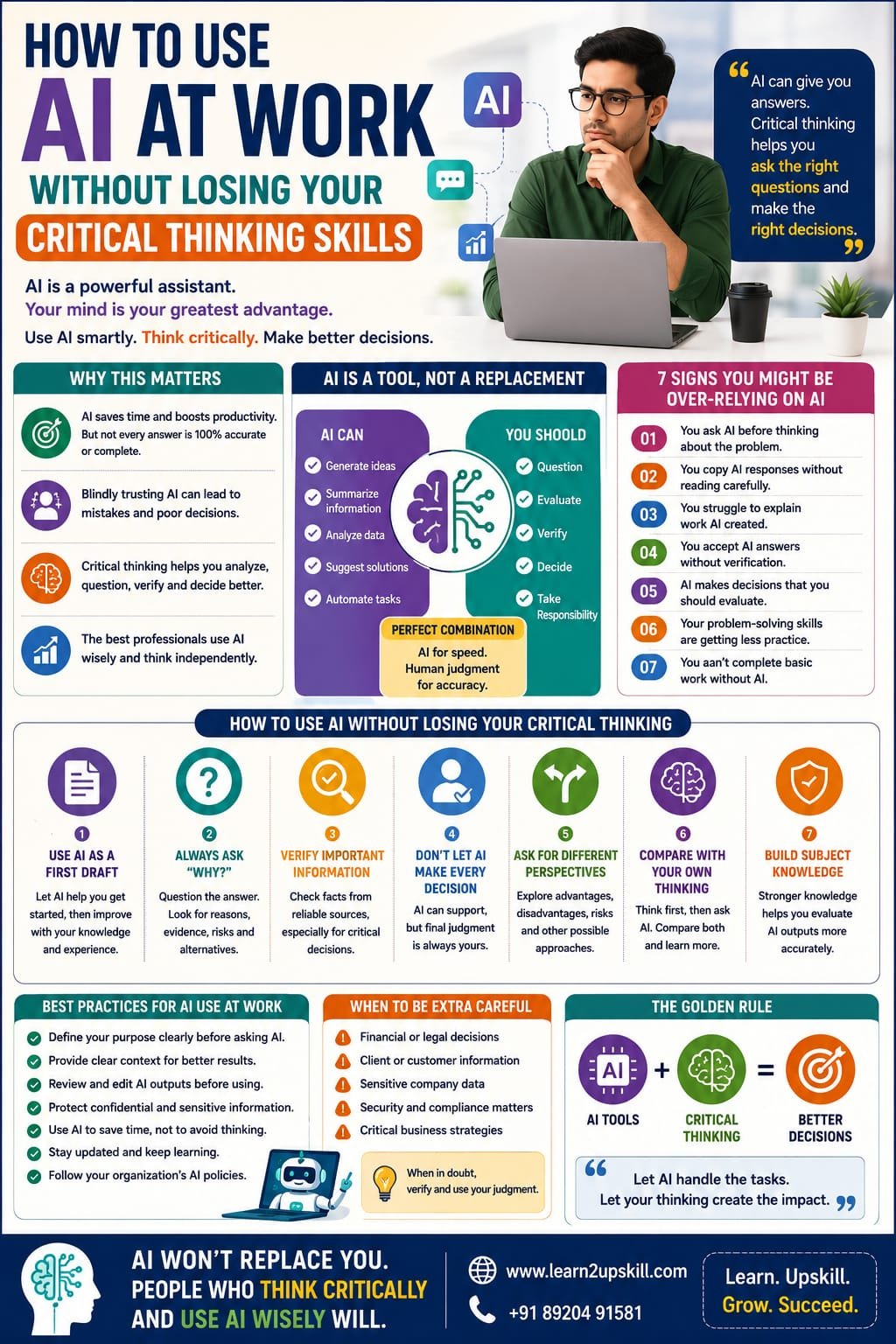
How to Use AI at Work Without Losing Your Critical Thinking Skills
Description: Learn how to use AI at work while protecting your critical thinking skills. Discover practical strategies to use AI responsibly, verify information, make better decisions and stay professionally valuable.
Suggested URL Slug:
“/use-ai-at-work-without-losing-critical-thinking/”
—
How to Use AI at Work Without Losing Your Critical Thinking Skills
Artificial Intelligence is changing the way people work.
Today, AI tools can help professionals:
– Write emails
– Summarize documents
– Analyze information
– Generate ideas
– Create presentations
– Automate repetitive tasks
– Write reports
– Solve problems faster
For many employees, AI has become a powerful workplace assistant.
But there is an important question that every professional should ask:
«If AI is doing more of our thinking, are we using our own critical thinking skills less?»
This is one of the biggest challenges of the AI era.
AI can make work faster.
But faster does not always mean better.
An AI-generated answer may sound convincing while being incomplete, inaccurate or inappropriate for a particular situation.
That is why professionals must learn an important balance:
«Use AI to improve your work—not to replace your ability to think.»
The future will not belong simply to people who know how to use AI.
It will belong to people who know when to trust AI, when to question it and when to make their own decisions.
In this guide, we will explore how to use AI effectively at work without losing your critical thinking skills.
—
What Is Critical Thinking?
Critical thinking is the ability to carefully analyze information before accepting it as true or making a decision.
A critical thinker does not simply ask:
«What is the answer?»
They also ask:
– Is this information accurate?
– Where did this information come from?
– What evidence supports it?
– Are there other possible explanations?
– What information might be missing?
– Does this answer make sense in this situation?
Critical thinking helps professionals make better decisions.
It is useful in almost every career, including:
– Business
– Finance
– Marketing
– Human Resources
– Education
– Technology
– Healthcare
– Management
In the AI era, critical thinking is becoming even more important.
—
Why AI Can Create a Critical Thinking Problem
AI is designed to provide information quickly.
That convenience can sometimes create a problem.
When people receive an answer immediately, they may stop asking questions.
For example, imagine asking AI:
«”What is the best strategy for our business?”»
AI may generate a detailed answer in seconds.
The answer may look professional.
It may contain logical points.
But does that mean it is automatically the right strategy for your business?
Not necessarily.
AI may not fully understand:
– Your company’s goals
– Your customers
– Your internal challenges
– Your financial situation
– Your market conditions
This is why professionals should avoid treating AI as an automatic decision-maker.
AI can provide ideas.
Humans must evaluate those ideas.
—
AI Is a Tool, Not a Replacement for Thinking
Think of AI like a calculator.
A calculator can perform calculations quickly.
But you still need to understand:
– What numbers to enter
– What calculation is appropriate
– Whether the final answer makes sense
AI works in a similar way.
It can help you:
– Generate
– Organize
– Summarize
– Analyze
– Suggest
But you still need to:
– Question
– Evaluate
– Verify
– Decide
The best approach is:
«AI assists. Humans think.»
—
The Biggest Risk: Blindly Trusting AI
One of the biggest mistakes professionals can make is assuming:
«”AI said it, so it must be correct.”»
AI-generated information can sometimes contain:
– Errors
– Outdated information
– Missing context
– Incorrect assumptions
– Confident but inaccurate statements
This means you should not simply copy and paste important AI-generated content into your work.
Instead, ask:
Is this accurate?
Is this relevant?
Is this complete?
Does this make sense?
Should I verify this information?
These questions are the foundation of critical thinking.
—
How to Use AI Without Losing Critical Thinking Skills
Here are practical strategies for professionals.
—
- Use AI as Your First Draft, Not Your Final Answer
AI is excellent for creating a starting point.
For example, you can ask AI to help you:
– Create an outline
– Generate ideas
– Draft an email
– Summarize a document
– Prepare presentation points
But don’t assume the first output is perfect.
Review it.
Improve it.
Add your own knowledge.
Ask yourself:
«What would I change based on my experience and understanding?»
Your expertise should improve the AI output.
—
- Always Ask “Why?”
Critical thinkers do not simply accept answers.
They ask why.
For example, if AI recommends a particular strategy, ask:
«Why would this strategy work?»
«What evidence supports this recommendation?»
«What are the possible risks?»
«Are there alternative approaches?»
You can even ask the AI these questions.
Instead of using AI only to generate answers, use it to explore different perspectives.
—
- Verify Important Information
Not every AI-generated answer requires the same level of verification.
For simple brainstorming, extensive verification may not be necessary.
But for important professional decisions involving areas such as:
– Finance
– Legal matters
– Business strategy
– Security
– Customer information
verification becomes essential.
Use reliable sources and organizational information when accuracy matters.
Remember:
«The more important the decision, the more carefully the information should be checked.»
—
- Don’t Let AI Make Every Decision
AI can support decision-making.
But it should not automatically replace human judgment.
Imagine AI recommends:
«”Reduce the budget for a particular department.”»
Before making that decision, a manager should consider:
– Business priorities
– Employee impact
– Long-term consequences
– Financial data
– Alternative solutions
AI may provide useful analysis.
But humans understand the wider context and consequences.
—
- Ask AI for Different Perspectives
One of the best ways to use AI for critical thinking is to avoid asking only:
«”Give me the answer.”»
Instead, ask:
– What are the advantages?
– What are the disadvantages?
– What could go wrong?
– What assumptions am I making?
– What alternative solutions exist?
This turns AI into a thinking partner rather than an answer machine.
—
- Compare AI’s Answer With Your Own Thinking
Before asking AI for a solution, try thinking about the problem yourself.
Write down your ideas first.
Then compare your thinking with the AI response.
Ask:
– What did I miss?
– What did AI miss?
– Where do we agree?
– Where do we disagree?
This approach helps you continue developing your own problem-solving ability.
—
- Learn the Subject, Not Just the Prompt
Knowing how to write prompts is useful.
But prompting alone is not enough.
Imagine using AI to analyze financial data.
If you don’t understand basic finance, you may not recognize when the AI makes a mistake.
The same applies to:
– Marketing
– Data analysis
– Cybersecurity
– Human resources
– Business strategy
The stronger your subject knowledge, the better you can evaluate AI outputs.
This is why:
«AI skills should complement professional knowledge—not replace it.»
—
A Simple Example: AI and Email Writing
Suppose you are frustrated with a colleague and ask AI to write an email.
AI may create a polite and professional message.
That’s helpful.
But you still need to decide:
– Should this email be sent?
– Is email the best communication method?
– Is the information accurate?
– Does the tone match the relationship?
– Could this situation be solved through a conversation instead?
AI can write the words.
But professional judgment decides what should happen next.
—
AI Can Make You More Productive—If Used Correctly
AI can save valuable time.
For example, instead of spending one hour creating the first draft of a report, AI may help create a starting structure more quickly.
You can then spend more time on:
– Analysis
– Strategy
– Problem-solving
– Creativity
– Decision-making
This is one of the smartest ways to use AI.
Don’t use saved time simply to do less thinking.
Use saved time to do better thinking.
—
The Difference Between AI Assistance and AI Dependence
There is an important difference.
AI Assistance
You use AI to:
– Save time
– Generate ideas
– Improve productivity
– Organize information
But you remain responsible for the final result.
AI Dependence
You:
– Ask AI before thinking
– Accept answers without checking
– Copy outputs without understanding
– Let AI make every decision
The first approach builds productivity.
The second can weaken professional skills.
—
7 Warning Signs You May Be Becoming Too Dependent on AI
Ask yourself honestly.
- Do you ask AI questions before trying to think about the problem?
- Do you copy AI responses without reading them carefully?
- Do you struggle to explain work that AI created?
- Do you accept AI answers without verification?
- Do you use AI for decisions you should personally evaluate?
- Are your own problem-solving skills getting less practice?
- Would you be unable to complete basic work without AI?
If the answer is yes to several of these questions, it may be time to rebalance how you use AI.
—
How Managers Can Encourage Critical Thinking With AI
Organizations also have an important role.
Managers should encourage employees to use AI responsibly.
Instead of asking employees:
«”Did you use AI?”»
A better question may be:
«”How did you evaluate the AI output?”»
Teams can encourage employees to:
– Explain their reasoning
– Verify important information
– Identify risks
– Discuss alternatives
– Document major decisions
This creates a workplace culture where AI supports thinking rather than replacing it.
—
AI and Critical Thinking in Meetings
AI tools can summarize meetings and generate action items.
This can be useful.
But participants should still think critically.
Before accepting an AI-generated meeting summary, ask:
– Did it capture the important decisions?
– Is any context missing?
– Are the action items correct?
– Was anything misunderstood?
AI summaries can save time.
Human review protects accuracy.
—
AI and Creativity: Don’t Let AI Think of Everything First
AI can generate hundreds of ideas quickly.
But if you always begin with AI-generated ideas, your own creativity may get less practice.
Try this approach:
Step 1: Think of your own ideas.
Step 2: Ask AI for additional ideas.
Step 3: Compare both.
Step 4: Create a stronger solution.
This allows AI to expand your thinking instead of replacing it.
—
A Practical AI Workflow for Professionals
Here is a simple five-step process.
Step 1: Think
Understand the problem yourself.
Step 2: Ask
Use AI to generate ideas, information or possible solutions.
Step 3: Analyze
Evaluate the response critically.
Step 4: Verify
Check important facts and information.
Step 5: Decide
Use your professional judgment to make the final decision.
Remember this formula:
«Think → Ask → Analyze → Verify → Decide»
This is a powerful way to use AI responsibly at work.
—
The Importance of Human Judgment
AI can process enormous amounts of information.
But professional decisions often involve factors that are difficult to reduce to simple answers.
For example:
– Ethics
– Human emotions
– Organizational culture
– Relationships
– Personal circumstances
– Long-term consequences
A manager deciding how to handle an employee conflict needs more than information.
They need empathy and judgment.
A business leader making a strategic decision needs more than predictions.
They need experience and responsibility.
AI can support these decisions.
But human judgment remains essential.
—
Skills You Should Develop Alongside AI Skills
The future professional should not focus only on learning AI tools.
You should also develop:
🧠 Critical Thinking
The ability to analyze and question information.
💬 Communication Skills
The ability to explain ideas clearly.
🤝 Emotional Intelligence
The ability to understand people and emotions.
🔍 Problem-Solving
The ability to identify and solve challenges.
🎯 Decision-Making
The ability to choose the right action.
🔄 Adaptability
The ability to learn and adjust to change.
The strongest professionals will combine:
«AI Skills + Human Skills + Professional Knowledge»
—
How Students Can Use AI Without Becoming Dependent
Students also need to develop healthy AI habits.
AI can help students:
– Understand difficult concepts
– Create study plans
– Generate practice questions
– Explain topics differently
But students should avoid using AI simply to complete assignments without understanding the work.
A better approach is:
- Try the problem yourself.
- Ask AI for guidance.
- Compare your answer.
- Understand your mistakes.
- Try again independently.
The goal should be learning—not simply finishing the assignment.
—
Common Mistakes to Avoid
❌ Copying AI Content Without Understanding It
If you cannot explain the content, you should not claim it as your work.
—
❌ Trusting Every AI Answer
AI can be useful and still make mistakes.
—
❌ Sharing Confidential Information
Never enter sensitive company or customer information into AI tools unless you are authorized and it complies with your organization’s policies.
—
❌ Using AI Instead of Learning
AI should support your learning journey.
—
❌ Ignoring Your Own Experience
Your experience and professional understanding are valuable.
Use them.
—
❌ Asking AI to Make Every Important Decision
Use AI for support, but maintain human responsibility.
—
Frequently Asked Questions
Can AI replace critical thinking?
AI can support analysis and generate ideas, but professionals still need critical thinking to evaluate information, understand context and make responsible decisions.
How can I use AI responsibly at work?
Use AI as an assistant, verify important information, protect confidential data, follow workplace policies and review outputs before using them.
Why is critical thinking important in the AI era?
AI can generate large amounts of information quickly. Critical thinking helps professionals identify errors, question assumptions and make better decisions.
Should employees trust AI-generated information?
AI-generated information should be reviewed appropriately, especially when accuracy is important or decisions have significant consequences.
What skills are important alongside AI skills?
Critical thinking, communication, emotional intelligence, problem-solving, adaptability and professional knowledge remain highly valuable.
—
Conclusion
AI is one of the most powerful workplace technologies of our time.
Used correctly, it can help professionals become:
– Faster
– More productive
– More creative
– Better organized
But there is one thing we should never outsource completely:
«Our ability to think.»
The best professionals will not compete against AI by refusing to use it.
They will learn how to use it intelligently.
They will ask better questions.
They will verify important information.
They will challenge assumptions.
And they will use human judgment to make better decisions.
The future of work is not:
«Human vs AI»
It is:
«Human Intelligence + Artificial Intelligence»
Use AI to save time.
Use critical thinking to create value.
And use both to become a smarter, more capable professional.
—
🚀 Build Future-Ready AI and Professional Skills With Learn2Upskill
The workplace is changing rapidly, and professionals need the right combination of AI knowledge, critical thinking and human skills.
Develop practical, career-focused skills with Learn2Upskill.
🌐 www.coral-kudu-326218.hostingersite.com
📞 Contact Us: +91 89204 91581
Learn. Upskill. Grow. Succeed.
—
Leave a Reply