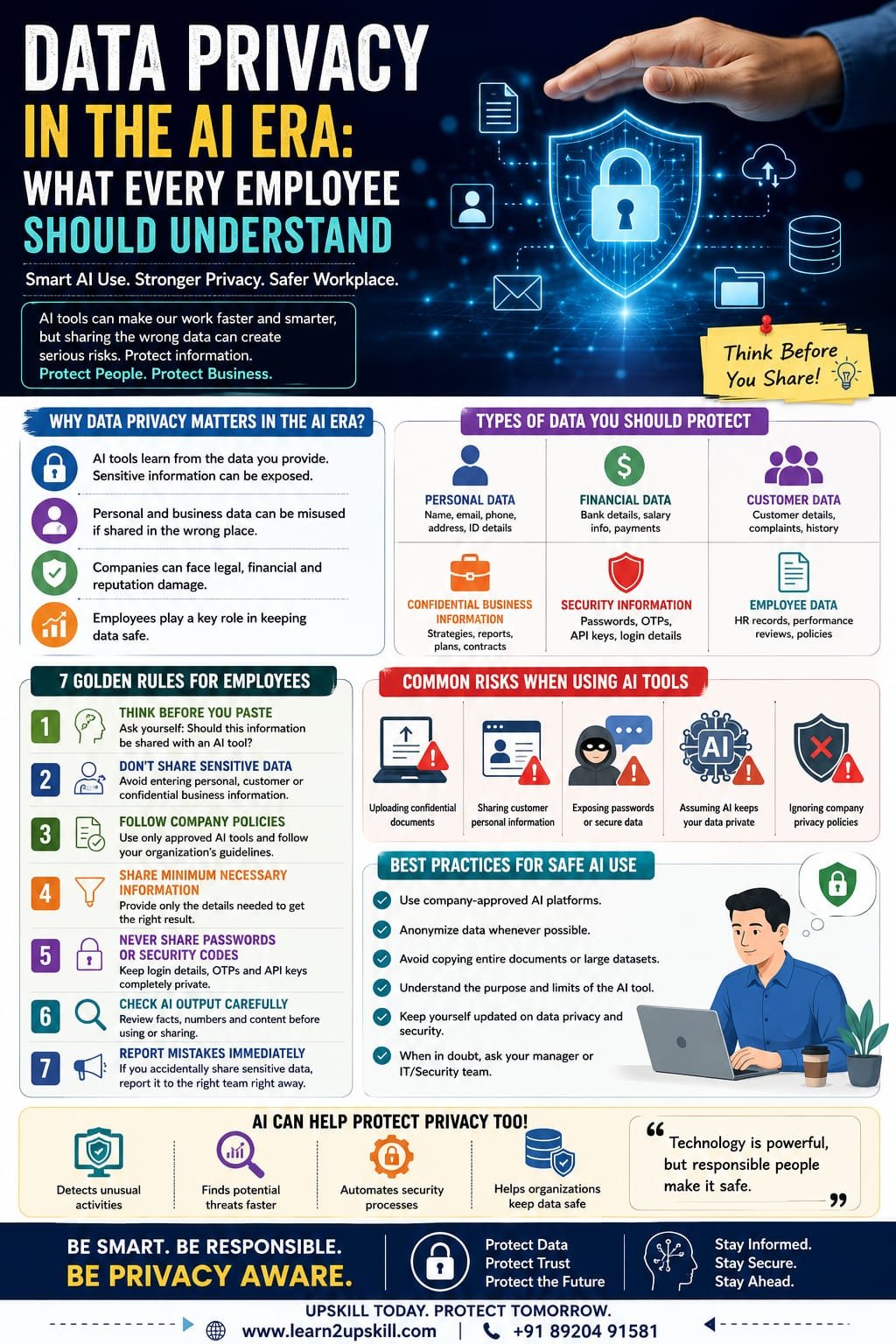
Data Privacy in the AI Era: What Every Employee Should Understand
Learn why data privacy is important in the AI era and what every employee should understand about protecting personal, customer and business information when using AI tools.
Suggested URL Slug:
“/data-privacy-in-the-ai-era/”
—
Data Privacy in the AI Era: What Every Employee Should Understand
Artificial intelligence is changing the way people work.
Employees now use AI tools to write emails, summarize documents, analyze information, create presentations, generate reports, brainstorm ideas and automate repetitive tasks.
These tools can improve productivity and help employees work more efficiently.
But there is an important question that every employee should ask before using AI:
«What happens to the information I share with an AI tool?»
This question is becoming increasingly important.
AI can be incredibly useful, but careless use of AI can create serious privacy and security risks. Employees may accidentally share sensitive customer information, confidential business data, personal details or internal company information with tools that are not approved for that purpose.
In the AI era, data privacy is no longer only the responsibility of the IT or cybersecurity department.
Every employee has a role to play.
Whether you work in HR, finance, marketing, sales, customer service, operations or administration, understanding the basics of data privacy can help protect both you and your organization.
This guide explains what every employee should understand about data privacy in the AI era, the risks of sharing information with AI tools and how to use AI more responsibly in the workplace.
—
What Is Data Privacy?
Data privacy refers to the proper handling, protection and use of personal and sensitive information.
It involves questions such as:
– Who can access the information?
– Why is the information being collected?
– How is the information being used?
– Where is the information stored?
– Who can share it?
– How long is it kept?
– How is it protected?
Personal information can include details such as:
– Names
– Phone numbers
– Email addresses
– Home addresses
– Identification information
– Financial information
– Employee records
– Customer information
Organizations may also have confidential information that is not necessarily personal data but still requires protection.
For example:
– Business strategies
– Financial reports
– Internal documents
– Customer lists
– Product plans
– Contracts
– Passwords
– Source code
– Research
– Company policies
The important point is simple:
«Not all information should be shared everywhere.»
—
Why Is Data Privacy More Important in the AI Era?
Traditional workplace software usually has clear systems for storing and managing company information.
AI introduces additional questions.
When employees use an AI tool, they may copy and paste information into prompts without thinking carefully about the consequences.
For example:
«”Please summarize this confidential customer complaint.”»
Or:
«”Analyze this employee performance report.”»
Or:
«”Rewrite this internal financial document.”»
These requests may contain information that should not be entered into an external or unapproved AI system.
The problem is not necessarily AI itself.
The problem is how people use it.
AI tools can process information quickly, which makes them extremely useful. But employees must understand their organization’s policies and use appropriate safeguards before sharing business or personal information.
—
What Types of Data Should Employees Protect?
Every employee should learn to recognize sensitive information.
- Personal Data
Personal data can include information connected to an identifiable individual.
Examples include:
– Full name
– Phone number
– Email address
– Home address
– Employee identification details
– Customer records
Employees should avoid unnecessarily sharing personal information with AI tools.
—
- Financial Information
Financial information may include:
– Bank details
– Payment information
– Salary information
– Financial reports
– Tax-related information
– Business revenue data
This information can be highly sensitive.
—
- Customer Information
Customer data can include:
– Contact details
– Purchase history
– Complaints
– Account information
– Support conversations
Employees should follow company policies before using customer information in AI tools.
—
- Confidential Business Information
This can include:
– Business strategies
– Internal discussions
– Product plans
– Pricing strategies
– Contracts
– Company reports
Just because information is useful for an AI prompt does not mean it should be entered into one.
—
- Passwords and Security Information
Employees should never enter passwords, authentication codes, secret keys or sensitive login information into an AI chatbot.
This is a basic but essential security practice.
—
How Can AI Create Data Privacy Risks?
Let’s look at some common situations.
Risk 1: Copying Sensitive Information Into AI Prompts
An employee may copy an entire confidential document into an AI tool and ask:
«”Please summarize this.”»
This may expose information that should remain protected.
A safer approach may be to use an approved company AI system or remove sensitive information before requesting assistance.
—
Risk 2: Sharing Customer Information
Imagine a customer service employee enters a customer’s full details and complaint into a public AI tool.
Even if the employee’s intention is simply to improve the response, the information may not have been appropriate to share.
Instead, remove unnecessary identifying information where possible.
For example:
Instead of:
«”Customer Rahul Sharma, phone number XXXXX, living at XXXXX, complained about…”»
Use a safer, anonymized example such as:
«”A customer reported that their product delivery was delayed. Please help me draft a polite response.”»
The AI can still help without receiving unnecessary personal information.
—
Risk 3: Uploading Confidential Documents
Employees may upload documents to AI platforms without checking whether the platform is approved by their organization.
Documents could contain:
– Internal strategies
– Customer information
– Financial information
– Employee details
Before uploading any workplace document, ask:
«Is this AI tool approved for this type of information?»
If you don’t know, ask your manager, IT department or data security team.
—
Risk 4: Trusting AI Without Checking the Output
Data privacy is not the only risk.
AI-generated content can also contain:
– Incorrect information
– Misleading statements
– Outdated information
– Unintended confidential details
– Fabricated references
Employees should always review important AI-generated work.
AI can assist.
Human responsibility remains essential.
—
The Difference Between Public and Company-Approved AI Tools
Not every AI tool is designed for the same purpose.
Some organizations provide approved AI platforms with specific security and privacy controls.
Other publicly available tools may have different terms, settings and data-handling practices.
Employees should understand their organization’s rules.
Before using an AI tool for work, ask:
Is this tool approved by my organization?
What type of information can I enter?
Can I upload company documents?
Does the organization have a policy for using AI?
Should sensitive information be anonymized?
When in doubt:
«Ask before you share.»
That simple habit can prevent serious mistakes.
—
The Importance of Responsible AI Use
Responsible AI means using artificial intelligence thoughtfully and appropriately.
For employees, responsible AI use includes:
– Protecting sensitive information
– Following company policies
– Checking AI-generated content
– Avoiding unnecessary sharing of personal data
– Using approved tools
– Understanding the limitations of AI
– Maintaining human responsibility
AI should help employees become more productive.
It should not become an excuse for careless decision-making.
—
7 Data Privacy Rules Every Employee Should Follow
Rule 1: Think Before You Paste
Before copying information into an AI tool, stop for a moment.
Ask:
«”Should this information be shared?”»
This simple pause can prevent many privacy mistakes.
—
Rule 2: Don’t Share Sensitive Personal Information
Avoid entering unnecessary personal details into AI prompts.
Remove information such as:
– Names
– Phone numbers
– Addresses
– Account numbers
– Identification details
Use anonymized examples whenever possible.
—
Rule 3: Follow Your Company’s AI Policy
Your organization may have specific rules about:
– Approved AI tools
– Confidential information
– Customer data
– Document uploads
– AI-generated content
Follow these guidelines carefully.
—
Rule 4: Use the Minimum Information Necessary
You often don’t need to provide an AI tool with an entire document.
Give only the information required to complete the task.
For example, instead of uploading a complete confidential report, you might provide a general description of the writing style or structure you need.
—
Rule 5: Never Share Passwords or Security Codes
Do not enter:
– Passwords
– One-time passwords
– Authentication codes
– API keys
– Secret credentials
into AI tools or chatbots.
These should always be protected.
—
Rule 6: Check AI Output Before Using It
AI-generated content should not automatically be trusted.
Review:
– Facts
– Names
– Numbers
– Recommendations
– Tone
– Confidential information
The employee using the output remains responsible for the final result.
—
Rule 7: Report Mistakes Quickly
If you accidentally share sensitive information with an unapproved system, don’t hide the mistake.
Report it quickly through the appropriate internal process.
Fast reporting can help an organization assess and manage the situation.
—
Data Privacy and AI in Different Departments
AI privacy is relevant to almost every department.
HR
HR professionals may handle:
– Employee records
– Resumes
– Salary information
– Performance reviews
These documents can contain highly sensitive information.
AI should be used according to appropriate organizational policies and privacy requirements.
—
Finance
Finance teams may work with:
– Revenue data
– Financial reports
– Banking information
– Salary information
Financial data should be handled carefully.
—
Marketing
Marketing teams may use AI for:
– Content creation
– Campaign ideas
– Customer analysis
– Social media planning
Customer data should not be shared unnecessarily.
—
Customer Service
Customer service employees may work with personal customer information.
When using AI for drafting responses, anonymizing customer details can help reduce unnecessary privacy risks.
—
Sales
Sales teams may have access to:
– Customer information
– Contracts
– Pricing
– Business opportunities
Confidential business information should be protected.
—
Data Privacy vs Cybersecurity: What’s the Difference?
These two concepts are related but not exactly the same.
Data Privacy
Data privacy focuses on the proper use and handling of information.
Cybersecurity
Cybersecurity focuses on protecting systems, networks and data from threats such as:
– Hacking
– Phishing
– Malware
– Unauthorized access
A strong organization needs both.
For example:
A company might have excellent cybersecurity technology.
But if an employee accidentally shares confidential information in an inappropriate place, a privacy problem can still occur.
This is why employee awareness is so important.
—
How AI Can Actually Help Data Privacy
AI is not only a source of risk.
When used responsibly, AI can also support privacy and security work.
Organizations may use AI to help with:
– Detecting unusual activity
– Identifying potential threats
– Monitoring security events
– Automating repetitive security tasks
– Analyzing large volumes of information
However, AI systems themselves must also be designed and used responsibly.
The goal is not to avoid technology.
The goal is to use technology intelligently.
—
Common AI and Data Privacy Mistakes Employees Should Avoid
❌ Copying confidential documents into public tools
Always check whether the tool is approved.
—
❌ Sharing customer information unnecessarily
Use anonymized information whenever possible.
—
❌ Assuming every AI tool handles data the same way
Different tools and organizational systems may have different privacy settings and policies.
—
❌ Trusting AI without reviewing the result
Always check important outputs.
—
❌ Ignoring company policies
AI policies exist to help employees use technology safely.
—
❌ Sharing passwords or security information
Never provide sensitive credentials to an AI tool.
—
A Simple AI Privacy Checklist Before Using Any Tool
Before entering workplace information into an AI system, ask yourself:
✅ Is this AI tool approved for work?
✅ Does this information contain personal data?
✅ Does it contain confidential business information?
✅ Can I remove names or identifying details?
✅ Do I need to share the complete document?
✅ Have I followed company policy?
✅ Will I review the AI output before using it?
If you are unsure about any answer:
Stop and ask for guidance.
—
How Employees Can Build Better Data Privacy Awareness
Data privacy awareness is a skill.
Employees can improve it by:
Learning basic cybersecurity
Understand common threats such as phishing and social engineering.
Understanding company policies
Know what information can and cannot be shared.
Staying updated
Technology changes quickly, and workplace practices may also change.
Asking questions
If you don’t understand whether a tool is safe to use, ask.
Practicing responsible AI use
Use AI to support your work without unnecessarily exposing sensitive information.
—
The Future of Data Privacy in the AI Workplace
AI will continue to become part of everyday work.
Employees may increasingly use AI assistants to:
– Write
– Analyze
– Research
– Organize
– Automate
– Communicate
This means privacy awareness will become an increasingly important workplace skill.
Future-ready employees will need more than technical knowledge.
They will need to understand:
AI + Data + Privacy + Security + Human Judgment
The most valuable employees will not simply know how to use new technology.
They will know how to use it responsibly.
—
Frequently Asked Questions
What is data privacy in AI?
Data privacy in AI refers to protecting personal, confidential and sensitive information when AI systems collect, process or use data.
Can employees use AI tools at work?
Employees should follow their organization’s policies and use approved tools for appropriate tasks.
What information should not be entered into AI tools?
Employees should avoid sharing sensitive information unnecessarily, including passwords, authentication codes, confidential business information and personal data that is not approved for sharing.
Why is anonymizing data important?
Anonymizing information can reduce unnecessary exposure of personal details while still allowing an AI tool to help with a general task.
Is cybersecurity the same as data privacy?
No. Cybersecurity focuses on protecting systems and information from threats, while data privacy focuses on how personal and sensitive information is collected, used and handled.
Who is responsible for data privacy in an organization?
Data privacy is a shared responsibility. Organizations need appropriate policies and systems, while employees need to follow procedures and handle information responsibly.
—
Conclusion
Artificial intelligence is creating exciting opportunities for employees and businesses.
It can improve productivity, automate repetitive work and help people complete tasks more efficiently.
But technology should always be used responsibly.
In the AI era, every employee should understand the importance of protecting:
– Personal information
– Customer data
– Employee information
– Financial information
– Confidential business information
– Passwords and security credentials
The most important habit is also the simplest:
«Think before you share.»
Before entering information into an AI tool, ask whether the information is necessary, appropriate and permitted under your organization’s policies.
AI can be a powerful workplace assistant.
But protecting privacy requires something AI cannot replace:
Human judgment and responsibility.
The future workplace will increasingly depend on professionals who can combine technology skills with responsible decision-making.
Use AI smartly. Protect data carefully. Stay privacy-aware.
—
🔐 Build Future-Ready Digital Skills With Learn2Upskill
The modern workplace requires more than technical knowledge.
Professionals need skills in AI, cybersecurity, data awareness, communication and responsible technology use.
Develop practical, career-ready skills with Learn2Upskill.
🌐 www.coral-kudu-326218.hostingersite.com
📞 Contact Us: +91 89204 91581
Learn. Upskill. Grow. Succeed.
—
Leave a Reply