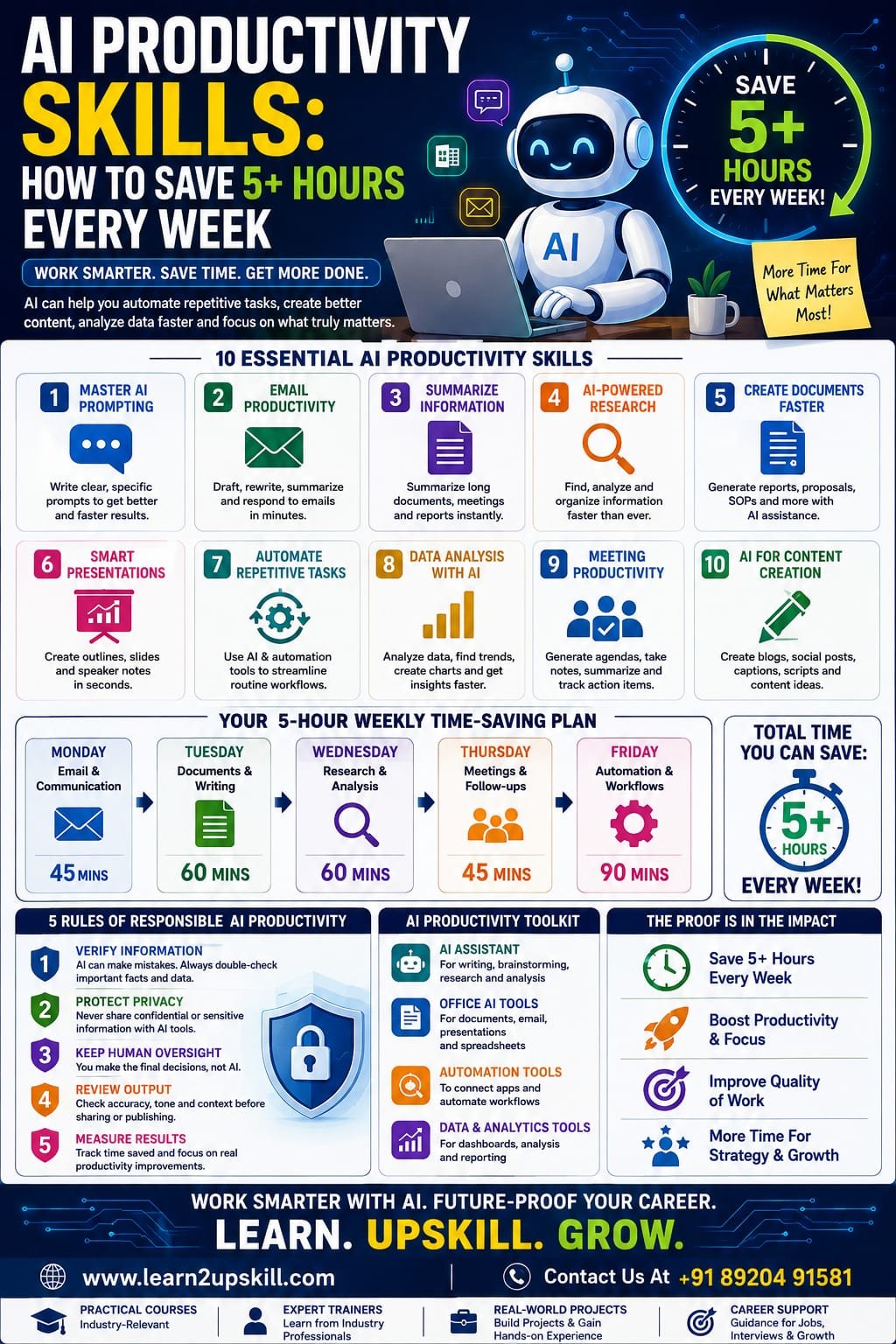
AI Productivity Skills: How to Save 5+ Hours Every Week
Learn how AI productivity skills can help you save 5+ hours every week. Discover practical AI tools, automation techniques, prompts and workflows for smarter work.
Suggested URL Slug:
“ai-productivity-skills-save-5-hours-every-week”
—
Introduction
What if you could get back 5 or more hours every week without working longer hours?
For many professionals, the problem isn’t a lack of effort. It’s the amount of time spent on repetitive activities such as writing emails, preparing documents, searching for information, creating reports, organizing meetings, summarizing information and performing routine administrative work.
This is where AI productivity skills can make a significant difference.
Artificial intelligence is increasingly becoming a practical workplace assistant. Instead of thinking about AI only as a technology for developers or data scientists, professionals in finance, HR, marketing, sales, education, operations and management can use AI to reduce repetitive work and focus more on higher-value activities.
The key isn’t simply learning dozens of AI tools.
The real skill is learning how to identify time-consuming tasks and use AI effectively to improve the workflow.
In this guide, we’ll explore practical AI productivity skills that can help you save 5+ hours every week.
—
What Are AI Productivity Skills?
AI productivity skills are the abilities required to use artificial intelligence effectively to complete work faster, improve quality and reduce repetitive tasks.
These skills include:
– Writing effective AI prompts
– Using Generative AI tools
– Summarizing information
– Creating documents
– Research assistance
– Data analysis
– Email assistance
– Meeting summarization
– Workflow automation
– Content creation
– Task organization
– AI-assisted decision-making
– Evaluating AI-generated information
The objective isn’t to let AI do everything.
Instead:
«Use AI for repetitive work so you can spend more time on work that requires human judgment.»
—
Why AI Productivity Matters in the Modern Workplace
A typical professional may spend several hours each week on tasks that don’t directly create strategic value.
For example:
– Writing routine emails
– Formatting reports
– Searching for information
– Summarizing meetings
– Creating presentation drafts
– Rewriting documents
– Preparing repetitive reports
– Organizing notes
– Creating social media drafts
– Copying information between systems
Individually, these tasks may seem small.
Together, they can consume a surprising amount of time.
AI can help reduce the time spent on many of these activities.
The biggest productivity gains often come from combining several small improvements into one AI-powered workflow.
—
- Master AI Prompting
One of the most useful AI productivity skills is prompt engineering.
The quality of your instructions can significantly influence the usefulness of an AI response.
Instead of writing:
«”Write an email.”»
Give AI more context:
«”Write a professional follow-up email to a client who attended our product demonstration yesterday. Keep it under 150 words, thank them for their time, summarize the next steps and maintain a friendly professional tone.”»
The second instruction gives the AI:
– Context
– Audience
– Objective
– Length
– Tone
– Expected output
A simple prompt formula
Try:
Role + Context + Task + Requirements + Format
For example:
«”Act as a business analyst. Review the following sales information. Identify the three biggest trends, explain what they could mean for the business and present the findings as five concise bullet points.”»
Better prompts can reduce the amount of editing and follow-up required.
Potential time saving
10–20 minutes per day
—
- Use AI for Email Productivity
Email can consume a large portion of the working day.
AI can help with:
– Drafting emails
– Rewriting emails
– Summarizing long messages
– Changing tone
– Creating follow-ups
– Extracting action items
– Preparing responses
– Translating messages
– Making emails more concise
For example, instead of spending 15 minutes writing a difficult response, you can provide AI with the situation and ask for three versions:
Professional
Friendly
Concise
You can then select and edit the version that best fits your situation.
Important rule
Never blindly send AI-generated emails.
Always review:
– Names
– Dates
– Numbers
– Commitments
– Tone
– Confidential information
AI should assist your communication—not replace your judgment.
—
- Let AI Summarize Information
Professionals often spend significant time reading long documents, meeting notes, reports and research material.
AI can help summarize information into:
– Key points
– Action items
– Decisions
– Risks
– Questions
– Deadlines
– Executive summaries
For example, after a long meeting, you could organize your notes and ask AI to produce:
Meeting Summary
Key Decisions
Action Items
Responsible Person
Deadline
This can turn a messy collection of notes into a structured document quickly.
Potential time saving
30–60 minutes per week
—
- Use AI for Research
Research is another area where AI can help accelerate the early stages of work.
You can use AI to:
– Generate research questions
– Organize topics
– Explain unfamiliar concepts
– Compare ideas
– Create research frameworks
– Summarize information
– Identify areas requiring further investigation
However, AI-generated information should not automatically be treated as fact.
For important business, financial, legal, academic or technical work:
Verify the information using reliable sources.
AI can accelerate research, but critical thinking remains essential.
—
- Create Documents Faster
Professionals frequently create:
– Reports
– Proposals
– Business plans
– SOPs
– Project updates
– Meeting agendas
– Training material
– Job descriptions
– Internal communications
Instead of starting from a blank page, AI can help create a first draft.
A useful workflow is:
Idea → AI outline → AI draft → Human review → Final document
This is often much faster than:
Blank page → staring at screen → typing → rewriting → formatting
Potential time saving
30–90 minutes per week
—
- Use AI for Presentations
Creating presentations can also become faster with AI.
AI can help you:
– Develop presentation structures
– Generate slide ideas
– Summarize reports into presentation points
– Create speaker notes
– Rewrite complex information
– Suggest examples
– Develop presentation narratives
For example, you can give AI a 10-page business report and ask it to create a proposed 10-slide executive presentation structure.
You still need to verify the content and design the final presentation appropriately, but the initial planning stage can become much faster.
—
- Automate Repetitive Tasks
This is where AI productivity can become particularly powerful.
Start by identifying tasks that you perform repeatedly.
Ask yourself:
«”What do I do every week that follows almost the same process?”»
Examples include:
– Weekly reports
– Customer follow-ups
– Lead categorization
– Data entry
– Meeting summaries
– Content scheduling
– Invoice processing
– Spreadsheet updates
– Status reports
– Routine notifications
Some of these workflows can be partially or fully automated using AI and automation platforms.
The basic automation formula
Trigger → AI processing → Action
For example:
New customer inquiry
↓
AI analyzes inquiry
↓
Categorizes the lead
↓
Creates a response draft
↓
Adds information to a CRM
Instead of manually handling every step, AI can support the workflow.
—
- Use AI for Data Analysis
You don’t need to be a data scientist to benefit from AI-assisted analytics.
AI can help professionals work with:
– Excel spreadsheets
– CSV files
– Sales data
– Survey results
– Customer information
– Marketing data
– Financial data
It can assist with:
– Finding patterns
– Identifying trends
– Creating formulas
– Explaining calculations
– Generating summaries
– Suggesting charts
– Identifying unusual values
However, professionals still need to understand the underlying data.
AI can help analyze data, but you remain responsible for interpreting the business meaning.
—
- Create a Personal AI Assistant Workflow
One of the best ways to develop AI productivity skills is to create a repeatable personal workflow.
For example:
Morning
Use AI to:
– Review priorities
– Organize tasks
– Summarize important information
– Prepare for meetings
During the Workday
Use AI for:
– Writing
– Research
– Analysis
– Brainstorming
– Documentation
End of Day
Use AI to:
– Summarize completed work
– Organize notes
– Identify unfinished tasks
– Prepare tomorrow’s priorities
This doesn’t mean handing your entire day over to AI.
It means using AI as a productivity layer around your existing workflow.
—
- Learn AI-Powered Spreadsheet Productivity
For professionals working with Excel, AI can make many spreadsheet tasks easier.
AI can help with:
– Formula creation
– Formula explanations
– Data cleaning
– Data summaries
– Chart suggestions
– Data analysis
– Dashboard planning
– Identifying trends
For example, instead of spending time trying to remember a complicated Excel formula, you can describe the result you need and use AI to help construct the formula.
But you should still understand what the formula does before using it in important work.
AI + Excel = Powerful combination
For professionals in:
– Finance
– Operations
– Sales
– HR
– Business analysis
– Marketing
learning Excel + AI can be a highly practical productivity skill.
—
- Improve Your Meeting Productivity
Meetings generate another category of repetitive work.
AI can assist with:
– Meeting agendas
– Notes
– Summaries
– Action items
– Follow-up messages
– Decision tracking
Imagine finishing a one-hour meeting and having a structured summary ready within minutes.
Instead of spending another 30 minutes organizing notes, you can spend that time executing the decisions made during the meeting.
—
- Use AI for Content Creation
AI productivity tools can accelerate content workflows for:
– Marketing teams
– Social media managers
– Bloggers
– Entrepreneurs
– Teachers
– Trainers
– Communication teams
AI can help generate:
– Topic ideas
– Content outlines
– Headlines
– First drafts
– Social media captions
– Email newsletters
– Video scripts
– FAQs
The best approach is:
AI generates → Human improves → Brand approves
AI should support originality and efficiency rather than produce generic content without human editing.
—
- Build an AI Productivity System Instead of Using Random Tools
One common mistake is collecting too many AI tools.
You don’t need 30 applications.
Start with a small toolkit.
For example:
Tool 1: AI Assistant
For:
– Writing
– Brainstorming
– Research
– Analysis
Tool 2: Productivity/Office AI
For:
– Documents
– Presentations
– Spreadsheets
Tool 3: Automation Platform
For:
– Connecting applications
– Automating repetitive processes
– Trigger-based workflows
Tool 4: Data/Analytics Tool
For:
– Dashboards
– Data analysis
– Reporting
The objective is not:
“How many AI tools do I know?”
The objective is:
“How much useful work can I accomplish with the tools I know?”
—
- A Practical 5-Hour Weekly AI Productivity Plan
Let’s make the goal measurable.
Monday — Email & Communication
Use AI to improve email drafting and summarization.
Target saving: 45 minutes
Tuesday — Documents
Use AI for reports, proposals and document outlines.
Target saving: 60 minutes
Wednesday — Research & Analysis
Use AI to organize research and analyze information.
Target saving: 60 minutes
Thursday — Meetings
Use AI to create agendas, summaries and action items.
Target saving: 45 minutes
Friday — Automation
Identify one repetitive process and improve it with AI.
Target saving: 90 minutes
Total potential time recovered:
5 hours per week
That’s approximately:
20+ hours per month
And more than:
250 hours per year
Even if your actual saving is lower, the exercise demonstrates an important principle:
«Small AI productivity improvements can add up to significant time savings.»
—
- The 5 Rules of Responsible AI Productivity
Saving time shouldn’t mean sacrificing quality.
Follow these five rules.
Rule 1: Verify Important Information
AI can make mistakes.
Rule 2: Protect Confidential Information
Don’t enter sensitive company, customer or personal information into AI tools without understanding the organization’s policies.
Rule 3: Keep Human Oversight
AI should support important decisions rather than automatically make every decision.
Rule 4: Review AI-Generated Content
Check facts, numbers, tone and context.
Rule 5: Measure Results
Don’t assume an AI tool is useful simply because it looks impressive.
Ask:
Did it actually save time?
Did it improve quality?
Did it reduce repetitive work?
—
- AI Productivity Skills Every Professional Should Learn
If you’re starting from scratch, focus on these skills:
- AI literacy
- Prompt engineering
- Generative AI
- AI-assisted research
- AI writing and communication
- AI data analysis
- Workflow automation
- AI-powered productivity tools
- Critical evaluation of AI output
- Responsible AI usage
These skills can be useful across industries.
Whether you work in finance, HR, marketing, education, sales, operations or IT, the fundamentals are similar.
—
AI Productivity Is About Working Smarter, Not Simply Faster
There is an important distinction between being busy and being productive.
If AI helps you write 50 emails instead of 30, you may simply become busier.
But if AI helps you eliminate unnecessary repetitive work, organize information faster and focus on strategic activities, that’s genuine productivity.
The ultimate goal isn’t to fill your extra five hours with more tasks.
It’s to use those hours for work that creates more value.
—
Conclusion
AI productivity skills are becoming essential workplace skills.
Professionals who learn how to use AI effectively can reduce repetitive work, accelerate research, improve communication, analyze information faster and automate routine workflows.
The key is not to become dependent on AI.
The key is to become AI-enabled.
Start small.
Choose one repetitive task.
Use AI to improve it.
Measure the time saved.
Then move to the next task.
If you save just 15–30 minutes across several activities each day, you can potentially recover 5 or more hours every week.
The future of productivity isn’t about working longer.
It’s about working smarter with the right combination of human expertise and AI.
Learn AI. Apply AI. Automate wisely. Work smarter.
—
Start Your AI Upskilling Journey with Learn2Upskill
The future belongs to professionals who know how to combine human expertise with AI productivity skills.
At Learn2Upskill, develop practical, future-focused skills in AI, Generative AI, automation, Excel, data analytics, cybersecurity, business and more.
🌐 www.coral-kudu-326218.hostingersite.com
Learn. Upskill. Grow.
—
Leave a Reply