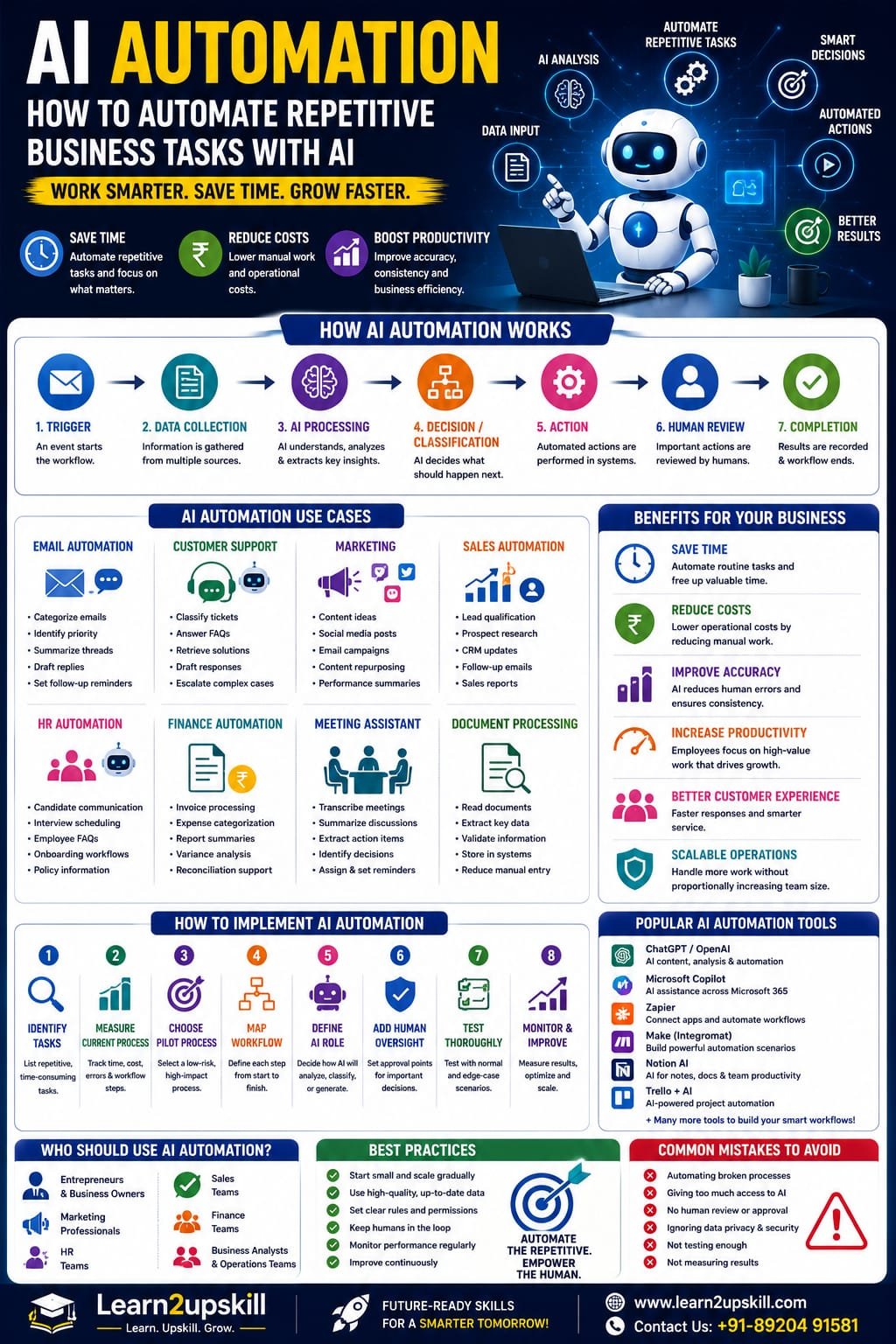
AI Automation: How to Automate Repetitive Business Tasks With AI
Suggested URL Slug: /ai-automation-repetitive-business-tasks/
AI Automation: How to Automate Repetitive Business Tasks With AI
Imagine starting your workday and discovering that several hours of routine work have already been completed.
Emails have been categorized.
Customer enquiries have been sorted.
Meeting notes have been summarized.
Reports have been prepared.
Data has been entered into the right systems.
Follow-up reminders have been created.
A first draft of the weekly report is ready for review.
This isn’t science fiction anymore.
AI automation is changing how businesses approach repetitive work.
Traditional automation has been used for years to perform predictable tasks based on predefined rules.
AI adds another layer.
Instead of only following fixed instructions, AI-powered systems can work with text, documents, conversations, images, unstructured information and changing situations.
When AI is combined with automation tools, businesses can create workflows that can analyze information, generate content, classify requests, extract data, make recommendations and trigger actions.
The World Economic Forum’s Future of Jobs Report 2025 found that 86% of employers expect AI and information-processing technologies to transform their businesses by 2030, while automation is expected to change the share of work performed by humans, technology and human-machine collaboration. �
World Economic Forum +1
The opportunity isn’t simply to “replace people with AI.”
A better goal is:
Automate repetitive work so people can spend more time on valuable work.
Let’s understand how AI automation works, where businesses can use it, and how you can start.
What Is AI Automation?
AI automation is the use of artificial intelligence together with software workflows and automation technologies to perform tasks with less manual intervention.
Traditional automation usually follows predetermined rules.
For example:
If a customer submits a form → send an email.
AI automation can handle more flexible situations.
For example:
Read the customer enquiry → understand the customer’s issue → classify the request → find relevant information → draft a response → send it for approval.
The AI component helps interpret information.
The automation component helps move the task through the workflow.
Simple formula:
AI + Data + Workflow + Automation = AI-Powered Process
Traditional Automation vs AI Automation
Traditional Automation
AI Automation
Rule-based
Can interpret information
Works best with structured data
Can work with unstructured information
“If X, do Y”
Can analyze context
Predictable workflows
More flexible workflows
Fixed instructions
Can use AI-generated reasoning/output
Limited interpretation
Can summarize, classify and generate
Best for repetitive rules
Useful for repetitive knowledge tasks
Traditional automation isn’t disappearing.
In fact, the two can work together.
Example:
Traditional automation:
Move a file to a folder.
AI:
Read and summarize the file.
Traditional automation:
Send the summary to a manager.
Together, they create a more capable workflow.
Why Is AI Automation Important in 2026?
Businesses are under constant pressure to:
Reduce repetitive work
Improve productivity
Respond faster
Control operating costs
Improve customer experience
Handle more information
Scale operations
Make better use of employee time
At the same time, employees are dealing with growing volumes of:
Emails
Documents
Meetings
Data
Customer enquiries
Reports
Administrative tasks
AI automation can help organizations process some of this workload more efficiently.
The World Economic Forum reports that employers expect automation and AI to significantly reshape work through 2030. It also finds that AI and big data, networks and cybersecurity, and technological literacy are among the fastest-growing skill areas. �
World Economic Forum
This means AI automation is becoming both a business opportunity and a career skill.
How Does AI Automation Work?
A typical AI automation workflow can look like this:
- Trigger
Something happens.
Example:
New customer email arrives.
↓
- Data Collection
The system gathers relevant information.
↓
- AI Analysis
AI interprets the information.
↓
- Decision or Classification
The system determines what should happen next.
↓
- Action
An automated workflow performs an approved task.
↓
- Human Review
A person checks important or sensitive outputs.
↓
- Completion
The system records the result.
Example
Imagine a company receives 500 customer enquiries every week.
Without automation:
Customer email → Employee reads → Employee researches → Employee writes response → Employee updates system
With AI automation:
Customer email → AI classifies → Retrieves relevant information → Drafts response → Human approval → CRM update
The employee is still involved.
But the repetitive parts become much faster.
- AI Automation for Email Management
Email is one of the easiest places to identify repetitive work.
AI automation can potentially help with:
Categorizing emails
Identifying urgent messages
Summarizing long conversations
Extracting action items
Drafting replies
Routing messages
Creating follow-up reminders
Extracting customer information
Example workflow:
Email arrives
↓
AI identifies topic
↓
Classifies priority
↓
Summarizes message
↓
Drafts response
↓
Human reviews
↓
Reply is sent
This can reduce the amount of time employees spend processing routine email.
- AI Automation for Customer Support
Customer support teams often handle similar questions repeatedly.
AI automation can help with:
FAQ responses
Ticket classification
Sentiment analysis
Information retrieval
Response drafting
Ticket routing
Customer-history summaries
Escalation
Example:
A customer writes:
“My payment was deducted, but my course access hasn’t been activated.”
The AI system could:
Identify the issue as a payment/access problem.
Retrieve the customer’s account information.
Check approved troubleshooting information.
Draft an appropriate response.
Escalate the issue if it requires human intervention.
This doesn’t mean every customer interaction should be fully automated.
For sensitive or complex cases, human support remains important.
- AI Automation for Marketing
Marketing involves many repetitive activities.
AI can assist with:
Content ideas
Social media drafts
Email campaigns
Content repurposing
Keyword clustering
Competitor research
Campaign summaries
Customer segmentation
Performance analysis
Example workflow:
Blog published
↓
AI extracts key points
↓
Creates LinkedIn post
↓
Creates Instagram caption
↓
Creates email newsletter draft
↓
Creates short-video script
↓
Human reviews
This allows one piece of content to be repurposed across multiple channels.
- AI Automation for Sales
Sales teams spend significant time researching prospects and updating systems.
AI automation can assist with:
Lead qualification
Prospect research
CRM updates
Follow-up reminders
Meeting summaries
Proposal drafts
Sales reporting
Customer communication
Example:
New lead
↓
AI analyzes lead information
↓
Identifies relevant characteristics
↓
Assigns a qualification category
↓
Creates CRM summary
↓
Drafts follow-up email
↓
Salesperson reviews
This gives sales professionals more time for actual customer conversations.
- AI Automation for HR
Human Resources involves large amounts of administrative work.
AI automation can assist with:
Job-description drafting
Candidate communication
Interview scheduling
Employee FAQs
Onboarding documents
Training recommendations
Policy information retrieval
Meeting summaries
Example onboarding workflow:
New employee joins
↓
Collect required information
↓
Generate onboarding checklist
↓
Send approved documents
↓
Schedule orientation
↓
Create reminders
↓
Track completion
AI can support the process while HR professionals retain responsibility for important people-related decisions.
- AI Automation for Finance
Finance teams work with large amounts of structured and unstructured information.
AI automation can assist with:
Invoice data extraction
Expense categorization
Report summaries
Variance analysis
Document processing
Financial research
Reconciliation support
Management reporting
Example:
Invoice received
↓
AI extracts vendor, amount and date
↓
Checks required fields
↓
Routes information into accounting workflow
↓
Flags exceptions
↓
Human reviews
This can reduce repetitive data-entry work.
- AI Automation for Business Analysts
Business Analysts can benefit significantly from AI automation.
Possible applications include:
Meeting transcription
Requirements extraction
User-story drafting
Process documentation
Data analysis
Report generation
Stakeholder-question generation
Requirement-gap identification
Example workflow:
Stakeholder meeting
↓
Transcript generated
↓
AI extracts requirements
↓
Groups requirements by theme
↓
Identifies missing information
↓
Drafts user stories
↓
Business Analyst reviews
This doesn’t replace the Business Analyst.
It reduces documentation workload and gives the analyst more time for stakeholder discussions and problem-solving.
- AI Automation for Document Processing
Businesses process thousands of documents.
Examples include:
Invoices
Contracts
Applications
Forms
Reports
Receipts
Policies
Customer documents
AI can help extract information from these documents.
For example:
Document → AI extraction → Structured data → Validation → Business workflow
This is especially useful when documents don’t follow exactly the same format.
- AI Automation for Meetings
Meetings can generate a lot of administrative work.
An AI-powered workflow can potentially:
Record or transcribe a meeting.
Summarize the discussion.
Identify decisions.
Extract action items.
Identify owners.
Create follow-up reminders.
Draft a meeting report.
Example:
Meeting ends
↓
AI creates summary
↓
Action items identified
↓
Tasks assigned
↓
Follow-up reminders created
Instead of spending 30–60 minutes writing notes, employees can review the AI-generated summary.
- AI Automation for Reports
Many employees repeatedly create similar reports.
AI automation can help transform:
Raw data → Analysis → Summary → Report
For example:
A sales dashboard updates automatically.
AI reviews the changes.
It identifies:
Revenue growth
Declining products
Unusual changes
Regional differences
Key trends
Then it creates an executive summary.
The manager reviews the result before making decisions.
- AI Automation for Data Entry
Data entry is one of the most repetitive workplace activities.
AI can assist when information needs to be extracted from:
Emails
PDFs
Forms
Documents
Images
Receipts
Example:
PDF invoice
↓
AI reads information
↓
Extracts:
Vendor
Invoice number
Date
Amount
Tax
↓
Sends structured information into the appropriate workflow.
This can reduce manual copying and pasting.
- AI Automation for Internal Knowledge
Employees frequently ask questions such as:
“What’s our leave policy?”
“Where is the onboarding document?”
“What is the refund procedure?”
“How do I create this report?”
A company can create an AI-powered internal knowledge assistant that retrieves information from approved documents.
Workflow:
Employee question
↓
AI searches knowledge source
↓
Relevant information retrieved
↓
AI generates answer
↓
Source or document reference provided
This can reduce the time employees spend searching through internal documents.
AI Automation and AI Agents
AI automation and Agentic AI are closely related.
Traditional AI automation may follow a predefined workflow.
An AI agent can potentially interpret a goal, select tools and perform multiple steps within defined boundaries.
For example:
Basic automation
New lead → Add lead to CRM.
AI automation
New lead → Analyze information → Categorize lead → Create CRM record.
Agentic workflow
“Prepare this new lead for the sales team.”
The agent may:
Research the company
Analyze the lead
Retrieve relevant information
Update approved CRM fields
Prepare a summary
Draft follow-up questions
Notify the salesperson
The more autonomy you give a system, the more important permissions, testing, monitoring and human oversight become.
AI Automation vs AI Agents
AI Automation
AI Agents
Often follows predefined workflows
Can pursue a goal through multiple steps
More predictable
More flexible
Rule + AI based
AI + tools + planning
Best for repeatable processes
Useful for variable workflows
Easier to control
Requires stronger governance
Usually narrower
Potentially broader
They are not competitors.
A business may use both.
Which Business Tasks Should You Automate?
Not every task is a good candidate.
Start with tasks that are:
Repetitive
The same task happens frequently.
Time-consuming
Employees spend significant time on it.
Rules-based
There are clear guidelines.
Digital
The information already exists electronically.
Low-risk
Errors don’t create severe consequences.
Measurable
You can measure whether automation helped.
A Simple AI Automation Test
Ask these five questions:
- Does this task happen frequently?
If yes, automation may be worthwhile.
- Is the task repetitive?
If employees perform the same steps repeatedly, investigate automation.
- Can AI interpret the information?
If the task involves emails, documents or natural language, AI may help.
- Can success be measured?
Define a metric.
- Can a human review important decisions?
If yes, you can create a safer workflow.
Tasks You Should Be Careful About Automating
Avoid giving AI unrestricted control over high-risk decisions.
Be particularly careful with:
Employment decisions
Financial approvals
Legal decisions
Medical decisions
Security actions
Sensitive customer data
Account deletion
Large financial transactions
Access-control changes
For these tasks, use appropriate human approval and organizational controls.
How to Start AI Automation in Your Business
Don’t try to automate everything at once.
Use a phased approach.
Step 1: List Repetitive Tasks
Ask employees:
“What do you do every day that feels repetitive?”
You may discover dozens of opportunities.
Step 2: Measure the Current Process
Record:
Time spent
Number of tasks
Error rate
Employees involved
Current cost
Delays
Step 3: Choose One Pilot
Select a low-risk, high-volume process.
For example:
Meeting summaries
or
Customer-email classification
Step 4: Map the Workflow
Document:
Trigger → Input → AI → Decision → Action → Human Review → Completion
Step 5: Define the AI’s Role
Be specific.
Does AI:
Classify?
Summarize?
Generate?
Recommend?
Extract?
Search?
Take an action?
Step 6: Add Human Oversight
Determine where employees must review the output.
Step 7: Test
Test:
Normal situations
Difficult cases
Missing information
Incorrect information
Unexpected inputs
Security risks
Step 8: Measure Results
Compare:
Before automation
vs.
After automation
Track:
Time saved
Accuracy
Cost
Response time
Employee satisfaction
Customer satisfaction
Example: Automating a Customer Enquiry Workflow
Let’s build a simple example.
Before
Customer email arrives.
Employee reads it.
Employee identifies issue.
Employee searches documents.
Employee writes response.
Employee updates CRM.
Time: potentially several minutes per enquiry.
After
Customer email arrives.
↓
AI identifies topic.
↓
AI retrieves relevant information.
↓
AI drafts response.
↓
Employee reviews.
↓
Approved response is sent.
↓
CRM is updated.
The employee still controls the important decision.
But repetitive work has been reduced.
AI Automation Tools
The technology stack depends on your needs.
A typical AI automation system may include:
AI Model
Used for:
Understanding
Classification
Generation
Summarization
Automation Platform
Connects different applications and triggers workflows.
Business Applications
Such as:
CRM
Accounting software
Project-management tools
HR systems
Knowledge Sources
Such as:
Documents
Databases
Internal knowledge bases
APIs
Allow different applications to communicate.
Monitoring
Tracks performance and errors.
The exact tools you choose should depend on your business requirements, data sensitivity, budget and technical capability.
AI Automation for Small Businesses
You don’t need a huge technology department to start.
Small businesses can begin with simple workflows such as:
Marketing
Blog → Social posts → Email draft
Customer Support
Customer enquiry → Categorization → Response draft
Sales
Lead form → Qualification → CRM entry
Administration
Invoice → Data extraction → Record
Meetings
Meeting → Transcript → Summary → Action items
Content
Long article → Short posts → Newsletter → Video script
Start small.
Prove the value.
Then expand.
AI Automation for Learn2upskill-Type Businesses
For an online learning business, AI automation can be especially useful.
For example:
Student Enquiry Workflow
Website enquiry
↓
AI identifies course interest
↓
AI categorizes enquiry
↓
Drafts personalized response
↓
Human reviews
↓
CRM/database updated
Content Marketing Workflow
New blog
↓
AI creates:
Social media caption
LinkedIn post
Email draft
Short-video script
Carousel ideas
↓
Human reviews
↓
Content scheduled
Course Development Workflow
Course topic
↓
AI creates:
Course outline
Module ideas
Quiz questions
Practice exercises
Learning objectives
↓
Trainer reviews
↓
Final course prepared
AI doesn’t replace the trainer’s expertise.
It reduces the time spent on repetitive preparation.
How AI Automation Can Improve Employee Productivity
The real value of automation isn’t simply:
“We used AI.”
It’s:
“Our employees spent less time on repetitive work and more time on meaningful work.”
For example, an employee might previously spend:
2 hours/day on repetitive administrative tasks
After automation:
45 minutes/day
That could free more than an hour every working day for:
Customer conversations
Strategy
Problem-solving
Creative work
Learning
Collaboration
The World Economic Forum expects the human-machine frontier to shift substantially by 2030, with employers anticipating a much more even distribution among tasks performed primarily by people, technology and human-technology collaboration. �
World Economic Forum
Does AI Automation Replace Employees?
This is the question that worries many professionals.
The answer isn’t simply yes or no.
AI automation can reduce the need for certain repetitive tasks.
But businesses can also use automation to augment employees.
The World Economic Forum projects both job creation and displacement through 2030 and notes that automation will change how tasks are delivered, while human-machine collaboration also expands. �
World Economic Forum +1
The practical lesson for employees is:
Don’t compete with automation on repetitive tasks.
Instead, develop skills that complement it.
Learn:
AI literacy
Data analysis
Critical thinking
Communication
Problem-solving
Creativity
Business knowledge
AI workflow design
Skills Needed for AI Automation
If you want to build AI automation skills, learn these areas:
AI Fundamentals
Understand what AI can and cannot do.
Prompt Engineering
Learn how to communicate effectively with AI models.
Workflow Design
Understand processes and dependencies.
Automation Platforms
Learn how applications connect.
APIs
Understand how systems communicate.
Data Literacy
Understand data quality and structure.
RAG
Learn how AI can work with external knowledge.
AI Agents
Understand more autonomous workflows.
AI Security
Understand data protection and permissions.
AI Governance
Understand responsible deployment.
AI Automation Career Opportunities
AI automation skills can complement many careers.
Potential roles include:
AI Automation Specialist
AI Workflow Specialist
AI Consultant
Automation Consultant
AI Business Analyst
AI Solutions Specialist
Business Process Analyst
AI Product Specialist
Digital Transformation Specialist
AI Operations Specialist
You don’t necessarily need to become a programmer.
There are no-code, low-code and technical paths into AI automation.
AI Automation Roadmap for Beginners
If you’re starting from zero, follow this sequence:
Step 1
Learn AI fundamentals.
↓
Step 2
Learn Generative AI.
↓
Step 3
Learn Prompt Engineering.
↓
Step 4
Learn workflow automation.
↓
Step 5
Learn APIs and integrations.
↓
Step 6
Learn RAG and knowledge retrieval.
↓
Step 7
Explore AI agents.
↓
Step 8
Learn AI security and governance.
↓
Step 9
Build practical automation projects.
↓
Step 10
Apply AI automation to your industry.
5 AI Automation Projects to Practice
Project 1: Email Classification
Build a workflow that categorizes incoming emails.
Project 2: Meeting Assistant
Turn meeting transcripts into summaries and action items.
Project 3: Lead Qualification
Analyze new leads and create structured summaries.
Project 4: Content Repurposing
Convert one blog into multiple content formats.
Project 5: Document Data Extraction
Extract structured information from invoices or forms.
These projects help you develop a portfolio rather than just collecting theoretical knowledge.
Common AI Automation Mistakes
❌ Automating Everything
Not every task should be automated.
❌ No Human Review
Important decisions may require human approval.
❌ Giving Excessive Permissions
Limit what an AI system can access and change.
❌ Ignoring Data Privacy
Sensitive information needs appropriate protection.
❌ Automating a Broken Process
First improve the process.
Then automate it.
❌ Measuring Only Cost
Also measure:
Quality
Accuracy
Customer experience
Employee experience
Risk
❌ Using AI Without Testing
Always test before deploying at scale.
AI Automation Best Practices
Start Small
Choose one workflow.
Keep Humans in the Loop
Especially for sensitive decisions.
Limit Permissions
Give systems only the access they need.
Use Approved Data
Don’t connect sensitive information casually.
Monitor Results
Track performance.
Create Escalation Rules
Know when AI should stop and involve a person.
Evaluate Regularly
AI systems can behave differently as inputs and surrounding systems change.
Train Employees
People need to understand how the automation works.
The Future of AI Automation
The next phase of workplace automation will likely combine:
Generative AI + AI Agents + Automation + Business Applications
Instead of isolated AI tools, organizations may increasingly build interconnected workflows.
For example:
Customer enquiry
↓
AI agent understands request
↓
Retrieves customer information
↓
Checks knowledge base
↓
Drafts response
↓
Updates CRM
↓
Schedules follow-up
↓
Human reviews sensitive cases
This is more than simple automation.
It is an AI-powered business workflow.
The World Economic Forum’s 2026 workplace coverage notes that AI agents are moving from pilots toward real-world deployment, while also highlighting that governance, autonomy, safety, integration and trust need to keep pace. �
World Economic Forum
Final Thoughts
AI automation isn’t about making humans unnecessary.
It’s about making work less repetitive and more valuable.
Businesses can use AI to:
Process information
Classify requests
Extract data
Draft content
Summarize meetings
Analyze information
Support customers
Prepare reports
Connect workflows
But successful automation requires more than technology.
It requires:
Good processes + good data + appropriate AI + human oversight + security + measurement
The biggest opportunity isn’t simply automating more tasks.
It’s redesigning work so people can spend more time on the things humans do best:
Think. Create. Communicate. Solve problems. Build relationships. Make decisions.
So don’t ask:
“What can I automate?”
Start with:
“What repetitive work is preventing my team from creating more value?”
That’s where AI automation becomes truly useful.
Automate the repetitive. Empower the human. Build smarter workflows.
Quick AI Automation Checklist
[ ] Identify repetitive tasks
[ ] Measure current time and cost
[ ] Choose a low-risk process
[ ] Map the workflow
[ ] Define the AI’s role
[ ] Provide relevant data
[ ] Set clear rules
[ ] Add human review
[ ] Limit permissions
[ ] Test unusual cases
[ ] Monitor performance
[ ] Measure time saved
[ ] Measure accuracy
[ ] Improve continuously
[ ] Train employees
Build AI Automation Skills With Learn2upskill
AI automation is becoming an important part of the modern workplace.
At Learn2upskill, we help students, professionals, job seekers and business learners develop practical, future-ready skills.
Explore learning opportunities in:
Advanced AI • Generative AI • Prompt Engineering • AI Agents • AI Automation • ChatGPT • Business Analysis • Excel • Digital Marketing • Cybersecurity • Professional Development
Don’t just learn how AI works.
Learn how to apply AI to real business problems.
Learn. Upskill. Grow.
🌐 www.coral-kudu-326218.hostingersite.com�
Contact Us: +91-89204 91581
Leave a Reply