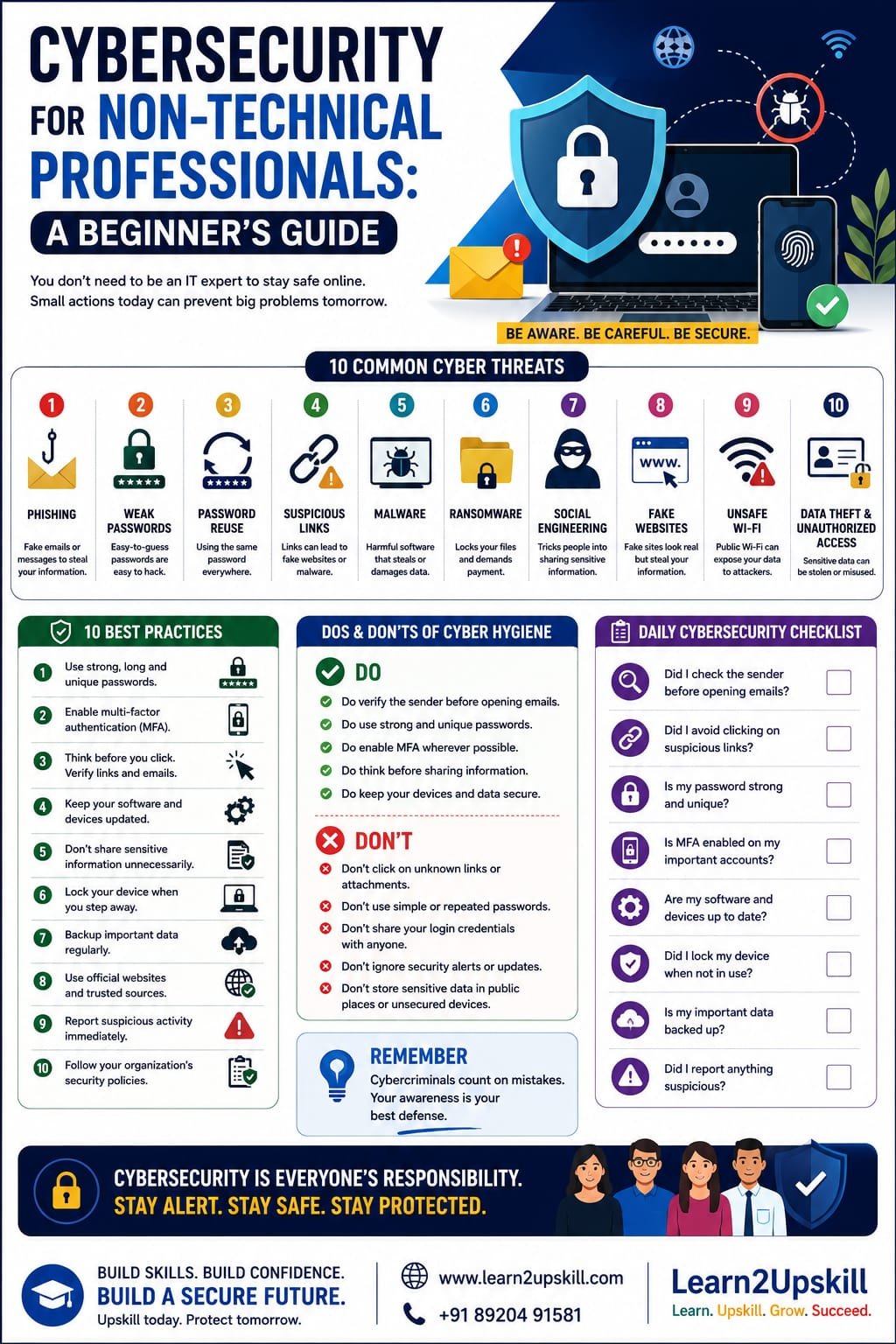
Cybersecurity for Non-Technical Professionals: A Beginner’s Guide
Description: Learn cybersecurity basics for non-technical professionals. Discover common cyber threats, phishing, passwords, data protection and essential cybersecurity practices for the workplace.
Suggested URL Slug:
“/cybersecurity-for-non-technical-professionals/”
—
Cybersecurity for Non-Technical Professionals: A Beginner’s Guide
When people hear the word cybersecurity, they often imagine:
– Hackers writing complex code
– Cybersecurity experts monitoring computer systems
– IT teams responding to cyberattacks
– Highly technical software and networks
But cybersecurity is no longer only the responsibility of IT professionals.
Every employee who uses:
– A computer
– A smartphone
– Online accounts
– Company data
plays an important role in cybersecurity.
In fact, many cyberattacks do not begin with someone breaking through a complicated technical security system.
They often begin with something much simpler.
A suspicious email.
A fake login page.
A weak password.
A dangerous attachment.
One small mistake can sometimes create a serious security problem.
That is why every professional—not just technical employees—should understand the basics of cybersecurity.
The good news is that you do not need to become a cybersecurity expert to become more secure online.
You simply need to understand the common risks and develop safer digital habits.
In this beginner’s guide, you will learn the essential cybersecurity knowledge every non-technical professional should understand.
—
What Is Cybersecurity?
Cybersecurity is the practice of protecting:
– Computers
– Networks
– Devices
– Accounts
– Information
– Digital systems
from unauthorized access, attacks and damage.
In simple words:
«Cybersecurity is about protecting digital information and systems from threats.»
For a business, cybersecurity may involve protecting:
– Customer information
– Employee data
– Financial information
– Business documents
– Passwords
– Company systems
Cybersecurity combines technology, processes and people.
And people are an extremely important part of the security process.
—
Why Cybersecurity Matters for Non-Technical Professionals
You might think:
«”I’m not in IT, so cybersecurity isn’t really my responsibility.”»
But consider how many digital activities you perform every day.
You may:
– Open emails
– Download files
– Click links
– Share documents
– Access company accounts
– Communicate with customers
– Use cloud platforms
Each of these activities can potentially create a security risk if handled carelessly.
Cybersecurity awareness helps professionals recognize threats before they become serious problems.
—
The Human Side of Cybersecurity
Cybercriminals often target people rather than technology.
Why?
Because convincing a person to:
– Click a link
– Share a password
– Download a file
– Provide information
can sometimes be easier than attacking a secure computer system directly.
This type of manipulation is often called social engineering.
Cybercriminals may create messages that make people feel:
– Afraid
– Curious
– Excited
– Urgent
For example:
«URGENT: Your account will be closed today! Click here immediately.»
The goal is to make you react quickly without thinking carefully.
That is why cybersecurity requires both:
«Technology + Human Awareness»
—
10 Common Cybersecurity Threats Every Professional Should Know
Let’s look at some common threats.
—
- Phishing Emails 🎣
Phishing is one of the most common cyber threats.
A phishing email attempts to trick you into:
– Clicking a malicious link
– Providing login information
– Sharing sensitive data
– Downloading dangerous files
A phishing message may pretend to come from:
– Your bank
– A company
– Your manager
– A government organization
– A delivery service
The message may look convincing.
But small details may reveal the scam.
—
How to Identify a Suspicious Email
Look for warning signs such as:
🚩 Unexpected requests
🚩 Urgent language
🚩 Suspicious sender addresses
🚩 Spelling or grammar mistakes
🚩 Unknown links
🚩 Unexpected attachments
Before clicking, stop and ask:
«Is this message really what it appears to be?»
—
- Weak Passwords 🔑
Weak passwords make accounts easier to compromise.
Avoid passwords such as:
– “123456”
– “password”
– Your name
– Your date of birth
A stronger password should be:
– Long
– Unique
– Difficult to guess
One of the most important rules is:
«Do not reuse the same password across multiple important accounts.»
If one password is exposed, reused passwords can put other accounts at risk.
—
- Password Reuse
Imagine using the same password for:
– Social media
– Work accounts
– Banking
If one service suffers a security breach, criminals may try the same password on other accounts.
Use unique passwords for important accounts.
A reputable password manager can help people manage strong, unique passwords.
—
- Suspicious Links 🔗
A dangerous link may lead to:
– Fake websites
– Malware
– Phishing pages
Before clicking:
– Check the sender.
– Consider whether you expected the message.
– Look carefully at the website address.
If something feels suspicious, don’t rush.
—
- Malware 🦠
Malware is harmful software designed to damage systems, steal information or perform unauthorized activities.
Malware may arrive through:
– Email attachments
– Suspicious downloads
– Fake websites
– Infected software
Avoid downloading files or software from untrusted sources.
—
- Ransomware 🔒
Ransomware is a type of malicious software that can lock or encrypt data.
Cybercriminals may then demand payment.
Ransomware attacks can seriously affect organizations by disrupting:
– Business operations
– Access to important information
– Customer services
Regular backups and strong cybersecurity practices can help organizations reduce risks.
—
- Social Engineering 🎭
Social engineering involves manipulating people.
A criminal may pretend to be:
– An IT employee
– A manager
– A customer
– A trusted company
They may ask for information or request urgent action.
Remember:
«Don’t trust a request simply because it sounds confident or urgent.»
Verify unusual requests using an official communication channel.
—
- Fake Websites 🌐
Cybercriminals may create websites that look similar to real websites.
The goal may be to steal:
– Usernames
– Passwords
– Financial information
Always check the website address carefully before entering sensitive information.
—
- Unsafe Public Wi-Fi 📶
Public Wi-Fi networks can create security risks.
Avoid performing highly sensitive activities on untrusted networks when possible.
Follow your organization’s policies when accessing company systems remotely.
—
- Data Theft and Unauthorized Access 🔐
Sensitive information can be exposed through:
– Lost devices
– Weak passwords
– Unauthorized sharing
– Phishing attacks
Treat business and customer information responsibly.
—
The Golden Rule: Think Before You Click
One of the simplest cybersecurity habits is:
«STOP. THINK. CHECK.»
Before clicking a link or downloading a file, ask:
Who sent this?
Was I expecting it?
Does the request make sense?
Is the message creating unnecessary urgency?
A few seconds of careful thinking can prevent a serious problem.
—
How to Create Stronger Password Habits
Good password security is essential.
Use Long Passwords
Long passwords are generally harder to guess.
Use Unique Passwords
Don’t reuse important passwords.
Consider a Password Manager
Password managers can help securely manage multiple unique passwords.
Never Share Passwords
Legitimate organizations generally should not ask you to reveal your password through email or messages.
—
What Is Multi-Factor Authentication?
Multi-factor authentication (MFA) adds another layer of account security.
Instead of relying only on a password, you may also need:
– A verification code
– An authentication app
– A security key
– Another approved verification method
This makes unauthorized access more difficult.
Whenever available and appropriate, enable MFA on important accounts.
—
How to Protect Sensitive Information
Professionals often handle important information.
This may include:
– Customer details
– Employee information
– Financial documents
– Business strategies
Follow these basic principles:
Share Information Only When Necessary
Don’t send sensitive information to unnecessary recipients.
Verify the Recipient
Before sending important information, check the email address carefully.
Follow Company Policies
Your organization may have specific rules for handling information.
Lock Your Devices
Don’t leave devices unlocked and unattended.
—
Cybersecurity and Remote Work
Remote and hybrid work have created new cybersecurity challenges.
Employees may work from:
– Home
– Shared workspaces
– Hotels
– Public locations
When working remotely:
Keep Devices Updated
Install approved security updates.
Secure Your Devices
Use strong authentication and screen locks.
Be Careful With Public Networks
Follow your organization’s security guidelines.
Protect Your Workspace
Avoid exposing confidential information to people nearby.
—
What Should You Do If You Receive a Suspicious Email?
Do not panic.
Follow these steps:
- Don’t Click Links
Avoid interacting with suspicious content.
- Don’t Download Attachments
Unless you are certain they are legitimate.
- Verify the Sender
Use an official channel if necessary.
- Report the Message
Follow your organization’s reporting process.
- Delete or Follow IT Instructions
Your IT or security team may provide guidance.
The faster suspicious activity is reported, the faster an organization can respond.
—
What Should You Do If You Accidentally Clicked Something Suspicious?
Mistakes can happen.
The important thing is to act quickly.
Don’t Hide the Mistake
Report it immediately according to your organization’s procedures.
Follow Security Instructions
Your IT or cybersecurity team can investigate.
Change Passwords if Recommended
Follow official guidance.
Remember:
«Reporting a mistake quickly is usually much better than hiding it.»
—
Cybersecurity in Everyday Workplace Communication
Cybersecurity awareness should be part of everyday work.
For example:
Before sending an email, check:
– Is the recipient correct?
– Does this attachment contain sensitive information?
– Should this information be shared?
Before clicking a link, ask:
– Is this expected?
– Is the sender trustworthy?
Before sharing information, ask:
– Does this person need access?
Small habits can make a big difference.
—
Common Cybersecurity Mistakes to Avoid
❌ Clicking Without Checking
Always pause before interacting with suspicious messages.
—
❌ Using Weak Passwords
Weak passwords create unnecessary risks.
—
❌ Reusing Passwords Everywhere
Use unique passwords for important accounts.
—
❌ Ignoring Software Updates
Updates can include important security improvements.
—
❌ Sharing Sensitive Information Carelessly
Always verify recipients and follow policies.
—
❌ Assuming “It Won’t Happen to Me”
Cybersecurity awareness is everyone’s responsibility.
—
A Simple Daily Cybersecurity Checklist
Before finishing your workday, consider:
✅ Did I lock my device?
✅ Did I handle sensitive information appropriately?
✅ Did I avoid suspicious links?
✅ Did I report anything unusual?
✅ Are my accounts protected with strong authentication?
Good cybersecurity often begins with good habits.
—
Cybersecurity Skills for Career Growth
Cybersecurity awareness is becoming an increasingly valuable professional skill.
Even if you do not want to become a cybersecurity specialist, understanding basic security can help you become:
– A more responsible employee
– A safer digital professional
– A more valuable team member
Organizations need employees who understand the importance of protecting information.
Cybersecurity awareness is therefore becoming an important part of modern workplace readiness.
—
Cybersecurity and Artificial Intelligence
AI is creating new opportunities and new cybersecurity challenges.
Cybercriminals may use advanced technologies to create more convincing:
– Phishing messages
– Fake content
– Social engineering attempts
This makes critical thinking even more important.
Don’t assume that a professional-looking message is automatically trustworthy.
The best defense often begins with:
«Awareness + Verification + Responsible Action»
—
Frequently Asked Questions
Do non-technical professionals need cybersecurity knowledge?
Yes. Anyone who uses digital devices, email, online accounts or workplace information can benefit from cybersecurity awareness.
What is the most common cybersecurity threat employees face?
Phishing and social engineering are common threats that attempt to manipulate people into taking unsafe actions.
What should I do if I receive a suspicious email?
Avoid clicking links or downloading attachments. Verify the message and report it according to your organization’s security procedures.
What is MFA?
Multi-factor authentication adds an additional verification step beyond a password to help protect an account.
Can one employee cause a cybersecurity incident?
Human mistakes can contribute to security incidents, which is why cybersecurity awareness and safe digital habits are important across an organization.
—
Conclusion
Cybersecurity is not only about technology.
It is also about people.
Every professional can help protect themselves and their organization by developing simple habits:
🔍 Think before clicking.
📧 Verify suspicious messages.
🔑 Use strong and unique passwords.
🔐 Protect sensitive information.
🚨 Report suspicious activity.
You don’t need to become a cybersecurity engineer to make a difference.
You simply need awareness.
Because in today’s digital workplace:
«Cybersecurity is everyone’s responsibility.»
The more informed and careful employees become, the stronger an organization’s overall security can be.
—
🚀 Build Future-Ready Cybersecurity Skills With Learn2Upskill
The modern workplace requires professionals to understand more than just their job role.
Build practical skills in:
– Cybersecurity Awareness
– AI and Digital Skills
– Data Privacy
– Professional Communication
– Critical Thinking
– Workplace Safety
with Learn2Upskill.
🌐 www.coral-kudu-326218.hostingersite.com
📞 Contact Us: +91 89204 91581
Learn. Upskill. Grow. Succeed.
—
Leave a Reply