Blog

  • Excel vs Google Sheets: Which Is Better?

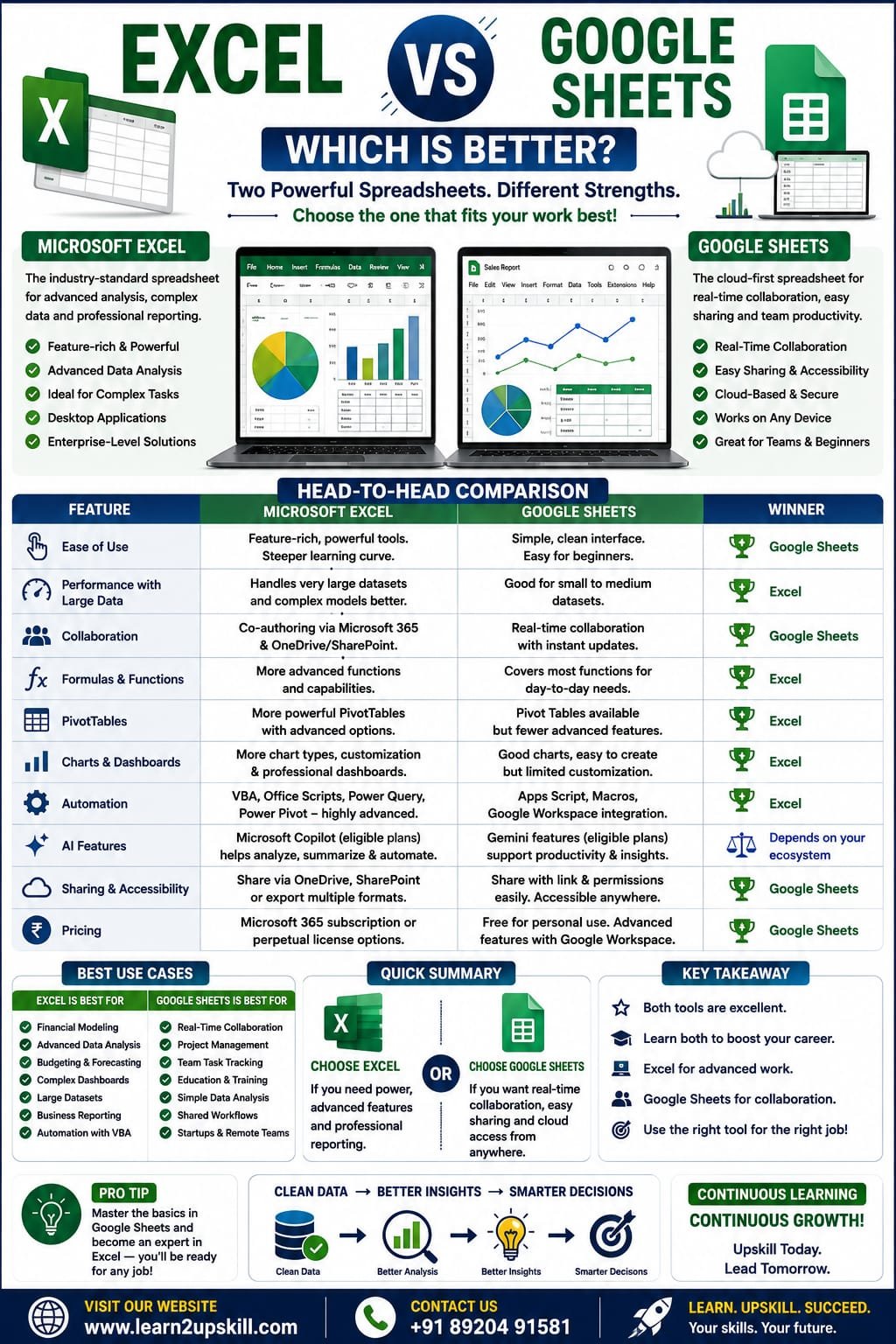
    Excel vs Google Sheets: Which Is Better?

    Excel vs Google Sheets: Which Is Better?

    Compare Microsoft Excel and Google Sheets in terms of features, performance, collaboration, AI tools, pricing, formulas, dashboards, and business use cases. Find out which spreadsheet tool is best for your needs.

    Focus Keyword: Excel vs Google Sheets

    Spreadsheets are an essential part of modern work. Whether you’re managing budgets, analyzing sales, tracking inventory, creating reports, or building dashboards, chances are you’ll use either Microsoft Excel or Google Sheets.

    Both are powerful spreadsheet applications, but they are designed with different strengths. Excel is known for its advanced analytics, powerful formulas, and enterprise-level capabilities, while Google Sheets is popular for real-time collaboration and cloud-based accessibility.

    So, which one should you choose?

    In this comprehensive guide, we’ll compare Excel and Google Sheets across features, performance, collaboration, AI capabilities, pricing, and real-world use cases to help you decide.

    —

    What Is Microsoft Excel?

    Microsoft Excel is a spreadsheet application included with Microsoft 365 and available as a desktop application, web app, and mobile app.

    Excel is widely used for:

    – Financial modeling

    – Data analysis

    – Dashboards

    – PivotTables

    – Advanced formulas

    – Business reporting

    – Large datasets

    – Automation with VBA and Office Scripts

    It is the preferred choice for many finance, accounting, operations, and analytics professionals.

    —

    What Is Google Sheets?

    Google Sheets is Google’s cloud-based spreadsheet application, available through Google Workspace and free Google accounts.

    Google Sheets focuses on:


    – Real-time collaboration

    – Cloud storage

    – Easy sharing

    – Team productivity

    – Lightweight data analysis

    – Integration with Google Workspace apps

    It is especially popular among teams, educators, startups, and remote workers.

    —

    Excel vs Google Sheets: Quick Comparison

    Feature| Microsoft Excel| Google Sheets

    Best For| Advanced analysis| Team collaboration

    Platform| Desktop, Web, Mobile| Web, Mobile

    Offline Support| Excellent| Available with setup

    Large Datasets| Excellent| Good for smaller to medium datasets

    Collaboration| Very good| Excellent

    PivotTables| Advanced| Good

    Charts| Extensive options| Good selection

    Dashboards| Advanced| Basic to intermediate

    Automation| VBA, Office Scripts| Apps Script

    AI Features| Microsoft Copilot (eligible plans)| Gemini features (eligible plans)

    Cost| Microsoft 365 subscription or perpetual license options| Free version available; advanced features via Google Workspace

    —

    1. Ease of Use

    Excel

    – Feature-rich interface

    – Powerful tools for advanced users

    – Steeper learning curve for beginners

    Google Sheets

    – Simple, clean interface

    – Easy for beginners

    – Quick to start without installing software


    Winner: Google Sheets for beginners.

    —

    1. Performance with Large Data

    Excel

    Excel handles large datasets, complex formulas, and advanced models more efficiently on capable hardware.

    Google Sheets

    Works well for many everyday tasks but may become slower with very large datasets or highly complex workbooks.

    Winner: Excel.

    —

    1. Collaboration

    Excel

    Supports co-authoring through Microsoft 365 and OneDrive/SharePoint.

    Google Sheets

    Built for real-time collaboration with instant updates, comments, and sharing.

    Winner: Google Sheets.

    —

    1. Formulas and Functions

    Both applications support many common formulas such as:

    – SUM

    – IF

    – XLOOKUP (Excel)

    – FILTER

    – INDEX

    – MATCH

    – COUNTIF

    – VLOOKUP


    Excel generally offers a broader set of advanced features and functions, while Google Sheets includes functions tailored to its ecosystem.

    Winner: Excel for advanced functionality.

    —

    1. PivotTables

    Excel provides more advanced PivotTable capabilities, formatting options, and integration with larger reporting workflows.

    Google Sheets includes Pivot Tables that work well for many business scenarios but offer fewer advanced options.

    Winner: Excel.

    —

    1. Charts and Dashboards

    Excel

    – More chart types

    – Advanced customization

    – Professional dashboards

    – Rich formatting options

    Google Sheets

    – Easy chart creation

    – Suitable for collaborative dashboards

    – Fewer customization options

    Winner: Excel.

    —

    1. Automation

    Excel

    Supports:

    – VBA (Visual Basic for Applications)

    – Office Scripts

    – Power Query

    – Power Pivot

    Google Sheets

    Supports:

    – Google Apps Script

    – Macros

    – Integration with Google Workspace

    Winner: Excel for advanced automation.

    1. AI Features

    Excel

    Microsoft Copilot can help generate formulas, analyze data, create charts, summarize information, and assist with spreadsheet tasks for eligible Microsoft 365 users.

    Google Sheets

    Google’s AI features (such as Gemini capabilities in supported plans) can help with content generation, summaries, and productivity tasks within Google Workspace.

    Winner: Depends on your ecosystem and subscription.

    —

    1. Sharing and Accessibility

    Excel

    Files can be shared through OneDrive, SharePoint, or exported in multiple formats.

    Google Sheets

    Sharing is straightforward with links and permissions, making it easy for teams to collaborate from any location.

    Winner: Google Sheets.

    —

    1. Pricing

    Excel

    Available through Microsoft 365 subscriptions, with some standalone desktop versions also available.

    Google Sheets

    Free for personal use with a Google account. Additional business features are available through Google Workspace plans.

    Winner: Google Sheets for users looking for a free option.

    —

    Real-World Use Cases

    Finance

    Best Choice: Excel

    Ideal for budgeting, financial models, forecasting, and reporting.

    —

    Education

    Best Choice: Google Sheets

    Easy sharing makes it convenient for students and teachers working together.

    —

    Data Analysis

    Best Choice: Excel

    Advanced formulas, PivotTables, Power Query, and charting tools make Excel a strong choice for analytical work.

    —

    Small Business

    Either tool can work well.

    Choose:

    – Excel for complex reporting.

    – Google Sheets for collaborative workflows.

    —

    Project Management

    Google Sheets is excellent for collaborative project tracking, while Excel offers more advanced reporting and customization.

    —

    Pros and Cons

    Microsoft Excel

    Pros

    – Powerful data analysis

    – Advanced formulas

    – Excellent dashboards

    – Handles large datasets

    – Strong automation capabilities

    Cons

    – More features to learn

    – Some advanced capabilities require Microsoft 365 or newer versions

    —

    Google Sheets

    Pros

    – Free for many users

    – Excellent collaboration

    – Accessible from almost anywhere

    – Easy sharing

    Cons

    – Fewer advanced analytics features

    – Can slow down with very large or complex spreadsheets

    —

    Which One Should You Learn?

    If you’re just starting:

    Learn Google Sheets to understand spreadsheet basics and collaborative workflows.

    If you want to build a career in:

    – Data Analysis

    – Finance

    – Accounting

    – Business Intelligence

    – MIS

    – Operations

    – Corporate Reporting

    You should also master Microsoft Excel, as it remains one of the most in-demand workplace skills.

    Ideally, learn both. Many employers use a mix of Microsoft 365 and Google Workspace, and being comfortable with each platform increases your versatility.


    Both Microsoft Excel and Google Sheets are outstanding spreadsheet tools, but they serve different strengths.

    Choose Excel if you need advanced formulas, powerful dashboards, automation, and large-scale data analysis.


    Choose Google Sheets if your priority is real-time collaboration, cloud accessibility, and simple sharing.

    The best investment for your career is to learn both platforms. By understanding their strengths and limitations, you’ll be ready to work effectively in almost any modern workplace.

    At Learn2Upskill, we provide practical tutorials, real-world examples, and career-focused learning to help you master Excel, Google Sheets, AI tools, and other in-demand digital skills.

    Visit: www.coral-kudu-326218.hostingersite.com

    Contact Us: +91 89204 91581

    Learn Today. Upskill for Tomorrow.
  • XLOOKUP vs VLOOKUP: Which One Should You Use?

    XLOOKUP vs VLOOKUP: Which One Should You Use?

    XLOOKUP vs VLOOKUP: Which One Should You Use?

    Learn the difference between XLOOKUP and VLOOKUP in Excel with practical examples, syntax, advantages, disadvantages, and expert tips. Find out which lookup function is best for your work.

    XLOOKUP vs VLOOKUP: Which One Should You Use?

    If you’ve worked with Microsoft Excel, you’ve probably used VLOOKUP to retrieve data from tables. For years, it has been one of Excel’s most popular functions.

    However, Microsoft introduced XLOOKUP, a more powerful and flexible lookup function that solves many of VLOOKUP’s limitations. Today, many Excel professionals prefer XLOOKUP because it’s easier to use, more reliable, and works with modern Excel versions.

    In this guide, you’ll learn:

    – What is VLOOKUP?

    – What is XLOOKUP?

    – Key differences between XLOOKUP and VLOOKUP

    – Practical examples

    – Pros and cons

    – Which one should you learn first?

    Let’s get started.

    What is VLOOKUP?

    VLOOKUP stands for Vertical Lookup.

    It searches for a value in the first column of a table and returns information from another column in the same row.

    Syntax

    =VLOOKUP(lookup_value, table_array, col_index_num, FALSE)

    Example

    Suppose you have this table:

    Employee ID| Name| Department

    E101| Rahul| Sales

    E102| Priya| HR

    E103| Aman| IT


    Formula:

    =VLOOKUP(“E102”,A2:C4,2,FALSE)


    Result:

    Priya

    What is XLOOKUP?

    XLOOKUP is Microsoft’s modern lookup function that replaces both VLOOKUP and HLOOKUP in many scenarios.

    Unlike VLOOKUP, it allows you to search in any direction and doesn’t rely on column numbers, making formulas easier to maintain.

    Syntax

    =XLOOKUP(lookup_value, lookup_array, return_array)

    Example

    =XLOOKUP(“E102”,A2:A4,B2:B4)

    Result:

    Priya

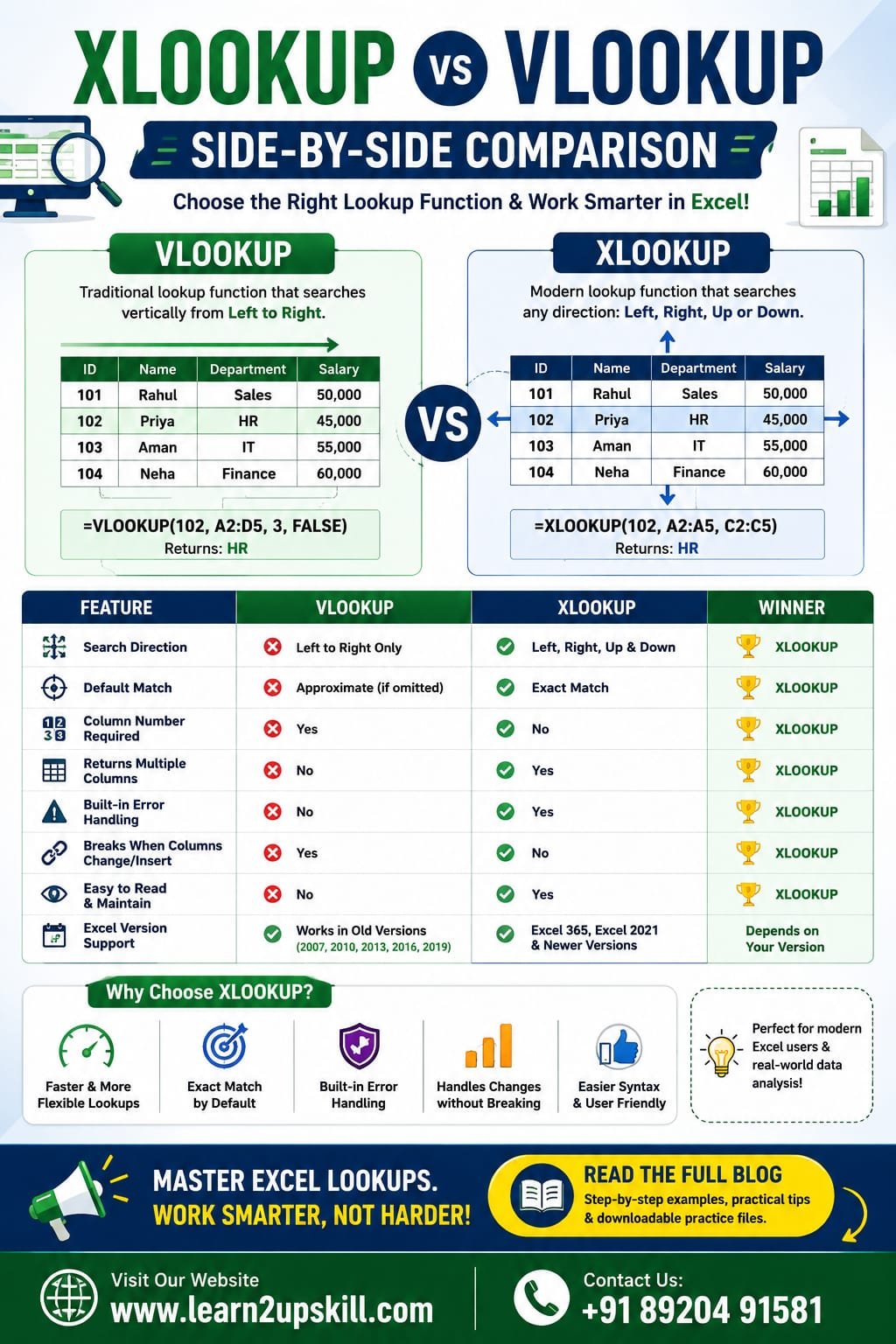
    XLOOKUP vs VLOOKUP: Side-by-Side Comparison

    Feature| VLOOKUP| XLOOKUP

    Search Direction| Left to Right Only| Left, Right, Up & Down

    Default Match| Approximate (if omitted)| Exact Match

    Column Number Required| Yes| No

    Returns Multiple Columns| No| Yes

    Built-in Error Handling| No| Yes

    Breaks When Columns Change| Yes| No

    Easier to Read| No| Yes

    Excel Version| Older Versions| Excel 365, Excel 2021 & newer

    1. Search Direction

    VLOOKUP

    Can only search from left to right.

    Example:

    Employee ID → Name

    Works perfectly.

    But if Name comes before Employee ID, VLOOKUP cannot retrieve it directly.

    XLOOKUP

    Can search in any direction.

    It works even if the return column is on the left.

    This is one of the biggest reasons professionals prefer XLOOKUP.

    1. Exact Match by Default

    One of the most common VLOOKUP mistakes is forgetting to use FALSE.

    Example:

    =VLOOKUP(A2,D:G,3)

    This may return an incorrect approximate match.

    With XLOOKUP:

    =XLOOKUP(A2,D:D,F:F)

    Exact match is the default, reducing the chance of accidental errors.

    1. No More Counting Columns

    In VLOOKUP:

    =VLOOKUP(A2,D:H,4,FALSE)

    The number 4 means “return the fourth column.”

    If someone inserts a new column, the formula can return incorrect data.

    With XLOOKUP:

    =XLOOKUP(A2,D:D,G:G)

    You directly specify the return column, so inserting or deleting columns won’t break the formula.

    1. Built-in Error Handling

    VLOOKUP usually requires:

    =IFERROR(VLOOKUP(A2,D:H,4,FALSE),”Not Found”)

    With XLOOKUP:

    =XLOOKUP(A2,D:D,G:G,”Not Found”)

    The error message is built into the function, making formulas cleaner.

    1. Return Multiple Columns

    Suppose you want:

    – Name

    – Department

    – Salary

    VLOOKUP needs separate formulas.

    XLOOKUP can return multiple adjacent columns in one formula in supported versions of Excel.

    Advantages of VLOOKUP

    – Easy for beginners

    – Works in older Excel versions

    – Widely used in legacy workbooks

    – Common in interview questions

    Advantages of XLOOKUP

    – Searches left and right

    – Exact match by default

    – Built-in error handling

    – Easier syntax

    – Doesn’t break when columns change

    – More flexible and easier to maintain

    When Should You Use VLOOKUP?

    Use VLOOKUP if:

    – You’re working with Excel 2016 or older.

    – Your organization uses legacy spreadsheets.

    – You need compatibility with older workbook

    When Should You Use XLOOKUP?

    Use XLOOKUP if:

    – You’re using Microsoft 365 or Excel 2021 and later.

    – You’re creating new spreadsheets.

    – You want cleaner, more reliable formulas.

    – You need flexible lookups in any direction.

    For most new Excel projects, XLOOKUP is generally the recommended choice because it addresses many of VLOOKUP’s long-standing limitations

    Real-World Example

    Imagine an HR database with:

    – Employee ID

    – Name

    – Department

    – Salary


    Need: Find an employee’s salary using Employee ID.

    VLOOKUP

    =VLOOKUP(A2,D:G,4,FALSE)

    XLOOKUP

    =XLOOKUP(A2,D:D,G:G)

    The XLOOKUP version is shorter, easier to understand, and remains correct even if columns are rearranged.

    Common Mistakes

    VLOOKUP Mistakes

    – Forgetting FALSE

    – Wrong column number

    – Inserting new columns

    – Lookup column not on the left

    XLOOKUP Mistakes

    – Using it in unsupported Excel versions

    – Choosing the wrong lookup or return range

    Frequently Asked Questions (FAQs)

    Is XLOOKUP better than VLOOKUP?

    Yes. XLOOKUP is generally more flexible, supports searches in any direction, defaults to exact matches, and is easier to maintain.

    Does XLOOKUP replace VLOOKUP?

    For modern versions of Excel, yes. However, VLOOKUP is still useful when you need compatibility with older Excel versions.

    Which one should beginners learn first?

    Learn both. Start with VLOOKUP to understand traditional lookup concepts, then move to XLOOKUP because it’s the preferred function for modern Excel users.

    Is XLOOKUP available in all Excel versions?

    No. XLOOKUP is available in Microsoft 365 and newer supported Excel releases. It isn’t available in Excel 2016 or Excel 2019.

    Final Thoughts

    Both VLOOKUP and XLOOKUP are valuable Excel functions, but they serve different needs.

    If you’re maintaining older spreadsheets or working in an environment with legacy Excel versions, VLOOKUP is still important. However, if you’re learning Excel today or building new workbooks, XLOOKUP should be your first choice because it’s more powerful, easier to read, and less prone to errors.

    At Learn2Upskill, we recommend mastering both functions so you’re prepared for interviews, real-world business tasks, and modern data analysis projects.

    Ready to become an Excel expert? Explore more Excel tutorials, practical guides, and career-focused learning resources at www.coral-kudu-326218.hostingersite.com.

    Contact Us: +91 89204 91581

  • How to Build Self-Confidence as a Student

    How to Build Self-Confidence as a Student

    How to Build Self-Confidence as a Student

    Introduction

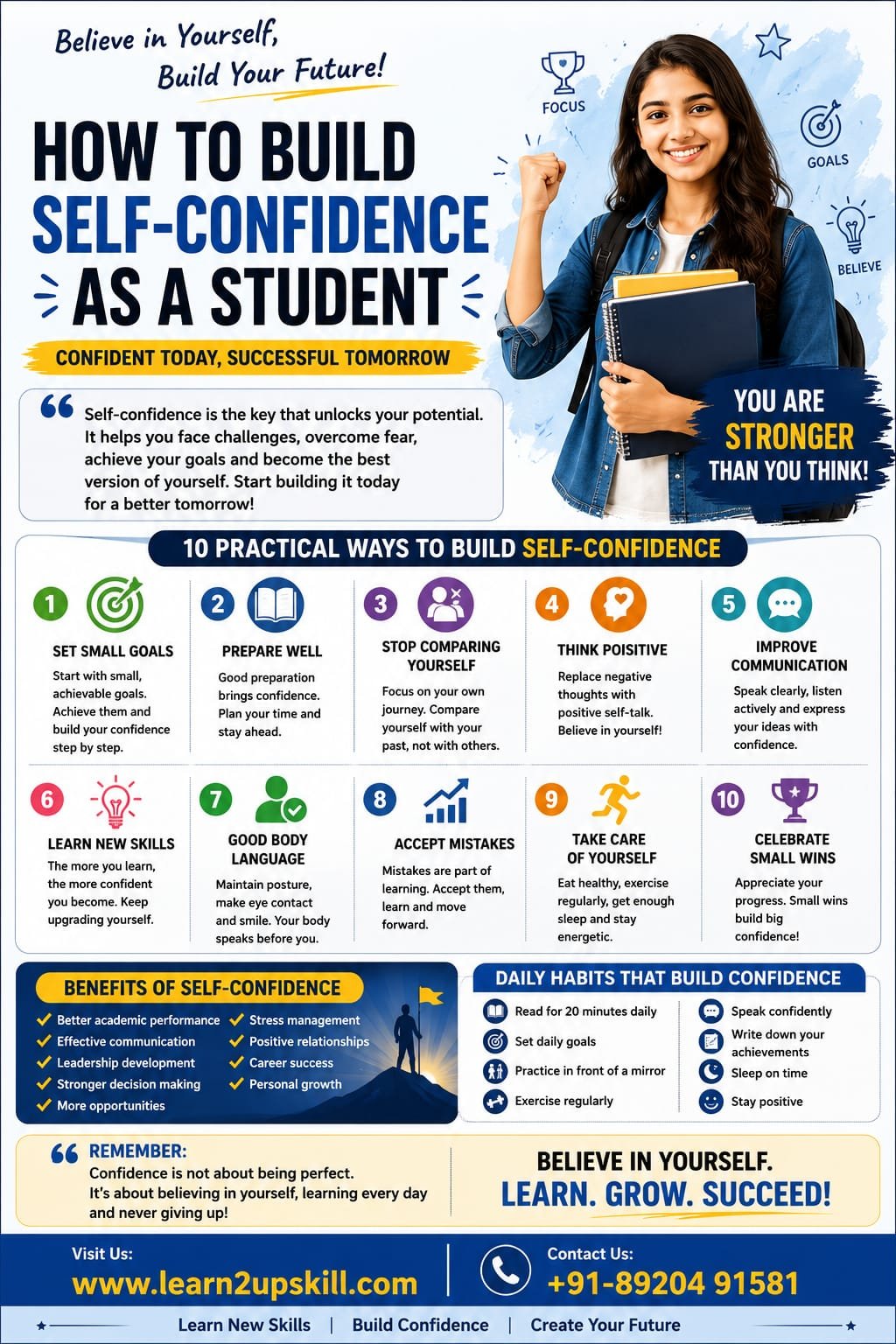
    Self-confidence is one of the most valuable qualities a student can develop. It helps you participate actively in class, perform better in exams, communicate effectively, make informed decisions, and overcome challenges with a positive attitude. Confidence is not something people are born with—it is a skill that can be developed through consistent effort and practice.

    Many students struggle with self-doubt, fear of failure, and comparison with others. The good news is that confidence grows with every small achievement and every new experience.

    At Learn2Upskill, we believe that building self-confidence is just as important as gaining academic knowledge. A confident student is better prepared to face future opportunities and succeed in both personal and professional life.

    —

    What Is Self-Confidence?

    Self-confidence is the belief in your own abilities, strengths, and potential. It means trusting yourself to handle challenges, learn from mistakes, and keep moving forward even when things become difficult.

    Confidence is not about being perfect. It is about believing that you can learn, improve, and grow.

    —

    Why Is Self-Confidence Important for Students?

    A confident student is more likely to:

    – Participate actively in classroom discussions.

    – Perform better in exams and presentations.

    – Develop leadership qualities.

    – Communicate effectively with teachers and classmates.

    – Handle criticism positively.

    – Take on new challenges without fear.

    – Build healthy relationships.

    – Stay motivated and focused on goals.

    Confidence creates a strong foundation for lifelong success.

    —

    Common Reasons Students Lack Confidence

    Many students lose confidence because of:

    – Fear of failure

    – Comparing themselves with others

    – Negative self-talk

    – Lack of preparation

    – Poor communication skills

    – Fear of public speaking

    – Past failures

    – Bullying or criticism

    – Unrealistic expectations

    Recognizing these causes is the first step toward overcoming them.

    —

    Practical Ways to Build Self-Confidence

    1. Set Small and Achievable Goals

    Break large goals into smaller tasks. Every completed task gives you a sense of achievement and motivates you to keep improving.

    —

    1. Prepare Well

    Confidence comes from preparation. Whether it is an exam, presentation, or interview, proper preparation reduces anxiety and improves performance.

    —

    1. Stop Comparing Yourself with Others

    Everyone has a unique learning journey. Instead of comparing yourself with classmates, focus on improving your own skills and celebrating your progress.

    —

    1. Develop Positive Self-Talk

    Replace negative thoughts like “I can’t do this” with positive ones such as:

    – I am learning every day.

    – I can improve with practice.

    – I believe in my abilities.

    – Every mistake helps me grow.

    Positive thinking builds inner confidence.

    —

    1. Improve Your Communication Skills

    Practice speaking clearly and confidently. Participate in classroom discussions, group activities, debates, and presentations to improve your communication.

    —

    1. Learn New Skills

    Every new skill you learn increases your confidence. Explore areas like:

    – Public speaking

    – Digital skills

    – Artificial Intelligence (AI)

    – Coding

    – Digital marketing

    – Graphic design

    – Microsoft Excel

    – Leadership skills

    Learning keeps you motivated and future-ready.

    —

    1. Practice Good Body Language

    Your body language affects how you feel and how others perceive you.

    Maintain:

    – Good posture

    – Eye contact

    – A genuine smile

    – Calm gestures

    – Confident walking style

    Positive body language reflects confidence.

    —

    1. Accept Mistakes as Learning Opportunities

    No one succeeds without making mistakes. Instead of fearing failure, treat every setback as a lesson that helps you become stronger and wiser.

    —

    1. Take Care of Your Health

    A healthy body supports a confident mind.

    Make sure to:

    – Sleep 7–8 hours.

    – Eat nutritious food.

    – Exercise regularly.

    – Stay hydrated.

    – Limit excessive screen time.

    Good health improves concentration, energy, and confidence.

    —

    1. Celebrate Small Wins

    Every achievement matters, whether it’s completing an assignment, improving your grades, or speaking confidently in class. Celebrate your progress to stay motivated.

    —

    Daily Habits That Build Confidence

    Develop these simple habits:

    – Read for 20 minutes every day.

    – Learn one new skill each month.

    – Speak in English or your preferred language confidently.

    – Practice in front of a mirror.

    – Exercise regularly.

    – Maintain personal grooming.

    – Write down three achievements every evening.

    – Stay away from negative influences.

    Consistency is the key to lasting confidence.

    —

    Confidence During Exams

    To stay confident during exams:

    – Create a study timetable.

    – Revise regularly.

    – Solve previous years’ question papers.

    – Avoid last-minute cramming.

    – Stay calm and trust your preparation.

    – Get enough sleep before the exam.

    Remember, confidence comes from consistent preparation.

    —

    Confidence During Interviews

    If you’re preparing for college admissions, internships, or jobs:

    – Research the organization.

    – Practice common interview questions.

    – Dress neatly and professionally.

    – Speak clearly and confidently.

    – Maintain eye contact.

    – Smile naturally.

    – Believe in your abilities.

    Interview confidence improves with practice.

    —

    Mistakes That Reduce Confidence

    Avoid these common habits:

    – Comparing yourself constantly

    – Negative thinking

    – Fear of asking questions

    – Avoiding challenges

    – Giving up after one failure

    – Poor time management

    – Ignoring feedback

    – Lack of preparation

    Replacing these habits with positive actions can make a big difference.

    —

    Benefits of Self-Confidence

    Strong self-confidence helps students:

    – Improve academic performance

    – Build leadership skills

    – Communicate effectively

    – Make better decisions

    – Reduce stress and anxiety

    – Face challenges with courage

    – Perform better in interviews

    – Build stronger relationships

    – Achieve personal and career goals

    —

    Conclusion

    Self-confidence is not built overnight. It develops through continuous learning, practice, preparation, and a positive mindset. Every student has the potential to become confident by believing in themselves and taking small, consistent steps toward improvement.

    Remember, success does not come from never making mistakes—it comes from learning, growing, and never giving up.

    At Learn2Upskill, we are committed to helping students build confidence, develop essential life skills, improve communication, and prepare for successful careers through expert training and career guidance.

    —

    Contact Learn2Upskill

    Website: www.coral-kudu-326218.hostingersite.com

    Contact Us: +91-89204 91581

    Learn2Upskill – Learn. Grow. Succeed.

  • Top 25 Excel Formulas

    Top 25 Excel Formulas

    Top 25 Excel Formulas

    Introduction

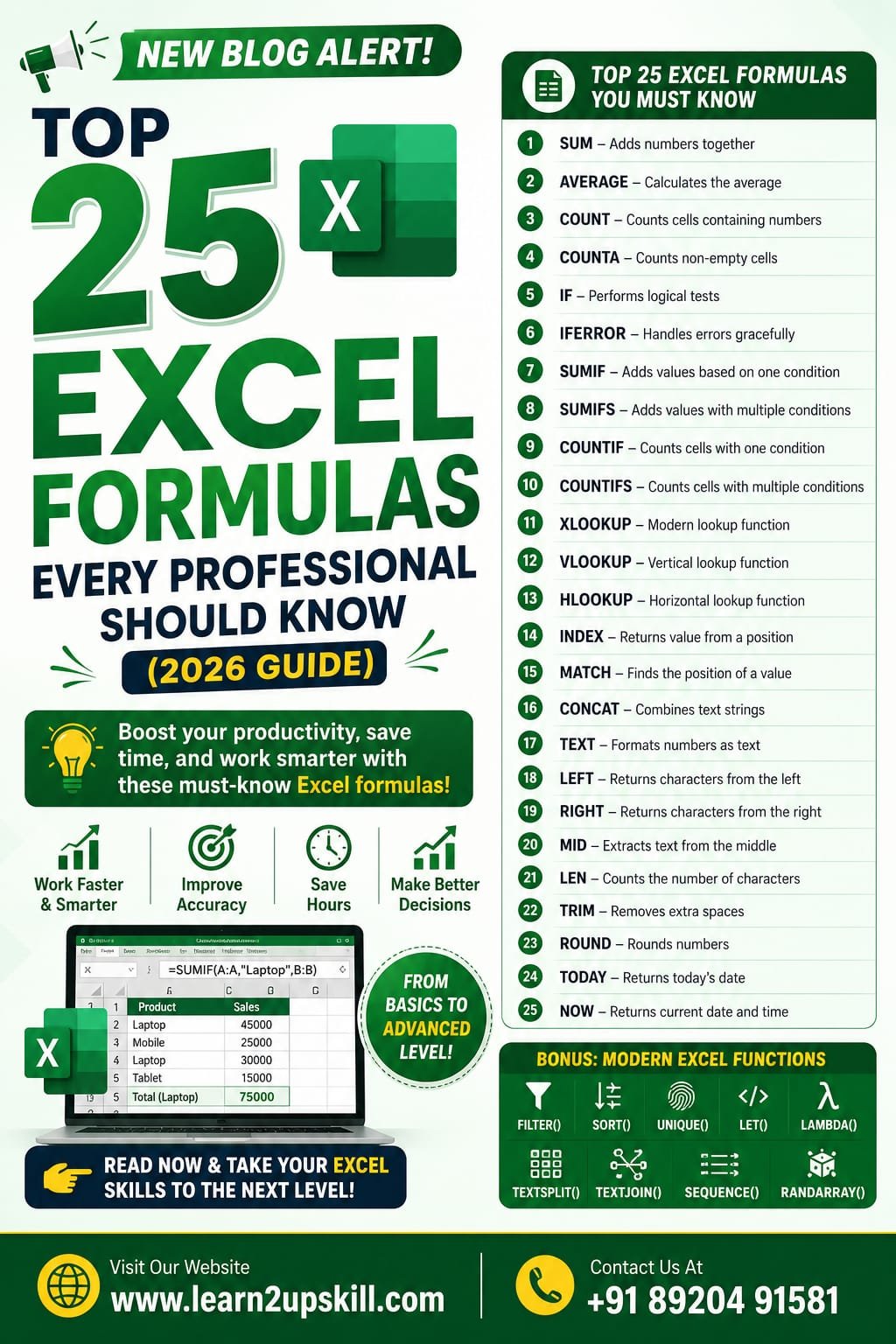
    Microsoft Excel remains one of the most valuable workplace skills across industries. Whether you’re a student, accountant, data analyst, HR professional, marketer, or business owner, knowing the right Excel formulas can save hours of manual work and improve your productivity.

    In this comprehensive guide, you’ll learn the top 25 Excel formulas every professional should know, along with practical examples and real-world use cases.


    1. SUM

    Purpose: Adds numbers together.

    Syntax:

    =SUM(A1:A10)

    Example:

    If cells A1 to A10 contain sales figures, this formula calculates the total sales.

    Use Cases:

    – Sales reports

    – Expense tracking

    – Budget management

    1. AVERAGE

    Purpose: Calculates the average value.

    Syntax:

    =AVERAGE(B2:B20)

    Example:

    Find the average marks of students.

    1. COUNT

    Purpose: Counts cells containing numbers.

    Syntax:

    =COUNT(A1:A100)

    Useful for counting sales records, invoices, or employee IDs.

    1. COUNTA

    Purpose: Counts all non-empty cells.

    Syntax

    =COUNTA(A1:A100)

    Ideal for checking how many records have been entered.

    1. IF

    Purpose: Performs logical tests.

    Syntax

    =IF(A2>=50,”Pass”,”Fail”)

    Perfect for grading systems and decision-making.

    1. IFERROR

    Purpose: Replaces errors with custom values.

    Syntax

    =IFERROR(A2/B2,”Error”)

    Useful when dividing numbers or using lookup functions.

    1. SUMIF

    Purpose: Adds values based on one condition.

    Syntax

    =SUMIF(A:A,”Laptop”,B:B)

    Example:

    Calculate total sales of laptops only.

    1. SUMIFS

    Purpose: Adds values using multiple conditions.

    Syntax

    =SUMIFS(C:C,A:A,”North”,B:B,”Laptop”)

    Excellent for sales reporting.

    1. COUNTIF

    Counts records matching one condition.

    =COUNTIF(A:A,”Completed”)

    1. COUNTIFS

    Counts records matching multiple conditions.

    =COUNTIFS(A:A,”North”,B:B,”Completed”)

    1. XLOOKUP

    The modern replacement for VLOOKUP.

    =XLOOKUP(A2,D:D,E:E)

    Advantages:

    – Searches left and right

    – More accurate

    – Easier to use

    1. VLOOKUP

    Still widely used.

    =VLOOKUP(A2,D:F,2,FALSE)

    Useful for employee databases and product lists.

    1. HLOOKUP

    Searches horizontally.

    =HLOOKUP(“Jan”,A1:M5,2,FALSE)

    1. INDEX

    Returns values from a specific position.

    =INDEX(A1:C10,3,2)

    1. MATCH

    Finds the position of a value.

    =MATCH(“Laptop”,A:A,0)

    Often combined with INDEX.

    1. CONCAT

    Combines text.

    =CONCAT(A2,” “,B2)

    Example:

    Join first and last names.

    1. TEXT

    Formats numbers as text.

    =TEXT(A2,”dd-mm-yyyy”)

    Useful for dates and reports.

    1. LEFT

    Returns characters from the left.

    =LEFT(A2,5)


    1. RIGHT

    Returns characters from the right.

    =RIGHT(A2,4)

    1. MID

    Extracts text from the middle.

    =MID(A2,4,6)

    Useful for invoice numbers and IDs.

    1. LEN

    Counts the number of characters.

    =LEN(A2)

    Great for data validation.

    1. TRIM

    Removes extra spaces.

    =TRIM(A2)

    Perfect for cleaning imported data.

    1. ROUND

    Rounds numbers.

    =ROUND(A2,2)

    Ideal for financial reports.

    1. TODAY

    Returns today’s date.

    =TODAY()

    Useful in attendance sheets and project tracking.

    1. NOW

    Returns the current date and time.

    =NOW()

    Useful for timestamps and live reports.

    Bonus Excel Formulas

    If you’re aiming for advanced Excel skills, also learn:


    – FILTER()

    – SORT()

    – UNIQUE()

    – LET()

    – LAMBDA()

    – TEXTSPLIT()

    – TEXTJOIN()

    – SEQUENCE()

    – RANDARRAY()


    These modern functions make Excel faster and more powerful.

    Tips to Master Excel Faster

    – Practice formulas daily.

    – Learn keyboard shortcuts.

    – Build real-world dashboards.

    – Analyze sample datasets.

    – Solve business problems using Excel.

    Frequently Asked Questions (FAQs)

    Which Excel formula is most useful?

    The IF, XLOOKUP, SUMIFS, INDEX, MATCH, and Pivot Tables are among the most commonly used tools in professional environments.


    Is XLOOKUP better than VLOOKUP?

    Yes. XLOOKUP is faster, more flexible, and can search in any direction, making it the preferred choice in newer versions of Excel.


    Can beginners learn these formulas?

    Absolutely. Start with SUM, AVERAGE, IF, COUNT, and VLOOKUP before moving on to advanced formulas like XLOOKUP, INDEX, and MATCH.


    Which Excel formulas are important for data analysts?

    Data analysts frequently use XLOOKUP, SUMIFS, COUNTIFS, INDEX, MATCH, FILTER, SORT, UNIQUE, IFERROR, and TEXT functions for cleaning, analyzing, and reporting data.

    Final Thoughts

    Mastering Excel formulas is one of the smartest investments you can make in your career. These 25 formulas cover everything from basic calculations to advanced data analysis and reporting. Whether you’re preparing for a job interview, managing business data, or improving your productivity, consistent practice with these formulas will help you work faster and make better decisions.


    Start by learning a few formulas each week, apply them to real datasets, and gradually build your confidence. As you become more comfortable, you’ll be ready to explore advanced Excel features like dashboards, Pivot Tables, Power Query, and AI-powered tools, taking your spreadsheet skills to the next level.


    Learn. Practice. Upskill.

  • Career Planning Guide for Students

    Career Planning Guide for Students

    Career Planning Guide for Students

    Learn how to plan your career with this complete guide for students. Discover how to identify your interests, choose the right career, build in-demand skills, and prepare for future job opportunities.

    Focus Keyword: Career Planning Guide for Students

    —

    Career Planning Guide for Students

    Choosing the right career is one of the most important decisions a student will make. With thousands of career options available today and rapid changes in technology, many students feel confused about where to begin.

    The good news is that career planning doesn’t require you to have all the answers immediately. Instead, it’s about understanding yourself, exploring opportunities, developing the right skills, and making informed decisions over time.

    This comprehensive guide will help students create a clear career roadmap and prepare for a successful future.

    —

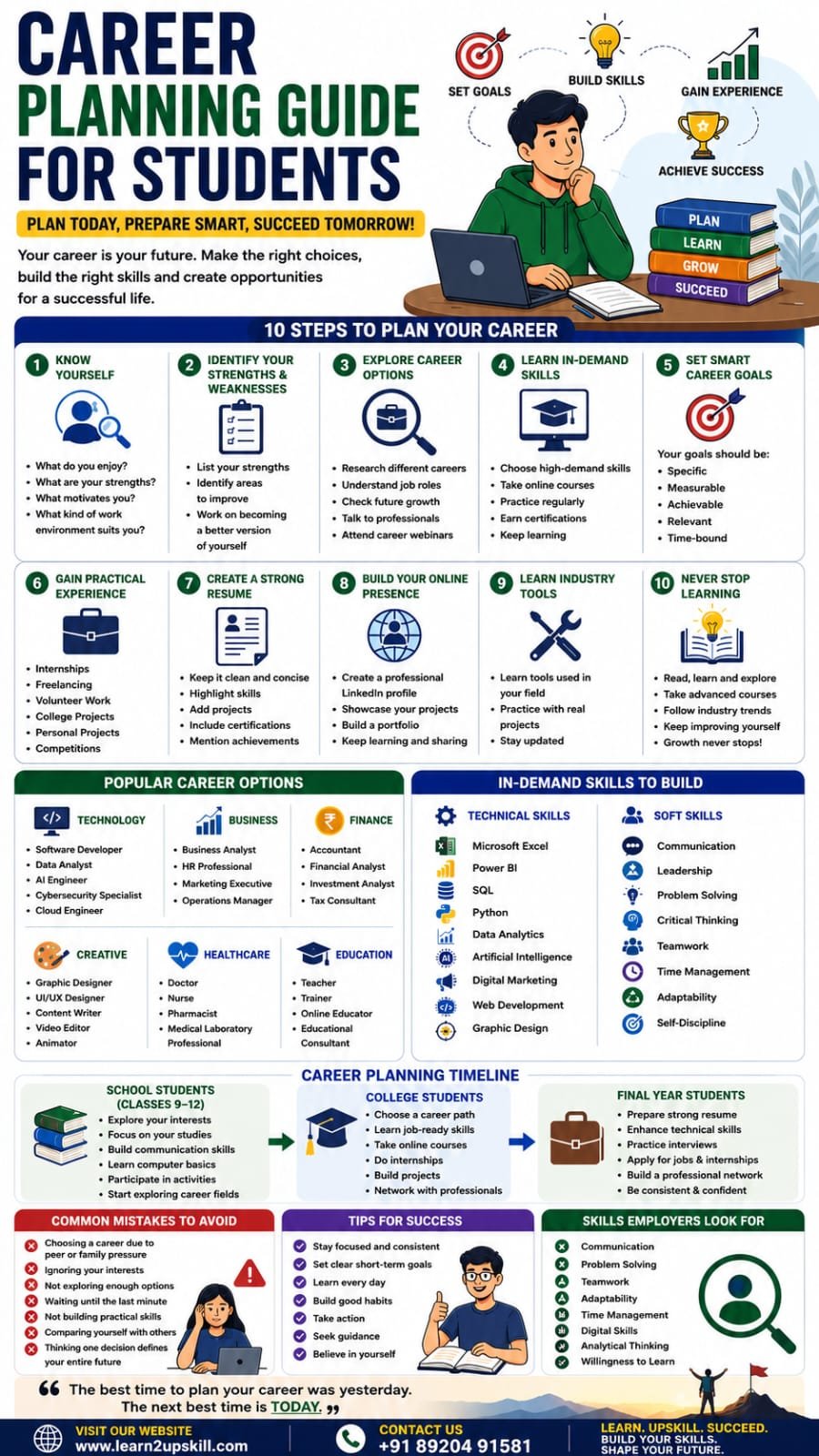
    What Is Career Planning?

    Career planning is the process of identifying your interests, strengths, values, and goals, then selecting a career path that aligns with them.

    It involves:

    – Self-assessment

    – Career exploration

    – Skill development

    – Goal setting

    – Continuous learning

    – Practical experience

    Good career planning helps you make confident decisions instead of choosing a career based only on trends or pressure.

    —

    Why Is Career Planning Important?

    Proper career planning helps students:

    – Understand their strengths

    – Make informed career choices

    – Reduce confusion and stress

    – Develop job-ready skills

    – Improve employability

    – Build confidence

    – Achieve long-term career goals

    —

    Step 1: Know Yourself

    Before choosing any profession, understand who you are.


    Ask yourself:


    – What subjects do I enjoy?

    – What activities excite me?

    – What are my strengths?

    – What kind of work environment suits me?

    – What values matter most to me?

    Knowing yourself makes career decisions easier.

    —

    Step 2: Identify Your Strengths and Weaknesses

    Create a simple list.

    Strengths

    Examples:

    – Communication

    – Problem Solving

    – Leadership

    – Creativity

    – Mathematics

    – Analytical Thinking

    – Teamwork

    Areas to Improve

    Examples:

    – Public Speaking

    – Time Management

    – Technical Skills

    – Confidence

    – Organization

    Improving your weaker areas can significantly increase your career opportunities.

    —

    Step 3: Explore Career Options

    Don’t limit yourself to careers you hear about most often.

    Research different industries.

    Technology

    Business

    Finance

    Creative Careers

    Healthcare

    Education

    —

    Step 4: Learn In-Demand Skills

    Today’s employers value practical skills in addition to academic qualifications.

    Some of the most sought-after skills include:

    Technical Skills

    Soft Skills

    These skills are valuable across many industries.

    —

    Step 5: Set SMART Career Goals

    A good goal is:

    – Specific

    – Measurable

    – Achievable

    – Relevant

    – Time-bound

    —

    Step 6: Build Practical Experience

    Experience helps turn knowledge into skills.

    Ways to gain experience:

    – Internships

    – Freelancing

    – Volunteer work

    – College projects

    – Online competitions

    – Personal projects

    – Hackathons

    Employers appreciate candidates who can demonstrate practical work.

    —

    Step 7: Create a Strong Resume

    A student resume should include:

    – Education

    – Skills

    – Certifications

    – Projects

    – Internships

    – Achievements

    – Volunteer Experience

    Keep it concise, accurate, and tailored to the role you’re applying for.

    —

    Step 8: Build Your Online Presence

    Recruiters often review candidates online.

    —

    Step 9: Learn Industry Tools

    Different careers require different tools.

    Examples:

    Data Analytics

    Marketing

    Design

    Project Management

    Learning industry-standard tools gives you a competitive advantage.

    —

    Step 10: Never Stop Learning

    Technology evolves rapidly.

    Stay updated by:

    – Taking online courses

    – Reading industry blogs

    – Watching educational videos

    – Practicing regularly

    – Attending webinars

    – Networking with professionals

    Continuous learning is essential for long-term career growth.

    —

    Common Career Planning Mistakes

    Avoid these common mistakes:

    – Choosing a career because of peer pressure.

    – Ignoring your interests and strengths.

    – Waiting until graduation to build skills.

    – Not gaining practical experience.

    – Comparing yourself with others.

    – Believing one decision determines your entire future.

    —

    Skills Employers Look For

    Across industries, employers consistently value:

    – Communication

    – Problem Solving

    – Teamwork

    – Adaptability

    – Critical Thinking

    – Time Management

    – Digital Skills

    – Microsoft Excel

    – Analytical Thinking

    – Willingness to Learn

    Developing these skills can significantly improve your employability.

    —

    Final Thoughts

    Career planning is not about having your entire future figured out today—it’s about taking consistent steps toward a meaningful and successful career. By understanding yourself, exploring opportunities, building practical skills, and gaining real-world experience, you can create a strong foundation for long-term success.

    Start early, stay curious, and continue learning. Every course you complete, every project you build, and every new skill you develop brings you closer to your career goals.

    At Learn2Upskill, we help students become job-ready with practical training in Microsoft Excel, Data Analytics, Power BI, Python, AI, Digital Marketing, and other high-demand professional skills.

    Why Learn with Learn2Upskill?

    – Industry-focused training

    – Hands-on projects

    – Practical learning approach

    – Career-oriented curriculum

    – Expert guidance

    – Skills aligned with today’s job market

    Visit: www.coral-kudu-326218.hostingersite.com

    Contact Us: +91 89204 91581

    Learn Today. Build Skills. Shape Your Future.

  • Group Discussion Tips to Stand Out

    Group Discussion Tips to Stand Out

    Group Discussion Tips to Stand Out

    Introduction

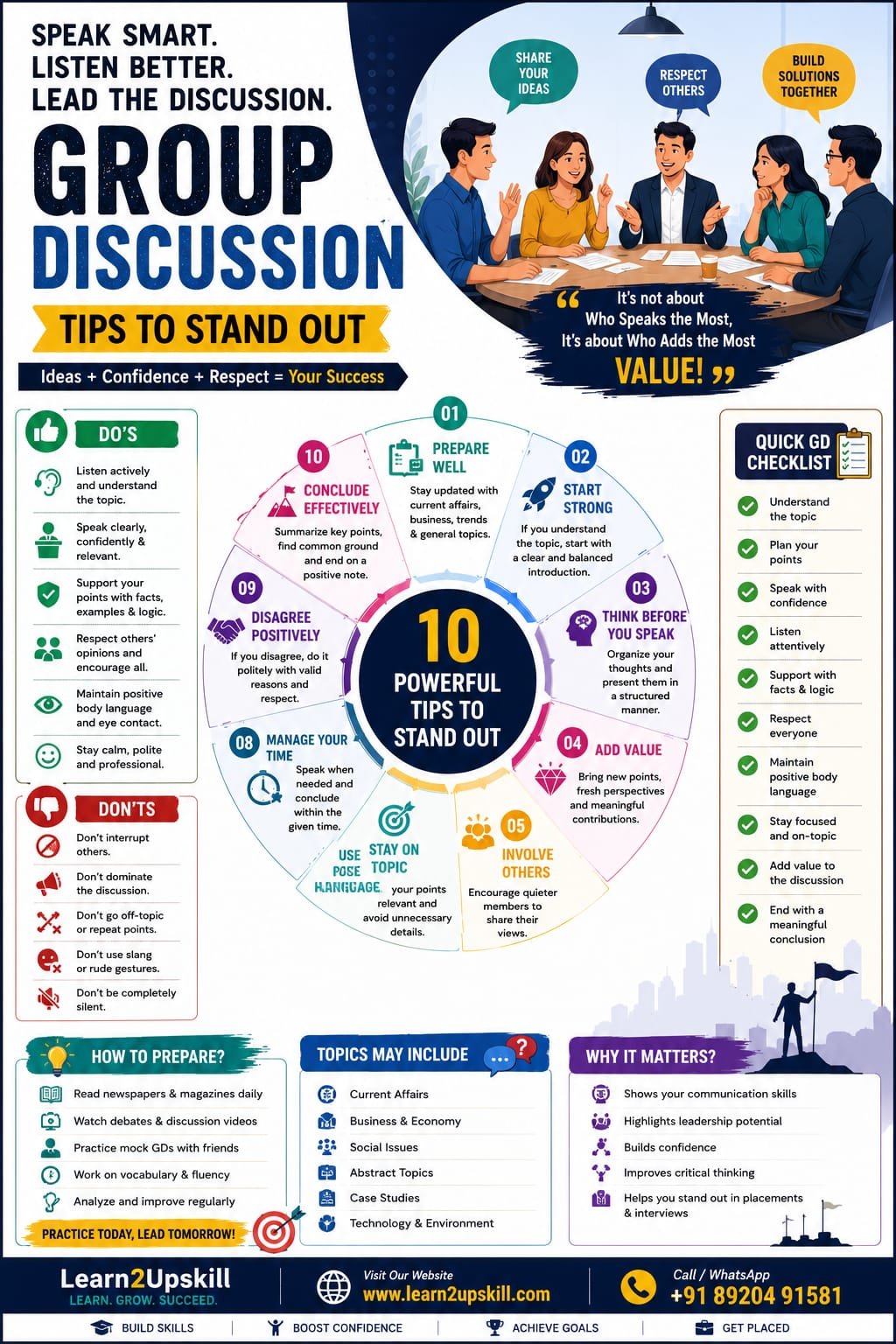
    Group Discussions (GDs) are a common part of campus placements, job interviews, management admissions, and scholarship selection processes. They help recruiters evaluate not only your knowledge but also your communication skills, confidence, leadership, teamwork, and problem-solving ability.

    Many candidates lose confidence because they think they must speak the most to impress the panel. In reality, recruiters look for candidates who communicate clearly, listen actively, present logical ideas, and contribute positively to the discussion.

    With the right preparation and approach, you can confidently stand out in any Group Discussion.

    At Learn2Upskill, we help students and job seekers build the confidence, communication skills, and professional attitude needed to excel in Group Discussions and interviews.

    —

    What Is a Group Discussion?

    A Group Discussion is a structured conversation where a group of candidates discusses a given topic within a limited time. The purpose is to assess how participants think, communicate, collaborate, and handle different opinions.

    The discussion may be based on current affairs, business topics, social issues, abstract ideas, or case studies.

    —

    Why Are Group Discussions Important?

    Recruiters use Group Discussions to evaluate:

    – Communication skills

    – Leadership qualities

    – Confidence

    – Teamwork

    – Listening ability

    – Critical thinking

    – Problem-solving skills

    – Creativity

    – Decision-making

    – Professional attitude

    A strong GD performance often increases your chances of advancing to the interview stage.

    —

    Qualities Recruiters Look For

    During a Group Discussion, employers observe whether you:

    – Speak confidently.

    – Present logical ideas.

    – Listen to others respectfully.

    – Support your opinions with examples.

    – Encourage teamwork.

    – Stay calm under pressure.

    – Respect different viewpoints.

    – Avoid unnecessary arguments.

    – Demonstrate leadership.

    – Manage time effectively.

    Remember, it is about contributing meaningfully—not dominating the discussion.

    —

    Types of Group Discussion Topics

    You may encounter topics such as:

    Current Affairs

    Examples:

    – Artificial Intelligence in Education

    – Climate Change

    – Digital India

    – Social Media and Society

    Business Topics

    – Startup Culture

    – Remote Work

    – Digital Marketing

    – E-commerce Growth

    Abstract Topics

    – Success

    – Time Is Money

    – Blue Is Better Than Green

    Case Studies

    Candidates analyze a business or real-life problem and suggest solutions.

    Preparing for different topic types improves your confidence.

    —

    How to Prepare Before a Group Discussion

    1. Stay Updated

    Read newspapers, business magazines, and trusted news websites regularly. Understanding current events helps you contribute with relevant examples.

    —

    1. Improve Communication Skills

    Practice speaking clearly and confidently.

    Regular practice makes communication more natural.

    —

    1. Practice with Friends

    Join mock Group Discussions with classmates or mentors.

    Practice is one of the best ways to reduce nervousness.

    —

    1. Organize Your Thoughts

    Before speaking:

    – Understand the topic.

    – Think about key points.

    – Arrange ideas logically.

    – Support your opinion with examples.

    Structured responses are easier to understand.

    —

    Tips to Stand Out in a Group Discussion

    1. Start the Discussion (If You Can)

    If you understand the topic well, begin the discussion with a clear and balanced introduction.

    Starting confidently can create a positive first impression, but only if you have something meaningful to say.

    —

    1. Listen Carefully

    Do not focus only on speaking.

    Listen actively to:

    – Understand others’ viewpoints.

    – Build on good ideas.

    – Avoid repeating points.

    Good listeners often become better speakers.

    —

    1. Speak Clearly and Confidently

    Maintain:

    – Moderate speed

    – Clear pronunciation

    – Confident tone

    – Professional language

    Avoid speaking too softly or too quickly.

    —

    1. Support Your Arguments

    Use:

    – Facts

    – Statistics (when accurate)

    – Real-life examples

    – Logical reasoning

    Strong arguments make your opinions more convincing.

    —

    1. Respect Different Opinions

    Even if you disagree:

    – Stay polite.

    – Avoid personal attacks.

    – Focus on ideas, not individuals.

    Professional behavior leaves a lasting impression.

    —

    1. Encourage Team Participation

    Leadership is not about speaking the most.

    Invite quieter participants by saying things like:

    «”I’d like to hear another perspective on this.”»

    This shows maturity and teamwork.

    —

    1. Maintain Positive Body Language

    Good body language includes:

    – Eye contact

    – Upright posture

    – Natural hand gestures

    – Smiling when appropriate

    – Calm facial expressions

    Positive body language reflects confidence.

    —

    1. Avoid Interrupting Others

    Wait for the right moment before speaking.

    Interrupting repeatedly creates a negative impression.

    —

    1. Stay Relevant

    Speak only about the topic.

    Avoid unnecessary stories or unrelated information.

    Quality matters more than quantity.

    —

    1. Conclude Effectively

    If given the opportunity, summarize the discussion by highlighting the key points and common conclusions without introducing new arguments.

    A good conclusion demonstrates leadership and clarity.

    —

    Common Group Discussion Mistakes

    Avoid these common mistakes:

    – Speaking without understanding the topic

    – Interrupting others

    – Dominating the discussion

    – Remaining completely silent

    – Speaking too fast

    – Giving incorrect facts confidently

    – Using disrespectful language

    – Poor eye contact

    – Negative body language

    – Arguing aggressively

    Avoiding these habits significantly improves your GD performance.

    —

    Body Language Tips

    During the discussion:

    – Sit upright.

    – Maintain eye contact with different participants.

    – Smile naturally.

    – Keep your hands relaxed.

    – Avoid fidgeting.

    – Show interest while others speak.

    Confident body language enhances your overall personality.

    —

    Daily Practice Routine

    To improve your Group Discussion skills:

    – Read news for 20 minutes daily.

    – Watch discussions and debates.

    – Learn five new words every day.

    – Practice speaking in front of a mirror.

    – Join mock Group Discussions.

    – Record yourself and review your performance.

    – Work on pronunciation and clarity.

    Consistency leads to confidence.

    —

    Skills You Develop Through Group Discussions

    Participating regularly improves:

    – Communication skills

    – Leadership

    – Critical thinking

    – Teamwork

    – Confidence

    – Decision-making

    – Public speaking

    – Emotional intelligence

    – Professional etiquette

    These skills are valuable throughout your career.

    —

    Final Checklist Before a Group Discussion

    Before entering the discussion, remember to:

    – ✔ Understand the topic carefully.

    – ✔ Stay calm and confident.

    – ✔ Listen actively.

    – ✔ Speak with clarity.

    – ✔ Respect everyone.

    – ✔ Support your ideas with logic.

    – ✔ Maintain positive body language.

    – ✔ Stay focused on the topic.

    Small habits can make a big difference.

    —

    Conclusion

    A successful Group Discussion is not about speaking the loudest—it is about communicating effectively, thinking logically, listening respectfully, and working collaboratively. With regular practice, current affairs knowledge, and strong communication skills, you can confidently stand out and make a lasting impression on recruiters.

    Every Group Discussion is an opportunity to demonstrate your personality, leadership, and professionalism. Prepare well, believe in yourself, and let your ideas speak with confidence.

    At Learn2Upskill, we help students and job seekers build communication skills, personality development, interview preparation, career readiness, and leadership abilities to achieve success in placements and professional careers.

    —

    Contact Learn2Upskill

    Website: www.coral-kudu-326218.hostingersite.com

    Contact Us: +91-89204 91581

    Learn2Upskill – Learn. Grow. Succeed.

  • Excel Skills That Can Help You Get a Job

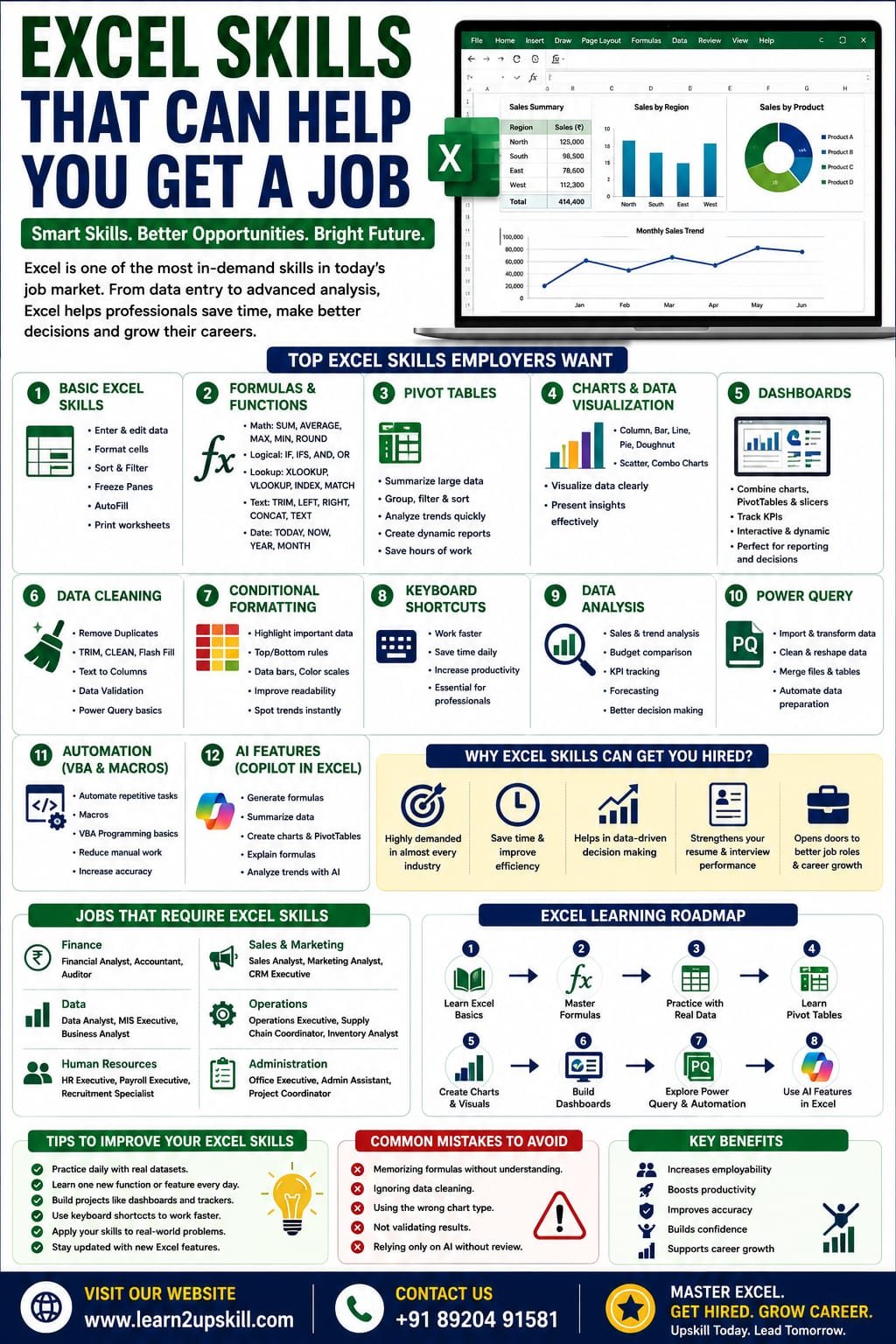
    Excel Skills That Can Help You Get a Job

    Excel Skills That Can Help You Get a Job

    Discover the most in-demand Excel skills that can help you get hired. Learn formulas, Pivot Tables, dashboards, charts, automation, AI features, and more with this complete career guide.

    Focus Keyword: Excel Skills That Can Help You Get a Job

    Excel Skills That Can Help You Get a Job

    In today’s competitive job market, Microsoft Excel remains one of the most valuable workplace skills. From multinational companies to startups, organizations rely on Excel to organize data, analyze business performance, create reports, and support decision-making.

    Whether you’re a student, fresher, working professional, or job seeker, strong Excel skills can improve your employability and open doors to careers in finance, accounting, HR, marketing, operations, administration, data analysis, and many other fields.

    In this guide, we’ll explore the top Excel skills employers look for, why they matter, and how you can build them to strengthen your career.

    Why Excel Skills Matter

    Excel is used across nearly every industry because it helps professionals:

    – Organize large amounts of data

    – Perform calculations quickly

    – Analyze trends

    – Build reports

    – Create dashboards

    – Visualize information

    – Improve business decisions

    Employers often list Excel as a required or preferred skill in job descriptions, especially for office-based roles.

    Top Excel Skills Employers Want

    1. Basic Excel Skills

    Every professional should know how to:

    – Create and save workbooks

    – Format cells

    – Enter and edit data

    – Sort and filter information

    – Freeze panes

    – Print worksheets

    – Use AutoFill

    These are the building blocks of Excel proficiency.

    1. Excel Formulas and Functions

    Formulas are one of Excel’s greatest strengths.

    Essential functions include:

    Mathematical

    – SUM

    – AVERAGE

    – MAX

    – MIN

    – ROUND

    Logical

    – IF

    – IFS

    – AND

    – OR

    Lookup

    – XLOOKUP

    – VLOOKUP

    – INDEX

    – MATCH

    Text

    – TRIM

    – LEFT

    – RIGHT

    – MID

    – CONCAT

    – TEXT

    Date & Time

    – TODAY

    – NOW

    – YEAR

    – MONTH

    – DATEDIF

    Employers value candidates who can use formulas to automate calculations and reduce manual work.

    1. Pivot Tables

    Pivot Tables allow users to summarize thousands of rows of data in seconds.

    With Pivot Tables, you can:

    – Analyze sales

    – Compare regions

    – Summarize expenses

    – Track employee performance

    – Build reports

    This is one of the most requested Excel skills in business roles.

    1. Charts and Data Visualization

    Knowing how to present data visually is just as important as analyzing it.

    Useful chart types include:

    – Column Chart

    – Bar Chart

    – Line Chart

    – Pie Chart

    – Doughnut Chart

    – Scatter Plot

    – Combo Chart

    Well-designed charts make reports easier to understand and more impactful.

    1. Excel Dashboards

    Dashboards combine charts, Pivot Tables, slicers, and KPIs into interactive reports.

    Professionals use dashboards to monitor:

    – Sales performance

    – Business growth

    – Inventory

    – Financial results

    – HR metrics

    Dashboard skills are especially valuable in analyst and management roles.

    1. Data Cleaning

    Employers expect candidates to work with clean, reliable data.

    Important techniques include:

    – Remove Duplicates

    – TRIM

    – CLEAN

    – Flash Fill

    – Text to Columns

    – Find & Replace

    – Data Validation

    – Power Query basics

    Clean data leads to accurate analysis.

    1. Conditional Formatting

    Conditional Formatting helps highlight important information automatically.

    Examples:

    – Top-performing salespeople

    – Overdue tasks

    – Low inventory

    – Duplicate values

    – High expenses

    It improves readability and helps users focus on key insights.

    1. Keyboard Shortcuts

    Using shortcuts increases productivity.

    Some popular shortcuts include:

    – Ctrl + C (Copy)

    – Ctrl + V (Paste)

    – Ctrl + Z (Undo)

    – Ctrl + Shift + L (Filter)

    – Ctrl + T (Create Table)

    – F4 (Repeat last action or toggle references in formulas)

    – Alt + = (AutoSum)

    Employers appreciate candidates who can work efficiently.

    1. Data Analysis

    Excel supports a wide range of analytical tasks.

    Examples include:

    – Sales analysis

    – Trend analysis

    – Budget comparisons

    – Forecasting

    – KPI tracking

    – Customer insights

    Analytical thinking combined with Excel skills is highly valued.

    1. Power Query

    Power Query allows users to:

    – Import data

    – Clean data

    – Merge files

    – Transform datasets

    – Automate repetitive preparation tasks

    It is increasingly used in reporting and business intelligence workflows.

    1. Automation

    Automation helps reduce repetitive work.

    Common automation tools include:

    – Macros

    – VBA (Visual Basic for Applications)

    – Office Scripts (supported Microsoft 365 environments)

    Automation skills are especially valuable for repetitive reporting tasks.

    1. AI Features in Excel

    Modern Excel includes AI-assisted capabilities in supported Microsoft 365 plans, such as Microsoft Copilot.

    These features can help users:

    – Generate formulas

    – Summarize data

    – Create charts

    – Build PivotTables

    – Explain formulas

    – Analyze trends

    Understanding how to use AI responsibly alongside core Excel skills can improve productivity.

    Which Jobs Require Excel?

    Excel is commonly used in roles such as:

    Finance

    – Financial Analyst

    – Accountant

    – Auditor

    Data

    – Data Analyst

    – MIS Executive

    – Business Analyst

    Human Resources

    – HR Executive

    – Payroll Executive

    – Recruiter

    Sales & Marketing

    – Sales Analyst

    – Marketing Analyst

    – CRM Executive

    Operations

    – Operations Executive

    – Supply Chain Coordinator

    – Inventory Analyst

    Administration

    – Office Executive

    – Administrative Assistant

    – Project Coordinator

    Tips to Improve Your Excel Skills

    – Practice daily with sample datasets.

    – Learn keyboard shortcuts.

    – Build small projects such as expense trackers or sales reports.

    – Create dashboards.

    – Solve real-world business problems.

    – Keep learning new Excel features as they become available.

    Common Mistakes to Avoid

    – Memorizing formulas without understanding them.

    – Ignoring data cleaning.

    – Using the wrong chart type.

    – Forgetting to validate results.

    – Relying solely on AI without reviewing outputs.

    Final Thoughts

    Excel is much more than a spreadsheet program—it’s a powerful business tool that supports data analysis, reporting, planning, and decision-making across countless industries.

    By mastering formulas, Pivot Tables, charts, dashboards, data cleaning, automation, and AI-assisted features, you’ll build skills that employers actively seek and improve your chances of landing better job opportunities.

    The key is consistent practice. Work on real-world datasets, build projects, and keep expanding your knowledge as Excel continues to evolve.

    At Learn2Upskill, we help students and professionals develop practical Excel, AI, and data analysis skills through hands-on, career-focused training.

    Visit: www.coral-kudu-326218.hostingersite.com

    Contact Us: +91 89204 91581

    Master Excel. Build Confidence. Get Job-Ready.

  • Skills Every Student Should Develop Before Graduation: A Complete Guide to Career Success

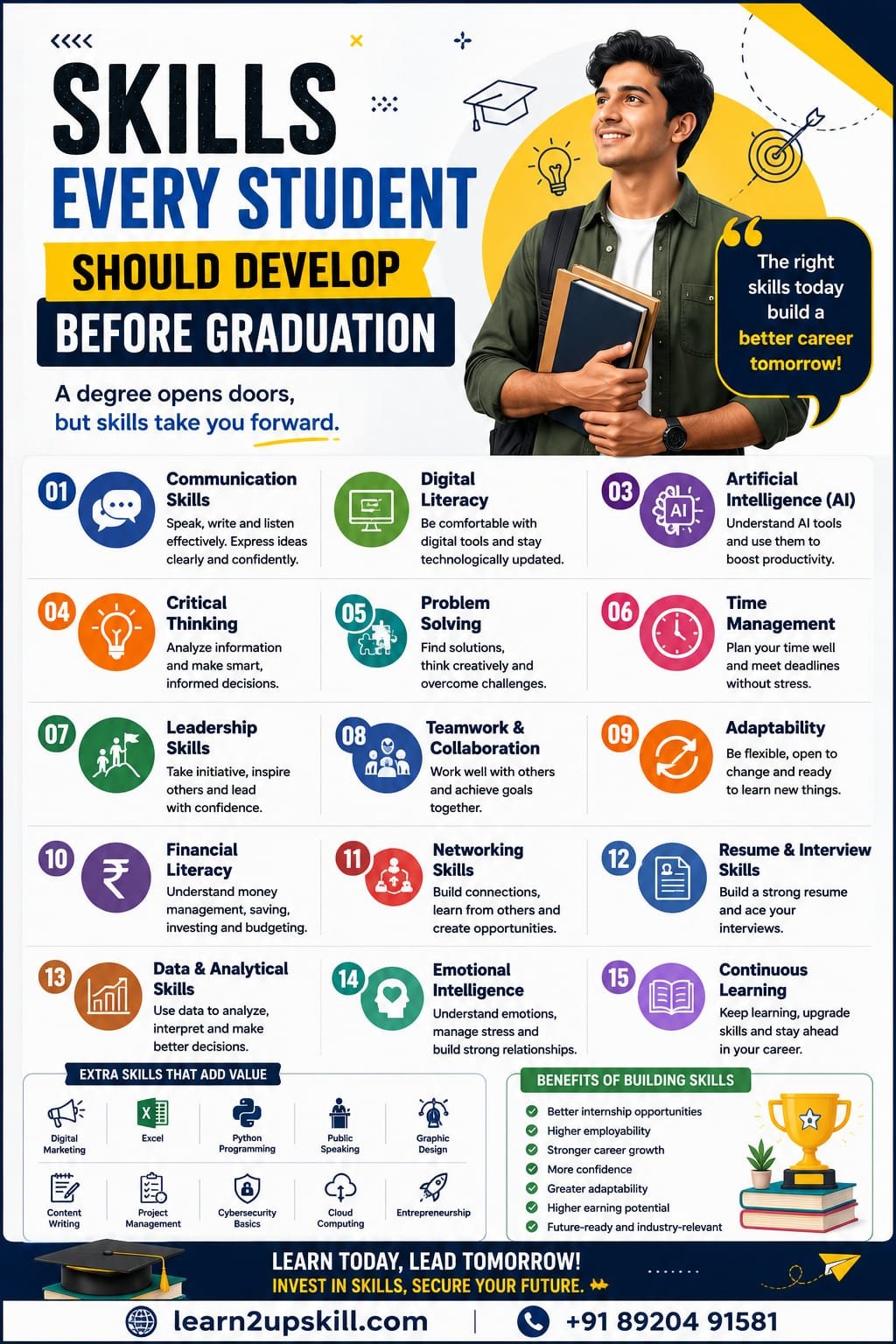
    Skills Every Student Should Develop Before Graduation: A Complete Guide to Career Success

    Skills Every Student Should Develop Before Graduation: A Complete Guide to Career Success

    Published by: Learn2Upskill

    Website: www.coral-kudu-326218.hostingersite.com

    Contact: +91 89204 91581

    Introduction

    Graduating from college is an exciting milestone, but today’s employers expect more than just a degree. They look for graduates who can communicate effectively, solve problems, adapt to change, and use modern technology with confidence.

    Developing the right skills before graduation can make the transition from classroom to workplace much smoother. Whether you plan to pursue a job, higher education, or entrepreneurship, building these skills early will give you a competitive advantage.

    In this blog, we’ll explore the essential skills every student should develop before graduation to improve employability and prepare for long-term career success.

    —

    Why Skills Matter More Than Ever

    The job market is evolving rapidly due to technology, automation, and Artificial Intelligence (AI). While academic knowledge remains important, employers increasingly value practical skills that help employees contribute from day one.

    Students who combine a strong educational foundation with practical, professional, and digital skills are better positioned to secure internships, job offers, and career growth opportunities.

    —

    1. Communication Skills

    Strong communication is essential in every profession.

    Develop the ability to:

    – Speak confidently

    – Write professional emails

    – Deliver presentations

    – Listen actively

    – Communicate with diverse teams

    Good communication builds confidence and improves workplace relationships.

    —

    1. Digital Literacy

    Every graduate should be comfortable using modern digital tools.

    Learn:

    – Microsoft Word

    – Microsoft Excel

    – Microsoft PowerPoint

    – Google Workspace

    – Online collaboration tools

    – Cloud storage platforms

    Digital literacy is now a basic requirement across industries.

    —

    1. Artificial Intelligence (AI) Skills

    AI is changing the way businesses operate.

    Students should understand:

    – Generative AI tools

    – Prompt writing

    – AI-assisted research

    – AI for productivity

    – Responsible use of AI

    Learning AI can improve efficiency and open doors to future-ready careers.

    —

    1. Critical Thinking

    Employers value people who can analyze situations and make informed decisions.

    Practice:

    – Evaluating information

    – Asking thoughtful questions

    – Comparing solutions

    – Identifying risks

    – Making logical decisions

    Critical thinking helps solve real-world challenges.

    —

    1. Problem-Solving Skills

    Every organization faces challenges.

    Develop the ability to:

    – Identify problems

    – Analyze causes

    – Generate solutions

    – Test ideas

    – Learn from outcomes

    Strong problem-solvers are valuable in every industry.

    —

    1. Time Management

    Managing time effectively helps students balance academics, internships, projects, and personal life.

    Useful habits include:

    – Creating daily schedules

    – Setting priorities

    – Avoiding procrastination

    – Meeting deadlines

    – Reviewing progress regularly

    Time management increases productivity and reduces stress.

    —

    1. Leadership Skills

    Leadership is not limited to managers.

    Students can build leadership by:

    – Leading group projects

    – Organizing events

    – Volunteering

    – Taking initiative

    – Mentoring peers

    Leadership demonstrates responsibility and confidence.

    —

    1. Teamwork and Collaboration

    Most workplaces rely on teamwork.

    Develop skills such as:

    – Respecting different opinions

    – Sharing responsibilities

    – Resolving conflicts

    – Supporting teammates

    – Achieving common goals

    Employers highly value professionals who work well with others.

    —

    1. Adaptability

    Technology and industries continue to change rapidly.

    Adaptable students are willing to:

    – Learn new tools

    – Accept feedback

    – Adjust to change

    – Develop new skills

    – Embrace innovation

    Adaptability is essential for long-term career growth.

    —

    1. Financial Literacy

    Understanding money management is an important life skill.

    Learn:

    – Budgeting

    – Saving

    – Investing basics

    – Taxes

    – Managing expenses

    – Emergency planning

    Financial literacy supports personal and professional stability.

    —

    1. Networking Skills

    Professional networking creates opportunities.

    Students should:

    – Build a professional LinkedIn profile

    – Attend seminars and workshops

    – Connect with mentors

    – Participate in career fairs

    – Join professional communities

    Strong networks often lead to internships and job opportunities.

    —

    1. Resume and Interview Skills

    Before graduation, every student should know how to:

    – Create a professional resume

    – Write an effective cover letter

    – Prepare for interviews

    – Answer common HR questions

    – Showcase projects and achievements

    Preparation increases confidence during recruitment.

    —

    1. Data and Analytical Skills

    Many careers require data-driven decision-making.

    Useful skills include:

    – Microsoft Excel

    – SQL basics

    – Power BI

    – Data visualization

    – Basic statistics

    Analytical skills are valuable in business, finance, marketing, healthcare, and technology.

    —

    1. Emotional Intelligence

    Emotional intelligence helps students succeed both personally and professionally.

    Develop the ability to:

    – Understand emotions

    – Manage stress

    – Show empathy

    – Build positive relationships

    – Handle workplace challenges calmly

    Strong emotional intelligence improves teamwork and leadership.

    —

    1. Continuous Learning Mindset

    Learning shouldn’t stop after graduation.

    Successful professionals:

    – Read books and industry blogs

    – Take online courses

    – Earn certifications

    – Attend webinars

    – Stay updated with industry trends

    Continuous learning keeps your skills relevant.

    —

    Additional Skills That Add Value

    Students can further strengthen their profiles by learning:

    – Digital Marketing

    – Python Programming

    – Public Speaking

    – Graphic Design

    – Video Editing

    – Content Writing

    – Cybersecurity Basics

    – Cloud Computing Fundamentals

    – Project Management

    – Entrepreneurship

    These skills increase career flexibility and job opportunities.

    —

    How to Start Developing These Skills

    – Enroll in online courses.

    – Participate in internships.

    – Join student clubs and organizations.

    – Volunteer for community projects.

    – Build personal projects and portfolios.

    – Practice communication every day.

    – Seek feedback from mentors.

    – Set monthly learning goals.

    Small, consistent efforts create long-term success.

    —

    Benefits of Building Skills Before Graduation

    Students who develop these skills often enjoy:

    – Better internship opportunities

    – Stronger resumes

    – Improved interview performance

    – Higher employability

    – Greater confidence

    – Faster career growth

    – Increased earning potential

    – Better adaptability to workplace changes

    —

    Final Tips for Students

    – Don’t wait until your final semester to prepare.

    – Learn one new skill every few months.

    – Balance academics with practical experience.

    – Stay curious and open to learning.

    – Build a portfolio that showcases your achievements.

    – Invest in your personal and professional development.

    —

    Conclusion

    A degree is an important achievement, but it is your skills that help you stand out in today’s competitive job market. Employers seek graduates who can communicate effectively, solve problems, adapt to change, and use modern technology confidently.


    By developing these essential skills before graduation, you’ll be better prepared to seize opportunities, overcome challenges, and build a successful career.

    Start today, stay consistent, and invest in lifelong learning—your future self will thank you.

    —

    Learn with Learn2Upskill

    At Learn2Upskill, we help students become career-ready through practical, industry-focused training and expert guidance.

    Our programs cover in-demand skills such as Artificial Intelligence (AI), Microsoft Excel, Data Analytics, Digital Marketing, Programming, Communication Skills, Career Development, and much more.

    Whether you’re preparing for your first job or planning your future career, we’re here to help you succeed.

    Website: www.coral-kudu-326218.hostingersite.com

    Contact: +91 89204 91581

    Build the skills employers want. Graduate with confidence. Grow your career with Learn2Upskill.

  • Goal Setting Techniques for Students

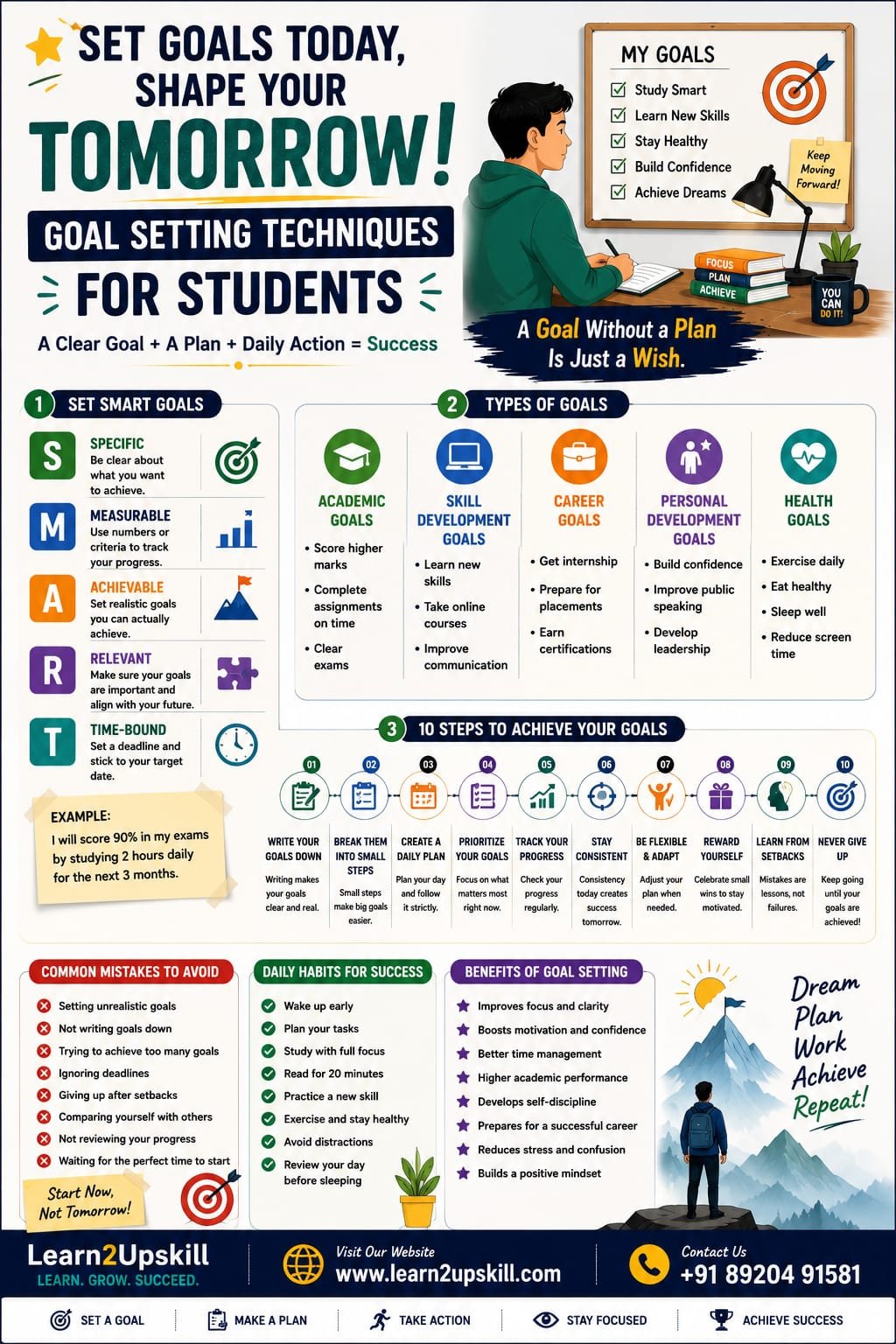
    Goal Setting Techniques for Students

    Goal Setting Techniques for Students

    Introduction

    Every successful student has one thing in common—they have clear goals. Whether it’s scoring higher marks, learning a new skill, getting into a dream college, or securing a great job, goals provide direction and purpose. Without goals, students often lose focus, waste time, and struggle to stay motivated.

    Goal setting is not just about writing down what you want to achieve. It is about creating a practical plan, staying committed, and taking consistent action. When students set meaningful goals, they become more organized, confident, and prepared to face challenges.

    At Learn2Upskill, we believe that goal setting is one of the most powerful life skills. It helps students stay focused, build discipline, and prepare for long-term academic and career success.

    —

    What Is Goal Setting?

    Goal setting is the process of identifying what you want to achieve and creating a step-by-step plan to reach it. A goal gives you a clear target and motivates you to work consistently toward success.

    Goals can be related to:

    – Academic performance

    – Career planning

    – Skill development

    – Health and fitness

    – Personality development

    – Financial management

    – Personal growth

    Having clear goals makes it easier to prioritize your time and efforts.

    —

    Why Is Goal Setting Important for Students?

    Setting goals helps students:

    – Stay focused on their priorities.

    – Improve academic performance.

    – Develop self-discipline.

    – Increase motivation.

    – Manage time effectively.

    – Build confidence.

    – Reduce stress caused by uncertainty.

    – Track progress and celebrate achievements.

    – Prepare for future careers.

    Students with clear goals are more likely to stay committed to their learning journey.

    —

    Types of Goals Every Student Should Set

    1. Academic Goals

    Examples:

    – Improve mathematics scores.

    – Read one book every month.

    – Complete assignments before deadlines.

    – Score above 90% in examinations.

    —

    1. Skill Development Goals

    Examples:

    – Learn Microsoft Excel.

    – Complete a Digital Marketing course.

    – Improve English communication.

    – Learn Artificial Intelligence (AI) basics.

    – Develop coding skills.

    —

    1. Career Goals

    Examples:

    – Get an internship.

    – Build a professional LinkedIn profile.

    – Prepare for campus placements.

    – Earn industry-recognized certifications.

    —

    1. Personal Development Goals

    Examples:

    – Improve public speaking.

    – Build self-confidence.

    – Develop leadership skills.

    – Practice positive thinking.

    —

    1. Health Goals

    Examples:

    Exercise for 30 minutes daily.

    – Sleep 7–8 hours every night.

    – Eat healthy meals.

    – Reduce excessive screen time.

    Good health supports better learning and productivity.

    —

    Effective Goal Setting Techniques

    1. Set SMART Goals

    One of the most effective methods is the SMART framework. Your goals should be:

    – Specific – Clearly define what you want to achieve.

    – Measurable – Track your progress.

    – Achievable – Set realistic goals.

    – Relevant – Align them with your priorities.

    – Time-bound – Give yourself a deadline.

    Example:

    Instead of saying, “I want better grades,” say, “I will improve my mathematics score from 75% to 90% by the end of this semester by studying one hour every day.”

    —

    1. Write Down Your Goals

    Writing your goals makes them more concrete and keeps you accountable. Keep them in a notebook, planner, or digital app where you can review them regularly.

    —

    1. Break Big Goals into Small Steps

    Large goals can feel overwhelming. Divide them into smaller tasks that you can complete daily or weekly.

    For example:

    Goal: Learn Microsoft Excel.

    Steps:

    – Learn basic formulas.

    – Practice charts.

    – Master Pivot Tables.

    – Build sample dashboards.

    – Complete an online certification.

    Small wins build momentum.

    —

    1. Prioritize Your Goals

    Not all goals are equally important. Focus on what will have the greatest impact on your studies and future career.

    Ask yourself:

    – Which goal is most urgent?

    – Which goal supports my long-term career?

    – What can I start today?

    —

    1. Create a Daily Action Plan

    Your goals should become part of your daily routine.

    Example:

    – Study for one hour.

    – Read for 20 minutes.

    – Practice communication skills.

    – Complete one online lesson.

    – Revise class notes.

    Consistent daily actions lead to long-term success.

    —

    1. Track Your Progress

    Review your progress every week.

    Ask yourself:

    – What did I accomplish?

    – What challenges did I face?

    – What should I improve next week?

    Tracking progress keeps you motivated.

    —

    1. Stay Flexible

    Sometimes circumstances change, and goals may need adjustment. Review your goals regularly and update them when necessary without losing sight of your long-term vision.

    —

    1. Reward Yourself

    Celebrate achievements, even small ones.

    Examples:

    – Take a short break.

    – Watch a favorite movie.

    – Spend time with family or friends.

    – Buy yourself a book.

    Rewards help maintain motivation.

    —

    1. Learn from Failures

    Not every goal will be achieved on the first attempt. Treat setbacks as opportunities to learn and improve.

    Failure is not the end—it is part of the learning process.

    —

    1. Stay Consistent

    Consistency matters more than perfection. Small daily efforts create remarkable long-term results.

    Even 30 minutes of focused learning every day can make a significant difference over time.

    —

    Common Goal Setting Mistakes

    Avoid these mistakes:

    – Setting unrealistic goals

    – Not writing goals down

    – Trying to achieve too many goals at once

    – Ignoring deadlines

    – Giving up after setbacks

    – Comparing yourself with others

    – Not reviewing progress

    – Waiting for the “perfect” time to start

    The best time to begin is today.

    —

    Daily Habits That Help You Achieve Your Goals

    Develop these habits:

    – Wake up early.

    – Plan your day.

    – Read for at least 20 minutes.

    – Practice one new skill regularly.

    – Exercise daily.

    – Stay organized.

    – Limit distractions.

    – Reflect on your progress before sleeping.

    Small habits build extraordinary results.

    —

    Benefits of Goal Setting

    Effective goal setting helps students:

    – Improve academic performance

    – Build self-confidence

    – Develop discipline

    – Manage time efficiently

    – Stay motivated

    – Improve decision-making

    – Reduce stress

    – Prepare for successful careers

    – Develop lifelong learning habits

    Goal setting transforms dreams into achievable plans.

    —

    Conclusion

    Success does not happen by chance—it begins with clear goals and consistent action. Whether you want to excel in academics, build valuable skills, prepare for placements, or grow personally, goal setting provides the direction you need.

    Start with one meaningful goal today, create a practical plan, and take one step at a time. Every small effort brings you closer to achieving your dreams.

    At Learn2Upskill, we are committed to helping students achieve academic excellence and career success through career counselling, personality development, communication skills training, interview preparation, professional grooming, and industry-relevant skill development programs.

    —

    Contact Learn2Upskill

    Website: www.coral-kudu-326218.hostingersite.com

    Contact Us: +91-89204 91581

    Learn2Upskill – Learn. Grow. Succeed.

  • Online Skill Development Courses to Boost Your Career

    Online Skill Development Courses to Boost Your Career

    Upgrade your future with online skill development courses designed to help you stay ahead in today’s competitive world.

    Learn new skills online with career-focused training programs for students, job seekers, and working professionals.

    Why Choose Our Platform?

    • Expert-led training programs
    • Flexible online learning
    • Real-world projects
    • Certification courses
    • Career support

    Explore Courses

    • Digital Marketing
    • Data Analytics
    • AI & ChatGPT
    • Business Skills
    • Competitive Exams

    Learn Anytime, Anywhere

    Access courses from mobile, tablet, or desktop and learn at your own pace.

    Certification & Career Support

    • Industry-recognized certificates
    • Resume building
    • Interview preparation
    • Placement assistance

    Get Started Today

    Join now and explore the best online learning platform for career growth.