Blog

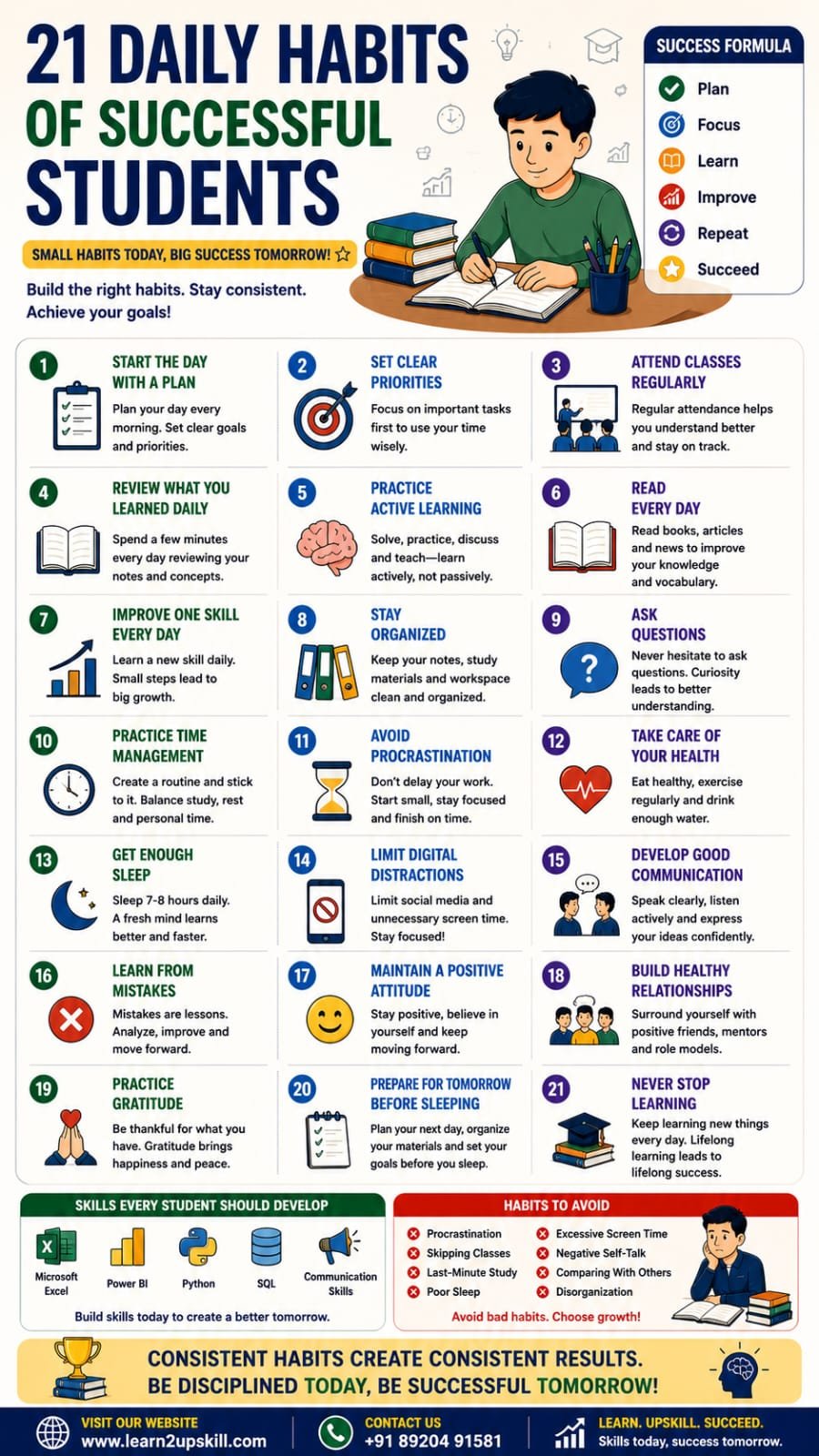
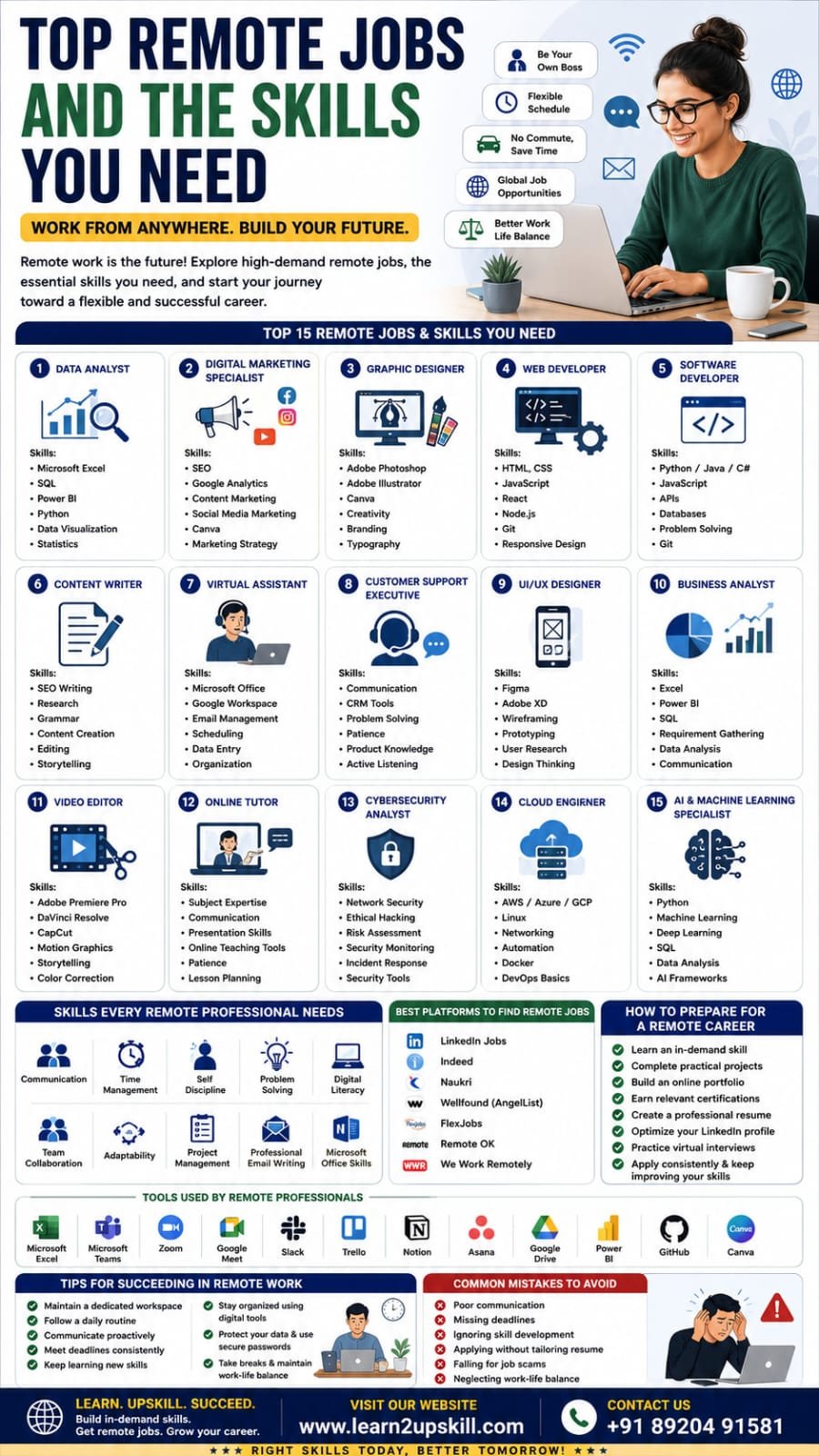
  • Top Remote Jobs and the Skills You Need

    Top Remote Jobs and the Skills You Need

    Top Remote Jobs and the Skills You Need

    Discover the best remote jobs in 2026, the essential skills required, expected salary ranges, and how to prepare for a successful work-from-home career.

    Focus Keyword: Top Remote Jobs and the Skills You Need

    —

    Top Remote Jobs and the Skills You Need

    Remote work has transformed the modern workplace. Companies around the world are hiring talented professionals regardless of their location, giving people the flexibility to work from home, coworking spaces, or while traveling.

    Whether you’re a student, a fresher, or an experienced professional looking for more flexibility, remote jobs offer exciting career opportunities across industries.

    In this guide, we’ll explore the most in-demand remote jobs, the skills required for each role, and practical steps to build a successful remote career.

    —

    Why Are Remote Jobs Growing?

    Advancements in technology, cloud computing, and collaboration tools have made remote work easier than ever. Businesses have realized that many roles can be performed effectively without employees being in a physical office.

    Benefits of Remote Jobs

    – Flexible work schedules

    – Better work-life balance

    – Reduced commuting time and expenses

    – Access to global job opportunities

    – Increased productivity for many professionals

    – Opportunity to work from anywhere

    —

    Skills Every Remote Professional Needs

    Regardless of your job role, successful remote workers usually possess these skills:

    – Communication

    – Time Management

    – Self-Discipline

    – Problem Solving

    – Digital Literacy

    – Team Collaboration

    – Adaptability

    – Project Management

    – Basic Microsoft Office Skills

    – Professional Email Writing

    —

    1. Data Analyst

    What They Do

    Data Analysts collect, clean, analyze, and visualize business data to help organizations make informed decisions.

    —

    1. Digital Marketing Specialist

    Responsibilities

    – Social Media Marketing

    – SEO

    – Content Marketing

    – Email Marketing

    – Paid Advertising

    – Analytics

    —

    1. Graphic Designer

    Graphic Designers create:

    – Social Media Posts

    – Posters

    – Logos

    – Brochures

    – Advertisements

    – Website Graphics

    —

    1. Web Developer

    Developers build websites and web applications.

    Skills

    – HTML

    – CSS

    – JavaScript

    – React

    – Node.js

    – Git

    – Responsive Design

    —

    1. Software Developer

    Software Developers create desktop, web, and mobile applications.

    Skills

    – Python

    – Java

    – C#

    – JavaScript

    – APIs

    – Databases

    – Problem Solving

    —

    1. Content Writer

    Content Writers create:

    – Blog articles

    – Website content

    – Product descriptions

    – Newsletters

    – Case studies

    —

    1. Virtual Assistant

    Virtual Assistants help businesses with:


    – Email Management

    – Scheduling

    – Customer Support

    – Documentation

    – Data Entry

    —

    1. Customer Support Executive

    Many companies hire remote customer support professionals.

    Skills

    – Communication

    – CRM Software

    – Problem Solving

    – Patience

    – Product Knowledge

    —

    1. UI/UX Designer

    UI/UX Designers improve digital products by creating intuitive and user-friendly experiences.

    —

    1. Business Analyst

    Business Analysts identify business problems and recommend technology-driven solutions.

    Skills

    – Microsoft Excel

    – Power BI

    – SQL

    – Requirement Gathering

    – Data Analysis

    – Communication

    —

    1. Video Editor

    The demand for video content continues to grow.


    Skills

    – Adobe Premiere Pro

    – DaVinci Resolve

    – CapCut

    – Motion Graphics

    – Storytelling

    —

    1. Online Tutor

    Teach students in areas such as:

    – Mathematics

    – English

    – Coding

    – Data Analytics

    – Microsoft Excel

    – Competitive Exam Preparation

    —

    1. Cybersecurity Analyst

    Organizations need professionals to protect systems and data.

    Skills

    – Network Security

    – Ethical Hacking

    – Risk Assessment

    – Security Monitoring

    – Incident Response

    —

    1. Cloud Engineer

    Cloud Engineers manage cloud-based infrastructure and services.

    Skills

    – AWS

    – Microsoft Azure

    – Google Cloud

    – Linux

    – Networking

    – Automation

    —

    1. AI & Machine Learning Specialist

    One of the fastest-growing career paths.

    Skills

    – Python

    – Machine Learning

    – Deep Learning

    – SQL

    – Data Analysis

    – AI Frameworks

    —

    Common Mistakes to Avoid

    – Poor communication

    – Missing deadlines

    – Ignoring skill development

    – Applying without tailoring your resume

    – Falling for job scams

    – Neglecting work-life balance

    Final Thoughts

    Remote work is no longer just a trend—it’s a significant part of today’s global job market. By developing practical, in-demand skills and building a strong portfolio, you can unlock opportunities with companies around the world while enjoying the flexibility that remote work offers.

    Whether you’re interested in data analytics, digital marketing, software development, design, or content creation, consistent learning and hands-on practice are the keys to success.

    At Learn2Upskill, we help students and professionals build career-ready skills through practical training in Microsoft Excel, Data Analytics, Power BI, Python, AI, Digital Marketing, and more.

    Visit: www.coral-kudu-326218.hostingersite.com

    Contact Us: +91 89204 91581

    Learn Today. Work Anywhere. Build a Future Without Limits.
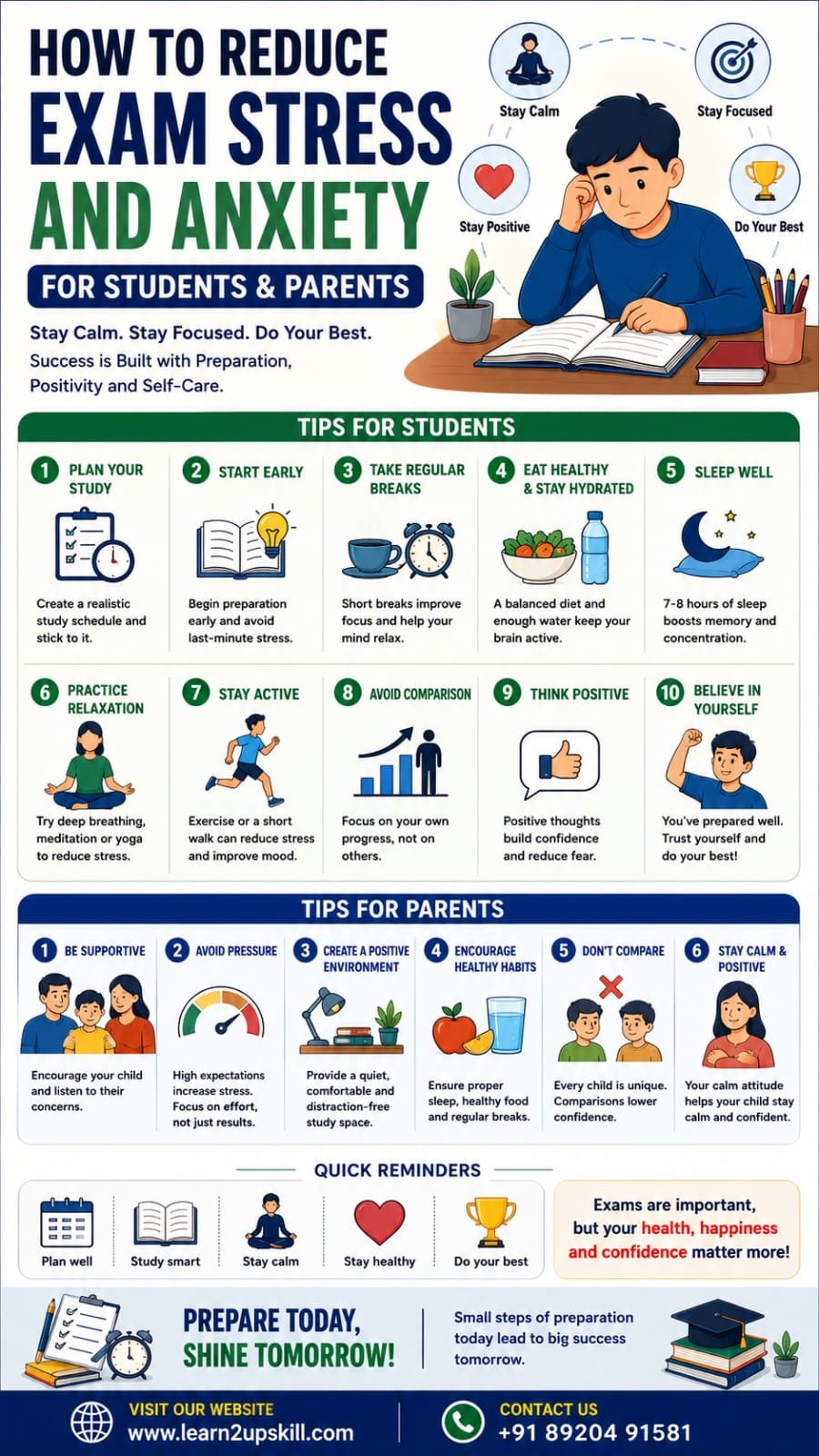
  • How to Reduce Exam Stress and Anxiety

    How to Reduce Exam Stress and Anxiety

    How to Reduce Exam Stress and Anxiety

    Meta Title: How to Reduce Exam Stress and Anxiety | A Complete Guide for Students & Parents

    Meta Description: Learn practical ways to reduce exam stress and anxiety. Discover proven tips for students and parents to improve focus, confidence, mental well-being, and exam performance.

    Focus Keyword: How to Reduce Exam Stress and Anxiety

    —

    How to Reduce Exam Stress and Anxiety: A Complete Guide for Students & Parents

    Examinations are an important part of every student’s academic journey. While a little nervousness before an exam is normal, excessive stress and anxiety can affect concentration, memory, confidence, and overall performance.

    Parents also experience stress during exam season as they want their children to succeed. The good news is that exam stress can be managed with the right habits, emotional support, and a balanced approach to preparation.

    This guide offers practical strategies for both students and parents to reduce exam anxiety, improve focus, and build confidence.

    —

    What Is Exam Stress?

    Exam stress is the physical and emotional pressure students feel before or during examinations.

    It can result from:

    – Fear of failure

    – High expectations

    – Poor preparation

    – Time pressure

    – Lack of confidence

    – Comparison with others

    – Uncertainty about results

    A manageable level of stress can improve alertness, but excessive anxiety can make studying and performing in exams more difficult.

    —

    Common Signs of Exam Stress

    Students may experience:

    Emotional Signs

    – Constant worry

    – Fear of failure

    – Irritability

    – Mood swings

    – Low confidence

    – Feeling overwhelmed

    Physical Signs

    – Headaches

    – Trouble sleeping

    – Fatigue

    – Loss of appetite

    – Rapid heartbeat

    – Stomach discomfort

    Academic Signs

    – Difficulty concentrating

    – Forgetting studied topics

    – Procrastination

    – Lack of motivation

    – Avoiding study sessions

    Recognizing these signs early allows students and parents to take supportive action.

    —

    Why Do Students Feel Exam Anxiety?

    Some common reasons include:

    – Pressure to score high marks

    – Competition with classmates

    – Unrealistic expectations

    – Poor time management

    – Last-minute preparation

    – Fear of disappointing parents or teachers

    – Negative self-talk

    Understanding the cause is the first step toward managing it.

    —

    Tips for Students to Reduce Exam Stress

    1. Create a Realistic Study Plan

    Break your syllabus into manageable sections.

    Instead of studying everything in one day:

    – Divide subjects into daily goals.

    – Set achievable targets.

    – Include revision time.

    – Leave time for breaks.

    Consistency is more effective than cramming.

    —

    1. Start Preparing Early

    Last-minute studying increases anxiety.

    Beginning your preparation weeks in advance gives you more time to understand concepts, revise regularly, and identify areas that need improvement.

    —

    1. Practice Active Learning

    Instead of only reading textbooks:

    – Solve previous years’ papers.

    – Practice mock tests.

    – Create summary notes.

    – Teach concepts to a friend.

    – Use flashcards for quick revision.

    Active learning improves memory and confidence.

    —

    1. Take Regular Breaks

    Studying continuously for long hours can reduce concentration.

    Try studying for focused sessions followed by short breaks to refresh your mind.

    Use breaks to stretch, hydrate, or take a short walk.

    —

    1. Get Enough Sleep


    Sleep is essential for memory and concentration.

    Aim for 7–9 hours of quality sleep each night, especially before an exam.

    Avoid sacrificing sleep for last-minute revision whenever possible.

    —

    1. Eat Healthy

    A balanced diet supports brain function.

    Choose foods such as:

    – Fruits

    – Vegetables

    – Whole grains

    – Nuts

    – Dairy products

    – Protein-rich meals

    Drink enough water throughout the day.

    Limit excessive caffeine and sugary drinks if they make you feel jittery.

    —

    1. Avoid Comparing Yourself

    Every student learns at a different pace.

    Comparing marks, preparation, or study hours with others often increases unnecessary stress.

    Focus on improving your own progress.

    —

    1. Practice Relaxation Techniques

    Simple relaxation methods can help calm your mind.

    Examples include:

    – Deep breathing

    – Gentle stretching

    – Mindfulness

    – Short meditation sessions

    – Listening to calming music during breaks

    —

    1. Stay Physically Active

    Regular physical activity helps reduce stress.

    Even 20–30 minutes of walking, cycling, yoga, or another enjoyable activity can improve mood and concentration.

    —

    1. Maintain a Positive Mindset

    Replace thoughts like:

    “I’ll definitely fail.”

    With:

    “I’ve prepared well, and I’ll do my best.”

    Positive self-talk can help build confidence.

    —

    Tips for Parents to Support Their Child

    1. Avoid Excessive Pressure

    Encourage your child to do their best rather than expecting perfection.

    Celebrate effort as well as achievement.

    —

    1. Listen and Communicate

    Ask open-ended questions such as:

    – How are you feeling about your exams?

    – Is there anything you’re finding difficult?

    – How can I support you?

    Listening without judgment helps children feel understood.

    —

    1. Provide a Positive Study Environment

    Help create a space that is:

    – Quiet

    – Comfortable

    – Well-lit

    – Free from distractions

    A good study environment improves focus.

    —

    1. Encourage Healthy Habits

    Support your child by encouraging:

    – Regular meals

    – Adequate sleep

    – Physical activity

    – Scheduled breaks

    Healthy routines improve both well-being and academic performance.

    —

    1. Avoid Comparisons

    Avoid comparing your child with siblings, relatives, or classmates.

    Every child has different strengths and learning styles.

    —

    1. Recognize Their Effort

    Praise consistency, discipline, and improvement—not just marks.

    Positive encouragement builds confidence.

    —

    1. Stay Calm During Exam Season

    Children often notice their parents’ emotions.

    A calm and supportive attitude can help reduce a student’s anxiety.

    —

    What to Do One Day Before the Exam

    Students should:

    – Revise key concepts.

    – Review summary notes.

    – Prepare exam materials.

    – Sleep on time.

    – Avoid learning completely new topics.

    – Stay hydrated.

    Parents should:

    – Encourage relaxation.

    – Avoid discussing marks or expectations.

    – Ensure the child gets proper rest.

    —

    What to Do on Exam Day

    Students

    – Wake up early.

    – Eat a healthy breakfast.

    – Reach the exam center on time.

    – Read questions carefully.

    – Manage time wisely.

    – Stay calm if you don’t know every answer.

    Parents

    – Offer encouragement.

    – Avoid increasing pressure.

    – Remind your child to do their best.

    – Stay positive regardless of the outcome.

    —

    Common Mistakes to Avoid

    Students

    – Last-minute cramming

    – Skipping meals

    – Staying awake all night

    – Comparing preparation with friends

    – Ignoring breaks

    Parents

    – Unrealistic expectations

    – Frequent criticism

    – Comparing children

    – Focusing only on marks

    – Discussing negative outcomes before exams

    —

    Building Long-Term Confidence

    Confidence grows through:

    – Consistent preparation

    – Regular practice

    – Healthy routines

    – Positive thinking

    – Learning from mistakes

    – Seeking help when needed

    Exams measure knowledge at a point in time—they do not define a student’s worth or future.

    —

    —

    Final Thoughts


    Exam stress is a common part of academic life, but it doesn’t have to take over. With thoughtful preparation, healthy routines, emotional support, and realistic expectations, students can approach exams with greater confidence and resilience.

    Parents play a vital role by encouraging effort, creating a supportive environment, and reminding children that learning is a journey—not just a score on a report card.

    Success isn’t measured only by marks. It is built through consistent learning, personal growth, and the confidence to keep moving forward.

    At Learn2Upskill, we are committed to helping students build not only academic skills but also confidence, career readiness, and lifelong learning habits through practical courses, career guidance, and professional skill development.

    Why Choose Learn2Upskill?

    – Student-focused learning

    – Career guidance and mentoring

    – Practical skill development

    – Microsoft Excel, AI, Power BI & Python training

    – Job-ready programs

    – Expert instructors

    Visit: www.coral-kudu-326218.hostingersite.com

    Contact Us: +91 89204 91581

    Learn with Confidence. Grow with Knowledge. Succeed with Learn2Upskill.

  • Excel Interview Mastery: From Blank Sheet to Hire

    Excel Interview Mastery: From Blank Sheet to Hire

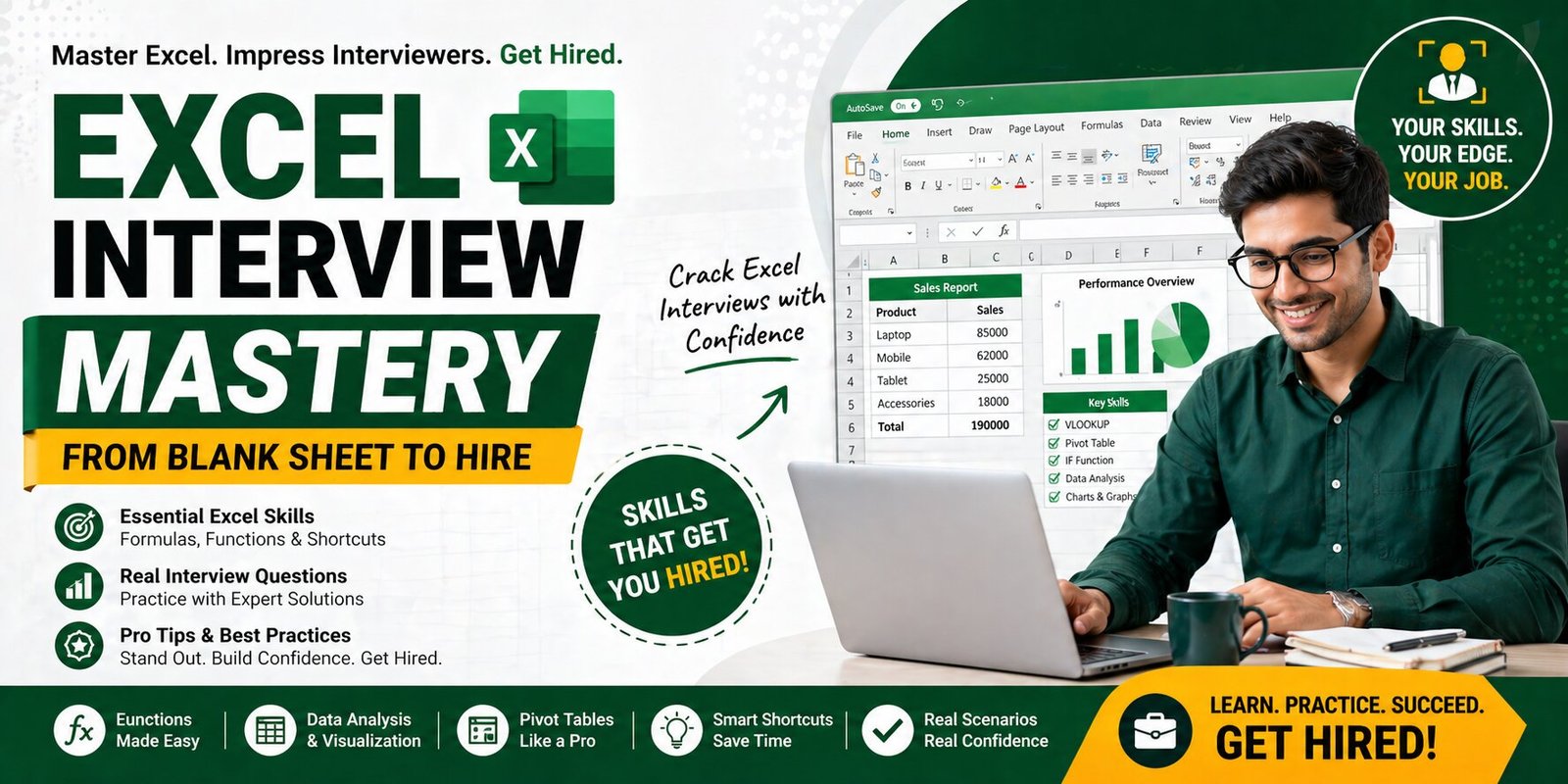
    Landing a job today often depends on one crucial skill—Microsoft Excel. Whether you’re applying for roles in data analysis, finance, marketing, or operations, Excel is a must-have skill that employers actively test during interviews.

    If you’ve ever felt nervous opening a blank Excel sheet during an interview, you’re not alone. The good news? With the right preparation, you can confidently turn that blank sheet into a powerful opportunity.

    Why Excel Skills Matter in Interviews

    Excel is one of the most widely used tools across industries. Recruiters use Excel-based tests to evaluate:

    • Problem-solving ability
    • Data handling skills
    • Logical thinking
    • Attention to detail

    Strong Excel skills can instantly set you apart from other candidates.

    Common Excel Interview Questions

    1. Basic Functions

    • SUM, AVERAGE, COUNT
    • IF statements

    2. Lookup Functions

    • VLOOKUP
    • HLOOKUP
    • XLOOKUP

    3. Data Analysis Tools

    • Pivot Tables
    • Sorting & Filtering
    • Conditional Formatting

    4. Advanced Topics

    • Data Validation
    • Charts & Dashboards
    • Basic Macros

    Step-by-Step Strategy to Crack Excel Interviews

    1. Start with Basics

    Master core functions like SUM, IF, and basic formulas before moving to advanced topics.

    2. Practice Real Scenarios

    Work on real datasets instead of just theory. This improves your problem-solving skills.

    3. Learn Shortcuts

    Using keyboard shortcuts shows efficiency and impresses interviewers.

    4. Focus on Pivot Tables

    Pivot tables are one of the most commonly tested skills in interviews.

    5. Build Small Projects

    Create dashboards or reports to showcase your practical knowledge.

    Top Skills That Get You Hired

    • Data analysis and interpretation
    • Creating reports and dashboards
    • Using formulas efficiently
    • Handling large datasets
    • Visualizing data with charts

    Mistakes to Avoid in Excel Interviews

    • Memorizing without practice
    • Ignoring shortcuts
    • Not understanding formulas
    • Overcomplicating simple tasks

    How to Practice for Excel Interviews

    • Use sample datasets
    • Solve real-world problems
    • Take mock tests
    • Practice time-based exercises

    Benefits of Learning Excel for Your Career

    • Opens doors to multiple job roles
    • Increases salary potential
    • Enhances productivity at work
    • Makes you job-ready

    Start Your Learning Journey Today

    Excel is more than just a tool—it’s a career accelerator. By mastering Excel interview skills, you can confidently face interviews and improve your chances of getting hired.

    Explore Excel Course

    FAQs

    What Excel skills are required for interviews?

    Basic formulas, pivot tables, lookup functions, and data analysis skills are commonly required.

    Is Excel important for freshers?

    Yes, Excel is one of the most important skills for freshers across multiple job roles.

    How can I practice Excel for interviews?

    You can practice using real datasets, mock tests, and online training programs.

  • How Career Counselling Helps Students Make Better Decisions

    How Career Counselling Helps Students Make Better Decisions

    How Career Counselling Helps Students Make Better Decisions

    Published by: Learn2Upskill

    Website: www.coral-kudu-326218.hostingersite.com

    Contact: +91 89204 91581

    Introduction

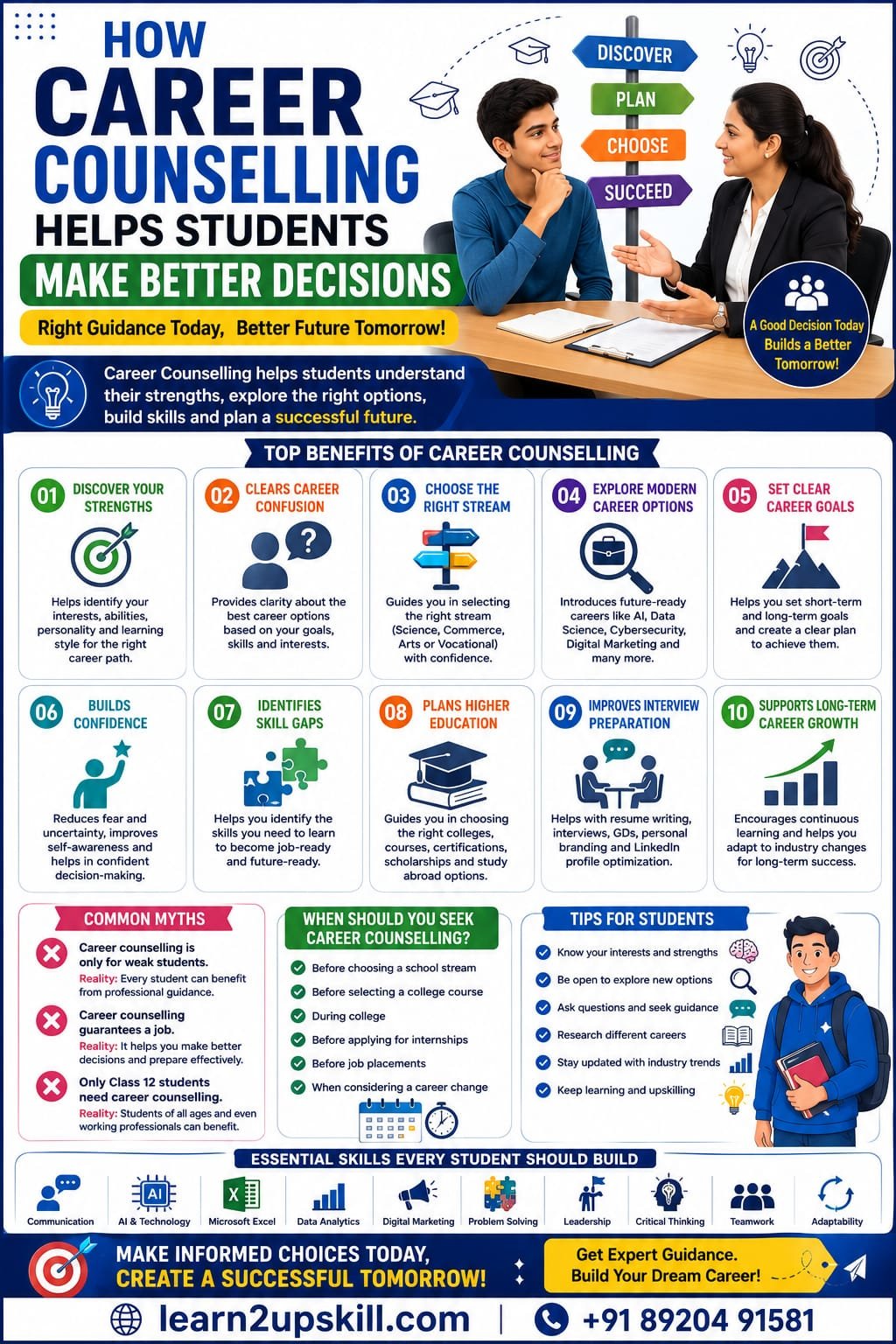
    Choosing the right career is one of the biggest decisions a student will ever make. With thousands of courses, careers, certifications, and job opportunities available today, it’s easy to feel confused or overwhelmed.

    Many students choose careers based on family expectations, peer pressure, or limited information. Unfortunately, these decisions can lead to dissatisfaction, wasted time, and missed opportunities.

    This is where career counselling plays a vital role. A professional career counsellor helps students understand their strengths, interests, personality, and career options, enabling them to make informed decisions that align with their goals.

    In this blog, we’ll explore how career counselling benefits students and why it has become more important than ever in today’s fast-changing world.

    —

    What Is Career Counselling?

    Career counselling is a structured process that helps students:

    – Understand their interests and abilities

    – Identify suitable career options

    – Select the right course or stream

    – Set career goals

    – Develop job-ready skills

    – Plan for long-term success

    Career counselling is not about telling students what to do—it’s about helping them make confident, well-informed choices.

    —

    Why Career Counselling Is Important

    Today’s job market is changing rapidly due to technology, automation, and Artificial Intelligence (AI). New careers are emerging while others are evolving.

    Career counselling helps students:

    – Make informed decisions

    – Avoid choosing the wrong career path

    – Save time and money

    – Build confidence

    – Stay prepared for future job opportunities

    —

    Benefits of Career Counselling

    1. Helps Students Discover Their Strengths

    Every student has unique talents.

    Career counselling helps identify:

    – Academic strengths

    – Natural abilities

    – Interests

    – Personality traits

    – Learning style

    Understanding yourself is the first step toward choosing the right career.

    —

    1. Clears Career Confusion

    Many students ask questions like:

    – Which course should I choose?

    – Which career has the best future?

    – What skills should I learn?

    – Which industry pays well?

    – Should I study abroad?

    Career counselling provides personalized answers based on your goals and interests.

    —

    1. Helps Choose the Right Stream

    Students often struggle to choose between:

    – Science

    – Commerce

    – Arts/Humanities

    – Vocational Courses

    A counsellor can explain the opportunities available in each stream and help students choose wisely.


    —

    1. Introduces Modern Career Options

    Many students know only about traditional professions such as engineering, medicine, or government jobs.

    Career counselling also introduces exciting careers in:

    – Artificial Intelligence (AI)

    – Data Analytics

    – Cybersecurity

    – Cloud Computing

    – Digital Marketing

    – UI/UX Design

    – Content Creation

    – Business Analytics

    – Animation

    – Entrepreneurship

    This broadens students’ career horizons.

    —

    1. Helps Set Career Goals

    Students learn to create:

    Short-Term Goals

    – Improve communication skills

    – Complete certifications

    – Build a portfolio

    Long-Term Goals

    – Secure a dream job

    – Start a business

    – Become an industry expert

    Goal-setting provides clarity and motivation.

    —

    1. Builds Confidence

    Many students lack confidence when making career decisions.

    Career counselling helps by:

    – Reducing fear and uncertainty

    – Improving self-awareness

    – Encouraging informed decision-making

    – Providing a clear action plan

    Confident students are better prepared for academic and professional success.

    —

    1. Identifies Skill Gaps

    Employers today look beyond degrees.

    Career counselling helps students identify important skills such as:

    – Communication

    – Artificial Intelligence (AI)

    – Microsoft Excel

    – Digital Marketing

    – Data Analytics

    – Coding

    – Leadership

    – Critical Thinking

    – Problem Solving

    – Teamwork

    Students can then focus on learning the skills employers value most.

    —

    1. Helps Plan Higher Education

    Career counsellors guide students on:

    – College selection

    – Degree programs

    – Professional certifications

    – Online learning opportunities

    – Scholarships

    – Study-abroad options

    This ensures students make informed educational choices.

    —

    1. Improves Interview Preparation

    Career counselling often includes guidance on:

    – Resume writing

    – Interview skills

    – Group discussions

    – Personal branding

    – LinkedIn profile optimization

    These skills improve employability.

    —

    1. Supports Long-Term Career Growth

    Career planning doesn’t stop after choosing a course.

    Career counselling encourages lifelong learning, helping students:

    – Adapt to industry changes

    – Learn new technologies

    – Upgrade skills

    – Stay competitive throughout their careers

    —

    Common Career Counselling Myths

    Myth 1: Career counselling is only for weak students.

    Reality: Every student can benefit from professional career guidance.

    Myth 2: Career counselling guarantees a job.

    Reality: It helps students make better decisions and prepare effectively, but success still depends on effort and continuous learning.

    Myth 3: Only Class 12 students need career counselling.

    Reality: Students from middle school, high school, college, and even working professionals can benefit.

    —

    When Should Students Seek Career Counselling?

    The ideal time is:

    – Before choosing a school stream

    – Before selecting a college course

    – During college

    – Before applying for internships

    – Before job placements

    – When considering a career change

    Early guidance can prevent costly mistakes later.

    —

    Tips for Students Before Career Counselling

    – Think about your interests and hobbies.

    – List your strengths and weaknesses.

    – Be open to exploring new career paths.

    – Ask questions without hesitation.

    – Research different industries.

    – Keep an open mind about future opportunities.

    —

    The Future of Career Counselling

    Technology is changing career guidance.

    Modern career counselling may include:

    – AI-powered career assessments

    – Virtual counselling sessions

    – Online aptitude tests

    – Personalized learning plans

    – Industry trend analysis

    – Digital career portfolios

    These tools make career planning more accessible and effective.

    —

    Conclusion

    Career counselling empowers students to make informed, confident decisions about their future. Instead of following the crowd or making choices based on assumptions, students gain clarity about their interests, strengths, and career opportunities.


    Combined with continuous learning and practical skill development, career counselling can lay the foundation for a successful and fulfilling career.


    Remember, the best career decisions are made with knowledge, self-awareness, and proper guidance.

    —

    Learn with Learn2Upskill

    At Learn2Upskill, we believe every student deserves the right guidance to build a successful future.

    We offer career guidance, skill development programs, and industry-focused training in areas such as Artificial Intelligence (AI), Digital Marketing, Microsoft Excel, Data Analytics, Programming, and other in-demand skills.

    Whether you’re choosing your first career path or upgrading your professional skills, we’re here to support your journey.

    Website: www.coral-kudu-326218.hostingersite.com

    Contact: +91 89204 91581

    Choose your career with confidence. Learn the skills that matter. Build your future with Learn2Upskill.

  • Best Time Management Techniques for Students: Study Smarter, Stress Less

    Best Time Management Techniques for Students: Study Smarter, Stress Less

    Best Time Management Techniques for Students: Study Smarter, Stress Less

    Published by: Learn2Upskill

    Website: www.coral-kudu-326218.hostingersite.com

    Contact: +91 89204 91581

    Introduction

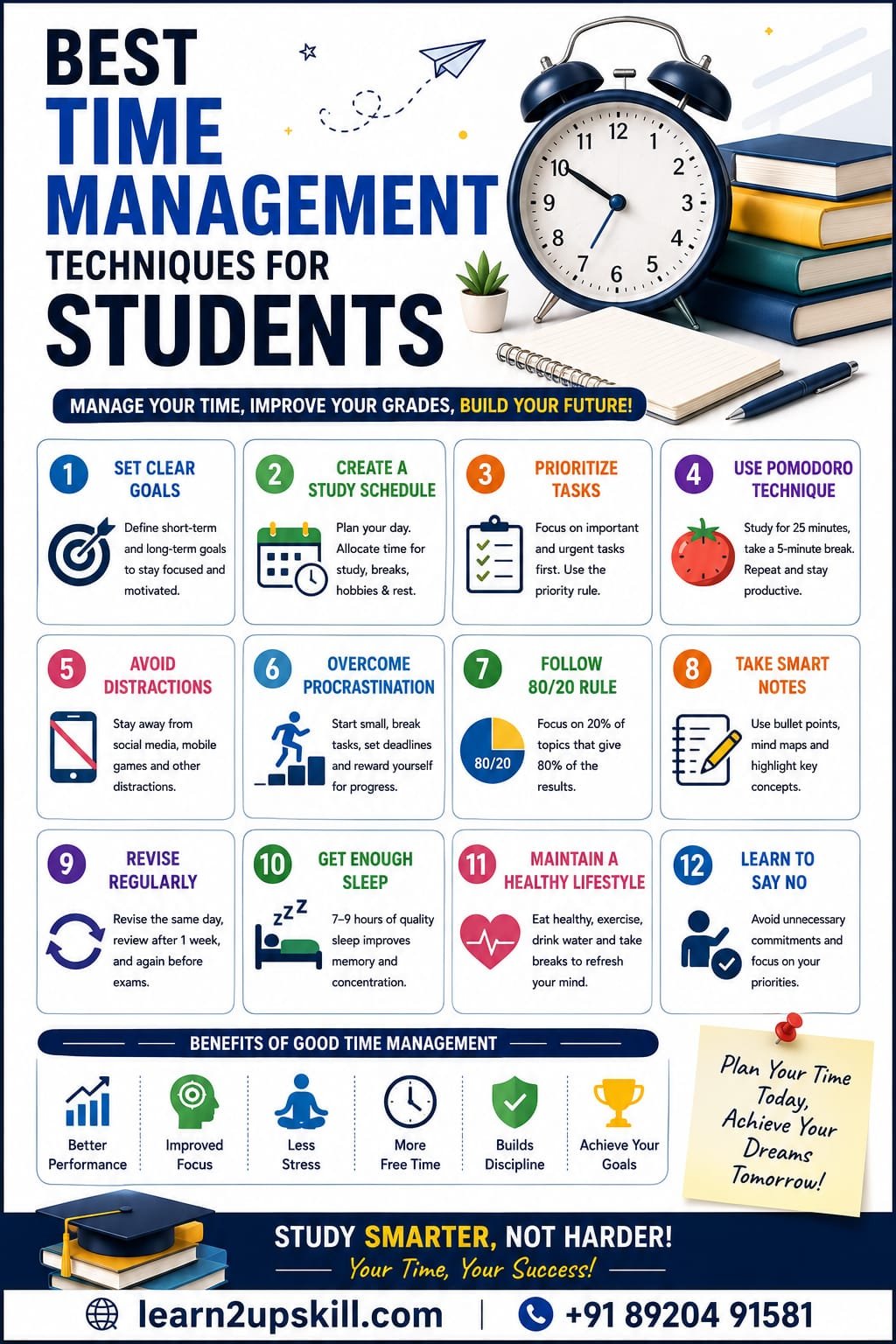
    Time is one of the most valuable resources for every student. Whether you’re preparing for board exams, college entrance tests, competitive exams, or balancing academics with extracurricular activities, managing your time effectively can make a huge difference.

    Many students struggle not because they lack intelligence, but because they don’t have a proper plan for using their time. By developing good time management habits, you can improve your grades, reduce stress, and still have time for hobbies, family, and relaxation.

    In this blog, we’ll explore the best time management techniques every student should use to become more productive and successful.

    Why Time Management Is Important

    Effective time management helps students:

    – Complete assignments on time

    – Reduce exam stress

    – Improve concentration

    – Increase productivity

    – Maintain a healthy study-life balance

    – Build self-discipline and confidence

    Students who manage their time well are more likely to achieve their academic and career goals.

    —

    1. Set Clear Goals

    Start by defining what you want to achieve.

    Short-Term Goals

    – Finish today’s homework

    – Revise one chapter

    – Practice 20 math questions

    Long-Term Goals

    – Score above 90%

    – Crack competitive exams

    – Improve English communication

    – Learn a new skill

    Clear goals give your studies direction and purpose.

    —

    1. Create a Daily Study Schedule

    A timetable helps you organize your day effectively.

    Remember to keep your schedule realistic and flexible.

    —

    1. Prioritize Important Tasks

    Not every task has the same importance.

    Focus first on:

    – Upcoming exams

    – Assignments with deadlines

    – Difficult subjects

    – Project work

    Complete high-priority tasks before spending time on less important activities.

    —

    1. Use the Pomodoro Technique

    The Pomodoro Technique is a simple and effective study method.

    – Study for 25 minutes

    – Take a 5-minute break

    – Repeat four times

    – Take a longer 20–30 minute break

    This technique helps maintain focus and prevents mental fatigue.

    —

    1. Avoid Procrastination

    Procrastination is one of the biggest obstacles to success.

    Common reasons include:

    – Fear of failure

    – Lack of motivation

    – Mobile phone distractions

    – Poor planning

    How to overcome it:

    – Start with small tasks.

    – Break large projects into smaller steps.

    – Set deadlines for yourself.

    – Reward yourself after completing tasks.

    —

    1. Eliminate Distractions

    Distractions reduce productivity and waste valuable study time.

    Common distractions:

    – Social media

    – Mobile games

    – TV

    – Notifications

    – Unnecessary internet browsing

    1. Follow the 80/20 Rule

    The Pareto Principle suggests that 20% of your efforts often produce 80% of your results.

    Identify the topics that carry the most marks or require the most attention, and focus on mastering them first.

    —

    1. Take Smart Notes

    Well-organized notes make revision easier.

    Use:

    – Bullet points

    – Mind maps

    – Flowcharts

    – Highlight key formulas and definitions

    – Color coding for important concepts

    Good notes save time during exam preparation.

    —

    1. Revise Regularly

    Revision helps move information into long-term memory.

    A simple revision plan:

    – Revise the same day.

    – Review after one week.

    – Revise again before exams.

    Frequent revision improves retention and confidence.

    —

    1. Get Enough Sleep

    Sleeping less does not mean studying more effectively.

    Aim for 7–9 hours of quality sleep each night. Adequate rest improves memory, concentration, and learning ability.

    —

    1. Maintain a Healthy Lifestyle

    Your brain performs better when your body is healthy.

    – Eat nutritious meals.

    – Drink plenty of water.

    – Exercise regularly.

    – Take short breaks while studying.

    A healthy routine supports better academic performance.

    —

    1. Learn to Say No

    Avoid unnecessary commitments that take time away from your priorities.

    Politely decline activities that interfere with your study schedule and focus on what matters most.

    —

    Useful Time Management Apps

    Students can use these apps to stay organized:

    – Google Calendar

    – Microsoft To Do

    – Notion

    – Todoist

    – Forest

    – Trello

    These tools help you manage tasks, deadlines, and study plans effectively.

    —

    Common Time Management Mistakes

    Avoid these habits:

    – Studying without a plan

    – Multitasking

    – Leaving work until the last minute

    – Ignoring breaks

    – Spending excessive time on social media

    – Not reviewing completed work

    Recognizing these mistakes is the first step toward improving your productivity.

    —

    Benefits of Good Time Management

    Students who manage their time effectively often experience:

    – Better academic performance

    – Reduced stress

    – Improved focus

    – Increased confidence

    – More free time

    – Stronger discipline

    – Better career preparation

    —

    Final Tips for Success

    – Plan your day the night before.

    – Start with the hardest subject.

    – Review your progress weekly.

    – Keep learning consistently.

    – Stay positive and motivated.

    – Celebrate small achievements.

    —

    Conclusion


    Time management is a skill that every student can develop. By planning your day, setting clear goals, avoiding distractions, and staying consistent, you can improve your academic performance while maintaining a healthy balance in life.

    Remember, success isn’t about studying for the longest hours—it’s about making the best use of the time you have. Start applying these techniques today, and you’ll be one step closer to achieving your educational and career goals.

    Learn with Learn2Upskill

    At Learn2Upskill, we help students build practical, career-ready skills through expert guidance, online courses, and professional development resources.

    Website: www.coral-kudu-326218.hostingersite.com

    Contact: +91 89204 91581

    Learn smarter. Manage your time better. Build a brighter future with Learn2Upskill!

  • 50 Excel Keyboard Shortcuts to Save Time

    50 Excel Keyboard Shortcuts to Save Time

    50 Excel Keyboard Shortcuts to Save Time

    Learn the 50 most useful Excel keyboard shortcuts that every student, professional, accountant, and data analyst should know to work faster and smarter in Microsoft Excel.

    50 Excel Keyboard Shortcuts to Save Time

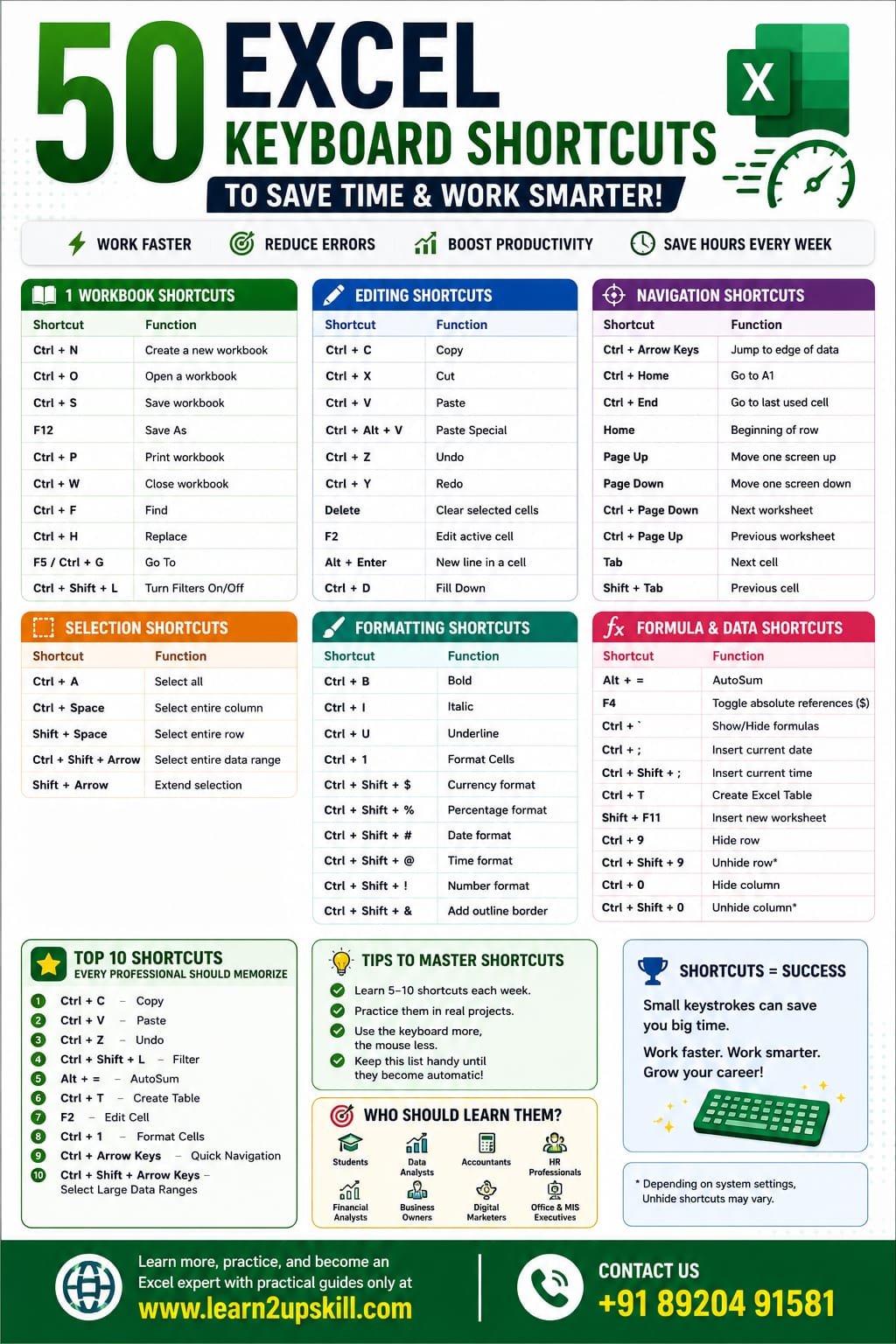
    Microsoft Excel is one of the most powerful tools for managing data, creating reports, and analyzing information. While many users rely on the mouse, professionals know that keyboard shortcuts are the fastest way to work in Excel. Microsoft also recommends keyboard shortcuts as an efficient way to improve productivity and accessibility.


    In this guide, you’ll learn 50 essential Excel keyboard shortcuts that can save you hours every week.

    Why Learn Excel Keyboard Shortcuts?

    Using keyboard shortcuts helps you:

    – Work faster

    – Reduce mouse clicks

    – Improve productivity

    – Analyze data efficiently

    – Impress employers during Excel interviews

    Workbook Shortcuts

    Shortcut| Function

    Ctrl + N| Create a new workbook

    Ctrl + O| Open a workbook

    Ctrl + S| Save workbook

    F12| Save As

    Ctrl + P| Print workbook

    Ctrl + W| Close workbook

    Ctrl + F| Find

    Ctrl + H| Replace

    F5 / Ctrl + G| Go To

    Ctrl + Shift + L| Turn Filters On/Off

    Editing Shortcuts

    Shortcut| Function

    Ctrl + C| Copy

    Ctrl + X| Cut

    Ctrl + V| Paste

    Ctrl + Alt + V| Paste Special

    Ctrl + Z| Undo

    Ctrl + Y| Redo

    Delete| Clear selected cells

    F2| Edit active cell

    Alt + Enter| New line inside a cell

    Ctrl + D| Fill Down

    Navigation Shortcuts

    Shortcut| Function

    Ctrl + Arrow Keys| Jump to edge of data

    Ctrl + Home| Go to A1

    Ctrl + End| Go to last used cell

    Home| Beginning of row

    Page Up| Move one screen up

    Page Down| Move one screen down

    Ctrl + Page Down| Next worksheet

    Ctrl + Page Up| Previous worksheet

    Tab| Next cell

    Shift + Tab| Previous cell

    Selection Shortcuts

    Shortcut| Function

    Ctrl + A| Select all

    Ctrl + Space| Select entire column

    Shift + Space| Select entire row

    Ctrl + Shift + Arrow| Select entire data range

    Shift + Arrow| Extend selection

    Formatting Shortcuts

    Shortcut| Function

    Ctrl + B| Bold

    Ctrl + I| Italic

    Ctrl + U| Underline

    Ctrl + 1| Format Cells

    Ctrl + Shift + $| Currency format

    Ctrl + Shift + %| Percentage format

    Ctrl + Shift + #| Date format

    Ctrl + Shift + @| Time format

    Ctrl + Shift + !| Number format

    Ctrl + Shift + &| Add outline border

    Shortcut| Function

    Alt + =| AutoSum

    F4| Toggle absolute references ($)

    Ctrl + `| Show/Hide formulas

    Ctrl + ;| Insert current date

    Ctrl + Shift + ;| Insert current time

    Ctrl + T| Create Excel Table

    Shift + F11| Insert new worksheet

    Ctrl + 9| Hide row

    Ctrl + 0| Hide column

    Ctrl + Shift + 9| Unhide row*

    *Depending on your Windows settings, Ctrl + Shift + 0 for unhide columns may need to be enabled separately.

    Top 10 Shortcuts Every Professional Should Memorize

    1. Ctrl + C — Copy
    2. Ctrl + V — Paste
    3. Ctrl + Z — Undo
    4. Ctrl + Shift + L — Filter
    5. Alt + = — AutoSum
    6. Ctrl + T — Create Table
    7. F2 — Edit Cell
    8. Ctrl + 1 — Format Cells
    9. Ctrl + Arrow Keys — Quick Navigation
    10. Ctrl + Shift + Arrow Keys — Select Large Data Ranges

    These are among the shortcuts Excel power users frequently recommend because they dramatically reduce repetitive mouse actions.

    Tips to Learn Keyboard Shortcuts Faster

    – Learn 5–10 shortcuts each week.

    – Practice them in real Excel projects.

    – Challenge yourself to use the keyboard instead of the mouse for common tasks.

    – Keep a printable cheat sheet near your workspace until the shortcuts become automatic.

    Who Should Learn These Shortcuts?

    These shortcuts are useful for:

    – Students

    – Data Analysts

    – Accountants

    – HR Professionals

    – Financial Analysts

    – Digital Marketers

    – Business Owners

    – Office Executives

    – MIS Executives

    Frequently Asked Questions (FAQs)

    Which Excel shortcut saves the most time?

    Ctrl + Arrow Keys, Alt + =, Ctrl + Shift + L, and Ctrl + T are among the biggest time savers for everyday work.

    Are these shortcuts available in Microsoft 365?

    Most of these shortcuts work in Microsoft 365 and many also work in older desktop versions of Excel. Some shortcuts can differ slightly in Excel for the web or on macOS.

    How long does it take to memorize Excel shortcuts?

    With daily practice, most people can become comfortable with the most useful shortcuts within a few weeks.

    Final Thoughts

    Learning Excel keyboard shortcuts is one of the easiest ways to boost your productivity. Even mastering just a handful of shortcuts can save minutes every day, which adds up to hours over the course of a month.

    Start with the shortcuts you use most often, practice them consistently, and gradually build your speed. Over time, you’ll spend less time clicking through menus and more time focusing on meaningful work.

    For more Excel tutorials, career-focused learning guides, and practical skill-building resources, visit www.coral-kudu-326218.hostingersite.com.

    Contact Us: +91 89204 91581

  • Best Online Courses to Upskill in 2026 – Future-Proof Your Career

    Best Online Courses to Upskill in 2026 – Future-Proof Your Career

    In today’s fast-changing digital world, staying updated with the latest skills is essential. If you want career growth, better job opportunities, or a career switch, enrolling in the best online courses to upskill in 2026 can give you a strong competitive advantage.

    With industries evolving rapidly, companies are looking for professionals with practical, job-ready skills. The good news is that you can now learn new skills online from anywhere and build a future-ready career.

    Why Upskilling is Important in 2026

    Technology is transforming every industry—from marketing to finance to healthcare. To stay relevant, professionals must continuously upgrade their skills.

    • Better job opportunities
    • Higher salary potential
    • Career growth and promotions
    • Ability to switch careers
    • Improved confidence and productivity

    Top Online Courses to Upskill in 2026

    1. Digital Marketing Course

    Digital marketing is one of the most in-demand skills as businesses continue to grow online.

    • SEO (Search Engine Optimization)
    • Social Media Marketing
    • Google Ads & Meta Ads
    • Content Marketing

    2. Data Analytics (Excel & Power BI)

    Data-driven decision-making is crucial for businesses today.

    • Advanced Excel
    • Power BI dashboards
    • Data visualization
    • Reporting techniques

    3. AI & Machine Learning Courses

    AI is shaping the future of every industry.

    • Machine learning basics
    • AI tools and automation
    • Predictive analysis

    4. Web Development & Full Stack Development

    Every business needs a strong online presence.

    • HTML, CSS, JavaScript
    • Backend development
    • Database management

    5. Cybersecurity & Ethical Hacking

    With increasing cyber threats, cybersecurity skills are in high demand.

    • Network security
    • Ethical hacking techniques
    • Risk management

    6. Prompt Engineering & ChatGPT Courses

    AI tools like ChatGPT are transforming how we work and automate tasks.

    • Prompt writing techniques
    • AI automation
    • Real-world applications

    How to Choose the Right Course

    • Choose job-oriented courses
    • Focus on practical learning
    • Look for certification and career support
    • Check course curriculum and reviews
    • Prefer self-paced learning options

    Who Should Take These Courses?

    • Students
    • Freshers
    • Working professionals
    • Career switchers
    • Freelancers

    Benefits of Online Learning

    • Learn anytime, anywhere
    • Affordable compared to offline courses
    • Access to expert trainers
    • Hands-on practical learning

    Start Your Upskilling Journey Today

    The future belongs to those who continuously learn and adapt. By enrolling in the best online courses to upskill in 2026, you can build in-demand skills and unlock better career opportunities.

    Explore All Courses

  • 21 Daily Habits of Successful Students: Build a Routine for Academic and Career Success

    21 Daily Habits of Successful Students: Build a Routine for Academic and Career Success

    21 Daily Habits of Successful Students: Build a Routine for Academic and Career Success

    Discover 21 daily habits that help successful students improve productivity, learning, confidence, time management, and career readiness. Practical tips for school, college, and competitive exam students.

    Focus Keyword: 21 Daily Habits of Successful Students

    —

    21 Daily Habits of Successful Students

    Success in academics doesn’t happen overnight. It is built through small, consistent habits practiced every day. While intelligence and talent are important, discipline, consistency, and the willingness to learn often make the biggest difference.

    Successful students don’t necessarily study for the longest hours—they study smart, manage their time well, and continuously improve themselves.

    Whether you’re in school, college, or preparing for competitive exams, these 21 daily habits can help you become more productive, confident, and career-ready.

    —

    Why Daily Habits Matter

    Daily habits help students:

    – Improve concentration

    – Reduce stress

    – Stay organized

    – Build self-confidence

    – Develop discipline

    – Learn more effectively

    – Prepare for future careers

    Small improvements made consistently can lead to significant long-term results.

    —

    1. Start the Day with a Plan

    Spend 5–10 minutes each morning planning your day.

    Write down:

    – Study goals

    – Assignments

    – Revision topics

    – Personal tasks

    A clear plan helps you stay focused and avoid wasting time.

    —

    1. Set Clear Priorities

    Not every task is equally important.

    Complete high-priority work first, especially subjects or assignments with upcoming deadlines.

    —

    1. Attend Classes Regularly

    Whether learning in person or online, regular attendance helps you:

    – Understand concepts better

    – Stay updated

    – Participate in discussions

    – Avoid last-minute confusion

    —

    1. Review What You Learned Daily

    Spend 15–20 minutes reviewing class notes every day.

    Regular revision improves long-term memory and reduces exam pressure.

    —

    1. Practice Active Learning

    Instead of only reading:

    – Solve problems

    – Take quizzes

    – Teach someone else

    – Create mind maps

    – Summarize concepts

    Active learning improves understanding and retention.

    —

    1. Read Every Day

    Develop the habit of reading beyond textbooks.

    Read:

    – Books

    – Articles

    – Industry blogs

    – News

    – Educational content

    Reading expands knowledge and improves communication skills.

    —

    1. Improve One Skill Every Day

    Spend at least 30 minutes learning a practical skill.

    Examples:

    – Microsoft Excel

    – Python

    – Power BI

    – SQL

    – Digital Marketing

    – Graphic Design

    – Communication Skills

    Skill development prepares you for future career opportunities.

    —

    1. Stay Organized

    Keep your:

    – Notes

    – Study materials

    – Files

    – Digital folders

    – Assignments

    well organized.

    An organized environment saves time and reduces stress.

    —

    1. Ask Questions

    Never hesitate to ask questions.

    Curiosity leads to deeper understanding and better learning.

    Remember:

    There are no foolish questions—only missed opportunities to learn.

    —

    1. Practice Time Management

    Allocate dedicated time for:

    – Study

    – Revision

    – Exercise

    – Family

    – Hobbies

    – Rest

    Managing time effectively improves productivity without leading to burnout.

    —

    1. Avoid Procrastination

    Break large tasks into smaller steps.

    Instead of saying:

    I’ll study the whole chapter.”

    Start with:

    “I’ll complete the first three pages.”

    Small actions build momentum.

    —

    1. Take Care of Your Health

    Healthy students learn better.

    Maintain:

    – Balanced nutrition

    – Regular exercise

    – Proper hydration

    – Good posture while studying

    Physical health supports mental performance.

    —

    1. Get Enough Sleep

    Aim for 7–9 hours of quality sleep.

    Adequate rest improves:

    – Memory

    – Focus

    – Mood

    – Decision-making

    Avoid sacrificing sleep for last-minute studying.

    —

    1. Limit Digital Distractions

    Social media, games, and constant notifications can interrupt concentration.

    Consider:

    – Turning off unnecessary notifications

    – Keeping your phone away during study sessions

    – Setting specific times for entertainment

    —

    1. Develop Good Communication Skills

    Practice:

    – Speaking confidently

    – Listening actively

    – Writing clearly

    – Presenting ideas

    Communication is valuable in academics, interviews, and the workplace.

    —

    1. Learn from Mistakes

    Don’t fear mistakes.

    Instead:

    – Analyze what went wrong.

    – Identify areas for improvement.

    – Apply the lessons in the future.

    Mistakes are part of the learning process.

    —

    1. Maintain a Positive Attitude

    Believe in your ability to improve.

    Replace negative thoughts like:

    “I’m not good enough.”

    With:

    “I can improve through practice and effort.”

    A positive mindset encourages persistence.

    —

    1. Build Healthy Relationships

    Successful students surround themselves with:

    – Supportive friends

    – Inspiring teachers

    – Helpful mentors

    – Positive role models

    A strong support system encourages growth.

    —

    1. Practice Gratitude

    Spend a few minutes each day appreciating:

    – Learning opportunities

    – Family support

    – Good health

    – Personal achievements

    Gratitude helps maintain perspective and motivation.

    —

    1. Prepare for Tomorrow Before Sleeping

    Before ending your day:

    – Organize study materials.

    – Pack your bag.

    – Review your schedule.

    – Set goals for the next day.

    Preparation reduces morning stress and improves productivity.

    —

    1. Never Stop Learning

    The most successful students remain curious.

    Keep learning through:

    – Online courses

    – Books

    – Workshops

    – Webinars

    – Educational videos

    – Practical projects

    Learning is a lifelong habit that supports both academic and professional success.

    —

    Final Thoughts

    Success is not built by one extraordinary effort—it is created through ordinary actions repeated consistently. The habits you practice every day shape your future achievements, confidence, and career opportunities.

    Start with one or two habits, stay consistent, and gradually add more to your routine. Over time, these small improvements can lead to significant academic growth, stronger life skills, and greater career readiness.

    At Learn2Upskill, we help students go beyond academics by providing practical training in Microsoft Excel, Power BI, Python, Artificial Intelligence, Data Analytics, Digital Marketing, and other industry-relevant skills that prepare them for real-world success.

    Why Choose Learn2Upskill?

    – Career-focused learning

    – Practical, hands-on projects

    – Industry-relevant courses

    – Expert mentors

    – Skill development for students

    – Job-ready training programs

    Visit: www.coral-kudu-326218.hostingersite.com

    Contact Us: +91 89204 91581

    Build Better Habits Today. Create a Brighter Tomorrow with Learn2Upskill.

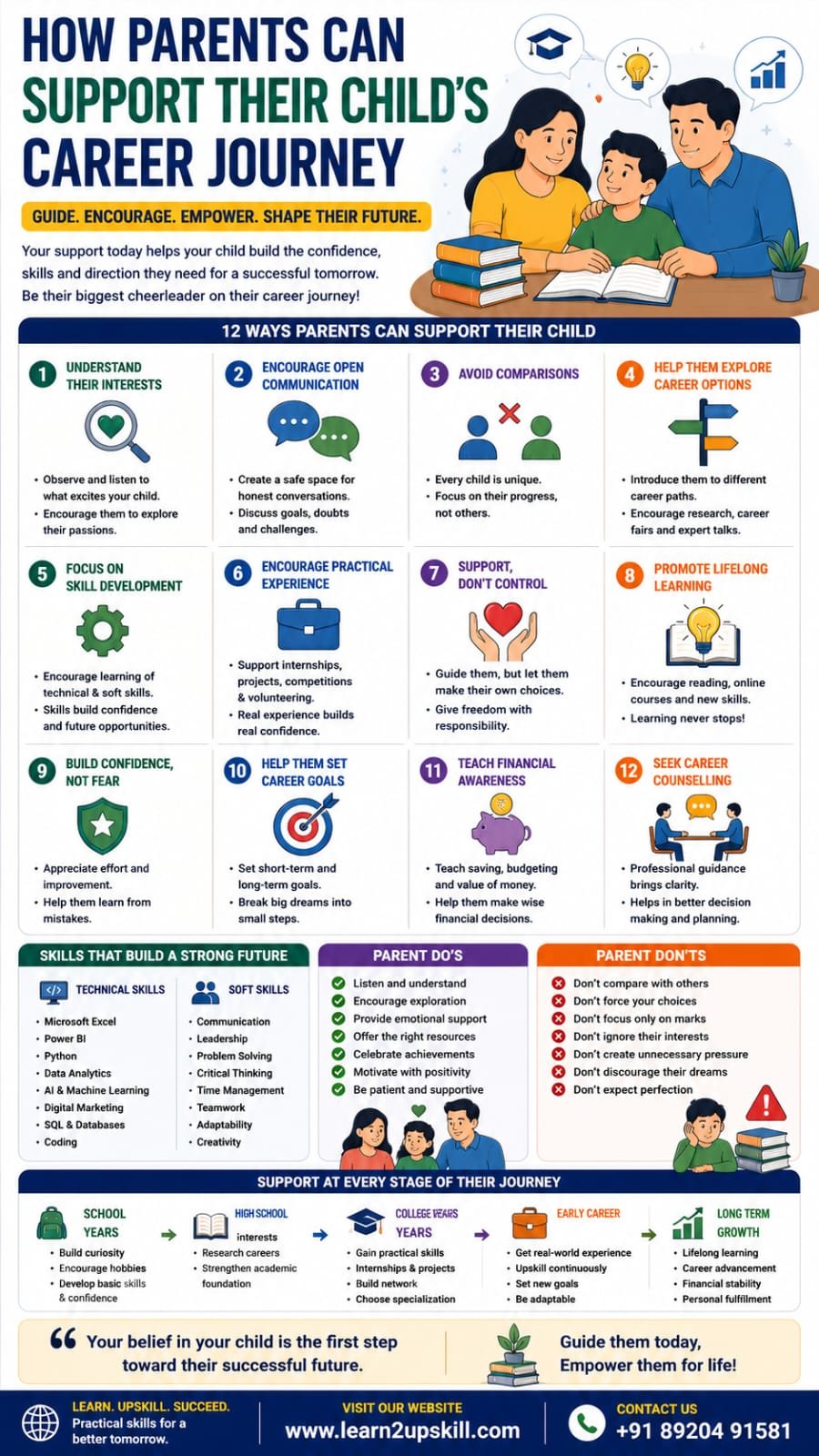
  • How Parents Can Support Their Child’s Career Journey

    How Parents Can Support Their Child’s Career Journey

    How Parents Can Support Their Child’s Career Journey

    Learn how parents can support their child’s career journey through guidance, communication, skill development, and informed career planning without creating unnecessary pressure.

    Focus Keyword: How Parents Can Support Their Child’s Career Journey

    —

    How Parents Can Support Their Child’s Career Journey

    Every parent wants their child to have a bright, successful, and fulfilling future. However, today’s career landscape is more diverse and dynamic than ever before. Traditional professions are now joined by exciting opportunities in Artificial Intelligence, Data Analytics, Cybersecurity, Digital Marketing, Content Creation, UI/UX Design, Cloud Computing, and many other emerging fields.

    With so many choices, students often feel overwhelmed. During this stage, parents play one of the most influential roles in helping children discover their strengths, make informed decisions, and develop confidence in their career path.

    Supporting your child’s career journey isn’t about making decisions for them—it’s about empowering them with guidance, encouragement, and opportunities to grow.

    This guide explains how parents can effectively support their child’s career development while respecting their individuality.

    —

    Why Parents Play a Crucial Role

    Children often look to their parents for advice, reassurance, and motivation.

    Positive parental involvement can help students:

    – Build confidence

    – Explore career options

    – Develop valuable skills

    – Make informed decisions

    – Handle setbacks positively

    – Stay motivated

    – Build long-term career goals

    When parents become supportive mentors rather than decision-makers, children are more likely to succeed.

    —

    Step 1: Understand Your Child’s Interests

    Every child is unique.

    Some enjoy:


    – Mathematics

    – Science

    – Art

    – Technology

    – Writing

    – Sports

    – Business

    – Design

    – Music

    – Problem-solving

    Observe what naturally excites your child instead of assuming that one career fits everyone.

    Ask questions like:

    – What subjects do you enjoy the most?

    – What activities make you feel excited?

    – What kind of problems do you enjoy solving?

    – What do you imagine yourself doing in the future?

    Listening carefully is the first step toward meaningful guidance.

    —

    Step 2: Encourage Open Communication

    Create an environment where your child feels comfortable discussing:

    – Career dreams

    – Doubts

    – Challenges

    – Academic concerns

    – Future goals

    Avoid judging or dismissing their ideas immediately.

    Instead, have regular conversations about possibilities and help them explore options together.

    —

    Step 3: Avoid Comparing Your Child with Others

    Comparison can reduce confidence and increase anxiety.

    Avoid statements such as:

    – “Your cousin already knows what career to choose.”

    – “Your friend scored higher than you.”

    Instead, focus on your child’s personal growth and achievements.

    Every student’s journey is different.

    —

    Step 4: Help Them Explore Career Options

    Many students only know about a few traditional careers.

    Introduce them to emerging fields such as:

    Technology

    – Software Development

    – Data Analytics

    – Artificial Intelligence

    – Cybersecurity

    – Cloud Computing

    Business

    – Marketing

    – Human Resources

    – Business Analysis

    – Entrepreneurship

    Creative Careers

    – Graphic Design

    – UI/UX Design

    – Video Editing

    – Animation

    – Content Creation

    Healthcare

    – Medicine

    – Nursing

    – Physiotherapy

    – Medical Technology

    Encourage research, webinars, workshops, career fairs, and informational interviews.

    —

    Step 5: Focus on Skill Development

    Today’s employers value practical skills as much as academic qualifications.

    Encourage your child to learn:

    Technical Skills

    – Microsoft Excel

    – Power BI

    – Python

    – SQL

    – Artificial Intelligence (AI)

    – Digital Marketing

    – Coding

    – Data Analytics

    Soft Skills

    – Communication

    – Leadership

    – Teamwork

    – Time Management

    – Problem Solving

    – Critical Thinking

    – Adaptability

    Practical skills improve confidence and employability.

    —

    Step 6: Encourage Practical Experience

    Learning extends beyond the classroom.

    Help your child gain experience through:

    – Internships

    – Volunteer work

    – Personal projects

    – Competitions

    – Freelancing

    – Workshops

    – Online certifications

    Real-world experience helps students understand what they enjoy and build stronger resumes.

    —

    Step 7: Support Without Controlling

    Guidance is helpful.

    Control is not.

    Instead of saying:

    “You must become an engineer.”

    Try:

    “Let’s explore different careers together and see what matches your interests and strengths.”

    Children perform better when they feel ownership over their decisions.

    —

    Step 8: Teach the Importance of Lifelong Learning

    The job market changes rapidly.

    Help your child understand that learning doesn’t stop after school or college.

    Encourage:

    – Reading books

    – Taking online courses

    – Learning new software

    – Following industry trends

    – Building new skills regularly

    Continuous learning prepares students for future opportunities.

    —

    Step 9: Build Confidence, Not Fear

    Fear-based motivation may produce short-term results but can reduce long-term confidence.

    Instead:

    – Celebrate effort.

    – Appreciate improvement.

    – Encourage resilience.

    – Treat mistakes as learning opportunities.

    Confidence grows when children feel supported.

    —

    Step 10: Help Them Set Career Goals

    Teach your child how to set achievable goals.

    Short-Term Goals

    – Complete an Excel course.

    – Improve communication skills.

    – Participate in a competition.

    Medium-Term Goals

    – Complete an internship.

    – Build a portfolio.

    – Earn certifications.

    Long-Term Goals

    – Secure a job in a chosen field.

    – Pursue higher education.

    – Start a business.

    Breaking large ambitions into smaller goals makes progress more manageable.

    —

    Step 11: Teach Financial Awareness

    Introduce basic concepts such as:

    – Budgeting

    – Saving

    – Scholarships

    – Education expenses

    – Career investment

    Financial literacy helps students make informed decisions about education and career planning.

    —

    Step 12: Seek Career Counselling When Needed

    Professional career counselling can help students:

    – Identify strengths

    – Explore suitable careers

    – Understand aptitude

    – Set realistic goals

    – Develop career roadmaps

    Counselling complements parental guidance and offers objective insights.

    —

    Common Mistakes Parents Should Avoid

    Avoid:

    – Choosing a career on behalf of your child.

    – Comparing them with others.

    – Focusing only on marks.

    – Ignoring their interests.

    – Discouraging new career options.

    – Expecting perfection.

    – Dismissing creative or unconventional careers without proper research.

    —

    Final Thoughts

    A successful career begins with encouragement, exploration, and continuous learning. As a parent, your role is not to choose your child’s future but to help them discover it with confidence.

    By listening, encouraging skill development, exposing them to different career opportunities, and supporting informed decision-making, you can help your child build a fulfilling and successful career.

    Remember, every child has a unique path. With patience, guidance, and the right opportunities, they can achieve their goals and adapt to the ever-changing world of work.

    At Learn2Upskill, we are dedicated to helping students and parents navigate career decisions through expert guidance and practical training in Microsoft Excel, Data Analytics, Power BI, Python, Artificial Intelligence, Digital Marketing, and other industry-relevant skills.

    Why Choose Learn2Upskill?

    – Personalized career guidance

    – Practical, job-oriented training

    – Industry-expert mentors

    – Hands-on projects

    – Skill-based learning

    – Career-focused programs


    Visit: www.coral-kudu-326218.hostingersite.com

    Contact Us: +91 89204 91581

    Support Their Dreams Today. Shape Their Success Tomorrow.

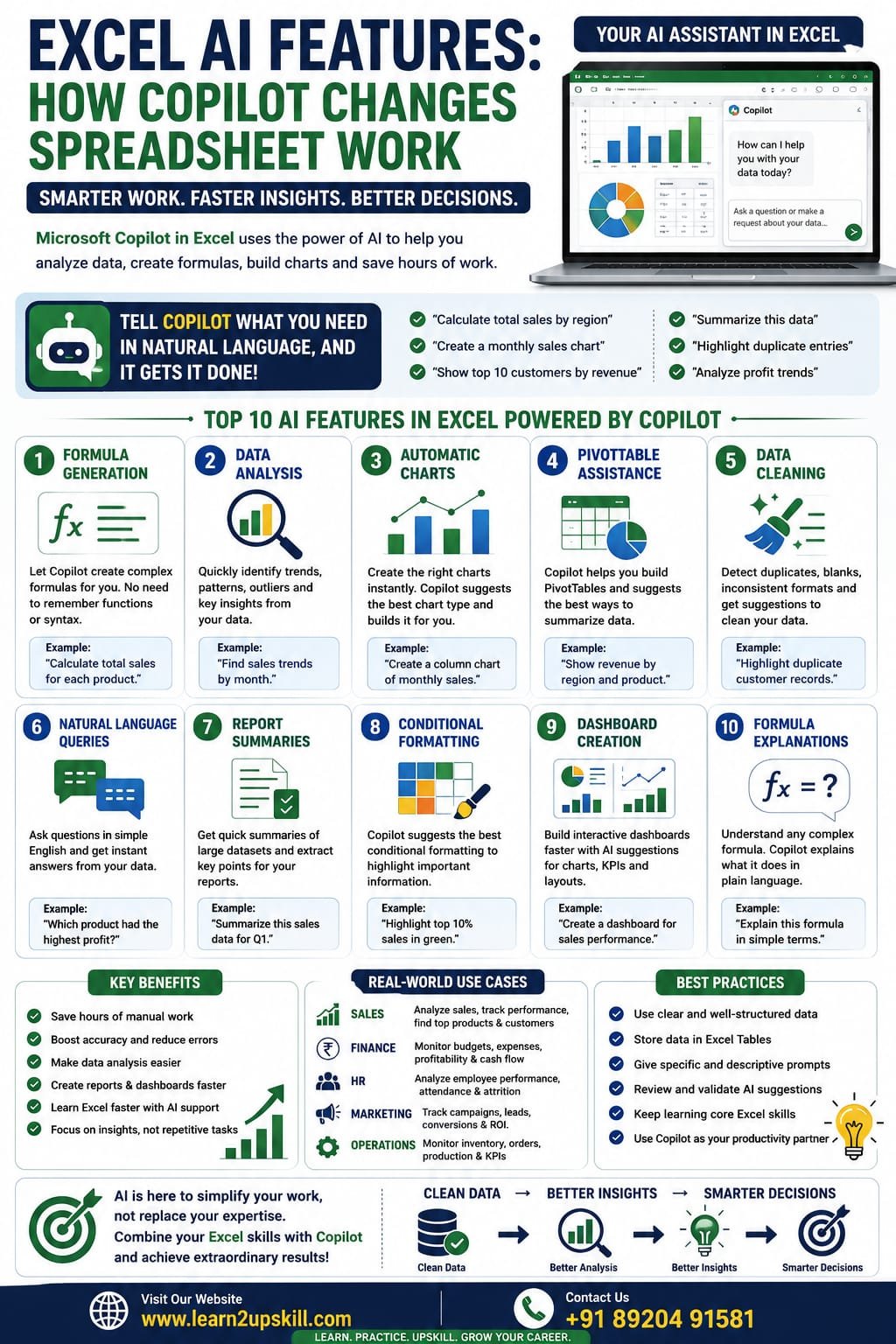
  • How Microsoft Copilot Changes Spreadsheet Work

    How Microsoft Copilot Changes Spreadsheet Work

    Excel AI Features: How Microsoft Copilot Changes Spreadsheet Work

    Discover how Microsoft Copilot in Excel uses AI to automate data analysis, create formulas, generate charts, summarize data, and boost productivity with real-world examples.

    Focus Keyword: Excel AI Features

    Excel AI Features: How Microsoft Copilot Changes Spreadsheet Work

    Artificial Intelligence (AI) is transforming the way people work, and Microsoft Excel is no exception. With the introduction of Microsoft Copilot for Excel, users can analyze data, generate formulas, build charts, summarize information, and automate repetitive tasks using natural language.

    Instead of spending hours writing complex formulas or manually creating reports, you can simply describe what you want, and Copilot helps you complete the task faster.

    Whether you’re a student, accountant, HR professional, financial analyst, marketer, business owner, or data analyst, learning Excel’s AI-powered features can significantly improve your productivity.

    In this guide, you’ll learn what Microsoft Copilot is, its key AI features, practical use cases, benefits, limitations, and tips for getting the most from it.

    What Is Microsoft Copilot in Excel?

    Microsoft Copilot is an AI-powered assistant integrated into supported Microsoft 365 applications, including Excel. It uses generative AI to help users interact with spreadsheets using everyday language.

    Instead of memorizing formulas or searching through menus, you can ask questions such as:

    – “Calculate total sales by region.”

    – “Create a monthly sales chart.”

    – “Highlight duplicate entries.”

    – “Summarize this dataset.”

    – “Show the top 10 customers by revenue.”

    Copilot then suggests formulas, charts, PivotTables, summaries, or other actions based on your request.

    Why Is AI Important in Excel?

    Traditional spreadsheet work often involves:

    – Writing complex formulas

    – Cleaning data

    – Creating Pivot Tables

    – Designing charts

    – Building dashboards

    – Analyzing large datasets

    AI helps automate many of these repetitive tasks, allowing you to focus more on interpreting results and making decisions.

    Top AI Features in Excel

    1. Formula Generation

    One of Copilot’s most useful capabilities is generating formulas from plain-language requests.

    Example

    Instead of remembering a complex formula, you can ask:

    «”Calculate the total sales for each region.”»

    Copilot suggests an appropriate formula based on your data.

    This is especially helpful for beginners and users working with advanced functions.

    1. Data Analysis

    Copilot can analyze your dataset and identify:

    – Trends

    – Patterns

    – Outliers

    – Top-performing categories

    – Seasonal changes

    Instead of manually reviewing thousands of rows, AI summarizes key insights in seconds.

    1. Automatic Charts

    Creating charts becomes much easier.

    Ask Copilot:

    «”Create a column chart showing monthly sales.”»

    It recommends a suitable chart and generates it for you, saving time on formatting and setup.

    1. PivotTable Assistance

    Copilot can help build PivotTables by suggesting useful summaries based on your data.

    Examples:

    – Sales by product

    – Revenue by region

    – Employee performance

    – Monthly expenses

    This is particularly useful for users who are new to PivotTables.


    1. Data Cleaning Suggestions

    AI can help identify:

    – Duplicate records

    – Missing values

    – Inconsistent formatting

    – Unexpected data patterns

    While you should always review suggested changes, Copilot can speed up the initial cleanup process.

    1. Natural Language Queries

    Instead of building formulas manually, you can ask questions such as:

    – Which product had the highest sales?

    – What is the average monthly revenue?

    – Which region generated the lowest profit?

    Copilot interprets your request and provides answers based on your spreadsheet.

    1. Report Summaries

    For large datasets, Copilot can generate concise summaries highlighting key metrics and trends, making it easier to prepare reports or presentations.

    1. Conditional Formatting Suggestions

    AI can recommend conditional formatting to highlight:

    – Top performers

    – Duplicate values

    – Low inventory

    – Values above or below targets

    This makes important information stand out visually.

    1. Dashboard Support

    Copilot can assist with dashboard creation by recommending charts, KPIs, and layouts based on your data, helping you build reports more efficiently.

    1. Formula Explanations

    If you inherit a workbook with unfamiliar formulas, Copilot can help explain what a formula is doing in plain language, making it easier to understand and maintain spreadsheets.

    Real-World Use Cases


    Sales

    – Analyze monthly revenue

    – Compare product performance

    – Identify top customers

    Finance

    – Summarize expenses

    – Track budgets

    – Review cash flow

    HR

    – Analyze attendance

    – Monitor employee performance

    – Summarize recruitment data

    Marketing

    – Evaluate campaign results

    – Compare lead sources

    – Analyze conversion rates

    Education

    – Review student performance

    – Analyze attendance

    – Track assignment scores

    Benefits of Microsoft Copilot in Excel

    – Saves time on repetitive tasks

    – Makes advanced features more accessible

    – Helps users learn Excel functions

    – Speeds up report creation

    – Improves productivity

    – Encourages data-driven decision-making

    Limitations to Keep in Mind

    – Copilot is available only with supported Microsoft 365 plans and regions.

    – AI-generated suggestions should always be reviewed for accuracy.

    – Complex business scenarios may still require manual formulas or advanced Excel knowledge.

    – Data quality remains important—AI works best with well-structured datasets.

    Tips for Using Copilot Effectively

    – Organize your data with clear headers.

    – Store data in Excel Tables when possible.

    – Use descriptive prompts.

    – Verify AI-generated formulas and analyses.

    – Continue learning core Excel skills alongside AI tools.

    Frequently Asked Questions (FAQs)

    Does Copilot replace Excel formulas?

    No. Copilot helps generate and explain formulas, but understanding core Excel functions remains valuable for troubleshooting and advanced work.

    Can beginners use Copilot?

    Yes. Copilot is especially helpful for beginners because it reduces the need to memorize formulas and menu locations.

    Does Copilot create charts?

    Yes. It can recommend and generate charts based on your data and your natural-language requests.

    Is Copilot available in every Excel version?

    No. Copilot is available in supported Microsoft 365 environments and requires an eligible subscription and supported version of Excel.

    Best Practices

    – Learn Excel fundamentals before relying entirely on AI.

    – Double-check AI-generated outputs.

    – Protect sensitive data according to your organization’s policies.

    – Keep your data clean and well-structured for the best results.

    – Use AI as a productivity assistant, not a replacement for critical thinking.

    Final Thoughts

    Microsoft Copilot is changing the way people work with spreadsheets by making data analysis, reporting, and formula creation faster and more intuitive. It allows users to interact with Excel using natural language while reducing repetitive work.

    However, the most effective Excel users combine AI tools with a strong understanding of Excel fundamentals. By mastering formulas, PivotTables, charts, dashboards, and data cleaning—and then using Copilot to accelerate those tasks—you’ll be well prepared for modern workplaces.

    At Learn2Upskill, we help students and professionals build practical Excel and AI skills through real-world tutorials and career-focused learning resources.


    Visit: www.coral-kudu-326218.hostingersite.com

    Contact Us: +91 89204 91581

    Learn Excel. Embrace AI. Build Your Future.