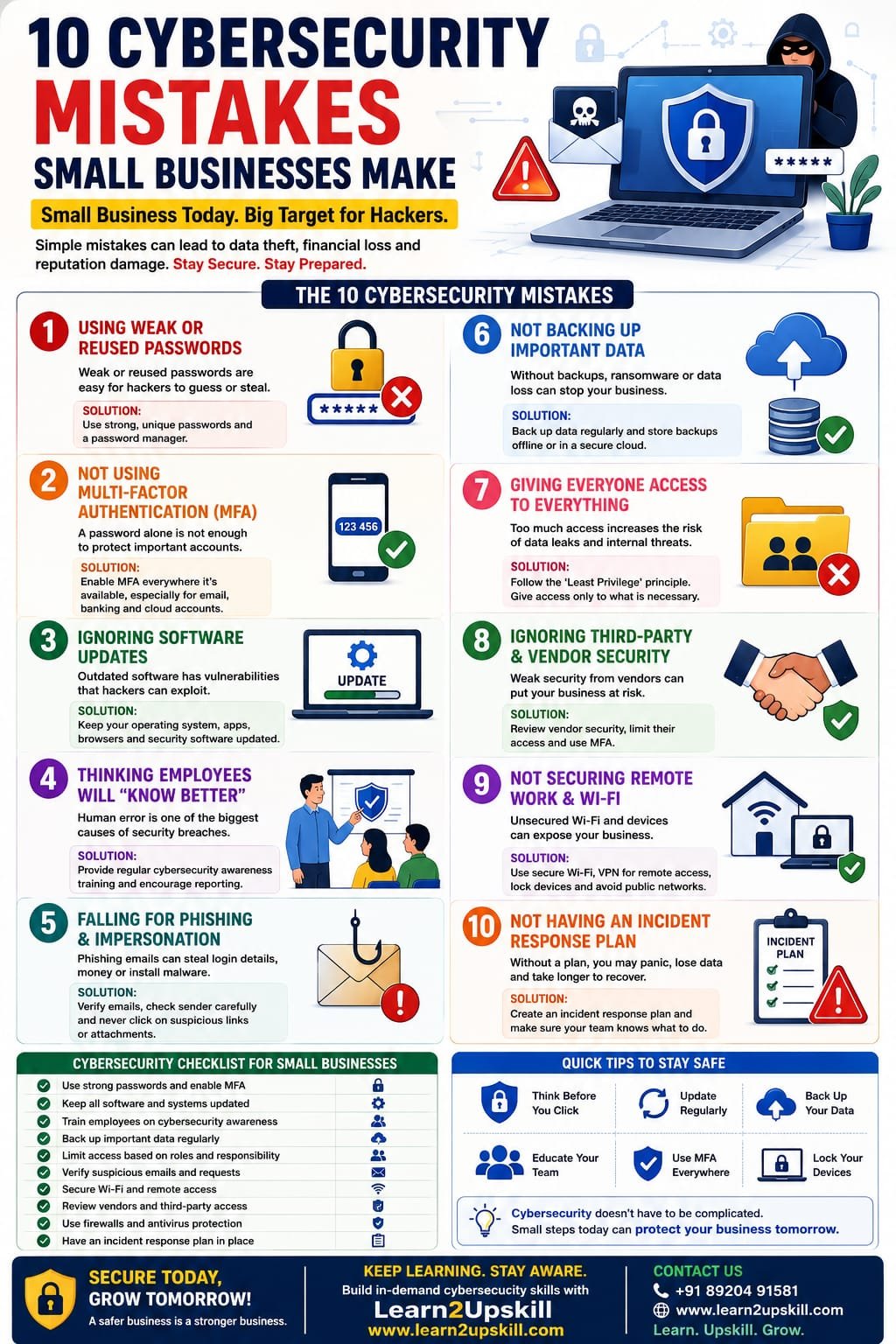
10 Cybersecurity Mistakes Small Businesses Make
Discover 10 common cybersecurity mistakes small businesses make and learn practical ways to protect your business, employees, data, devices and customers from cyber threats.
Suggested URL Slug:
10-cybersecurity-mistakes-small-businesses-make
Introduction
Many small-business owners believe that cybercriminals primarily target large corporations.
That’s a dangerous assumption.
Small businesses handle valuable information every day, including customer details, employee information, financial records, passwords, payment information and business documents. Cybercriminals can target organizations of any size, and the Federal Trade Commission specifically recommends that businesses of all sizes implement basic cybersecurity practices such as strong passwords, multi-factor authentication, software updates, backups, encryption and employee training. �
Federal Trade Commission +1
The good news?
You don’t necessarily need a massive cybersecurity budget to improve your security.
You need to avoid the basics going wrong.
In this article, we’ll explore 10 cybersecurity mistakes small businesses make, why they are risky and what businesses can do to reduce their exposure.
- Using Weak or Reused Passwords
One of the simplest cybersecurity mistakes is also one of the most common:
Weak passwords.
Employees may use passwords that are:
Easy to guess
Short
Based on personal information
Used across multiple accounts
Shared with colleagues
The bigger problem is password reuse.
If one account is compromised and the same password is used elsewhere, attackers may attempt to access other systems.
The FTC recommends strong passwords and specifically advises businesses not to reuse or share passwords. �
Federal Trade Commission
How to improve password security
Encourage employees to:
Use long, unique passwords or passphrases
Never reuse passwords across important accounts
Use a reputable password manager
Never share passwords
Change compromised credentials immediately
- Not Using Multi-Factor Authentication
A password alone may not provide enough protection for important accounts.
Multi-factor authentication (MFA) adds another verification step.
For example:
Password + authenticator app
or:
Password + security key
Even if an attacker obtains a password, MFA can provide an additional barrier.
The FTC recommends using multi-factor authentication to protect sensitive business information and network access. �
Federal Trade Commission
Small-business action
Enable MFA wherever it is available, especially for:
Business email
Cloud storage
Banking and financial services
Website administration
CRM systems
Social media accounts
Remote-access systems
- Ignoring Software Updates
“Remind me later” can become a cybersecurity problem.
Outdated operating systems, browsers, applications, plugins and other software may contain vulnerabilities that attackers can exploit.
The FTC recommends keeping software and security tools updated and enabling automatic updates where possible. �
Federal Trade Commission +1
What should be updated?
Don’t focus only on computers.
Remember:
Operating systems
Web browsers
Mobile devices
Business applications
Website software
Plugins
Routers
Security software
Better approach
Create a regular update process and enable automatic updates where appropriate.
- Assuming Employees Will “Know Better”
Cybersecurity isn’t only an IT problem.
Employees interact with:
Emails
Websites
Attachments
Cloud applications
Customers
Vendors
Payment systems
Business accounts
One careless click can create a serious security incident.
Phishing messages can impersonate vendors, colleagues or executives and may attempt to steal credentials, financial information or install malicious software. �
Federal Trade Commission +1
What businesses should do
Provide regular cybersecurity awareness training covering:
Phishing
Suspicious links
Malicious attachments
Password security
MFA
Social engineering
Safe remote working
Incident reporting
Training shouldn’t happen only once during employee onboarding.
Cybersecurity awareness should be ongoing.
- Falling for Phishing and Business Impersonation
Phishing attacks are designed to make people perform an action they shouldn’t.
An email may appear to come from:
Your CEO
Your bank
A supplier
A customer
Microsoft
A colleague
The message might say:
“Urgent: Your account will be closed today.”
Or:
“Please transfer the payment immediately.”
Attackers often create urgency to discourage careful verification.
The FTC recommends employees verify suspicious requests using a known, trusted contact method rather than relying on contact information contained in the suspicious message. �
Federal Trade Commission +1
Create a simple rule
STOP → CHECK → VERIFY → THEN ACT
Never allow urgency to override security procedures.
- Not Backing Up Important Data
Imagine losing:
Customer records
Financial files
Contracts
Employee documents
Business databases
Website files
Project information
What happens next?
Without reliable backups, recovery can become much harder.
The FTC recommends regularly backing up important files and, for ransomware protection, keeping backups separated from the network so attackers cannot simply compromise the backups along with the primary systems. �
Federal Trade Commission +1
A good backup strategy
Identify critical business data and establish:
What gets backed up
How frequently
Where backups are stored
Who manages them
How recovery works
Most importantly:
Test your backups.
A backup you have never tested may not be a backup you can confidently recover from.
- Giving Everyone Access to Everything
Another common mistake is giving employees more access than they actually need.
For example:
Why should someone in marketing have access to sensitive financial files?
Why should a temporary contractor have permanent access to customer databases?
The principle of least privilege means people should have access appropriate to their responsibilities.
The FTC recommends limiting access to sensitive information to people who need it for their jobs. �
Federal Trade Commission +1
Review access regularly
When an employee:
Changes departments
Leaves the company
Finishes a project
Stops working with a vendor
their access should be reviewed and, when appropriate, removed.
- Ignoring Third-Party and Vendor Security
Your business may use:
Cloud software
Payment providers
Marketing platforms
Accounting services
Website hosting
CRM systems
Freelancers
IT providers
Your security can be affected by the security practices of those providers.
The FTC recommends considering vendor security, controlling vendor access, using MFA and limiting vendors to the information they actually need. �
Federal Trade Commission
Before giving a vendor access, ask:
What information will they access?
Why do they need it?
How is it protected?
Is MFA available?
How is access removed?
What happens if they experience a breach?
Don’t assume that “it’s a trusted vendor” means security can be ignored.
- Not Securing Remote Work and Wi-Fi
Remote work has created more flexibility for businesses—but it can also introduce additional security considerations.
Employees may work from:
Home
Cafés
Hotels
Airports
Coworking spaces
Business devices may connect to different networks and environments.
The FTC recommends secure remote access and properly secured wireless networks, including modern encryption and strong router credentials. �
Federal Trade Commission
Basic remote-work security
Employees should:
Use company-approved devices where possible
Keep devices updated
Use strong passwords
Enable MFA
Avoid unsecured public networks where possible
Use approved secure remote-access methods
Lock devices when unattended
Report lost devices immediately
- Not Having an Incident Response Plan
Here’s a question every small-business owner should be able to answer:
“What will we do if we are hacked tomorrow?”
If the answer is:
“We’ll figure it out.”
that’s a problem.
A cyber incident can create confusion.
Employees may not know:
Who to contact
Which systems to disconnect
Who communicates with customers
Who contacts the IT provider
How to preserve evidence
How to restore data
When to report the incident
The FTC recommends businesses develop an incident response plan covering actions such as protecting data, keeping the business operating and handling notifications following a breach. �
Federal Trade Commission
Your incident response plan should identify:
Who responds?
Who makes decisions?
Who contacts IT/security providers?
Who communicates with customers?
Where are backups?
Which accounts should be secured immediately?
Preparation is much easier when you’re not trying to solve everything during an active attack.
Bonus Mistake: Thinking “We’re Too Small to Be Targeted”
This mindset can create unnecessary risk.
Cybersecurity shouldn’t be based on:
“Nobody will attack us.”
It should be based on:
“What would happen if someone tried?”
A small business may have fewer resources than a large enterprise, which makes practical security controls particularly important.
The FTC explicitly notes that cybercriminals target companies of all sizes. �
Federal Trade Commission
Small Business Cybersecurity Checklist
Use this quick checklist to assess your business.
Account Security
☐ Strong unique passwords
☐ Password manager where appropriate
☐ MFA enabled
☐ Former employee accounts disabled
☐ Access reviewed regularly
Device Security
☐ Operating systems updated
☐ Applications updated
☐ Security software maintained
☐ Devices protected with passwords
☐ Lost devices can be remotely secured where appropriate
Data Security
☐ Important files backed up
☐ Backups tested
☐ Sensitive information encrypted where appropriate
☐ Access limited to people who need it
Email Security
☐ Employees trained on phishing
☐ Suspicious messages can be reported
☐ Payment-change requests are independently verified
☐ Business email authentication is configured appropriately
Network Security
☐ Business Wi-Fi secured
☐ Router credentials changed from defaults
☐ Remote access secured
☐ Guest devices separated where appropriate
People
☐ Employees receive cybersecurity awareness training
☐ New employees receive security guidance
☐ Staff know how to report incidents
Incident Response
☐ Incident response plan exists
☐ Key contacts are documented
☐ Backup recovery process is understood
☐ Important vendors and security contacts are listed
How Small Businesses Can Build Better Cybersecurity
Cybersecurity doesn’t have to be an overwhelming project.
Start with the basics.
Step 1: Identify Your Important Data
Know what you’re protecting.
Step 2: Identify Who Has Access
Review employees, contractors and vendors.
Step 3: Secure Accounts
Implement strong passwords and MFA.
Step 4: Update Everything
Patch software and devices regularly.
Step 5: Back Up Critical Data
Create and test reliable backups.
Step 6: Train Employees
Teach people how to identify and report suspicious activity.
Step 7: Prepare for Incidents
Create a simple response plan.
Step 8: Review Regularly
Cybersecurity isn’t a one-time project.
The FTC describes security as an ongoing process and recommends maintaining security procedures as vulnerabilities and threats change. �
Federal Trade Commission
Why Cybersecurity Awareness Training Matters
Technology alone cannot solve every security problem.
A business may have:
Firewalls
Antivirus software
Email filtering
MFA
Backups
But if an employee unknowingly provides an attacker with credentials, technical controls can still be challenged.
That’s why cybersecurity awareness training is so important.
Employees should know:
What does a suspicious email look like?
What should I do if I click a suspicious link?
Who should I tell?
Should I transfer money based on an urgent email?
How do I report a suspicious message?
A strong security culture makes every employee part of the defense.
The Bottom Line
Small businesses don’t need to become cybersecurity experts overnight.
They need to stop making avoidable mistakes.
Start with the fundamentals:
Strong passwords
MFA
Software updates
Employee training
Phishing awareness
Backups
Access controls
Vendor security
Secure remote work
Incident response planning
These measures won’t guarantee that a business can never experience a cyberattack—but they can significantly strengthen its security posture and improve its ability to respond and recover.
Conclusion
Cybersecurity is no longer something only large corporations need to worry about.
Small businesses handle valuable data, accounts, devices and financial information every day.
The biggest cybersecurity problems often don’t begin with an extremely sophisticated attack.
They can begin with something much simpler:
A reused password.
An unpatched application.
An unchecked email.
An unnecessary user permission.
An untested backup.
Or an employee who doesn’t know what to do.
The solution is not fear.
The solution is preparation.
Build good cybersecurity habits across your business, train your employees regularly and create a plan before something goes wrong.
Cybersecurity is not just an IT responsibility. It’s a business responsibility.
Frequently Asked Questions
- What are the most common cybersecurity mistakes small businesses make?
Common mistakes include weak or reused passwords, lack of MFA, outdated software, inadequate employee training, poor backup practices, excessive access permissions and failure to prepare an incident response plan.
- Why are small businesses targeted by cybercriminals?
Cybercriminals can target organizations of all sizes. Small businesses may also have valuable data and accounts while having fewer dedicated cybersecurity resources.
- What is the most important cybersecurity step for a small business?
There isn’t one single solution. Start with the fundamentals: MFA, strong unique passwords, software updates, backups, employee training and access controls.
- How can small businesses prevent phishing attacks?
Train employees to recognize suspicious messages, verify unusual requests independently, avoid unexpected links and attachments, and provide an easy way to report suspected phishing.
- How often should employees receive cybersecurity training?
Cybersecurity awareness should be ongoing rather than a one-time event. Threats and scam techniques change, so businesses should regularly refresh employee awareness.
- Should small businesses use MFA?
Yes. MFA provides an additional layer of protection beyond a password and is particularly important for sensitive business accounts.
- Why are backups important for cybersecurity?
Backups can help businesses recover from incidents such as ransomware, accidental deletion or hardware failure. Backups should be protected and periodically tested.
- What should a small business do after a cyberattack?
Activate its incident-response procedures, contain the incident where appropriate, secure compromised accounts and systems, contact qualified IT/security professionals and follow applicable reporting and notification requirements.
Learn Cybersecurity Skills with Learn2Upskill
Cybersecurity isn’t just for IT professionals.
Every modern business needs people who understand cybersecurity awareness, phishing, data protection, AI-powered threats and safe digital practices.
Build practical, future-focused skills with Learn2Upskill.
🌐 www.coral-kudu-326218.hostingersite.com�
📞 Contact Us: +91 89204 91581
Learn. Upskill. Grow.