Author: Learn2Up Skill

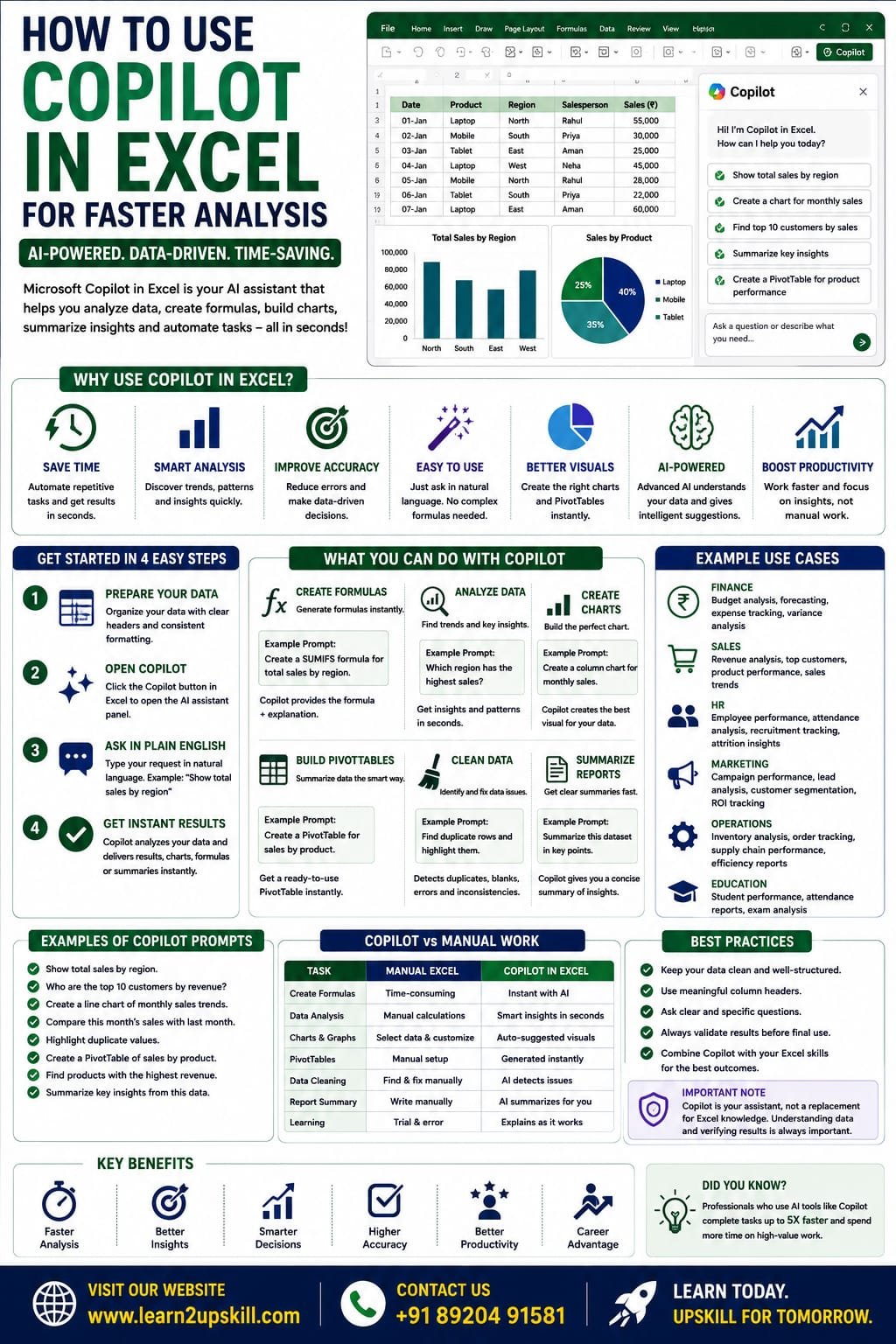
  • How to Use Copilot in Excel for Faster Analysis

    How to Use Copilot in Excel for Faster Analysis

    How to Use Copilot in Excel for Faster Analysis

    Learn how to use Microsoft Copilot in Excel to analyze data faster, generate formulas, create charts, summarize reports, clean data, and boost productivity with AI.

    How to Use Copilot in Excel for Faster Analysis

    Artificial Intelligence (AI) is changing the way professionals work with spreadsheets, and Microsoft Copilot in Excel is one of the biggest innovations in recent years. Instead of manually creating formulas, Pivot Tables, or charts, you can simply describe what you need in plain English, and Copilot helps you perform complex tasks in seconds.

    Whether you’re working in finance, HR, sales, marketing, operations, or education, Copilot can help you analyze data faster, automate repetitive tasks, and make better decisions.

    In this guide, you’ll learn how to use Copilot in Excel, its key features, real-world examples, best practices, and limitations.

    What is Microsoft Copilot in Excel?

    Microsoft Copilot is an AI-powered assistant integrated into supported versions of Microsoft Excel. It uses advanced AI to understand your requests written in natural language and assists with tasks such as:

    – Creating formulas

    – Summarizing data

    – Building PivotTables

    – Generating charts

    – Identifying trends

    – Cleaning data

    – Creating reports

    – Explaining formulas

    Instead of memorizing complicated Excel functions, you can simply ask Copilot what you want to achieve.

    Why Use Copilot in Excel?

    Copilot helps users:

    – Save time

    – Reduce manual work

    – Improve accuracy

    – Analyze data quickly

    – Build reports faster

    – Learn Excel more efficiently


    It is useful for both beginners and experienced Excel professionals.

    Requirements Before Using Copilot

    To use Copilot in Excel, you generally need:

    – A supported Microsoft 365 subscription with Copilot access

    – A compatible version of Microsoft Excel

    – An internet connection for AI-powered features

    – Well-structured data with clear column headers

    Availability may vary based on your Microsoft 365 plan and region.

    Step 1: Organize Your Data

    Before asking Copilot for help:

    Ensure your data:

    – Has column headers

    – Contains no blank header rows

    – Uses consistent formatting

    – Is stored as an Excel Table whenever possible

    Example:

    Date| Product| Region| Salesperson| Sales (₹)

    01-Jan| Laptop| North| Rahul| 55,000

    02-Jan| Mobile| South| Priya| 30,000

    03-Jan| Tablet| East| Aman| 25,000

    Clean data leads to better AI suggestions.

    Step 2: Open Copilot

    In supported versions of Excel:

    1. Open your workbook.
    2. Select your dataset.
    3. Click the Copilot button from the Excel ribbon or side panel (location may vary by version).
    4. Type your request in natural language.

    Step 3: Ask Questions in Plain English

    Instead of writing formulas, ask questions like:


    – Show total sales by region.

    – Find the top 10 customers.

    – Calculate average monthly sales.

    – Highlight duplicate values.

    – Show products with the highest revenue.

    – Summarize this dataset.

    Copilot interprets your request and suggests results.

    Create Excel Formulas with Copilot

    You don’t need to remember complex functions.

    Example prompts:

    – Create a SUMIFS formula.

    – Find the employee with the highest salary.

    – Calculate yearly growth.

    – Create an XLOOKUP formula.

    – Generate an IF formula for bonus eligibility.

    Copilot generates the appropriate formula and explains it if needed.

    Analyze Large Datasets

    Imagine you have 50,000 sales records.

    Ask Copilot:

    – Which region has the highest sales?

    – Which products are declining?

    – Compare this month with last month.

    – Show monthly growth trends.

    – Find unusual sales patterns.

    Copilot quickly identifies insights that would otherwise take much longer to uncover.

    Create Charts Automatically

    Instead of manually selecting chart types, ask:

    – Create a column chart for monthly sales.

    – Show sales trends using a line chart.

    – Compare regional performance with a bar chart.

    – Create a pie chart showing product contribution.


    Copilot recommends suitable visualizations based on your data.

    Build PivotTables

    Creating PivotTables becomes easier with AI.

    Example prompts:

    – Create a PivotTable showing sales by region.

    – Summarize revenue by product.

    – Show average sales by salesperson.

    – Count orders by month.

    Copilot generates a PivotTable that you can further customize.

    Clean Data Faster

    Copilot can help identify:

    – Duplicate records

    – Blank cells

    – Inconsistent formatting

    – Missing values

    – Unexpected patterns

    While you should review the suggestions, AI can significantly speed up the cleanup process.

    Summarize Reports

    If you’re working with large datasets, ask Copilot:

    – Summarize key insights.

    – Identify top-performing products.

    – Explain sales trends.

    – Highlight important changes.

    This is especially useful before meetings or presentations.

    Explain Existing Formulas

    Inherited a workbook with complicated formulas?

    Ask Copilot:

    – Explain this formula.

    – Why is this formula returning an error?

    – Simplify this formula.


    Copilot can help you understand and troubleshoot existing spreadsheets.

    Real-World Examples

    Finance

    – Budget analysis

    – Profit tracking

    – Expense summaries

    – Financial forecasting

    Sales

    – Revenue analysis

    – Top customer reports

    – Product performance

    – Regional comparisons

    HR

    – Attendance analysis

    – Employee performance

    – Recruitment tracking

    Marketing

    – Campaign performance

    – Lead analysis

    – Customer segmentation

    Education

    – Student grades

    – Attendance reports

    – Performance summaries

    Best Practices

    – Keep your data clean and organized.

    – Use Excel Tables for structured datasets.

    – Write clear, specific prompts.

    – Verify AI-generated results before making business decisions.

    – Continue learning Excel fundamentals alongside AI tools.


    Common Mistakes to Avoid

    – Asking vague questions.

    – Using poorly structured data.

    – Assuming AI results are always correct.

    – Ignoring data validation.

    – Depending entirely on AI without understanding the analysis.

    Advantages of Copilot in Excel

    – Faster reporting

    – Easier formula creation

    – Simplified data analysis

    – Better charts and summaries

    – Reduced manual work

    – Improved productivity

    – Helpful for learning Excel features

    Limitations

    – Requires eligible Microsoft 365 access.

    – Needs internet connectivity for AI features.

    – Works best with clean, structured data.

    – Complex business scenarios may still require manual review and advanced Excel skills.


    Final Thoughts

    Microsoft Copilot is making Excel faster, smarter, and more accessible by allowing users to interact with spreadsheets using natural language. From generating formulas and PivotTables to creating charts and summarizing reports, Copilot can dramatically reduce the time spent on repetitive tasks.

    However, the best results come from combining AI with strong Excel fundamentals. By understanding formulas, PivotTables, dashboards, and data cleaning—and then using Copilot to accelerate your workflow—you’ll be better equipped for today’s data-driven workplace.

    At Learn2Upskill, we help students and professionals master Excel, AI tools, and data analytics through practical, career-focused learning.

    Visit: www.coral-kudu-326218.hostingersite.com

    Contact Us: +91 89204 91581

    Learn Faster. Analyze Smarter. Upskill with AI.
  • Python in Excel

    Python in Excel

    Python in Excel

    Learn how to use Python in Microsoft Excel with this beginner-friendly guide. Discover setup, syntax, examples, benefits, limitations, and real-world use cases for data analysis.

    Python in Excel: Beginner’s Guide

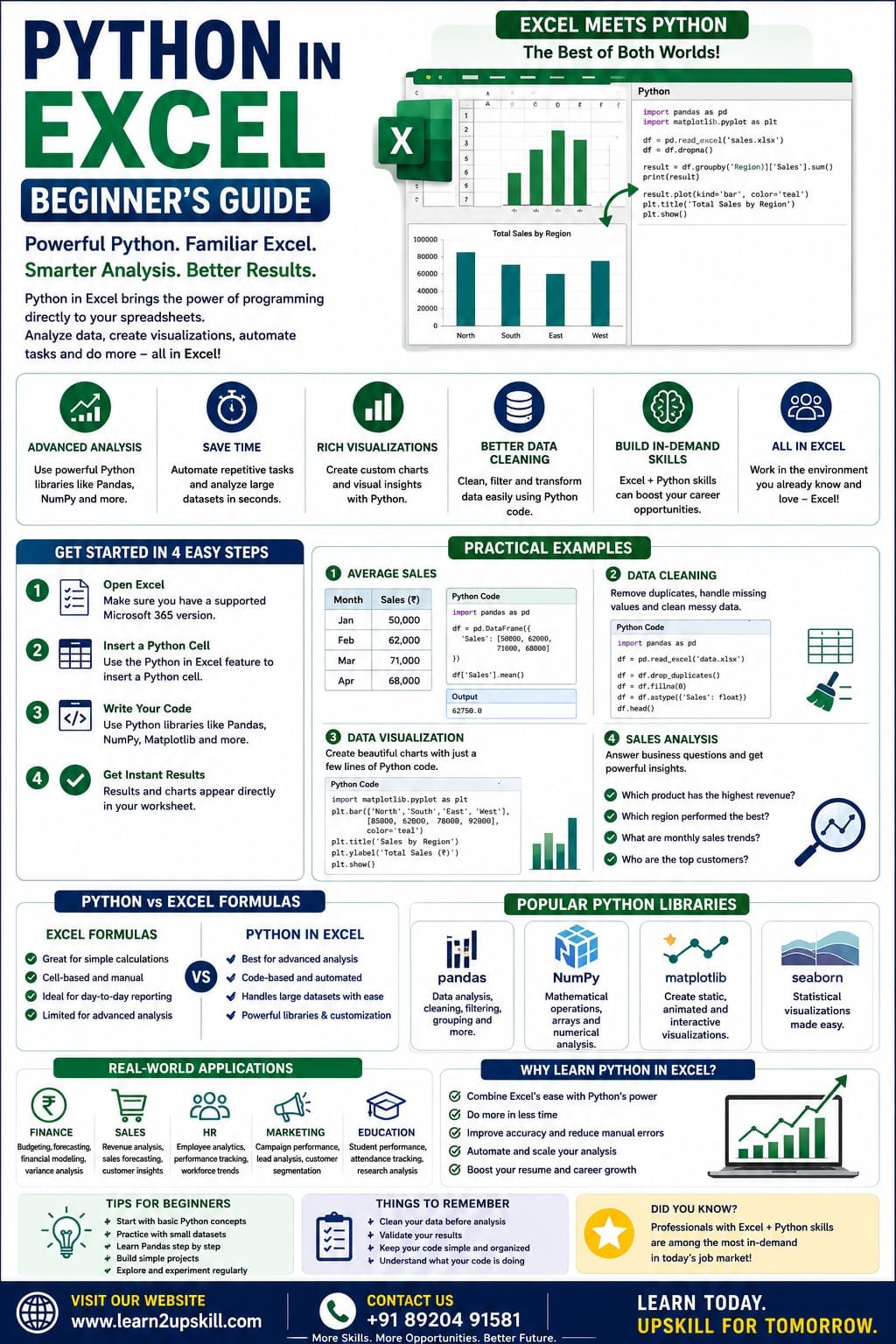
    Microsoft Excel has long been the go-to tool for data analysis, reporting, and business intelligence. Now, with Python integrated into Excel, users can perform advanced data analysis, create powerful visualizations, automate repetitive tasks, and work with large datasets—all without leaving Excel.

    For beginners, this combination opens the door to learning programming while continuing to work in the familiar Excel environment.

    In this guide, you’ll learn what Python in Excel is, how it works, its benefits, practical examples, and how to start using it.

    What Is Python in Excel?

    Python in Excel is a feature that allows you to write and execute Python code directly inside Excel worksheets.

    Instead of switching between Excel and a separate Python environment, you can combine Excel’s spreadsheet capabilities with Python’s powerful data analysis libraries.

    This enables you to:

    – Analyze large datasets

    – Perform statistical calculations

    – Create advanced charts

    – Clean and transform data

    – Automate repetitive analysis

    – Use machine learning workflows (where supported)

    Why Learn Python in Excel?

    Learning Python in Excel offers the best of both worlds.

    You continue using Excel while gaining access to Python’s advanced capabilities.

    Benefits include:

    – Faster data analysis

    – Advanced calculations

    – Powerful visualizations

    – Better automation

    – Improved productivity

    – Valuable career skills


    Who Should Learn Python in Excel?

    Python in Excel is useful for:

    – Students

    – Data Analysts

    – Financial Analysts

    – Accountants

    – Business Analysts

    – HR Professionals

    – Marketing Analysts

    – Researchers

    – Engineers

    – Excel Power Users

    Prerequisites

    Before learning Python in Excel, it’s helpful to know:

    – Basic Excel formulas

    – Tables and charts

    – Pivot Tables

    – Basic data cleaning

    No prior Python experience is required to get started.

    How Does Python Work in Excel?

    Instead of using traditional Excel formulas, you can insert Python code into dedicated Python cells.

    Excel executes the code and returns the results directly in your workbook.

    This makes it possible to combine spreadsheet calculations with Python-based analysis in a single file.

    Common Python Libraries Available

    Python in Excel supports several popular libraries, including:

    Pandas

    Used for:

    – Data cleaning

    – Data analysis

    – Filtering

    – Grouping

    – Merging datasets

    —

    NumPy

    Useful for:

    – Mathematical calculations

    – Arrays

    – Statistical operations

    – Numerical analysis

    —

    Matplotlib

    Creates charts such as:

    – Line charts

    – Bar charts

    – Scatter plots

    – Histograms

    —

    Seaborn

    Helps create advanced statistical visualizations with minimal code.

    —

    Getting Started

    Step 1

    Open Microsoft Excel (supported Microsoft 365 version with Python in Excel).

    —

    Step 2

    Create or open a workbook.

    —

    Step 3

    Insert a Python cell using the Python feature available in supported versions.


    —

    Step 4

    Write your Python code.

    Example:

    numbers = [10, 20, 30, 40]

    sum(numbers)

    Output:

    100

    —

    Example 1: Average Sales

    Dataset

    Month| Sales

    Jan| 50000

    Feb| 62000

    Mar| 71000

    Apr| 68000

    Python can calculate averages, trends, and additional statistics with concise code.

    —

    Example 2: Data Cleaning

    Suppose your dataset contains:

    – Blank cells

    – Duplicate entries

    – Extra spaces

    Using Python with libraries such as Pandas, you can efficiently:

    – Remove duplicates

    – Fill missing values

    – Standardize text

    – Convert data types

    This is especially useful for large datasets.

    —

    Example 3: Data Visualization

    Instead of relying only on Excel charts, Python can generate customized visualizations for deeper analysis.

    Common chart types include:

    – Bar Charts

    – Line Charts

    – Scatter Plots

    – Histograms

    – Box Plots

    —

    Example 4: Sales Analysis

    Imagine you have 50,000 sales records.

    Python can quickly answer questions like:

    – Which product generated the highest revenue?

    – Which region had the best performance?

    – What were the monthly sales trends?

    – Who were the top customers?

    —

    Python vs Excel Formulas

    Excel Formula| Python

    Easy for simple calculations| Better for advanced analysis

    Cell-based formulas| Code-based workflows

    Great for everyday reporting| Excellent for automation and large datasets

    Limited programming features| Extensive programming capabilities

    —

    Advantages of Python in Excel

    1. Handles Large Datasets

    Python is well-suited for analyzing datasets that would be cumbersome to process manually.

    —

    1. Better Automation

    Reduce repetitive work by automating common analysis tasks.

    —

    1. Advanced Analytics

    Perform statistical analysis and complex data transformations.

    —

    1. Rich Visualizations

    Create detailed charts beyond Excel’s standard options.

    —

    1. Career Growth

    Python and Excel are both highly valued skills in data-related careers.

    —

    Limitations

    – Available only in supported Microsoft 365 environments.

    – Requires some learning of Python syntax.

    – Not every Python package is available in Excel.

    – Some advanced workflows may still require external development environments.

    —

    Real-World Applications

    Finance

    – Budget analysis

    – Forecasting

    – Financial modeling

    —

    Sales

    – Revenue analysis

    – Customer segmentation

    – Sales forecasting

    —

    HR

    – Employee analytics

    – Attendance reports

    – Workforce trends

    —

    Marketing

    – Campaign performance

    – Customer insights

    – Lead analysis

    —

    Education

    – Student performance analysis

    – Attendance tracking

    – Research data analysis

    —

    Tips for Beginners

    – Learn Excel fundamentals first.

    – Start with basic Python concepts such as variables and lists.

    – Practice using small datasets.

    – Explore Pandas for data analysis.

    – Build simple projects before moving to advanced topics.

    —

    Common Mistakes to Avoid

    – Ignoring data quality before analysis.

    – Writing overly complex code for simple tasks.

    – Forgetting to validate results.

    – Relying on automation without understanding the underlying data.

    Python in Excel represents a significant step forward for spreadsheet users. It combines Excel’s familiar interface with Python’s powerful programming capabilities, making advanced data analysis more accessible than ever.

    Whether you’re a student beginning your data journey or a professional looking to automate reports and analyze larger datasets, learning Python in Excel can improve your productivity and expand your career opportunities.

    At Learn2Upskill, we help students and professionals master Excel, Python, AI tools, and data analytics through practical, career-focused learning.

    Visit: www.coral-kudu-326218.hostingersite.com

    Contact Us: +91 89204 91581

    Learn Excel. Learn Python. Build the Skills Employers Want.

  • Common Career Mistakes Students Should Avoid: A Complete Guide to Building a Successful Future

    Common Career Mistakes Students Should Avoid: A Complete Guide to Building a Successful Future

    Common Career Mistakes Students Should Avoid: A Complete Guide to Building a Successful Future

    Published by: Learn2Upskill

    Website: www.coral-kudu-326218.hostingersite.com

    Contact: +91 89204 91581

    Introduction

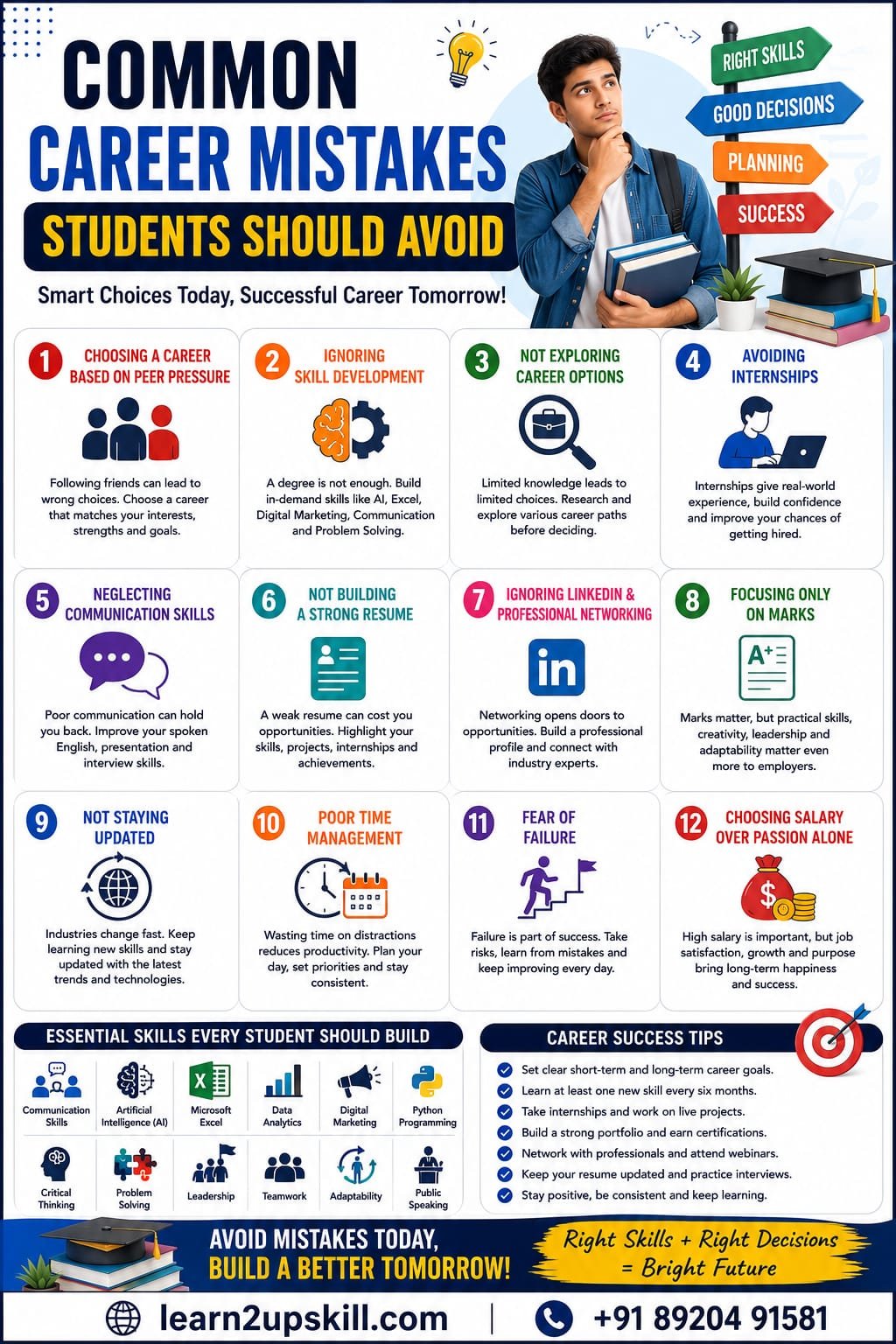
    Choosing a career is one of the most important decisions in a student’s life. However, many students make avoidable mistakes that can delay their success, limit opportunities, or lead to dissatisfaction in the future.

    The good news is that these mistakes can be avoided with the right guidance, planning, and continuous learning. Whether you’re in school, college, or preparing for your first job, understanding these common career mistakes can help you make smarter decisions and build a rewarding career.

    In this guide, we’ll discuss the most common career mistakes students make and practical ways to avoid them.

    —

    Why Career Planning Matters

    A well-planned career helps you:

    – Choose the right education path

    – Build relevant skills

    – Increase employability

    – Save time and money

    – Achieve long-term career goals

    – Stay competitive in a changing job market

    Career planning isn’t about predicting the future—it’s about preparing for it.

    —

    1. Choosing a Career Based on Peer Pressure

    Many students choose a course or career simply because their friends are doing it.

    Why It’s a Mistake

    – Your interests may be different.

    – You may lose motivation over time.

    – It can lead to poor job satisfaction.

    What You Should Do

    – Identify your strengths and interests.

    – Research different career options.

    – Seek guidance from teachers, mentors, or career counselors.

    —

    1. Ignoring Skill Development

    A degree alone is often not enough to secure a good job.

    Employers increasingly look for practical skills such as:

    – Communication

    – Digital Marketing

    – Artificial Intelligence (AI)

    – Data Analytics

    – Microsoft Excel

    – Programming

    – Problem Solving

    – Teamwork

    Investing in skill development alongside your studies gives you a competitive edge.

    —

    1. Not Exploring Career Options

    Many students only know about a few traditional professions.

    Today’s career landscape includes opportunities in:

    – Artificial Intelligence

    – Cybersecurity

    – Cloud Computing

    – Data Science

    – UI/UX Design

    – Digital Marketing

    – Content Creation

    – Business Analytics

    – Product Management

    – Entrepreneurship

    Explore a wide range of industries before making a decision.

    —

    1. Avoiding Internships

    Internships provide valuable real-world experience.

    Benefits

    – Learn workplace skills

    – Build confidence

    – Improve your resume

    – Network with professionals

    – Increase your chances of getting hired

    Even short internships can make a big difference.

    —

    1. Neglecting Communication Skills

    Strong communication is essential in almost every profession.

    Improve your:

    – Spoken English

    – Presentation skills

    – Email writing

    – Interview communication

    – Listening skills

    Clear communication can set you apart from equally qualified candidates.

    —

    1. Not Building a Strong Resume

    Your resume is often your first impression.

    A good resume should include:

    – Education

    – Skills

    – Certifications

    – Projects

    – Internships

    – Achievements

    Keep it concise, accurate, and tailored to each job application.

    —

    1. Ignoring LinkedIn and Professional Networking

    Networking can open doors to internships, jobs, and mentorship opportunities.

    Create a professional LinkedIn profile and:

    – Share your achievements

    – Connect with industry professionals

    – Follow companies

    – Engage with relevant content

    Building your professional presence early can benefit your career.

    —

    1. Focusing Only on Marks

    Good grades are important, but employers also value:

    – Practical skills

    – Creativity

    – Leadership

    – Adaptability

    – Critical thinking

    – Teamwork

    Balance academic performance with skill development and real-world experience.

    —

    1. Not Staying Updated

    Industries evolve rapidly, especially with advances in technology.

    Stay informed by:

    – Reading industry blogs

    – Following reputable news sources

    – Taking online courses

    – Attending webinars

    – Learning new tools and technologies

    Continuous learning keeps you relevant.

    —

    1. Poor Time Management

    Many students waste valuable time on distractions.

    Improve productivity by:

    – Creating a daily schedule

    – Setting priorities

    – Avoiding procrastination

    – Limiting unnecessary screen time

    Effective time management helps you balance studies, learning, and personal life.

    —

    1. Fear of Failure

    Many students avoid applying for internships, competitions, or jobs because they fear rejection.

    Remember:

    – Every successful professional has faced setbacks.

    – Failure is an opportunity to learn and improve.

    – Confidence grows through experience.

    Take calculated risks and keep moving forward.

    —

    1. Choosing Salary Over Passion Alone

    While salary is important, don’t choose a career based only on immediate earnings.

    Consider:

    – Long-term growth

    – Job satisfaction

    – Learning opportunities

    – Work-life balance

    – Career stability

    The best careers often combine passion, skills, and market demand.

    —

    Essential Skills Every Student Should Build

    – Communication Skills

    – Artificial Intelligence (AI)

    – Microsoft Excel

    – Data Analytics

    – Digital Marketing

    – Python Programming

    – Critical Thinking

    – Problem Solving

    – Leadership

    – Teamwork

    – Adaptability

    – Public Speaking

    These skills can improve your employability across industries.

    —

    Career Success Tips

    – Set clear career goals.

    – Learn at least one new skill every six months.

    – Complete internships or live projects.

    – Build a professional portfolio.

    – Earn relevant certifications.

    – Keep your resume updated.

    – Network with professionals.

    – Practice interview skills regularly.

    – Stay curious and keep learning.

    —

    Conclusion

    Avoiding common career mistakes can save you years of frustration and help you achieve your goals more quickly. Focus on building practical skills, gaining real-world experience, and making informed career decisions based on your interests and strengths.

    Success doesn’t happen overnight—it comes from consistent learning, smart choices, and a willingness to grow. Start preparing today, and you’ll be ready for the opportunities of tomorrow.

    —

    Learn with Learn2Upskill

    At Learn2Upskill, we are committed to helping students become career-ready through practical courses, industry-relevant training, and expert guidance.

    Whether you want to learn AI, Digital Marketing, Excel, Data Analytics, Programming, or other job-ready skills, we’re here to support your journey.

    Website: www.coral-kudu-326218.hostingersite.com

    Contact: +91 89204 91581


    Start learning today. Build the skills employers want. Shape a successful future with Learn2Upskill!

  • SEO for Beginners: Complete Guide

    SEO for Beginners: Complete Guide

    SEO for Beginners: Complete Guide

    Learn SEO from scratch with this beginner-friendly guide. Discover on-page SEO, off-page SEO, technical SEO, keyword research, and the latest SEO best practices for 2026.

    If you’ve ever wondered “How do websites appear on the first page of Google?”, the answer is Search Engine Optimization (SEO).

    SEO is one of the most valuable digital marketing skills you can learn. Whether you’re a student, blogger, business owner, freelancer, or digital marketer, understanding SEO can help you attract more visitors, generate leads, and grow your online presence—without relying solely on paid advertising.

    In this complete beginner’s guide, you’ll learn what SEO is, how search engines work, the different types of SEO, and the practical steps you can take to improve your website’s visibility in 2026.

    What Is SEO?

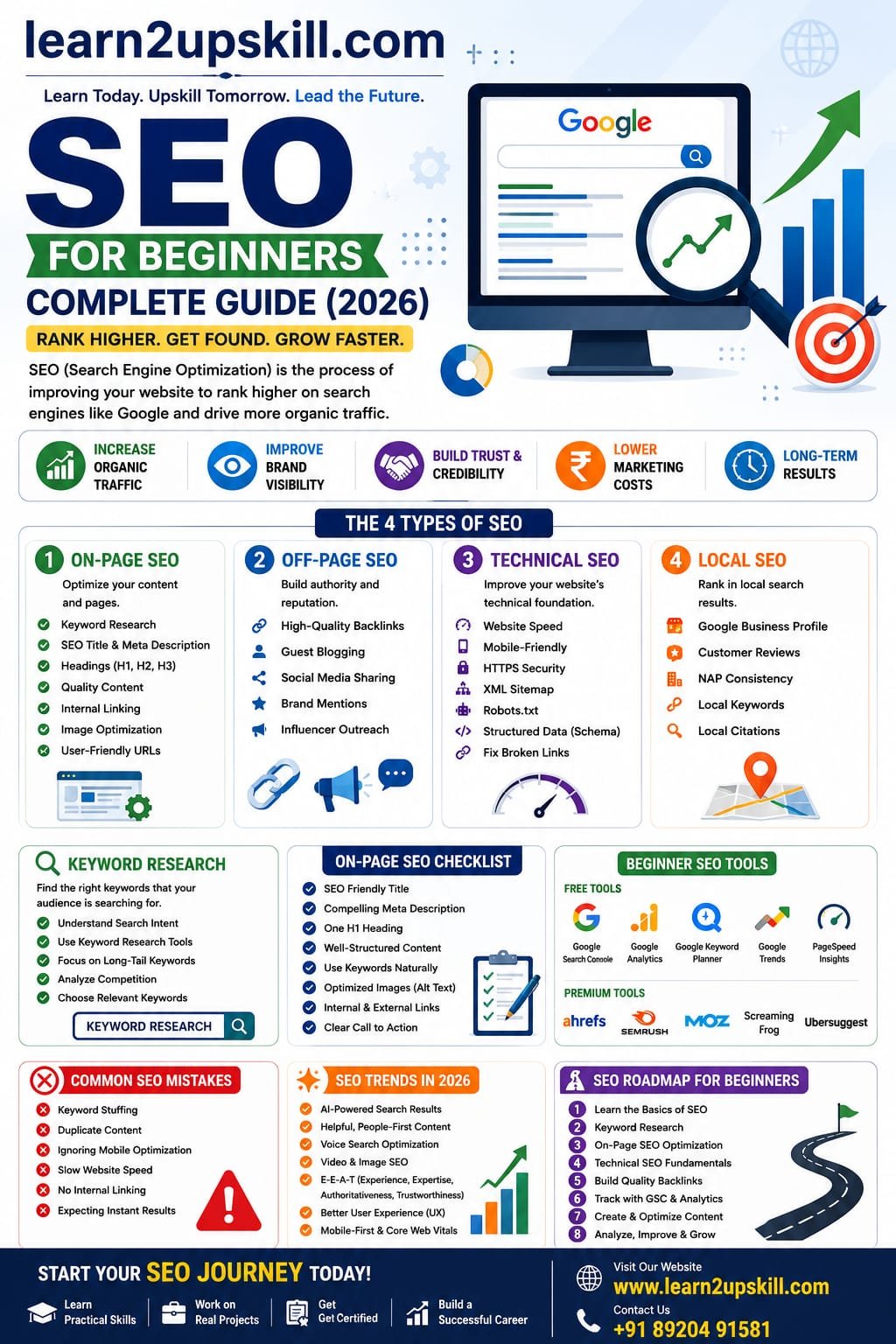
    Search Engine Optimization (SEO) is the process of improving a website so that it appears higher in search engine results for relevant searches.

    For example, if someone searches for:

    – Best Digital Marketing Course

    – AI Tools for Students

    – Learn Excel Online

    SEO helps your website become one of those pages.

    Why Is SEO Important?

    Every day, billions of searches are made online. Most users click on one of the first few results, so ranking well can make a significant difference.

    Benefits of SEO include:

    – Increased organic (free) website traffic

    – Better brand visibility

    – More leads and sales

    – Higher trust and credibility

    – Long-term marketing results

    – Lower customer acquisition costs compared to many paid campaigns

    How Do Search Engines Work?

    Search engines such as Google generally follow three main steps:

    1. Crawling

    Search engine bots discover webpages by following links across the internet.

    1. Indexing

    The content of those pages is stored and organized in Google’s index.

    1. Ranking

    When someone searches, Google evaluates many factors to decide which pages are most useful and should appear first.

    Your SEO efforts help search engines understand why your page deserves to rank.

    Types of SEO

    SEO can be divided into four major areas.

    1. On-Page SEO

    On-page SEO focuses on optimizing the content and structure of individual pages.

    Key elements include:

    – Keyword research

    – SEO-friendly titles

    – Meta descriptions

    – Headings (H1, H2, H3)

    – Internal linking

    – Image optimization

    – User-friendly URLs

    – High-quality content

    1. Off-Page SEO

    Off-page SEO helps build your website’s authority.

    Common techniques include:

    – High-quality backlinks

    – Guest blogging

    – Brand mentions

    – Social media sharing

    – Digital PR

    Quality matters much more than quantity when it comes to backlinks.

    1. Technical SEO

    Technical SEO ensures your website is easy for search engines to crawl and provides a good user experience.

    Important areas include:

    – Fast loading speed

    – Mobile-friendly design

    – Secure HTTPS connection

    – XML sitemap

    – Robots.txt

    – Structured data (Schema)

    – Fixing broken links

    – Clean site architecture

    1. Local SEO

    Local SEO helps businesses appear in location-based searches.

    Content Is the Foundation of SEO

    Creating helpful, original content is one of the most effective ways to improve your rankings.

    Good content should:

    – Solve a real problem

    – Be easy to read

    – Include examples

    – Use headings and bullet points

    – Stay up to date

    – Demonstrate expertise and trustworthiness

    Write for people first, then optimize for search engines.

    Essential On-Page SEO Checklist

    Before publishing a page, check that you have:

    – An engaging SEO title

    – A compelling meta description

    – One H1 heading

    – Well-organized H2 and H3 headings

    – Relevant keywords used naturally

    – Optimized images with descriptive alt text

    – Internal links to related pages

    – External links to reliable sources when appropriate

    – A clear call to action


    Beginner-Friendly SEO Tools

    These tools can help you improve your website:

    Free Tools

    – Google Search Console

    – Google Analytics

    – Google Keyword Planner

    – Google Trends

    – PageSpeed Insights

    Paid Tools

    – Ahrefs

    – SEMrush

    – Moz

    – Screaming Frog SEO Spider

    – Surfer SEO

    Start with the free tools and upgrade only when your needs grow.

    Common SEO Mistakes to Avoid

    Many beginners make these mistakes:

    – Keyword stuffing

    – Copying content from other websites

    – Ignoring mobile optimization

    – Publishing thin or low-value content

    – Neglecting technical SEO

    – Forgetting internal linking

    – Using duplicate title tags and meta descriptions

    – Expecting instant results

    SEO is a long-term strategy that rewards consistency.

    SEO Trends in 2026

    SEO continues to evolve. Some important trends include:

    – AI-assisted content creation with strong human editing

    – Greater focus on user experience

    – Helpful, experience-based content

    – Voice search optimization

    – Video SEO

    – Image search optimization

    – Structured data implementation

    – Fast, mobile-first websites

    Successful websites combine useful content with excellent technical performance.

    Step-by-Step SEO Learning Roadmap

    If you’re just getting started, follow this path:

    Week 1: Learn SEO basics and search intent.

    Week 2: Understand keyword research.

    Week 3: Practice on-page SEO.

    Week 4: Learn technical SEO fundamentals.

    Week 5: Build backlinks ethically.

    Week 6: Use Google Search Console and Analytics.

    Week 7: Create SEO-optimized blog posts.

    Week 8: Analyze results and improve existing content.

    Keep practicing by optimizing your own website or blog.

    Frequently Asked Questions

    Is SEO difficult to learn?

    No. The basics are beginner-friendly, but mastering SEO requires continuous learning and practical experience.

    How long does SEO take to show results?

    SEO is a long-term investment. Depending on your website, competition, and content quality, noticeable improvements can take several weeks to several months.

    Can I learn SEO for free?

    Yes. There are many free resources, and you can gain valuable experience by working on your own website.

    Does SEO require coding?

    Not for most beginners. While technical SEO benefits from some technical knowledge, you can achieve strong results without being a programmer.

    Conclusion


    SEO remains one of the most powerful ways to grow a website organically. Whether you’re building a personal blog, promoting a business, or starting a career in digital marketing, understanding SEO gives you a valuable advantage.

    The key is to focus on creating helpful content, optimizing your website, and continuously improving based on user needs and search performance.

    Remember, SEO is not about trying to “beat” search engines—it’s about making your website the best answer for your audience.

    At Learn2UpSkill, we’re committed to helping learners build practical, future-ready digital skills. Explore our resources on SEO, AI, digital marketing, analytics, and more to accelerate your career.

    Start optimizing today, stay consistent, and let your content work for you.

  • Will AI Replace Jobs?

    Will AI Replace Jobs?

    Will AI Replace Jobs?

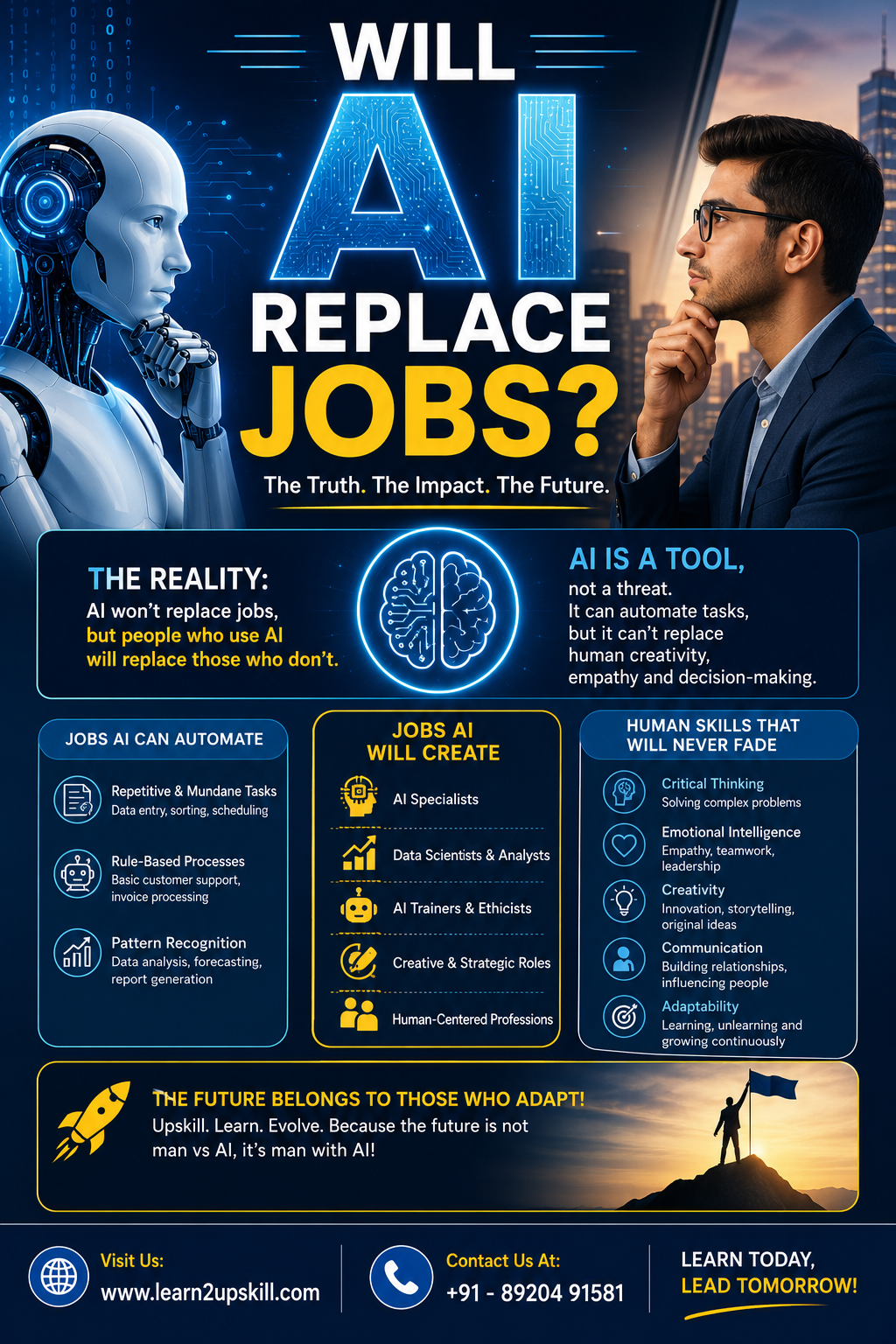
    AI is unlikely to replace every job completely. Instead, it is changing how work gets done.

    Tasks that are repetitive, rule-based, and predictable are more likely to be automated. Jobs that require creativity, emotional intelligence, strategic thinking, leadership, and complex decision-making are much harder to replace.

    Think of AI as a powerful assistant rather than a complete replacement. Professionals who learn to use AI effectively can often become more productive and valuable.

    Jobs Most Likely to Be Affected by AI

    Some roles involve repetitive work that AI can perform quickly and efficiently.

    These include:

    Data Entry Operators

    Basic Customer Support Executives

    Transcriptionists

    Routine Administrative Assistants

    Simple Content Writers

    Basic Bookkeeping Roles

    Basic Graphic Editing Tasks

    Telemarketing Jobs

    This doesn’t mean these jobs will disappear overnight. Instead, many of them are evolving, with employees expected to use AI tools as part of their daily work.

    Jobs That Are Growing Because of AI

    As AI adoption increases, demand is rising for professionals who can build, manage, and use AI effectively.

    Some of the fastest-growing roles include:

    AI Engineer

    Machine Learning Engineer

    Data Analyst

    Data Scientist

    AI Product Manager

    Prompt Engineer

    Digital Marketing Specialist

    Cybersecurity Analyst

    Cloud Computing Engineer

    AI Trainer

    Automation Specialist

    Business Intelligence Analyst

    AI Content Strategist

    These careers combine technical knowledge with problem-solving and often offer excellent long-term growth opportunities.

    Skills You Should Learn Instead

    Instead of worrying about job loss, focus on building skills that complement AI.

    1. Artificial Intelligence Literacy

    Understand how AI works and how to use popular AI tools responsibly.

    Learn:

    ChatGPT

    AI-powered search

    AI image generation

    AI productivity tools

    AI ethics and responsible use

    1. Digital Marketing

    Digital marketing remains one of the fastest-growing fields.

    Key skills include:

    Search Engine Optimization (SEO)

    Social Media Marketing

    Google Ads

    Meta Ads

    Email Marketing

    Content Marketing

    Marketing Analytics

    Professionals who can combine AI with digital marketing are becoming increasingly valuable.

    1. Data Analytics

    Businesses rely on data to make better decisions.

    Learn:

    Microsoft Excel

    SQL

    Power BI

    Tableau

    Data Visualization

    Google Analytics

    Being able to interpret data is a skill AI supports—but doesn’t replace.

    1. Cybersecurity

    As organizations use more technology and AI, protecting digital systems becomes even more important.

    Important skills include:

    Network Security

    Ethical Hacking

    Security Monitoring

    Risk Assessment

    Incident Response

    Cybersecurity professionals remain in high demand.

    1. Programming

    Coding continues to be a valuable skill.

    Popular languages include:

    Python

    JavaScript

    Java

    C#

  • Digital Marketing: Skills, Salary, and Career Opportunities

    Digital Marketing: Skills, Salary, and Career Opportunities

    Digital Marketing: Skills, Salary & Career Opportunities

    Discover the complete Digital Marketing Roadmap for 2026. Learn essential skills, salary expectations, career opportunities, certifications, and a step-by-step plan to become a successful digital marketer.

    Digital marketing is one of the fastest-growing and most rewarding career fields in 2026. As businesses continue to expand their online presence, the demand for skilled digital marketers is increasing across industries.

    Whether you’re a student, a working professional, or someone planning a career switch, this roadmap will help you understand what digital marketing is, the skills you need, salary expectations, and the best career opportunities available.


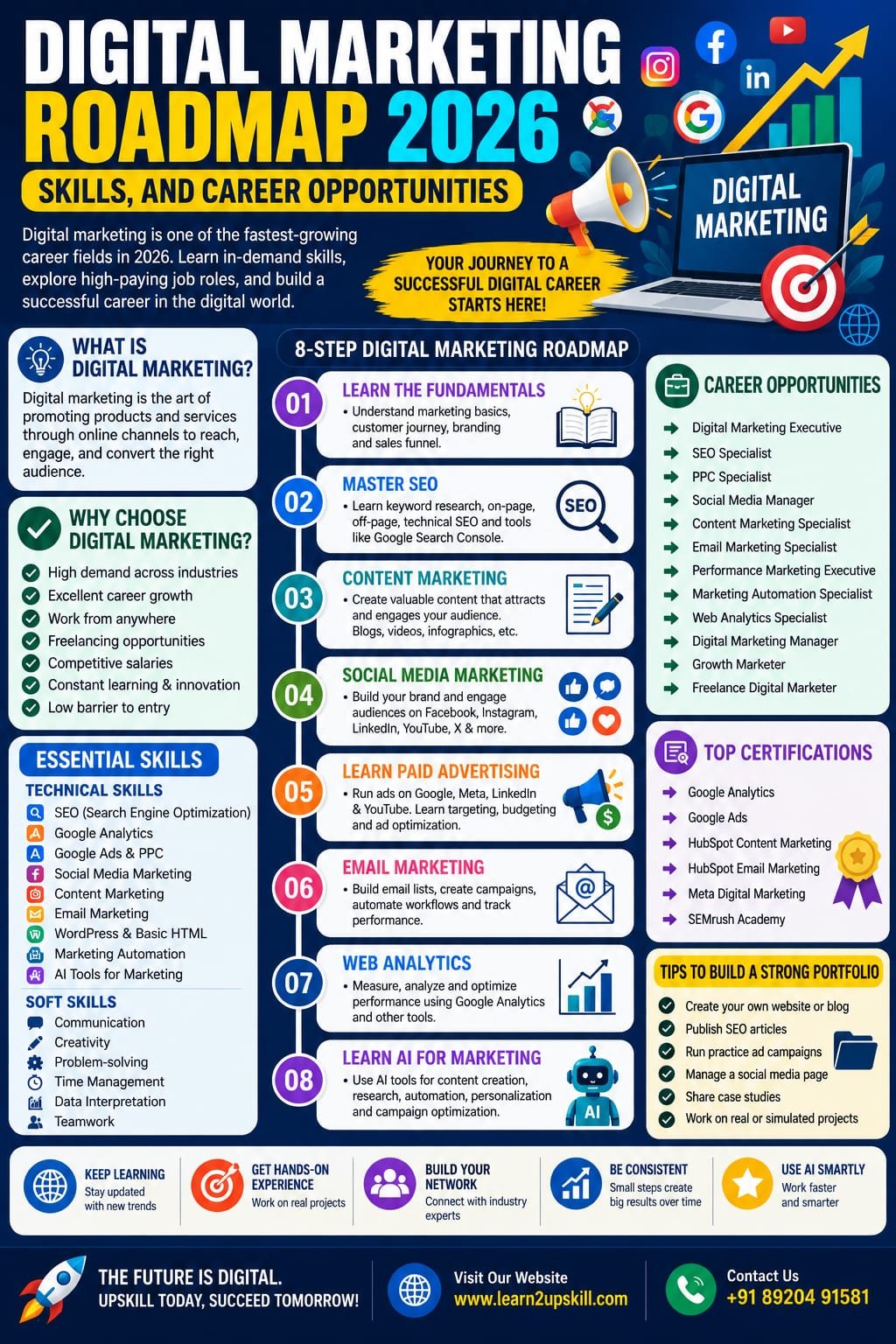
    What Is Digital Marketing?

    Digital marketing is the practice of promoting products and services through online channels such as search engines, social media platforms, email, websites, and mobile applications.

    Unlike traditional marketing, digital marketing allows businesses to measure campaign performance, reach targeted audiences, and optimize strategies based on data.

    Why Choose Digital Marketing in 2026?

    Digital marketing continues to grow because businesses of every size rely on online channels to reach customers.

    Benefits of Choosing Digital Marketing

    – High demand across industries

    – Excellent career growth

    – Opportunity to work remotely

    – Freelancing and consulting opportunities

    – Competitive salaries

    – Constant learning and innovation

    – Low barrier to entry compared to many technical careers


    Step-by-Step Digital Marketing Roadmap


    Step 1: Learn the Fundamentals


    Start by understanding the basics of:


    – Marketing principles

    – Customer journey

    – Sales funnel

    – Branding

    – Content marketing


    A strong foundation will help you understand how different digital marketing channels work together.


    Step 2: Master SEO (Search Engine Optimization)

    SEO helps websites rank higher on search engines and attract organic traffic.

    Learn:

    – Keyword research

    – On-page SEO

    – Technical SEO

    – Off-page SEO

    – Link building

    – Local SEO

    – SEO tools


    Popular tools include Google Search Console, Google Analytics, and keyword research platforms.

    Step 3: Learn Content Marketing

    Content is one of the most important parts of digital marketing.

    Focus on creating:

    – Blog articles

    – Landing pages

    – Social media content

    – Email newsletters

    – Case studies

    – Video scripts

    Develop strong writing skills and learn how to create content that solves user problems.


    Step 4: Social Media Marketing

    Every digital marketer should understand how major social platforms work.


    Learn to create strategies for:


    – Facebook

    – Instagram

    – LinkedIn

    – YouTube

    – X

    – Pinterest

    Key skills include content planning, audience engagement, analytics, and paid promotions.

    Step 5: Learn Paid Advertising

    Paid advertising helps businesses reach potential customers quickly.

    Important platforms include:

    – Google Ads

    – Meta Ads

    – LinkedIn Ads

    – YouTube Ads

    Understand campaign setup, audience targeting, budgeting, and performance tracking.

    Step 6: Email Marketing

    Email remains one of the highest-return digital marketing channels.

    Learn:

    – Email campaign creation

    – Automation

    – Segmentation

    – A/B testing

    – Performance analysis

    Step 7: Web Analytics

    Successful marketers make decisions based on data.


    Learn to measure:

    – Website traffic

    – Conversion rates

    – Bounce rate

    – User behavior

    – Campaign performance

    – Return on investment (ROI)

    Step 8: Learn AI for Digital Marketing

    AI is transforming digital marketing.

    Learn how AI can help with:

    – Content creation

    – SEO research

    – Customer support

    – Marketing automation

    – Data analysis

    – Campaign optimization

    – Personalization

    Understanding AI tools can significantly improve productivity.

    Essential Skills Every Digital Marketer Needs

    Technical Skills

    – SEO

    – Google Analytics

    – Google Ads

    – Social Media Marketing

    – Content Writing

    – Email Marketing

    – Basic HTML

    – WordPress

    – AI Tools

    – Marketing Automation


    Soft Skills

    – Communication

    – Creativity

    – Problem-solving

    – Time management

    – Critical thinking

    – Data interpretation

    Digital marketing offers a wide range of career paths.

    Popular job roles include:

    – Digital Marketing Executive

    – SEO Specialist

    – PPC Specialist

    – Social Media Manager

    – Content Marketing Specialist

    – Email Marketing Specialist

    – Performance Marketing Executive

    – Marketing Automation Specialist

    – Web Analytics Specialist

    – Digital Marketing Manager

    – Growth Marketer

    – Freelance Digital Marketer

    Tips to Build a Strong Portfolio

    Recruiters value practical work.

    Build your portfolio by:

    – Creating your own website or blog

    – Publishing SEO articles

    – Running practice ad campaigns

    – Managing a social media page

    – Sharing case studies

    – Completing real or simulated projects


    A portfolio often has a greater impact than certificates alone.

    Frequently Asked Questions

    Is digital marketing a good career in 2026?

    Yes. It remains one of the fastest-growing career options with opportunities in almost every industry.

    Do I need coding to become a digital marketer?

    No. Basic technical knowledge is helpful, but advanced coding is not required for most roles.

    Can freshers get a digital marketing job?


    Yes. With practical skills, a portfolio, and relevant certifications, freshers can find entry-level opportunities.


    How long does it take to learn digital marketing?

    Most beginners can learn the fundamentals in 3–6 months with consistent practice. Becoming highly skilled requires continuous learning and hands-on experience.

    Conclusion

    Digital marketing is more than just a career—it’s a field that rewards curiosity, creativity, and continuous learning. As technology evolves, marketers who combine analytical thinking, practical skills, and AI knowledge will be in high demand.

    If you’re starting your journey in 2026, focus on learning one skill at a time, build real projects, stay updated with industry trends, and keep improving your portfolio.

    Ready to become a digital marketing professional? Learn new skills, explore practical tutorials, and accelerate your career with Learn2UpSkill.

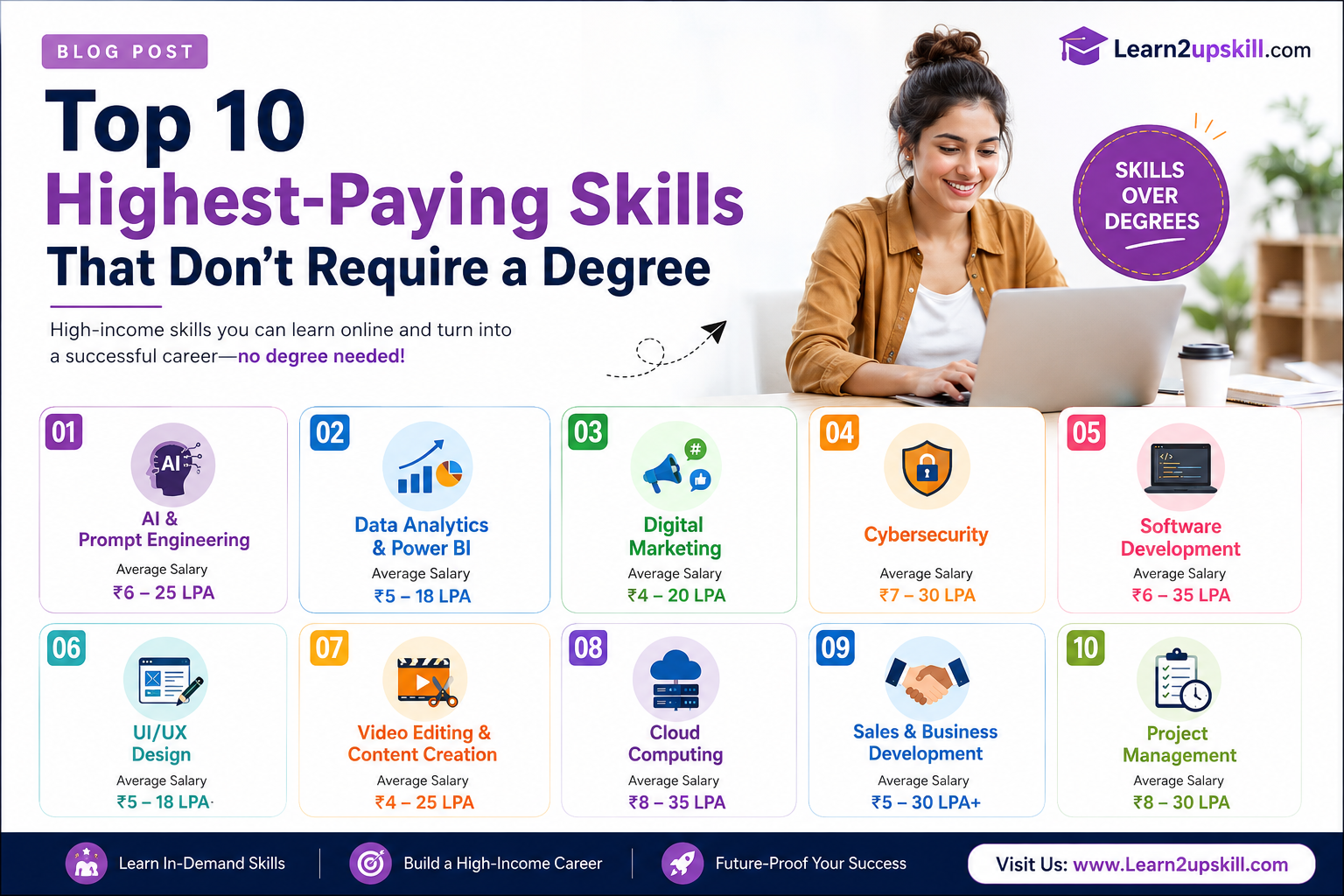
  • Top 10 High-Paying Skills to Learn in 2026

    Top 10 High-Paying Skills to Learn in 2026

    Top 10 High-Paying Skills to Learn in 2026

    Introduction

    The job market is evolving faster than ever. With Artificial Intelligence, automation, and digital transformation reshaping industries, employers are looking for professionals with practical, future-ready skills—not just degrees.

    Whether you’re a student, a recent graduate, or a working professional planning a career switch, learning the right skills in 2026 can significantly boost your salary, job security, and career growth.

    In this blog, we’ll explore the Top 10 High-Paying Skills to Learn in 2026 and explain why they’re in demand.

    1. Artificial Intelligence (AI)

    Artificial Intelligence is no longer limited to tech companies. Businesses across healthcare, finance, education, retail, manufacturing, and marketing are adopting AI to improve productivity and decision-making.

    Why Learn AI?

    • High demand across industries
    • Excellent salary packages
    • Future-proof career opportunities
    • Ability to automate repetitive tasks

    Career Opportunities

    • AI Engineer
    • AI Consultant
    • Prompt Engineer
    • AI Product Manager
    • AI Business Analyst
    1. Data Analytics & Power BI

    Companies generate enormous amounts of data every day. Professionals who can analyze this data and create insightful dashboards are highly valued.

    Key Skills

    • Power BI
    • Microsoft Excel
    • SQL
    • Data Visualization
    • Dashboard Design

    Career Opportunities

    • Data Analyst
    • Business Intelligence Analyst
    • Reporting Analyst
    • MIS Executive
    1. Digital Marketing

    As businesses move online, digital marketing has become one of the fastest-growing career fields.

    Important Skills

    • SEO
    • Social Media Marketing
    • Google Ads
    • Content Marketing
    • Email Marketing

    Career Opportunities

    • Digital Marketing Specialist
    • SEO Expert
    • Performance Marketer
    • Content Strategist
    1. Cybersecurity

    Cyber threats continue to increase every year, making cybersecurity one of the highest-paying and most stable career options.

    Skills to Learn

    • Network Security
    • Ethical Hacking
    • Risk Assessment
    • Cloud Security
    • Security Auditing

    Career Opportunities

    • Cybersecurity Analyst
    • Ethical Hacker
    • Security Consultant
    • SOC Analyst
    1. Cloud Computing

    Businesses rely heavily on cloud platforms to store data, host applications, and scale operations efficiently.

    Popular Platforms

    • AWS
    • Microsoft Azure
    • Google Cloud Platform

    Career Opportunities

    • Cloud Engineer
    • Cloud Architect
    • DevOps Engineer
    • Infrastructure Consultant

    Average Salary: ₹8–35 LPA

    1. Microsoft Excel (Advanced)

    Excel remains one of the most requested skills across finance, HR, operations, and business management.

    Learn Topics Like

    • Pivot Tables
    • VLOOKUP & XLOOKUP
    • Power Query
    • Dashboards
    • Advanced Formulas

    Career Opportunities

    • MIS Executive
    • Financial Analyst
    • Business Analyst
    • Operations Executive
    1. Project Management

    Organizations seek professionals who can lead projects, manage teams, and deliver results on time.

    Valuable Certifications

    • PMP
    • Scrum Master
    • Agile
    • PRINCE2

    Career Opportunities

    • Project Manager
    • Scrum Master
    • Program Manager
    • Delivery Manager
    1. UI/UX Design

    Businesses need attractive, user-friendly websites and mobile apps to stand out in a competitive market.

    Skills Required

    • Figma
    • Adobe XD
    • Wireframing
    • Prototyping
    • User Research

    Career Opportunities

    • UI Designer
    • UX Designer
    • Product Designer
    1. Financial Analysis

    Financial professionals help organizations make informed business decisions through budgeting, forecasting, and investment analysis.

    Learn

    • Financial Modeling
    • Excel
    • Business Valuation
    • Budget Planning
    • Corporate Finance

    Career Opportunities

    • Financial Analyst
    • Investment Analyst
    • Corporate Finance Executive
    1. Communication & Leadership

    Technical expertise alone isn’t enough. Employers increasingly value professionals who can communicate effectively, solve problems, collaborate, and lead teams.

    Essential Soft Skills

    • Public Speaking
    • Business Communication
    • Leadership
    • Critical Thinking
    • Negotiation
    • Team Management

    Career Opportunities

    These skills are valuable across every profession and often lead to faster promotions and leadership roles.

    How to Choose the Right Skill?

    Before investing your time and money, ask yourself:

    • What are my interests?
    • Which industries are growing?
    • What skills complement my current education?
    • Which skill offers long-term career opportunities?
    • Can I build practical projects while learning?

    The best skill is one that aligns with both your interests and market demand.

    Why Upskilling Matters in 2026

    Technology is changing the way we work. Employers are hiring candidates who can adapt, learn continuously, and solve real-world problems.

    By investing in future-ready skills today, you can:

    • Increase your earning potential
    • Improve your employability
    • Access better job opportunities
    • Stay competitive in a changing job market
    • Build a long-term, rewarding career

    Learn Future-Ready Skills with Learn2upskill

    At Learn2upskill, we help students and professionals become job-ready through industry-focused training.

    Our popular programs include:

    • Artificial Intelligence
    • Microsoft Excel
    • Power BI
    • Digital Marketing
    • Resume Building
    • Placement Assistance
    • Soft Skills & Interview Preparation

    Our courses combine practical learning, real-world projects, expert guidance, and career support to help you succeed.

    Conclusion

    The demand for skilled professionals continues to rise, and 2026 offers exciting opportunities for those willing to learn. Whether you’re aiming for your first job, a promotion, or a complete career change, developing the right skills can open doors to higher salaries and better career prospects.

    Start your learning journey today, stay consistent, and invest in skills that will remain valuable for years to come.

    Ready to future-proof your career? Visit Learn2upskill and take the first step toward building the skills employers are looking for in 2026.


  • Top 10 Chat GPT Prompts Every Student Should Know

    Top 10 Chat GPT Prompts Every Student Should Know

    Top 10 Chat GPT Prompts Every Student Should Know

    Discover the best Chat GPT prompts for students. Learn how to study smarter, complete assignments, prepare for exams, improve writing, and boost productivity with AI.

    Top-10-chatgpt-prompts-for-students

    Top 10 Chat GPT Prompts

    Artificial Intelligence is changing the way students learn, study, and complete academic tasks. Among the many AI tools available today, Chat GPT has become one of the most useful learning assistants. Whether you’re preparing for exams, writing assignments, or improving your communication skills, the right prompts can help you save time and learn more effectively.

    In this guide, you’ll discover 10 powerful Chat GPT prompts that every student should know, along with tips on how to use them responsibly.

    What Is a Chat GPT Prompt?

    A prompt is simply the instruction or question you give Chat GPT. The more specific your prompt is, the more useful the response is likely to be.

    For example:

    ❌ Weak Prompt:

    “Teach me science.”

    ✅ Better Prompt:

    “Explain Newton’s Laws of Motion in simple language with real-life examples suitable for a Class 10 student.”

    The second prompt gives Chat GPT enough context to provide a much more helpful answer.

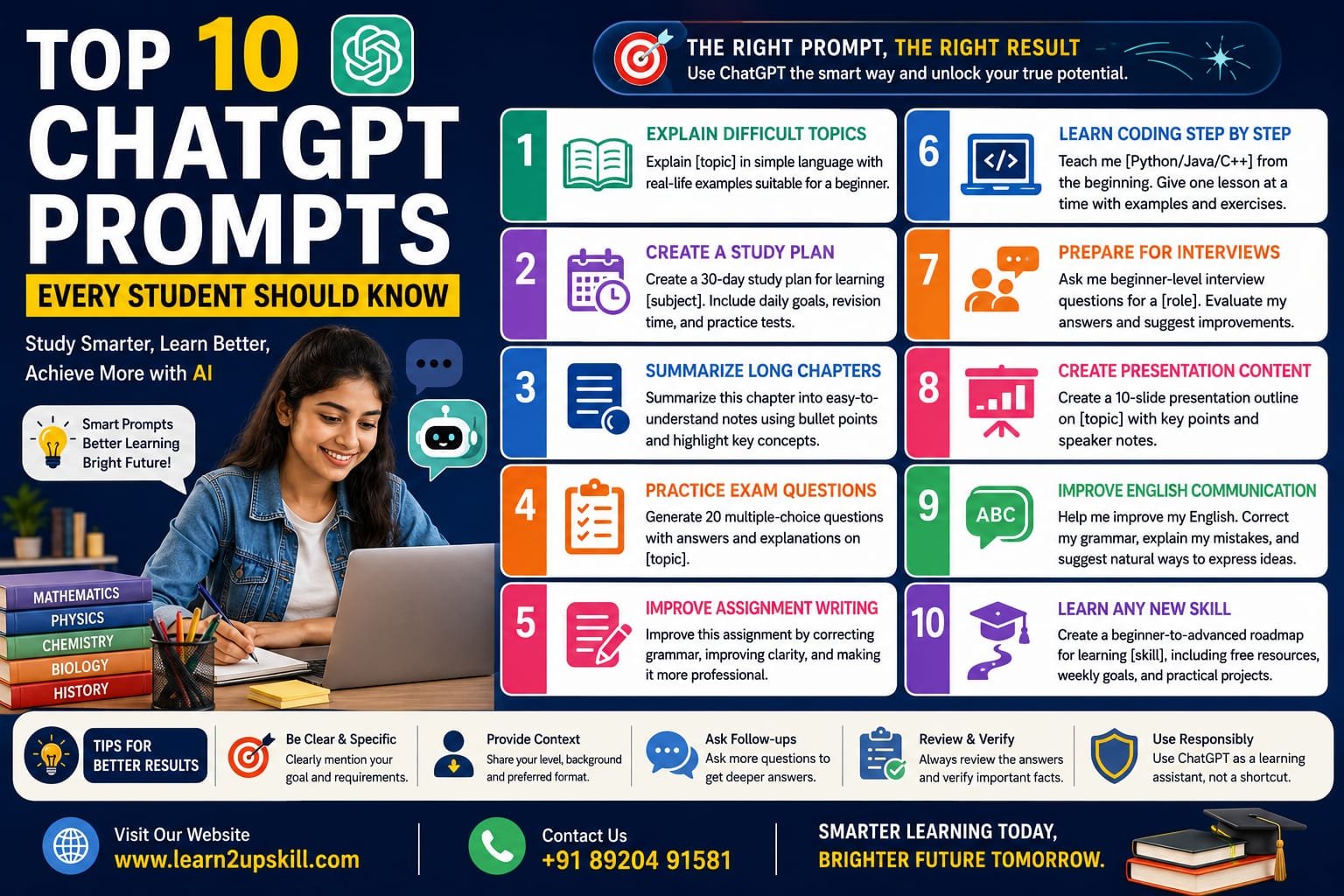
    1. Explain Difficult Topics in Simple Language

    Prompt:

    Explain [topic] in simple language with real-life examples suitable for a beginner.

    Best For

    Science

    Mathematics

    Economics

    Computer Science

    History

    Example:

    Explain Artificial Intelligence in simple language with examples that a school student can understand.

    1. Create a Personalized Study Plan

    Prompt:

    Create a 30-day study plan for learning [subject]. Include daily goals, revision time, and practice tests.

    This helps students stay organized and avoid last-minute exam preparation.

    1. Summarize Long Chapters

    Prompt:

    Summarize this chapter into easy-to-understand notes using bullet points and highlight the most important concepts.

    Perfect for revision before exams.

    1. Practice Exam Questions

    Prompt:

    Generate 20 multiple-choice questions with answers and explanations on [topic].

    This allows you to test your knowledge and identify areas where you need more practice.

    1. Improve Assignment Writing

    Prompt:

    Improve this assignment by correcting grammar, improving clarity, and making it more professional while keeping the original meaning.

    Remember to review the output and ensure it reflects your own understanding.

    1. Learn Coding Step by Step

    Prompt:

    Teach me Python/Java/C++ from the beginning. Give one lesson at a time with examples and practice exercises.

    This prompt is ideal for students who are new to programming.

    1. Prepare for Interviews

    Prompt:

    Ask me beginner-level interview questions for a Digital Marketing / Software Developer / Data Analyst role. Evaluate my answers and suggest improvements.

    This helps build confidence before internships or job interviews.

    1. Create Presentation Content

    Prompt:

    Create a 10-slide presentation outline on [topic] with key points and speaker notes.

    A great way to organize ideas before creating your slides.

    1. Improve English Communication

    Prompt:

    Help me improve my English. Correct my grammar, explain my mistakes, and suggest more natural ways to express my ideas.

    Practicing regularly can improve both written and spoken communication.

    1. Learn Any New Skill

    Prompt:

    Create a beginner-to-advanced roadmap for learning [skill], including free resources, weekly goals, and practical projects.

    Examples:

    Digital Marketing

    Data Analytics

    Graphic Design

    Excel

    Cybersecurity

    Artificial Intelligence

    Tips for Writing Better Chat GPT Prompts

    To get better answers:

    Be clear about your goal.

    Mention your education level or experience.

    Specify the format you want (table, bullet points, essay, quiz, etc.).

    Include any word limit or deadline.

    Ask follow-up questions if you need more detail.

    Best Practices for Students

    Use Chat GPT as a learning partner—not a shortcut.

    Understand the concepts instead of copying answers.

    Verify important facts from trusted textbooks or official sources.

    Edit AI-generated content before submitting assignments.

    Follow your school’s academic integrity rules.

    Conclusion

    Chat GPT can become one of the most valuable learning tools for students when used thoughtfully. The right prompts can help you understand difficult subjects, organize your studies, improve your writing, prepare for interviews, and learn new skills faster.

    The goal isn’t to let AI do all the work—it’s to use AI to become a better learner. Combine Chat GPT with curiosity, critical thinking, and consistent practice, and you’ll be better prepared for academic and career success.

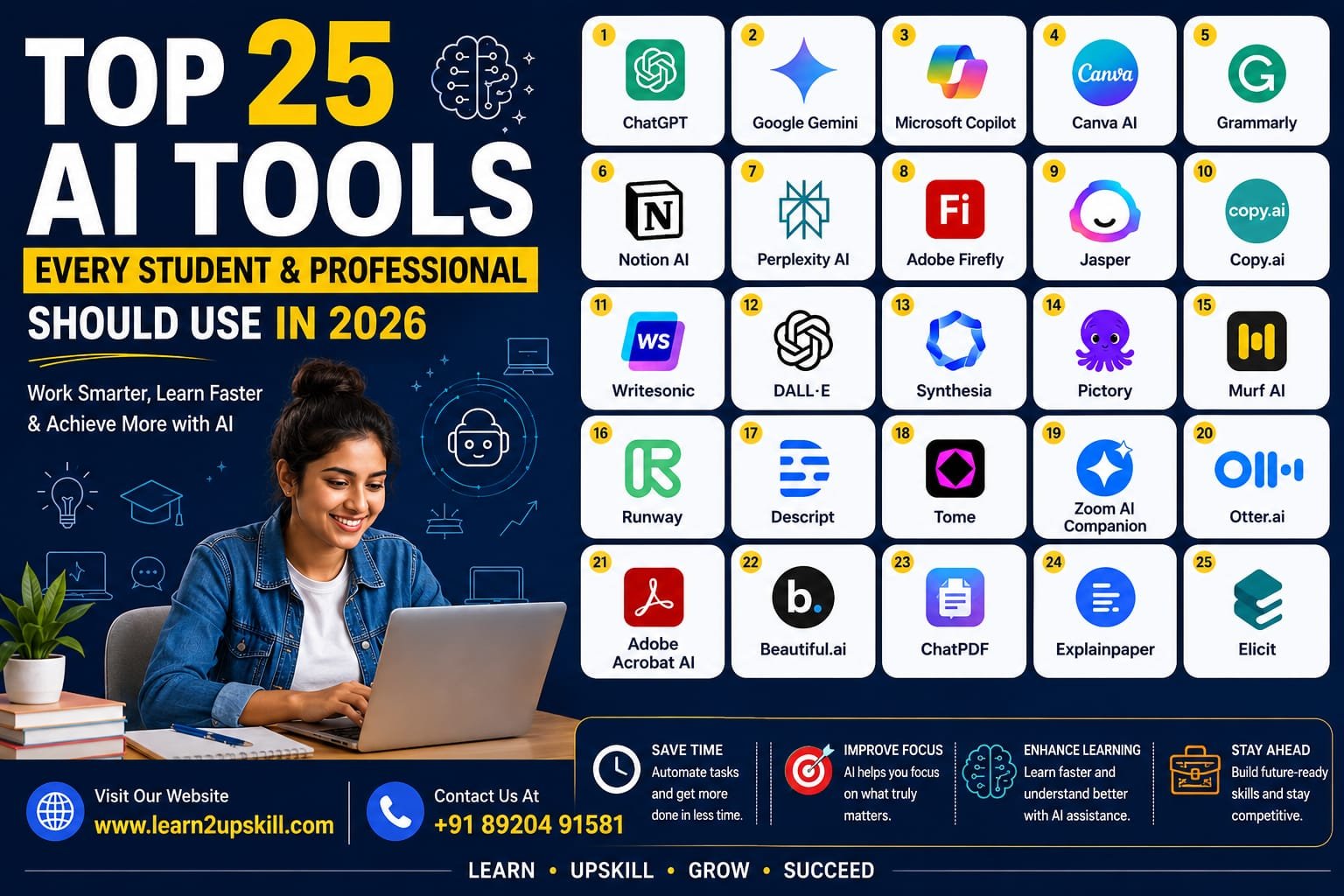
  • Top 25 AI Tools Every Student and Professional Should Use in 2026

    Top 25 AI Tools Every Student and Professional Should Use in 2026

    Top 25 AI Tools Every Student and Professional Should Use in 2026

    Meta Title: Top 25 AI Tools Every Student and Professional Should Use in 2026

    Meta Description: Discover the 25 best AI tools for students and professionals in 2026. Boost productivity, improve learning, create content, and save time with these powerful AI tools.

    URL Slug: top-25-ai-tools-for-students-and-professionals-2026

    Top 25 AI Tools Every Student and Professional Should Use in 2026

    Artificial Intelligence (AI) has become an essential part of education and the workplace. From writing assignments and creating presentations to designing graphics and analyzing data, AI tools can help students and professionals work faster and more efficiently.

    The key is not to replace your skills with AI, but to use AI to improve your productivity, creativity, and decision-making.

    In this guide, we’ll explore 25 of the best AI tools you should know in 2026.

    —

    1. ChatGPT

    Best For: Writing, brainstorming, coding, learning, and research

    ChatGPT is one of the most versatile AI assistants available today. Students can use it to understand complex concepts, summarize notes, prepare for exams, and practice interviews. Professionals can use it to draft emails, create reports, generate ideas, write code, and solve business problems.

    Key Features

    – Content writing
    – Coding assistance
    – Research support
    – Resume writing
    – Language translation

    —

    2. Google Gemini

    Best For: Research, document creation, and productivity

    Google Gemini integrates with Google Workspace, making it useful for users who rely on Docs, Gmail, Sheets, and Drive. It can help draft documents, summarize emails, and assist with research.

    Key Features

    – Google Workspace integration
    – AI-powered writing
    – Smart research
    – Image understanding

    —

    3. Microsoft Copilot

    Best For: Office productivity

    Microsoft Copilot works inside Word, Excel, PowerPoint, Outlook, and Teams. It helps create presentations, analyze spreadsheets, summarize meetings, and draft professional documents.

    Key Features

    – Excel analysis
    – PowerPoint generation
    – Meeting summaries
    – Email drafting

    —

    4. Canva AI

    Best For: Graphic design and presentations

    Canva AI allows anyone to create professional designs without advanced design skills. It can generate presentations, social media posts, logos, posters, and marketing materials in minutes.

    Key Features

    – AI image generation
    – Magic Design
    – Presentation creator
    – Background remover

    —

    5. Grammarly

    Best For: Writing improvement

    Grammarly checks grammar, spelling, punctuation, tone, and clarity. It is especially useful for students writing assignments and professionals preparing business emails and reports.

    Key Features

    – Grammar checking
    – Tone suggestions
    – AI writing assistance
    – Plagiarism detection (Premium)

    —

    6. Notion AI

    Best For: Notes and project management

    Notion AI helps users summarize notes, organize projects, create task lists, and generate content within the Notion workspace.

    Key Features

    – AI note summaries
    – Task management
    – Meeting notes
    – Content generation

    —

    7. Perplexity AI

    Best For: Research with sources

    Perplexity AI provides direct answers with references, making it valuable for students, researchers, and professionals who need reliable information quickly.

    Key Features

    – Source-backed answers
    – Research assistant
    – Web search
    – AI summaries

    —

    8. Adobe Firefly

    Best For: AI-powered image creation

    Adobe Firefly helps create images, text effects, and design assets from simple prompts. It is widely used by designers and marketers.

    Key Features

    – AI image generation
    – Text effects
    – Commercial-friendly content
    – Easy integration with Adobe Creative Cloud

    Contact us for more details

    Why Should You Learn AI Tools?

    Learning AI tools can help you:

    – Save time on repetitive tasks.
    – Improve productivity.
    – Create professional documents and presentations.
    – Learn new concepts faster.
    – Build valuable workplace skills.
    – Stay competitive in a rapidly changing job market.

    Employers increasingly expect candidates to understand how to use AI responsibly and effectively. Combining AI with strong communication, analytical thinking, and technical skills can make you more valuable in almost any industry.

    Conclusion

    AI is transforming the way we study and work. Whether you’re a student preparing for exams or a professional looking to improve productivity, these tools can help you achieve more in less time. The most successful users won’t be those who rely entirely on AI—they’ll be the ones who combine AI with critical thinking, creativity, and continuous learning.

    Start by exploring a few tools that match your goals, practice using them regularly, and keep learning as AI continues to evolve.

    Ready to build future-ready skills? Explore more career guides, digital skills, and AI learning resources on Learn2UpSkill to stay ahead in 2026 and beyond.

  • Why Career Counselling Is More Important Than Ever in 2026: A Roadmap for Students, Graduates, and Professionals

    Why Career Counselling Is More Important Than Ever in 2026: A Roadmap for Students, Graduates, and Professionals

    Why Career Counselling Is More Important Than Ever in 2026: A Roadmap for Students, Graduates, and Professionals

    In today’s fast-changing world, choosing the right career has become more challenging than ever before. Artificial Intelligence, automation, new industries, and evolving job roles are transforming the employment landscape at an unprecedented pace. A degree alone is no longer enough. Success now depends on choosing the right career path, continuously upgrading your skills, and making informed decisions at every stage of your journey.

    This is where professional career counselling plays a vital role.

    Why Career Counselling Matters

    Many students and professionals make career decisions based on trends, peer pressure, or limited information. Unfortunately, these choices can lead to frustration, wasted time, and missed opportunities.

    Professional career counselling helps you:

    – Identify your strengths, interests, and personality.
    – Explore career options that match your abilities.
    – Select the right course, college, or certification.
    – Understand future industry trends.
    – Build a clear roadmap towards your career goals.

    The right guidance today can save years of uncertainty tomorrow.

    The Career Landscape Is Changing

    Employers are increasingly looking for practical skills rather than qualifications alone. Fields such as Artificial Intelligence, Cybersecurity, Data Analytics, Digital Marketing, Healthcare, Finance, and Sustainable Technologies are creating exciting opportunities for learners who are prepared.

    To stay competitive, students and professionals must embrace lifelong learning and regularly update their skills.

    Common Mistakes to Avoid

    Many people unknowingly make career decisions that limit their future growth. Some of the most common mistakes include:

    – Following friends instead of personal interests.
    – Choosing courses without understanding career opportunities.
    – Ignoring emerging technologies like Artificial Intelligence.
    – Waiting until graduation to think about employment.
    – Avoiding career counselling because of overconfidence or confusion.

    Awareness is the first step towards making better decisions.

    How Learn2UpSkill Can Help

    At Learn2UpSkill, we believe every individual deserves access to expert guidance and practical learning opportunities.

    Our services include:

    – Career Counselling
    – College Admission Guidance
    – Skill Development & Upskilling
    – AI Learning Programs
    – Resume Building
    – Interview Preparation
    – Placement Support
    – Career Roadmap Planning

    Whether you are a school student, college student, graduate, working professional, or parent, our experienced team helps you make informed career decisions with confidence.

    Your Five-Step Career Roadmap

    1. Discover your strengths and interests.
    2. Explore career opportunities that match your goals.
    3. Build the right skills for your chosen field.
    4. Gain practical experience through projects and internships.
    5. Continue learning and adapting throughout your career.

    Remember, successful careers are built through continuous improvement—not one-time decisions.

    Final Thoughts

    Your future is shaped by the choices you make today. Investing time in career planning is one of the smartest decisions you can make for yourself or your child.

    Instead of leaving your future to chance, build it with clarity, confidence, and expert guidance.

    Visit www.coral-kudu-326218.hostingersite.com to explore our career counselling and upskilling services.

    Book your FREE career consultation today.

    📞 Contact us: +91-8920491581

    Learn Together. Earn Together. Grow Together.